
1. ആമുഖം
This manual provides detailed instructions for the LIGE Smartwatch Model EF14-I. It covers setup, operation, maintenance, and troubleshooting to ensure optimal performance and user experience. Please read this manual thoroughly before using your device.

Image 1: LIGE Smartwatch Model EF14-I, showcasing its design, interchangeable straps, and multiple digital watch faces.
2. സജ്ജീകരണം
2.1 ഉപകരണം ചാർജ് ചെയ്യുന്നു
Before initial use, fully charge your smartwatch. The device features a 730mAh polymer battery. Use the provided magnetic charging cable. A full charge typically takes approximately 2.5 hours. The watch offers 5-7 days of daily use and up to 50 days in standby mode.

Image 2: The LIGE Smartwatch connected to its magnetic charger, illustrating its 730mAh battery capacity and extended battery life.
2.2 ആപ്പ് ഇൻസ്റ്റലേഷൻ (FitCloudPro)
നിങ്ങളുടെ സ്മാർട്ട് വാച്ചിന്റെ പൂർണ്ണമായ പ്രവർത്തനം അൺലോക്ക് ചെയ്യാൻ, ഡൗൺലോഡ് ചെയ്ത് ഇൻസ്റ്റാൾ ചെയ്യുക FitCloudPro നിങ്ങളുടെ സ്മാർട്ട്ഫോണിലെ ആപ്ലിക്കേഷൻ. ആപ്പ് Android 5.0+, iOS 11.0+ ഉപകരണങ്ങളുമായി പൊരുത്തപ്പെടുന്നു.
- Scan the QR code provided in the watch packaging or on the watch screen to download the app.
- Alternatively, search for "FitCloudPro" in the Apple App Store (for iOS) or Google Play Store (for Android).
- നിങ്ങളുടെ സ്മാർട്ട്ഫോണിൽ ആപ്ലിക്കേഷൻ ഇൻസ്റ്റാൾ ചെയ്യുക.
2.3 ഉപകരണ ജോടിയാക്കൽ
Ensure your smartphone's Bluetooth is enabled. Open the FitCloudPro app and follow the on-screen instructions to pair your smartwatch. The device uses Bluetooth 5.0 for a stable connection.
3. പ്രവർത്തന നിർദ്ദേശങ്ങൾ
3.1 അടിസ്ഥാന നാവിഗേഷൻ
- ടച്ച് സ്ക്രീൻ: മെനുകളിലൂടെയും സവിശേഷതകളിലൂടെയും നാവിഗേറ്റ് ചെയ്യാൻ ഇടത്തോട്ടോ വലത്തോട്ടോ മുകളിലേക്കോ താഴേക്കോ സ്വൈപ്പ് ചെയ്യുക. തിരഞ്ഞെടുക്കാൻ ടാപ്പ് ചെയ്യുക.
- സൈഡ് ബട്ടണുകൾ: Use the physical buttons on the side of the watch for quick access to functions or to return to the home screen.
3.2 Bluetooth Calls and Notifications
Once paired with your smartphone, the smartwatch supports Bluetooth 5.3 for direct calls from your wrist. You can also receive instant notifications for messages, calls, and various applications.
- കോളുകൾ ചെയ്യുക/സ്വീകരിക്കുക: Access the call log or dial pad on the watch to initiate calls. Answer incoming calls directly on the watch.
- സന്ദേശ അറിയിപ്പുകൾ: View incoming messages from SMS and social media apps.
- ആപ്പ് അറിയിപ്പുകൾ: Receive alerts from compatible applications.

Image 3: The smartwatch interface showing Bluetooth call functionality, message alerts, and voice assistant interaction.
3.3 ആരോഗ്യ നിരീക്ഷണം
The smartwatch provides comprehensive health tracking features:
- ഹൃദയമിടിപ്പ്: Continuous heart rate monitoring throughout the day.
- രക്ത ഓക്സിജൻ (SpO2): രക്തത്തിലെ ഓക്സിജൻ സാച്ചുറേഷൻ അളവ് അളക്കുന്നു.
- ഉറക്ക ട്രാക്കിംഗ്: Monitors sleep patterns, including sleep duration and quality.
- റിട്ടയർമീറ്റർ: Tracks steps taken, distance covered, and calories burned.

Image 4: Health monitoring features of the smartwatch, including heart rate, daily activity, sleep analysis, and guided breath training.
3.4 സ്പോർട്സ് മോഡുകൾ
The device supports over 110 professional sport modes, accurately tracking your activity data.
- Select your desired sport mode from the watch menu.
- The watch will record data such as steps, calories burned, and distance.
- All fitness data synchronizes with the FitCloudPro app for detailed analysis.

Image 5: The smartwatch tracking a running activity, demonstrating its multi-sport mode capabilities for various physical activities.
3.5 അധിക പ്രവർത്തനങ്ങൾ
- LED ലൈറ്റ്: A powerful LED flashlight for emergencies or low-light conditions.
- സംഗീത നിയന്ത്രണം: നിങ്ങളുടെ സ്മാർട്ട്ഫോണിൽ സംഗീത പ്ലേബാക്ക് നിയന്ത്രിക്കുക.
- ക്യാമറ നിയന്ത്രണം: നിങ്ങളുടെ ഫോണിന്റെ ക്യാമറയ്ക്ക് റിമോട്ട് ഷട്ടറായി വാച്ച് ഉപയോഗിക്കുക.
- വോയ്സ് അസിസ്റ്റന്റ്: Access your smartphone's voice assistant.
- കാലാവസ്ഥ: View current weather information.
- ഓർമ്മപ്പെടുത്തലുകൾ: Set alarms, sedentary reminders, and drink water reminders.
- ഫോൺ കണ്ടെത്തുക: Locate your paired smartphone.
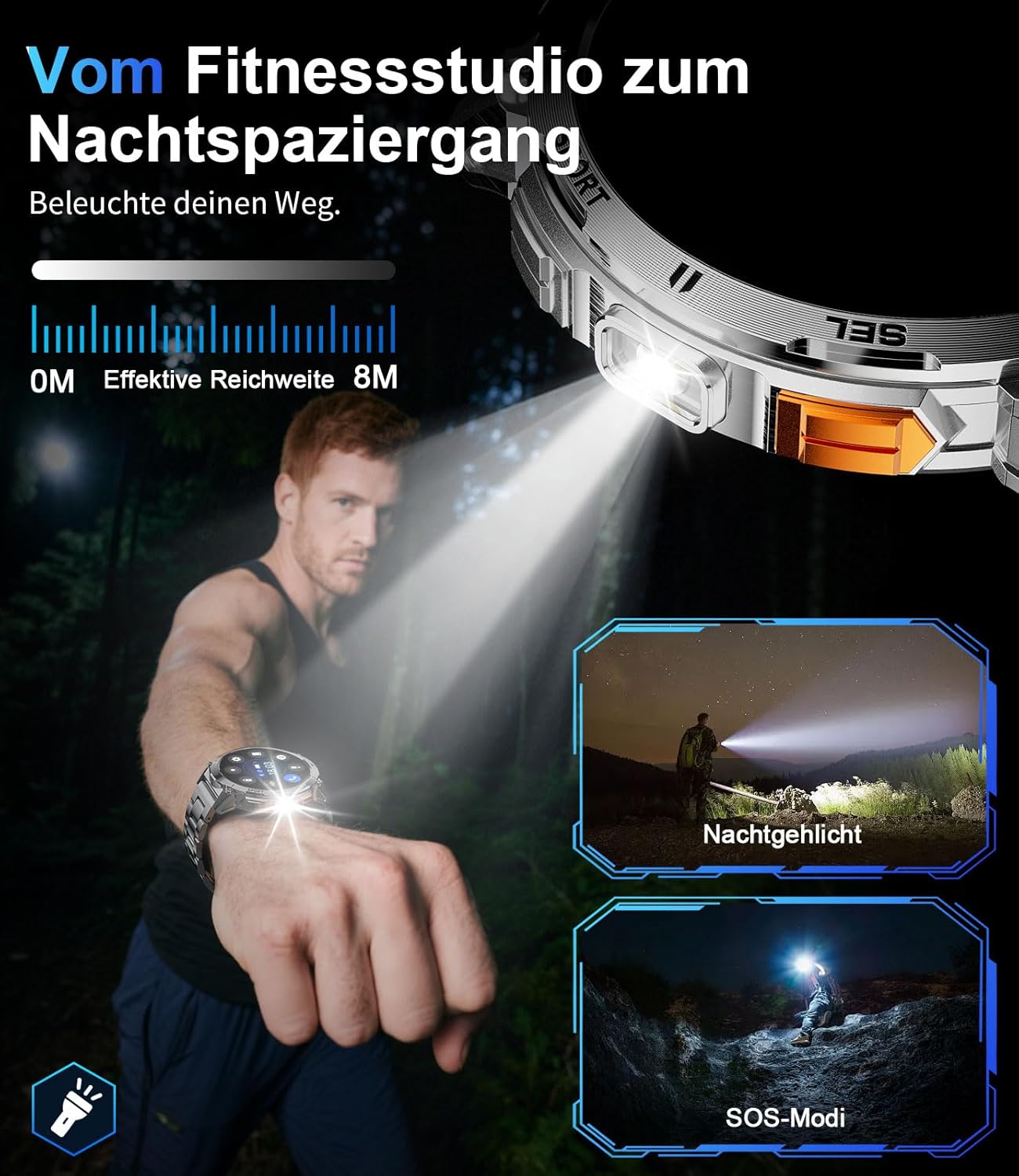
Image 6: The smartwatch's integrated LED flashlight in use, providing illumination in a dark environment.
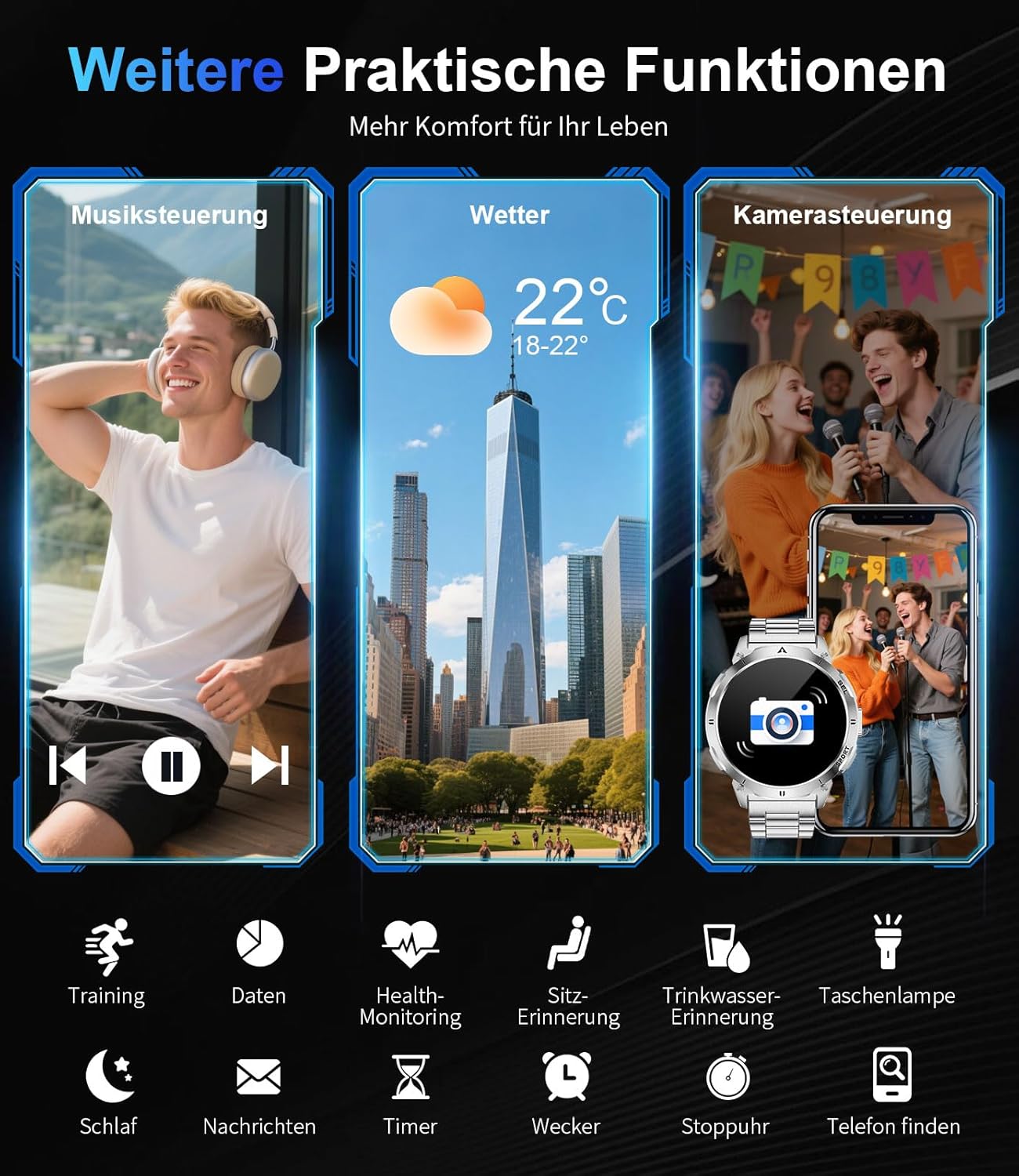
ചിത്രം 7: കഴിഞ്ഞുview of additional practical functions including music control, weather display, and remote camera operation.
4. സവിശേഷതകൾ കഴിഞ്ഞുview
4.1 AMOLED ഡിസ്പ്ലേ
The smartwatch features a 1.62-inch AMOLED display with 480x480 pixels and 850 nits brightness, ensuring clear visuals even in direct sunlight. The ONCELL touch panel provides precise and responsive control.
4.2 ഈടുനിൽക്കുന്ന ഡിസൈൻ
Constructed with a zinc alloy casing and a robust polycarbonate back, the smartwatch is lightweight (83g) and durable. It is 3 ATM waterproof, making it resistant to rain, sweat, and suitable for swimming.

Image 8: Visual representation of the smartwatch's durability, highlighting its resistance to shock, extreme temperatures, dust, scratches, and impacts.
ഇഷ്ടാനുസൃതമാക്കാവുന്ന 4.3 വാച്ച് ഫെയ്സുകൾ
Personalize your smartwatch with over 200 watch faces available through the FitCloudPro app. You can also create custom watch faces to match your style.

Image 9: The smartwatch's extensive watch face customization options, including a preview of a custom background being set via the app.
5. പരിപാലനം
5.1 ജല പ്രതിരോധം
The LIGE Smartwatch Model EF14-I is 3 ATM waterproof. This means it can withstand splashes, rain, and brief immersion in water, such as during swimming. It is not recommended for diving or high-pressure water activities.
5.2 വൃത്തിയാക്കൽ
നിങ്ങളുടെ സ്മാർട്ട് വാച്ച് വൃത്തിയാക്കാൻ, മൃദുവായ, ഡി ക്ലീനർ ഉപയോഗിച്ച് തുടയ്ക്കുക.amp cloth. Avoid using harsh chemicals or abrasive materials, as these can damage the device. Ensure the charging contacts are clean and dry before charging.
5.3 ബാറ്ററി കെയർ
To prolong battery life, avoid exposing the watch to extreme temperatures. Charge the device regularly, but avoid leaving it fully discharged for extended periods.
6. പ്രശ്നപരിഹാരം
- ഉപകരണം ഓണാക്കുന്നില്ല: വാച്ച് പൂർണ്ണമായും ചാർജ് ചെയ്തിട്ടുണ്ടെന്ന് ഉറപ്പാക്കുക. അത് ചാർജറുമായി ബന്ധിപ്പിച്ച് പവർ ഓൺ ചെയ്യാൻ ശ്രമിക്കുന്നതിന് മുമ്പ് കുറച്ച് മിനിറ്റ് കാത്തിരിക്കുക.
- സ്മാർട്ട്ഫോണുമായി ജോടിയാക്കാൻ കഴിയില്ല: Make sure Bluetooth is enabled on your phone and the watch is within range. Restart both the watch and your phone, then try pairing again through the FitCloudPro app.
- കൃത്യമല്ലാത്ത ആരോഗ്യ ഡാറ്റ: വാച്ച് നിങ്ങളുടെ കൈത്തണ്ടയിൽ നന്നായി ധരിച്ചിട്ടുണ്ടെന്ന് ഉറപ്പാക്കുക, അധികം ഇറുകിയതോ അധികം അയഞ്ഞതോ അല്ല. വാച്ചിന്റെ പിൻഭാഗത്തുള്ള സെൻസർ വൃത്തിയാക്കുക.
- അറിയിപ്പുകൾ ലഭിച്ചിട്ടില്ല: Check app notification settings in the FitCloudPro app and your phone's system settings to ensure permissions are granted.
- ഹ്രസ്വ ബാറ്ററി ലൈഫ്: സ്ക്രീൻ തെളിച്ചം കുറയ്ക്കുക, അനാവശ്യ സവിശേഷതകൾ പ്രവർത്തനരഹിതമാക്കുക, പശ്ചാത്തല ആപ്പ് ഉപയോഗം ഒപ്റ്റിമൈസ് ചെയ്തിട്ടുണ്ടെന്ന് ഉറപ്പാക്കുക.
7 സ്പെസിഫിക്കേഷനുകൾ
| ഫീച്ചർ | സ്പെസിഫിക്കേഷൻ |
|---|---|
| ബ്രാൻഡ് | ലൈഗ് |
| മോഡൽ നമ്പർ | EF14-I |
| പ്രദർശിപ്പിക്കുക | 1.62-inch AMOLED, 480x480 pixels, 850 nits |
| ബാറ്ററി ശേഷി | 730 mAh ലിഥിയം-പോളിമർ |
| ബാറ്ററി ലൈഫ് | 5-7 days (daily use), up to 50 days (standby) |
| ചാർജിംഗ് സമയം | Approx. 2.5 hours (magnetic charging) |
| ജല പ്രതിരോധം | 3 എ.ടി.എം |
| കണക്റ്റിവിറ്റി | ബ്ലൂടൂത്ത് 5.0 / 5.3 |
| ഓപ്പറേറ്റിംഗ് സിസ്റ്റം | Wear OS (compatible with Android 5.0+, iOS 11.0+) |
| മെമ്മറി സ്റ്റോറേജ് | 256 MB |
| പ്രത്യേക സവിശേഷതകൾ | LED Light, Pedometer, Fitness Tracker, Heart Rate Monitor, SpO2, Sleep Tracker, Bluetooth Calls, Music Player, Voice Assistant, Reminders, Alarms, Notifications, Sedentary Reminder, Calculator |
| അനുയോജ്യമായ ഉപകരണങ്ങൾ | സ്മാർട്ട്ഫോൺ |
| ഭാരം | 83 ഗ്രാം |
8. വാറൻ്റിയും പിന്തുണയും
The LIGE Smartwatch Model EF14-I comes with a 2-year warranty. Additionally, a 30-day return policy is typically offered. For technical support or warranty claims, please refer to the contact information provided with your purchase or visit the official LIGE support webസൈറ്റ്.