
AODSK UAED-403TS
AODSK Electric Drum Set UAED-403TS Instruction Manual
Model: UAED-403TS | Brand: AODSK
1 സുരക്ഷാ വിവരങ്ങൾ
Please read and understand all safety instructions before using your AODSK Electric Drum Set. Keep this manual for future reference. Always ensure proper electrical connections and use only the provided power adapter. Avoid exposing the drum set to extreme temperatures, humidity, or direct sunlight. Do not attempt to disassemble or modify the drum module or any components, as this may void your warranty and pose a safety risk. Keep small parts away from children to prevent choking hazards.
2. ബോക്സിൽ എന്താണുള്ളത്?
നിങ്ങളുടെ AODSK ഇലക്ട്രിക് ഡ്രം സെറ്റ് പാക്കേജിൽ ഇനിപ്പറയുന്ന ഘടകങ്ങൾ ഉൾപ്പെടുന്നു:

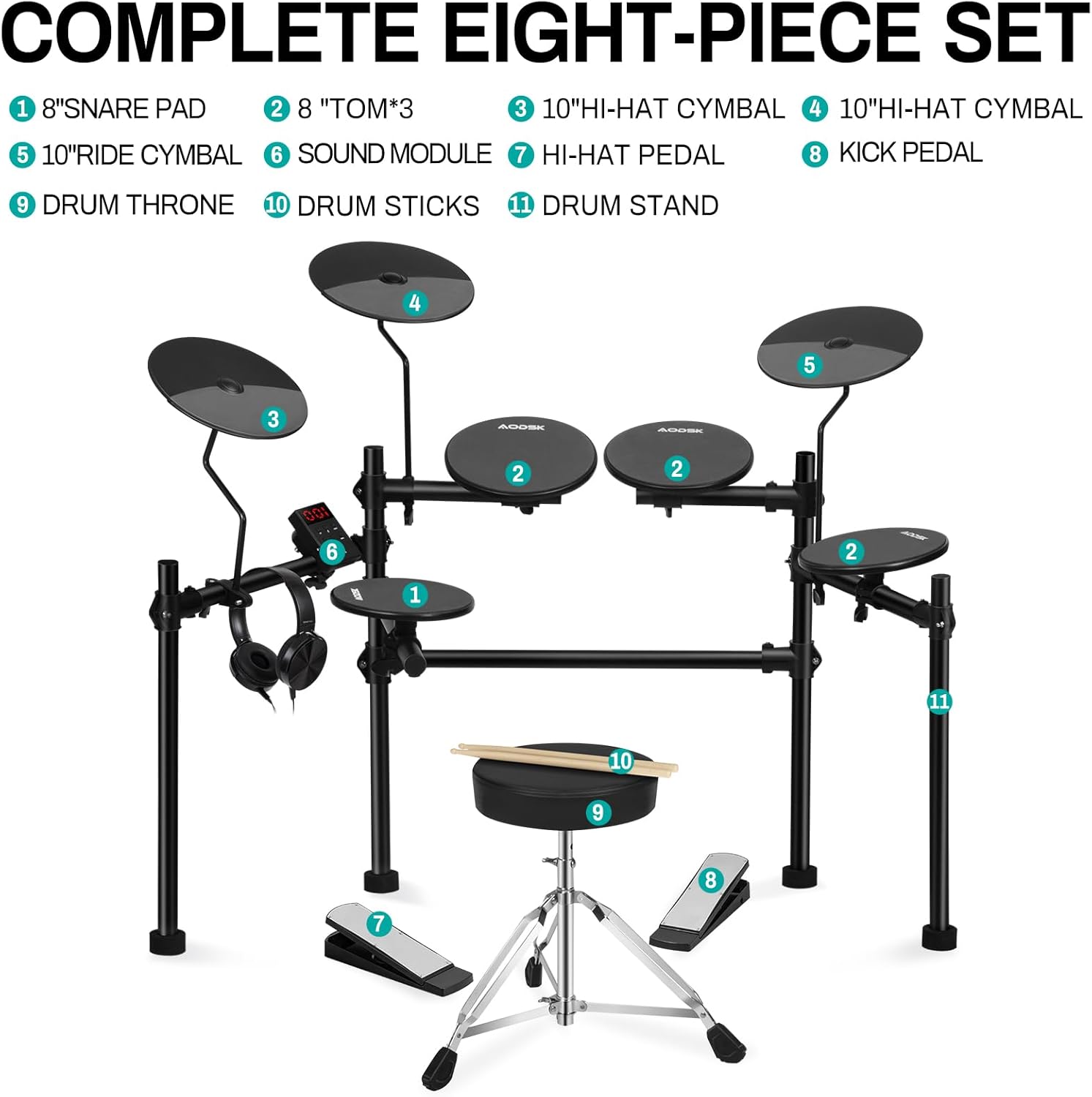
ചിത്രം: കഴിഞ്ഞുview of all included components for the AODSK Electric Drum Set.
- Electronic drum set frame with 4x8'' drum pads and 3x10" cymbals
- ഡ്രം മൊഡ്യൂൾ
- Drum throne
- Drumsticks (2 pairs)
- ഹെഡ്ഫോണുകൾ
- 2 Switch pedals (Hi-Hat and Kick)
- All necessary cables (power adapter, audio cables)
3. സജ്ജീകരണം
3.1 അസംബ്ലി
The AODSK Electric Drum Set features a sturdy metal frame designed for easy assembly and portability. Follow these steps to set up your drum kit:
- Unpack all components and identify each part using the 'What's in the Box' section.
- Assemble the main drum frame by connecting the vertical and horizontal bars. Ensure all clamps are securely tightened. The frame is foldable for convenient storage and transport.
- Attach the 4x8'' drum pads (snare, tom1, tom2, floor tom) and 3x10" cymbals (hi-hat, crash, ride) to the designated mounts on the frame. Adjust their positions and angles for comfortable playing.
- Mount the drum module to the central bar of the frame.
- Connect the drum pads and cymbals to the drum module using the provided audio cables. Ensure each cable is connected to its corresponding input on the module.
- Connect the hi-hat pedal and kick pedal to the module. The upgraded weighted pedal simulates the feel of an acoustic drum pedal.
- Assemble the drum throne and adjust its height for comfortable seating.

Image: The AODSK Electric Drum Set fully assembled, showcasing its compact and foldable design.
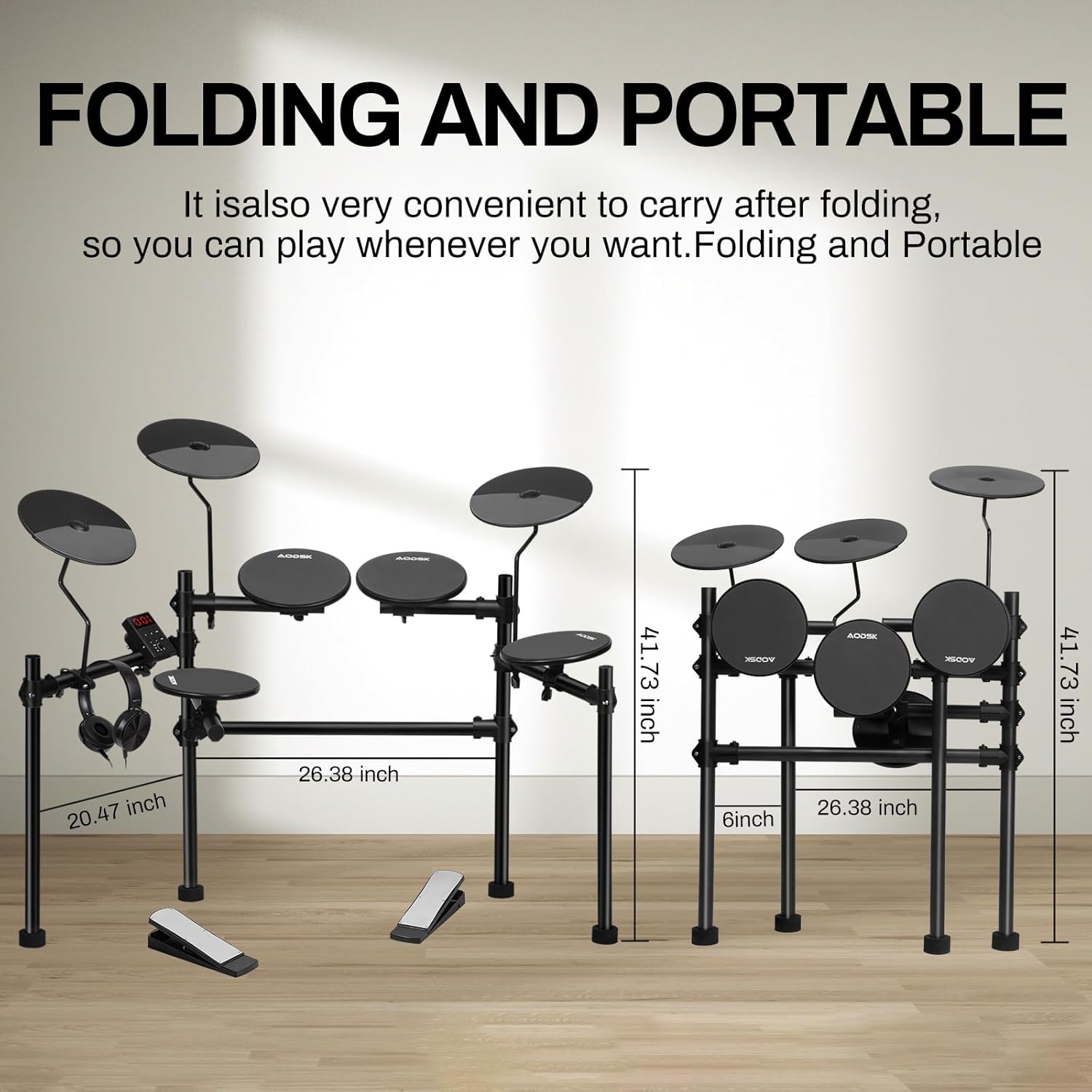
Image: The AODSK Electric Drum Set in its folded, portable configuration, highlighting its space-saving design.
3.2 കണക്ഷനുകൾ
After assembling the physical components, connect the necessary cables:
- ശക്തി: Connect the DC 9V power adapter to the module and plug it into a power outlet.
- ഹെഡ്ഫോണുകൾ: Plug the included headphones into the 'PHONES' jack on the module for private practice.
- External Speaker (Optional): Use the 'LINE OUT' jack to connect to an external ampലൈഫയർ അല്ലെങ്കിൽ സ്പീക്കർ സിസ്റ്റം.
- AUX ഇതിൽ: Connect an external audio device (e.g., smartphone, MP3 player) to the 'Aux in' jack to play along with your favorite music.
- USB MIDI: Use the 'USB' port to connect the module to a computer for MIDI recording or software control.
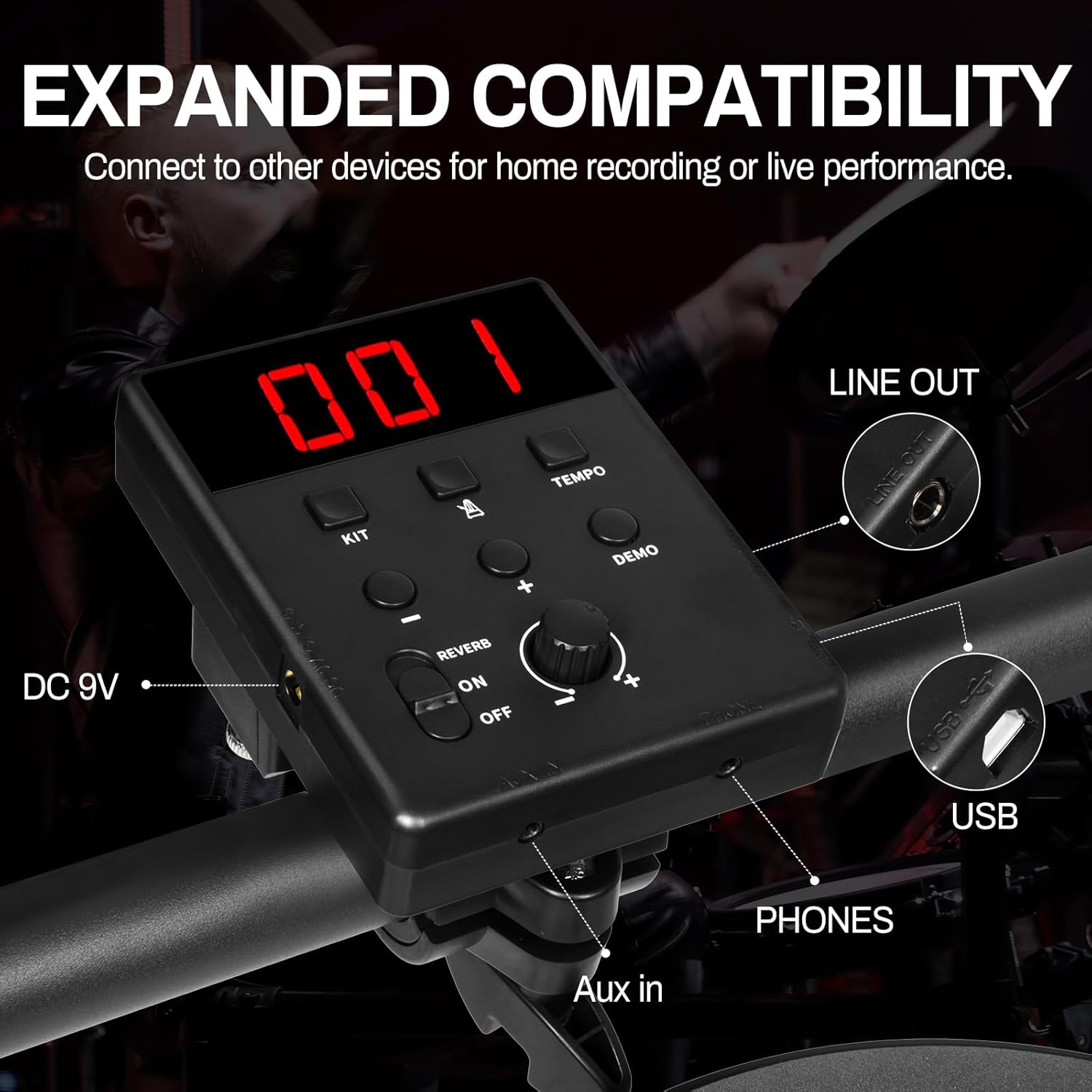
ചിത്രം: വിശദമായത് view of the drum module's connectivity options, including power, audio input/output, and USB.
Video: AODSK Electric Drum Set 403T - This video provides a visual overview of the drum set's components and basic setup, demonstrating its compact design and connectivity.
Video: Aodsk Electric Drum Set Unboxing and Assembly Tutorial - This tutorial guides users through the unboxing process and step-by-step assembly of the AODSK electric drum set.
4. പ്രവർത്തന നിർദ്ദേശങ്ങൾ
4.1 Drum Module Overview
The drum module is the central control unit for your AODSK Electric Drum Set. It features an easy-to-read LED display and various buttons for sound selection, tempo control, and other functions.
ചിത്രം: വിശദമായത് view of the drum module's interface, highlighting the LED display and control buttons.
- വോളിയം നോബ്: മൊത്തത്തിലുള്ള ഔട്ട്പുട്ട് വോളിയം ക്രമീകരിക്കുന്നു.
- കിറ്റ് ബട്ടൺ: Cycles through 20 preset drum kits.
- വോയ്സ് ബട്ടൺ: Allows selection of individual drum sounds (200 available).
- SONG Button: Selects from 20 built-in demo songs.
- ടെമ്പോ ബട്ടൺ: Adjusts the metronome tempo.
- CLICK Button: Activates/deactivates the metronome.
- REC/SAVE Button: Initiates recording and saves custom settings.
- റിവർബ് ഓൺ/ഓഫ്: Toggles reverb effect.
- മെനു ബട്ടൺ: Accesses additional settings and parameters.
4.2 Sound Selection and Customization
Your drum module comes with an extensive sound system:
- ഡ്രം കിറ്റുകൾ: Choose from 20 pre-configured drum kits by pressing the 'KIT' button and using the +/- buttons. These kits offer a variety of styles, from acoustic to electronic.
- Individual Sounds: Customize your kit by selecting individual sounds for each pad. Press the 'VOICE' button, strike the desired pad, and then use the +/- buttons to browse through 200 available sounds.
- ഡെമോ ഗാനങ്ങൾ: Practice along with 20 diverse demo songs. Press the 'SONG' button and use +/- to select a track.
4.3 Metronome and Coaching
Improve your timing and rhythm with the built-in metronome:
- Activate Metronome: Press the 'CLICK' button to start the metronome.
- ടെമ്പോ ക്രമീകരിക്കുക: Use the 'TEMPO' button and +/- to set your desired beats per minute (BPM).
- Coaching Mode: The module may include coaching functions to help beginners learn rhythms and improve consistency. Refer to the full manual for detailed instructions on using coaching features.
4.4 റെക്കോർഡിംഗും പ്ലേബാക്കും
Capture your performances directly on the module:
- റെക്കോർഡ്: Press the 'REC/SAVE' button once to enter record standby mode. Press it again to start recording.
- പ്ലേബാക്ക്: After recording, press the Play/Pause button to listen to your performance.
- സംരക്ഷിക്കുക: Press and hold 'REC/SAVE' to save your recorded track or custom kit settings.
5. പരിപാലനം
Proper maintenance ensures the longevity and optimal performance of your AODSK Electric Drum Set:
- വൃത്തിയാക്കൽ: Use a soft, dry cloth to wipe down the drum pads, cymbals, module, and frame. Avoid abrasive cleaners or solvents.
- കേബിൾ മാനേജുമെന്റ്: Keep all cables neatly organized and secured to prevent tangling or damage. Avoid sharp bends or excessive pulling.
- സംഭരണം: When not in use, fold the drum set to save space and store it in a dry, dust-free environment.
- പാഡ് കെയർ: The high-density rebound sponge drumheads are durable, but avoid excessive force or sharp objects that could damage the mesh.
6. പ്രശ്നപരിഹാരം
If you encounter any issues with your drum set, refer to the following common problems and solutions:
- ശബ്ദമില്ല:
- Check if the power adapter is securely connected and the module is turned on.
- Ensure headphones or external speakers are properly connected and their volume is turned up.
- Verify that the module's master volume is not set to zero.
- Pad Not Responding:
- Check the cable connection for the specific pad to the module.
- Ensure the pad is not damaged.
- പെഡൽ പ്രശ്നങ്ങൾ:
- Verify that the pedal cables are correctly plugged into the module.
- Ensure the pedals are placed on a stable surface to prevent sliding during use.
- വികലമായ ശബ്ദം:
- Lower the volume on the module or connected external devices.
- അയഞ്ഞ കേബിൾ കണക്ഷനുകൾ പരിശോധിക്കുക.
7 സ്പെസിഫിക്കേഷനുകൾ
Here are the technical specifications for your AODSK Electric Drum Set UAED-403TS:
| മോഡലിൻ്റെ പേര് | UAED-403TS |
| ഇനത്തിൻ്റെ ഭാരം | 24 പൗണ്ട് |
| ഉൽപ്പന്ന അളവുകൾ | 26 x 20 x 41 ഇഞ്ച് |
| ബോഡി മെറ്റീരിയൽ | Iron, Plastic, Sponge |
| ഫിനിഷ് തരം | പൊടി പൂശി |
| നിറം | കറുപ്പ് |
| കൈ ഓറിയൻ്റേഷൻ | ഉഭയകക്ഷി |
| കണക്റ്റർ തരം | സഹായക |
8. വാറൻ്റിയും പിന്തുണയും
Your AODSK Electric Drum Set comes with a manufacturer's warranty. Please refer to the warranty card included in your package for specific terms and conditions. For technical support, troubleshooting assistance, or warranty claims, please contact AODSK customer service through the retailer where you purchased the product.
Ask a question about this manual
Ask about setup, troubleshooting, compatibility, parts, safety, or missing instructions. Manuals+ will review the question and use this page’s manual context to help answer it.