
1. ആമുഖം
Thank you for choosing the Raynic CR1026A Remote Control. This remote is specifically designed to provide convenient and direct control over your Raynic 10.1 Inches Digital Calendar Clock CR1026. It allows for easy adjustment of settings, including time, screen display, and alarm functions, without needing to physically interact with the clock itself. This manual will guide you through the product's features, setup, operation, and maintenance.
2 സുരക്ഷാ വിവരങ്ങൾ
WARNING: CHOKING HAZARD - This product contains a button or coin cell battery. A swallowed button or coin battery can cause Internal Chemical Burns in as little as 2 hours and can lead to death or serious injury if ingested. Keep new and used batteries away from children. If the battery compartment does not close securely, stop using the product and keep it away from children. If you think batteries might have been swallowed or placed inside any part of the body, seek immediate medical attention.
- നേരിട്ടുള്ള സൂര്യപ്രകാശം, താപ സ്രോതസ്സുകൾ, അല്ലെങ്കിൽ തീവ്രമായ താപനില എന്നിവയിലേക്ക് റിമോട്ട് കൺട്രോൾ തുറന്നുകാട്ടരുത്.
- റിമോട്ട് കൺട്രോൾ താഴെയിടുകയോ ശക്തമായ ആഘാതങ്ങൾക്ക് വിധേയമാക്കുകയോ ചെയ്യുന്നത് ഒഴിവാക്കുക.
- റിമോട്ട് കൺട്രോൾ ഡിസ്അസംബ്ലിംഗ് ചെയ്യാനോ പരിഷ്ക്കരിക്കാനോ ശ്രമിക്കരുത്.
- റിമോട്ട് കൺട്രോൾ വെള്ളത്തിൽ നിന്നും മറ്റ് ദ്രാവകങ്ങളിൽ നിന്നും അകറ്റി നിർത്തുക.
3. ഉൽപ്പന്നം കഴിഞ്ഞുview
3.1 റിമോട്ട് കൺട്രോൾ ലേഔട്ട്
The Raynic CR1026A remote control features a simple and intuitive button layout for easy operation of your digital calendar clock.
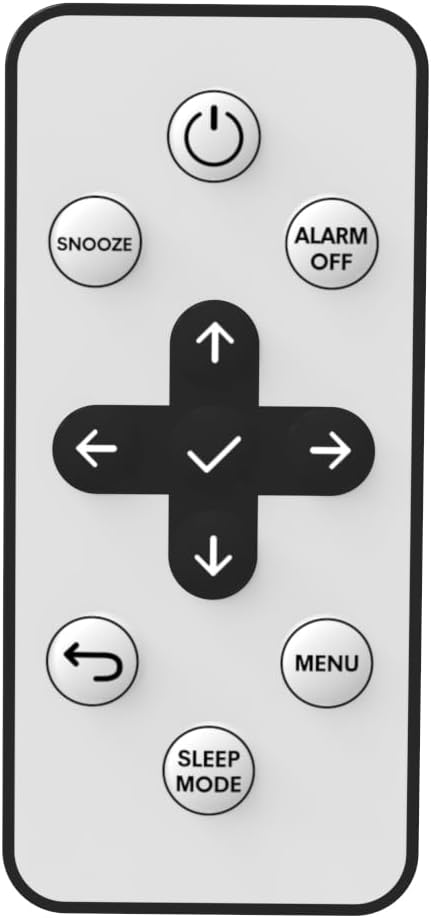
ചിത്രം 1: മുൻഭാഗം view of the Raynic CR1026A Remote Control. Buttons include Power, Snooze, Alarm Off, Navigation (Up, Down, Left, Right, OK/Confirm), Back, Menu, and Sleep Mode.
3.2 ബാറ്ററി കമ്പാർട്ട്മെൻ്റ്
The battery compartment is located on the back of the remote control. It houses the required button cell battery.

ചിത്രം 2: പിന്നിലേക്ക് view of the Raynic CR1026A Remote Control, illustrating the battery compartment with a slide-out tray and a warning label regarding button cell batteries.
4. സജ്ജീകരണം
4.1 ബാറ്ററി ഇൻസ്റ്റാളേഷൻ
- റിമോട്ട് കൺട്രോളിന്റെ പിൻഭാഗത്ത് ബാറ്ററി കമ്പാർട്ട്മെന്റ് കണ്ടെത്തുക (ചിത്രം 2 കാണുക).
- Slide the battery tray out in the direction indicated by the arrow.
- Remove the protective battery sheet if present.
- Insert one CR2025 3V Nonstandard Battery into the tray with the positive (+) side facing up.
- Gently slide the battery tray back into the remote control until it clicks securely into place.
4.2 Initial Use (No Pairing Required)
The Raynic CR1026A remote control is designed for direct use with the Raynic 10.1 Inches Digital Calendar Clock CR1026. No pairing or complex programming is required. Once the battery is correctly installed, the remote is ready to control your CR1026 calendar clock immediately.
5. പ്രവർത്തന നിർദ്ദേശങ്ങൾ
Point the remote control directly at your Raynic CR1026 Digital Calendar Clock to ensure proper signal transmission.
- പവർ ബട്ടൺ: Press to turn the clock display on or off.
- സ്നൂസ് ബട്ടൺ: Activates the snooze function when an alarm is sounding.
- Alarm Off Button: Disables the active alarm.
- നാവിഗേഷൻ ബട്ടണുകൾ (മുകളിലേക്ക്, താഴേക്ക്, ഇടത്, വലത്): Use these arrows to navigate through menus and adjust settings on the clock's display.
- OK/Confirm Button (Center of Navigation): തിരഞ്ഞെടുപ്പുകൾ സ്ഥിരീകരിക്കുന്നു അല്ലെങ്കിൽ ഉപമെനുകളിൽ പ്രവേശിക്കുന്നു.
- ബാക്ക് ബട്ടൺ: മുമ്പത്തെ മെനുവിലേക്കോ സ്ക്രീനിലേക്കോ മടങ്ങുന്നു.
- മെനു ബട്ടൺ: Accesses the main settings menu of the clock.
- സ്ലീപ്പ് മോഡ് ബട്ടൺ: Activates or deactivates the clock's sleep mode.
5.1 പൊതുവായ പ്രവർത്തനങ്ങൾ
- ക്രമീകരണ സമയം: അമർത്തുക മെനു button, navigate to the time settings using the നാവിഗേഷൻ ബട്ടണുകൾ, എന്നിവ ഉപയോഗിക്കുക ശരി/സ്ഥിരീകരിക്കുക button to enter. Adjust values with മുകളിലേക്ക് / താഴേക്ക് ഒപ്പം സ്ഥിരീകരിക്കുക ശരി/സ്ഥിരീകരിക്കുക.
- Turning Off Screen: അമർത്തുക ശക്തി button to toggle the screen display.
- അലാറം ഓഫാക്കുന്നു: അലാറം മുഴങ്ങുമ്പോൾ, അമർത്തുക അലാറം ഓഫാണ് അത് നിശബ്ദമാക്കാൻ ബട്ടൺ.
- Using as Wall Clock: The remote allows you to control the CR1026 calendar clock even when it is hung on a wall, eliminating the need to take it down for adjustments.
6. പരിപാലനം
6.1 ബാറ്ററി മാറ്റിസ്ഥാപിക്കൽ
When the remote control's responsiveness decreases or it stops functioning, it is likely time to replace the battery. Follow the battery installation steps in Section 4.1 to replace the CR2025 3V battery.
6.2 വൃത്തിയാക്കൽ
To clean the remote control, gently wipe its surface with a soft, dry cloth. Do not use abrasive cleaners, solvents, or immerse the remote in water.
7. പ്രശ്നപരിഹാരം
- റിമോട്ട് പ്രതികരിക്കുന്നില്ല:
- Ensure the remote is pointed directly at the CR1026 clock.
- Check if the battery is correctly installed and has sufficient power. Replace the battery if necessary.
- Ensure there are no obstructions between the remote and the clock.
- ബട്ടണുകൾ പ്രവർത്തിക്കുന്നില്ല:
- Clean the remote's surface to ensure no debris is obstructing the buttons.
- If individual buttons are unresponsive, the remote may be damaged.
- Remote is damaged:
If the remote control is physically damaged or ceases to function after troubleshooting, it may need to be replaced. Multiple spare remote controls are compatible with the CR1026 calendar clock.
8 സ്പെസിഫിക്കേഷനുകൾ
| മോഡൽ നമ്പർ | CR1026A |
| അനുയോജ്യമായ ഉപകരണം | Raynic 10.1 Inches Digital Calendar Clock CR1026 |
| പവർ ഉറവിടം | 1 x CR2025 3V Nonstandard Battery (included) |
| നിറം | കറുപ്പ് |
| അളവുകൾ (L x W x H) | 2.36 x 1.18 x 0.39 ഇഞ്ച് (ഏകദേശം) |
| ഇനത്തിൻ്റെ ഭാരം | 2.46 ഔൺസ് (ഏകദേശം) |
| പ്രത്യേക ഫീച്ചർ | പ്രോഗ്രാമിംഗ് ആവശ്യമില്ല |
9. വാറൻ്റിയും പിന്തുണയും
For information regarding the warranty of your Raynic CR1026A Remote Control, please refer to the documentation provided with your original purchase of the Raynic 10.1 Inches Digital Calendar Clock CR1026, or contact the seller/manufacturer directly. Raynic Electronic is the manufacturer of this product.
For further assistance or technical support, please visit the official Raynic website or contact their customer service department. Ensure you have your product model number (CR1026A) and details of your issue ready when seeking support.