
1. ആമുഖം
This manual provides detailed instructions for setting up, operating, and maintaining your LEFFOT RK3518 Android 14.0 4K Ultra HD Streaming Device. Please read this manual thoroughly before use to ensure proper functionality and to maximize your entertainment experience.
പാക്കേജ് ഉള്ളടക്കം
അൺപാക്ക് ചെയ്യുമ്പോൾ, താഴെ ലിസ്റ്റ് ചെയ്തിരിക്കുന്ന എല്ലാ ഇനങ്ങളും അവിടെയുണ്ടെന്ന് ദയവായി ഉറപ്പാക്കുക:
- LEFFOT RK3518 Android 14.0 4K Ultra HD Streaming Device
- വോയ്സ് റിമോട്ട് കൺട്രോൾ
- HDMI കേബിൾ
- പവർ അഡാപ്റ്റർ (5V/2A)
- ഉപയോക്തൃ മാനുവൽ (ഈ പ്രമാണം)

Image 1.1: Contents of the LEFFOT RK3518 package, including the streaming device, remote, cables, and manual.
2. ഉൽപ്പന്നം കഴിഞ്ഞുview
The LEFFOT RK3518 is a high-performance Android 14.0 TV Box designed to deliver a cinematic 4K streaming experience. It features a powerful Rockchip RK3518 Quad-Core A53 processor, 2GB RAM, and 16GB ROM, ensuring smooth operation and ample storage for applications. Advanced connectivity options include dual-band WiFi 6 (2.4G & 5G), Bluetooth 5.4, and USB 3.0.
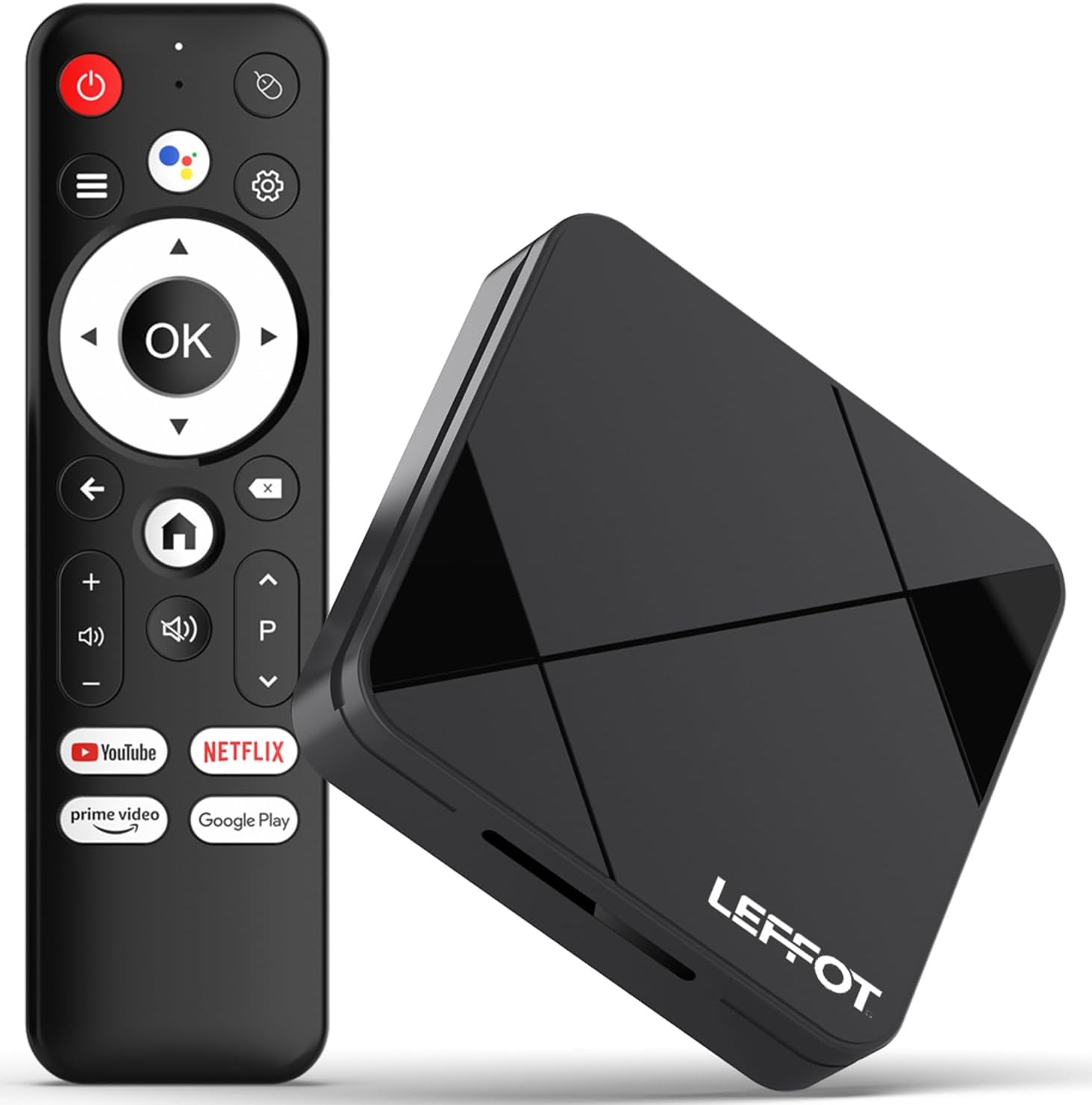
Image 2.1: The LEFFOT RK3518 streaming device and its accompanying voice remote control.
പ്രധാന സവിശേഷതകൾ:
- 4K അൾട്രാ HD റെസല്യൂഷൻ: Supports 4K@60fps and HDR10 for vibrant colors and sharp details.
- ശക്തമായ പ്രോസസ്സർ: Rockchip RK3518 Quad-Core A53 with Mali-450 GPU for smooth performance.
- വിപുലമായ കണക്റ്റിവിറ്റി: Dual-band WiFi 6 (2.4G & 5G), Bluetooth 5.4, USB 3.0, and Ethernet.
- വോയ്സ് റിമോട്ട് കൺട്രോൾ: Intuitive navigation and hands-free control with built-in voice assistant.
- Android 14.0 Ecosystem: Access to thousands of apps via Google Play.
- സ്ക്രീൻ മിററിംഗ്: Supports AirPlay, DLNA, and WiFi Display for sharing content from mobile devices.
3. സജ്ജീകരണം
3.1 ഉപകരണം ബന്ധിപ്പിക്കുന്നു
- ടിവിയിലേക്ക് കണക്റ്റ് ചെയ്യുക: Insert one end of the provided HDMI cable into the HDMI port on the LEFFOT RK3518 device and the other end into an available HDMI input on your television.
- പവറിലേക്ക് ബന്ധിപ്പിക്കുക: Plug the power adapter into the DC 5V/2A port on the device, then plug the adapter into a wall outlet.
- ഇന്റർനെറ്റിലേക്ക് കണക്റ്റുചെയ്യുക (ഓപ്ഷണൽ):
- വയർഡ് കണക്ഷൻ: For a stable connection, connect an Ethernet cable from your router to the Ethernet port on the device.
- വയർലെസ് കണക്ഷൻ: The device supports 2.4G and 5G WiFi 6. You will configure this after initial power-on.

Image 3.1: Diagram showing the various ports on the LEFFOT RK3518 device, including TF card slot, USB, USB 3.0, AV, HDMI, Ethernet, and DC 5V/2A power input.
3.2 പ്രാരംഭ പവർ ഓണും സജ്ജീകരണ വിസാർഡും
- നിങ്ങളുടെ ടെലിവിഷൻ ഓണാക്കി ശരിയായ HDMI ഇൻപുട്ട് ഉറവിടം തിരഞ്ഞെടുക്കുക.
- The LEFFOT RK3518 device will automatically power on and display the boot-up screen.
- Follow the on-screen instructions of the Android setup wizard to:
- നിങ്ങളുടെ ഭാഷ തിരഞ്ഞെടുക്കുക.
- Connect to a Wi-Fi network (if not using Ethernet).
- Sign in with your Google account to access Google Play Store and other services.
- നിബന്ധനകളും വ്യവസ്ഥകളും അംഗീകരിക്കുക.
3.3 വിദൂര നിയന്ത്രണ ജോടിയാക്കൽ
The included voice remote control is typically pre-paired. If the remote does not respond, ensure batteries are correctly inserted. If issues persist, follow these steps to re-pair:
- ഉപകരണം ഓണാണെന്ന് ഉറപ്പാക്കുക.
- അമർത്തിപ്പിടിക്കുക OK ബട്ടൺ ഒപ്പം വോളിയം ഡൗൺ button simultaneously for a few seconds until a pairing indicator appears on the screen or the remote's LED flashes.
- Release the buttons. The remote should now be paired.
4. പ്രവർത്തന നിർദ്ദേശങ്ങൾ
4.1 ഇന്റർഫേസ് നാവിഗേറ്റ് ചെയ്യൽ
Use the directional pad (up, down, left, right) on the remote control to navigate through menus and select items. The OK button confirms selections, and the തിരികെ button returns to the previous screen. The വീട് button takes you directly to the main home screen.
4.2 വോയ്സ് കൺട്രോൾ ഉപയോഗം
The LEFFOT RK3518 features a voice-enabled remote control for convenient hands-free operation.
- അമർത്തുക Google അസിസ്റ്റൻ്റ് button (usually a microphone icon) on your remote.
- Speak clearly into the remote's microphone. You can ask to search for content, open applications, check weather, or control smart home devices.
- The device will process your command and display results or perform the requested action.

Image 4.1: Illustration of using the voice remote control to interact with the LEFFOT RK3518 streaming device.
4.3 ആപ്ലിക്കേഷനുകൾ ഇൻസ്റ്റാൾ ചെയ്യുകയും കൈകാര്യം ചെയ്യുകയും ചെയ്യുക
Your device comes with the Google Play Store pre-installed, allowing access to a vast library of applications.
- From the home screen, navigate to the ഗൂഗിൾ പ്ലേ സ്റ്റോർ icon and select it.
- ആവശ്യമുള്ള ആപ്ലിക്കേഷനുകൾക്കായി ബ്രൗസ് ചെയ്യുക അല്ലെങ്കിൽ തിരയുക.
- Select an app and choose ഇൻസ്റ്റാൾ ചെയ്യുക.
- To manage installed apps, go to ക്രമീകരണങ്ങൾ > ആപ്പുകൾ.
4.4 Screen Mirroring (AirPlay, DLNA, WiFi Display)
The device supports various screen mirroring protocols to cast content from your smartphone or tablet to your TV.
- Ensure your mobile device and the LEFFOT RK3518 are connected to the same Wi-Fi network.
- On your mobile device, open the screen mirroring feature (e.g., AirPlay for iOS, Smart View/Screen Cast for Android).
- Select the LEFFOT RK3518 device from the list of available devices.
- Your mobile device's screen will now be mirrored on your TV.
5. പരിപാലനം
5.1 ഉപകരണം വൃത്തിയാക്കുന്നു
To clean the exterior of the device, use a soft, dry, lint-free cloth. Do not use liquid cleaners, aerosols, or abrasive materials, as these can damage the finish or internal components.
5.2 സോഫ്റ്റ്വെയർ അപ്ഡേറ്റുകൾ
The LEFFOT RK3518 may receive periodic software updates to improve performance, add features, or enhance security. It is recommended to keep your device's software up to date.
- നാവിഗേറ്റ് ചെയ്യുക ക്രമീകരണങ്ങൾ > ഉപകരണ മുൻഗണനകൾ > ആമുഖം > സിസ്റ്റം അപ്ഡേറ്റ്.
- If an update is available, follow the on-screen prompts to download and install it. Ensure the device remains powered on during the update process.
5.3 സ്റ്റോറേജ് മാനേജ്മെൻ്റ്
Periodically check the device's storage to ensure optimal performance. You can uninstall unused apps or clear cache data to free up space.
- പോകുക ക്രമീകരണങ്ങൾ > ആപ്പുകൾ to manage individual applications.
- പോകുക Settings > Device Preferences > Storage വരെ view storage usage and manage external storage (TF card).
6. പ്രശ്നപരിഹാരം
If you encounter issues with your LEFFOT RK3518 device, refer to the following common problems and solutions:
| പ്രശ്നം | സാധ്യമായ കാരണം / പരിഹാരം |
|---|---|
| പവർ ഇല്ല / ഉപകരണം ഓണാകുന്നില്ല. | പവർ അഡാപ്റ്റർ ഉപകരണത്തിലേക്കും പ്രവർത്തിക്കുന്ന ഒരു പവർ ഔട്ട്ലെറ്റിലേക്കും സുരക്ഷിതമായി ബന്ധിപ്പിച്ചിട്ടുണ്ടെന്ന് ഉറപ്പാക്കുക. മറ്റൊരു ഔട്ട്ലെറ്റ് പരീക്ഷിക്കുക. |
| No signal on TV. | Verify the HDMI cable is securely connected to both the device and the TV. Ensure your TV is set to the correct HDMI input source. Try a different HDMI port or cable. |
| റിമോട്ട് കൺട്രോൾ പ്രതികരിക്കുന്നില്ല. | Check the batteries in the remote control and replace if necessary. Re-pair the remote control as described in Section 3.3. |
| വൈഫൈ കണക്ഷൻ പ്രശ്നങ്ങൾ. | Ensure your Wi-Fi router is on and functioning. Check Wi-Fi settings on the device (Settings > Network & Internet). Try restarting your router and the streaming device. Ensure you are within range of your Wi-Fi network. |
| ആപ്ലിക്കേഷനുകൾ മന്ദഗതിയിലാണ് അല്ലെങ്കിൽ ക്രാഷ് ചെയ്യുന്നു. | Close unused applications. Clear the cache of problematic apps (Settings > Apps > [App Name] > Clear cache). Ensure sufficient storage space is available. Restart the device. |
| Poor video quality (not 4K). | Ensure your TV supports 4K resolution. Verify the content being streamed is 4K. Check your internet speed; 4K streaming requires a stable, high-speed connection. Ensure HDMI cable is 4K compatible. |
7 സ്പെസിഫിക്കേഷനുകൾ
Below are the technical specifications for the LEFFOT RK3518 Android 14.0 4K Ultra HD Streaming Device:
| ഫീച്ചർ | സ്പെസിഫിക്കേഷൻ |
|---|---|
| മോഡലിൻ്റെ പേര് | RK3518 |
| ഓപ്പറേറ്റിംഗ് സിസ്റ്റം | ആൻഡ്രോയിഡ് 14.0 |
| പ്രോസസ്സർ | Rockchip RK3518 Quad-Core A53 |
| ജിപിയു | മാലി -450 എംപി 2 |
| റാം | 2 ജിബി |
| ആന്തരിക സംഭരണം (ROM) | 16GB (expandable via TF card) |
| വീഡിയോ ഔട്ട്പുട്ട് | HDMI 2.0 (4K@60fps, HDR10) |
| കണക്റ്റിവിറ്റി | 2.4G & 5G WiFi 6 (802.11 a/b/g/n/ac/ax), Bluetooth 5.4, 100M Ethernet |
| തുറമുഖങ്ങൾ | HDMI, USB 3.0, USB 2.0, LAN, TF Card Slot, AV, DC 5V/2A |
| പിന്തുണയ്ക്കുന്ന ഇന്റർനെറ്റ് സേവനങ്ങൾ | Netflix, Prime Video, YouTube, and more via Google Play |
| അളവുകൾ | 3.2 x 3.2 x 0.67 ഇഞ്ച് (ഏകദേശം 90 x 90 x 18.8 മിമി) |
| ഭാരം | 3.25 ഔൺസ് |
8. വാറൻ്റിയും പിന്തുണയും
8.1 വാറൻ്റി വിവരങ്ങൾ
Your LEFFOT RK3518 Android 14.0 4K Ultra HD Streaming Device is covered by a manufacturer's warranty against defects in materials and workmanship. The specific terms and duration of the warranty may vary by region and retailer. Please retain your proof of purchase for warranty claims.
8.2 ഉപഭോക്തൃ പിന്തുണ
For technical assistance, troubleshooting beyond this manual, or warranty inquiries, please contact LEFFOT customer support through the retailer where the product was purchased or refer to the official LEFFOT webബന്ധപ്പെടാനുള്ള വിവരങ്ങൾക്കുള്ള സൈറ്റ്.