
ആമുഖം
This manual provides essential information for setting up, operating, maintaining, and troubleshooting your NIMO 15.6-inch FHD Gaming Laptop, model Nimo N153. Please read this manual thoroughly before using your device to ensure proper function and longevity.

Image: The NIMO 15.6-inch FHD Gaming Laptop, showcasing അതിന്റെ മിനുസമാർന്ന ഡിസൈൻ.
ബോക്സിൽ എന്താണുള്ളത്
അൺബോക്സിംഗ് ചെയ്യുമ്പോൾ, താഴെ ലിസ്റ്റ് ചെയ്തിരിക്കുന്ന എല്ലാ ഇനങ്ങളും ഉണ്ടെന്ന് ഉറപ്പാക്കുക:
- 1 x Nimo N153 Laptop
- 1 x Type-C 100W PD Fast Charger
- 1 x ഉപയോക്തൃ മാനുവൽ (ഈ പ്രമാണം)
- Windows 11 Home (pre-installed)
- വാറണ്ടിയും റിട്ടേൺ വിവരവും
സജ്ജമാക്കുക
1. പ്രാരംഭ പവർ ഓണും ചാർജിംഗും
Before first use, connect the laptop to the power adapter and a wall outlet. The Type-C 100W PD Fast Charger is designed for efficient charging. Allow the battery to charge sufficiently before disconnecting.

Image: The compact Type-C 100W PD Fast Charger included with the laptop.
2. ഓപ്പറേറ്റിംഗ് സിസ്റ്റം സജ്ജീകരണം (വിൻഡോസ് 11)
Upon first boot, follow the on-screen instructions to complete the Windows 11 Home setup. This includes selecting your region, language, connecting to a Wi-Fi network, and creating a user account.
3. ഫിംഗർപ്രിന്റ് റീഡർ സജ്ജീകരണം
For enhanced security, set up the integrated fingerprint reader. Navigate to Windows Settings > Accounts > Sign-in options and follow the prompts to register your fingerprint.

Image: Close-up of the laptop's keyboard, highlighting the fingerprint reader and backlit keys.
4. പെരിഫറലുകൾ ബന്ധിപ്പിക്കുന്നു
ബാഹ്യ ഉപകരണങ്ങൾ ബന്ധിപ്പിക്കുന്നതിന് ലാപ്ടോപ്പിൽ വിവിധ പോർട്ടുകൾ ഉണ്ട്:
- USB പോർട്ടുകൾ: Connect USB devices such as mice, keyboards, and external storage.
- എച്ച്ഡിഎംഐ പോർട്ട്: ദീർഘനേരം ഡിസ്പ്ലേ കാണുന്നതിന് ഒരു ബാഹ്യ മോണിറ്ററിലേക്കോ ടിവിയിലേക്കോ കണക്റ്റുചെയ്യുക.
- Type-C Ports: For data transfer, charging, and connecting compatible Type-C accessories.
- മൈക്രോ എസ്ഡി കാർഡ് സ്ലോട്ട്: Insert Micro SD cards for additional storage or data transfer.
- ഹെഡ്ഫോൺ ജാക്ക്: ഹെഡ്ഫോണുകളോ ബാഹ്യ സ്പീക്കറുകളോ ബന്ധിപ്പിക്കുക.
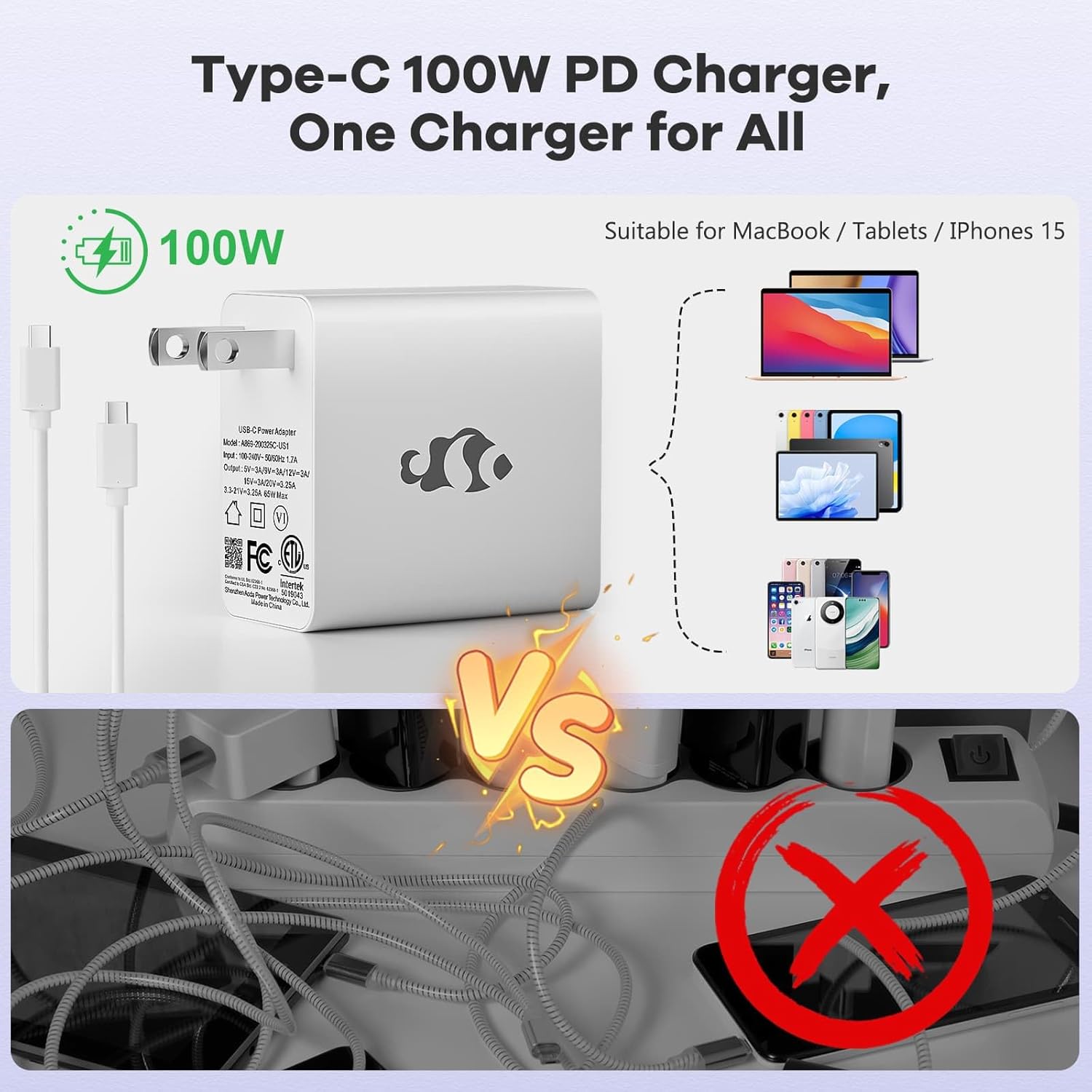
Image: Diagram illustrating the various ports available on the NIMO laptop, including USB, HDMI, Type-C, Micro SD, and headphone jack.
പ്രവർത്തന നിർദ്ദേശങ്ങൾ
1. പവർ ഓൺ/ഓഫ്, സ്ലീപ്പ് മോഡ്
- പവർ ഓൺ: കീബോർഡിൽ സ്ഥിതിചെയ്യുന്ന പവർ ബട്ടൺ അമർത്തുക.
- പവർ ഓഫ്: വിൻഡോസിൽ സ്റ്റാർട്ട് ബട്ടൺ ക്ലിക്ക് ചെയ്യുക, തുടർന്ന് പവർ > ഷട്ട് ഡൗൺ തിരഞ്ഞെടുക്കുക.
- സ്ലീപ്പ് മോഡ്: Close the laptop lid or click the Start button, then select Power > Sleep.
2. Keyboard and Touchpad Functions
- ബാക്ക്ലൈറ്റ് കീബോർഡ്: The keyboard features backlighting for use in low-light conditions. Use the dedicated function key (Fn + F key combination, typically) to adjust brightness or toggle it on/off.
- സംഖ്യാ കീപാഡ്: The full-size keyboard includes a numeric keypad for convenient data entry.
- Multi-touch Touchpad: Supports various gestures for navigation and control within Windows. Refer to Windows settings for touchpad gesture customization.
3. വയർലെസ് കണക്റ്റിവിറ്റി
- വൈഫൈ: ഒരു വയർലെസ്സ് നെറ്റ്വർക്കിലേക്ക് കണക്റ്റുചെയ്യാൻ, ടാസ്ക്ബാറിലെ Wi-Fi ഐക്കണിൽ ക്ലിക്ക് ചെയ്യുക, നിങ്ങൾക്ക് ആവശ്യമുള്ള നെറ്റ്വർക്ക് തിരഞ്ഞെടുക്കുക, ആവശ്യമെങ്കിൽ പാസ്വേഡ് നൽകുക.
- ബ്ലൂടൂത്ത്: ബ്ലൂടൂത്ത് ഉപകരണങ്ങൾ ജോടിയാക്കാൻ, വിൻഡോസ് ക്രമീകരണങ്ങൾ > ബ്ലൂടൂത്ത് & ഉപകരണങ്ങൾ എന്നതിലേക്ക് പോയി പുതിയൊരു ഉപകരണം ചേർക്കുന്നതിനുള്ള നിർദ്ദേശങ്ങൾ പാലിക്കുക.
4. Webcam Shield
The laptop is equipped with a physical webcam shield for privacy. Slide the shield to cover or uncover the webആവശ്യാനുസരണം ക്യാമറ.
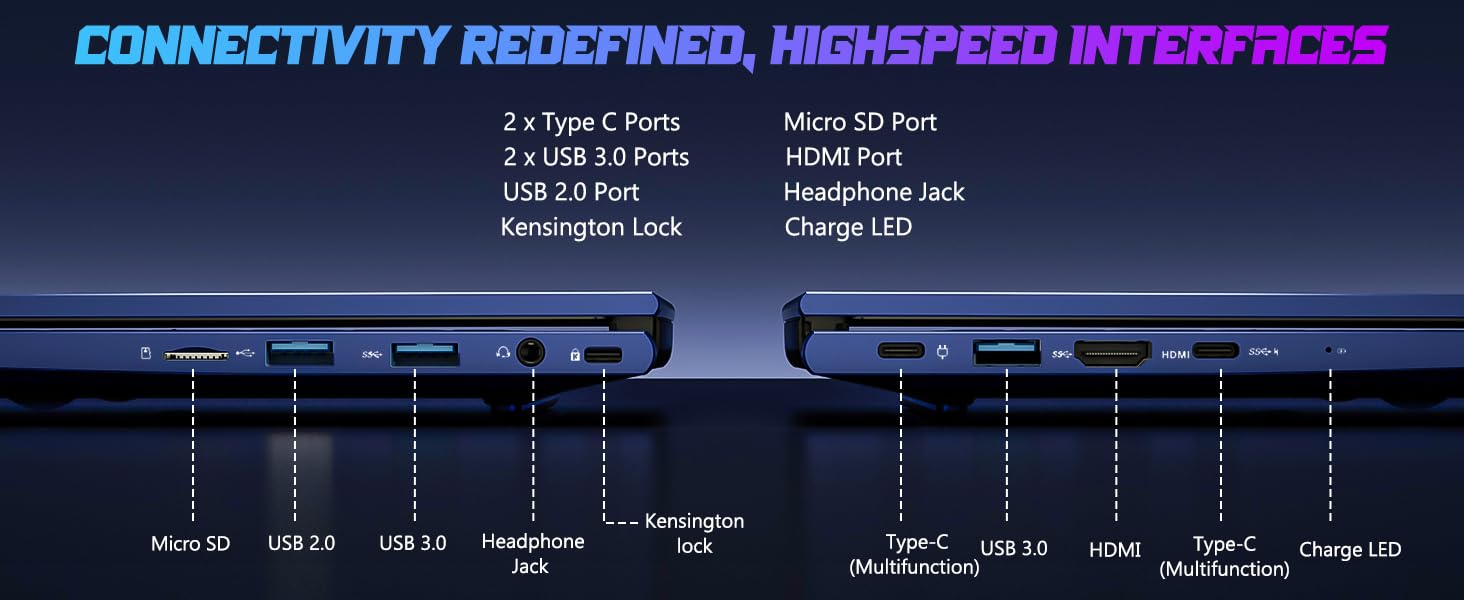
Image: Illustration of the laptop's webcam with a privacy shield feature.
5. ഡിസ്പ്ലേ സവിശേഷതകൾ
The 15.6-inch FHD IPS anti-glare display (1920x1080 resolution) provides clear visuals. Adjust display settings such as brightness and resolution through Windows Display Settings.

Image: The NIMO laptop displaying a vibrant image on its 15.6-inch FHD IPS screen.
മെയിൻ്റനൻസ്
1. ലാപ്ടോപ്പ് വൃത്തിയാക്കൽ
- സ്ക്രീൻ: നനവില്ലാത്തതും ലിനില്ലാത്തതുമായ തുണി ചെറുതായി ഉപയോഗിക്കുകampവെള്ളമോ സ്ക്രീൻ ക്ലീനറോ ഉപയോഗിച്ച് നനയ്ക്കുക. സ്ക്രീനിൽ നേരിട്ട് ദ്രാവകം സ്പ്രേ ചെയ്യരുത്.
- കീബോർഡും ചേസിസും: മൃദുവായതും ഉണങ്ങിയതുമായ തുണി ഉപയോഗിക്കുക. കഠിനമായ അഴുക്കിന്, അല്പം ഡി.amp തുറസ്സുകളിൽ ദ്രാവകം പ്രവേശിക്കുന്നില്ലെന്ന് ഉറപ്പാക്കാൻ തുണി ഉപയോഗിക്കാം.
- തുറമുഖങ്ങൾ: പോർട്ടുകൾ പൊടിയും അവശിഷ്ടങ്ങളും ഇല്ലാതെ സൂക്ഷിക്കുക. ആവശ്യമെങ്കിൽ കംപ്രസ് ചെയ്ത വായു ഉപയോഗിക്കുക, ക്യാൻ നേരെ പിടിക്കുക.
2. സോഫ്റ്റ്വെയർ അപ്ഡേറ്റുകൾ
Regularly check for and install Windows updates to ensure system stability, security, and optimal performance. Go to Windows Settings > Windows Update.
3. Upgradability
The Nimo N153 laptop supports upgradable dual-channel memory and detachable RAM/SSD. If you plan to upgrade components, it is recommended to consult a qualified technician or refer to NIMO's official support resources to avoid voiding your warranty or damaging the device.
ട്രബിൾഷൂട്ടിംഗ്
If you encounter issues with your NIMO laptop, try the following basic troubleshooting steps:
- ശക്തിയില്ല: Ensure the charger is securely connected to both the laptop and a working power outlet. Check the charge LED indicator.
- ഡിസ്പ്ലേ പ്രശ്നങ്ങൾ: If the screen is blank, try connecting an external monitor via HDMI to check if the issue is with the laptop's internal display. Ensure display drivers are up to date.
- കണക്റ്റിവിറ്റി പ്രശ്നങ്ങൾ (വൈ-ഫൈ/ബ്ലൂടൂത്ത്): Restart the laptop and your router/Bluetooth device. Check Windows network settings to ensure Wi-Fi and Bluetooth are enabled.
- മന്ദഗതിയിലുള്ള പ്രകടനം: Close unnecessary applications, check for malware, and ensure sufficient free storage space on the SSD.
- സിസ്റ്റം ഫ്രീസുചെയ്യുന്നു: Press and hold the power button for 10-15 seconds to force a shutdown, then restart the laptop.
For more complex issues or if the problem persists, please contact NIMO customer support.
സ്പെസിഫിക്കേഷനുകൾ
| ഫീച്ചർ | വിശദാംശങ്ങൾ |
|---|---|
| ബ്രാൻഡ് | NIMO |
| മോഡലിൻ്റെ പേര് | Nimo N153 |
| സ്ക്രീൻ വലിപ്പം | 15.6 ഇഞ്ച് |
| റെസലൂഷൻ | 1920x1080 Pixels (FHD IPS Anti-glare) |
| സിപിയു മോഡൽ | എഎംഡി റൈസൺ 5 6600H (6 കോറുകൾ, 12 ത്രെഡുകൾ, 4.5 GHz വരെ) |
| ഗ്രാഫിക്സ് കോപ്രൊസസർ | എഎംഡി റേഡിയൻ 660എം (ഇന്റഗ്രേറ്റഡ് ജിപിയു) |
| ഇൻസ്റ്റാൾ ചെയ്ത RAM മെമ്മറി വലുപ്പം | 16 ജിബി DDR5 (4800 MHz) |
| ഹാർഡ് ഡിസ്ക് വലിപ്പം | 1 TB SSD (PCIe 4.0) |
| ഓപ്പറേറ്റിംഗ് സിസ്റ്റം | വിൻഡോസ് 11 ഹോം |
| പ്രത്യേക സവിശേഷതകൾ | Backlit Keyboard, Fingerprint Reader, HD Audio, Numeric Keypad, Webcam Shield |
| കണക്റ്റിവിറ്റി ടെക്നോളജി | Wi-Fi (802.11a/b/g/n/ac), Bluetooth |
| തുറമുഖങ്ങൾ | 2x Type-C, 2x USB 3.0, 1x USB 2.0, 1x HDMI, 1x Micro SD, 1x Headphone Jack, Kensington Lock |
| ബാറ്ററി ലൈഫ് | Up to 5 Hours (Usage), Up to 7 Hours (Standby) |
| ബാറ്ററി ശേഷി | 53.58 വാട്ട് മണിക്കൂർ |
| ചാർജർ | 100W GaN Type-C PD Fast Charger |
| ഇനത്തിൻ്റെ ഭാരം | 3.8 പൗണ്ട് |
| അളവുകൾ (L x W x Th) | 14.07" x 8.98" x 0.76" |
ശ്രദ്ധിക്കുക: മുൻകൂർ അറിയിപ്പ് കൂടാതെ സ്പെസിഫിക്കേഷനുകൾ മാറ്റത്തിന് വിധേയമാണ്.
വാറൻ്റിയും പിന്തുണയും
1. നിർമ്മാതാവിന്റെ വാറന്റി
Your NIMO N153 laptop is covered by a 2 വർഷത്തെ നിർമ്മാതാവിന്റെ വാറന്റി from Nimo Direct Inc. This warranty covers defects in materials and workmanship under normal use. Please retain your proof of purchase for warranty claims.
2. റിട്ടേൺ പോളിസി
NIMO offers a 90-day hassle-free return policy. If you are not satisfied with your purchase, you may return the product within 90 days of purchase. Refer to your purchase documentation for specific return procedures.
3. ഉപഭോക്തൃ പിന്തുണ
For technical assistance, warranty claims, or any product-related inquiries, please contact NIMO customer support:
- ഇമെയിൽ: service@nimopc.com
- ഓൺലൈൻ: Visit the official NIMO webപിന്തുണാ ഉറവിടങ്ങൾക്കും കോൺടാക്റ്റ് ഓപ്ഷനുകൾക്കുമുള്ള സൈറ്റ്.
Our dedicated support team is available to assist you.

Image: NIMO customer service representatives ready to assist.