
Greadio GB-W17
Greadio CD Player Alarm Clock Boombox User Manual
Model: GB-W17
പ്രധാനപ്പെട്ട സുരക്ഷാ നിർദ്ദേശങ്ങൾ
Please read these instructions carefully before operating the unit and retain them for future reference. Adhere to all warnings on the appliance and in the operating instructions. Follow all instructions.
- വെള്ളത്തിനടുത്ത് ഈ ഉപകരണം ഉപയോഗിക്കരുത്.
- ഉണങ്ങിയ തുണി ഉപയോഗിച്ച് മാത്രം വൃത്തിയാക്കുക.
- വെന്റിലേഷൻ തുറസ്സുകളൊന്നും തടയരുത്. നിർമ്മാതാവിന്റെ നിർദ്ദേശങ്ങൾക്കനുസൃതമായി ഇൻസ്റ്റാൾ ചെയ്യുക.
- റേഡിയറുകൾ, ഹീറ്റ് രജിസ്റ്ററുകൾ, സ്റ്റൗകൾ, അല്ലെങ്കിൽ മറ്റ് ഉപകരണങ്ങൾ (ഉൾപ്പെടെ) പോലെയുള്ള താപ സ്രോതസ്സുകൾക്ക് സമീപം ഇൻസ്റ്റാൾ ചെയ്യരുത്. ampലൈഫയറുകൾ) ചൂട് ഉത്പാദിപ്പിക്കുന്നത്.
- പ്രത്യേകിച്ച് പ്ലഗുകൾ, കൺവീനിയൻസ് റെസെപ്റ്റക്കിളുകൾ, ഉപകരണത്തിൽ നിന്ന് പുറത്തുകടക്കുന്ന ഇടം എന്നിവയിൽ നടക്കുകയോ നുള്ളുകയോ ചെയ്യുന്നതിൽ നിന്ന് പവർ കോർഡ് സംരക്ഷിക്കുക.
- നിർമ്മാതാവ് വ്യക്തമാക്കിയ അറ്റാച്ച്മെൻ്റുകൾ/ആക്സസറികൾ മാത്രം ഉപയോഗിക്കുക.
- മിന്നൽ കൊടുങ്കാറ്റുകളുടെ സമയത്തോ ദീർഘനേരം ഉപയോഗിക്കാത്ത സമയത്തോ ഈ ഉപകരണം അൺപ്ലഗ് ചെയ്യുക.
- എല്ലാ സേവനങ്ങളും യോഗ്യതയുള്ള സേവന ഉദ്യോഗസ്ഥർക്ക് റഫർ ചെയ്യുക. പവർ സപ്ലൈ കോർഡ് അല്ലെങ്കിൽ പ്ലഗ് കേടാകുക, ദ്രാവകം ഒഴുകുകയോ ഉപകരണങ്ങൾ ഉപകരണത്തിലേക്ക് വീഴുകയോ ചെയ്യുക, ഉപകരണം മഴയോ ഈർപ്പമോ സമ്പർക്കം പുലർത്തുക, സാധാരണയായി പ്രവർത്തിക്കാത്തത് എന്നിങ്ങനെയുള്ള ഏതെങ്കിലും വിധത്തിൽ ഉപകരണത്തിന് കേടുപാടുകൾ സംഭവിക്കുമ്പോൾ സേവനം ആവശ്യമാണ്. , അല്ലെങ്കിൽ ഉപേക്ഷിച്ചു.
ഉൽപ്പന്നം കഴിഞ്ഞുview
The Greadio GB-W17 is a versatile CD player alarm clock boombox designed for home use, offering multiple audio playback options and convenience features.

ചിത്രം: മുൻഭാഗം view of the Greadio GB-W17 CD Player Alarm Clock Boombox, showcasing its large digital display, control buttons, and CD compartment. A remote control and battery are also visible.
പ്രധാന സവിശേഷതകൾ:
- CD Player (CD, CD-R/RW, MP3/WMA compatible)
- Bluetooth 5.1 Connectivity (Transmitter & Receiver)
- എഫ്എം റേഡിയോ
- AUX ഇൻപുട്ട്
- USB/TF കാർഡ് പ്ലേബാക്ക്
- Alarm Clock with Dual Alarms and Snooze
- 8 White Noise Soundscapes
- Dimmable LCD Display
- ബിൽറ്റ്-ഇൻ 5000mAh റീചാർജ് ചെയ്യാവുന്ന ബാറ്ററി
- റിമോട്ട് കൺട്രോൾ

Image: An infographic illustrating the 12 key functions of the Greadio CD Player, such as CD playback, Bluetooth, alarm clock, and various input options.
ബോക്സിൽ എന്താണുള്ളത്
അൺബോക്സിംഗ് ചെയ്യുമ്പോൾ, ഇനിപ്പറയുന്ന എല്ലാ ഇനങ്ങളും ഉണ്ടെന്ന് ഉറപ്പാക്കുക:
- Digital Alarm Clock Boom Box CD Player Combo (1 unit)
- Pin (1 unit) - (Note: The purpose of the "Pin" is unclear from the product description, it might be for reset or SIM tray style access for a component. User should refer to the included physical manual for clarification.)
- AUX Cord (1 unit)
- റിമോട്ട് കൺട്രോൾ (1 യൂണിറ്റ്)
- Type-C Cord (1 unit)
- Adapter (1 unit)
- ഉപയോക്തൃ മാനുവൽ (1 യൂണിറ്റ്)
സജ്ജീകരണ ഗൈഡ്
1. ഉപകരണം പവർ ചെയ്യുന്നു
The Greadio GB-W17 can be powered via the included AC adapter or its built-in rechargeable battery.
- എസി പവർ: Connect the Type-C cord to the unit's Type-C port and the adapter to a standard wall outlet.
- ബാറ്ററി പവർ: The unit comes with a built-in 5000mAh lithium-ion battery. Ensure it is charged before portable use.

Image: The Greadio CD Player connected to a wall outlet via its USB-C cable and adapter, indicating it is charging.
2. പ്രാരംഭ നിരക്ക്
For optimal battery life, fully charge the unit before its first portable use. The battery indicator on the LCD will show charging status.
3. റിമോട്ട് കൺട്രോൾ ബാറ്ററി ഇൻസ്റ്റാളേഷൻ
The remote control requires batteries (not specified in product data, typically AAA or button cell). Open the battery compartment on the back of the remote and insert batteries according to polarity markings.
പ്രവർത്തന നിർദ്ദേശങ്ങൾ
അടിസ്ഥാന നിയന്ത്രണങ്ങൾ
Familiarize yourself with the buttons on the unit and the remote control.
- FUNC: Cycle through modes (CD, Bluetooth, FM, AUX, USB, TF).
- പവർ: യൂണിറ്റ് ഓൺ / ഓഫ് ചെയ്യുക.
- പ്ലേ/താൽക്കാലികമായി നിർത്തുക: പ്ലേബാക്ക് ആരംഭിക്കുക അല്ലെങ്കിൽ താൽക്കാലികമായി നിർത്തുക.
- മുൻകൂർ/അടുത്തത്: Skip tracks/stations.
- VOL-/VOL+: വോളിയം ക്രമീകരിക്കുക.
- സമയം: സമയം സജ്ജമാക്കുക.
- സ്നൂസ്: Activate snooze during alarm.
- ചെറുത്: എൽസിഡി തെളിച്ചം ക്രമീകരിക്കുക.
- അലാറം 1/അലാറം 2: അലാറങ്ങൾ സജ്ജമാക്കുക.
1. Setting the Clock and Alarm
The unit features a large, dimmable LCD display for time and alarm settings.
- ക്രമീകരണ സമയം: അമർത്തുക സമയം ബട്ടൺ. ഉപയോഗിക്കുക PREV/അടുത്തത് to adjust hours/minutes, and സമയം സ്ഥിരീകരിക്കാൻ വീണ്ടും.
- അലാറങ്ങൾ സജ്ജീകരിക്കുക: അമർത്തുക അലാറം 1 or അലാറം 2. ഉപയോഗിക്കുക PREV/അടുത്തത് to set alarm time. Press the alarm button again to select wake-up source (CD, White Noise, FM Radio, USB, TF Card). Confirm settings.
- സ്നൂസ് പ്രവർത്തനം: When an alarm sounds, press സ്നൂസ് ചെയ്യുക for a temporary pause.
- LCD ഡിമ്മർ: അമർത്തുക ഡിമ്മർ button to cycle through brightness levels (e.g., 25%, 50%, 100%).
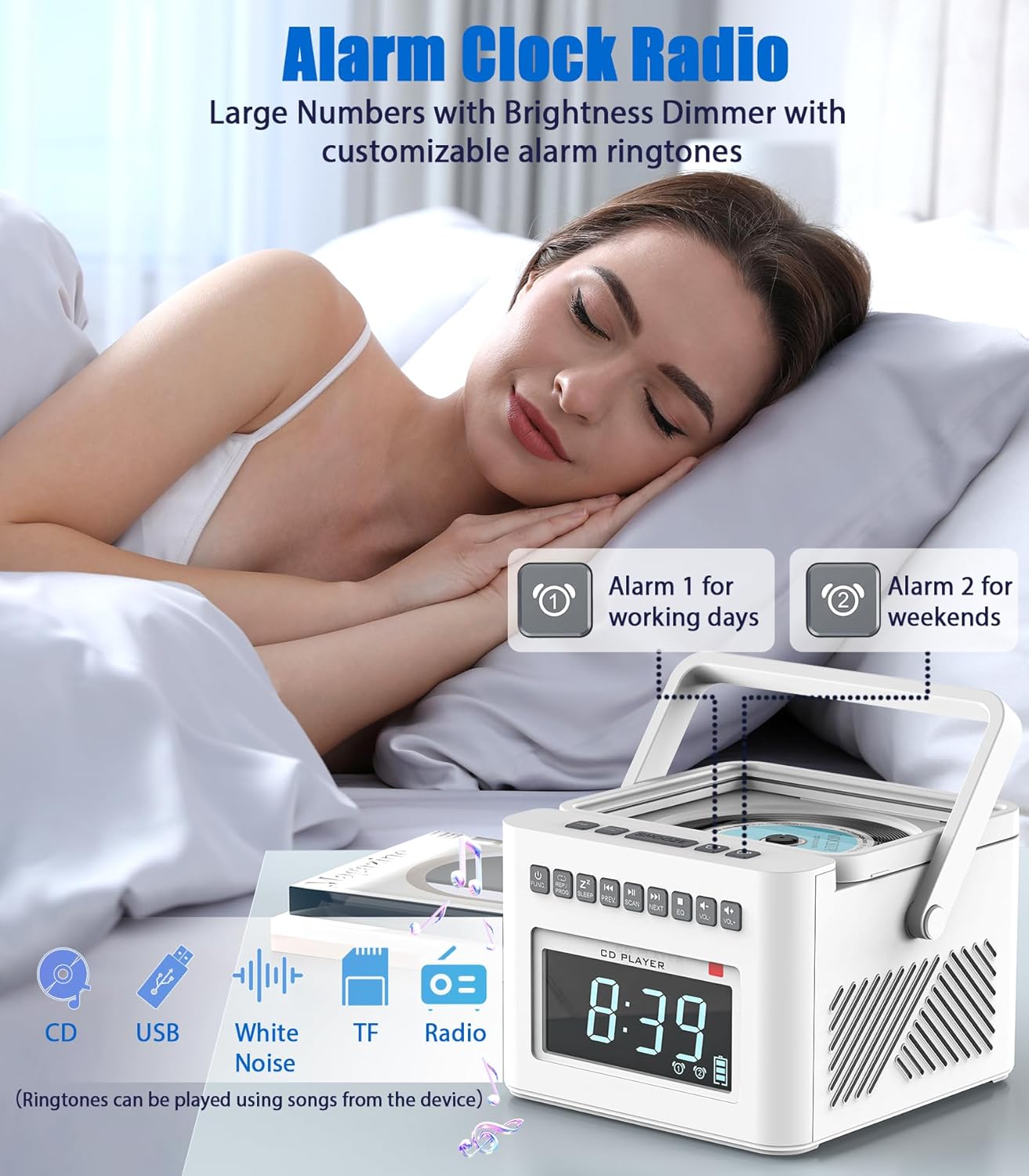
Image: The Greadio CD Player functioning as an alarm clock on a nightstand, demonstrating its dual alarm capability and large display.
2. സിഡി പ്ലേബാക്ക്
The unit supports CD, CD-R/RW, and MP3/WMA discs.
- സിഡി കമ്പാർട്ട്മെന്റ് ലിഡ് തുറക്കുക.
- ലേബൽ വശം മുകളിലേക്ക് അഭിമുഖീകരിക്കുന്ന ഒരു സിഡി ചേർക്കുക.
- Close the lid. The unit will automatically switch to CD mode or you can select it using the ജീവനക്കാരൻ ബട്ടൺ.
- ഉപയോഗിക്കുക പ്ലേ/താൽക്കാലികമായി നിർത്തുക, PREV/അടുത്തത് പ്ലേബാക്ക് നിയന്ത്രിക്കാൻ.
- പ്രോഗ്രാം പ്ലേ: Refer to the physical manual for detailed instructions on programming track sequences.
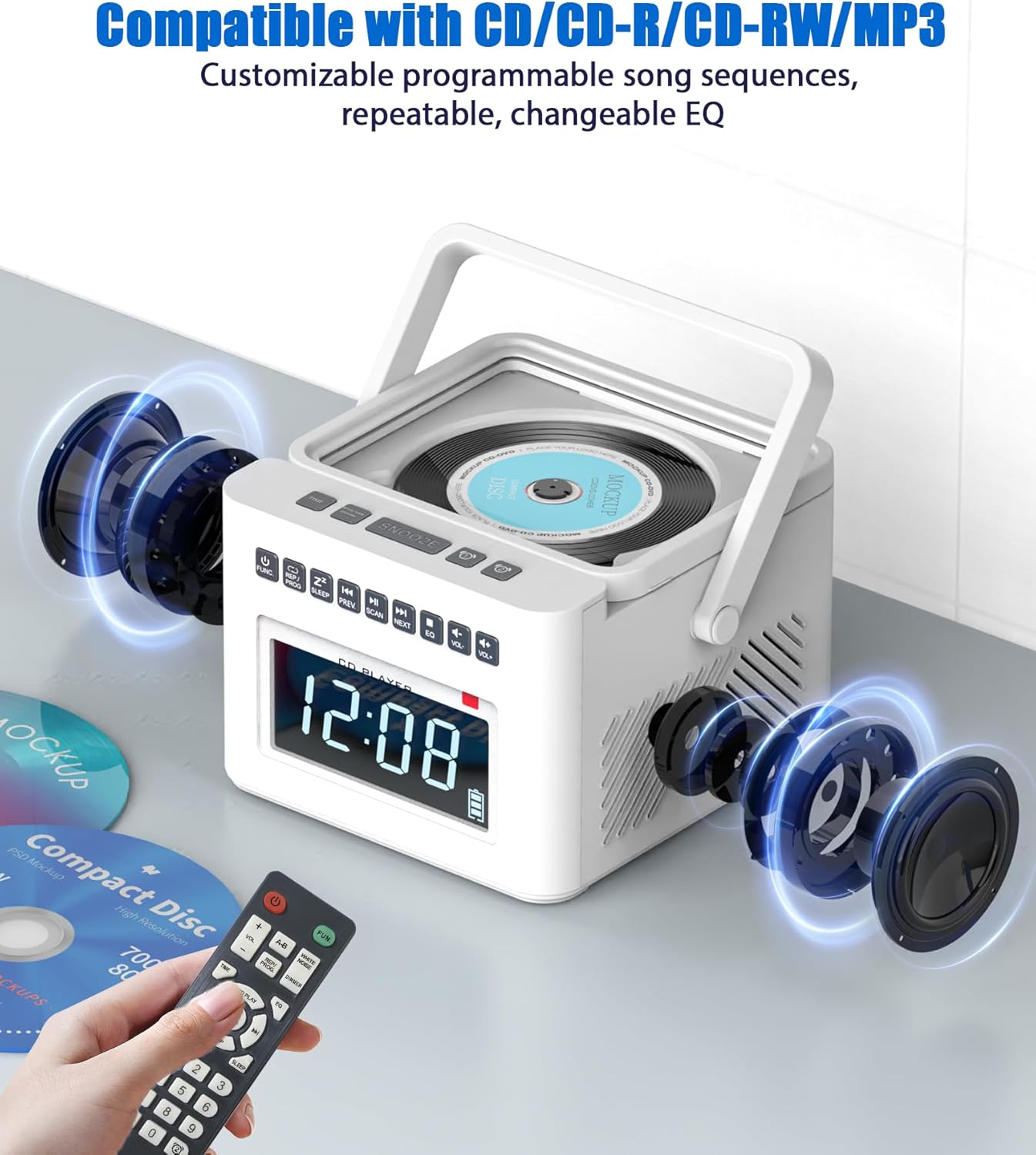
Image: The Greadio CD Player with an exploded view showing its internal speakers, emphasizing its compatibility with various CD formats and remote control functionality.
3. ബ്ലൂടൂത്ത് പ്രവർത്തനം
The GB-W17 functions as both a Bluetooth transmitter and receiver.
Bluetooth Receiver Mode (Connect your phone to the boombox)
- അമർത്തുക ജീവനക്കാരൻ button to select Bluetooth mode. The LCD will display "BLUE" and the Bluetooth indicator will flash.
- On your mobile device (phone, tablet, laptop), enable Bluetooth and search for "GB-W17".
- Select "GB-W17" to pair. Once connected, the Bluetooth indicator will stop flashing.
- You can now stream audio from your device to the boombox.

Image: A visual representation of the Greadio CD Player acting as a Bluetooth receiver, receiving audio from a smartphone, tablet, or computer.
Bluetooth Transmitter Mode (Connect the boombox to Bluetooth headphones/speakers)
- Ensure the boombox is playing audio from a source like CD, FM, AUX, USB, or TF.
- Press and hold the Bluetooth button (if available, otherwise refer to manual for specific button for transmitter mode activation). The unit will enter pairing mode.
- നിങ്ങളുടെ ബ്ലൂടൂത്ത് ഹെഡ്ഫോണുകളോ സ്പീക്കറോ പെയറിംഗ് മോഡിൽ ഇടുക.
- The boombox will automatically connect to the nearest discoverable Bluetooth audio device.
- Audio from the boombox will now be transmitted to your connected Bluetooth headphones/speaker.
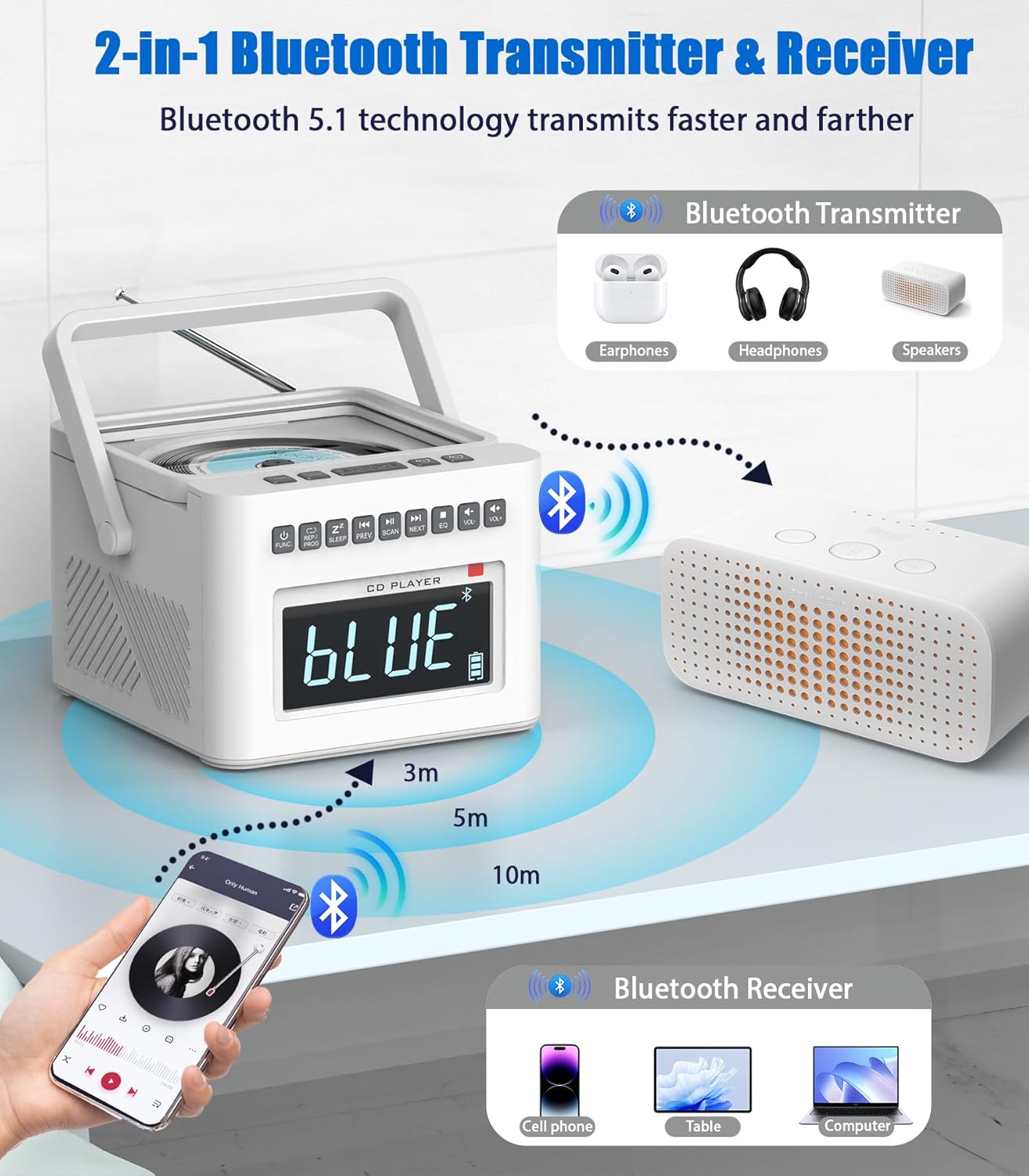
Image: An illustration demonstrating the Greadio CD Player's capability to transmit Bluetooth audio to external devices like headphones or other Bluetooth speakers.
4. എഫ്എം റേഡിയോ പ്രവർത്തനം
- അമർത്തുക ജീവനക്കാരൻ എഫ്എം റേഡിയോ മോഡ് തിരഞ്ഞെടുക്കാൻ ബട്ടൺ.
- മികച്ച സ്വീകരണത്തിനായി ടെലിസ്കോപ്പിക് ആന്റിന നീട്ടുക.
- അമർത്തിപ്പിടിക്കുക സ്കാൻ ചെയ്യുക (or Play/Pause button, depending on model) to auto-scan and save available stations.
- ഉപയോഗിക്കുക PREV/അടുത്തത് to navigate through saved stations or manually tune.

Image: The Greadio CD Player with its antenna extended, highlighting its FM radio functionality and the importance of antenna positioning for optimal reception.
5. USB/TF കാർഡ് പ്ലേബാക്ക്
- Insert a USB flash drive into the USB port or a TF card into the TF card slot.
- അമർത്തുക ജീവനക്കാരൻ button to select USB or TF mode.
- The unit will automatically begin playing compatible audio files (MP3/WMA).
- ഉപയോഗിക്കുക PREV/അടുത്തത് ട്രാക്കുകൾ ഒഴിവാക്കാൻ.

Image: A collage demonstrating the multi-mode playback capabilities of the Greadio CD Player, including FM radio, USB, TF card, and AUX input.
6. AUX ഇൻപുട്ട്
- Connect an external audio device (e.g., smartphone, MP3 player) to the AUX-IN port using the provided AUX cable.
- അമർത്തുക ജീവനക്കാരൻ AUX മോഡ് തിരഞ്ഞെടുക്കാൻ ബട്ടൺ.
- നിങ്ങളുടെ ബാഹ്യ ഉപകരണത്തിൽ നിന്നുള്ള ഓഡിയോ ഇപ്പോൾ ബൂംബോക്സ് സ്പീക്കറുകളിലൂടെ പ്ലേ ചെയ്യും. നിങ്ങളുടെ ബാഹ്യ ഉപകരണത്തിൽ നിന്ന് പ്ലേബാക്ക് നിയന്ത്രിക്കുക.
7. White Noise Function
The unit includes 8 soothing white noise tracks.
- അമർത്തുക വൈറ്റ് നോയിസ് button (or cycle through FUNC until White Noise mode is selected).
- ഉപയോഗിക്കുക PREV/അടുത്തത് to select different white noise sounds (e.g., Brook Bird, Water Stream, Lullabies, Cricket, Thunder Rain, Rainstorm).
- Set the auto-off timer (10-90 minutes) if desired, by pressing the ഉറങ്ങുക ബട്ടൺ.

Image: The Greadio CD Player highlighting its 8 built-in white noise soundscapes, designed to aid relaxation and sleep.
പരിപാലനവും പരിചരണവും
- വൃത്തിയാക്കൽ: യൂണിറ്റിന്റെ പുറംഭാഗം വൃത്തിയാക്കാൻ മൃദുവായതും ഉണങ്ങിയതുമായ തുണി ഉപയോഗിക്കുക. അബ്രസീവ് ക്ലീനറുകളോ ലായകങ്ങളോ ഉപയോഗിക്കരുത്.
- സിഡി ലെൻസ് കെയർ: Avoid touching the CD lens. If necessary, use a specialized CD lens cleaner disc.
- ബാറ്ററി കെയർ: To prolong battery life, avoid fully discharging the battery frequently. Recharge the unit regularly, especially if not used for extended periods.
- സംഭരണം: നേരിട്ടുള്ള സൂര്യപ്രകാശത്തിൽ നിന്നും തീവ്രമായ താപനിലയിൽ നിന്നും മാറി തണുത്തതും വരണ്ടതുമായ സ്ഥലത്ത് യൂണിറ്റ് സൂക്ഷിക്കുക.
- വെൻ്റിലേഷൻ: അമിതമായി ചൂടാക്കുന്നത് തടയാൻ വെന്റിലേഷൻ ഓപ്പണിംഗുകൾ തടഞ്ഞിട്ടില്ലെന്ന് ഉറപ്പാക്കുക.
ട്രബിൾഷൂട്ടിംഗ്
| പ്രശ്നം | സാധ്യമായ കാരണം | പരിഹാരം |
|---|---|---|
| യൂണിറ്റ് പവർ ഓണാക്കുന്നില്ല. | No power, battery drained, power cord loose. | Check power connection. Recharge battery. Ensure power outlet is functional. |
| സ്പീക്കറുകളിൽ നിന്ന് ശബ്ദമില്ല. | Volume too low, wrong mode selected, headphones connected. | Increase volume. Select correct input mode (CD, BT, FM, AUX, USB, TF). Disconnect headphones if plugged in. |
| സിഡി ഒഴിവാക്കുന്നു അല്ലെങ്കിൽ പ്ലേ ചെയ്യുന്നില്ല. | Dirty/scratched CD, CD inserted incorrectly, dirty lens. | Clean CD. Reinsert CD correctly. Use a CD lens cleaner. |
| ബ്ലൂടൂത്ത് ജോടിയാക്കൽ പ്രശ്നങ്ങൾ. | Device too far, not in pairing mode, interference. | Ensure boombox is in Bluetooth pairing mode. Move devices closer. Turn off other Bluetooth devices. Forget "GB-W17" on your device and re-pair. |
| മോശം എഫ്എം റേഡിയോ സ്വീകരണം. | ആന്റിന നീട്ടിയില്ല, ദുർബലമായ സിഗ്നൽ, ഇടപെടൽ. | ടെലിസ്കോപ്പിക് ആന്റിന പൂർണ്ണമായും നീട്ടി ക്രമീകരിക്കുക. യൂണിറ്റ് മറ്റൊരു സ്ഥലത്തേക്ക് മാറ്റാൻ ശ്രമിക്കുക. |
| റിമോട്ട് കൺട്രോൾ പ്രവർത്തിക്കുന്നില്ല. | Dead batteries, obstruction, not pointing at sensor. | Replace remote batteries. Remove any obstructions between remote and unit. Point remote directly at the unit's sensor. |
സ്പെസിഫിക്കേഷനുകൾ
| ഫീച്ചർ | വിശദാംശങ്ങൾ |
|---|---|
| മോഡൽ നമ്പർ | GB-W17 |
| ഉൽപ്പന്ന അളവുകൾ (L x W x H) | 7.55 x 7.55 x 5.15 ഇഞ്ച് |
| ഇനത്തിൻ്റെ ഭാരം | 2.64 പൗണ്ട് |
| പവർ ഉറവിടം | AC Adapter / Built-in 5000mAh Lithium Ion Battery |
| ബാറ്ററി ലൈഫ് (ഏകദേശം) | 11+ hours (Bluetooth), 5 hours (CD) |
| കണക്റ്റിവിറ്റി ടെക്നോളജി | ബ്ലൂടൂത്ത് 5.1, ഓക്സിലറി, യുഎസ്ബി |
| പിന്തുണയ്ക്കുന്ന മീഡിയ | CD, CD-R, CD-RW, MP3, WMA (via USB/TF) |
| സ്പീക്കർ തരം | സ്റ്റീരിയോ |
| എഫ്എം ഫ്രീക്വൻസി റേഞ്ച് | 87.5-108 MHz |
| നിറം | വെള്ള |

Image: An illustration detailing the approximate playback times for the Greadio CD Player on its 5000mAh battery across various modes (TF, CD, Bluetooth, FM, USB).
വാറൻ്റിയും പിന്തുണയും
വാറൻ്റി വിവരങ്ങൾ
Greadio products typically come with a limited warranty covering manufacturing defects. Please refer to the warranty card included in your product packaging for specific terms, conditions, and duration. Retain your proof of purchase for warranty claims.
ഉപഭോക്തൃ പിന്തുണ
For any questions, technical assistance, or warranty claims, please contact Greadio customer support. Contact information is usually available on the official Greadio webഉൽപ്പന്ന പാക്കേജിംഗിനുള്ളിൽ.
You may also visit the Greadio Store on Amazon for more information and support resources: Greadio Amazon Store
Ask a question about this manual
Ask about setup, troubleshooting, compatibility, parts, safety, or missing instructions. Manuals+ will review the question and use this page’s manual context to help answer it.