
1. ആമുഖം
This manual provides essential information for the proper setup, operation, and maintenance of your Kalobee H9 Smart Watch. Please read these instructions carefully before using your device to ensure optimal performance and longevity.
The Kalobee H9 Smart Watch features a 49mm clear case design with an orange and black band, offering a blend of style and functionality. It includes a digital display with chronograph-style complications and wireless charging capability.
2. പാക്കേജ് ഉള്ളടക്കം
പാക്കേജിൽ എല്ലാ ഇനങ്ങളും ഉണ്ടെന്ന് ഉറപ്പാക്കുക:
- Kalobee H9 Smart Watch Unit
- ചാർജിംഗ് കേബിൾ
- ഉപയോക്തൃ മാനുവൽ (ഈ പ്രമാണം)
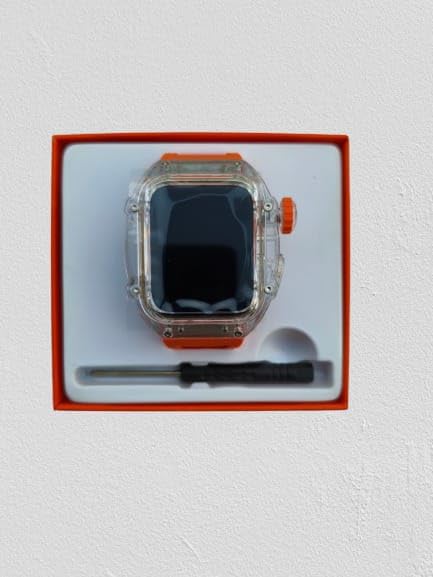
Image: The Kalobee H9 Smart Watch, charging cable, and a small tool are neatly arranged within its retail packaging.
3. ഉൽപ്പന്നം കഴിഞ്ഞുview
Familiarize yourself with the components of your Kalobee H9 Smart Watch:

Image: An exploded diagram illustrating the main components of the Kalobee H9 Smart Watch, including the face cover, non-slip crown, function key, middle frame, rear cover, and liquid silicone strap.
- Face Cover: The transparent protective layer over the display.
- Non-slip Crown: A rotating and pressable button for navigation and selection.
- ഫംഗ്ഷൻ കീ: An additional button for specific functions.
- Middle Frame: The central housing of the watch.
- പിൻ കവർ: The back panel of the watch, typically housing sensors and charging contacts.
- Liquid Silicone Strap: The comfortable and durable watch band.
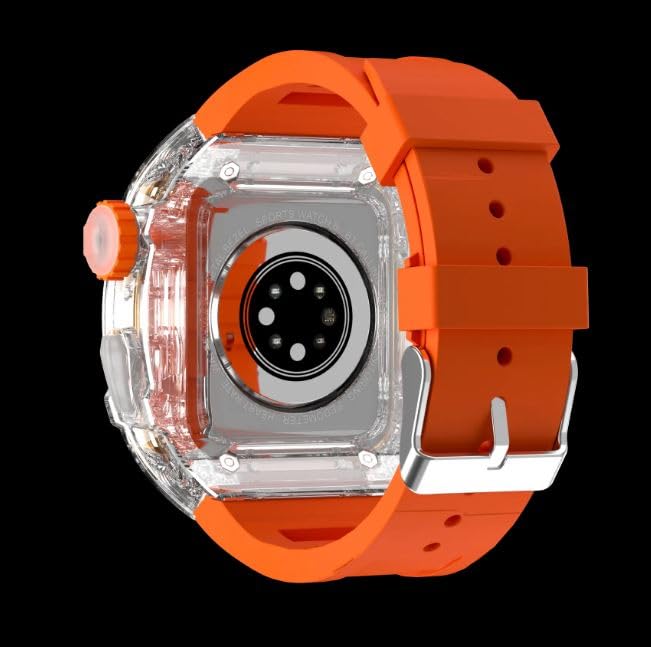
ചിത്രം: പിൻഭാഗം view of the Kalobee H9 Smart Watch, highlighting the sensor array and wireless charging area on the back panel.
4. സജ്ജീകരണം
4.1 സ്മാർട്ട് വാച്ച് ചാർജ് ചെയ്യുന്നു
The Kalobee H9 Smart Watch supports wireless charging. Before initial use, fully charge the device.
- Connect the provided charging cable to a compatible USB power adapter (not included).
- Place the rear cover of the watch onto the wireless charging pad. Ensure the watch is centered on the pad for proper contact.
- The watch display will indicate charging status. Allow sufficient time for a full charge.
4.2 പവർ ഓൺ/ഓഫ്
- പവർ ഓണാക്കാൻ: Press and hold the Non-slip Crown until the Kalobee logo appears on the screen.
- പവർ ഓഫ് ചെയ്യാൻ: Press and hold the Non-slip Crown, then select the 'Power Off' option on the screen.
4.3 ഒരു സ്മാർട്ട്ഫോണുമായി ജോടിയാക്കൽ
To access all smart features, pair your H9 Smart Watch with a compatible smartphone via Bluetooth.
- നിങ്ങളുടെ സ്മാർട്ട്ഫോണിന്റെ ബ്ലൂടൂത്ത് പ്രവർത്തനക്ഷമമാക്കിയിട്ടുണ്ടെന്ന് ഉറപ്പാക്കുക.
- On your H9 Smart Watch, navigate to the Bluetooth settings (refer to Section 5.1 for navigation).
- On your smartphone, open the dedicated Kalobee companion app (if available) or go to Bluetooth settings to search for devices.
- Select 'Kalobee H9' from the list of available devices on your smartphone.
- നിങ്ങളുടെ വാച്ചിലും സ്മാർട്ട്ഫോണിലും ജോടിയാക്കൽ അഭ്യർത്ഥന സ്ഥിരീകരിക്കുക.
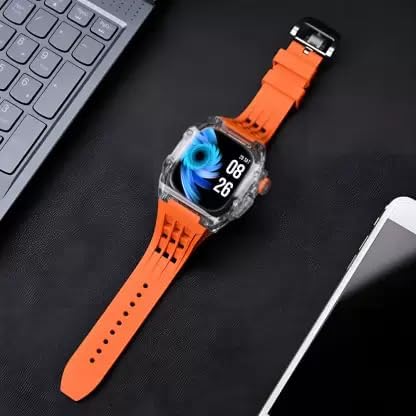
Image: The Kalobee H9 Smart Watch displayed on a desk alongside a smartphone and laptop, illustrating its connectivity with other devices.
5. പ്രവർത്തന നിർദ്ദേശങ്ങൾ
5.1 അടിസ്ഥാന നാവിഗേഷൻ
The H9 Smart Watch features both touchscreen and physical button controls:
- ടച്ച് സ്ക്രീൻ: മെനുകളിലൂടെയും സ്ക്രീനുകളിലൂടെയും നാവിഗേറ്റ് ചെയ്യാൻ ഇടത്തോട്ടോ വലത്തോട്ടോ മുകളിലേക്കോ താഴേക്കോ സ്വൈപ്പ് ചെയ്യുക. ഇനങ്ങൾ തിരഞ്ഞെടുക്കാൻ ടാപ്പ് ചെയ്യുക.
- Non-slip Crown: ലിസ്റ്റുകളിലൂടെ സ്ക്രോൾ ചെയ്യുന്നതിനോ ക്രമീകരണങ്ങൾ ക്രമീകരിക്കുന്നതിനോ തിരിക്കുക. ഹോം സ്ക്രീനിലേക്ക് മടങ്ങുന്നതിനോ തിരഞ്ഞെടുപ്പുകൾ സ്ഥിരീകരിക്കുന്നതിനോ അമർത്തുക.
- ഫംഗ്ഷൻ കീ: Typically used for quick access to a specific feature or as a back button. Refer to the on-screen prompts for its exact function in different contexts.
5.2 പ്രധാന സവിശേഷതകൾ
The Kalobee H9 Smart Watch offers several features to enhance your daily activities:
- പ്രവർത്തന ട്രാക്കർ: Monitors steps, distance, and calories burned.
- അലാറം ക്ലോക്ക്: നിങ്ങളുടെ വാച്ചിൽ നിന്ന് നേരിട്ട് അലാറങ്ങൾ സജ്ജമാക്കുക.
- ദൈനംദിന വർക്ക്ഔട്ട് മെമ്മറി: Records and stores your workout data.
- ഡിജിറ്റൽ ഡിസ്പ്ലേ: Provides clear time, date, and other information.
- അറിയിപ്പുകൾ: നിങ്ങളുടെ ജോടിയാക്കിയ സ്മാർട്ട്ഫോണിൽ നിന്ന് കോളുകൾ, സന്ദേശങ്ങൾ, ആപ്പ് അറിയിപ്പുകൾ എന്നിവയ്ക്കുള്ള അലേർട്ടുകൾ സ്വീകരിക്കുക.
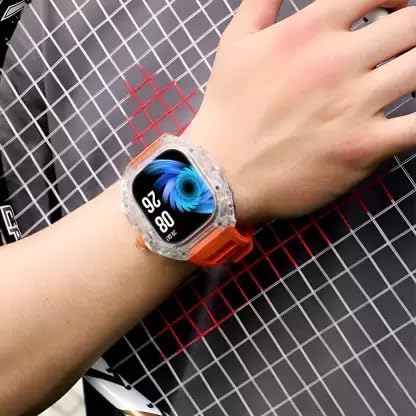
Image: The Kalobee H9 Smart Watch worn on a wrist, displaying the current time and date on its digital interface.
6. പരിപാലനം
To ensure the longevity and proper functioning of your Kalobee H9 Smart Watch, follow these maintenance guidelines:
- വൃത്തിയാക്കൽ: മൃദുവായതും ഉണങ്ങിയതുമായ തുണി ഉപയോഗിച്ച് വാച്ചും സ്ട്രാപ്പും പതിവായി തുടയ്ക്കുക. കഠിനമായ അഴുക്കിന്, അല്പം ഡി ക്ലീനർ ഉപയോഗിക്കുക.amp തുണിയും വീര്യം കുറഞ്ഞ സോപ്പും ഉപയോഗിച്ച് നന്നായി ഉണക്കുക. കഠിനമായ രാസവസ്തുക്കളോ ഉരച്ചിലുകളോ ഉള്ള വസ്തുക്കൾ ഒഴിവാക്കുക.
- ജല പ്രതിരോധം: While the watch features a robust construction, avoid prolonged submersion in water or exposure to high-pressure water jets. Dry the watch thoroughly if it gets wet.
- ചാർജിംഗ്: Use only the provided charging cable. Avoid exposing the charging contacts to moisture or corrosive substances.
- താപനില: ഉയർന്ന താപനിലയിൽ (ചൂട് അല്ലെങ്കിൽ തണുപ്പ്) അല്ലെങ്കിൽ നേരിട്ടുള്ള സൂര്യപ്രകാശം ദീർഘനേരം വാച്ച് ഏൽക്കരുത്.
- സംഭരണം: When not in use for an extended period, store the watch in a cool, dry place.
7. പ്രശ്നപരിഹാരം
If you encounter issues with your Kalobee H9 Smart Watch, refer to the following common problems and solutions:
| പ്രശ്നം | സാധ്യമായ കാരണം | പരിഹാരം |
|---|---|---|
| വാച്ച് ഓണാകുന്നില്ല | ബാറ്ററി കുറവാണ്; ഉപകരണത്തിന്റെ തകരാറ് | Charge the watch fully. If the issue persists, contact customer support. |
| സ്മാർട്ട്ഫോണുമായി ജോടിയാക്കാൻ കഴിയില്ല | Bluetooth off; watch not in pairing mode; interference | Ensure Bluetooth is enabled on both devices. Restart both devices. Try pairing again. |
| അറിയിപ്പുകൾ ലഭിച്ചിട്ടില്ല | Not paired; app permissions; notification settings | Verify successful pairing. Check notification permissions in your smartphone's settings for the companion app. Ensure notifications are enabled on the watch. |
| കൃത്യമല്ലാത്ത ആക്റ്റിവിറ്റി ട്രാക്കിംഗ് | Improper wear; software glitch | Ensure the watch is worn snugly on your wrist. Restart the watch. |
8 സ്പെസിഫിക്കേഷനുകൾ
Detailed technical specifications for the Kalobee H9 Smart Watch:
- ബ്രാൻഡ്: Generic (Manufactured by Kalobee)
- മോഡൽ: H9
- ഇനം മോഡൽ നമ്പർ: H9
- പാക്കേജ് അളവുകൾ: 15 x 8 x 3.5 സെ.മീ
- ഇനത്തിൻ്റെ ഭാരം: 85 ഗ്രാം
- മെമ്മറി സ്റ്റോറേജ് കപ്പാസിറ്റി: 32 MB
- ഓപ്പറേറ്റിംഗ് സിസ്റ്റം: Proprietary OS
- അനുയോജ്യമായ ഉപകരണങ്ങൾ: സ്മാർട്ട്ഫോൺ
- പ്രത്യേക സവിശേഷതകൾ: Activity Tracker, Alarm Clock, Daily Workout Memory, Digital Display, Notifications
- മൗണ്ടിംഗ് ഹാർഡ്വെയർ: Charging Cable, Smart Watch, User Manual
- സ്റ്റാൻഡിംഗ് സ്ക്രീൻ ഡിസ്പ്ലേ വലുപ്പം: 49 മില്ലിമീറ്റർ
- ഡിസ്പ്ലേ തരം: ഡിജിറ്റൽ
- ബാറ്ററി ശേഷി: 10000 Amp മണിക്കൂറുകൾ
- വയർലെസ് തരം: ബ്ലൂടൂത്ത്
- കണക്റ്റർ തരം: ബ്ലൂടൂത്ത്, വയർലെസ്
- Device Interface - Primary: ബട്ടണുകൾ, ടച്ച്സ്ക്രീൻ
- മാതൃരാജ്യം: ചൈന
9. വാറൻ്റിയും പിന്തുണയും
വാറന്റി വിവരങ്ങൾക്കും ഉപഭോക്തൃ പിന്തുണയ്ക്കും, വാങ്ങുന്ന സ്ഥലത്ത് നൽകിയിരിക്കുന്ന ഡോക്യുമെന്റേഷൻ പരിശോധിക്കുകയോ നിങ്ങളുടെ റീട്ടെയിലറെ ബന്ധപ്പെടുകയോ ചെയ്യുക. ഏതെങ്കിലും വാറന്റി ക്ലെയിമുകൾക്കായി നിങ്ങളുടെ വാങ്ങിയതിന്റെ തെളിവ് സൂക്ഷിക്കുക.
കൂടുതൽ സഹായത്തിന്, നിങ്ങൾക്ക് നിർമ്മാതാവിന്റെ ഉദ്യോഗസ്ഥനെയും സന്ദർശിക്കാവുന്നതാണ്. webസൈറ്റ് അല്ലെങ്കിൽ അവരുടെ ഉപഭോക്തൃ സേവന വിഭാഗവുമായി ബന്ധപ്പെടുക.