
ആമുഖം
Thank you for choosing the T&G Portable Bluetooth Speaker TG-sp01. This manual provides essential information for setting up, operating, and maintaining your speaker. Please read it thoroughly to ensure proper use and to maximize your audio experience.
This compact and versatile speaker features Bluetooth 5.3 connectivity, a 10-watt audio output with enhanced bass, and multi-color LED lighting. It is designed for both indoor and outdoor use, offering hands-free calling and multiple playback options.
സുരക്ഷാ വിവരങ്ങൾ
- തീവ്രമായ താപനിലയിലോ നേരിട്ടുള്ള സൂര്യപ്രകാശത്തിലോ സ്പീക്കറിനെ ദീർഘനേരം തുറന്നുകാട്ടരുത്.
- സ്പീക്കറെ ശക്തമായ ആഘാതങ്ങൾക്ക് വിധേയമാക്കുകയോ താഴെയിടുകയോ ചെയ്യുന്നത് ഒഴിവാക്കുക.
- Do not disassemble or attempt to repair the speaker yourself. Contact qualified service personnel.
- Keep the speaker away from water and liquids. While it features IPX5 splash resistance, it is not designed for submersion.
- നൽകിയിരിക്കുന്ന ചാർജിംഗ് കേബിളോ സാക്ഷ്യപ്പെടുത്തിയ തത്തുല്യമായതോ മാത്രം ഉപയോഗിക്കുക.
- കുട്ടികൾക്ക് ലഭ്യമാകാതെ സൂക്ഷിക്കുക.
പാക്കേജ് ഉള്ളടക്കം
പാക്കേജിൽ ഇനിപ്പറയുന്ന ഇനങ്ങൾ ഉണ്ടോ എന്ന് പരിശോധിക്കുക:
- T&G Portable Bluetooth Speaker TG-sp01
- Power Cable (USB charging cable)
- ദ്രുത ആരംഭ ഗൈഡ്
ഉൽപ്പന്നം കഴിഞ്ഞുview
സ്പീക്കറിന്റെ നിയന്ത്രണങ്ങളും പോർട്ടുകളും ഉപയോഗിച്ച് സ്വയം പരിചയപ്പെടുക.

ചിത്രം: മുൻഭാഗം view of the T&G Portable Bluetooth Speaker TG-sp1, highlighting the control panel and T&G logo.
നിയന്ത്രണ പാനൽ പ്രവർത്തനങ്ങൾ:
- പവർ ബട്ടൺ (⏻): Press and hold to power on/off. Short press to play/pause music or answer/end calls.
- വോളിയം കുറയ്ക്കൽ / മുമ്പത്തെ ട്രാക്ക് (−): Short press for volume down. Long press for previous track.
- വോളിയം കൂട്ടുക / അടുത്ത ട്രാക്ക് (+): Short press for volume up. Long press for next track.
- മോഡ് ബട്ടൺ (എം): Short press to switch between Bluetooth, TF Card, and AUX modes.
- LED ലൈറ്റ് ബട്ടൺ: Press to cycle through LED light modes or turn lights off.

ചിത്രം: വശം view of the T&G Portable Bluetooth Speaker TG-sp01, illustrating the various input ports for Bluetooth, TF card, AUX, and TWS playback.
തുറമുഖങ്ങൾ:
- USB ചാർജിംഗ് പോർട്ട്: സ്പീക്കറിന്റെ ആന്തരിക ബാറ്ററി ചാർജ് ചെയ്യുന്നതിന്.
- ടിഎഫ് കാർഡ് സ്ലോട്ട്: Insert a MicroSD (TF) card for direct music playback.
- AUX ഇൻപുട്ട്: Connect external audio devices using a 3.5mm audio cable (not included).
സജ്ജമാക്കുക
1. സ്പീക്കറിൽ നിന്ന് നിരക്ക് ഈടാക്കുന്നു
- നൽകിയിരിക്കുന്ന USB ചാർജിംഗ് കേബിൾ സ്പീക്കറിന്റെ ചാർജിംഗ് പോർട്ടുമായി ബന്ധിപ്പിക്കുക.
- Connect the other end of the USB cable to a USB power adapter (5V/1A recommended) or a computer's USB port.
- ചാർജ് ചെയ്യുമ്പോൾ LED ഇൻഡിക്കേറ്റർ പ്രകാശിക്കുകയും പൂർണ്ണമായി ചാർജ് ചെയ്യുമ്പോൾ ഓഫാകുകയും ചെയ്യും.
- ഒരു ഫുൾ ചാർജിന് ഏകദേശം 4 മണിക്കൂർ എടുക്കും.
2. പവർ ഓൺ/ഓഫ്
- പവർ ഓണിലേക്ക്: പവർ ബട്ടൺ അമർത്തിപ്പിടിക്കുക (⏻) for approximately 3 seconds until you hear an audible prompt and the LED lights activate.
- പവർ ഓഫ് ചെയ്യാൻ: പവർ ബട്ടൺ അമർത്തിപ്പിടിക്കുക (⏻) for approximately 3 seconds until the speaker powers down.
പ്രവർത്തന നിർദ്ദേശങ്ങൾ
1. ബ്ലൂടൂത്ത് ജോടിയാക്കൽ
- സ്പീക്കർ ഓണാണെന്നും ബ്ലൂടൂത്ത് മോഡിൽ ആണെന്നും ഉറപ്പാക്കുക (മിന്നുന്ന നീല LED സൂചിപ്പിക്കുന്നു). ഇല്ലെങ്കിൽ, ബ്ലൂടൂത്ത് മോഡിലേക്ക് മാറാൻ മോഡ് ബട്ടൺ (M) അമർത്തുക.
- നിങ്ങളുടെ മൊബൈൽ ഉപകരണത്തിൽ (സ്മാർട്ട്ഫോൺ, ടാബ്ലെറ്റ്, ലാപ്ടോപ്പ്), ബ്ലൂടൂത്ത് പ്രവർത്തനക്ഷമമാക്കി ലഭ്യമായ ഉപകരണങ്ങൾക്കായി തിരയുക.
- Select "TG-sp01" from the list of devices.
- Once paired, you will hear a confirmation sound, and the blue LED will stop flashing.
- പരിധിക്കുള്ളിലാണെങ്കിൽ, സ്പീക്കർ ഓണാക്കുമ്പോൾ അവസാനം ജോടിയാക്കിയ ഉപകരണത്തിലേക്ക് യാന്ത്രികമായി കണക്റ്റുചെയ്യും.

Image: The T&G Portable Bluetooth Speaker TG-sp01 positioned next to a laptop, demonstrating a typical use case for Bluetooth connectivity.
2. ഹാൻഡ്സ്-ഫ്രീ കോളിംഗ്
When connected via Bluetooth to your smartphone:
- കോളിന് ഉത്തരം നൽകുക: Short press the Power button (⏻).
- കോൾ അവസാനിപ്പിക്കുക: Short press the Power button (⏻) ഒരു കോളിനിടെ.
- കോൾ നിരസിക്കുക: പവർ ബട്ടൺ അമർത്തിപ്പിടിക്കുക (⏻) 2 സെക്കൻഡ് നേരത്തേക്ക്.
3. Audio Playback Modes
- ബ്ലൂടൂത്ത് മോഡ്: After successful pairing, play audio from your connected device.
- ടിഎഫ് കാർഡ് മോഡ്: Insert a MicroSD (TF) card with MP3 audio files into the TF card slot. The speaker will automatically switch to TF card mode and begin playback. Press the Mode button (M) to switch if it doesn't.
- AUX മോഡ്: Connect an external audio device (e.g., MP3 player) to the AUX input port using a 3.5mm audio cable. Press the Mode button (M) to switch to AUX mode.
4. LED ലൈറ്റ് കൺട്രോൾ
Press the dedicated LED Light button to cycle through various seven-color light effects or to turn the lights off.
5. True Wireless Stereo (TWS) Pairing (Optional)
If you have two TG-sp01 speakers, you can pair them together for a stereo sound experience:
- രണ്ട് സ്പീക്കറുകളും ഓണാക്കിയിട്ടുണ്ടെന്നും ഏതെങ്കിലും ബ്ലൂടൂത്ത് ഉപകരണവുമായി ബന്ധിപ്പിച്ചിട്ടില്ലെന്നും ഉറപ്പാക്കുക.
- On one speaker (this will be the primary speaker), press and hold the Mode button (M) for a few seconds until you hear a pairing tone.
- രണ്ട് സ്പീക്കറുകളും പരസ്പരം യാന്ത്രികമായി ബന്ധിപ്പിക്കും. കണക്റ്റ് ചെയ്തുകഴിഞ്ഞാൽ, നിങ്ങൾക്ക് ഒരു സ്ഥിരീകരണ ശബ്ദം കേൾക്കാനാകും.
- ഇനി, "Bluetooth Pairing" വിഭാഗത്തിൽ വിവരിച്ചിരിക്കുന്നതുപോലെ, Bluetooth വഴി നിങ്ങളുടെ മൊബൈൽ ഉപകരണം പ്രാഥമിക സ്പീക്കറുമായി ബന്ധിപ്പിക്കുക. രണ്ട് സ്പീക്കറുകളും സ്റ്റീരിയോയിൽ ഓഡിയോ പ്ലേ ചെയ്യും.
മെയിൻ്റനൻസ്
- വൃത്തിയാക്കൽ: Use a soft, dry cloth to clean the speaker's surface. Do not use abrasive cleaners or solvents.
- സംഭരണം: Store the speaker in a cool, dry place away from direct sunlight and extreme temperatures when not in use for extended periods.
- ബാറ്ററി കെയർ: To prolong battery life, fully charge the speaker before first use and recharge it at least once every three months if not used regularly.
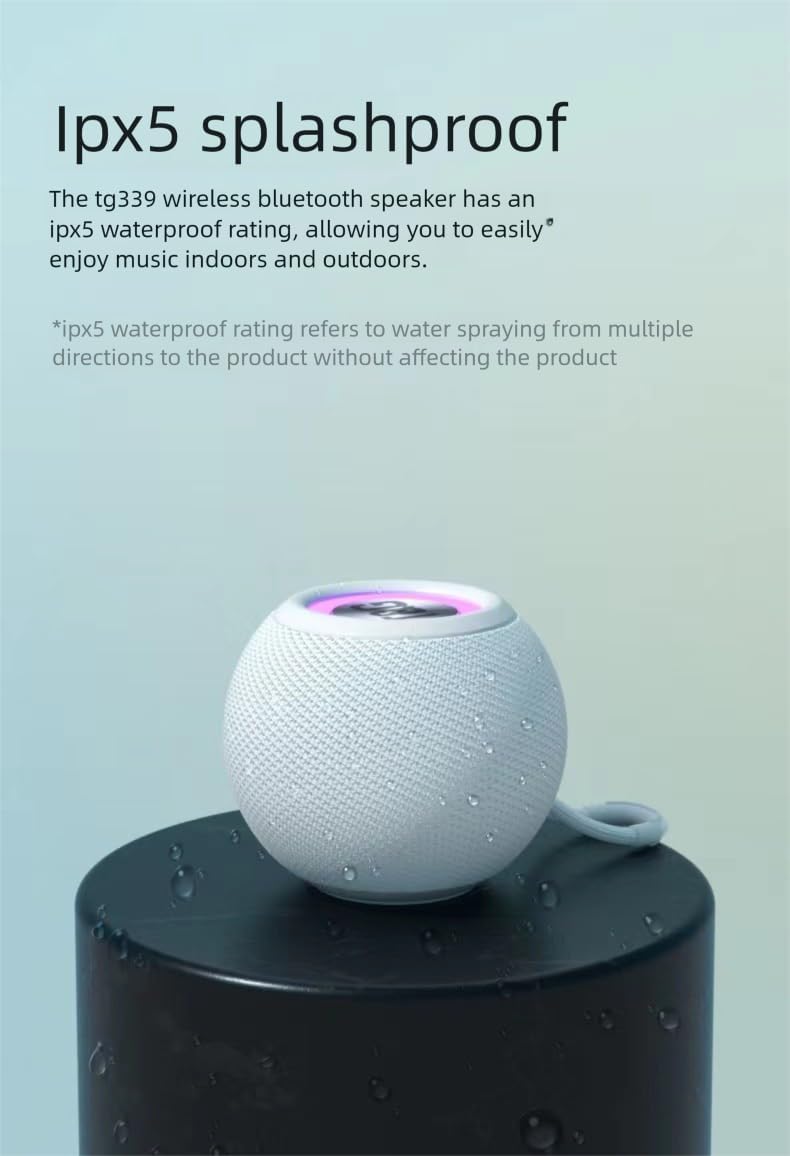
Image: The T&G Portable Bluetooth Speaker TG-sp01 demonstrating its IPX5 splashproof capability with water droplets on its surface.
Note: The speaker is IPX5 splashproof, meaning it can withstand water jets from any direction. It is not waterproof and should not be submerged in water.

Image: The T&G Portable Bluetooth Speaker TG-sp01 shown in an outdoor setting, highlighting its IP4X dustproof protection.
Note: The speaker is IP4X dustproof, offering protection against solid objects larger than 1mm.
ട്രബിൾഷൂട്ടിംഗ്
| പ്രശ്നം | സാധ്യമായ കാരണം | പരിഹാരം |
|---|---|---|
| സ്പീക്കർ പവർ ഓൺ ചെയ്യുന്നില്ല | ബാറ്ററി ചാർജ് കുറവാണ്; പവർ ബട്ടൺ അധികം നേരം അമർത്തിയിട്ടില്ല. | സ്പീക്കർ ചാർജ് ചെയ്യുക; പവർ ബട്ടൺ 3 സെക്കൻഡ് അമർത്തിപ്പിടിക്കുക. |
| ശബ്ദമില്ല | Volume too low; Incorrect mode; Device not paired | Increase volume; Press Mode button to select correct input; Re-pair Bluetooth device |
| ബ്ലൂടൂത്ത് കണക്ഷൻ അസ്ഥിരമാണ് | Device too far; Obstructions; Interference | Move device closer (within 10 meters); Remove obstructions; Avoid strong electromagnetic fields |
| ഉപകരണവുമായി ജോടിയാക്കാൻ കഴിയില്ല | Speaker already paired; Bluetooth not enabled on device | Disconnect from other devices; Ensure Bluetooth is on and visible on your device |
| LED വിളക്കുകൾ പ്രവർത്തിക്കുന്നില്ല | ലൈറ്റുകൾ ഓഫായി; തകരാറ് | Press the LED Light button to cycle modes; If issue persists, contact support |
സ്പെസിഫിക്കേഷനുകൾ
| ഫീച്ചർ | സ്പെസിഫിക്കേഷൻ |
|---|---|
| മോഡലിൻ്റെ പേര് | TG-sp01 |
| സ്പീക്കർ ഔട്ട്പുട്ട് പവർ | 10 വാട്ട്സ് |
| കണക്റ്റിവിറ്റി ടെക്നോളജി | ബ്ലൂടൂത്ത് 5.3 |
| വയർലെസ് ശ്രേണി | 10 മീറ്റർ വരെ (33 അടി) |
| ഓഡിയോ put ട്ട്പുട്ട് മോഡ് | സ്റ്റീരിയോ |
| ഫ്രീക്വൻസി പ്രതികരണം | 120 Hz (lower limit provided) |
| സ്പീക്കർ വലിപ്പം | 2.5 ഇഞ്ച് (6.35 സെ.മീ) |
| ഓഡിയോ ഡ്രൈവർ തരം | ഡൈനാമിക് ഡ്രൈവർ |
| പ്രതിരോധം | 4 ഓം |
| പവർ ഉറവിടം | ബാറ്ററി പവർ (റീചാർജ് ചെയ്യാവുന്നത്) |
| ഇൻപുട്ട് വോളിയംtage | 3.7 വോൾട്ട് |
| ചാർജിംഗ് സമയം | ഏകദേശം 4 മണിക്കൂർ |
| പ്ലേബാക്ക് സമയം | 3 മണിക്കൂർ വരെ (മിതമായ അളവിൽ) |
| മെറ്റീരിയൽ | അക്രിലോണിട്രൈൽ ബ്യൂട്ടാഡീൻ സ്റ്റൈറൈൻ (എബിഎസ്) |
| ഉൽപ്പന്ന അളവുകൾ (D x W x H) | 4.37" x 4.37" x 3.4" (11.1 സെ.മീ x 11.1 സെ.മീ x 8.6 സെ.മീ) |
| ഇനത്തിൻ്റെ ഭാരം | 350 ഗ്രാം (12.3 ഔൺസ്) |
| ജല പ്രതിരോധ നില | IPX5 Splashproof (Not Waterproof) |
| Dust Resistance Level | IP4X Dustproof |
| നിയന്ത്രണ രീതി | പുഷ് ബട്ടൺ |
| അനുയോജ്യമായ ഉപകരണങ്ങൾ | Smartphones, Tablets, Laptops, Computers |
വാറൻ്റിയും പിന്തുണയും
This product comes with a standard manufacturer's warranty. For detailed warranty information, please refer to the documentation provided at the time of purchase or contact your retailer.
For technical support or inquiries, please refer to the contact information provided by your seller or the product packaging.