
SONRU S57 Earbuds and 120W Car Charger
SONRU Wireless Earbuds S57 and 120W USB C Car Charger User Manual
1. ആമുഖം
This manual provides detailed instructions for the SONRU Wireless Earbuds S57 and the SONRU 120W USB C Car Charger. Please read this manual thoroughly before using the products to ensure proper operation and to maximize their lifespan. Keep this manual for future reference.
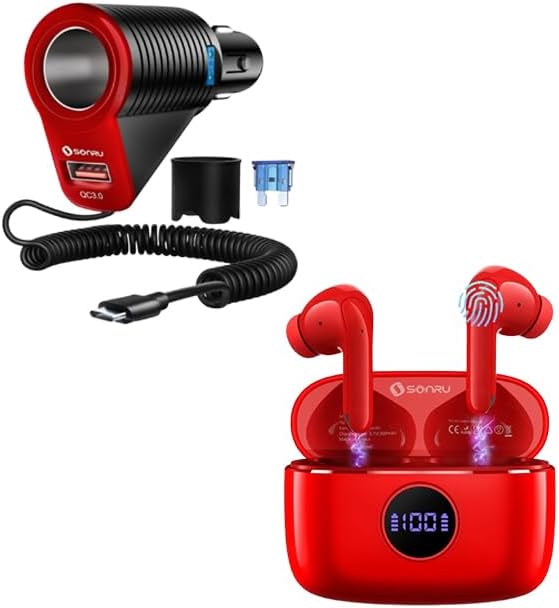
Image 1.1: SONRU Wireless Earbuds S57 and 120W USB C Car Charger. This image displays both the red wireless earbuds in their charging case and the red and black car charger with its coiled USB-C cable.
2. ഉൽപ്പന്നം കഴിഞ്ഞുview
2.1 SONRU Wireless Earbuds S57
The SONRU S57 Wireless Earbuds are designed for high-fidelity audio and comfortable wear. They feature Bluetooth 5.3 connectivity, 13mm speakers, and smart touch controls.
- ഹൈഫൈ സ്റ്റീരിയോ സൗണ്ട്: Equipped with 13mm speakers and a triple-layer composite diaphragm for clear highs, powerful bass, and balanced mids.
- ബ്ലൂടൂത്ത് 5.3: Ensures faster and more stable signal transmission for a reliable wireless connection up to 33 feet.
- എർഗണോമിക് ഡിസൈൻ: In-ear curved design with S-M-L earbud sizes for a secure and comfortable fit during various activities.
- സ്മാർട്ട് ടച്ച് നിയന്ത്രണം: Allows for easy management of music, calls, volume, and voice assistant directly from the earbuds.
- LED പവർ ഡിസ്പ്ലേ: The charging case features a digital LED display to show the charge level of both the case and the earbuds.
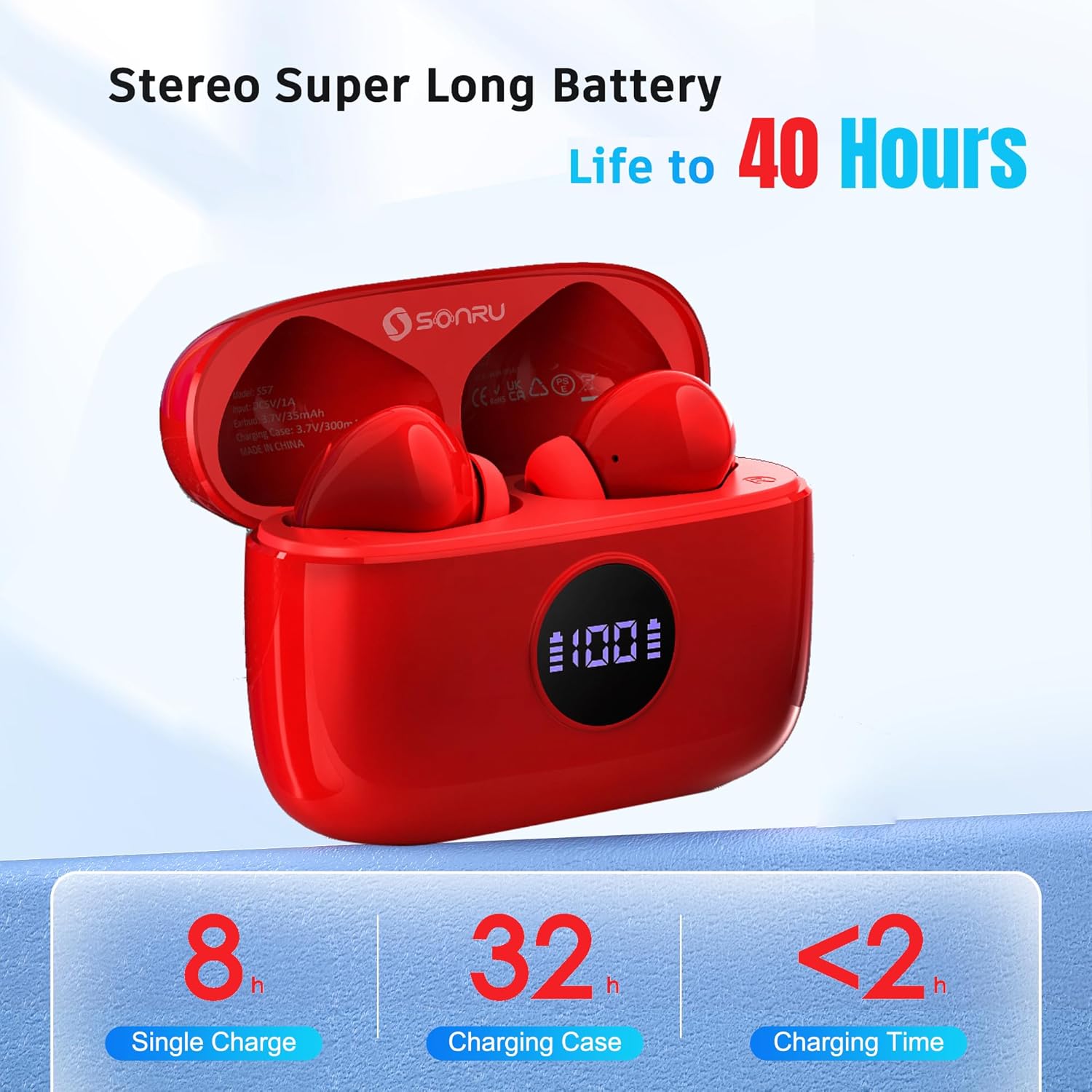
Image 2.1: Internal components of the SONRU S57 Earbud, highlighting the 13mm speaker driver and Bluetooth 5.3 chip for Hi-Fi stereo sound.

Image 2.2: Dimensions of the SONRU S57 earbuds and their charging case, illustrating their compact and lightweight design.
2.2 SONRU 120W USB C Car Charger
The SONRU 120W USB C Car Charger is a 3-in-1 adapter designed to provide fast charging for multiple devices in your vehicle.
- ഉയർന്ന പവർ ഔട്ട്പുട്ട്: Delivers up to 120W total power.
- ഒന്നിലധികം തുറമുഖങ്ങൾ: Features a USB-A port (18W QC3.0) and a USB-C port (30W PD), along with a car lighter socket.
- സംയോജിത കേബിൾ: Includes a coiled USB-C cable for convenience.

Image 2.3: The SONRU 120W USB C Car Charger connected to a car's cigarette lighter socket, simultaneously charging a smartphone via its integrated USB-C cable and another device via the USB-A port.
3. സജ്ജീകരണവും ജോടിയാക്കലും
3.1 Initial Charging (Earbuds)
- രണ്ട് ഇയർബഡുകളും ചാർജിംഗ് കേസിൽ വയ്ക്കുക.
- ഒരു USB-C കേബിൾ ഉപയോഗിച്ച് ചാർജിംഗ് കേസ് ഒരു പവർ സ്രോതസ്സുമായി ബന്ധിപ്പിക്കുക.
- ചാർജിംഗ് കെയ്സിലെ LED ഡിസ്പ്ലേ ബാറ്ററി ശതമാനം കാണിക്കും.tage, flashing from 1 to 100 during charging. The L&R bars will flash when the earbuds are charging.
- ആദ്യ ഉപയോഗത്തിന് മുമ്പ് ഇയർബഡുകളും കെയ്സും പൂർണ്ണമായും ചാർജ് ചെയ്തിട്ടുണ്ടെന്ന് ഉറപ്പാക്കുക.

Image 3.1: The SONRU S57 charging case displaying its digital battery percentage and individual earbud charging status indicators.
3.2 Bluetooth Pairing (Earbuds)
The S57 earbuds feature one-step automatic pairing.
- ചാർജിംഗ് കേസ് തുറക്കുക. ഇയർബഡുകൾ സ്വയമേവ ഓണാകുകയും ജോടിയാക്കൽ മോഡിലേക്ക് പ്രവേശിക്കുകയും ചെയ്യും.
- നിങ്ങളുടെ ഉപകരണത്തിൽ (സ്മാർട്ട്ഫോൺ, ടാബ്ലെറ്റ്, ലാപ്ടോപ്പ്), ബ്ലൂടൂത്ത് പ്രവർത്തനക്ഷമമാക്കുക.
- ഇതിനായി തിരയുക available Bluetooth devices and select "S57" from the list.
- Once connected, the earbuds will automatically pair with your device whenever you take them out of the charging case.

Image 3.2: A smartphone screen showing the "S57" earbuds successfully connected via Bluetooth, demonstrating the one-step auto-pairing feature.
3.3 Car Charger Installation
- Insert the SONRU 120W USB C Car Charger firmly into your vehicle's 12V/24V cigarette lighter socket.
- Ensure a secure connection. The charger is now ready to power your devices.
4. പ്രവർത്തന നിർദ്ദേശങ്ങൾ
4.1 ഇയർബഡുകൾ ധരിക്കൽ
- Select the ear tip size (S, M, L) that provides the most comfortable and secure fit for your ears.
- Gently insert the earbuds into your ear canals, rotating them slightly until they feel snug and stable.

Image 4.1: A person wearing the SONRU S57 earbuds, demonstrating their ergonomic design for comfortable and secure placement in the ear.
4.2 Smart Touch Controls (Earbuds)
The S57 earbuds feature intuitive touch controls on the outer surface of each earbud.
| ആക്ഷൻ | നിയന്ത്രണം |
|---|---|
| സംഗീതം പ്ലേ ചെയ്യുക/താൽക്കാലികമായി നിർത്തുക | ഏതെങ്കിലും ഇയർബഡിൽ ഒറ്റ ടാപ്പ് ചെയ്യുക |
| അടുത്ത ട്രാക്ക് | വലതുവശത്തെ ഇയർബഡിൽ രണ്ടുതവണ ടാപ്പ് ചെയ്യുക |
| മുമ്പത്തെ ട്രാക്ക് | ഇടതുവശത്തെ ഇയർബഡിൽ രണ്ടുതവണ ടാപ്പ് ചെയ്യുക |
| വോളിയം കൂട്ടുക | വലത് ഇയർബഡിൽ മൂന്ന് തവണ ടാപ്പ് ചെയ്യുക |
| വോളിയം ഡൗൺ | ഇടത് ഇയർബഡിൽ മൂന്ന് തവണ ടാപ്പ് ചെയ്യുക |
| ഉത്തരം / കോൾ അവസാനിപ്പിക്കുക | ഏതെങ്കിലും ഇയർബഡിൽ ഒറ്റ ടാപ്പ് ചെയ്യുക |
| കോൾ നിരസിക്കുക | ഏതെങ്കിലും ഇയർബഡിൽ ദീർഘനേരം അമർത്തുക |
| വോയ്സ് അസിസ്റ്റൻ്റ് സജീവമാക്കുക | Long press on either earbud (when not on a call) |

Image 4.2: A visual representation of the touch control functions on the SONRU S57 earbuds, including play/pause, volume adjustment, track skipping, call management, and voice assistant activation.
4.3 Using the Car Charger
Once installed, the car charger can be used to power and charge your devices.
- യുഎസ്ബി-സി പോർട്ട്: Use the integrated coiled USB-C cable or plug your own USB-C cable into the port for fast charging compatible devices (up to 30W).
- USB-A പോർട്ട്: Plug your USB-A charging cable into this port for Quick Charge 3.0 compatible devices (up to 18W).
- Car Lighter Socket: This port can be used to power other 12V/24V car accessories.
5. ബാറ്ററിയും ചാർജിംഗും
5.1 Earbuds Battery Life
- Single Charge: 8 മണിക്കൂർ വരെ പ്ലേബാക്ക്.
- ചാർജിംഗ് കേസിനൊപ്പം: Up to 40 hours of total music playback (using the 300mAh battery capacity of the charging case).
5.2 കേസ് ചാർജ് ചെയ്യൽ
The charging case can be fully recharged in less than 2 hours.
- Connect the charging case to a USB power adapter using a USB-C cable.
- The digital LED display will indicate the charging progress.
6 സ്പെസിഫിക്കേഷനുകൾ
6.1 SONRU Wireless Earbuds S57
- ബ്ലൂടൂത്ത് പതിപ്പ്: 5.3
- സ്പീക്കർ വലിപ്പം: 13 മി.മീ
- Playback Time (Earbuds): 8 മണിക്കൂർ വരെ (ഒറ്റ ചാർജ്)
- Total Playback Time (with Case): 40 മണിക്കൂർ വരെ
- ചാർജ്ജ് കേസ് ബാറ്ററി ശേഷി: 300mAh
- ചാർജിംഗ് സമയം (കേസ്): 2 മണിക്കൂറിൽ കുറവ്
- വയർലെസ് ശ്രേണി: Approximately 33 feet (10 meters) without interference
6.2 SONRU 120W USB C Car Charger
- മൊത്തം പവർ ഔട്ട്പുട്ട്: 120W
- USB-A putട്ട്പുട്ട്: 18W (Quick Charge 3.0)
- USB-C ഔട്ട്പുട്ട്: 30W (പവർ ഡെലിവറി)
- ഇൻപുട്ട് വോളിയംtage: 12 വി / 24 വി ഡിസി
7. പരിപാലനം
7.1 വൃത്തിയാക്കൽ
- ഇയർബഡുകൾ, ചാർജിംഗ് കോൺടാക്റ്റുകൾ, ചാർജിംഗ് കേസ് എന്നിവ മൃദുവായതും ഉണങ്ങിയതും ലിന്റ് രഹിതവുമായ തുണി ഉപയോഗിച്ച് പതിവായി വൃത്തിയാക്കുക.
- കഠിനമായ രാസവസ്തുക്കൾ, ക്ലീനിംഗ് ലായകങ്ങൾ അല്ലെങ്കിൽ ശക്തമായ ഡിറ്റർജന്റുകൾ ഉപയോഗിക്കരുത്.
- Ensure all components are dry before placing earbuds back into the case or connecting to power.
7.2 സംഭരണം
- Store the products in a cool, dry place away from extreme temperatures and direct sunlight.
- Keep the earbuds in their charging case when not in use to protect them and keep them charged.
8. പ്രശ്നപരിഹാരം
8.1 Earbuds Pairing Issues
- ഇയർബഡുകൾ കണക്റ്റ് ചെയ്യുന്നില്ല: Ensure Bluetooth is enabled on your device and the earbuds are out of the charging case. Try turning Bluetooth off and on again on your device.
- ഒരു ഇയർബഡ് മാത്രമേ പ്രവർത്തിക്കുന്നുള്ളൂ: Place both earbuds back into the charging case, close the lid, wait a few seconds, then open the lid and try pairing again.
- Cannot find "S57" in Bluetooth list: Ensure the earbuds are charged. Try resetting your device's Bluetooth settings or restarting your device.
8.2 ശബ്ദ പ്രശ്നങ്ങൾ
- ശബ്ദമില്ല: Check the volume level on both your device and the earbuds. Ensure the earbuds are properly paired.
- Low sound quality: Ensure the earbuds are clean and properly seated in your ears. Try moving closer to your connected device to avoid interference.
8.3 ചാർജിംഗ് പ്രശ്നങ്ങൾ
- ഇനിപ്പറയുന്ന സാഹചര്യങ്ങളിൽ ഇയർബഡുകൾ ചാർജ് ചെയ്യുന്നില്ല: Ensure the charging contacts on both the earbuds and the case are clean and dry. Verify the case has sufficient power.
- ചാർജിംഗ് കേസ് ചാർജുചെയ്യുന്നില്ല: Ensure the USB-C cable and power adapter are working correctly. Check the connection to the charging port.
- Car charger not working: Ensure the car charger is firmly seated in the cigarette lighter socket. Check your vehicle's fuse for the cigarette lighter if no power is detected.
9. വാറൻ്റിയും പിന്തുണയും
SONRU products are designed for reliability and performance. For warranty information, technical support, or customer service inquiries, please refer to the contact information provided with your purchase or visit the official SONRU webസൈറ്റ്.
വാറൻ്റി ക്ലെയിമുകൾക്കായി നിങ്ങളുടെ വാങ്ങിയതിൻ്റെ തെളിവ് സൂക്ഷിക്കുക.
Ask a question about this manual
Ask about setup, troubleshooting, compatibility, parts, safety, or missing instructions. Manuals+ will review the question and use this page’s manual context to help answer it.