
1. ആമുഖം
This manual provides detailed instructions for the operation and maintenance of your LIGE Smart Watch EF13-F. Please read this manual thoroughly before using the device to ensure proper functionality and to maximize your user experience. The LIGE Smart Watch EF13-F is designed to be a versatile companion, offering a large HD display, long-lasting battery, comprehensive health monitoring, and various sports tracking features.

Image 1.1: The LIGE Smart Watch EF13-F, showcasing its round display and included dual strap options (metal and silicone).
2. പാക്കേജ് ഉള്ളടക്കം
നിങ്ങളുടെ ഉൽപ്പന്ന പാക്കേജിംഗിൽ എല്ലാ ഇനങ്ങളും ഉണ്ടെന്ന് ഉറപ്പാക്കുക:
- LIGE Smart Watch EF13 (1 unit)
- Silver Stainless Steel Strap (1 unit)
- White Silicone Strap (1 unit)
- Product Manual (1 unit)
- Customer Card (1 unit)
- Magnetic Charging Cable (1 unit)
- Strap Adjuster Tool (1 unit)

ചിത്രം 2.1: മുൻഭാഗം view of the LIGE Smart Watch EF13-F retail packaging.

Image 2.2: An illustration detailing the watch dimensions and the various components included in the package, such as the watch body, two straps, charging cable, and strap adjuster tool.
3. ആരംഭിക്കുന്നു
3.1 ഉപകരണം ചാർജ് ചെയ്യുന്നു
Before initial use, fully charge your LIGE Smart Watch EF13-F. Connect the magnetic charging cable to the charging points on the back of the watch and plug the USB end into a standard USB power adapter (not included). A full charge typically takes approximately 2.5 hours. The watch features a 1000mAh lithium-ion battery, providing up to 14+ days of normal use and over 50 days of standby time.

Image 3.1: Visual representation of the 1000mAh battery capacity and its extended daily use and standby times compared to smaller batteries.
3.2 ആപ്പ് ഇൻസ്റ്റാളേഷനും ജോടിയാക്കലും
To unlock the full functionality of your smart watch, download and install the dedicated "GloryFit Pro APP" on your smartphone. The app is compatible with Android 5.0+ and iOS 11.0+ devices.
- ആപ്പ് ഡൗൺലോഡ് ചെയ്യുക: ഇതിനായി തിരയുക "GloryFit Pro APP" on the Google Play Store (for Android) or Apple App Store (for iOS) and install it.
- ബ്ലൂടൂത്ത് പ്രവർത്തനക്ഷമമാക്കുക: നിങ്ങളുടെ സ്മാർട്ട്ഫോണിൽ ബ്ലൂടൂത്ത് ഓണാക്കുക.
- ഉപകരണം ചേർക്കുക: Open the GloryFit Pro APP, navigate to the device section, and tap "Add New Device." The app will search for available devices.
- ഉപകരണം ജോടിയാക്കുക: Select "EF13" from the list of found devices. Confirm the pairing request on both your watch and smartphone.
- അനുമതികൾ നൽകുക: Follow the on-screen prompts to grant necessary permissions for notifications and other features.
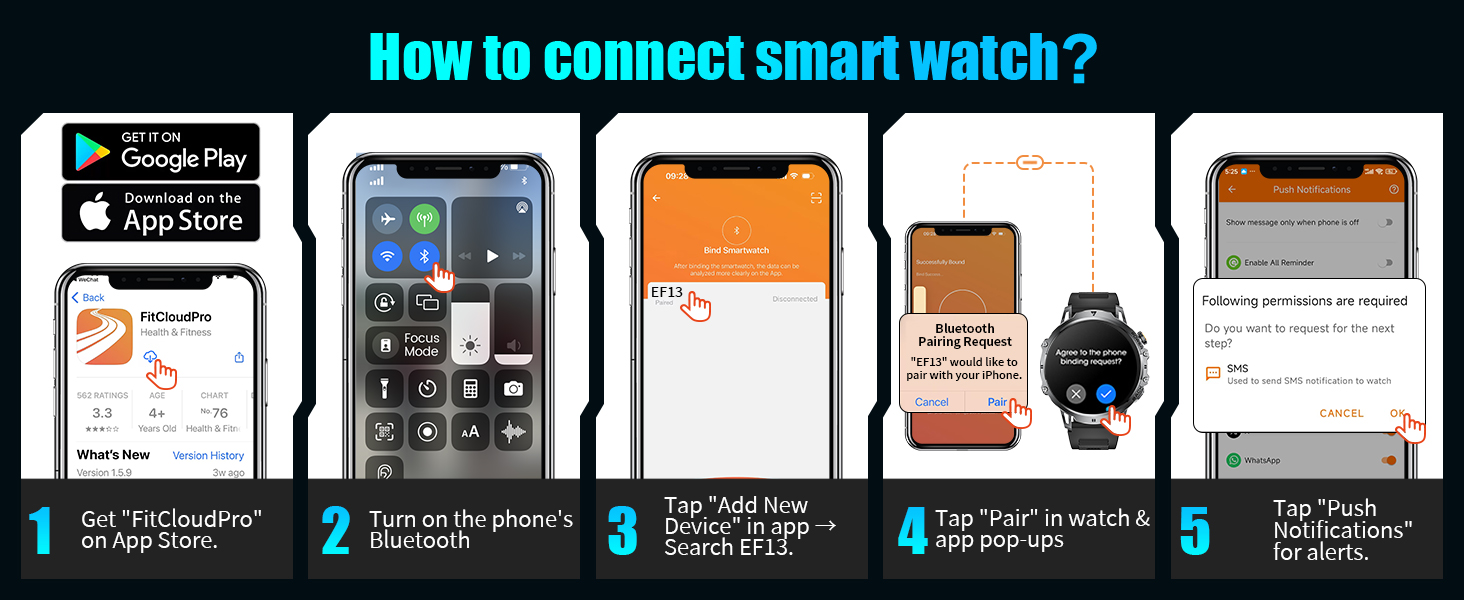
Image 3.2: A visual guide illustrating the five steps to connect the LIGE Smart Watch EF13-F to a smartphone via the FitCloudPro app, including app download, Bluetooth activation, device search, pairing confirmation, and notification permissions.
3.3 സ്ട്രാപ്പ് ക്രമീകരണം
The LIGE Smart Watch EF13-F comes with two interchangeable straps: a silver stainless steel strap and a white silicone strap. Use the provided strap adjuster tool to modify the length of the metal strap for a comfortable fit. The straps can be easily swapped to suit different occasions or activities.
4. അടിസ്ഥാന പ്രവർത്തനം
4.1 പവർ ഓൺ/ഓഫ്
- പവർ ഓൺ: Press and hold the 'POWER' button (typically the top right button) until the screen illuminates.
- പവർ ഓഫ്: From the watch face, swipe down to access quick settings, or navigate through the menu to find the 'Power Off' option. Alternatively, press and hold the 'POWER' button and select 'Power Off' when prompted.
4.2 ടച്ച്സ്ക്രീൻ നാവിഗേഷൻ
The watch features a 1.85-inch round HD AMOLED touchscreen with 360*360 resolution for intuitive navigation.
- മുകളിലേക്കും താഴേക്കും സ്വൈപ്പ് ചെയ്യുക: Scroll through menus, notifications, or quick settings.
- ഇടത്തേക്ക്/വലത്തേക്ക് സ്വൈപ്പ് ചെയ്യുക: Access different widgets, health data summaries, or app shortcuts.
- ടാപ്പ് ചെയ്യുക: Select an item, open an app, or confirm an action.
- അമർത്തിപ്പിടിക്കുക: Customize watch faces or access specific app functions.
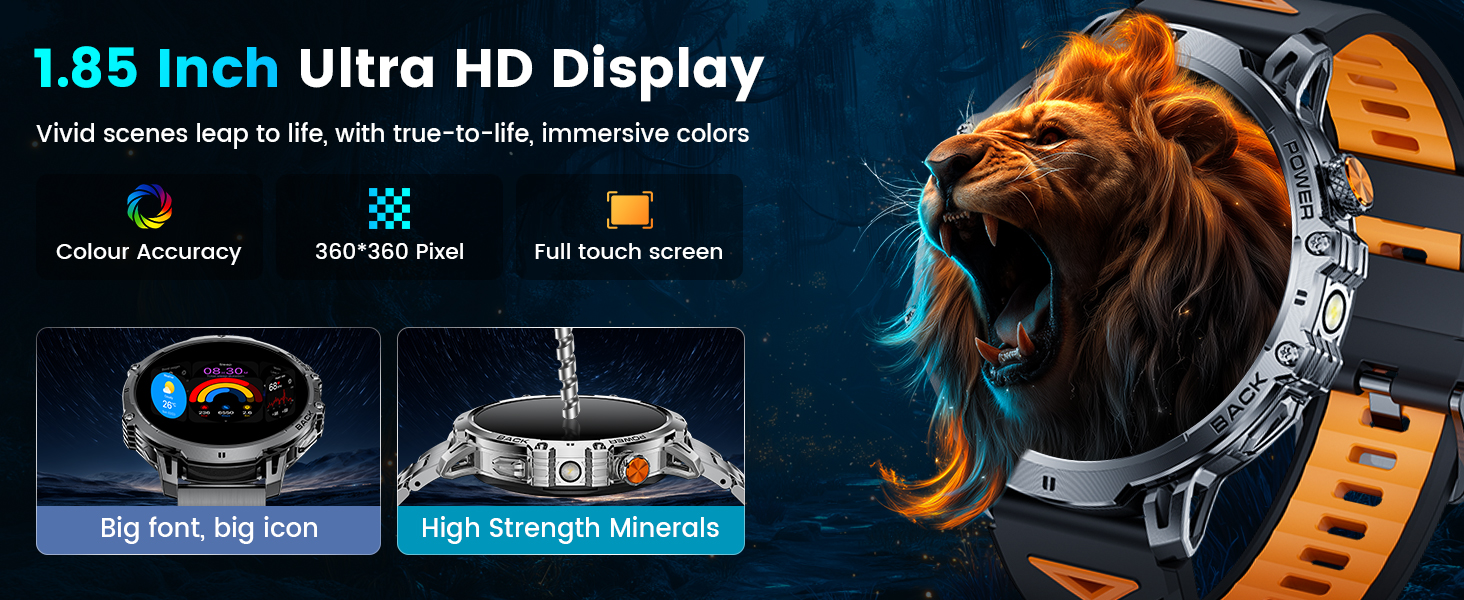
Image 4.1: The 1.85-inch Ultra HD display of the LIGE Smart Watch EF13-F, highlighting its color accuracy, 360*360 pixel resolution, and full touch screen capabilities.
4.3 ബട്ടൺ പ്രവർത്തനങ്ങൾ
The watch includes mechanical side buttons for additional control:
- POWER Button (Top Right): Short press to wake/sleep screen, return to watch face, or enter/exit menu. Long press to power on/off or restart.
- BACK Button (Bottom Right): Short press to go back to the previous screen.
4.4 വാച്ച് ഫെയ്സ് കസ്റ്റമൈസേഷൻ
Personalize your watch with over 200 available watch faces through the GloryFit Pro APP. You can also create custom watch faces using your own photos.
- വാച്ചിൽ: Press and hold the watch face to quickly switch between pre-loaded watch faces.
- ആപ്പ് വഴി: Open the GloryFit Pro APP, navigate to the 'Dial Market' or 'Watch Face' section to browse and download additional watch faces.

Image 4.2: A display of various watch faces available for the LIGE Smart Watch EF13-F, including options for digital, analog, and customizable photo backgrounds.
5 പ്രധാന സവിശേഷതകൾ
5.1 Bluetooth Calling & Message Notifications
Once connected via Bluetooth, the watch allows you to manage calls and receive notifications directly on your wrist.
- ഉത്തരം / കോളുകൾ ചെയ്യുക: Use the built-in microphone and speaker to answer incoming calls, dial numbers using the numeric keypad, or select contacts from your synced list.
- സന്ദേശ അലേർട്ടുകൾ: Receive notifications from SMS, Facebook, WhatsApp, Instagram, and other applications.

Image 5.1: The LIGE Smart Watch EF13-F displaying features like AI voice assistant, message alerts from various social media platforms, and options for answering/making calls directly from the watch.
5.2 AI വോയ്സ് അസിസ്റ്റന്റ്
Activate the integrated voice assistant to perform various tasks, such as checking the weather or setting alarms, using voice commands.
5.3 LED ഫ്ലാഷ്ലൈറ്റ്
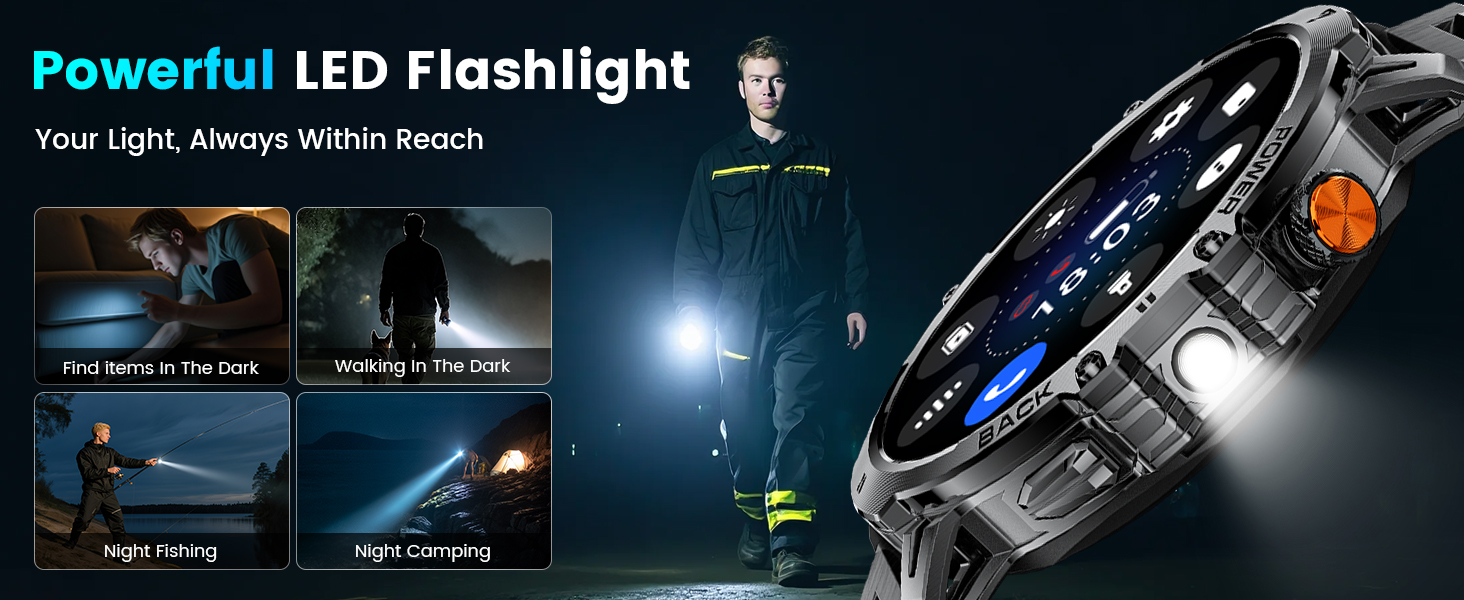
The watch includes a high-brightness LED flashlight with an illumination range of up to 20 meters, useful for various situations including outdoor activities or power outages.
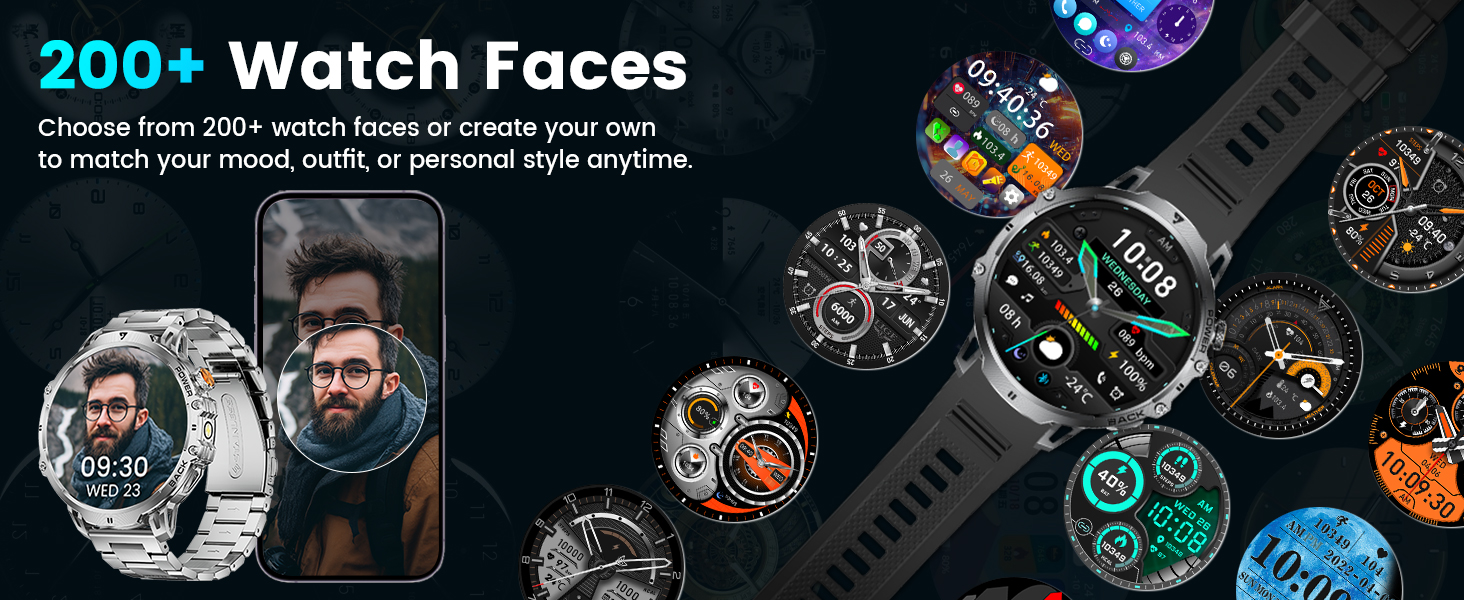
Image 5.2: The LIGE Smart Watch EF13-F demonstrating its powerful LED flashlight feature, useful for finding items in the dark, night walks, or during power outages.
5.4 Music and Camera Control
Control your smartphone's music playback (play, pause, skip tracks) and remotely trigger your phone's camera directly from the watch.
5.5 Other Utilities
The watch offers several practical tools:
- സ്റ്റോപ്പ് വാച്ച് & ടൈമർ: സമയക്രമീകരണ പ്രവർത്തനങ്ങൾക്ക്.
- അലാറം ക്ലോക്ക്: വാച്ചിൽ നേരിട്ട് അലാറങ്ങൾ സജ്ജമാക്കുക.
- കാലാവസ്ഥാ പ്രവചനം: തത്സമയ കാലാവസ്ഥാ അപ്ഡേറ്റുകൾ നേടുക.
- ഫോൺ കണ്ടെത്തുക: Locate your paired smartphone.
- കാൽക്കുലേറ്റർ: Basic calculations on your wrist.
- Sedentary & Hydration Reminders: Prompts to move or drink water.
ചിത്രം 5.3: ഒരു ഓവർview of additional practical features on the LIGE Smart Watch EF13-F, including camera control, stopwatch, find phone, weather, music control, calculator, flashlight, and alarm clock.
6. ആരോഗ്യ, ഫിറ്റ്നസ് ട്രാക്കിംഗ്
The LIGE Smart Watch EF13-F is equipped with sensors for continuous health and fitness monitoring.
6.1 ഹൃദയമിടിപ്പ് നിരീക്ഷണം
The watch provides 24/7 heart rate monitoring. View real-time heart rate data directly on the watch or access detailed historical data and analysis in the GloryFit Pro APP.

Image 6.1: The LIGE Smart Watch EF13-F displaying 24/7 health monitoring features, including heart rate tracking with a graph and sleep monitoring showing deep, light, and awake times.
6.2 രക്തത്തിലെ ഓക്സിജൻ നിരീക്ഷണം
Monitor your blood oxygen levels throughout the day. This data can be viewed on the watch and in the companion app.
6.3 സ്ലീപ്പ് മോണിറ്ററിംഗ്
The watch tracks various sleep stages (REM, light sleep, deep sleep) and records wake times to provide insights into your sleep quality. This information is available in the GloryFit Pro APP.
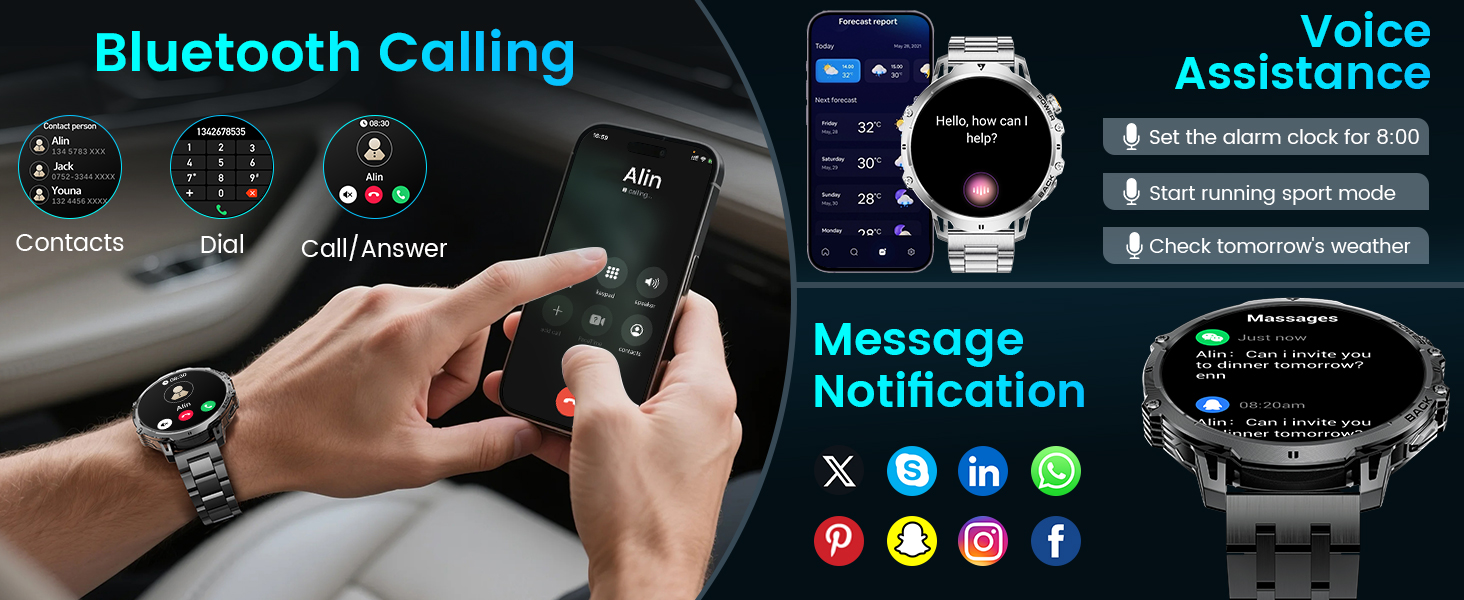
Image 6.2: The LIGE Smart Watch EF13-F showcasing its 100+ sports modes, with examples like running, climbing, surfing, and weightlifting, along with real-time data display for steps, distance, calories, and heart rate.
6.4 സ്പോർട്സ് മോഡുകളും ആക്ടിവിറ്റി ട്രാക്കിംഗും
With over 110 sports modes, the watch caters to a wide range of physical activities. It records real-time exercise data such as heart rate, steps, calories burned, distance, and activity duration. This data helps you track your progress and achieve your fitness goals.
7. ജല പ്രതിരോധം
The LIGE Smart Watch EF13-F features an IP68 waterproof rating. This means it is resistant to dust and can withstand immersion in water up to 1.5 meters for 30 minutes. It is suitable for daily activities such as handwashing, rain, and swimming. However, it is not recommended for hot water activities like showering or sauna, or for deep diving.
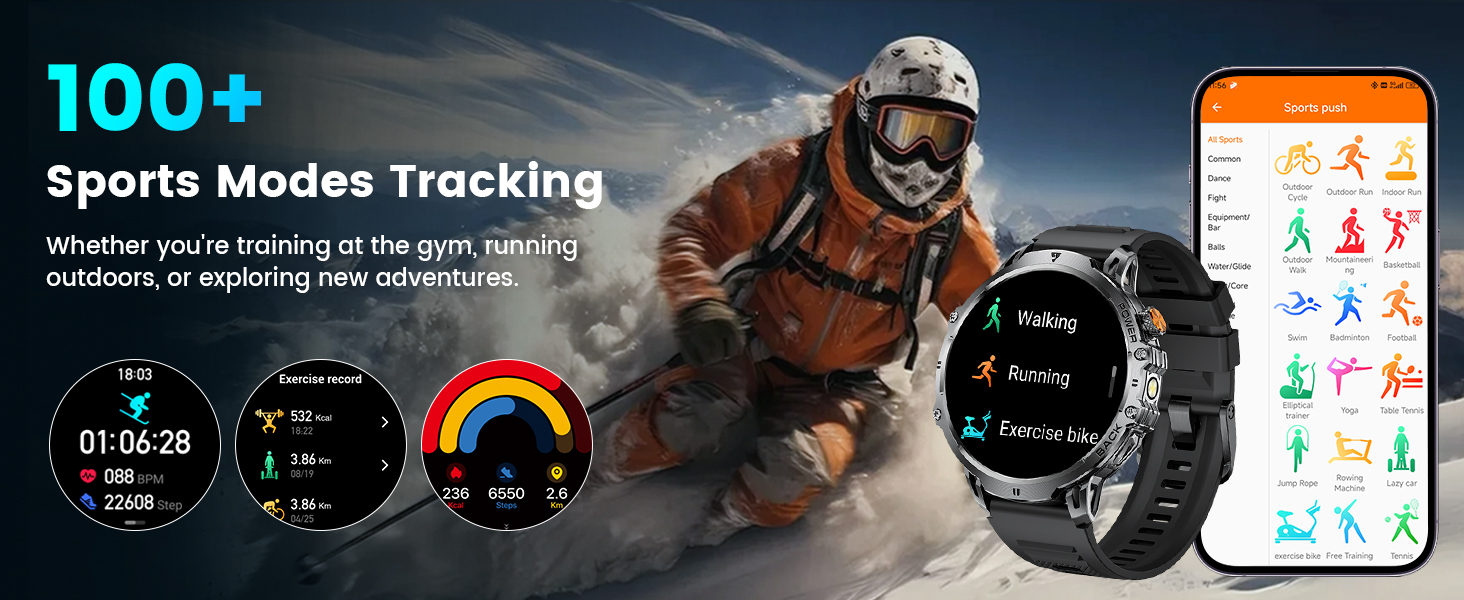
Image 7.1: A visual representation of the LIGE Smart Watch EF13-F's IP68 waterproof capabilities, showing its suitability for swimming, handwashing, rain, and sweatproof use.
8 സ്പെസിഫിക്കേഷനുകൾ
| ഫീച്ചർ | സ്പെസിഫിക്കേഷൻ |
|---|---|
| മോഡൽ നമ്പർ | EF13-F |
| ഡിസ്പ്ലേ വലിപ്പം | 1.85 ഇഞ്ച് |
| ഡിസ്പ്ലേ തരം | HD AMOLED, 360*360 resolution |
| ബാറ്ററി ശേഷി | 1000mAh ലിഥിയം പോളിമർ |
| ബാറ്ററി ലൈഫ് (സാധാരണ ഉപയോഗം) | 14+ ദിവസം |
| സ്റ്റാൻഡ്ബൈ സമയം | 50+ ദിവസം |
| ചാർജിംഗ് സമയം | ഏകദേശം 2.5 മണിക്കൂർ |
| വാട്ടർപ്രൂഫ് റേറ്റിംഗ് | IP68 |
| ഓപ്പറേറ്റിംഗ് സിസ്റ്റം അനുയോജ്യത | Android 5.0+, iOS 11.0+ |
| കണക്റ്റിവിറ്റി | ബ്ലൂടൂത്ത് |
| മെമ്മറി സ്റ്റോറേജ് കപ്പാസിറ്റി | 128 MB |
| ഇനത്തിൻ്റെ ഭാരം | 9.9 ഔൺസ് |
| ഉൽപ്പന്ന അളവുകൾ | 2.36 x 0.79 x 1.18 ഇഞ്ച് |
| പ്രത്യേക സവിശേഷതകൾ | LED flashlight, 2 straps, activity tracker, SMS notifications, sleep monitoring, sedentary reminder, calorie calculation, heart rate, sports modes, music control, smart alarm, weather forecast |
9. പരിചരണവും പരിപാലനവും
- വൃത്തിയാക്കൽ: Regularly wipe the watch screen and body with a soft, dry cloth. For stubborn dirt, use a slightly damp തുണി നന്നായി ഉണക്കുക.
- തീവ്രമായ താപനില ഒഴിവാക്കുക: Do not expose the watch to high-temperature environments, as this can affect battery life and device performance.
- ചാർജിംഗ്: നൽകിയിരിക്കുന്ന മാഗ്നറ്റിക് ചാർജിംഗ് കേബിൾ മാത്രം ഉപയോഗിക്കുക. ചാർജ് ചെയ്യുന്നതിന് മുമ്പ് ചാർജിംഗ് കോൺടാക്റ്റുകൾ വൃത്തിയുള്ളതും ഉണങ്ങിയതുമാണെന്ന് ഉറപ്പാക്കുക.
- സംഭരണം: ദീർഘനേരം ഉപയോഗിക്കാത്തപ്പോൾ, വാച്ച് തണുത്തതും വരണ്ടതുമായ സ്ഥലത്ത് സൂക്ഷിക്കുക.
- വേർപെടുത്തുക: Do not attempt to disassemble or modify the watch, as this will void the warranty and may cause damage.
10. പ്രശ്നപരിഹാരം
- വാച്ച് ഓണാകുന്നില്ല: വാച്ച് പൂർണ്ണമായും ചാർജ് ചെയ്തിട്ടുണ്ടെന്ന് ഉറപ്പാക്കുക. കുറഞ്ഞത് 30 മിനിറ്റെങ്കിലും ചാർജറുമായി ബന്ധിപ്പിക്കുക.
- ഫോണുമായി ജോടിയാക്കാൻ കഴിയില്ല: Make sure Bluetooth is enabled on your phone and the watch is within range. Restart both the watch and your phone, then try pairing again through the GloryFit Pro APP.
- അറിയിപ്പുകൾ ലഭിച്ചിട്ടില്ല: Check app permissions on your phone to ensure the GloryFit Pro APP has access to notifications. Verify that notifications are enabled within the app settings for the watch.
- കൃത്യമല്ലാത്ത ആരോഗ്യ ഡാറ്റ: Ensure the watch is worn snugly on your wrist, not too tight or too loose. Clean the sensors on the back of the watch. Note that health data is for reference only and not for medical use.
- ഹ്രസ്വ ബാറ്ററി ലൈഫ്: Reduce screen brightness, disable unnecessary features like continuous heart rate monitoring if not needed, and ensure no background apps are excessively draining power.
11. വാറൻ്റിയും പിന്തുണയും
The LIGE Smart Watch EF13-F comes with a 24-month service period and 365 days of after-sales support. For any questions or issues regarding your smart watch, please contact LIGE customer service. They aim to provide quick responses within 24 hours to resolve all your concerns.
അനുയോജ്യത: This smart watch is compatible with Android smartphones version 5.0 and above, and iOS smartphones version 11.0 and above.