
1. ആമുഖം
Thank you for choosing the PUTORSEN Triple Monitor Mount EMPT09-C036P-35B. This heavy-duty monitor mount is designed to provide a stable and adjustable solution for multi-screen workstations, supporting up to three monitors, each up to 35 inches in size and weighing up to 12 kg (26.4 lbs). It features fully articulating gas spring arms for precise positioning and includes options for both desk clamp ഗ്രോമെറ്റ് മൗണ്ടിംഗും.
2 സുരക്ഷാ വിവരങ്ങൾ
- എല്ലാ നിർദ്ദേശങ്ങളും ശ്രദ്ധാപൂർവ്വം വായിക്കുക: Ensure you understand all assembly and installation steps before proceeding.
- ഭാരം ശേഷി: Do not exceed the maximum weight capacity of 12 kg (26.4 lbs) per arm. Exceeding this limit may result in instability and potential damage.
- മോണിറ്റർ വലുപ്പം: 17 മുതൽ 35 ഇഞ്ച് വരെ നീളമുള്ള മോണിറ്ററുകൾക്കായി ഈ മൗണ്ട് രൂപകൽപ്പന ചെയ്തിരിക്കുന്നു.
- ഡെസ്ക് കനം: Ensure your desk meets the required thickness for the chosen mounting method (Clamp: 10-45mm; Grommet: 10-40mm).
- VESA അനുയോജ്യത: Verify your monitors have VESA mounting patterns of 75x75mm or 100x100mm.
- അസംബ്ലി: പോറലുകൾ ഉണ്ടാകാതിരിക്കാൻ മൃദുവും വൃത്തിയുള്ളതുമായ ഒരു പ്രതലത്തിൽ ഉൽപ്പന്നം കൂട്ടിച്ചേർക്കുക.
- ഗ്യാസ് സ്പ്രിംഗ് ക്രമീകരണം: Adjust the gas spring tension only after the monitor is mounted to prevent the arm from springing up or down unexpectedly.
- കുട്ടികൾ: ചെറിയ ഭാഗങ്ങൾ കുട്ടികളിൽ നിന്ന് അകറ്റി നിർത്തുക.
3. പാക്കേജ് ഉള്ളടക്കം
Please verify that all components are present before beginning assembly. Refer to the parts list in your physical manual for detailed identification.

ചിത്രം 3.1: All components included in the package. This diagram illustrates the various parts such as the main pole, gas spring arms, VESA plates, desk clamp, grommet base, and hardware.
4 സ്പെസിഫിക്കേഷനുകൾ
| ബ്രാൻഡ് | പുട്ടർമാർ |
| മോഡൽ നമ്പർ | EMPT09-C036P-35B |
| മൗണ്ടിംഗ് തരം | Tabletop Mount (Clamp അല്ലെങ്കിൽ ഗ്രോമെറ്റ്) |
| ചലന തരം | Articulating, Swivel, Tilt, Rotation |
| മെറ്റീരിയൽ | അക്രിലോണിട്രൈൽ ബ്യൂട്ടാഡീൻ സ്റ്റൈറൈൻ (ABS), അലോയ് സ്റ്റീൽ |
| നിറം | കറുപ്പ് |
| Minimum Supported Screen Size | 17 ഇഞ്ച് |
| Maximum Supported Screen Size | 35 ഇഞ്ച് (ഓരോന്നും) |
| ഭാരം ശേഷി | 12 kg (26.4 lbs) per arm |
| VESA അനുയോജ്യത | 75x75mm, 100x100mm |
| ഡെസ്ക് Clamp കനം | 0.39"-1.77" (10mm-45mm) |
| Grommet Mount Thickness | 0.39"-1.57" (10mm-40mm) |
| ഗ്രോമെറ്റ് ഹോൾ വ്യാസം | 0.39"-2.36" (10mm-60mm) |
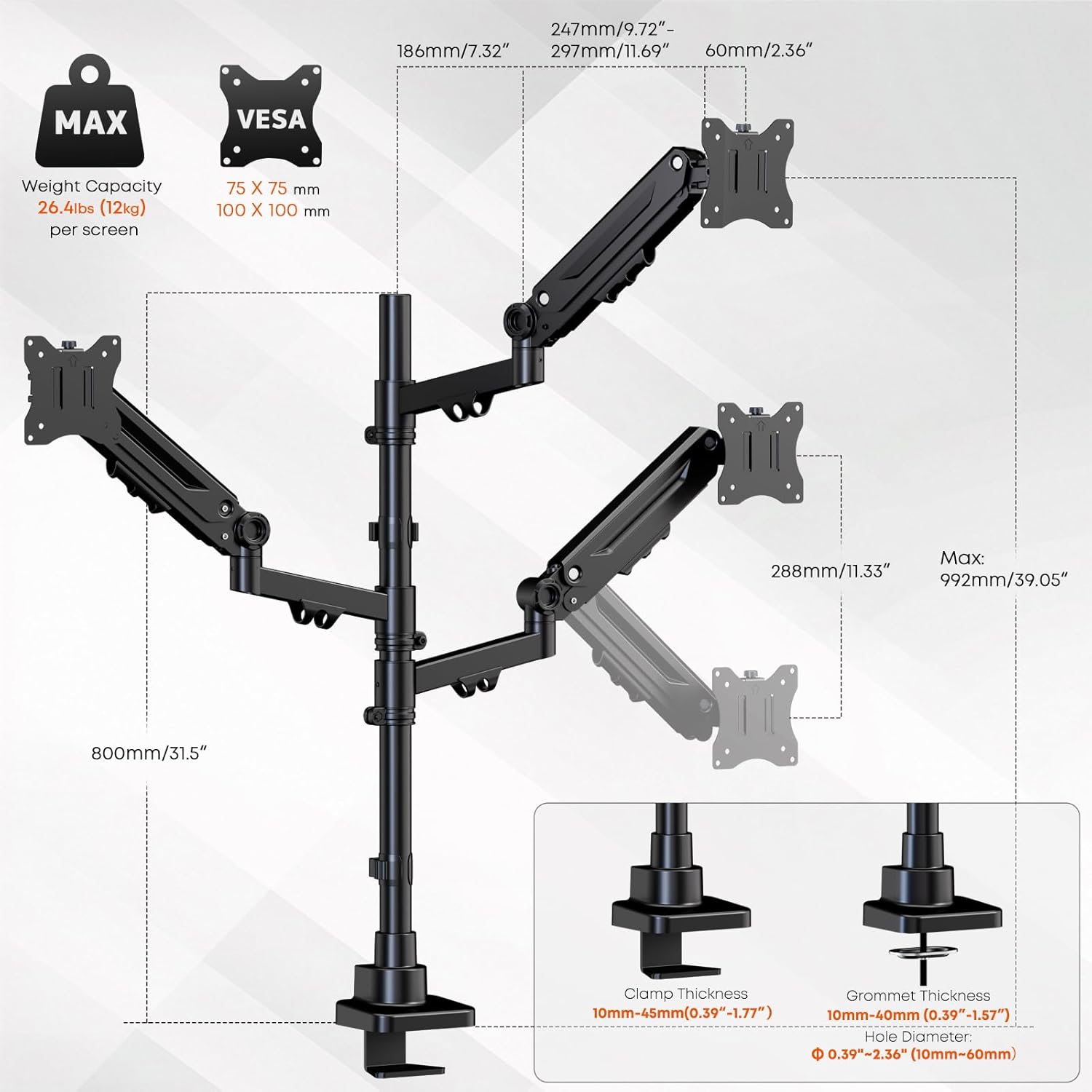
ചിത്രം 4.1: Detailed specifications and dimensions of the monitor mount, including VESA patterns, weight capacity, and desk compatibility for clamp ഗ്രോമെറ്റ് മൗണ്ടിംഗും.
5. സജ്ജീകരണവും ഇൻസ്റ്റാളേഷനും
Follow these steps to properly install your PUTORSEN Triple Monitor Mount.
5.1 നിങ്ങളുടെ മൗണ്ടിംഗ് രീതി തിരഞ്ഞെടുക്കുക
The mount supports two installation methods: C-clamp or grommet mount. Select the method suitable for your desk.
- C-Clamp ഇൻസ്റ്റലേഷൻ: C-cl അറ്റാച്ചുചെയ്യുകamp to the edge of your desk. Ensure the desk thickness is between 10mm and 45mm. Tighten the clamp ചലനം തടയാൻ സുരക്ഷിതമായി.
- ഗ്രോമെറ്റ് ഇൻസ്റ്റാളേഷൻ: If your desk has a grommet hole (10mm-60mm diameter) and a thickness between 10mm and 40mm, use the grommet base. Secure the base through the hole using the provided hardware.
5.2 പോളും ആയുധങ്ങളും കൂട്ടിച്ചേർക്കുക
- Attach the main pole to your chosen desk base (C-clamp അല്ലെങ്കിൽ ഗ്രോമെറ്റ്).
- Slide the gas spring arms onto the main pole. The arms can be positioned at desired heights. Secure them using the provided collars and screws.
5.3 Attach Monitors
- Attach the VESA plates to the back of each monitor using the appropriate screws (M4x12, M4x30, M5x12, M5x30). Ensure the screws are tightened securely but do not overtighten.
- Carefully slide the monitors (with VESA plates attached) onto the gas spring arms. Ensure they click into place or are secured with the locking mechanism.

ചിത്രം 5.1: The triple monitor mount with monitors installed, demonstrating the gas spring arms and support for up to 35-inch screens.
6. പ്രവർത്തനവും ക്രമീകരണങ്ങളും
The PUTORSEN Triple Monitor Mount offers extensive adjustability for optimal viewആശ്വാസം.
6.1 ഗ്യാസ് സ്പ്രിംഗ് ടെൻഷൻ ക്രമീകരണം
After mounting your monitors, you may need to adjust the gas spring tension to ensure the arms hold the monitors in place without sagging or floating. Use the included Allen key to turn the adjustment screw on each arm:
- തിരിയുക clockwise (-) to decrease tension for lighter monitors.
- തിരിയുക counter-clockwise (+) to increase tension for heavier monitors.
Adjust gradually until the monitor stays at the desired height when released.
6.2 Monitor Positioning
Each arm allows for independent adjustment:
- ഉയരം ക്രമീകരിക്കൽ: Move the arms up or down along the main pole, or use the gas spring mechanism for vertical movement.
- ടിൽറ്റ്: Adjust the monitor screen vertically by tilting it up or down (±35°).
- സ്വിവൽ: Rotate the monitor horizontally left or right (±90°).
- റൊട്ടേഷൻ: Rotate the monitor 360° for portrait or landscape orientation.

ചിത്രം 6.1: Demonstrating the full range of motion including tilt, swivel, and 360-degree rotation for optimal monitor positioning.
6.3 കേബിൾ മാനേജ്മെന്റ്
Utilize the integrated cable management clips along the arms and pole to route and organize your monitor cables. This helps maintain a clean and clutter-free workspace.

ചിത്രം 6.2: Integrated cable management system for a tidy setup.
7. പരിപാലനം
Regular maintenance ensures the longevity and safe operation of your monitor mount.
- വൃത്തിയാക്കൽ: മൗണ്ട് ഒരു സോഫ്റ്റ്, ഡി ക്ലീനർ ഉപയോഗിച്ച് തുടയ്ക്കുക.amp തുണി. ഉരച്ചിലുകൾ ഉണ്ടാക്കുന്ന ക്ലീനറുകളോ ലായകങ്ങളോ ഒഴിവാക്കുക.
- ആനുകാലിക പരിശോധന: എല്ലാ സ്ക്രൂകളും കണക്ഷനുകളും ഇറുകിയതാണെന്ന് ഉറപ്പാക്കാൻ ഇടയ്ക്കിടെ പരിശോധിക്കുക. ആവശ്യമെങ്കിൽ വീണ്ടും മുറുക്കുക.
- ഗ്യാസ് സ്പ്രിംഗ് പരിശോധന: If monitors begin to sag or drift over time, re-adjust the gas spring tension as described in Section 6.1.
8. പ്രശ്നപരിഹാരം
If you encounter issues with your monitor mount, refer to the following common problems and solutions:
| പ്രശ്നം | സാധ്യമായ കാരണം | പരിഹാരം |
|---|---|---|
| Monitor sags or drifts down | Gas spring tension is too low for the monitor's weight. | Increase gas spring tension by turning the adjustment screw counter-clockwise (+). |
| Monitor floats up or is difficult to push down | Gas spring tension is too high for the monitor's weight. | Decrease gas spring tension by turning the adjustment screw clockwise (-). |
| Mount feels unstable or wobbles | ഡെസ്ക് clamp or grommet base is not securely tightened. | ഡെസ്ക് cl ഉറപ്പാക്കുകamp or grommet base is fully tightened to the desk. Check all arm connections. |
| Monitors are not level | Minor variations in arm height or VESA plate alignment. | Adjust individual monitor tilt and rotation. Ensure arms are at the same height on the pole. |
| Cables do not fit into management clips | വളരെയധികം കേബിളുകൾ അല്ലെങ്കിൽ കേബിളുകൾ വളരെ കട്ടിയുള്ളതാണ്. | Reduce the number of cables or use thinner cables if possible. Use external cable ties if clips are insufficient. |
9. വാറൻ്റിയും പിന്തുണയും
9.1 വാറൻ്റി വിവരങ്ങൾ
This PUTORSEN Triple Monitor Mount is covered by a 10 വർഷത്തെ വാറൻ്റി വാങ്ങിയ തീയതി മുതൽ. സാധാരണ ഉപയോഗത്തിൽ നിർമ്മാണ വൈകല്യങ്ങളും മെറ്റീരിയൽ പിഴവുകളും ഈ വാറന്റി ഉൾക്കൊള്ളുന്നു. അനുചിതമായ ഇൻസ്റ്റാളേഷൻ, ദുരുപയോഗം, അപകടങ്ങൾ, അല്ലെങ്കിൽ അനധികൃത പരിഷ്കാരങ്ങൾ എന്നിവ മൂലമുണ്ടാകുന്ന നാശനഷ്ടങ്ങൾക്ക് ഇത് പരിരക്ഷ നൽകുന്നില്ല.
9.2 ഉപഭോക്തൃ പിന്തുണ
For technical assistance, warranty claims, or any questions regarding your PUTORSEN product, please contact our customer support team. Refer to the contact information provided in your product packaging or visit the official PUTORSEN webപിന്തുണാ വിശദാംശങ്ങൾക്കുള്ള സൈറ്റ്.
ഓൺലൈൻ ഉറവിടങ്ങൾ: For additional information, FAQs, and video tutorials, please visit the PUTORSEN Store on Amazon.