
1. ഉൽപ്പന്നം കഴിഞ്ഞുview
The DIERYA Falcon M1 is a high-performance wireless gaming mouse designed for precision and versatility. It features multiple connectivity options, customizable settings, and an ergonomic design for extended use.

ചിത്രം 1.1: കഴിഞ്ഞുview of the DIERYA Falcon M1 Wireless Gaming Mouse, illustrating its honeycomb design, 2.4GHz/Bluetooth 5.2/USB-C connectivity, 200-24000 DPI range, 125-1000Hz polling rate, 1000mAh battery, 6 programmable buttons, customizable RGB strip, dedicated software support, 20 million click durability, and ultra-light 90-gram weight.

ചിത്രം 1.2: The Falcon M1 mouse from a side view, highlighting its performance specifications including a maximum tracking speed of 300 IPS, a DPI range of 200-24000, a polling rate of 125-1000Hz, and 35G acceleration.
2. പാക്കേജ് ഉള്ളടക്കം
താഴെ ലിസ്റ്റ് ചെയ്തിരിക്കുന്ന എല്ലാ ഇനങ്ങളും നിങ്ങളുടെ പാക്കേജിൽ ഉൾപ്പെടുത്തിയിട്ടുണ്ടെന്ന് ദയവായി പരിശോധിക്കുക:
- DIERYA Falcon M1 Wireless Gaming Mouse
- യുഎസ്ബി-സി കേബിൾ
- ഇൻസ്ട്രക്ഷൻ മാനുവൽ
3. സജ്ജീകരണം
3.1. മൗസ് ചാർജ് ചെയ്യുന്നു
Before initial use, fully charge the mouse. Connect the provided USB-C cable to the mouse's charging port and the other end to a USB power source (e.g., computer USB port, USB wall adapter). A full charge typically takes approximately 1 hour.
3.2. മൗസ് ബന്ധിപ്പിക്കൽ
The Falcon M1 supports three connection modes: 2.4GHz Wireless, Bluetooth 5.2, and USB-C Wired.
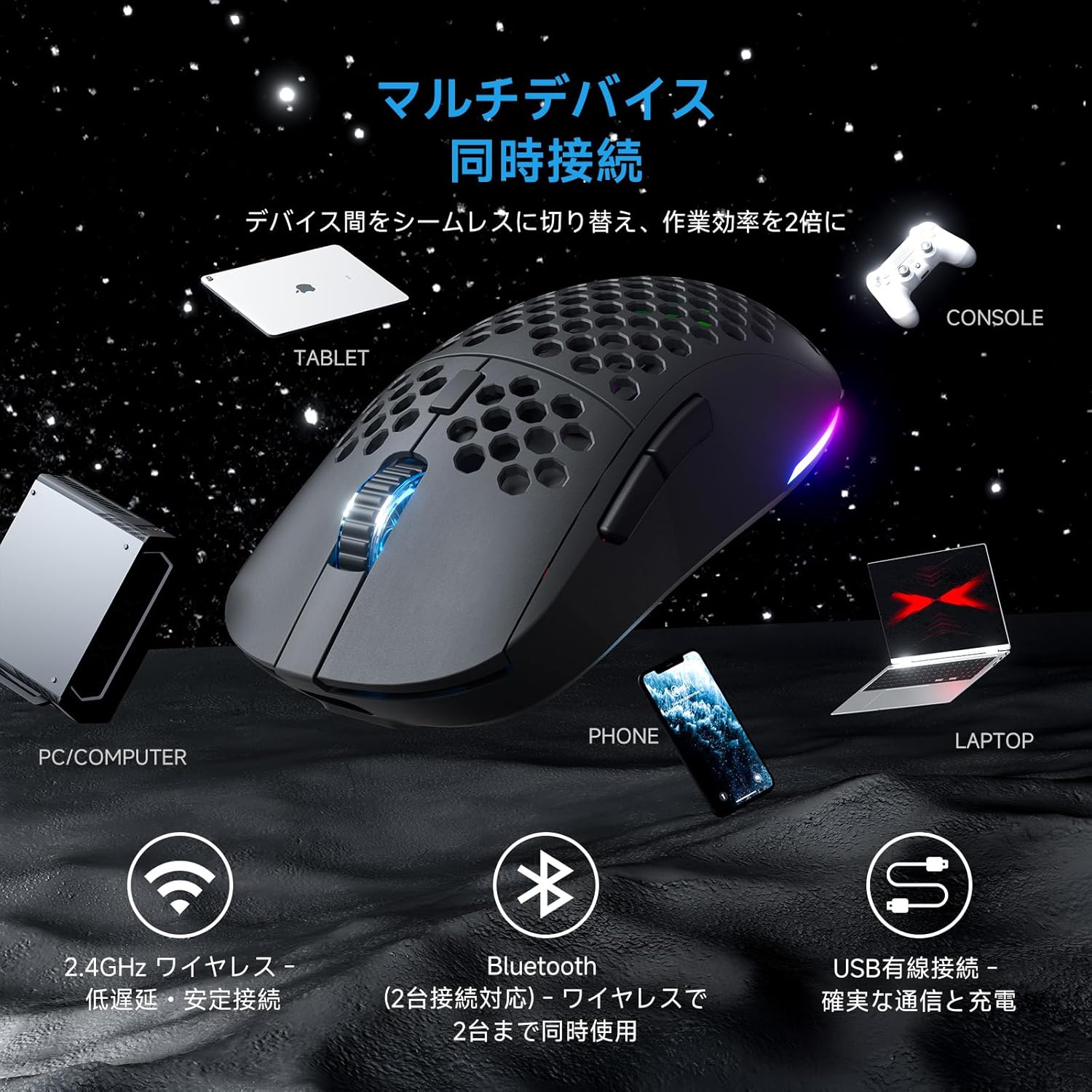
ചിത്രം 3.1: The Falcon M1 mouse demonstrating multi-device simultaneous connection capabilities, including PC/Computer, Tablet, Phone, Laptop, and Console via 2.4GHz wireless, Bluetooth 5.2, and USB wired connections.
3.2.1. 2.4GHz വയർലെസ് കണക്ഷൻ
- Locate the USB 2.4GHz receiver (dongle) inside the mouse's bottom compartment.
- നിങ്ങളുടെ കമ്പ്യൂട്ടറിൽ ലഭ്യമായ USB പോർട്ടിലേക്ക് USB റിസീവർ പ്ലഗ് ചെയ്യുക.
- താഴെയുള്ള പവർ സ്വിച്ച് ഉപയോഗിച്ച് മൗസ് ഓണാക്കുക. മൗസ് സ്വയമേവ റിസീവറുമായി ബന്ധിപ്പിക്കും.
- The LED indicator on the mouse will show the connection status.
3.2.2. ബ്ലൂടൂത്ത് 5.2 കണക്ഷൻ
- Turn on the mouse and switch to Bluetooth mode using the mode switch on the bottom.
- നിങ്ങളുടെ ഉപകരണത്തിൽ (പിസി, ലാപ്ടോപ്പ്, ടാബ്ലെറ്റ്, ഫോൺ), ബ്ലൂടൂത്ത് പ്രവർത്തനക്ഷമമാക്കി പുതിയ ഉപകരണങ്ങൾക്കായി തിരയുക.
- Select "DIERYA Falcon M1" from the list of available devices to pair.
- The mouse supports simultaneous connection to two Bluetooth devices. Use the bottom button to switch between saved profiles.
3.2.3. യുഎസ്ബി-സി വയർഡ് കണക്ഷൻ
- Connect the provided USB-C cable to the mouse and the other end to your computer's USB port.
- മൗസ് യാന്ത്രികമായി വയേർഡ് മോഡിലേക്ക് മാറുകയും ചാർജ് ചെയ്യാൻ തുടങ്ങുകയും ചെയ്യും.
4. പ്രവർത്തന നിർദ്ദേശങ്ങൾ
4.1. ഡിപിഐ ക്രമീകരണം
The Falcon M1 offers a wide DPI range from 200 to 24,000, adjustable in 1-unit increments. It comes with 6 preset DPI levels (400/800/1600/3200/4800/6400). You can cycle through these presets using the dedicated DPI button on the mouse. The current DPI setting is indicated by the color of the wheel LED and RGB strip (White/Yellow/Light Blue/Blue/Green/Red).
4.2. ബട്ടൺ കസ്റ്റമൈസേഷൻ
The mouse features 6 programmable buttons. To customize button functions, assign macros, or fine-tune settings, download and install the dedicated driver software from the official DIERYA website. The software is compatible with Windows systems.

ചിത്രം 4.1: Screenshot of the DIERYA Falcon M1 customization software, showing options for key functions, DPI adjustment, USB report rate, and various lighting effects. Note: This software is primarily for Windows systems.
4.3. RGB ലൈറ്റിംഗ് നിയന്ത്രണം
The Falcon M1 features customizable RGB lighting with 13 preset effects (e.g., breathing, flicker, flow, starlight) and 16.8 million color options. Lighting effects can be adjusted through the dedicated driver software.

ചിത്രം 4.2: The Falcon M1 mouse showcasing its customizable RGB full-color lighting, with options for 13 preset light effects and 16.7 million colors, allowing for personalized lighting modes.
4.4. പവർ മാനേജ്മെന്റ്
The mouse is equipped with a 1000mAh battery, offering up to 180 hours of use in ECO mode (RGB lighting off) and 48 hours with full RGB lighting. It features automatic sleep functions to conserve power:
- ലഘുവായ ഉറക്കം: Activates after 1 minute of inactivity.
- ഗാഢനിദ്ര: Activates after 5 minutes of inactivity.
The sleep activation times can be configured via the dedicated software.

ചിത്രം 4.3: Illustration of the Falcon M1's smart power management, showing a 1000mAh battery providing up to 180 hours in ECO mode (RGB off) and 45 hours with RGB on. It also details light sleep (1 min inactivity) and deep sleep (5 min inactivity) features.
5. പരിപാലനം
5.1. വൃത്തിയാക്കൽ
മികച്ച പ്രകടനവും രൂപഭംഗിയും നിലനിർത്താൻ, നിങ്ങളുടെ മൗസ് പതിവായി വൃത്തിയാക്കുക:
- മൗസിന്റെ ഉപരിതലം തുടയ്ക്കാൻ മൃദുവായതും ഉണങ്ങിയതുമായ ഒരു തുണി ഉപയോഗിക്കുക.
- കഠിനമായ അഴുക്കിന്, ചെറുതായി dampതുണിയിൽ വെള്ളം അല്ലെങ്കിൽ നേരിയ ക്ലീനിംഗ് ലായനി ഉപയോഗിക്കുക. കഠിനമായ രാസവസ്തുക്കൾ ഒഴിവാക്കുക.
- Use compressed air to clear dust from the honeycomb structure and sensor area.
5.2. സംഭരണം
ദീർഘനേരം ഉപയോഗിക്കാത്തപ്പോൾ, നേരിട്ട് സൂര്യപ്രകാശം ഏൽക്കാത്തതും ഉയർന്ന താപനില ഏൽക്കാത്തതുമായ തണുത്തതും വരണ്ടതുമായ സ്ഥലത്ത് മൗസ് സൂക്ഷിക്കുക. ബാറ്ററി ലൈഫ് ലാഭിക്കാൻ മൗസ് ഓഫാക്കിയിട്ടുണ്ടെന്ന് ഉറപ്പാക്കുക.
6. പ്രശ്നപരിഹാരം
If you encounter issues with your DIERYA Falcon M1 mouse, please refer to the following common solutions:
- മൗസ് പ്രതികരിക്കുന്നില്ല: Ensure the mouse is charged and turned on. Check the connection mode (2.4GHz, Bluetooth, or wired) and ensure it matches your device's connection. For 2.4GHz, ensure the USB receiver is properly plugged in. For Bluetooth, re-pair the device.
- DPI മാറുന്നില്ല: Press the DPI button to cycle through presets. If using custom DPI settings, ensure the driver software is installed and configured correctly.
- RGB ലൈറ്റിംഗ് പ്രവർത്തിക്കുന്നില്ല: Check if RGB lighting is enabled in the driver software. Ensure the mouse has sufficient battery charge, as RGB consumes power.
- കാലതാമസം അല്ലെങ്കിൽ വിച്ഛേദങ്ങൾ: For wireless connections, ensure there are no strong interferences (e.g., other wireless devices, large metal objects) between the mouse and the receiver/device. Try moving closer to the receiver or switching to a wired connection.
For further assistance, please visit the official DIERYA support webസൈറ്റ്.
7 സ്പെസിഫിക്കേഷനുകൾ
Detailed technical specifications for the DIERYA Falcon M1 Wireless Gaming Mouse:

ചിത്രം 7.1: The Falcon M1 mouse with its dimensions (125mm length, 63mm width, 41mm height) and illustrations of compatible grip styles: Palm Grip, Finger Tip Grip, and Claw Grip. Optimized for medium to large hands (approx. 17cm or larger).

ചിത്രം 7.2: ക്ലോസ് അപ്പ് view of the Falcon M1 mouse, highlighting its breathable honeycomb structure for comfort, sure-grip matte texture, and ultra-smooth PTFE feet for effortless gliding.
| ഫീച്ചർ | സ്പെസിഫിക്കേഷൻ |
|---|---|
| ബ്രാൻഡ് | ഡയറിയ |
| മോഡൽ | M1 |
| നിറം | കറുപ്പ് |
| കണക്റ്റിവിറ്റി | 2.4GHz വയർലെസ്, ബ്ലൂടൂത്ത് 5.2, യുഎസ്ബി-സി വയേർഡ് |
| ചലനം കണ്ടെത്തൽ | ഒപ്റ്റിക്കൽ |
| ഡിപിഐ ശ്രേണി | 200 - 24,000 DPI (adjustable in 1-unit increments) |
| ഡിപിഐ പ്രീസെറ്റുകൾ | 400, 800, 1600, 3200, 4800, 6400 |
| പോളിംഗ് നിരക്ക് | 125-1000Hz |
| ബട്ടണുകൾ | 6 (പ്രോഗ്രാം ചെയ്യാവുന്നത്) |
| സ്വിച്ചുകൾ | Huano (20 million click durability) |
| ഭാരം | ഏകദേശം 90 ഗ്രാം |
| അളവുകൾ | 125 x 63 x 41 മിമി |
| ബാറ്ററി ശേഷി | 1000mAh |
| ബാറ്ററി ലൈഫ് | Up to 180 hours (ECO mode), 48 hours (Full RGB) |
| ചാർജിംഗ് സമയം | Approx. 1 hour (USB-C) |
| അനുയോജ്യമായ OS | Windows 10, Windows 11, macOS, Linux |
| കൈ ഓറിയൻ്റേഷൻ | വലംകൈയ്യൻ |
| ബാഹ്യ മെറ്റീരിയൽ | പ്ലാസ്റ്റിക് |
8. വാറൻ്റിയും പിന്തുണയും
8.1. വാറൻ്റി വിവരങ്ങൾ
The DIERYA Falcon M1 Wireless Gaming Mouse comes with a 1 വർഷത്തെ വാറൻ്റി against manufacturing defects from the date of purchase. Please retain your proof of purchase for warranty claims. This warranty does not cover damage caused by misuse, accidents, unauthorized modifications, or normal wear and tear.
8.2. ഉപഭോക്തൃ പിന്തുണ
For technical support, warranty claims, or additional product information, please visit the official DIERYA website or contact their customer service. Refer to the packaging or official webഏറ്റവും കാലികമായ ബന്ധപ്പെടാനുള്ള വിശദാംശങ്ങൾക്കായി സൈറ്റ്.