
ആമുഖം
This manual provides detailed instructions for setting up, operating, and maintaining your Dargahou 4K 48MP WiFi Trail Camera. Designed for outdoor wildlife monitoring and security, this camera captures high-resolution images and videos with advanced features like low-glow night vision and app control. Please read this manual thoroughly before use to ensure optimal performance and longevity of your device.
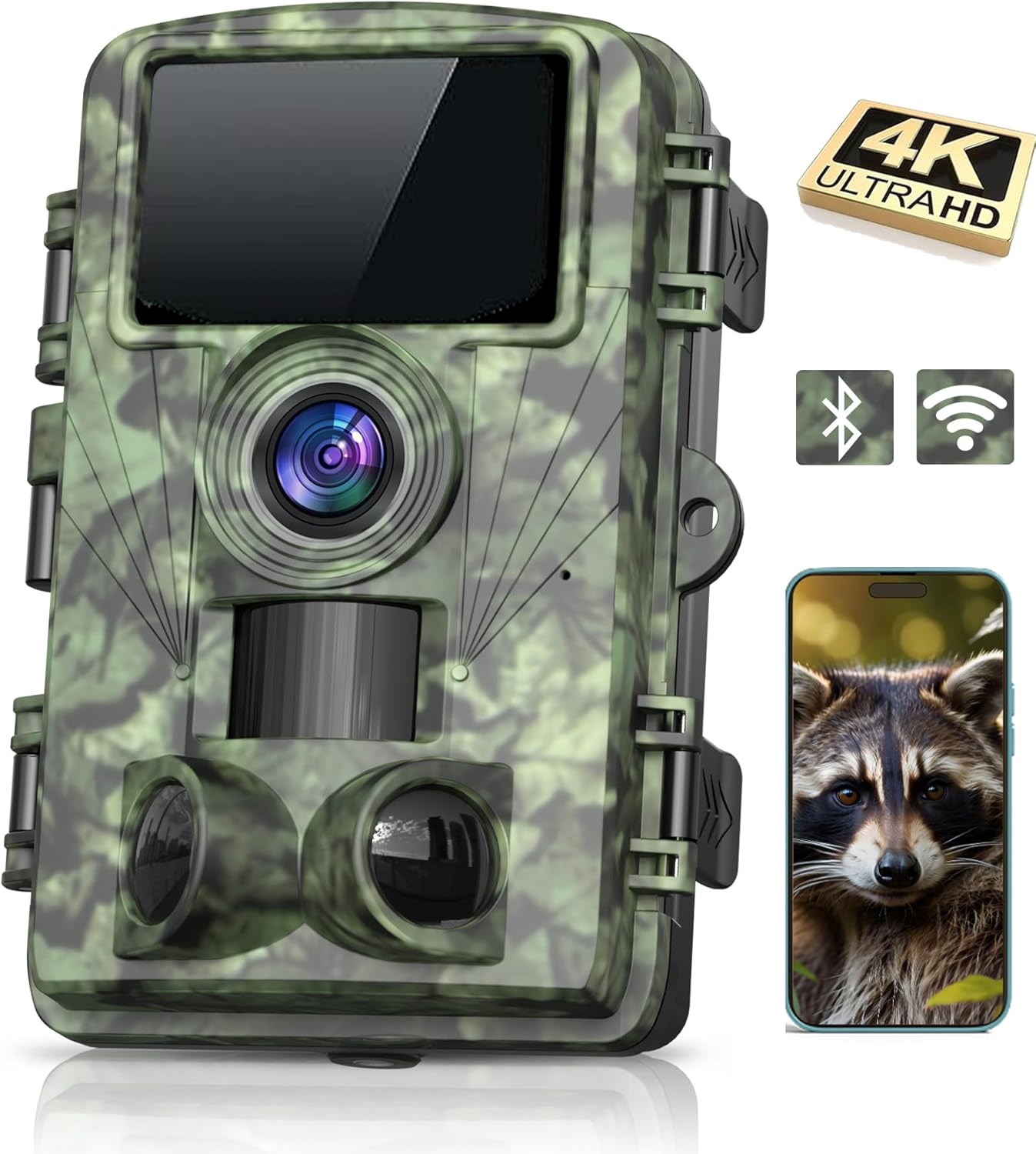
Image: The Dargahou 4K 48MP WiFi Trail Camera, featuring a camouflage design, a front-facing lens, motion sensors, and a small display screen. A smartphone displaying a raccoon image is shown next to it, indicating app connectivity.
പ്രധാന സവിശേഷതകൾ
- Wi-Fi and App Control: Connect to the camera via the free 'Trail Cam Go' mobile app within a 33-foot range to preview images and videos in real-time and adjust settings. Note: This Wi-Fi is for app connection only and does not support home Wi-Fi networks.
- Ultra-Sharp Resolution: Records HD 4K audio video and captures 48-megapixel still images, providing clear and detailed wildlife footage.
- Low Glow Night Vision: Equipped with upgraded infrared LEDs for super clear night vision, allowing the camera to capture moments in complete darkness without disturbing wildlife.
- 130-ഡിഗ്രി വൈഡ് ആംഗിൾ ലെൻസ്: വിശാലമായ ഒരു ഫീൽഡ് വാഗ്ദാനം ചെയ്യുന്നു view to monitor a wide range of fauna and cover larger areas.
- ഫാസ്റ്റ് ട്രിഗർ വേഗത: Features a rapid 0.05-second trigger speed to ensure no movement is missed.
- എളുപ്പമുള്ള പ്രവർത്തനം: Includes a built-in 2-inch color display for convenient menu navigation, camera setup, and image viewing without needing to download files.
- മോടിയുള്ളതും വാട്ടർപ്രൂഫും: IP66 rated for water resistance, designed to withstand various outdoor weather conditions.
പാക്കേജ് ഉള്ളടക്കം
The Dargahou 4K 48MP WiFi Trail Camera package includes the following items:
- Dargahou 4K 48MP WiFi Trail Camera
- മൗണ്ടിംഗ് സ്ട്രാപ്പ്
- USB കേബിൾ
- ഇൻസ്ട്രക്ഷൻ മാനുവൽ
- 32GB SD Card (may vary by package)

Image: A visual representation of the Dargahou Trail Camera package contents, including the camera, instruction manual, mounting strap, USB cables, and a 32GB SD card.
സജ്ജീകരണ ഗൈഡ്
- മെമ്മറി കാർഡ് ചേർക്കുക: Open the camera's battery case and insert a formatted SD card (up to 32GB recommended). Ensure the card is correctly oriented.
- ബാറ്ററികൾ ഇൻസ്റ്റാൾ ചെയ്യുക: Insert four or eight 1.5V AA alkaline batteries into the designated slots. Ensure correct polarity.
- പവർ ഓണും ടെസ്റ്റും: Move the power slider from 'OFF' to 'TEST'. The camera's screen will activate.
- SD കാർഡ് ഫോർമാറ്റ് ചെയ്യുക: If using the SD card for the first time, navigate through the menu to format the SD card. This ensures compatibility and optimal performance.
- പാരാമീറ്ററുകൾ സജ്ജമാക്കുക: Use the built-in 2-inch color display and navigation buttons (MENU, MODE, UP, DOWN, OK, SHOT) to set desired parameters such as photo/video mode, resolution, trigger interval, and time/date.
- ക്യാമറ സജീവമാക്കുക: Move the power slider from 'TEST' to 'ON'. The screen will turn off after approximately 5 seconds, and the camera will begin recording based on your settings.

Image: A visual quick start guide showing steps for inserting the memory card, installing batteries, switching to 'TEST' mode, setting the working mode, and finally switching to 'ON' to begin operation.
പ്രവർത്തന നിർദ്ദേശങ്ങൾ
App Control and Wi-Fi Connectivity
The Dargahou Trail Camera features built-in Wi-Fi and Bluetooth for convenient control via your smartphone. Download the free 'Trail Cam Go' app from your device's app store. Once installed, enable Bluetooth on your phone and open the app to connect to the camera. This allows you to:
- പ്രീview images and videos in real-time.
- Download captured media directly to your phone.
- Adjust camera settings remotely.
The Wi-Fi connection is active within a 33-foot range. Please note that this Wi-Fi is for direct camera-to-phone connection and does not support connection to a home Wi-Fi network.

Image: A Dargahou Trail Camera mounted on a fence, with a smartphone displaying a live preview of horses in a field, illustrating the app remote control and Bluetooth connection feature.
ചിത്രങ്ങളും വീഡിയോകളും ക്യാപ്ചർ ചെയ്യുന്നു
The camera automatically captures 4K video and 48MP photos when motion is detected. The 0.05-second trigger speed ensures quick response to movement. The 130-degree wide-angle lens provides extensive coverage of the monitored area.

Image: An illustration demonstrating the camera's 4K video and 48MP photo capabilities, showing clear images of a kingfisher in motion and two kingfishers perched on a branch.
Night Vision Operation
The camera's low-glow infrared LEDs activate automatically in low-light conditions, providing clear black-and-white night vision footage up to 98 feet (30 meters). These LEDs are designed to be discreet, minimizing disturbance to wildlife.

Image: A comparison showing a cheetah running in daylight and the same cheetah captured at night using the camera's no-glow infrared LEDs, demonstrating clear night vision without visible light emission.
Viewing Fileകമ്പ്യൂട്ടറിൽ എസ്
You can connect the camera to a computer using the provided USB cable to transfer and view files. Alternatively, remove the SD card and insert it into a card reader connected to your computer.

Image: The Dargahou Trail Camera connected to a laptop via a USB cable, with the laptop screen displaying an image captured by the camera, illustrating file കൈമാറ്റം.
മെയിൻ്റനൻസ്
- വൃത്തിയാക്കൽ: Gently wipe the camera lens and motion sensors with a soft, dry cloth. Avoid abrasive materials or harsh chemicals.
- ബാറ്ററി മാറ്റിസ്ഥാപിക്കൽ: Replace all batteries simultaneously with new 1.5V AA alkaline batteries when the battery indicator shows low power. Do not mix old and new batteries or different battery types.
- SD കാർഡ് മാനേജുമെന്റ്: Regularly format the SD card to maintain optimal performance and prevent data corruption. Back up important fileഫോർമാറ്റ് ചെയ്യുന്നതിന് മുമ്പ് എസ്.
- സംഭരണം: ദീർഘനേരം ഉപയോഗിക്കാത്തപ്പോൾ, ബാറ്ററികൾ നീക്കം ചെയ്ത് നേരിട്ട് സൂര്യപ്രകാശം ഏൽക്കാത്ത ഒരു തണുത്ത, വരണ്ട സ്ഥലത്ത് ക്യാമറ സൂക്ഷിക്കുക.
ട്രബിൾഷൂട്ടിംഗ്
- ക്യാമറ ഓണാക്കുന്നില്ല: Ensure batteries are inserted correctly with proper polarity and are fully charged. Check if the power slider is in the 'ON' or 'TEST' position.
- മോശം ചിത്രം/വീഡിയോ നിലവാരം: Check the lens for dirt or condensation. Ensure the camera is securely mounted and not subject to excessive movement. Verify resolution settings in the menu.
- Motion Sensor Not Triggering: Adjust the sensitivity settings of the motion sensor. Ensure there are no obstructions directly in front of the sensor.
- Wi-Fi/App Connection Issues: Ensure your smartphone is within 33 feet of the camera. Restart both the camera and the app. Confirm Bluetooth is enabled on your phone.
- SD കാർഡ് പിശകുകൾ: Format the SD card using the camera's menu. If the issue persists, try a different compatible SD card.
സ്പെസിഫിക്കേഷനുകൾ
| ഫീച്ചർ | സ്പെസിഫിക്കേഷൻ |
|---|---|
| ഇൻഡോർ/ഔട്ട്ഡോർ ഉപയോഗം | ഔട്ട്ഡോർ |
| വീഡിയോ ക്യാപ്ചർ റെസല്യൂഷൻ | 4K |
| ചിത്ര മിഴിവ് | 48 മെഗാപിക്സലുകൾ |
| ട്രിഗർ വേഗത | 0.05 സെക്കൻഡ് |
| നൈറ്റ് വിഷൻ റേഞ്ച് | 98 അടി (30 മീറ്റർ) |
| വൈഡ് ആംഗിൾ ലെൻസ് | 130 ഡിഗ്രി |
| കണക്റ്റിവിറ്റി ടെക്നോളജി | Bluetooth, Wi-Fi (App Control) |
| പവർ ഉറവിടം | Battery Powered (4 or 8 AA 1.5V alkaline batteries) |
| വാട്ടർപ്രൂഫ് റേറ്റിംഗ് | IP66 |
| പ്രദർശിപ്പിക്കുക | 2 ഇഞ്ച് കളർ ഡിസ്പ്ലേ |
| അളവുകൾ (L x W x H) | 6 x 4 x 3 ഇഞ്ച് |
| ഇനത്തിൻ്റെ ഭാരം | 14.9 ഔൺസ് |
| ഉൾപ്പെടുത്തിയ ഘടകങ്ങൾ | ട്രയൽ ക്യാമറ |
ഔദ്യോഗിക ഉൽപ്പന്ന വീഡിയോ
Video: An official product video from Dargahou-US showcasing the 4K WiFi Game Camera with Night Vision, demonstrating its capabilities in capturing wildlife footage.
വാറൻ്റിയും പിന്തുണയും
The Dargahou 4K 48MP WiFi Trail Camera comes with a രണ്ട് വർഷത്തെ വാറന്റി. To activate your warranty, please register your product within 14 days of purchase. Details for registration can typically be found in the included instruction manual or by scanning the QR code provided on the camera's internal casing.
For technical support, troubleshooting assistance, or warranty claims, please refer to the contact information provided in your product's packaging or visit the official Dargahou webസൈറ്റ്.