
ആമുഖം
Thank you for choosing the AWEI T66 Wireless Earbuds. These earbuds feature Bluetooth 5.3 technology, 13mm dynamic drivers for Hi-Fi sound, and ENC noise cancellation for clear calls. They are designed for comfort with an IPX6 waterproof rating, making them suitable for various activities including sports and daily use. This manual provides detailed instructions on how to set up, operate, maintain, and troubleshoot your earbuds.

Image: AWEI T66 Wireless Earbuds in their open charging case, showcasinജി ഡിസൈൻ.
സജ്ജമാക്കുക
1. അൺബോക്സിംഗും പ്രാരംഭ ചാർജും
Upon opening the package, ensure all components are present: Wireless Earbuds, Charging Case, Eartips, User Manual, and Charging Cable. Before first use, fully charge the earbuds and charging case.
- ചാർജിംഗ് കെയ്സിലേക്ക് ഇയർബഡുകൾ സ്ഥാപിക്കുക.
- Connect the charging cable to the Type-C port on the charging case and to a power source.
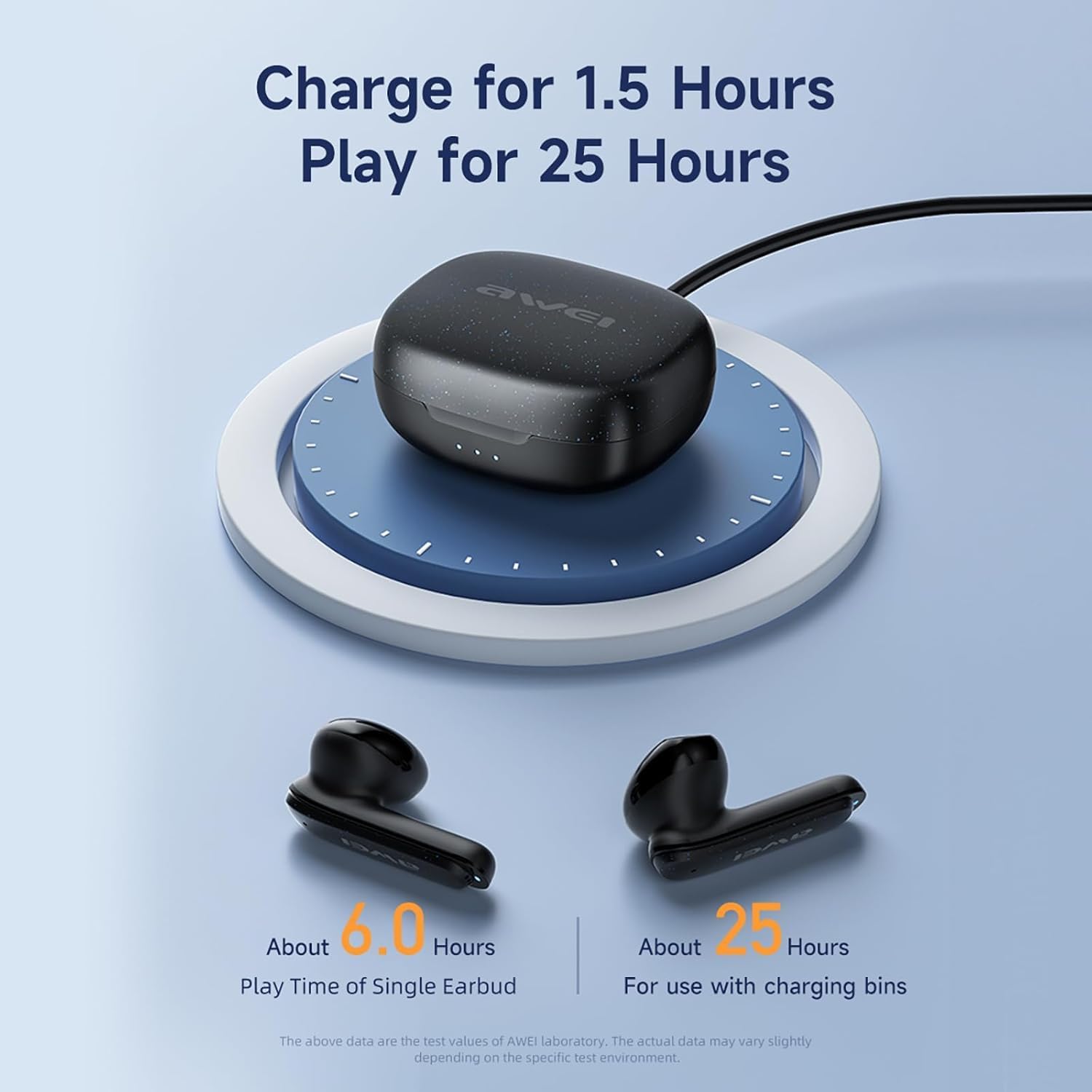
- The charging case takes approximately 1 hour to fully charge.

Image: The AWEI T66 charging case being charged, illustrating the charging process.
2. നിങ്ങളുടെ ഉപകരണവുമായി ജോടിയാക്കുന്നു
The AWEI T66 earbuds utilize Bluetooth 5.3 for a stable and efficient connection.
- ഇയർബഡുകൾ ചാർജ് ചെയ്തിട്ടുണ്ടെന്നും ചാർജിംഗ് കെയ്സിൽ വച്ചിട്ടുണ്ടെന്നും ഉറപ്പാക്കുക.
- ചാർജിംഗ് കേസ് തുറക്കുക. ഇയർബഡുകൾ സ്വയമേവ ജോടിയാക്കൽ മോഡിലേക്ക് പ്രവേശിക്കും.
- നിങ്ങളുടെ ഉപകരണത്തിൽ (സ്മാർട്ട്ഫോൺ, ടാബ്ലെറ്റ്, ലാപ്ടോപ്പ്), ബ്ലൂടൂത്ത് ക്രമീകരണങ്ങളിലേക്ക് പോകുക.
- ഇതിനായി തിരയുക available devices and select "AWEI T66" from the list.
- കണക്റ്റ് ചെയ്തുകഴിഞ്ഞാൽ, ഒരു സ്ഥിരീകരണ ടോൺ നിങ്ങൾ കേൾക്കും, ഇയർബഡുകൾ ഉപയോഗത്തിന് തയ്യാറാകും.
ഉപകരണത്തിൽ ബ്ലൂടൂത്ത് പ്രവർത്തനക്ഷമമാക്കിയിട്ടുണ്ടെങ്കിൽ, കേസിൽ നിന്ന് പുറത്തെടുക്കുമ്പോൾ ഇയർബഡുകൾ അവസാനം ജോടിയാക്കിയ ഉപകരണവുമായി യാന്ത്രികമായി വീണ്ടും കണക്റ്റുചെയ്യും.

Image: A visual representation of Bluetooth 5.3 technology, highlighting stable and smooth transmission.
പ്രവർത്തന നിർദ്ദേശങ്ങൾ
1. പവർ ഓൺ/ഓഫ്
- പവർ ഓൺ: ചാർജിംഗ് കെയ്സ് തുറക്കുക, ഇയർബഡുകൾ സ്വയമേവ ഓണാകും.
- പവർ ഓഫ്: ഇയർബഡുകൾ തിരികെ ചാർജിംഗ് കെയ്സിലേക്ക് വയ്ക്കുക, ലിഡ് അടയ്ക്കുക. അവ യാന്ത്രികമായി ഓഫാകുകയും ചാർജ് ചെയ്യാൻ തുടങ്ങുകയും ചെയ്യും.
2. സ്മാർട്ട് ടച്ച് നിയന്ത്രണങ്ങൾ
The AWEI T66 earbuds feature intuitive touch controls on each earbud for easy management of music and calls.
| ഫംഗ്ഷൻ | ആക്ഷൻ |
|---|---|
| സംഗീതം പ്ലേ ചെയ്യുക/താൽക്കാലികമായി നിർത്തുക | ഏതെങ്കിലും ഇയർബഡിൽ ഒറ്റ ടാപ്പ് ചെയ്യുക |
| അടുത്ത ഗാനം | വലതുവശത്തെ ഇയർബഡിൽ രണ്ടുതവണ ടാപ്പ് ചെയ്യുക |
| മുൻ ഗാനം | ഇടതുവശത്തെ ഇയർബഡിൽ രണ്ടുതവണ ടാപ്പ് ചെയ്യുക |
| ഉത്തരം / കോൾ അവസാനിപ്പിക്കുക | ഏതെങ്കിലും ഇയർബഡിൽ ഒറ്റ ടാപ്പ് ചെയ്യുക |
| കോൾ നിരസിക്കുക | ഏതെങ്കിലും ഇയർബഡിൽ 2 സെക്കൻഡ് അമർത്തിപ്പിടിക്കുക |
| വോയ്സ് അസിസ്റ്റൻ്റ് സജീവമാക്കുക | ഇയർബഡുകളിലൊന്നിൽ മൂന്ന് തവണ ടാപ്പ് ചെയ്യുക |
| വോളിയം കൂട്ടുക | Press and hold the right earbud |
| വോളിയം ഡൗൺ | ഇടതുവശത്തെ ഇയർബഡ് അമർത്തിപ്പിടിക്കുക |
3. Single and Dual Earbud Mode
You can use both earbuds together for a stereo experience or use a single earbud independently.
- ഡ്യുവൽ മോഡ്: Take both earbuds out of the charging case. They will automatically connect to each other and then to your device.
- സിംഗിൾ മോഡ്: Take only one earbud out of the charging case. It will connect to your device independently. The other earbud can remain in the case or be used later.
4. Calling with ENC Noise Cancellation
The earbuds feature ENC (Environmental Noise Cancellation) technology to ensure clear call quality by reducing background noise.
- When a call comes in, tap either earbud once to answer.
- Tap either earbud once to end an ongoing call.
- ഇൻകമിംഗ് കോൾ നിരസിക്കാൻ ഇയർബഡുകളിൽ ഏതെങ്കിലുമൊന്ന് 2 സെക്കൻഡ് അമർത്തിപ്പിടിക്കുക.

Image: Diagram illustrating the ENC (Environmental Noise Cancellation) feature of the AWEI T66 earbuds.

Image: A woman wearing AWEI T66 earbuds, demonstrating clear voice calls with dual ENC microphone technology.
മെയിൻ്റനൻസ്
1. ചാർജിംഗ്
To ensure optimal battery life, always charge your earbuds and case when the battery is low. The earbuds provide approximately 6 hours of continuous use per charge. The 300mAh charging case extends total playtime to 30 hours in dual-ear mode, or up to 60 hours in single-ear mode by alternating earbuds.
- Use the provided Type-C cable for charging the case.
- ഇയർബഡുകളിലെയും കേസിനുള്ളിലെയും ചാർജിംഗ് കോൺടാക്റ്റുകൾ വൃത്തിയുള്ളതാണെന്ന് ഉറപ്പാക്കുക.
2. വൃത്തിയാക്കൽ
പതിവായി വൃത്തിയാക്കുന്നത് ശബ്ദ നിലവാരവും ശുചിത്വവും നിലനിർത്താൻ സഹായിക്കുന്നു.
- മൃദുവായതും ഉണങ്ങിയതും ലിന്റ് രഹിതവുമായ ഒരു തുണി ഉപയോഗിച്ച് ഇയർബഡുകളും ചാർജിംഗ് കെയ്സും സൌമ്യമായി തുടയ്ക്കുക.
- അബ്രാസീവ് ക്ലീനറുകൾ, ആൽക്കഹോൾ, കെമിക്കൽ ലായകങ്ങൾ എന്നിവ ഉപയോഗിക്കരുത്.
- പരസ്യം ഉപയോഗിച്ച് ചെവിയുടെ നുറുങ്ങുകൾ പതിവായി വൃത്തിയാക്കുകamp വീണ്ടും ഘടിപ്പിക്കുന്നതിന് മുമ്പ് അവ തുണികൊണ്ട് പൂർണ്ണമായും ഉണങ്ങാൻ അനുവദിക്കുക.
3. ജല പ്രതിരോധം (IPX6)
The AWEI T66 earbuds are IPX6 waterproof, meaning they are protected against high-pressure water jets from any direction. This makes them suitable for workouts and use in light rain.
- ഇയർബഡുകൾ വെള്ളത്തിൽ മുക്കരുത്.
- കേടുപാടുകൾ സംഭവിക്കാതിരിക്കാൻ ചാർജിംഗ് കെയ്സിലേക്ക് തിരികെ വയ്ക്കുന്നതിന് മുമ്പ് ഇയർബഡുകൾ ഉണങ്ങിയെന്ന് ഉറപ്പാക്കുക.
ട്രബിൾഷൂട്ടിംഗ്
If you encounter issues with your AWEI T66 earbuds, try the following solutions:
- ഉപകരണവുമായി ഇയർബഡുകൾ ജോടിയാക്കുന്നില്ല:
- നിങ്ങളുടെ ഉപകരണത്തിൽ ബ്ലൂടൂത്ത് പ്രവർത്തനക്ഷമമാക്കിയിട്ടുണ്ടെന്ന് ഉറപ്പാക്കുക.
- ഇയർബഡുകൾ ചാർജ്ജ് ചെയ്തിട്ടുണ്ടെന്ന് ഉറപ്പാക്കുക.
- നിങ്ങളുടെ ഉപകരണത്തിൽ Bluetooth ഓഫാക്കുക, തുടർന്ന് അത് വീണ്ടും ഓണാക്കുക.
- Forget "AWEI T66" in your device's Bluetooth settings and attempt to pair again.
- Place both earbuds back into the charging case, close the lid, wait a few seconds, then open the lid to re-enter pairing mode.
- ഒരു ഇയർബഡ് മാത്രമേ പ്രവർത്തിക്കുന്നുള്ളൂ:
- രണ്ട് ഇയർബഡുകളും ചാർജ്ജ് ചെയ്തിട്ടുണ്ടെന്ന് ഉറപ്പാക്കുക.
- Place both earbuds back into the charging case, close the lid, then open it again to allow them to re-sync.
- If the issue persists, try resetting the earbuds (refer to the full user manual for specific reset instructions if available, or try forgetting the device and re-pairing).
- ശബ്ദമില്ല അല്ലെങ്കിൽ കുറഞ്ഞ ശബ്ദം:
- നിങ്ങളുടെ ഉപകരണത്തിലെയും ഇയർബഡുകളിലെയും വോളിയം ലെവൽ പരിശോധിക്കുക.
- ഇയർബഡുകൾ നിങ്ങളുടെ ഉപകരണവുമായി ശരിയായി ബന്ധിപ്പിച്ചിട്ടുണ്ടെന്ന് ഉറപ്പാക്കുക.
- ഇയർബഡ് സ്പീക്കർ മെഷിലെ അവശിഷ്ടങ്ങൾ വൃത്തിയാക്കുക.
- ചാർജിംഗ് കേസ് ചാർജുചെയ്യുന്നില്ല:
- ചാർജിംഗ് കേബിൾ കേസിലേക്കും പവർ സ്രോതസ്സിലേക്കും സുരക്ഷിതമായി ബന്ധിപ്പിച്ചിട്ടുണ്ടെന്ന് ഉറപ്പാക്കുക.
- മറ്റൊരു ചാർജിംഗ് കേബിളോ പവർ അഡാപ്റ്ററോ പരീക്ഷിച്ചുനോക്കൂ.
- കേസിലെ ചാർജിംഗ് പോർട്ട് വൃത്തിയുള്ളതും അവശിഷ്ടങ്ങൾ ഇല്ലാത്തതുമാണെന്ന് ഉറപ്പാക്കുക.
സ്പെസിഫിക്കേഷനുകൾ
| ഫീച്ചർ | വിശദാംശങ്ങൾ |
|---|---|
| ബ്രാൻഡ് | AWEI |
| മോഡൽ നമ്പർ | T66 |
| ബ്ലൂടൂത്ത് പതിപ്പ് | 5.3 |
| ബ്ലൂടൂത്ത് ശ്രേണി | 10 മീറ്റർ വരെ (33 അടി) |
| ചെവി പ്ലേസ്മെൻ്റ് | ചെവിയിൽ |
| ഡ്രൈവർ വലിപ്പം | 13 മി.മീ |
| പ്രതിരോധം | 32 ഓം |
| ഫ്രീക്വൻസി റേഞ്ച് | 20Hz - 20,000Hz |
| ശബ്ദ നിയന്ത്രണം | പരിസ്ഥിതി ശബ്ദം റദ്ദാക്കൽ (ENC) |
| നിയന്ത്രണ തരം | ടച്ച് നിയന്ത്രണം |
| ജല പ്രതിരോധം | IPX6 വാട്ടർപ്രൂഫ് |
| ഇയർബഡ് പ്ലേടൈം | Approx. 6 hours (per charge) |
| ആകെ പ്ലേടൈം (കേസിനൊപ്പം) | Approx. 30 hours (dual-ear), 60 hours (single-ear) |
| ചാർജിംഗ് കേസ് ബാറ്ററി | 300mAh |
| ചാർജിംഗ് സമയം (കേസ്) | Approx. 1 hour (Type-C) |
| അനുയോജ്യമായ ഉപകരണങ്ങൾ | Laptops, Tablets, Mobile Phones (iOS/Android) |
ചിത്രം: ക്ലോസ്-അപ്പ് view of the 13mm drive unit within the AWEI T66 earbud, highlighting its audio components.
വാറൻ്റി വിവരങ്ങൾ
The AWEI T66 Wireless Earbuds come with a 1 വർഷത്തെ വാറൻ്റി വാങ്ങിയ തീയതി മുതൽ. സാധാരണ ഉപയോഗത്തിലുള്ള നിർമ്മാണ വൈകല്യങ്ങളും പ്രവർത്തനക്ഷമതയും ഈ വാറന്റി ഉൾക്കൊള്ളുന്നു.
വാറൻ്റി ഉൾപ്പെടുന്നില്ല:
- ദുരുപയോഗം, ദുരുപയോഗം, അപകടം അല്ലെങ്കിൽ അവഗണന എന്നിവ മൂലമുണ്ടാകുന്ന നാശനഷ്ടങ്ങൾ.
- അനധികൃത അറ്റകുറ്റപ്പണികൾ അല്ലെങ്കിൽ പരിഷ്കാരങ്ങൾ.
- സാധാരണ തേയ്മാനം.
- Damage from liquids beyond the IPX6 rating (e.g., submersion).
വാറൻ്റി ക്ലെയിമുകൾക്കായി നിങ്ങളുടെ വാങ്ങിയതിൻ്റെ തെളിവ് സൂക്ഷിക്കുക.
ഉപഭോക്തൃ പിന്തുണ
For further assistance, technical support, or warranty inquiries, please contact AWEI customer service.
- നിങ്ങളുടെ ഉൽപ്പന്ന പാക്കേജിംഗിൽ നൽകിയിരിക്കുന്ന ബന്ധപ്പെടാനുള്ള വിവരങ്ങൾ പരിശോധിക്കുക.
- Visit the official AWEI webപിന്തുണാ ഉറവിടങ്ങൾക്കും ബന്ധപ്പെടാനുള്ള വിശദാംശങ്ങൾക്കുമുള്ള സൈറ്റ്.
- നിങ്ങൾക്ക് സന്ദർശിക്കാവുന്നതും AWEI Store on Amazon കൂടുതൽ ഉൽപ്പന്ന വിവരങ്ങൾക്ക്.