
ആമുഖം
This manual provides detailed instructions for the LIGE EF13-A Military Smartwatch. This multi-functional device offers Bluetooth calling, fitness tracking, health monitoring, and various smart features designed to enhance your daily life. Please read this manual thoroughly to ensure proper use and maintenance of your smartwatch.
സജ്ജമാക്കുക
1. അൺബോക്സിംഗും പ്രാരംഭ പരിശോധനയും
Carefully remove all components from the packaging. Ensure the smartwatch, charging cable, and any included straps are present and undamaged. The LIGE EF13-A smartwatch typically includes two straps: a wear-resistant stainless steel strap and a soft silicone strap.
2. സ്മാർട്ട് വാച്ച് ചാർജ് ചെയ്യുന്നു
Before first use, fully charge the smartwatch. Connect the magnetic charging cable to the charging port on the back of the watch and plug the USB end into a power adapter (not included) or a computer's USB port. The watch features a 1000mAh battery.
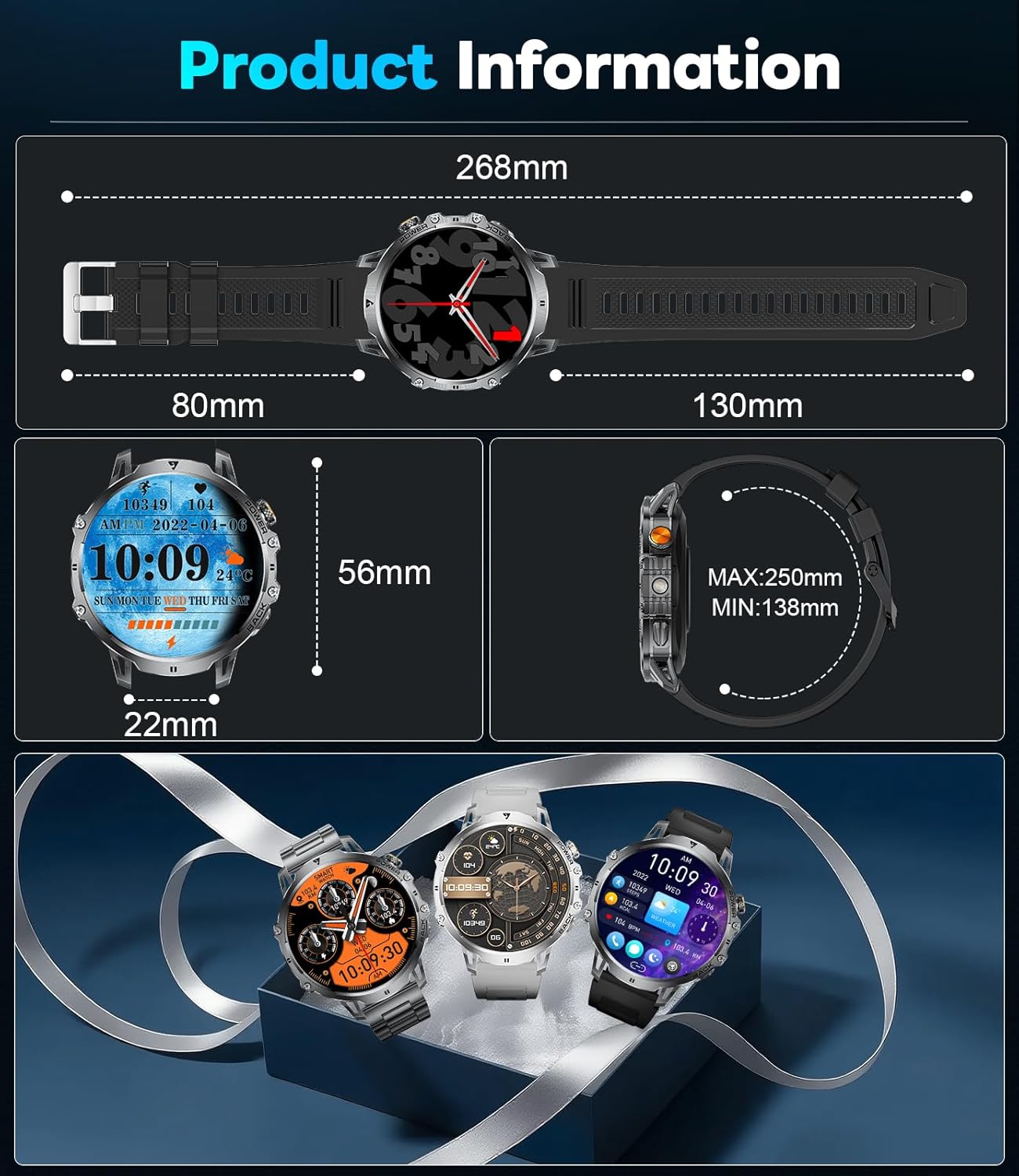
Image: The smartwatch connected to its magnetic charging cable, highlighting its 1000mAh battery and extended battery life capabilities.
3. ആപ്പ് ഇൻസ്റ്റാളേഷൻ
Download and install the companion application on your smartphone. The LIGE EF13-A smartwatch uses the ഫിറ്റ് ക്ലൗഡ് പ്രോ അപ്ലിക്കേഷൻ. ഇതിനായി തിരയുക "Fit Cloud Pro" in your smartphone's app store (Google Play Store for Android or Apple App Store for iOS).
4. നിങ്ങളുടെ സ്മാർട്ട്ഫോണുമായി ജോടിയാക്കൽ
- നിങ്ങളുടെ സ്മാർട്ട്ഫോണിൽ ബ്ലൂടൂത്ത് പ്രവർത്തനക്ഷമമാക്കിയിട്ടുണ്ടെന്ന് ഉറപ്പാക്കുക.
- Open the Fit Cloud Pro app and follow the on-screen instructions to add a new device.
- Select the LIGE EF13-A from the list of available devices.
- നിങ്ങളുടെ സ്മാർട്ട്ഫോണിലും സ്മാർട്ട് വാച്ചിലും പെയറിംഗ് അഭ്യർത്ഥന സ്ഥിരീകരിക്കുക.
- The smartwatch utilizes Bluetooth 5.3 for a fast and stable connection.
പ്രവർത്തന നിർദ്ദേശങ്ങൾ
1. അടിസ്ഥാന നാവിഗേഷൻ
The smartwatch features a 1.85-inch HD full-touch display with 360*360 resolution. Swipe left, right, up, or down to navigate through menus, notifications, and widgets. Tap to select items.

Image: A visual comparison demonstrating the larger and clearer 1.85-inch HD display of the smartwatch compared to a smaller screen.
2. കോളുകൾ ചെയ്യലും സ്വീകരിക്കലും
Once paired via Bluetooth, you can answer or dial calls directly from your smartwatch. The built-in 60dB HD speaker and noise-cancelling microphone ensure clear communication.
3. അറിയിപ്പുകൾ
Receive notifications for SMS, Facebook, WhatsApp, and other social media apps directly on your watch. Ensure notification permissions are enabled in the Fit Cloud Pro app.
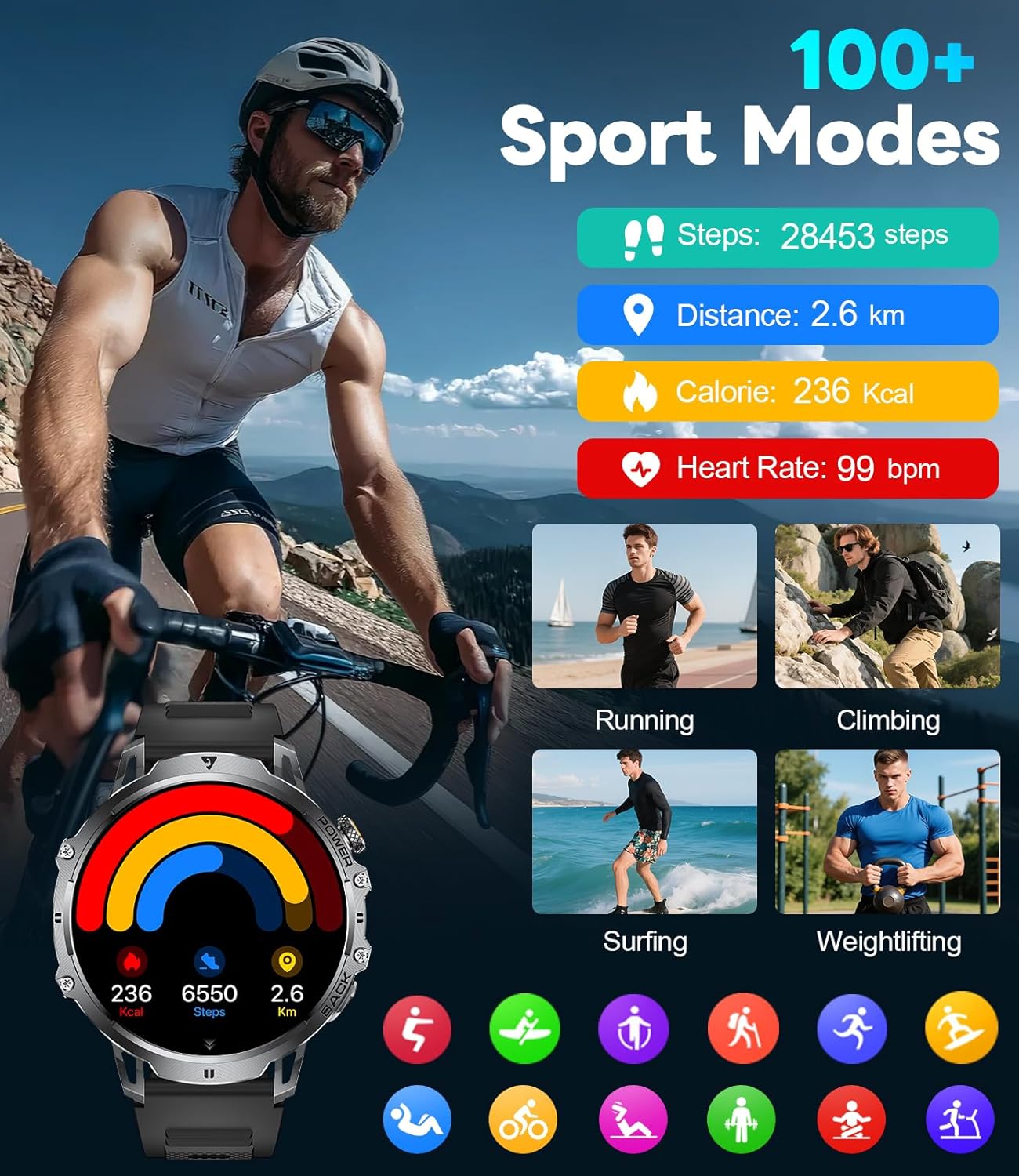
Image: The smartwatch interface showing features like AI voice assistant, incoming message alerts, and call management options.
4. ആരോഗ്യ ട്രാക്കിംഗ്
- ഹൃദയമിടിപ്പ് നിരീക്ഷണം: Monitor your heart rate throughout the day. Access historical data in the Fit Cloud Pro app.
- സ്ലീപ്പ് മോണിറ്റർ: ഗാഢനിദ്ര, നേരിയ ഉറക്കം, ഉണർന്നിരിക്കുന്ന സമയങ്ങൾ എന്നിവയുൾപ്പെടെ നിങ്ങളുടെ ഉറക്ക പാറ്റേണുകൾ ട്രാക്ക് ചെയ്യുന്നു.
- ഉദാസീനമായ ഓർമ്മപ്പെടുത്തൽ: നിങ്ങൾ വളരെ നേരം നിഷ്ക്രിയമായിരിക്കുമ്പോൾ നിങ്ങളെ അറിയിക്കുന്നു.
- ജല ഓർമ്മപ്പെടുത്തൽ: Prompts you to drink water at regular intervals.
Note: All health data is for reference only and should not be used for medical purposes.
5. സ്പോർട്സ് മോഡുകൾ
The smartwatch supports over 100 sports modes, including running, cycling, hiking, basketball, badminton, surfing, and weightlifting. Select your desired activity to track steps, distance, calories burned, and heart rate during your workout.

Image: The smartwatch interface showcasing its 100+ sports modes and real-time fitness data tracking.
6. LED ഫ്ലാഷ്ലൈറ്റ്
Activate the built-in LED flashlight with a single key press for instant illumination. This feature is useful in low-light conditions, during power outages, or for night activities.
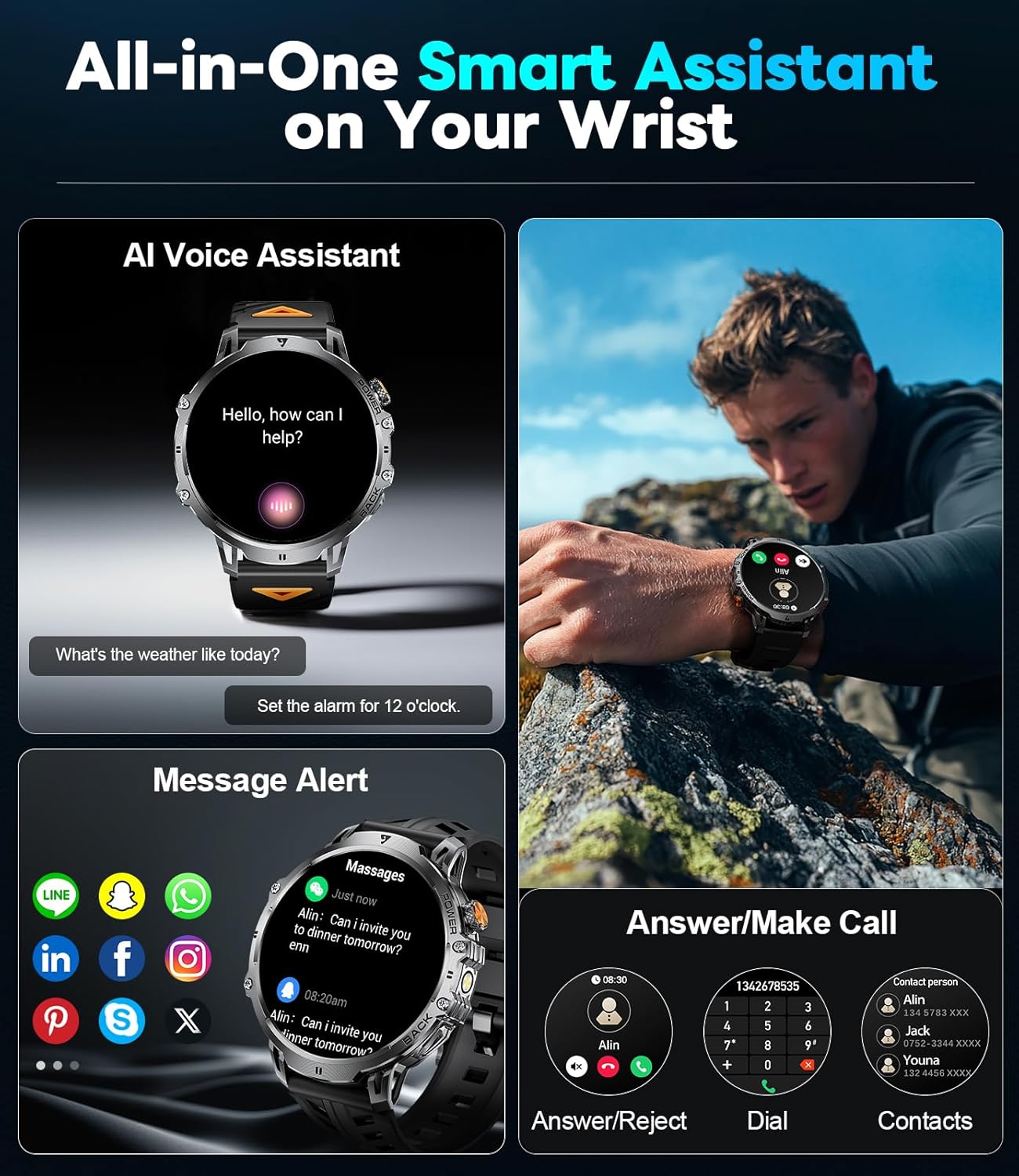
Image: The smartwatch with its powerful LED flashlight illuminated, demonstrating its utility in dark environments.
7. ഇഷ്ടാനുസൃതമാക്കൽ
- DIY ഡയൽ: Customize your watch face by uploading your favorite photos through the Fit Cloud Pro app.
- സ്ക്രീൻ തെളിച്ചം: Adjust the screen brightness settings for optimal visibility in different lighting conditions.
8. മറ്റ് പ്രവർത്തനങ്ങൾ
The smartwatch includes additional features such as:
- വോയ്സ് അസിസ്റ്റൻ്റ്
- കാലാവസ്ഥാ പ്രവചനം
- റിമോട്ട് ക്യാമറ കൺട്രോൾ
- സംഗീത നിയന്ത്രണം
- അലാറങ്ങൾ
- സ്റ്റോപ്പ് വാച്ച്
- ടൈമർ
മെയിൻ്റനൻസ്
1. ജല പ്രതിരോധം
The LIGE EF13-A smartwatch is IP68 waterproof, meaning it is resistant to sweat, rain, and splashes. It is not suitable for swimming, showering with hot water, or other water activities involving submersion or high-pressure water.
2. വൃത്തിയാക്കൽ
Wipe the smartwatch and straps regularly with a soft, dry cloth. For stubborn dirt, use a slightly damp തുണി ഉപയോഗിച്ച് നന്നായി ഉണക്കുക. കഠിനമായ രാസവസ്തുക്കളോ ഉരച്ചിലുകളോ ഉള്ള വസ്തുക്കൾ ഉപയോഗിക്കുന്നത് ഒഴിവാക്കുക.
3. ബാറ്ററി പരിചരണം
To maximize battery life, avoid extreme temperatures. The 1000mAh battery provides approximately 10-15 days of use in normal mode and up to 30 days in power-saving mode. Charge the watch when the battery level is low to prevent complete discharge.
ട്രബിൾഷൂട്ടിംഗ്
- വാച്ച് ഓണാകുന്നില്ല: വാച്ച് പൂർണ്ണമായും ചാർജ് ചെയ്തിട്ടുണ്ടെന്ന് ഉറപ്പാക്കുക. കുറഞ്ഞത് 30 മിനിറ്റെങ്കിലും ചാർജറുമായി ബന്ധിപ്പിക്കുക.
- സ്മാർട്ട്ഫോണുമായി ജോടിയാക്കാൻ കഴിയില്ല:
- നിങ്ങളുടെ ഫോണിലും വാച്ചിലും ബ്ലൂടൂത്ത് പ്രവർത്തനക്ഷമമാക്കിയിട്ടുണ്ടെന്ന് ഉറപ്പാക്കുക.
- വാച്ച് നിങ്ങളുടെ ഫോണിന്റെ പരിധിയിലാണെന്ന് ഉറപ്പാക്കുക.
- വാച്ചും ഫോണും റീസ്റ്റാർട്ട് ചെയ്യുക.
- Check if the Fit Cloud Pro app has necessary permissions.
- അറിയിപ്പുകൾ ദൃശ്യമാകുന്നില്ല:
- Verify that notifications are enabled in the Fit Cloud Pro app for specific applications.
- ആപ്പിന് അറിയിപ്പ് ആക്സസ് ഉണ്ടെന്ന് ഉറപ്പാക്കാൻ നിങ്ങളുടെ ഫോണിന്റെ സിസ്റ്റം ക്രമീകരണങ്ങൾ പരിശോധിക്കുക.
- വാച്ച് ബ്ലൂടൂത്ത് വഴി നിങ്ങളുടെ ഫോണുമായി ബന്ധിപ്പിച്ചിട്ടുണ്ടെന്ന് ഉറപ്പാക്കുക.
- കൃത്യമല്ലാത്ത ആരോഗ്യ ഡാറ്റ: Ensure the watch is worn snugly on your wrist, not too tight or too loose. Clean the sensors regularly. Remember, data is for reference only.
- ഹ്രസ്വ ബാറ്ററി ലൈഫ്: Reduce screen brightness, disable unnecessary features, and ensure background app usage is optimized on your phone.
സ്പെസിഫിക്കേഷനുകൾ

ചിത്രം: ഒരു ഓവർview of the smartwatch's physical dimensions and exampഇഷ്ടാനുസൃതമാക്കാവുന്ന നിരവധി വാച്ച് ഫെയ്സുകൾ.
| ഫീച്ചർ | വിശദാംശങ്ങൾ |
|---|---|
| മോഡൽ നമ്പർ | EF13-A |
| സ്ക്രീൻ വലിപ്പം | 1.85 ഇഞ്ച് HD |
| റെസലൂഷൻ | 360*360 പിക്സലുകൾ |
| ബാറ്ററി ശേഷി | 1000 mAh ലിഥിയം പോളിമർ |
| ബാറ്ററി ലൈഫ് (സാധാരണ ഉപയോഗം) | 10-15 ദിവസം |
| Battery Life (Power Saving) | 30 ദിവസം വരെ |
| കണക്റ്റിവിറ്റി | ബ്ലൂടൂത്ത് 5.3 |
| ജല പ്രതിരോധം | IP68 (Splash, Rain, Sweat Resistant) |
| അനുയോജ്യത | iOS 11.0+ / Android 5.0+ |
| മെമ്മറി സ്റ്റോറേജ് കപ്പാസിറ്റി | 128 MB |
| ഉൽപ്പന്ന അളവുകൾ | 23.88 x 4.5 x 0.79 സെ.മീ |
| ഭാരം | 250 ഗ്രാം |
| പ്രത്യേക സവിശേഷതകൾ | LED Flashlight, Activity Tracker, Heart Rate Monitor, Sleep Monitor, Bluetooth Calls, Voice Assistant, Music Control, Custom Dials |
വാറൻ്റിയും പിന്തുണയും
LIGE offers 24 months of product maintenance for the EF13-A smartwatch. If you encounter any issues or require assistance, please contact customer support. They aim to reply and resolve your problem within 24 hours.
For support, refer to the contact information provided with your purchase or on the official LIGE webസൈറ്റ്.