
ഉൽപ്പന്നം കഴിഞ്ഞുview
The RORRY 10,000mAh 30W Fast Charging Power Bank (Model H1) is a versatile portable charger designed to power multiple devices simultaneously. It features built-in retractable cables, a dedicated Apple Watch charger, and additional USB-C and USB-A ports for broad compatibility.
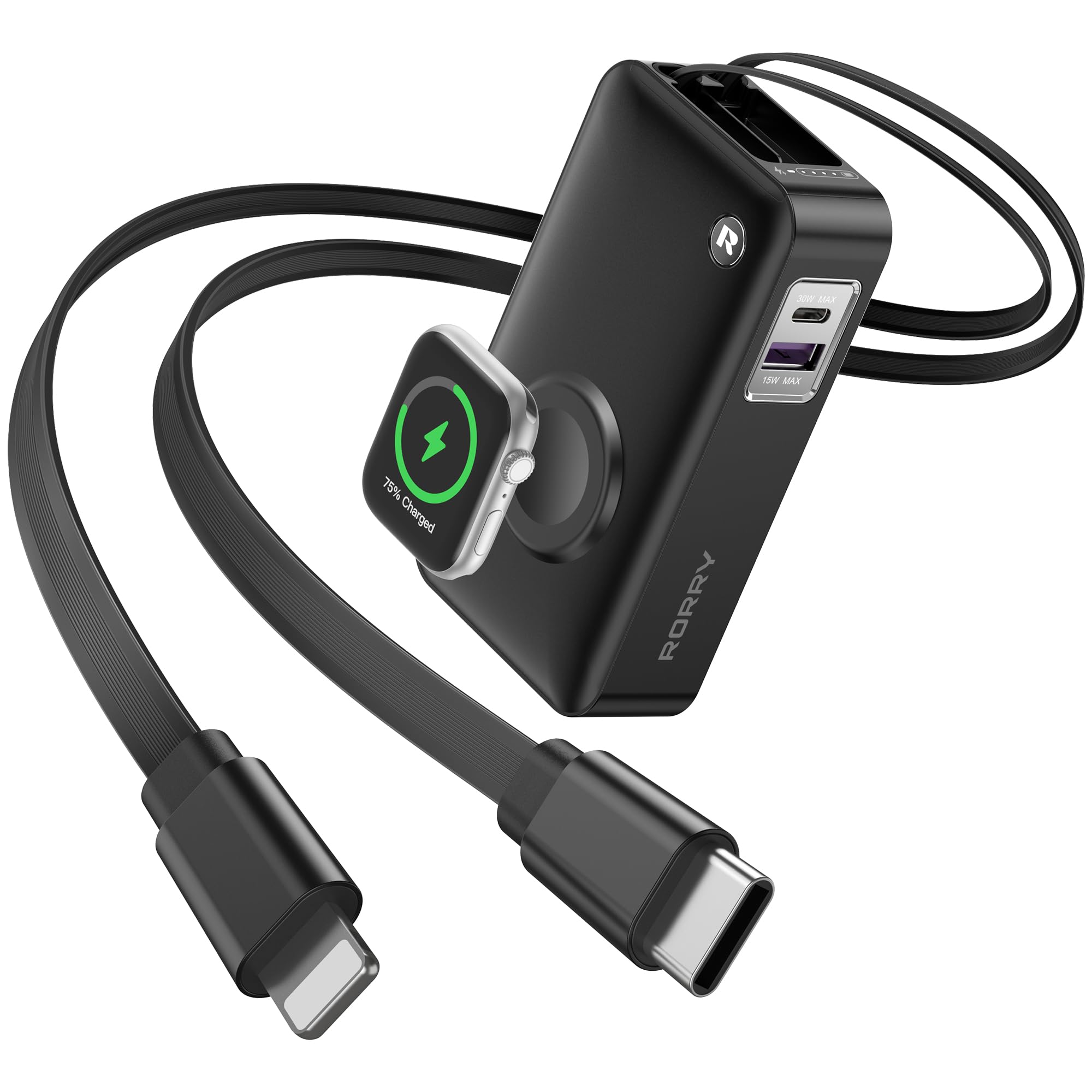
Image: The RORRY Portable Charger, showcasing its compact design with integrated cables and an Apple Watch charging area.
ബോക്സിൽ എന്താണുള്ളത്
- പവർ ബാങ്ക് * 1
- USB-C കേബിൾ * 1
- ഉപയോക്തൃ മാനുവൽ * 1
സജ്ജമാക്കുക
പവർ ബാങ്ക് ചാർജ് ചെയ്യുന്നു
Before initial use, fully charge your RORRY Power Bank. Use the provided USB-C cable or the built-in USB-C cable to connect the power bank to a compatible power adapter (not included). The LED indicator lights will show the charging progress. A full charge typically takes approximately 2.2 hours.
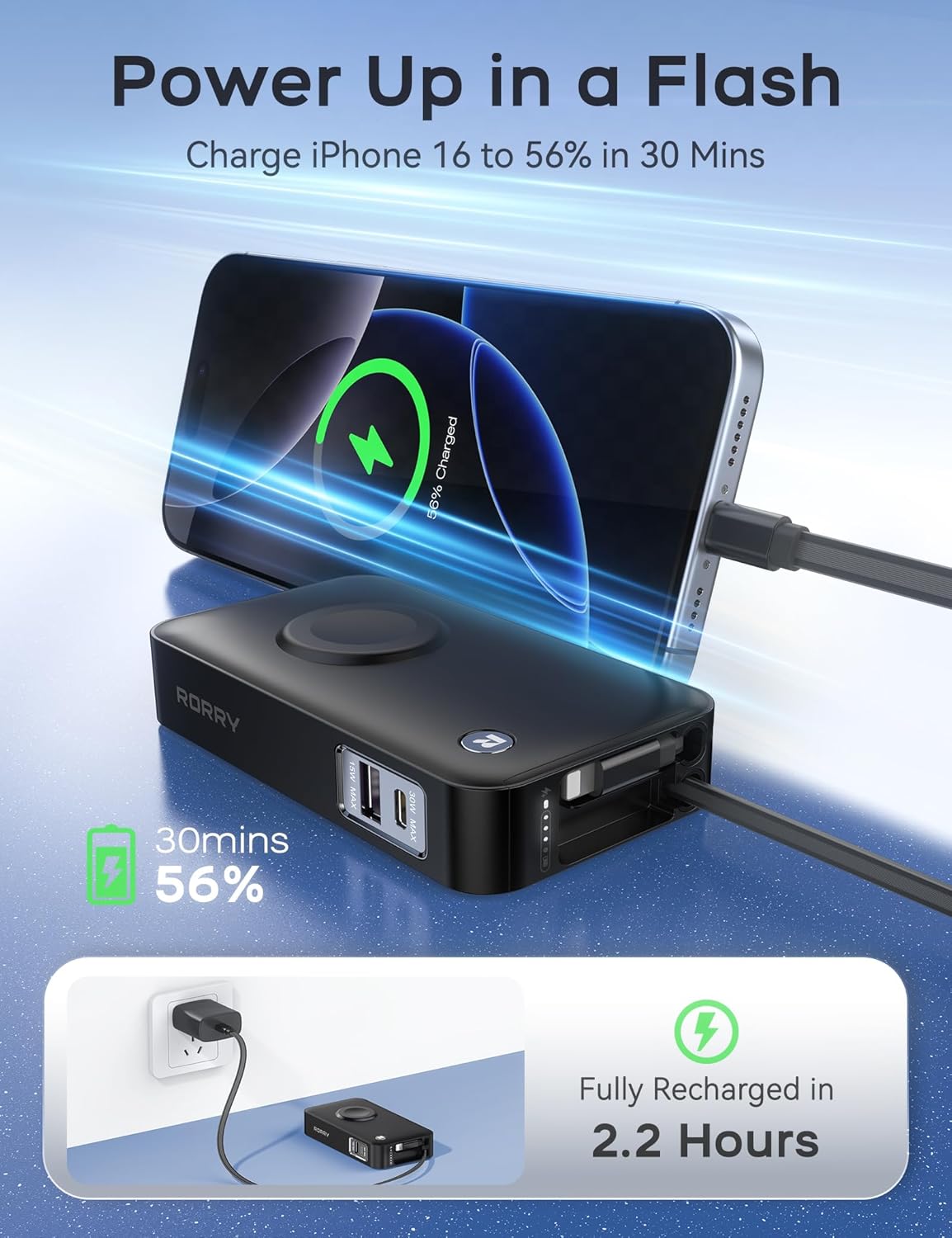
Image: The RORRY Power Bank connected to a wall adapter for recharging, with an iPhone also charging from the power bank.
ബാറ്ററി നില പരിശോധിക്കുന്നു
Press the power button located on the side of the power bank. The LED indicator lights will illuminate to show the remaining battery capacity.
പ്രവർത്തന നിർദ്ദേശങ്ങൾ
Charging Devices with Built-in Retractable Cables
- Gently pull the desired retractable cable (USB-C or Lightning) from its housing until it reaches the desired length. Do not pull excessively.
- നിങ്ങളുടെ ഉപകരണത്തിലേക്ക് കേബിൾ ബന്ധിപ്പിക്കുക.
- To retract the cable, pull it gently again, and it will automatically retract into the power bank.

Image: A woman holding the RORRY Portable Charger, extending one of its dual 25.6-inch retractable cables.
ആപ്പിൾ വാച്ച് ചാർജ് ചെയ്യുന്നു
Place your Apple Watch on the dedicated wireless charging pad on the front of the power bank. Ensure the watch is properly aligned for optimal charging. Press the power button on the power bank to initiate charging if it doesn't start automatically.
Charging Devices with USB-A/USB-C Ports
Connect your device's charging cable to the appropriate USB-A (15W Max) or USB-C (30W Max) port on the side of the power bank. The power bank will automatically detect and begin charging your device.
ഒരേസമയം ചാർജിംഗ്
The RORRY Power Bank supports charging up to 5 devices simultaneously using its various outputs: 30W USB-C, 20W iOS cables, a 30W USB-C port, 15W USB-A port, and a 5W Apple Watch charger. Note that charging speed may decrease when multiple devices are connected.

Image: The RORRY Portable Charger simultaneously charging an iPhone, Apple Watch, iPad, and AirPods, demonstrating its multi-device capability.
മെയിൻ്റനൻസ്
- പവർ ബാങ്ക് ഉയർന്ന താപനിലയിൽ നിന്നും, നേരിട്ടുള്ള സൂര്യപ്രകാശത്തിൽ നിന്നും, ദ്രാവകങ്ങളിൽ നിന്നും അകറ്റി നിർത്തുക.
- മൃദുവായതും ഉണങ്ങിയതുമായ തുണി ഉപയോഗിച്ച് ഉപകരണം വൃത്തിയാക്കുക. കഠിനമായ രാസവസ്തുക്കളോ ഉരച്ചിലുകളോ ഉള്ള വസ്തുക്കൾ ഉപയോഗിക്കരുത്.
- ഉപയോഗത്തിലില്ലാത്തപ്പോൾ പവർ ബാങ്ക് തണുത്തതും വരണ്ടതുമായ സ്ഥലത്ത് സൂക്ഷിക്കുക.
- Charge the power bank at least once every three months to maintain battery health if stored for extended periods.
ട്രബിൾഷൂട്ടിംഗ്
ഉപകരണം ചാർജ് ചെയ്യുന്നില്ല
- പവർ ബാങ്ക് ആവശ്യത്തിന് ചാർജ് ചെയ്തിട്ടുണ്ടെന്ന് ഉറപ്പാക്കുക. LED ഇൻഡിക്കേറ്ററുകൾ പരിശോധിക്കുക.
- ചാർജിംഗ് കേബിൾ പവർ ബാങ്കിലേക്കും നിങ്ങളുടെ ഉപകരണത്തിലേക്കും സുരക്ഷിതമായി ബന്ധിപ്പിച്ചിട്ടുണ്ടെന്ന് ഉറപ്പാക്കുക.
- ചാർജിംഗ് സജീവമാക്കാൻ പവർ ബാങ്കിലെ പവർ ബട്ടൺ അമർത്തുക.
- കണക്ഷൻ തകരാറിലാകാതിരിക്കാൻ മറ്റൊരു കേബിളോ പോർട്ടോ പരീക്ഷിക്കുക.
സ്ലോ ചാർജിംഗ്
- Ensure you are using a fast-charging compatible cable and adapter for recharging the power bank.
- When charging multiple devices, the output power is shared, which may result in slower charging for individual devices.
- Check if your device supports the fast charging protocols of the power bank (e.g., 30W USB-C).
ആപ്പിൾ വാച്ച് ചാർജ് ചെയ്യുന്നില്ല
- Ensure the Apple Watch is correctly positioned on the wireless charging pad.
- Press the power button on the power bank to activate the wireless charging function.
- Remove any thick cases from your Apple Watch that might interfere with wireless charging.
സ്പെസിഫിക്കേഷനുകൾ
| മോഡൽ നമ്പർ | H1 |
| ബാറ്ററി ശേഷി | 10000 മില്ലിamp മണിക്കൂറുകൾ |
| ഉൽപ്പന്ന അളവുകൾ | 4.33 x 2.44 x 0.94 ഇഞ്ച് |
| ഇനത്തിൻ്റെ ഭാരം | 8.8 ഔൺസ് |
| പ്രത്യേക സവിശേഷതകൾ | All-in-One, Auto Shut-Off, Built In Cable, Fast Charging, LED Indicator Lights |
| കണക്റ്റർ തരം | Built-in Cable L+C, 1A1C |
| നിർമ്മാതാവ് | Shenzhen Xianyang ഇന്നൊവേഷൻ ടെക്നോളജി കോ., ലിമിറ്റഡ് |
ഔദ്യോഗിക ഉൽപ്പന്ന വീഡിയോകൾ
RORRY 10000mAh 30W Power Bank with Built-in Cables
Video: An official product video from RORRY DIRECT showcasing the 10,000mAh 30W Power Bank with its built-in cables and various features. This video highlights the convenience and functionality of the device.
വാറൻ്റിയും പിന്തുണയും
The RORRY 10,000mAh 30W Fast Charging Power Bank comes with an 18-month extended warranty. For support or warranty claims, please refer to the contact information provided in the included User Manual or visit the official RORRY webസൈറ്റ്.
For additional information or to explore other RORRY products, please visit the RORRY Store on Amazon.