
IPASON IPASON-G2-97X
IPASON Gaming PC User Manual
Model: IPASON-G2-97X
ആമുഖം
This manual provides essential information for setting up, operating, maintaining, and troubleshooting your new IPASON Gaming PC. Designed for high-performance gaming, video editing, and multitasking, this system features an AMD Ryzen 7 9700X processor, Geforce RTX 5060Ti graphics card, 32GB DDR5 RAM, and a 1TB NVME SSD, running on Windows 11.

ചിത്രം 1: മുൻഭാഗം view of the IPASON Gaming PC, showcasing its transparent side panel and internal blue LED lighting.
സജ്ജീകരണ ഗൈഡ്
Follow these steps to set up your IPASON Gaming PC:
- അൺബോക്സിംഗ്: Carefully remove the PC from its packaging. Retain all packaging materials for future transport or service.
- പ്ലേസ്മെൻ്റ്: Place the PC on a stable, flat surface with adequate ventilation around all sides. Avoid placing it in enclosed spaces or near heat sources.
- പെരിഫറലുകൾ ബന്ധിപ്പിക്കുക:
- Connect your monitor(s) to the graphics card ports (HDMI, DisplayPort).
- ലഭ്യമായ യുഎസ്ബി പോർട്ടുകളിലേക്ക് നിങ്ങളുടെ കീബോർഡും മൗസും ബന്ധിപ്പിക്കുക.
- ഓഡിയോ ജാക്കുകളിലേക്ക് സ്പീക്കറുകളോ ഹെഡ്ഫോണുകളോ ബന്ധിപ്പിക്കുക.
- For internet access, connect an Ethernet cable to the LAN port or ensure Wi-Fi antennas are attached (if applicable).
- പവർ കണക്ഷൻ: പവർ കേബിൾ പിസിയുടെ പവർ സപ്ലൈ യൂണിറ്റിലേക്കും (പിഎസ്യു) പിന്നീട് ഒരു ഗ്രൗണ്ടഡ് ഇലക്ട്രിക്കൽ ഔട്ട്ലെറ്റിലേക്കും ബന്ധിപ്പിക്കുക.
- ആദ്യ ബൂട്ട്: Press the power button located on the front panel. The system will boot into Windows 11. Follow the on-screen instructions for initial Windows setup.

Figure 2: Detail of the front I/O panel, showing USB 3.0, USB 2.0, microphone, headset jacks, and the power button.
നിങ്ങളുടെ പിസി പ്രവർത്തിപ്പിക്കുന്നു
Your IPASON Gaming PC comes pre-installed with Windows 11 64-bit, optimized for performance. It is free of bloatware to ensure maximum efficiency from day one.
- പ്രാരംഭ വിൻഡോസ് സജ്ജീകരണം: Upon first boot, Windows 11 will guide you through setting up your user account, network connection, and privacy settings.
- ഡ്രൈവർ ഇൻസ്റ്റാളേഷൻ: All necessary drivers for your hardware components (graphics card, chipset, audio, network) are pre-installed. It is recommended to periodically check for updated drivers from the component manufacturers' websites for optimal performance and stability.
- ഗെയിമിംഗും ആപ്ലിക്കേഷനുകളും: The system is capable of running demanding applications and games at high settings. Ensure your games and software are installed on the 1TB NVME SSD for fastest loading times.
- മൾട്ടിടാസ്കിംഗ്: With 32GB DDR5 RAM, the PC handles multiple applications simultaneously with ease, making it suitable for streaming, content creation, and productivity tasks.

Figure 3: The IPASON Gaming PC set up with a monitor, demonstrating its capability for gaming and other demanding applications.
മെയിൻ്റനൻസ്
പതിവ് അറ്റകുറ്റപ്പണികൾ നിങ്ങളുടെ പിസിയുടെ ദീർഘായുസ്സും മികച്ച പ്രകടനവും ഉറപ്പാക്കാൻ സഹായിക്കുന്നു.
- പൊടി മാനേജ്മെന്റ്: Dust accumulation can lead to overheating. Periodically clean the interior of your PC using compressed air, focusing on fans (CPU cooler, case fans, GPU fans) and heatsinks. Ensure the PC is powered off and unplugged before cleaning.
- സോഫ്റ്റ്വെയർ അപ്ഡേറ്റുകൾ: Regularly update Windows, graphics drivers, and other software to benefit from performance improvements, security patches, and bug fixes.
- കേബിൾ മാനേജുമെന്റ്: മികച്ച വായുസഞ്ചാരം പ്രോത്സാഹിപ്പിക്കുന്നതിന് ആന്തരിക കേബിളുകൾ വൃത്തിയായി കൈകാര്യം ചെയ്യുന്നുണ്ടെന്ന് ഉറപ്പാക്കുക.
- Liquid Cooler Check: While the 240mm AIO liquid cooler is low-maintenance, occasionally check for any unusual noises or leaks.
ട്രബിൾഷൂട്ടിംഗ്
നിങ്ങൾ നേരിട്ടേക്കാവുന്ന പൊതുവായ പ്രശ്നങ്ങൾക്കുള്ള പരിഹാരങ്ങൾ ഇതാ:
| പ്രശ്നം | സാധ്യമായ കാരണം | പരിഹാരം |
|---|---|---|
| പിസി പവർ ഓൺ ചെയ്യുന്നില്ല. | Power cable loose, PSU switch off, faulty power outlet. | എല്ലാ പവർ കണക്ഷനുകളും പരിശോധിക്കുക. PSU സ്വിച്ച് ഓണാണെന്ന് ഉറപ്പാക്കുക. മറ്റൊരു പവർ ഔട്ട്ലെറ്റ് പരീക്ഷിക്കുക. |
| മോണിറ്ററിൽ ഡിസ്പ്ലേ ഇല്ല. | Monitor cable loose, connected to motherboard instead of GPU, monitor off. | Ensure monitor is ON and connected to the graphics card ports. Check monitor input source. |
| സിസ്റ്റം മന്ദഗതിയിലാണ് അല്ലെങ്കിൽ മരവിച്ചിരിക്കുന്നു. | Too many programs running, insufficient RAM, overheating, malware. | Close unnecessary programs. Check task manager for high resource usage. Ensure proper ventilation. Run antivirus scan. |
| വലിയ ഫാൻ ശബ്ദം. | Dust accumulation, high temperatures, fan malfunction. | Clean fans and heatsinks. Ensure good airflow. Monitor temperatures. If persistent, contact support. |
സ്പെസിഫിക്കേഷനുകൾ
Detailed technical specifications for your IPASON Gaming PC:
| ഘടകം | വിശദാംശങ്ങൾ |
|---|---|
| പ്രോസസ്സർ | AMD Ryzen 7 9700X (3.8GHz, 5.5GHz Max Boost) |
| ഗ്രാഫിക്സ് കാർഡ് | NVIDIA Geforce RTX 5060Ti 16G GDDR7 |
| റാം | 32GB DDR5 6000MHz Gaming Memory (2 DIMM slots, upgradeable to 64GB) |
| സംഭരണം | 1TB PCIe 4.0 NVME SSD |
| ഓപ്പറേറ്റിംഗ് സിസ്റ്റം | മൈക്രോസോഫ്റ്റ് വിൻഡോസ് 11 64-ബിറ്റ് |
| മദർബോർഡ് | MSI B650M |
| വൈദ്യുതി വിതരണം | 650W 80PLUS Gold PSU (with triple protection) |
| തണുപ്പിക്കൽ സംവിധാനം | 240mm AIO Liquid Cooler + 4 ARGB fans |
| കേസ് | IPASON G1 Gaming Case (Black) |
| USB പോർട്ടുകൾ | 3 x യുഎസ്ബി 2.0, 3 x യുഎസ്ബി 3.0 |
| മോഡൽ നമ്പർ | IPASON-G2-97X |
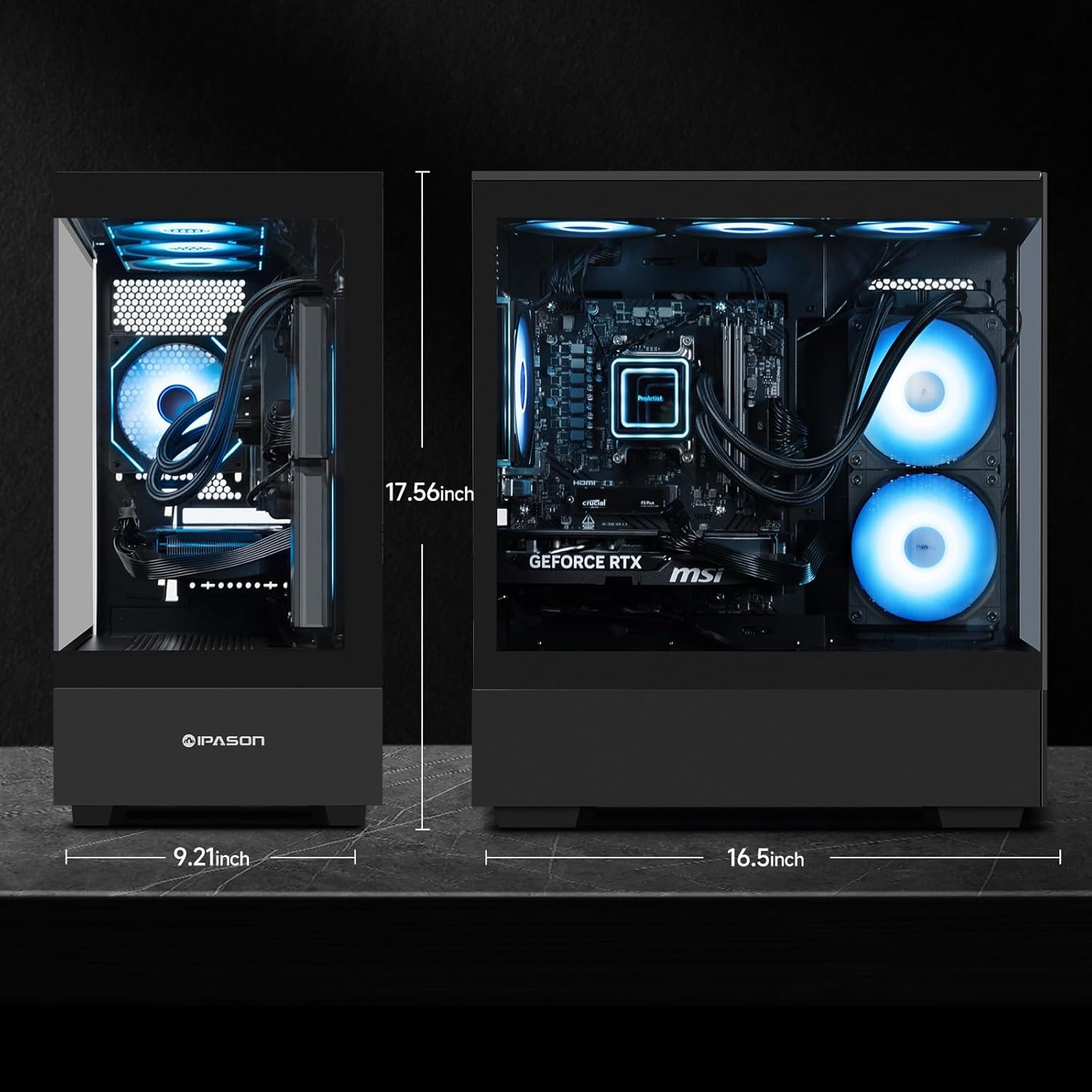
Figure 4: Physical dimensions of the IPASON Gaming PC case, showing height of 17.56 inches, width of 9.21 inches, and length of 16.5 inches.
വാറൻ്റിയും പിന്തുണയും
Your IPASON Gaming PC comes with a 1 വർഷത്തെ വാറൻ്റി covering manufacturing defects and hardware malfunctions.
For technical assistance and support, IPASON engineers are available from 9 AM to 6 PM PST, 7 days a week. You can expect responses to Amazon messages within 4 hours. Additionally, 10-minute setup tutorials are available to assist with initial configuration and common queries.
For warranty claims or technical support, please contact IPASON through the Amazon messaging system or refer to the contact information provided with your purchase documentation.
Ask a question about this manual
Ask about setup, troubleshooting, compatibility, parts, safety, or missing instructions. Manuals+ will review the question and use this page’s manual context to help answer it.