
Midea NT20-20AR
Midea 2000W PTC Ceramic Heater User Manual
Model: NT20-20AR
ബ്രാൻഡ്: Midea
1. ആമുഖം
Thank you for choosing the Midea 2000W PTC Ceramic Heater. This manual provides detailed instructions for the safe and efficient operation of your heater. Please read this manual thoroughly before use and keep it for future reference.

Figure 1: Midea 2000W PTC Ceramic Heater (Model NT20-20AR)
2. പ്രധാന സുരക്ഷാ നിർദ്ദേശങ്ങൾ
മുന്നറിയിപ്പ്: തീ, വൈദ്യുതാഘാതം അല്ലെങ്കിൽ പരിക്കുകൾ എന്നിവയ്ക്കുള്ള സാധ്യത കുറയ്ക്കുന്നതിന്, ഇനിപ്പറയുന്നവ നിരീക്ഷിക്കുക:
- ഹീറ്റർ എപ്പോഴും ഉറച്ചതും നിരപ്പായതുമായ ഒരു പ്രതലത്തിൽ സ്ഥാപിക്കുക.
- ഹീറ്റർ മൂടുകയോ എയർ ഇൻലെറ്റുകൾ/ഔട്ട്ലെറ്റുകൾ തടയുകയോ ചെയ്യരുത്.
- ഹീറ്ററിന്റെ മുൻവശത്ത് നിന്നും വശങ്ങളിൽ നിന്നും പിൻഭാഗത്തുനിന്നും കുറഞ്ഞത് 1 മീറ്റർ (3 അടി) അകലെയെങ്കിലും കത്തുന്ന വസ്തുക്കൾ (ഫർണിച്ചർ, കർട്ടനുകൾ, പേപ്പർ, വസ്ത്രങ്ങൾ) സൂക്ഷിക്കുക.
- Do not use the heater in bathrooms, laundry areas, or similar damp ഇൻഡോർ ലൊക്കേഷനുകൾ.
- Ensure the power cord is not damaged and is properly plugged into a suitable outlet.
- This heater is equipped with a 45° tip-over protection switch, V-0 flame-retardant materials, and overheat protection. If the heater tips over or overheats, it will automatically shut off.
- The heater features a 24-hour automatic shut-off for added safety.
- Do not insert any objects into the ventilation or exhaust openings.
- ഉപയോഗിക്കാത്തപ്പോൾ ഹീറ്റർ അൺപ്ലഗ് ചെയ്യുക.

Figure 2: Enhanced Safety Features
3. ഉൽപ്പന്നം കഴിഞ്ഞുview
3.1 പ്രധാന സവിശേഷതകൾ
- Efficient PTC Ceramic Heating: Provides rapid and effective warmth.
- ഇഷ്ടാനുസൃതമാക്കാവുന്ന സുഖസൗകര്യങ്ങൾ: Temperature adjustable from 5°C to 35°C in 1°C increments.
- ശാന്തമായ പ്രവർത്തനം: 42 dB എന്ന കുറഞ്ഞ ശബ്ദ തലത്തിലാണ് പ്രവർത്തിക്കുന്നത്.
- 24-മണിക്കൂർ ടൈമർ: Allows scheduled heating.
- ECO മോഡ്: ഊർജ്ജ ഉപഭോഗം ഒപ്റ്റിമൈസ് ചെയ്യുന്നു.
- വിപുലമായ സുരക്ഷ: 45° tip-over protection, V-0 flame-retardant materials, overheat protection, and 24-hour automatic shut-off.
- പോർട്ടബിൾ ഡിസൈൻ: Lightweight (1.46 kg) and compact for easy relocation.
3.2 ഘടകങ്ങൾ
The Midea PTC Ceramic Heater consists of the following main components:
- LED ഡിസ്പ്ലേ ഉള്ള കൺട്രോൾ പാനൽ
- എയർ ഇൻലെറ്റ് ഗ്രിൽ
- എയർ letട്ട്ലെറ്റ് ഗ്രിൽ
- പവർ കോർഡും പ്ലഗും
- Tip-over Switch (located at the base)

Figure 3: Instant Heating Feature
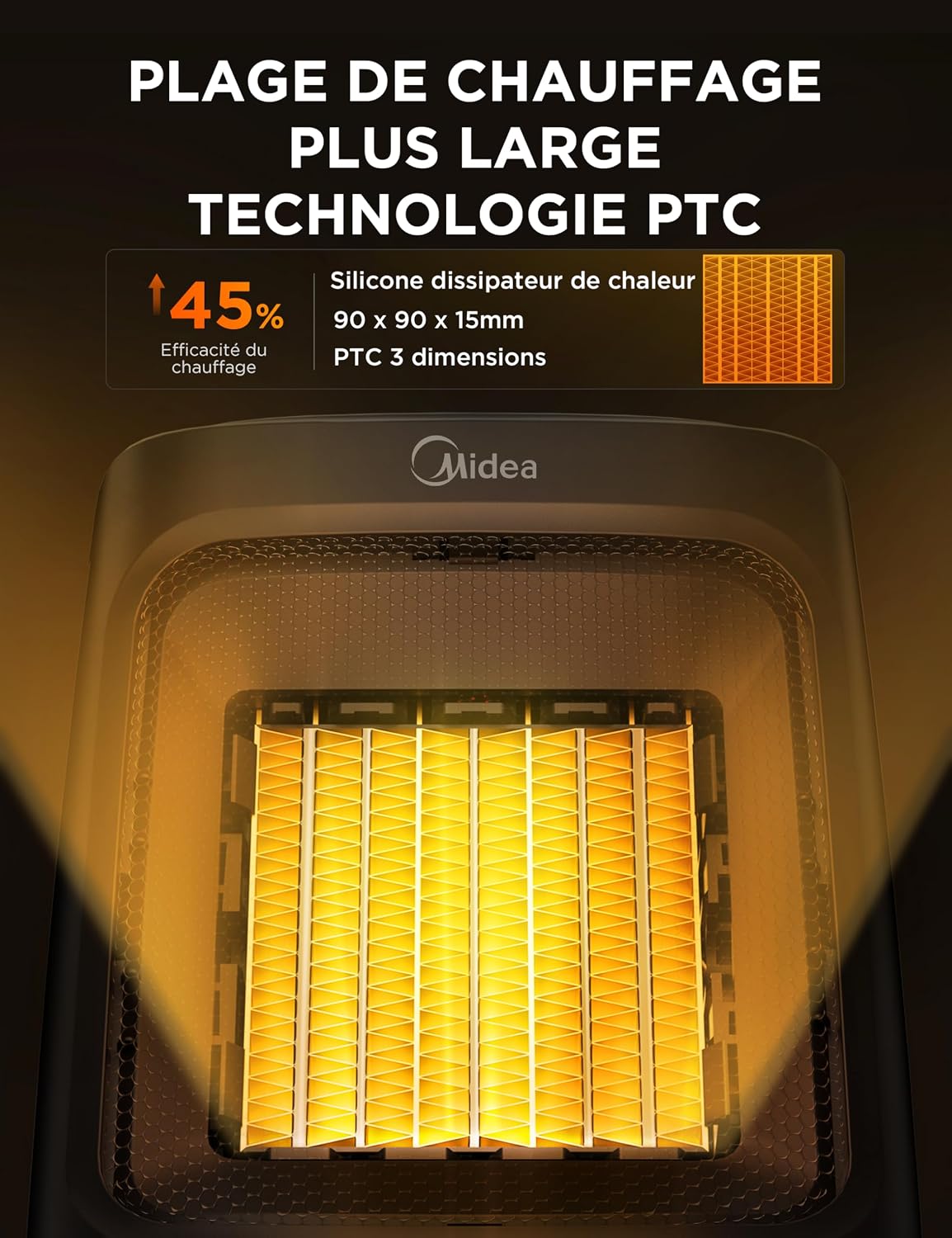
Figure 4: PTC Ceramic Heating Technology
4. സജ്ജീകരണം
- അൺപാക്ക്: ഹീറ്റർ അതിന്റെ പാക്കേജിംഗിൽ നിന്ന് ശ്രദ്ധാപൂർവ്വം നീക്കം ചെയ്യുക. ആവശ്യമെങ്കിൽ സംഭരണത്തിനായി പാക്കേജിംഗ് സൂക്ഷിക്കുക.
- പ്ലേസ്മെൻ്റ്: Place the heater on a stable, flat, and heat-resistant surface. Ensure there is at least 1 meter (3 feet) of clear space around the heater from any walls, furniture, or other objects.
- പവർ കണക്ഷൻ: Plug the power cord into a standard 230V AC electrical outlet. Ensure the outlet is in good condition and not overloaded.
5. പ്രവർത്തന നിർദ്ദേശങ്ങൾ
5.1 നിയന്ത്രണ പാനൽ
The heater features a touch-sensitive control panel with an LED display on the top. The display shows the current temperature and mode settings.

Figure 5: Control Panel and LED Display
5.2 പവർ ഓൺ/ഓഫ്
അമർത്തുക പവർ ബട്ടൺ on the control panel to turn the heater on or off.
5.3 മോഡ് തിരഞ്ഞെടുക്കൽ
ഹീറ്റർ 4 ഓപ്പറേറ്റിംഗ് മോഡുകൾ വാഗ്ദാനം ചെയ്യുന്നു:
- High Heat (HI): Provides maximum heating power.
- Low Heat (Lo): Provides reduced heating power.
- ECO Mode (Eco): Automatically adjusts heating power to maintain the set temperature while optimizing energy consumption.
- Fan Only (CL): ചൂടാക്കാതെ വായു പ്രചരിക്കുന്നു.
അമർത്തുക മോഡ് ബട്ടൺ to cycle through the available modes.

Figure 6: ECO Mode Operation
5.4 താപനില ക്രമീകരണം
In heating modes (HI, Lo, ECO), you can set the desired temperature between 5°C and 35°C. Use the താപനില വർദ്ധനവ് (+) ഒപ്പം താപനില കുറവ് (-) buttons to adjust the temperature in 1°C increments.
സെറ്റ് താപനില നിലനിർത്താൻ ഹീറ്റർ യാന്ത്രികമായി ഓണാക്കുകയോ ഓഫാക്കുകയോ ചെയ്യും.

Figure 7: Customizable Temperature Settings
5.5 ടൈമർ പ്രവർത്തനം
The 24-hour timer allows you to set a specific duration for the heater to operate before automatically shutting off. Press the ടൈമർ ബട്ടൺ ഒപ്പം ഉപയോഗിക്കുക താപനില വർദ്ധനവ് (+) ഒപ്പം താപനില കുറവ് (-) buttons to set the desired operating time in hours.

Figure 8: Quiet Operation and Timer
6. പരിപാലനം
പതിവ് അറ്റകുറ്റപ്പണികൾ നിങ്ങളുടെ ഹീറ്ററിന്റെ മികച്ച പ്രകടനവും ദീർഘായുസ്സും ഉറപ്പാക്കുന്നു.
- വൃത്തിയാക്കൽ:
- വൃത്തിയാക്കുന്നതിന് മുമ്പ് എല്ലായ്പ്പോഴും ഹീറ്റർ അൺപ്ലഗ് ചെയ്ത് പൂർണ്ണമായും തണുക്കാൻ അനുവദിക്കുക.
- ഒരു മൃദുവായ, ഡി ഉപയോഗിച്ച് ബാഹ്യ പ്രതലങ്ങൾ തുടയ്ക്കുകamp തുണി. ഉരച്ചിലുകളുള്ള ക്ലീനറുകളോ ലായകങ്ങളോ ഉപയോഗിക്കരുത്.
- എയർ ഇൻലെറ്റിലെയും ഔട്ട്ലെറ്റിലെയും ഗ്രില്ലുകളിൽ നിന്ന് പൊടി നീക്കം ചെയ്യാൻ ബ്രഷ് അറ്റാച്ച്മെന്റുള്ള ഒരു വാക്വം ക്ലീനർ ഉപയോഗിക്കുക.
- സംഭരണം:
- ഹീറ്റർ ദീർഘനേരം സൂക്ഷിക്കുകയാണെങ്കിൽ, അത് നന്നായി വൃത്തിയാക്കുക.
- Store the heater in its original packaging in a cool, dry place.
7. പ്രശ്നപരിഹാരം
| പ്രശ്നം | സാധ്യമായ കാരണം | പരിഹാരം |
|---|---|---|
| ഹീറ്റർ ഓണാക്കുന്നില്ല. | Not plugged in; power outlet malfunction; tip-over switch activated; overheat protection activated. | Ensure plug is secure. Test outlet with another device. Place heater on a flat surface. Allow heater to cool down for 30 minutes. |
| ഹീറ്റർ താപം ഉൽപാദിപ്പിക്കുന്നില്ല. | Fan Only (CL) mode selected; temperature setting too low. | Select a heating mode (HI, Lo, ECO). Increase the desired temperature setting. |
| ഹീറ്റർ അപ്രതീക്ഷിതമായി ഓഫാകുന്നു. | Overheat protection activated; tip-over switch activated; timer expired. | Ensure heater is not covered and has adequate ventilation. Place heater on a flat surface. Check timer settings. |
| Reduced airflow or heating efficiency. | ഗ്രില്ലുകളിൽ പൊടി അടിഞ്ഞുകൂടൽ. | Clean air inlet and outlet grilles as described in the Maintenance section. |
ഈ പരിഹാരങ്ങൾ പരീക്ഷിച്ചതിന് ശേഷവും പ്രശ്നം നിലനിൽക്കുകയാണെങ്കിൽ, ദയവായി Midea ഉപഭോക്തൃ പിന്തുണയുമായി ബന്ധപ്പെടുക.
8 സ്പെസിഫിക്കേഷനുകൾ
| ഫീച്ചർ | വിശദാംശങ്ങൾ |
|---|---|
| മോഡൽ നമ്പർ | NT20-20AR |
| ബ്രാൻഡ് | മിഡിയ |
| പവർ ഔട്ട്പുട്ട് | 2000 വാട്ട്സ് |
| വാല്യംtage | 230 വോൾട്ട് |
| താപനില പരിധി | 5°C - 35°C |
| മോഡുകളുടെ എണ്ണം | 4 (High, Low, ECO, Fan Only) |
| പ്രത്യേക സവിശേഷതകൾ | Electronic Thermostat, Tip-over Protection, Overheat Protection, 24-Hour Timer |
| അളവുകൾ (L x W x H) | 16.4 x 16.4 x 22 സെ.മീ |
| ഭാരം | 1.46 കി.ഗ്രാം |
| ഉദ്ദേശിച്ച ഉപയോഗം | Indoor, Multi-room |
| പവർ ഉറവിടം | കോർഡഡ് ഇലക്ട്രിക് |
9. വാറൻ്റിയും പിന്തുണയും
Midea products are manufactured to the highest quality standards. For warranty information, please refer to the warranty card included with your product or visit the official Midea webസൈറ്റ്.
For technical support, troubleshooting assistance, or to inquire about replacement parts, please contact Midea customer service:
- Webസൈറ്റ്: www.midea.com
- കസ്റ്റമർ സർവീസ്: Refer to your regional Midea contact information.
Ask a question about this manual
Ask about setup, troubleshooting, compatibility, parts, safety, or missing instructions. Manuals+ will review the question and use this page’s manual context to help answer it.