
hohem V3 Ultra
hohem iSteady V3 Ultra Gimbal Stabilizer User Manual
Model: V3 Ultra | Brand: hohem
1. ആമുഖം
The hohem iSteady V3 Ultra is an advanced 3-axis gimbal stabilizer designed for smartphones, offering exceptional stability and intelligent features for video recording and content creation. It integrates AI tracking, a built-in extendable rod, a tripod, a dual-color temperature fill light, and a detachable remote control, providing a versatile and portable solution for capturing smooth, professional-quality footage.
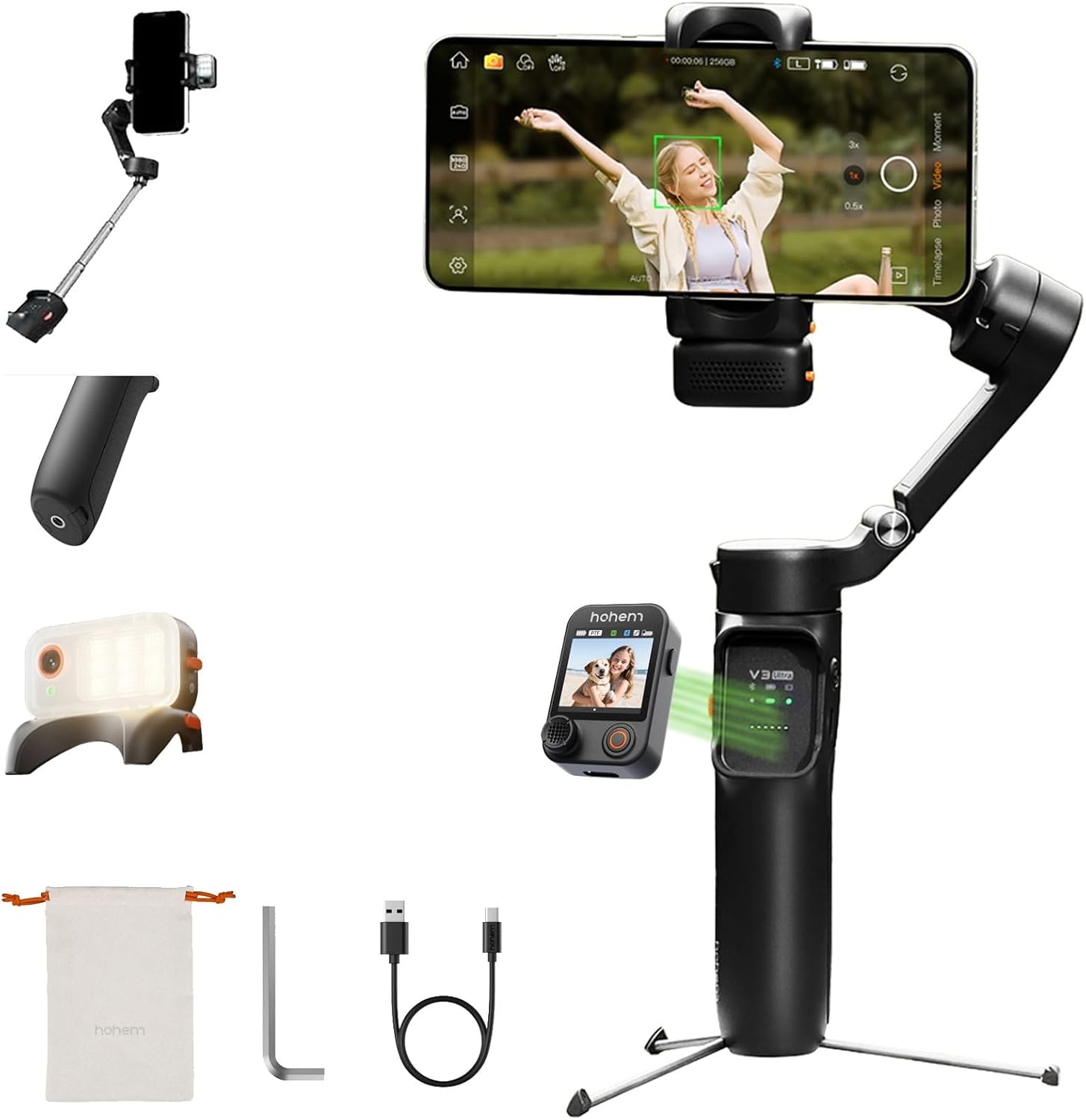
Figure 1.1: The hohem iSteady V3 Ultra Gimbal Stabilizer, showcasing അതിന്റെ ഒതുക്കമുള്ള രൂപകൽപ്പനയും സംയോജിത സവിശേഷതകളും.
2. പാക്കേജ് ഉള്ളടക്കം
താഴെ ലിസ്റ്റ് ചെയ്തിരിക്കുന്ന എല്ലാ ഇനങ്ങളും നിങ്ങളുടെ പാക്കേജിൽ ഉൾപ്പെടുത്തിയിട്ടുണ്ടെന്ന് ഉറപ്പാക്കുക:
- hohem iSteady V3 Ultra Gimbal Stabilizer
- AI Tracker Module
- ടച്ച്സ്ക്രീൻ റിമോട്ട് കൺട്രോളർ
- ടൈപ്പ്-സി ചാർജിംഗ് കേബിൾ
- ഹെക്സ് കീ
- സ്റ്റോറേജ് പൗച്ച്
- ദ്രുത ആരംഭ ഗൈഡ്
- വാറൻ്റി കാർഡ്
- സുരക്ഷാ മാർഗ്ഗനിർദ്ദേശങ്ങൾ

Figure 2.1: All components included in the hohem iSteady V3 Ultra retail package.
3. ഉൽപ്പന്നം കഴിഞ്ഞുview
Familiarize yourself with the main components of the iSteady V3 Ultra:
- ഗിംബൽ ബോഡി: Main handle and motor assembly.
- ഫോൺ Clamp: നിങ്ങളുടെ സ്മാർട്ട്ഫോൺ സുരക്ഷിതമായി സൂക്ഷിക്കുന്നു.
- 3-Axis Motors: Provide stabilization across pan, tilt, and roll axes.
- നിയന്ത്രണ പാനൽ: Buttons and joystick for basic operations.
- Detachable Touchscreen Remote: Allows remote control and live view.
- AI Vision Sensor: Built-in sensor for intelligent tracking.
- വെളിച്ചം നിറയ്ക്കുക: Integrated light with adjustable color temperature and brightness.
- നീട്ടാവുന്ന വടി: Telescopic rod for extended reach.
- Built-in Tripod: Foldable legs for stable tabletop placement.
- യുഎസ്ബി-സി പോർട്ട്: For charging the gimbal.

ചിത്രം 3.1: മുൻഭാഗം view of the iSteady V3 Ultra.

ചിത്രം 3.2: വശം view illustrating the detachable remote.
4. സജ്ജീകരണം
4.1 ഗിംബൽ ചാർജ് ചെയ്യുന്നു
Before first use, fully charge the iSteady V3 Ultra. Connect the provided USB-C cable to the gimbal's charging port and a USB power adapter (not included). The indicator lights will show charging status. A full charge provides up to 15 hours of operation.
4.2 നിങ്ങളുടെ സ്മാർട്ട്ഫോൺ മൌണ്ട് ചെയ്യുന്നു
ഫോൺ cl തുറക്കുകamp and carefully insert your smartphone. Ensure the phone is centered and securely held. For optimal balance, place the phone as close to the gimbal's center of gravity as possible.
4.3 ഗിംബലിനെ സന്തുലിതമാക്കൽ
Proper balancing is crucial for stable footage and efficient motor operation. Adjust the phone's position within the clamp until it remains level when the gimbal is powered off. This minimizes motor strain and extends battery life.
5. പ്രവർത്തന നിർദ്ദേശങ്ങൾ
5.1 പവർ ഓൺ/ഓഫ്
ജിംബൽ ഓൺ അല്ലെങ്കിൽ ഓഫ് ചെയ്യാൻ പവർ ബട്ടൺ 3 സെക്കൻഡ് അമർത്തിപ്പിടിക്കുക.
5.2 ഗിംബൽ മോഡുകൾ
The iSteady V3 Ultra supports various operating modes. Refer to the quick start guide for detailed button functions to switch between modes such as Pan Follow, Pan & Tilt Follow, All Lock, and POV (Point of View).
5.3 AI ട്രാക്കിംഗ്
The built-in AI vision sensor enables automatic tracking of subjects without needing an app. Activate AI tracking by double-tapping the touchscreen remote or using specific hand gestures.
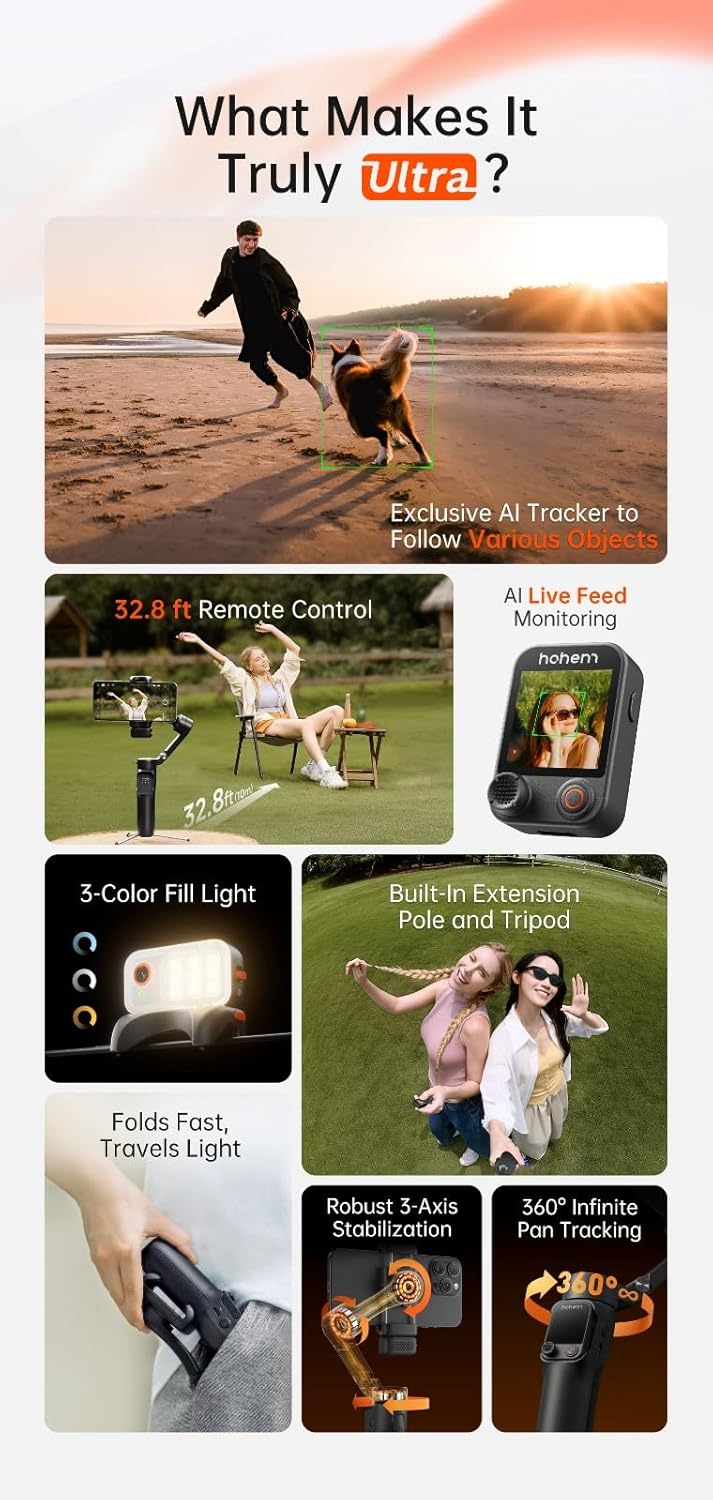
Figure 5.1: AI tracking in action, demonstrating precise subject recognition.

Figure 5.2: Gesture control for starting/stopping AI tracking and recording.
5.4 വേർപെടുത്താവുന്ന റിമോട്ട് കൺട്രോൾ
The remote control features a 1.22-inch full-color touchscreen for live monitoring and direct control of gimbal functions. It can be detached for remote operation up to 10 meters, allowing for flexible shooting angles and self-filming.

Figure 5.3: Remote control in use for distant filming.
5.5 ഫിൽ ലൈറ്റ്
The integrated fill light offers three brightness levels and dual-color temperature settings (cool, warm, natural). Press the dedicated button on the remote or gimbal to cycle through settings and adjust illumination for various lighting conditions.

Figure 5.4: The integrated fill light module.
5.6 Extendable Rod & Tripod
The built-in extendable rod can be pulled out to increase reach for wider shots or group photos. The integrated tripod legs fold out from the base, providing a stable platform for stationary recording or time-lapses.

Figure 5.5: Gimbal with extended rod and deployed tripod.
6. ആപ്പ് ഇൻ്റഗ്രേഷൻ
For enhanced functionality and creative features, download the official Hohem App from your smartphone's app store. The app unlocks advanced camera techniques such as Hitchcock zoom, dreamy panoramas, and motion control. It also supports wireless phone charging through the gimbal.
7. പരിപാലനം
7.1 വൃത്തിയാക്കൽ
Wipe the gimbal with a soft, dry cloth. Do not use liquid cleaners or solvents. Ensure no dust or debris accumulates around the motors or joints.
7.2 സംഭരണം
Store the gimbal in its provided storage pouch in a cool, dry place away from direct sunlight and extreme temperatures. Avoid placing heavy objects on top of the gimbal.
8. പ്രശ്നപരിഹാരം
8.1 Gimbal Not Powering On
- Ensure the gimbal is fully charged.
- കുറഞ്ഞത് 3 സെക്കൻഡ് നേരത്തേക്ക് പവർ ബട്ടൺ അമർത്തിപ്പിടിക്കുക.
8.2 Unstable Footage
- Verify that your smartphone is properly balanced in the clamp.
- Check for any obstructions preventing motor movement.
- Ensure the gimbal firmware is up to date via the Hohem App.
8.3 AI Tracking Not Responding
- Ensure the AI vision sensor is clean and unobstructed.
- Confirm sufficient lighting for the AI to detect subjects.
- Try recalibrating the AI tracking through the Hohem App if available.
8.4 Remote Control Disconnection
- റിമോട്ട് കൺട്രോൾ ചാർജ്ജ് ചെയ്തിട്ടുണ്ടെന്ന് ഉറപ്പാക്കുക.
- Move closer to the gimbal to reduce interference.
- Re-pair the remote control with the gimbal if necessary (refer to quick start guide).
9 സ്പെസിഫിക്കേഷനുകൾ
| ഫീച്ചർ | വിശദാംശങ്ങൾ |
|---|---|
| മോഡൽ നമ്പർ | V3 അൾട്രാ |
| ബ്രാൻഡ് | ഹോഹെം |
| നിറം | കറുപ്പ് |
| അനുയോജ്യമായ ഉപകരണങ്ങൾ | സെൽ ഫോൺ |
| ഇനത്തിൻ്റെ ഭാരം | 14.8 ഔൺസ് (0.42 കിലോഗ്രാം) |
| പാക്കേജ് അളവുകൾ | 7.4 x 4.84 x 2.6 ഇഞ്ച് |
| ബാറ്ററി ലൈഫ് | 15 മണിക്കൂർ വരെ |
10. വാറൻ്റിയും പിന്തുണയും
For detailed warranty information, please refer to the warranty card included in your product package or visit the official hohem website. If you encounter any issues or require technical assistance, please contact hohem customer support through their official channels.
Official hohem Webസൈറ്റ്: www.hohem.com
Ask a question about this manual
Ask about setup, troubleshooting, compatibility, parts, safety, or missing instructions. Manuals+ will review the question and use this page’s manual context to help answer it.