
1. ആമുഖം
This manual provides essential instructions for the safe and efficient use of your DOOGEE Fire 3 Ultra Rugged Smartphone. Please read this manual thoroughly before operating your device to ensure optimal performance and longevity. The DOOGEE Fire 3 Ultra is designed for durability and performance, featuring a robust build, advanced camera system, and long-lasting battery.

2. ബോക്സിൽ എന്താണുള്ളത്?
പാക്കേജിൽ എല്ലാ ഇനങ്ങളും ഉണ്ടെന്ന് ഉറപ്പാക്കുക:
- 1x DOOGEE Fire 3 Ultra Rugged Phone
- 1x ടൈപ്പ്-സി യുഎസ്ബി കേബിൾ
- 1x 18W Charger
- 1x സ്ലിംഗ്
- 1x Card Slot Opener
3. സജ്ജീകരണം
3.1. സിം കാർഡും TF കാർഡും ഇൻസ്റ്റാൾ ചെയ്യൽ
The DOOGEE Fire 3 Ultra supports dual Nano SIM cards or one Nano SIM card and one TF (microSD) card for expanded storage up to 2TB.
- ഉപകരണത്തിന്റെ വശത്ത് സിം കാർഡ് ട്രേ കണ്ടെത്തുക.
- Insert the provided card slot opener into the small hole next to the tray to eject it.
- Carefully place your Nano SIM card(s) and/or TF card into the designated slots on the tray. Ensure the gold contacts are facing down.
- Gently reinsert the tray into the phone until it clicks into place.
3.2. പ്രാരംഭ ചാർജിംഗും പവർ ഓണും
ആദ്യ ഉപയോഗത്തിന് മുമ്പ്, ഉപകരണം പൂർണ്ണമായും ചാർജ് ചെയ്യാൻ ശുപാർശ ചെയ്യുന്നു.
- Connect the Type-C USB cable to the phone's charging port and the 18W charger.
- Plug the charger into a power outlet. The charging indicator will appear on the screen.
- Once sufficiently charged, press and hold the Power button (usually on the side) until the DOOGEE logo appears.
- ഭാഷാ തിരഞ്ഞെടുപ്പ്, വൈ-ഫൈ കണക്ഷൻ, ഗൂഗിൾ അക്കൗണ്ട് സജ്ജീകരണം എന്നിവയുൾപ്പെടെയുള്ള പ്രാരംഭ സജ്ജീകരണം പൂർത്തിയാക്കാൻ ഓൺ-സ്ക്രീൻ നിർദ്ദേശങ്ങൾ പാലിക്കുക.

4. പ്രവർത്തന നിർദ്ദേശങ്ങൾ
4.1. അടിസ്ഥാന നാവിഗേഷനും ഡിസ്പ്ലേയും
The device features a 5.5-inch IPS HD+ display with a 60Hz refresh rate. Navigate using touch gestures: tap, swipe, pinch-to-zoom.
- പവർ ബട്ടൺ: സ്ക്രീൻ ഉണർത്താൻ/നിദ്രയിലാക്കാൻ അമർത്തുക. പവർ ഓഫ് ചെയ്യാനോ പുനരാരംഭിക്കാനോ അമർത്തിപ്പിടിക്കുക.
- വോളിയം ബട്ടണുകൾ: Adjust media volume, call volume, or ringtone volume.
- വൈഡ്വൈൻ എൽ1 പിന്തുണ: Enjoy high-definition content streaming from supported platforms.

4.2. ക്യാമറ പ്രവർത്തനങ്ങൾ
The DOOGEE Fire 3 Ultra is equipped with a versatile camera system.
- പ്രധാന ക്യാമറ: 16MP sensor for general photography.
- രാത്രി കാഴ്ച ക്യാമറ: 20MP sensor for enhanced low-light imaging.
- മുൻ ക്യാമറ: സെൽഫികൾക്കും വീഡിയോ കോളുകൾക്കും 8MP.
- ഷൂട്ടിംഗ് മോഡുകൾ: Includes HDR, Pro Mode, Panorama, Night Mode, Beauty, Portrait, Filters, Watermark Camera, Smile Shutter, and QR Code Scan.


4.3. കണക്റ്റിവിറ്റിയും നാവിഗേഷനും
The device supports various connectivity options and advanced navigation systems.
- വൈഫൈ: Connect to 2.4G/5G wireless networks.
- ബ്ലൂടൂത്ത്: Pair with wireless accessories.
- NFC: Enable for mobile payments, device pairing, and access card scanning.
- ജിപിഎസ്: Utilize Beidou, Galileo, Glonass, and GPS for accurate positioning and navigation.
- 4G Dual SIM: Supports two Nano SIM cards for flexible network usage.
4.4. സുരക്ഷാ സവിശേഷതകൾ
Secure your device with biometric authentication.
- സൈഡ് ഫിംഗർപ്രിന്റ് അൺലോക്ക്: Register your fingerprint for quick and secure access.
- ഫേസ് അൺലോക്ക്: Use facial recognition to unlock your device.
4.5. മെമ്മറിയും സംഭരണവും
The DOOGEE Fire 3 Ultra offers substantial memory and expandable storage.
- റാം: 24GB (6GB physical + 18GB virtual) for smooth multitasking.
- ആന്തരിക സംഭരണം: 256GB for applications, photos, and documents.
- വികസിപ്പിക്കാവുന്ന സംഭരണം: Supports TF cards up to 2TB (sold separately).

5. പരിപാലനം
5.1. Ruggedness and Cleaning
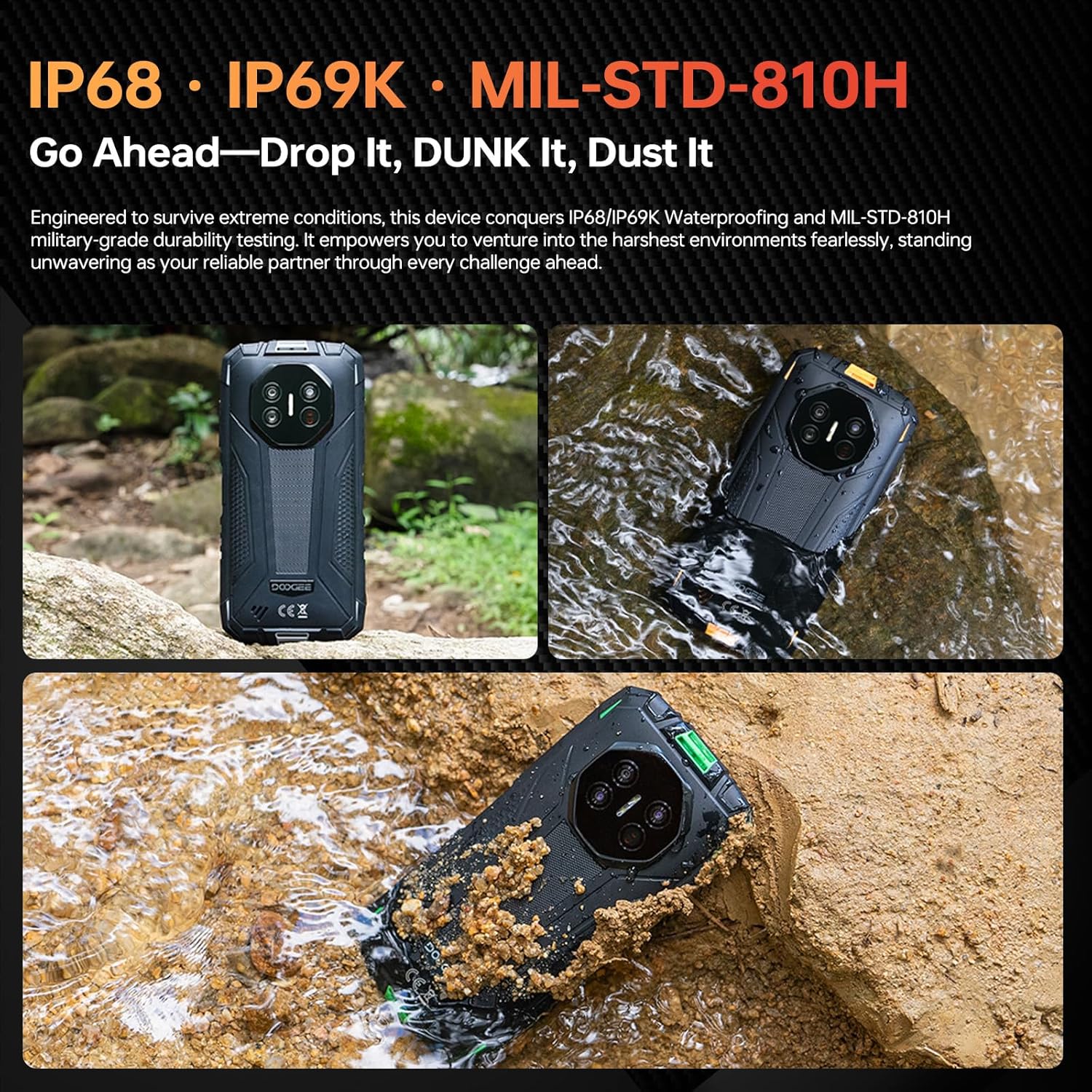
The DOOGEE Fire 3 Ultra is designed to withstand harsh environments with IP68/IP69K and MIL-STD-810H certifications.
- വെള്ളവും പൊടിയും പ്രതിരോധം: The device is resistant to dust and can be submerged in up to 1.5 meters of water for 30 minutes. Ensure all port covers are securely closed before exposure to water or dust.
- ഡ്രോപ്പ് സംരക്ഷണം: 1.5 മീറ്റർ വരെയുള്ള വീഴ്ചകളെ നേരിടാൻ രൂപകൽപ്പന ചെയ്തിരിക്കുന്നു.
- വൃത്തിയാക്കൽ: ഒരു സോഫ്റ്റ് ഉപയോഗിക്കുക, ഡിamp cloth to clean the device. Avoid harsh chemicals or abrasive materials. For water exposure, rinse with clean water and dry thoroughly.
5.2. ബാറ്ററി പരിചരണം
To maximize the lifespan of your 8350mAh battery:
- തീവ്രമായ താപനില ഒഴിവാക്കുക.
- Use only the provided 18W charger and Type-C USB cable.
- ബാറ്ററി ഇടയ്ക്കിടെ പൂർണ്ണമായും ഡിസ്ചാർജ് ചെയ്യാൻ അനുവദിക്കരുത്.
- The device supports OTG reverse charging, allowing it to charge other devices.
6. പ്രശ്നപരിഹാരം
നിങ്ങൾ നേരിട്ടേക്കാവുന്ന പൊതുവായ പ്രശ്നങ്ങളെ ഈ വിഭാഗം അഭിസംബോധന ചെയ്യുന്നു.
- ഉപകരണം ഓണാക്കുന്നില്ല: Ensure the battery is charged. Connect to the charger for at least 10 minutes, then try pressing and holding the Power button.
- സ്ക്രീൻ പ്രതികരിക്കുന്നില്ല: Restart the device by holding the Power button for an extended period (e.g., 10-15 seconds) until it reboots.
- Connectivity issues (Wi-Fi/Bluetooth/4G):
- Toggle the respective connection (Wi-Fi, Bluetooth, Mobile Data) off and on.
- ഉപകരണം പുനരാരംഭിക്കുക.
- For Wi-Fi, try forgetting the network and reconnecting.
- For 4G, ensure your SIM card is correctly inserted and your plan is active.
- ആപ്പുകൾ ക്രാഷാകുകയോ മരവിക്കുകയോ ചെയ്യുന്നു:
- ആപ്പ് അടച്ച് വീണ്ടും തുറക്കുക.
- ക്രമീകരണങ്ങൾ > ആപ്പുകൾ എന്നതിൽ ആപ്പിന്റെ കാഷെയും ഡാറ്റയും മായ്ക്കുക.
- ഏറ്റവും പുതിയ പതിപ്പിലേക്ക് ആപ്പ് അപ്ഡേറ്റ് ചെയ്തിട്ടുണ്ടെന്ന് ഉറപ്പാക്കുക.
- മന്ദഗതിയിലുള്ള പ്രകടനം:
- ആവശ്യമില്ലാത്ത പശ്ചാത്തല ആപ്ലിക്കേഷനുകൾ അടയ്ക്കുക.
- Clear cache regularly.
- ആവശ്യത്തിന് സംഭരണ സ്ഥലം ലഭ്യമാണെന്ന് ഉറപ്പാക്കുക.
If problems persist, contact customer support or refer to the official DOOGEE webകൂടുതൽ സഹായത്തിനുള്ള സൈറ്റ്.
7 സ്പെസിഫിക്കേഷനുകൾ
| ഫീച്ചർ | വിശദാംശങ്ങൾ |
|---|---|
| മോഡലിൻ്റെ പേര് | DOOGEE Fire 3 Ultra |
| ഓപ്പറേറ്റിംഗ് സിസ്റ്റം | ആൻഡ്രോയിഡ് 15 |
| റാം മെമ്മറി | 24 ജിബി (6 ജിബി ഫിസിക്കൽ + 18 ജിബി വെർച്വൽ) |
| ആന്തരിക സംഭരണം | 256 ജിബി |
| വികസിപ്പിക്കാവുന്ന സംഭരണം | Up to 2 TB (TF card) |
| സ്ക്രീൻ വലിപ്പം | 5.5 ഇഞ്ച് |
| ഡിസ്പ്ലേ റെസല്യൂഷൻ | 720 x 1440 (എച്ച്ഡി+) |
| പുതുക്കിയ നിരക്ക് | 60 Hz |
| പ്രധാന ക്യാമറ | 16 എം.പി |
| നൈറ്റ് വിഷൻ ക്യാമറ | 20 എം.പി |
| മുൻ ക്യാമറ | 8 എം.പി |
| ബാറ്ററി ശേഷി | 8350 mAh |
| ചാർജിംഗ് | 18W ഫാസ്റ്റ് ചാർജിംഗ്, OTG റിവേഴ്സ് ചാർജിംഗ് |
| കണക്റ്റിവിറ്റി | 4G Dual SIM, Wi-Fi (2.4G/5G), Bluetooth, NFC |
| നാവിഗേഷൻ | ജിപിഎസ്, ഗ്ലോനാസ്, ഗലീലിയോ, ബീഡോ |
| ഈട് റേറ്റിംഗുകൾ | IP68, IP69K, MIL-STD-810H |
| ഓഡിയോ ജാക്ക് | 3.5 മി.മീ |
| അളവുകൾ | 6.39 x 3.04 x 0.70 ഇഞ്ച് (ഏകദേശം) |
| ഭാരം | 1.2 പൗണ്ട് (ഏകദേശം) |
8. വാറൻ്റിയും പിന്തുണയും
For warranty information, please refer to the warranty card included with your product or visit the official DOOGEE website. For technical support, product registration, or service inquiries, please contact DOOGEE customer service through their official channels.
Official DOOGEE Webസൈറ്റ്: www.doogee.cc