
ആമുഖം
This manual provides essential information for the proper use and care of your Nokia C200 N151DL smartphone. Please read these instructions carefully before using your device to ensure optimal performance and longevity.
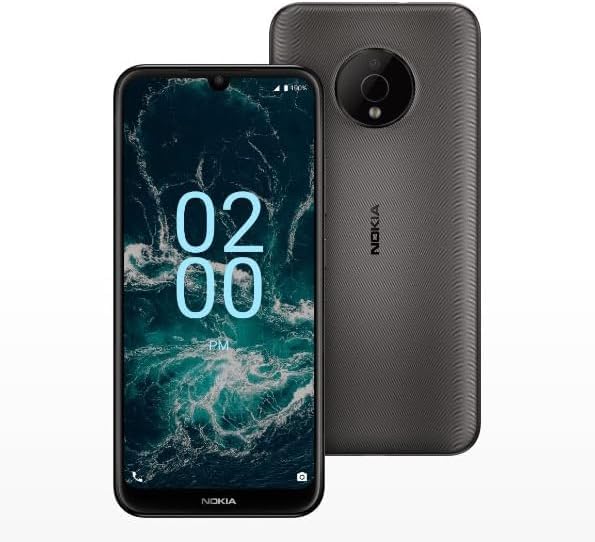
Image: The Nokia C200 N151DL smartphone, featuring its 6.1-inch HD+ display and Space Gray finish.
ബോക്സിൽ എന്താണുള്ളത്
Upon unboxing your Nokia C200 N151DL, verify that all the following items are included:
- Nokia C200 N151DL Smartphone
- യുഎസ്ബി-സി കേബിൾ
- സിം എജക്ടർ ഉപകരണം
സജ്ജമാക്കുക
1. സിം കാർഡ് ഇടുന്നു
- നിങ്ങളുടെ ഫോണിന്റെ വശത്ത് സിം കാർഡ് ട്രേ കണ്ടെത്തുക.
- ട്രേയിലെ ചെറിയ ദ്വാരം തുറക്കാൻ അതിലേക്ക് സിം എജക്റ്റർ ഉപകരണം തിരുകുക.
- സ്വർണ്ണ കോൺടാക്റ്റുകൾ താഴേക്ക് അഭിമുഖീകരിക്കുന്ന തരത്തിൽ നിങ്ങളുടെ നാനോ-സിം കാർഡ് ട്രേയിൽ വയ്ക്കുക.
- ട്രേ അതിന്റെ സ്ഥാനത്ത് ക്ലിക്കായി വരുന്നത് വരെ ശ്രദ്ധാപൂർവ്വം ഫോണിലേക്ക് തിരികെ തള്ളുക.
2 ഉപകരണം ചാർജ് ചെയ്യുന്നു
Before initial use, it is recommended to fully charge your Nokia C200 N151DL.
- ഫോണിന്റെ അടിയിലുള്ള ചാർജിംഗ് പോർട്ടിലേക്ക് USB-C കേബിൾ ബന്ധിപ്പിക്കുക.
- Connect the other end of the USB-C cable to a compatible USB wall adapter (not included) and plug it into a power outlet.
- സ്ക്രീനിലെ ബാറ്ററി ഇൻഡിക്കേറ്റർ ചാർജിംഗ് പുരോഗതി കാണിക്കും.
3. പവർ ഓൺ, പ്രാരംഭ കോൺഫിഗറേഷൻ
- Press and hold the power button (usually on the right side) until the Nokia logo appears.
- നിങ്ങളുടെ ഭാഷ തിരഞ്ഞെടുക്കുന്നതിനും, വൈഫൈയിലേക്ക് കണക്റ്റുചെയ്യുന്നതിനും, നിങ്ങളുടെ Google അക്കൗണ്ട് സജ്ജീകരിക്കുന്നതിനും ഓൺ-സ്ക്രീൻ നിർദ്ദേശങ്ങൾ പാലിക്കുക.
- Your phone runs on Android 12.0, providing a clean and intuitive user experience.
പ്രവർത്തിക്കുന്നു
അടിസ്ഥാന നാവിഗേഷൻ
The Nokia C200 N151DL features a 6.1-inch HD+ touchscreen display. Navigate by tapping, swiping, and pinching gestures. The Android 12.0 operating system offers a user-friendly interface for accessing apps, settings, and notifications.
ബാറ്ററി മാനേജ്മെൻ്റ്
Your device is equipped with a 5000 mAh battery designed for extended daily use. To optimize battery life:
- സ്ക്രീൻ തെളിച്ചം ക്രമീകരിക്കുക.
- പശ്ചാത്തലത്തിൽ പ്രവർത്തിക്കുന്ന ഉപയോഗിക്കാത്ത ആപ്ലിക്കേഷനുകൾ അടയ്ക്കുക.
- ഉപയോഗത്തിലില്ലാത്തപ്പോൾ വൈഫൈ, ബ്ലൂടൂത്ത് അല്ലെങ്കിൽ ജിപിഎസ് ഓഫാക്കുക.
സംഭരണവും പ്രകടനവും
With 32GB of internal storage and 3GB of RAM, the Nokia C200 N151DL provides reliable multitasking capabilities and space for your applications and media. For additional storage, consider using a microSD card (sold separately).
മെയിൻ്റനൻസ്
നിങ്ങളുടെ ഉപകരണം വൃത്തിയാക്കുന്നു
To clean your phone, use a soft, lint-free cloth. Avoid using abrasive materials, alcohol, or chemical cleaners, as these can damage the screen and finish.
സോഫ്റ്റ്വെയർ അപ്ഡേറ്റുകൾ
Periodically check for software updates to ensure your device has the latest features and security enhancements. Navigate to ക്രമീകരണങ്ങൾ > സിസ്റ്റം > സിസ്റ്റം അപ്ഡേറ്റ് ലഭ്യമായ അപ്ഡേറ്റുകൾ പരിശോധിച്ച് ഇൻസ്റ്റാൾ ചെയ്യാൻ.
ട്രബിൾഷൂട്ടിംഗ്
If you encounter issues with your Nokia C200 N151DL, try the following common solutions:
- ഫോൺ ഓണാക്കുന്നില്ല: Ensure the battery is charged. Connect the phone to a charger for at least 30 minutes, then try powering it on again.
- ആപ്പുകൾ ക്രാഷാകുകയോ മരവിക്കുകയോ ചെയ്യുന്നു: പ്രശ്നമുള്ള ആപ്പ് അടച്ച് വീണ്ടും തുറക്കുക. പ്രശ്നം നിലനിൽക്കുകയാണെങ്കിൽ, നിങ്ങളുടെ ഫോൺ റീസ്റ്റാർട്ട് ചെയ്യുക.
- മോശം നെറ്റ്വർക്ക് സിഗ്നൽ: Check your SIM card insertion. Move to an area with better network coverage.
- ചാർജിംഗ് പ്രശ്നങ്ങൾ: Verify the USB-C cable and charger are working correctly. Try a different cable or power source.
- മന്ദഗതിയിലുള്ള പ്രകടനം: Clear cache for frequently used apps. Consider uninstalling unused applications to free up storage.
For more complex issues, refer to Nokia's official support webസൈറ്റ് അല്ലെങ്കിൽ ഉപഭോക്തൃ സേവനവുമായി ബന്ധപ്പെടുക.
സ്പെസിഫിക്കേഷനുകൾ
Key technical specifications for the Nokia C200 N151DL:
| ഫീച്ചർ | സ്പെസിഫിക്കേഷൻ |
|---|---|
| ബ്രാൻഡ് | നോക്കിയ |
| മോഡലിൻ്റെ പേര് | നോക്കിയ C200 |
| ഓപ്പറേറ്റിംഗ് സിസ്റ്റം | ആൻഡ്രോയിഡ് 12.0 |
| ഇൻസ്റ്റാൾ ചെയ്ത RAM മെമ്മറി വലുപ്പം | 3 ജിബി |
| മെമ്മറി സ്റ്റോറേജ് കപ്പാസിറ്റി | 32 ജിബി |
| സിപിയു മോഡൽ | Qualcomm Snapdragon S1 QSD8650 |
| സിപിയു വേഗത | 1.8 GHz |
| സ്ക്രീൻ വലിപ്പം | 6.1 ഇഞ്ച് |
| ഡിസ്പ്ലേ തരം | എൽസിഡി |
| സെല്ലുലാർ ടെക്നോളജി | 4G |
| വയർലെസ് കാരിയർ | നേരായ സംസാരം |
| ബാറ്ററി പവർ | 5000 mAh |
| കണക്റ്റർ തരം | യുഎസ്ബി ടൈപ്പ് സി |
| നിറം | സ്പേസ് ഗ്രേ |
| നിർമ്മാതാവ് | എച്ച്എംഡി ഗ്ലോബൽ |
| യു.പി.സി | 617230227802 |
| ASIN | B0FGG1Y47Z |
വാറൻ്റിയും പിന്തുണയും
വാറൻ്റി വിവരങ്ങൾ
ഈ ഉൽപ്പന്നം എ 30 ദിവസത്തെ റിട്ടേൺ പോളിസി for a full refund or exchange from the date of purchase. Please retain your proof of purchase for warranty claims.
ഉപഭോക്തൃ പിന്തുണ
For further assistance, technical support, or warranty inquiries, please visit the official Nokia support website or contact your retailer. Ensure you have your device model number (N151DL) and proof of purchase available when seeking support.