
1. ആമുഖം
Thank you for choosing the Hodozzy Android 15 Car Stereo. This advanced 1-DIN car multimedia system features a 7-inch retractable touchscreen, powered by Android 15 with 6GB RAM and 128GB ROM, offering a seamless and intelligent driving experience. It integrates wireless CarPlay, Android Auto, GPS navigation, Bluetooth 5.0, FM/AM/RDS radio, DSP audio processing, and rearview camera support. This manual provides essential information for installation, operation, and maintenance to ensure optimal performance and safety.
2 സുരക്ഷാ വിവരങ്ങൾ
- പ്രൊഫഷണൽ ഇൻസ്റ്റാളേഷൻ ശുപാർശ ചെയ്യുന്നു: കാർ ഇലക്ട്രിക്കൽ സിസ്റ്റങ്ങളുടെ സങ്കീർണ്ണത കാരണം, യൂണിറ്റിനോ നിങ്ങളുടെ വാഹനത്തിനോ കേടുപാടുകൾ സംഭവിക്കാതിരിക്കാൻ പ്രൊഫഷണൽ ഇൻസ്റ്റാളേഷൻ വളരെ ശുപാർശ ചെയ്യുന്നു.
- വൈദ്യുതി വിതരണം: Ensure the unit is connected to a 9V-16V DC power supply. Incorrect voltage കേടുപാടുകൾ വരുത്തിവയ്ക്കാം.
- വയറിംഗ്: Follow the wiring diagram precisely. Incorrect wiring can lead to malfunctions or electrical hazards.
- ഡ്രൈവിംഗ് സുരക്ഷ: ഡ്രൈവിംഗിൽ നിന്ന് ശ്രദ്ധ തിരിക്കുന്ന രീതിയിൽ യൂണിറ്റ് പ്രവർത്തിപ്പിക്കരുത്. റോഡ് സുരക്ഷയ്ക്ക് എപ്പോഴും മുൻഗണന നൽകുക.
- താപനില: Avoid exposing the unit to extreme temperatures outside its operating range (-40°C to +85°C).
- വൃത്തിയാക്കൽ: വൃത്തിയാക്കാൻ മൃദുവായതും ഉണങ്ങിയതുമായ തുണി ഉപയോഗിക്കുക. ഉരച്ചിലുകൾ ഉള്ള ക്ലീനറുകളോ ലായകങ്ങളോ ഉപയോഗിക്കുന്നത് ഒഴിവാക്കുക.
3. പാക്കേജ് ഉള്ളടക്കം
താഴെ ലിസ്റ്റ് ചെയ്തിരിക്കുന്ന എല്ലാ ഇനങ്ങളും നിങ്ങളുടെ പാക്കേജിൽ ഉൾപ്പെടുത്തിയിട്ടുണ്ടെന്ന് ഉറപ്പാക്കുക:
- 1 x Hodozzy Android Car Stereo Main Unit
- 1 x Power Cable Harness
- 1 x ജിപിഎസ് ആന്റിന
- 1 x ഉപയോക്തൃ മാനുവൽ
- 1 x Accessory (Mounting Bracket/Screws)
- 1 x 4G Module
- 1 x വൈഫൈ ആന്റിന
- 1 x പിൻഭാഗംview ക്യാമറ
- 1 x ബാഹ്യ മൈക്രോഫോൺ
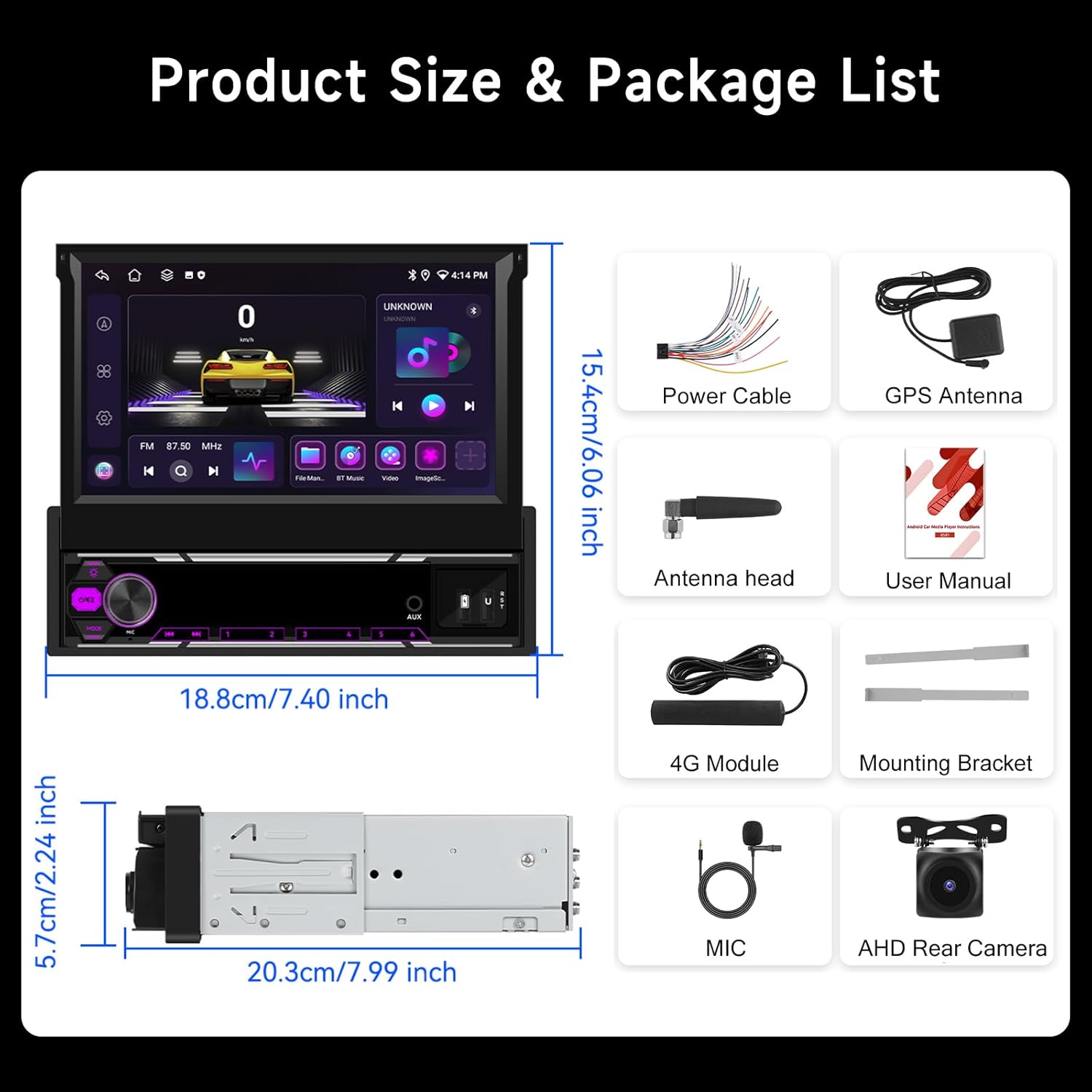
Image: Hodozzy Android 15 Car Stereo dimensions and included accessories.
4. ഉൽപ്പന്നം കഴിഞ്ഞുview
The Hodozzy Android 15 Car Stereo is designed to enhance your in-car entertainment and navigation. It features a powerful Android 15 operating system, a responsive 7-inch capacitive touchscreen, and a retractable design for flexible installation in 1-DIN slots.
പ്രധാന സവിശേഷതകൾ:
- ആൻഡ്രോയിഡ് 15 ഒഎസ്: Latest operating system for smooth performance.
- ഉയർന്ന പ്രകടനം: 6GB RAM + 128GB ROM for fast multitasking and ample സംഭരണം.
- 7-inch Retractable Touchscreen: 1024x600 resolution, adjustable for optimal viewing.
- വയർലെസ് കാർപ്ലേയും ആൻഡ്രോയിഡ് ഓട്ടോയും: Seamless smartphone integration.
- GPS നാവിഗേഷൻ: Supports online and offline maps (GPS/BDS/Glons).
- Built-in WiFi & Bluetooth 5.0: For internet access, hands-free calling, and audio streaming.
- FM/AM/RDS Radio: Access to local radio stations with station information.
- DSP Audio Processing: Enhanced sound quality with customizable equalizer settings.
- പിൻഭാഗംview ക്യാമറ ഇൻപുട്ട്: Automatic display for safer parking.
- സ്റ്റിയറിംഗ് വീൽ നിയന്ത്രണ പിന്തുണ: Convenient control without taking hands off the wheel.
- സ്പ്ലിറ്റ് സ്ക്രീൻ പ്രവർത്തനം: Run two applications simultaneously.

Image: Hodozzy Android 15 Car Stereo main unit.

Image: Android 15 system performance and integrated Wi-Fi/GPS navigation.
5. സജ്ജീകരണം
5.1. ഇൻസ്റ്റലേഷൻ
The Hodozzy Android 15 Car Stereo is designed for 1-DIN slots. Due to the varying complexity of vehicle wiring, professional installation is strongly recommended.
- ബാറ്ററി വിച്ഛേദിക്കുക: Before starting, disconnect the vehicle's negative battery terminal to prevent electrical shorts.
- പഴയ യൂണിറ്റ് നീക്കം ചെയ്യുക: Carefully remove your existing car stereo from the dashboard.
- വയറിംഗ് ഹാർനെസ് ബന്ധിപ്പിക്കുക: Connect the provided power cable harness to the corresponding wires of your vehicle. Ensure correct connections for power (ACC, B+, GND), speaker outputs, and other auxiliary wires (e.g., reverse trigger, steering wheel control).
- ആന്റിനകൾ ബന്ധിപ്പിക്കുക: Connect the GPS antenna, WiFi antenna, and 4G module (if applicable) to their respective ports on the main unit. Position the GPS antenna in a location with a clear view ആകാശത്തിൻ്റെ.
- പിൻഭാഗം ബന്ധിപ്പിക്കുകview ക്യാമറ: If installing the rearview camera, connect its video cable to the 'CAM IN' port and its power cable to the reverse light circuit.
- മൈക്രോഫോൺ ബന്ധിപ്പിക്കുക: Plug in the external microphone for improved call quality.
- മൗണ്ട് യൂണിറ്റ്: Slide the main unit into the 1-DIN slot and secure it using the provided mounting brackets.
- ബാറ്ററി വീണ്ടും ബന്ധിപ്പിക്കുക: വാഹനത്തിന്റെ നെഗറ്റീവ് ബാറ്ററി ടെർമിനൽ വീണ്ടും ബന്ധിപ്പിക്കുക.
5.2. പ്രാരംഭ പവർ ഓൺ
After installation, turn on your vehicle's ignition. The stereo should power on automatically. Follow any on-screen prompts for initial setup, such as language selection and time zone.
6. പ്രവർത്തന നിർദ്ദേശങ്ങൾ
6.1. Screen Operation and Adjustment
The 7-inch touchscreen is capacitive and supports multi-touch gestures. The screen is manually retractable and adjustable for angle.
- Retract/Extend Screen: Gently push or pull the screen to retract or extend it from the main unit.
- ആംഗിൾ ക്രമീകരിക്കുക: Tilt the screen up or down to achieve the best viewing ആംഗിൾ.
- സ്പർശന ആംഗ്യങ്ങൾ: Use standard Android touch gestures (tap, swipe, pinch-to-zoom) to navigate the interface.
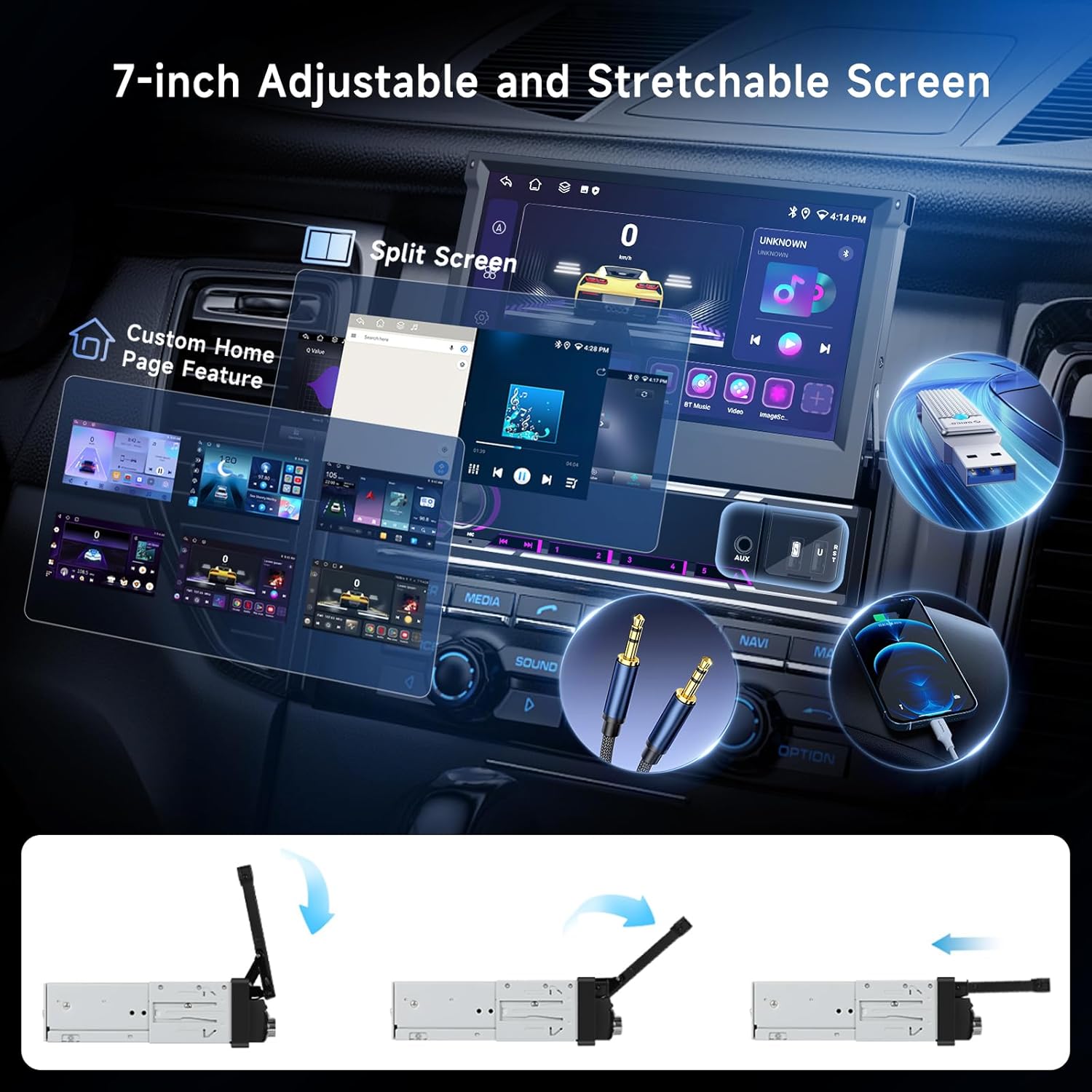
Image: Retractable screen mechanism and interface features.
6.2. വയർലെസ് കാർപ്ലേയും ആൻഡ്രോയിഡ് ഓട്ടോയും
Connect your iPhone or Android smartphone wirelessly for seamless access to navigation, music, calls, and messages.
- ബ്ലൂടൂത്തും വൈഫൈയും പ്രവർത്തനക്ഷമമാക്കുക: നിങ്ങളുടെ സ്മാർട്ട്ഫോണിൽ, ബ്ലൂടൂത്തും വൈ-ഫൈയും പ്രവർത്തനക്ഷമമാക്കിയിട്ടുണ്ടെന്ന് ഉറപ്പാക്കുക.
- ഉപകരണം ജോടിയാക്കുക: On the car stereo, go to the Bluetooth settings and pair with your smartphone.
- Launch CarPlay/Android Auto: Once paired, the system should prompt you to launch CarPlay or Android Auto. Follow the on-screen instructions on both the stereo and your phone.

Image: Wireless CarPlay, Android Auto, and MirrorLink connection methods.
6.3. ജിപിഎസ് നാവിഗേഷൻ
The unit supports GPS/BDS/Glons navigation with pre-installed offline maps. Online navigation is also available via Wi-Fi.
- ഓഫ്ലൈൻ മാപ്പുകൾ: The unit comes with pre-loaded offline maps. For updates or new regions, connect to Wi-Fi and download maps through the navigation app.
- ഓൺലൈൻ മാപ്പുകൾ: Connect the unit to a Wi-Fi hotspot (e.g., from your smartphone) to use online navigation apps like Google Maps, Waze, etc.
- ശബ്ദ മാർഗനിർദേശം: Enable voice guidance in the navigation app settings for turn-by-turn directions.
6.4. ബ്ലൂടൂത്ത് 5.0
Bluetooth 5.0 provides stable connections for hands-free calling and high-quality audio streaming.
- ജോടിയാക്കൽ: Go to the Bluetooth menu on the stereo, enable Bluetooth, and search for available devices. Select your phone from the list and confirm the pairing code.
- ഹാൻഡ്സ് ഫ്രീ കോളിംഗ്: Once paired, you can make and receive calls directly from the stereo screen. Use the external microphone for clear communication.
- ഓഡിയോ സ്ട്രീമിംഗ്: Play music from your smartphone via Bluetooth. Control playback (play/pause, skip tracks) from the stereo.

Image: DSP audio settings, FM/AM/RDS radio, and Bluetooth functions.
6.5. FM/AM/RDS Radio
Access local radio stations with clear reception and RDS (Radio Data System) information.
- ഓട്ടോ സ്കാൻ: In the Radio app, select 'Auto Scan' to automatically search and save available stations.
- സ്വമേധയാലുള്ള ട്യൂണിംഗ്: Manually tune to specific frequencies using the on-screen controls.
- പ്രീസെറ്റുകൾ: പെട്ടെന്നുള്ള ആക്സസ്സിനായി നിങ്ങളുടെ പ്രിയപ്പെട്ട സ്റ്റേഷനുകൾ പ്രീസെറ്റ് ബട്ടണുകളിൽ സംരക്ഷിക്കുക.
- RDS: When available, RDS will display station names, program types, and traffic information.
6.6. ഡിഎസ്പി ഓഡിയോ സജ്ജീകരണങ്ങൾ
The built-in DSP (Digital Sound Processor) allows for advanced audio customization.
- സമനില: Adjust frequency bands to tailor the sound to your preference. Choose from preset EQ modes or create custom settings.
- ബാലൻസ്/ഫേഡർ: Adjust the sound distribution between front/rear and left/right speakers.
- Loudness/Bass Boost: Enhance low frequencies for a richer sound.
6.7. യുഎസ്ബി മീഡിയ പ്ലേബാക്ക്
Connect USB drives to play audio and video files.
- USB ബന്ധിപ്പിക്കുക: Insert a USB flash drive into one of the USB ports.
- പ്രവേശനം Files: Open the 'File Manager' or 'Music/Video Player' app to browse and play media files.
- പിന്തുണയ്ക്കുന്ന ഫോർമാറ്റുകൾ: The unit supports various audio (APE/FLAC/WAV/MP3/WMA) and video (MKV/RMVB/AVI/MP4/MDV) formats.
6.8. പിൻഭാഗംview ക്യാമറ
വാഹനം റിവേഴ്സ് ഗിയറിലേക്ക് മാറ്റുമ്പോൾ, സ്റ്റീരിയോ യാന്ത്രികമായി പിൻഭാഗം പ്രദർശിപ്പിക്കുന്നുview ക്യാമറ ഫീഡ്.
- ഓട്ടോമാറ്റിക് ഡിസ്പ്ലേ: The screen will switch to the camera view റിവേഴ്സ് ഗിയർ ഇടുമ്പോൾ.
- പാർക്കിംഗ് മാർഗ്ഗനിർദ്ദേശങ്ങൾ: Dynamic parking guidelines may be displayed (if supported by the camera).

ചിത്രം: പിൻഭാഗംview camera display and steering wheel control functions.
6.9. Steering Wheel Controls
The unit supports connection to your vehicle's steering wheel controls for convenient operation.
- കോൺഫിഗറേഷൻ: Access the 'Steering Wheel Control' settings in the system menu. Follow the on-screen instructions to program each button (e.g., volume up/down, track skip, answer/hang up calls).
6.10. Split Screen & Customization
Enhance multitasking and personalize your user interface.
- സ്പ്ലിറ്റ് സ്ക്രീൻ: Long-press an app icon or use the recent apps button to activate split-screen mode, allowing two apps to run side-by-side.
- Home Page Customization: Drag and drop app icons, add widgets, and change wallpapers to personalize your home screen layout.
7. പരിപാലനം
- സ്ക്രീൻ ക്ലീനിംഗ്: Use a soft, lint-free cloth to wipe the touchscreen. For stubborn smudges, slightly dampen the cloth with water or a screen-safe cleaner. Do not spray cleaner directly onto the screen.
- സോഫ്റ്റ്വെയർ അപ്ഡേറ്റുകൾ: Periodically check for system software updates via the 'Settings' menu. Connecting to Wi-Fi is required for downloads. Updates can improve performance and add new features.
- പൊതു പരിചരണം: Avoid placing heavy objects on the unit or exposing it to direct sunlight for extended periods when parked.
8. പ്രശ്നപരിഹാരം
പൊതുവായ പ്രശ്നങ്ങളും അവയുടെ പരിഹാരങ്ങളും അറിയാൻ താഴെയുള്ള പട്ടിക കാണുക.
| പ്രശ്നം | സാധ്യമായ കാരണം | പരിഹാരം |
|---|---|---|
| യൂണിറ്റ് പവർ ഓണാക്കുന്നില്ല | Incorrect wiring; Blown fuse; Vehicle battery low | Check power connections (ACC, B+, GND); Inspect vehicle fuses; Check car battery voltage. |
| ശബ്ദമില്ല | Speaker wires disconnected; Volume too low; Mute activated; DSP settings incorrect | Verify speaker wiring; Increase volume; Check mute status; Reset DSP settings. |
| GPS സിഗ്നൽ നഷ്ടപ്പെട്ടു അല്ലെങ്കിൽ കൃത്യമല്ല. | GPS antenna obstructed or disconnected; Outdated maps | ജിപിഎസ് ആന്റിനയ്ക്ക് വ്യക്തമായ ഒരു രേഖ ഉണ്ടെന്ന് ഉറപ്പാക്കുക view of the sky and is securely connected; Update offline maps via Wi-Fi. |
| ബ്ലൂടൂത്ത് കണക്ഷൻ അസ്ഥിരമാണ് | Interference; Device too far; Phone Bluetooth issue | Move phone closer; Restart phone's Bluetooth; Re-pair the device. |
| പിൻഭാഗംview ക്യാമറ പ്രദർശിപ്പിക്കുന്നില്ല | Camera wiring incorrect; Reverse trigger not connected | Check camera video and power connections; Ensure reverse trigger wire is correctly connected to the vehicle's reverse light circuit. |
| ടച്ച്സ്ക്രീൻ പ്രതികരിക്കുന്നില്ല | System freeze; Screen calibration issue | Restart the unit (press and hold power button); If issue persists, perform a factory reset (data will be lost). |
9 സ്പെസിഫിക്കേഷനുകൾ
Detailed technical specifications for the Hodozzy Android 15 Car Stereo:
| ഫീച്ചർ | സ്പെസിഫിക്കേഷൻ |
|---|---|
| മോഡൽ | 6G+128G |
| ഓപ്പറേറ്റിംഗ് സിസ്റ്റം | ആൻഡ്രോയിഡ് 15.0 |
| പ്രോസസ്സർ | 8581 (8-core, 1.6 GHz) |
| റാം | 6 ജിബി |
| ROM | 128 ജിബി |
| സ്ക്രീൻ വലിപ്പം | 7 ഇഞ്ച് |
| സ്ക്രീൻ റെസല്യൂഷൻ | 1024 x 600 |
| സ്ക്രീൻ മെറ്റീരിയൽ | കപ്പാസിറ്റീവ് ടച്ച്സ്ക്രീൻ |
| ഔട്ട്പുട്ട് പവർ | 4 x 50W |
| റേഡിയോ ചിപ്പ് | SI4755 (FM/AM/RDS) |
| ഡിഎസ്പി ചിപ്പ് | എകെ 7604 |
| ബ്ലൂടൂത്ത് പതിപ്പ് | 5.0 |
| യുഎസ്ബി പതിപ്പ് | 2.0 |
| ഓപ്പറേറ്റിംഗ് വോളിയംtage | 9വി - 16വി |
| പ്രവർത്തന താപനില | -40°C മുതൽ +85°C വരെ |
| നാവിഗേഷൻ പിന്തുണ | GPS/BDS/Glons (Offline maps built-in, requires network download for updates) |
| പിൻഭാഗംview ക്യാമറ ഇൻപുട്ട് | CVBS/AHD/360 Panorama (Optional) |
| പിന്തുണയ്ക്കുന്ന ഓഡിയോ ഫോർമാറ്റുകൾ | APE/FLAC/WAV/MP3/WMA, etc. |
| പിന്തുണയ്ക്കുന്ന വീഡിയോ ഫോർമാറ്റുകൾ | MKV/RMVB/AVI/MP4/MDV, etc. |
| പിന്തുണയ്ക്കുന്ന ഇമേജ് ഫോർമാറ്റുകൾ | PNG/JPEG/JPG/GIF/WBMP/BNP, etc. |
| ഭാഷകൾ | Multi-language support (e.g., English, French, German, Spanish, Italian) |
| ഇനത്തിൻ്റെ ഭാരം | 1.83 കിലോഗ്രാം |
| പാക്കേജ് അളവുകൾ | 26.9 x 24.4 x 9.7 സെ.മീ |
10. പിന്തുണ
For further assistance, technical support, or warranty inquiries, please contact Hodozzy customer service through the platform where you purchased the product. Please have your model number (6G+128G) and purchase details ready when contacting support.