
1. ആമുഖം
The FOSSIBOT F114 is a rugged smartphone designed for durability and performance in challenging environments. It features a robust build, a powerful battery, and an advanced camera system, running on the Android 15 operating system. This manual provides essential information for setting up, operating, maintaining, and troubleshooting your device.
2. ബോക്സിൽ എന്താണുള്ളത്?
Upon opening your FOSSIBOT F114 package, you should find the following items:
- FOSSIBOT F114 Mobile Phone
- 18W ഫാസ്റ്റ് ചാർജർ
- ടൈപ്പ്-സി യുഎസ്ബി കേബിൾ
- സിം കാർഡ് പിൻ
- ഉപയോക്തൃ മാനുവൽ

വീഡിയോ: ഒരു അൺബോക്സിംഗും പ്രാരംഭ ഓവറുംview FOSSIBOT F114 റഗ്ഗഡ് സ്മാർട്ട്ഫോണിന്റെ, ഷോasing the included accessories and the device itself.
3. ഡിവൈസ് ഓവർview
3.1. ഡിസ്പ്ലേ
The FOSSIBOT F114 features a 6.67-inch HD+ IPS display with a resolution of 720 x 1600 pixels and a 60Hz refresh rate. The display is designed to be scratch-resistant, offer high transparency, and include anti-fingerprint properties for clear visibility.

3.2. പ്രോസസ്സറും മെമ്മറിയും
Powered by an octa-core UNISOC T615 processor, the F114 ensures smooth multitasking and gaming. It comes with 16GB of RAM (4GB physical + 12GB virtual RAM) and 128GB of internal storage, expandable up to 2TB via an SD card.

3.3. ക്യാമറ സിസ്റ്റം
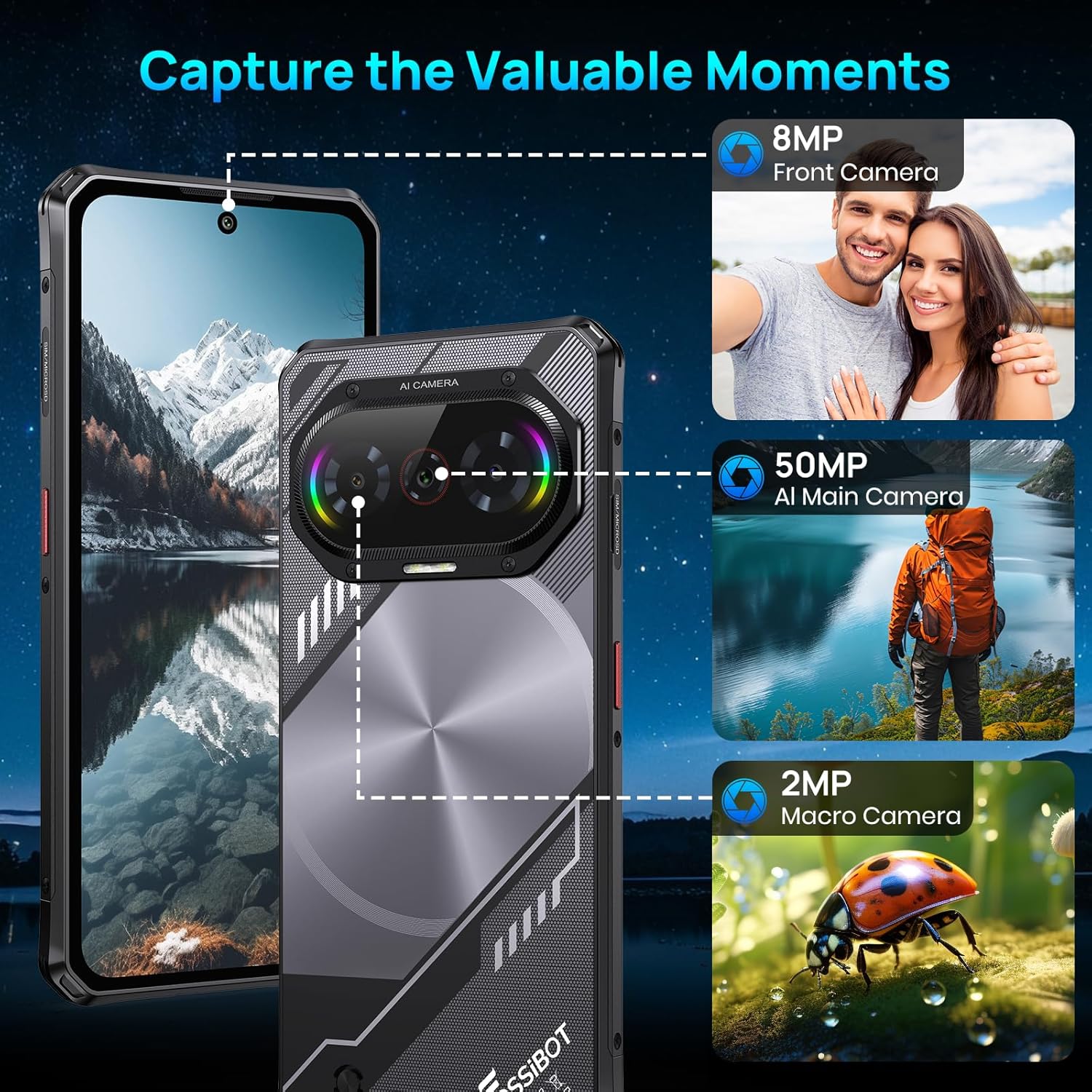
The device is equipped with a versatile camera setup: a 50MP AI main camera, an 8MP front camera, and a 2MP macro camera. This configuration allows for detailed photos, clear selfies, and close-up shots.
3.4. ബാറ്ററി
A 5000mAh large-capacity battery provides extended usage, complemented by 18W fast charging capabilities to quickly replenish power.

3.5. ഈട്
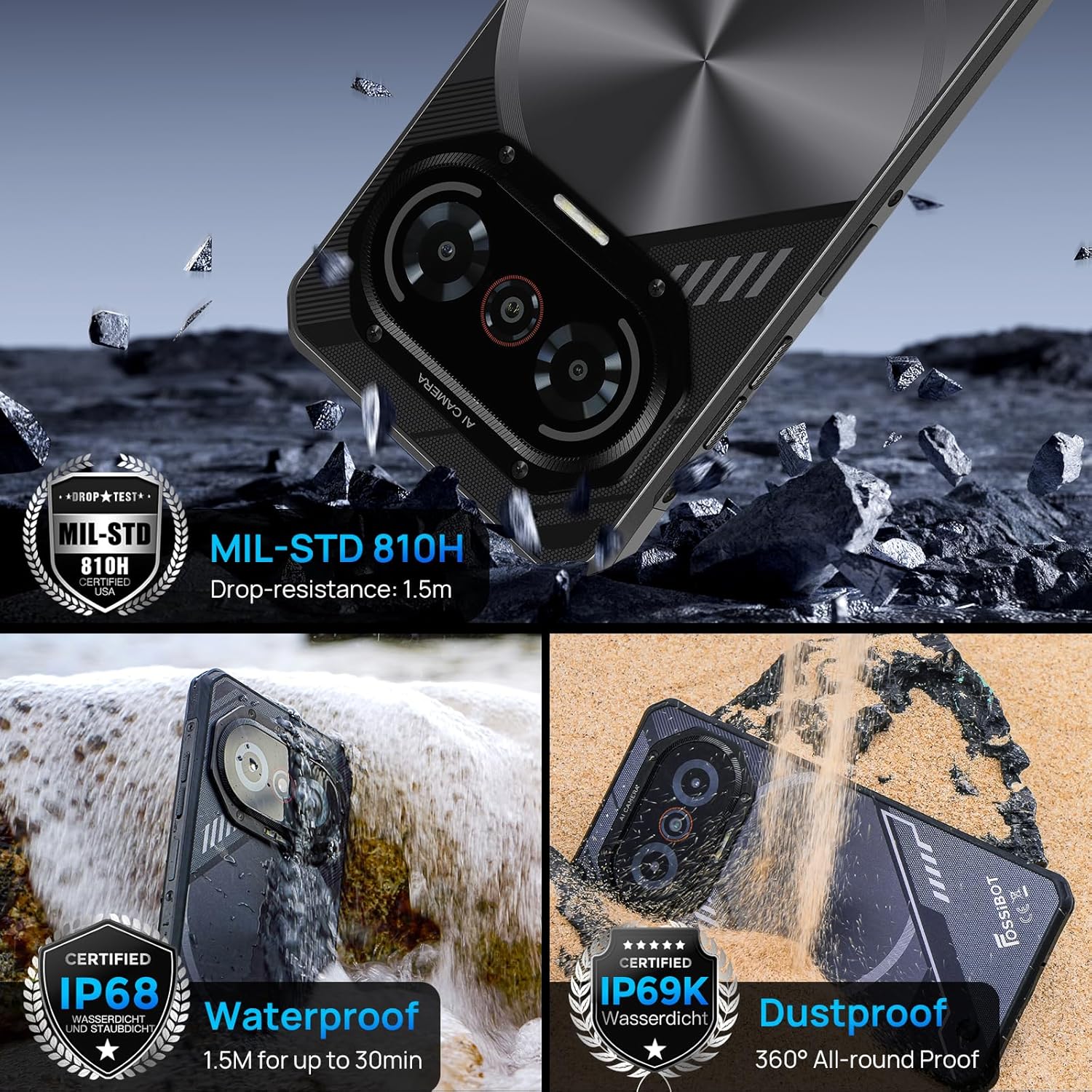
The F114 is certified with IP68/IP69K and MIL-STD-810H standards, making it waterproof, dustproof, and drop-resistant. It is built to withstand harsh outdoor conditions.
3.6. ഓപ്പറേറ്റിംഗ് സിസ്റ്റം
The smartphone runs on the latest Android 15 operating system, offering enhanced privacy features, faster app launches, and improved multitasking capabilities.

3.7. Connectivity and Other Features
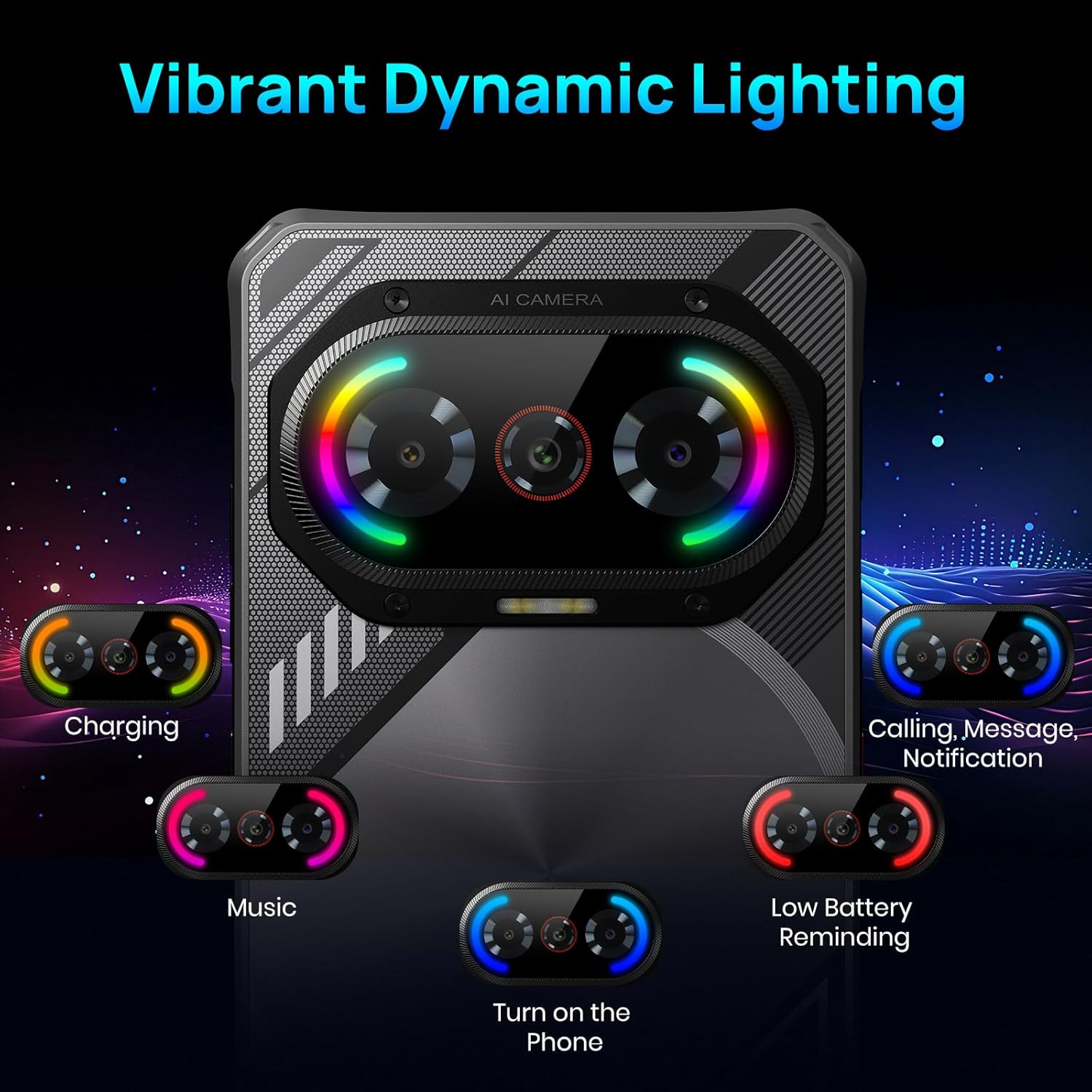
The F114 supports dual 4G SIM cards and includes comprehensive navigation systems (GPS, GLONASS, Galileo, Beidou, QZSS). It also features NFC for contactless payments and data transfer. The device incorporates a dynamic lighting effect on the rear for notifications and charging status.
4. പ്രാരംഭ സജ്ജീകരണം
4.1. സിം കാർഡും എസ്ഡി കാർഡും ഇൻസ്റ്റാൾ ചെയ്യൽ
- ഫോണിന്റെ വശത്ത് സിം കാർഡ് ട്രേ കണ്ടെത്തുക.
- നൽകിയിരിക്കുന്ന സിം കാർഡ് പിൻ ട്രേയുടെ അടുത്തുള്ള ചെറിയ ദ്വാരത്തിലേക്ക് തിരുകുക, അത് പുറത്തെടുക്കുക.
- Place your Nano SIM card(s) and/or a microSD card (up to 2TB) into the tray, ensuring correct orientation.
- ഫോണിലേക്ക് ട്രേ ശ്രദ്ധാപൂർവ്വം വീണ്ടും തിരുകുക.
4.2. പവർ ഓൺ/ഓഫ്
- പവർ ഓണാക്കാൻ: Press and hold the Power button (usually on the right side) until the FOSSIBOT logo appears.
- പവർ ഓഫ് ചെയ്യാൻ: പവർ ബട്ടൺ അമർത്തിപ്പിടിക്കുക, തുടർന്ന് സ്ക്രീനിലെ ഓപ്ഷനുകളിൽ നിന്ന് 'പവർ ഓഫ്' തിരഞ്ഞെടുക്കുക.
- പുനരാരംഭിക്കുക: പവർ ബട്ടൺ അമർത്തിപ്പിടിക്കുക, തുടർന്ന് ഓപ്ഷനുകളിൽ നിന്ന് 'പുനരാരംഭിക്കുക' തിരഞ്ഞെടുക്കുക.
5. അടിസ്ഥാന പ്രവർത്തനം
5.1. സ്ക്രീൻ നാവിഗേഷൻ
- ടാപ്പ് ചെയ്യുക: അത് തിരഞ്ഞെടുക്കാൻ ഒരു ഐക്കണോ ഓപ്ഷനോ സ്പർശിക്കുക.
- സ്വൈപ്പ്: സ്ക്രീനുകൾക്കിടയിൽ സ്ക്രോൾ ചെയ്യാനോ നാവിഗേറ്റ് ചെയ്യാനോ സ്ക്രീനിലുടനീളം നിങ്ങളുടെ വിരൽ വലിച്ചിടുക.
- പിഞ്ച്: ചിത്രങ്ങൾ സൂം ഇൻ ചെയ്യാനോ ഔട്ട് ചെയ്യാനോ രണ്ട് വിരലുകൾ ഉപയോഗിക്കുക, web പേജുകൾ.
5.2. അറിയിപ്പുകളും ദ്രുത ക്രമീകരണങ്ങളും
- അറിയിപ്പുകൾ: സ്ക്രീനിന്റെ മുകളിൽ നിന്ന് താഴേക്ക് സ്വൈപ്പ് ചെയ്യുക view അറിയിപ്പുകൾ.
- ദ്രുത ക്രമീകരണങ്ങൾ: Swipe down again from the notification panel to access quick settings for Wi-Fi, Bluetooth, brightness, etc.
6. ക്യാമറ പ്രവർത്തനം
The FOSSIBOT F114's camera app offers various modes to enhance your photography:
- ഫോട്ടോ മോഡ്: Standard mode for everyday pictures.
- പോർട്രെയിറ്റ് മോഡ്: പശ്ചാത്തലം മങ്ങിച്ചുകൊണ്ട് ഒരു ഡെപ്ത്-ഓഫ്-ഫീൽഡ് ഇഫക്റ്റ് സൃഷ്ടിക്കുന്നു.
- പ്രൊഫഷണൽ മോഡ്: Allows manual control over settings like ISO, white balance, and exposure.
- രാത്രി മോഡ്: Optimizes settings for low-light conditions.
- HDR: High Dynamic Range for balanced exposure in high-contrast scenes.
- മാക്രോ മോഡ്: For extreme close-up photography using the 2MP macro lens.
- അണ്ടർവാട്ടർ മോഡ്: Special mode for capturing photos and videos while submerged.
To take a photo, open the Camera app and tap the shutter button. To switch between modes, swipe left or right on the mode selector above the shutter button.
7. പ്രത്യേക സവിശേഷതകൾ
7.1. Dynamic Lighting Effects
The FOSSIBOT F114 features customizable dynamic lighting on the rear panel. These lights can indicate various statuses:
- ചാർജിംഗ് നില: Different light patterns/colors for charging levels.
- Incoming Calls/Messages: Visual alerts for new communications.
- സംഗീത താളം: Lights can synchronize with music playback.
- കുറഞ്ഞ ബാറ്ററി ഓർമ്മപ്പെടുത്തൽ: A distinct light pattern to indicate low power.
You can configure these lighting effects in the device settings under 'Radiant and agile' or similar menu options, allowing you to choose different rhythm modes like Joyful Movement, Bidirectional streaming light, Musical Pulse, and Rhythmic Pursuit.
Video: A demonstration of the FOSSIBOT F114's various features, including its display, processor, camera capabilities, dynamic mood lights, and fast charging.
7.2. എൻഎഫ്സി (നിയർ ഫീൽഡ് കമ്മ്യൂണിക്കേഷൻ)
NFC allows for quick, short-range wireless communication. Use it for:
- കോൺടാക്റ്റ്ലെസ് പേയ്മെൻ്റുകൾ: Make payments at compatible terminals using Google Pay.
- ഡാറ്റ കൈമാറ്റം: പങ്കിടുക files, photos, and contacts with other NFC-enabled devices.
To enable NFC, go to Settings > Connected devices > Connection preferences > NFC.
7.3. ജിപിഎസും നാവിഗേഷനും
The FOSSIBOT F114 supports multiple global navigation satellite systems (GPS, GLONASS, Galileo, Beidou, QZSS) for accurate location tracking and navigation, ideal for outdoor activities.
8. പരിപാലനം
- വൃത്തിയാക്കൽ: ഒരു സോഫ്റ്റ് ഉപയോഗിക്കുക, ഡിamp cloth to clean the device. Avoid harsh chemicals.
- വാട്ടർ എക്സ്പോഷർ: While waterproof, ensure all ports are securely closed before exposing the phone to water. After water exposure, dry the phone thoroughly before charging.
- സോഫ്റ്റ്വെയർ അപ്ഡേറ്റുകൾ: മികച്ച പ്രകടനവും സുരക്ഷയും ഉറപ്പാക്കാൻ സോഫ്റ്റ്വെയർ അപ്ഡേറ്റുകൾ പതിവായി പരിശോധിച്ച് ഇൻസ്റ്റാൾ ചെയ്യുക.
- ബാറ്ററി കെയർ: Avoid extreme temperatures. Do not fully discharge the battery frequently.
9. പ്രശ്നപരിഹാരം
9.1. ഉപകരണം ഓണാക്കുന്നില്ല
- ബാറ്ററി ചാർജ്ജ് ചെയ്തിട്ടുണ്ടെന്ന് ഉറപ്പാക്കുക. കുറഞ്ഞത് 30 മിനിറ്റെങ്കിലും ഫോൺ ചാർജറുമായി ബന്ധിപ്പിക്കുക.
- റീസ്റ്റാർട്ട് ചെയ്യാൻ പവർ ബട്ടൺ 10-15 സെക്കൻഡ് അമർത്തിപ്പിടിക്കുക.
9.2. Poor Network Connection
- നിങ്ങളുടെ സിം കാർഡ് ശരിയായി ചേർത്തിട്ടുണ്ടോ എന്ന് പരിശോധിക്കുക.
- Verify that your carrier is supported (Note: AT&T, CRICKET, and Verizon are not supported).
- ഫോൺ പുനരാരംഭിക്കുക.
- Go to Settings > Network & internet > Mobile network and ensure mobile data is enabled.
9.3. ആപ്പുകൾ ക്രാഷാകുകയോ മരവിപ്പിക്കുകയോ ചെയ്യുന്നു
- Clear the cache of the problematic app (Settings > Apps > [App Name] > Storage & cache > Clear cache).
- ഗൂഗിൾ പ്ലേ സ്റ്റോറിൽ നിന്ന് ഏറ്റവും പുതിയ പതിപ്പിലേക്ക് ആപ്പ് അപ്ഡേറ്റ് ചെയ്യുക.
- പ്രശ്നം നിലനിൽക്കുകയാണെങ്കിൽ, ആപ്പ് അൺഇൻസ്റ്റാൾ ചെയ്ത് വീണ്ടും ഇൻസ്റ്റാൾ ചെയ്യുക.
9.4. ബാറ്ററി വേഗത്തിൽ തീർന്നു പോകുന്നു
- സ്ക്രീൻ തെളിച്ചം കുറയ്ക്കുക.
- പശ്ചാത്തലത്തിൽ പ്രവർത്തിക്കുന്ന ഉപയോഗിക്കാത്ത ആപ്പുകൾ അടയ്ക്കുക.
- ഉപയോഗത്തിലില്ലാത്തപ്പോൾ വൈഫൈ, ബ്ലൂടൂത്ത്, ജിപിഎസ് എന്നിവ ഓഫാക്കുക.
- പവർ കൂടുതലുള്ള ആപ്പുകൾ തിരിച്ചറിയാൻ ക്രമീകരണങ്ങൾ > ബാറ്ററി എന്നതിൽ ബാറ്ററി ഉപയോഗം പരിശോധിക്കുക.
10 സ്പെസിഫിക്കേഷനുകൾ
| ഫീച്ചർ | സ്പെസിഫിക്കേഷൻ |
|---|---|
| ബ്രാൻഡ് | ഫോസിബോട്ട് |
| മോഡലിൻ്റെ പേര് | എഫ്114എഫ്ടി128 |
| ഓപ്പറേറ്റിംഗ് സിസ്റ്റം | ആൻഡ്രോയിഡ് 15 |
| ഇൻസ്റ്റാൾ ചെയ്ത RAM മെമ്മറി വലുപ്പം | 16 ജിബി |
| മെമ്മറി സ്റ്റോറേജ് കപ്പാസിറ്റി | 128 GB (Expandable to 2 TB via SD card) |
| സ്ക്രീൻ വലിപ്പം | 6.67 ഇഞ്ച് |
| റെസലൂഷൻ | 720 x 1600 |
| പുതുക്കിയ നിരക്ക് | 60 Hz |
| സെല്ലുലാർ ടെക്നോളജി | 4G |
| വയർലെസ് കാരിയർ | Unlocked (AT&T, CRICKET, and Verizon not supported) |
| സിം കാർഡ് സ്ലോട്ട് എണ്ണം | ഡ്യുവൽ സിം |
| കണക്റ്റർ തരം | യുഎസ്ബി ടൈപ്പ് സി |
| ജല പ്രതിരോധ നില | Waterproof (IP68/IP69K) |
| Front Photo Sensor Resolution | 8 എം.പി |
| Rear Facing Camera Photo Sensor Resolution | 50 MP (Main) |
| Number of Rear Facing Cameras | 2 (50MP Main + 2MP Macro) |
| ബാറ്ററി ശേഷി | 5000 മില്ലിamp മണിക്കൂറുകൾ |
| ബാറ്ററി ശരാശരി ആയുസ്സ് | 5 days (Standby) |
| വീഡിയോ ക്യാപ്ചർ റെസല്യൂഷൻ | 1080 fps-ൽ 30p |
| ജിപിഎസ് ജിയോtagging Functionality | സത്യം |
11. വാറൻ്റിയും പിന്തുണയും
FOSSIBOT offers comprehensive support for your F114 smartphone:
- വാറൻ്റി: A 1-year long-term warranty is provided.
- റിട്ടേണുകൾ: 30 ദിവസത്തെ സൗജന്യ റിട്ടേൺ ഗ്യാരണ്ടി ലഭ്യമാണ്.
- കസ്റ്റമർ സർവീസ്: Year-round customer support and 24-hour online customer service are provided to assist with any issues.
For further assistance, please refer to the contact information provided with your product documentation or visit the official FOSSIBOT webസൈറ്റ്.