
1. ഉൽപ്പന്നം കഴിഞ്ഞുview
The Allewie Vintage Queen Size Velvet Platform Bed Frame combines classic design with modern features. It includes a curved vertical tufted wingback headboard and footboard, an integrated charging station, and offers under-bed storage space. This bed frame is designed for easy assembly and does not require a box spring.
- Retro Meets Modern: Features a curved vertical tufted wingback headboard and footboard with an integrated charging station.
- സൗകര്യപ്രദമായ ചാർജിംഗ് സ്റ്റേഷൻ: Headboard includes a power strip with 2 USB ports and 1 USB-C port.
- Luxe High Footboard: Provides comfortable lounging and securely holds the mattress.
- Spacious Underbed Storage: Offers 6.2 inches of clearance for storage.
- കൂട്ടിച്ചേർക്കാൻ എളുപ്പമാണ്: All necessary tools are included for straightforward setup.
2 സുരക്ഷാ വിവരങ്ങൾ
അസംബ്ലി ചെയ്യുന്നതിനും ഉപയോഗിക്കുന്നതിനും മുമ്പ് എല്ലാ സുരക്ഷാ നിർദ്ദേശങ്ങളും വായിച്ച് മനസ്സിലാക്കുക. ഈ നിർദ്ദേശങ്ങൾ പാലിക്കുന്നതിൽ പരാജയപ്പെടുന്നത് ഉൽപ്പന്നത്തിന് പരിക്കോ കേടുപാടുകളോ ഉണ്ടാക്കാൻ കാരണമായേക്കാം.
- Always follow the assembly instructions carefully to prevent instability or tip-over.
- Be cautious around the charging station to avoid electrical hazards.
- Keep the under-bed storage area clear of obstructions to prevent entrapment.
- ഉപയോഗിക്കുന്നതിന് മുമ്പ് എല്ലാ കണക്ഷനുകളും സുരക്ഷിതമാണെന്ന് ഉറപ്പാക്കുക.
- പരമാവധി ഭാരം ശേഷി 800 പൗണ്ട് കവിയരുത്.
3. പാക്കേജ് ഉള്ളടക്കം
അസംബ്ലി ആരംഭിക്കുന്നതിന് മുമ്പ് എല്ലാ ഘടകങ്ങളും നിലവിലുണ്ടെന്ന് ഉറപ്പാക്കുക. ഏതെങ്കിലും ഭാഗങ്ങൾ നഷ്ടപ്പെട്ടാലോ കേടുപാടുകൾ സംഭവിച്ചാലോ, ദയവായി ഉപഭോക്തൃ പിന്തുണയുമായി ബന്ധപ്പെടുക.
- ഹെഡ്ബോർഡ്
- ഫുട്ബോർഡ്
- ബെഡ് ഫ്രെയിം സൈഡ് റെയിലുകൾ
- Slats (with adhesive for easy assembly)
- ചാർജിംഗ് സ്റ്റേഷൻ യൂണിറ്റ്
- Assembly Tools (Allen wrench, screws, etc.)
- ഇൻസ്റ്റലേഷൻ മാനുവൽ (ഈ പ്രമാണം)
4 സ്പെസിഫിക്കേഷനുകൾ
| വലിപ്പം | രാജ്ഞി |
| ഉൽപ്പന്ന അളവുകൾ (L x W x H) | 83.3" x 62.4" x 44.5" |
| ഭാരം ശേഷി | 800 പൗണ്ട് |
| ബോക്സ് സ്പ്രിംഗ് ആവശ്യമാണ് | ഇല്ല |
| ശുപാർശ ചെയ്യുന്ന മെത്തയുടെ വലിപ്പം | 80" x 60" (Queen) |
| മെറ്റീരിയൽ | Velvet, Wood, Metal |
| അണ്ടർ-ബെഡ് ക്ലിയറൻസ് | 6.2 ഇഞ്ച് |
| പ്രത്യേക സവിശേഷതകൾ | Charging Station (2 USB, 1 USB-C), Fade Resistant, Squeak Resistant |

Image: Detailed dimensions and features of the Allewie Queen Size Bed Frame, including USB and Type-C ports, under-bed clearance, and weight capacity.
5. അസംബ്ലി നിർദ്ദേശങ്ങൾ
ശരിയായ അസംബ്ലിക്ക് ഈ ഘട്ടങ്ങൾ ശ്രദ്ധാപൂർവ്വം പാലിക്കുക. രണ്ട് ആളുകളുമായി ഒത്തുചേരുന്നതാണ് ഉത്തമം.
- ഭാഗങ്ങൾ അൺപാക്ക് ചെയ്ത് തിരിച്ചറിയുക: Lay out all components on a clean, soft surface (like a rug or blanket) to prevent scratches. Refer to the included parts list to identify each piece.
- ഹെഡ്ബോർഡിൽ സൈഡ് റെയിലുകൾ ഘടിപ്പിക്കുക: Secure the side rails to the headboard using the provided hardware. Ensure all bolts are tightened securely but do not overtighten.
- ഫുട്ബോർഡ് ഘടിപ്പിക്കുക: Connect the footboard to the other end of the side rails, ensuring a snug fit.
- സെന്റർ സപ്പോർട്ട് ബീം ഇൻസ്റ്റാൾ ചെയ്യുക: Place the center support beam(s) into the designated slots or brackets on the side rails.
- സ്ലാറ്റുകൾ സ്ഥാപിക്കുക: Position the wooden slats across the bed frame. The adhesive slats simplify this step, ensuring they stay in place and reduce noise. Ensure foams are added for noise reduction.
- ചാർജിംഗ് സ്റ്റേഷൻ സ്ഥാപിക്കുക: Carefully insert the charging station unit into the designated slot on the headboard. Connect any necessary wiring as indicated in the detailed manual.
- അന്തിമ മുറുക്കൽ: Once all components are in place, go back and tighten all bolts and screws to ensure the frame is stable and secure.

Image: Illustration showing the durable, noise-free design with foams on slats and easy assembly features like adhesive slats and sturdy wood support.

Image: The bed frame with its headboard featuring an integrated charging station, ready for device connection.
6. പ്രവർത്തന നിർദ്ദേശങ്ങൾ (ചാർജിംഗ് സ്റ്റേഷൻ)
സംയോജിത ചാർജിംഗ് സ്റ്റേഷൻ നിങ്ങളുടെ ഇലക്ട്രോണിക് ഉപകരണങ്ങൾക്ക് സൗകര്യപ്രദമായ പവർ ആക്സസ് നൽകുന്നു.
- പവർ കണക്ഷൻ: Ensure the bed frame's power cord (if applicable, usually integrated with the charging station) is securely plugged into a functional wall outlet.
- ഉപകരണങ്ങൾ ബന്ധിപ്പിക്കുക: Use standard USB cables to connect your devices (phones, tablets, etc.) to the available USB-A ports (x2) or the USB-C port on the headboard.
- ചാർജിംഗ് സൂചകം: Some devices may show a charging indicator on their screen. The charging station itself typically does not have an indicator light.
- സുരക്ഷാ മുൻകരുതലുകൾ:
- Do not overload the charging station.
- Avoid spilling liquids near the charging ports.
- Unplug devices when not in use or during electrical storms.

ചിത്രം: വിശദമായ ഒരു ചിത്രം view of the headboard's charging station, highlighting the Type-C and USB ports.
7. പരിപാലനം
ശരിയായ പരിചരണം നിങ്ങളുടെ കിടക്ക ഫ്രെയിമിന്റെ ആയുസ്സും രൂപവും വർദ്ധിപ്പിക്കും.
- Cleaning Velvet Fabric:
- For light dust, use a soft brush or vacuum cleaner with an upholstery attachment.
- ചോർച്ച ഉണ്ടായാൽ, വൃത്തിയുള്ളതും ഉണങ്ങിയതുമായ തുണി ഉപയോഗിച്ച് ഉടൻ തുടയ്ക്കുക. തിരുമ്മരുത്.
- For tougher stains, consult a professional upholstery cleaner or use a velvet-safe cleaning product according to its instructions. Test on an inconspicuous area first.
- ഫ്രെയിം മെയിന്റനൻസ്:
- Periodically check all bolts and screws and tighten if necessary to maintain stability.
- Wipe metal and wood components with a soft, damp തുണി. കഠിനമായ രാസവസ്തുക്കൾ ഒഴിവാക്കുക.
- Under-Bed Area: Regularly clean the under-bed storage area to prevent dust accumulation.
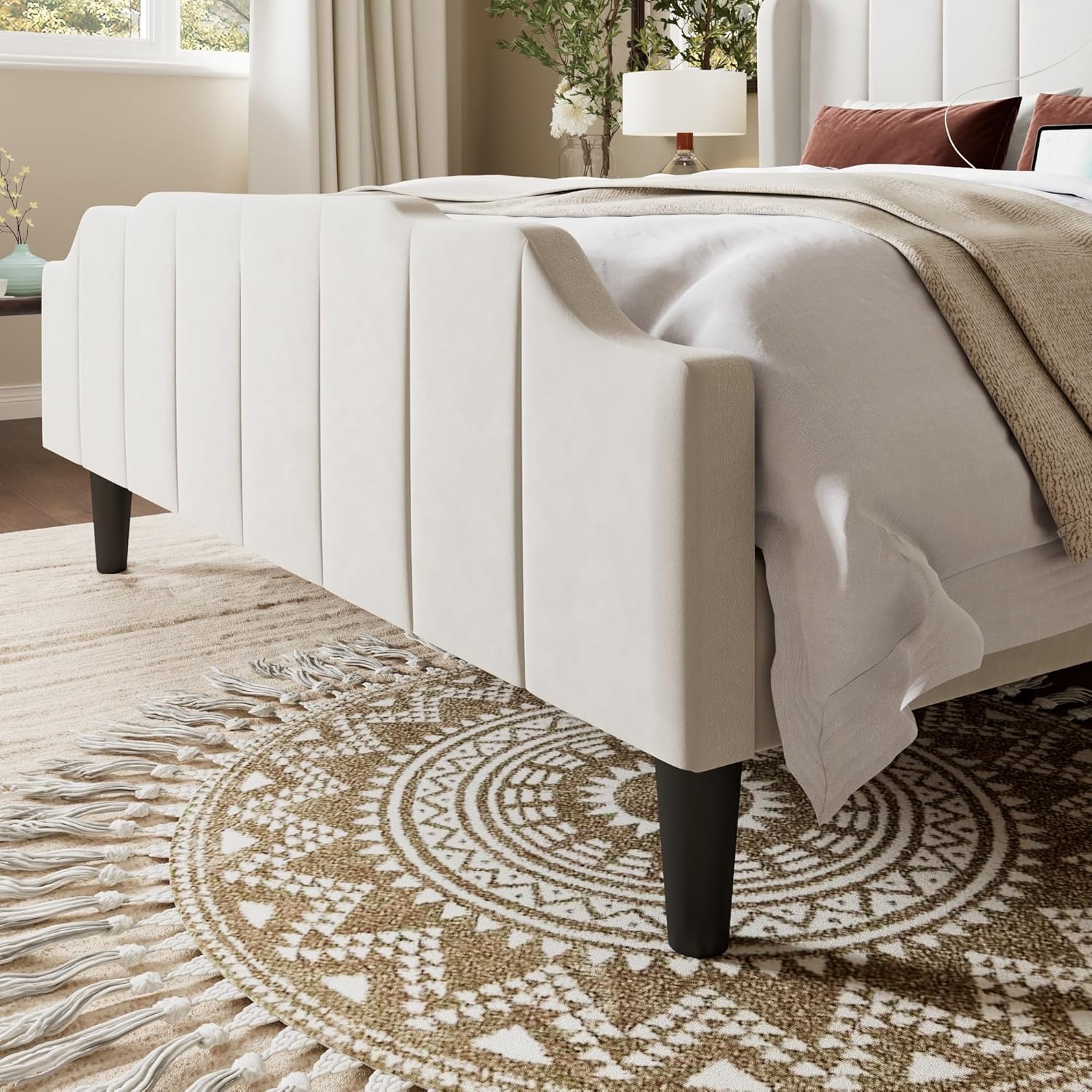
Image: Close-up of the velvet material, highlighting its skin-friendly, breathable, and shiny characteristics.
8. പ്രശ്നപരിഹാരം
പൊതുവായ പ്രശ്നങ്ങളും അവയുടെ പരിഹാരങ്ങളും അറിയാൻ ഈ വിഭാഗം കാണുക.
| പ്രശ്നം | സാധ്യമായ കാരണം | പരിഹാരം |
|---|---|---|
| Bed frame is wobbly/unstable. | അയഞ്ഞ ബോൾട്ടുകൾ അല്ലെങ്കിൽ തെറ്റായ അസംബ്ലി. | എല്ലാ ബോൾട്ടുകളും സുരക്ഷിതമായി മുറുക്കിയിട്ടുണ്ടെന്ന് ഉറപ്പാക്കുക. വീണ്ടുംview അസംബ്ലി ഘട്ടങ്ങൾ. |
| ഞരക്കങ്ങൾ. | Loose connections, slats rubbing against frame, or missing foam pads. | Tighten all hardware. Check that foam pads are correctly installed on slats and frame contact points. |
| ചാർജിംഗ് സ്റ്റേഷൻ പ്രവർത്തിക്കുന്നില്ല. | Power cord unplugged, faulty outlet, or device cable issue. | Verify the bed frame's power cord is plugged into a working outlet. Test the outlet with another device. Try a different USB cable or device. |
| ഫ്രെയിമിൽ മെത്ത സ്ലൈഡുചെയ്യുന്നു. | Mattress not properly seated or frame design. | Ensure the mattress is centered and fully within the frame. The wingback and high footboard design should help secure the mattress. |

Image: Illustration demonstrating how the wingback and high footboard design helps secure the mattress, preventing slipping.
9. വാറൻ്റിയും പിന്തുണയും
Allewie products are designed for quality and durability. For specific warranty information, please refer to the documentation included with your purchase or visit the official Allewie website. If you encounter any issues or require assistance, please contact Allewie customer support through their official channels or the retailer where the product was purchased.
ബന്ധപ്പെടാനുള്ള വിവരങ്ങൾ: Please refer to your purchase receipt or the Allewie brand store for the most up-to-date customer service contact details.
10. ഉൽപ്പന്ന വീഡിയോ
ഒരു വിഷ്വൽ ഓവറിനായി ഈ വീഡിയോ കാണുകview of the Allewie Velvet Bed Frame with Vertical Tufted Headboard.
Video: An official Allewie video showcasing the features and design of the Velvet Bed Frame with Vertical Tufted Headboard, including its high footboard, wingback design, and color options.