
1. ആമുഖം
This manual provides detailed instructions for the installation, operation, and maintenance of your Skyworth H30P WiFi 3MP Indoor Camera. Please read this manual carefully before using the product to ensure proper and safe operation. Keep this manual for future reference.
2 സുരക്ഷാ വിവരങ്ങൾ
- വൈദ്യുതി വിതരണം വോളിയം ഉറപ്പാക്കുകtage is within the specified range for the camera.
- Do not expose the camera to water, moisture, or extreme temperatures. This product is designed for indoor use only.
- ക്യാമറ താപ സ്രോതസ്സുകൾക്ക് സമീപമോ നേരിട്ടുള്ള സൂര്യപ്രകാശത്തിലോ വയ്ക്കുന്നത് ഒഴിവാക്കുക.
- ക്യാമറ വേർപെടുത്താനോ പരിഷ്ക്കരിക്കാനോ ശ്രമിക്കരുത്. ഇത് വാറന്റി അസാധുവാക്കുകയും കേടുപാടുകൾ വരുത്തുകയും ചെയ്തേക്കാം.
- ക്യാമറയും അനുബന്ധ ഉപകരണങ്ങളും കുട്ടികൾക്ക് ലഭ്യമാകാതെ സൂക്ഷിക്കുക.
- Use only the power adapter provided with the camera.
3. പാക്കേജ് ഉള്ളടക്കം
നിങ്ങളുടെ പാക്കേജിൽ എല്ലാ ഇനങ്ങളും ഉണ്ടെന്ന് ഉറപ്പാക്കുക:
- Skyworth H30P WiFi 3MP Indoor Camera
- പവർ അഡാപ്റ്റർ
- മൗണ്ടിംഗ് ആക്സസറികൾ (സ്ക്രൂകൾ, വാൾ പ്ലഗുകൾ)
- ഉപയോക്തൃ മാനുവൽ
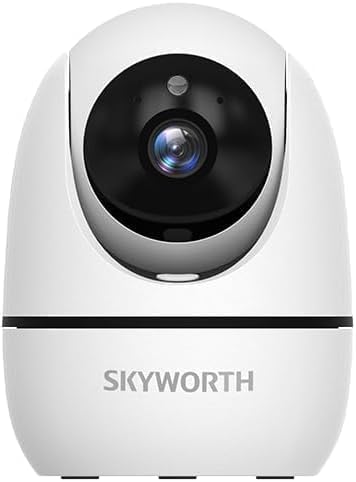
Image: The Skyworth H30P camera shown with its instruction manual and other accessories, indicating typical package contents.
4. ഉൽപ്പന്നം കഴിഞ്ഞുview
The Skyworth H30P camera features a compact design with advanced surveillance capabilities. Familiarize yourself with its main components:
- ക്യാമറ ലെൻസ്: Captures 3MP video.
- മൈക്രോഫോൺ: ഓഡിയോ ഇൻപുട്ടിനും ടു-വേ ആശയവിനിമയത്തിനും.
- സ്പീക്കർ: ഓഡിയോ ഔട്ട്പുട്ടിനും ടു-വേ ആശയവിനിമയത്തിനും.
- സ്റ്റാറ്റസ് ഇൻഡിക്കേറ്റർ ലൈറ്റ്: Shows camera status (e.g., connected, recording).
- പവർ പോർട്ട്: പവർ അഡാപ്റ്ററുമായി ബന്ധിപ്പിക്കുന്നു.
- റീസെറ്റ് ബട്ടൺ: ഫാക്ടറി ക്രമീകരണങ്ങൾ പുനഃസ്ഥാപിക്കാൻ ഉപയോഗിക്കുന്നു.
- RJ45 ഇഥർനെറ്റ് പോർട്ട്: വയർഡ് നെറ്റ്വർക്ക് കണക്ഷനായി.
- മൈക്രോ എസ്ഡി കാർഡ് സ്ലോട്ട്: പ്രാദേശിക വീഡിയോ സംഭരണത്തിനായി.
ചിത്രം: പിൻഭാഗം view of the Skyworth H30P camera, highlighting the RJ45 Ethernet port, power input, and other rear components.
5. സജ്ജീകരണം
5.1 പവർ ചെയ്യുന്നു
- ക്യാമറയുടെ പവർ പോർട്ടിലേക്ക് പവർ അഡാപ്റ്റർ ബന്ധിപ്പിക്കുക.
- ഒരു മതിൽ ഔട്ട്ലെറ്റിലേക്ക് പവർ അഡാപ്റ്റർ പ്ലഗ് ചെയ്യുക.
- The camera will power on, and the status indicator light will illuminate. Wait for the camera to initialize.
5.2 അപ്ലിക്കേഷൻ ഇൻസ്റ്റാളേഷൻ
- Download the recommended surveillance app (e.g., 'Skyworth Smart' or similar, check product packaging for specific app name) from your smartphone's app store (App Store for iOS, Google Play Store for Android).
- ഒരു അക്കൗണ്ടിനായി രജിസ്റ്റർ ചെയ്ത് ലോഗിൻ ചെയ്യുക.
5.3 നെറ്റ്വർക്കിലേക്ക് കണക്റ്റുചെയ്യുന്നു
The H30P supports both wireless (WiFi 6) and wired (RJ45) connections.
Wireless Connection (WiFi)
- Open the app and select 'Add Device'.
- Follow the on-screen instructions to connect the camera to your WiFi network. This typically involves scanning a QR code on the camera or entering your WiFi credentials.
- Ensure your WiFi network is 2.4GHz or 5GHz compatible (WiFi 6 for optimal performance).
Wired Connection (RJ45)
- Connect an Ethernet cable from your router to the RJ45 port on the back of the camera.
- Open the app and select 'Add Device'. The app should automatically detect the camera via the wired connection.
- Follow any remaining on-screen prompts to complete the setup.
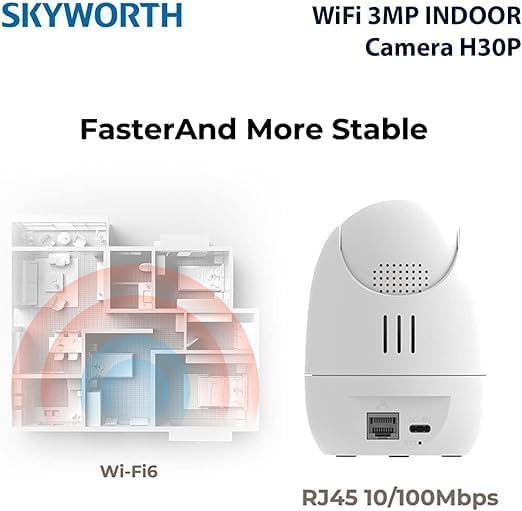
Image: A diagram illustrating the enhanced coverage of Wi-Fi 6 and the physical RJ45 port on the camera for stable network connectivity.
5.4 ക്യാമറ മൗണ്ടിംഗ്
The Skyworth H30P camera can be placed on a flat surface or mounted to a wall.
മതിൽ മൗണ്ടിംഗ്
- Choose a suitable location on a wall, ensuring it is within range of a power outlet and your network.
- Use the provided mounting template (if included) or mark the screw holes on the wall.
- Drill pilot holes and insert the wall plugs.
- Secure the mounting bracket (if applicable) or the camera directly to the wall using the screws.
- ക്യാമറ ആംഗിൾ ആവശ്യാനുസരണം ക്രമീകരിക്കുക.
6. പ്രവർത്തന നിർദ്ദേശങ്ങൾ
6.1 തത്സമയം View
Once connected, open the app to view the live feed from your camera. You can select the camera from your device list to access its real-time video stream.
6.2 പാൻ, ടിൽറ്റ്, സൂം (PTZ) നിയന്ത്രണം
The H30P camera offers 360-degree horizontal rotation and vertical tilt. Use the controls within the app to remotely adjust the camera's viewing angle. This allows for comprehensive coverage without blind spots.
6.3 ടു-വേ ഓഡിയോ
The camera features a built-in microphone and speaker. In the app, activate the microphone icon to speak through the camera and the speaker icon to listen to audio from the camera's location. This enables real-time communication.
6.4 നൈറ്റ് വിഷൻ
The H30P camera supports color night vision, providing clear images even in low-light conditions. This feature typically activates automatically when ambient light is insufficient.
6.5 മോഷൻ ഡിറ്റക്ഷനും ട്രാക്കിംഗും
Enable motion detection in the app settings to receive alerts when movement is detected. The camera can also be configured to track detected motion, keeping the subject in view.
6.6 റെക്കോർഡിംഗും സംഭരണവും
The camera supports local storage via a MicroSD card (not included) and may offer cloud storage options (subscription may be required). Insert a MicroSD card into the designated slot for continuous or event-triggered recording. Manage recording settings and view playback through the app.

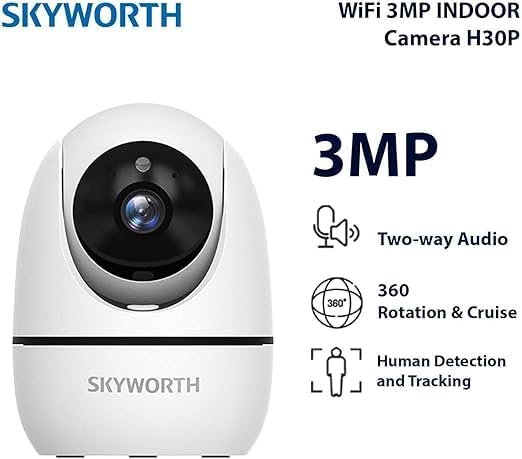
Image: A visual representation of the Skyworth H30P camera's key features, including 3MP resolution, two-way audio, 360-degree rotation, and human detection capabilities.
7. പരിപാലനം
7.1 വൃത്തിയാക്കൽ
To clean the camera, gently wipe the lens and body with a soft, dry cloth. Do not use harsh chemicals or abrasive cleaners.
7.2 ഫേംവെയർ അപ്ഡേറ്റുകൾ
Periodically check the app for available firmware updates. Keeping your camera's firmware up-to-date ensures optimal performance and security features.
8. പ്രശ്നപരിഹാരം
| പ്രശ്നം | സാധ്യമായ കാരണം | പരിഹാരം |
|---|---|---|
| ക്യാമറ ഓണാക്കുന്നില്ല | No power, faulty adapter | Check power connection and outlet. Ensure adapter is working. |
| വൈഫൈയിലേക്ക് കണക്റ്റ് ചെയ്യാനാവുന്നില്ല | Incorrect WiFi password, camera too far from router, 5GHz only network (if camera is 2.4GHz only) | Verify password. Move camera closer to router. Ensure router supports 2.4GHz or camera supports 5GHz. Reset camera and try again. |
| വീഡിയോ ഫീഡ് ഇല്ല | Network issue, camera offline | Check network connection. Restart camera and router. Verify camera status in app. |
| ടു-വേ ഓഡിയോ പ്രവർത്തിക്കുന്നില്ല | Microphone/speaker muted in app, volume too low | Check app settings for audio controls. Adjust volume. |
| Motion detection not triggering | Detection sensitivity too low, feature disabled | Adjust motion detection sensitivity in app. Ensure feature is enabled. |
9 സ്പെസിഫിക്കേഷനുകൾ
| ഫീച്ചർ | വിശദാംശങ്ങൾ |
|---|---|
| മോഡൽ നമ്പർ | H30P |
| വീഡിയോ ക്യാപ്ചർ റെസല്യൂഷൻ | 3 മെഗാപിക്സലുകൾ |
| കണക്റ്റിവിറ്റി ടെക്നോളജി | Wireless (WiFi 6), Wired (RJ45) |
| ആശയവിനിമയ പ്രോട്ടോക്കോൾ | വൈഫൈ നെറ്റ്വർക്ക് |
| പ്രത്യേക സവിശേഷതകൾ | HD Resolution, Two-Way Audio, Color Night Vision, Motion-Activated Recording, Motion Sensor |
| ഇൻഡോർ/ഔട്ട്ഡോർ ഉപയോഗം | ഇൻഡോർ |
| അനുയോജ്യമായ ഉപകരണങ്ങൾ | സ്മാർട്ട്ഫോൺ |
| പവർ ഉറവിടം | കോർഡഡ് ഇലക്ട്രിക് |
| മൗണ്ടിംഗ് തരം | മതിൽ മൗണ്ട് |
| ശുപാർശ ചെയ്യുന്ന ഉപയോഗങ്ങൾ | Baby Monitoring, Pet Monitoring, Indoor Security, Gaming, Tracking |
| ഉൽപ്പന്ന അളവുകൾ | 4 x 8 x 8 സെ.മീ; 240 ഗ്രാം |
| ബാറ്ററികൾ ആവശ്യമുണ്ടോ? | ഇല്ല |
| ഉൾപ്പെടുത്തിയ ഘടകങ്ങൾ | Skyworth Body |
| മാതൃരാജ്യം | ചൈന |
10. വാറൻ്റിയും പിന്തുണയും
Your Skyworth H30P camera comes with a standard manufacturer's warranty. Please refer to the warranty card included in your package or contact Skyworth customer support for details regarding warranty terms and conditions.
For technical support, troubleshooting assistance, or any inquiries regarding your product, please visit the official Skyworth webസൈറ്റിൽ നൽകുകയോ അവരുടെ ഉപഭോക്തൃ സേവന വിഭാഗവുമായി ബന്ധപ്പെടുകയോ ചെയ്യുക. കോൺടാക്റ്റ് വിവരങ്ങൾ സാധാരണയായി ഉൽപ്പന്ന പാക്കേജിംഗിലോ നിർമ്മാതാവിന്റെയോ webസൈറ്റ്.


