
1. ആമുഖം
Thank you for choosing the Schneider 43A1 4K UHD LED TV. This television combines advanced display technology with smart features to provide an immersive viewing experience. Featuring a 4K Ultra High Definition display, QLED-LCD technology with Direct LED backlighting, and the VIDAA Smart TV platform, your new TV offers vibrant colors, deep blacks, and access to a wide range of entertainment.
This manual provides essential information for the safe and efficient use of your television. Please read it thoroughly before operating the device and retain it for future reference.
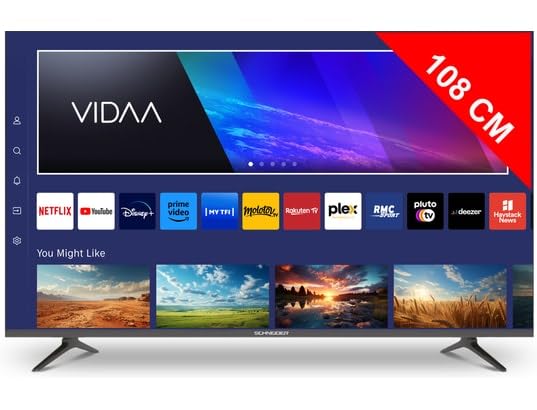
ചിത്രം 1.1: മുൻഭാഗം view of the Schneider 43A1 TV with VIDAA interface.
2 സുരക്ഷാ വിവരങ്ങൾ
സുരക്ഷിതമായ പ്രവർത്തനം ഉറപ്പാക്കുന്നതിനും കേടുപാടുകൾ തടയുന്നതിനും, ദയവായി ഇനിപ്പറയുന്ന സുരക്ഷാ മുൻകരുതലുകൾ പാലിക്കുക:
- പ്ലേസ്മെൻ്റ്: Position the TV on a stable, level surface. Avoid placing it in direct sunlight, near heat sources, or in environments with high humidity or dust.
- വെൻ്റിലേഷൻ: Ensure adequate ventilation around the TV. Do not block ventilation openings. Maintain a minimum distance of 10 cm from walls or other objects.
- വൈദ്യുതി വിതരണം: നിർദ്ദിഷ്ട പവർ സപ്ലൈ വോള്യം മാത്രം ഉപയോഗിക്കുകtage. Ensure the power cord is not pinched or walked on. Disconnect the power plug during lightning storms or when unused for extended periods.
- വൃത്തിയാക്കൽ: വൃത്തിയാക്കുന്നതിന് മുമ്പ് ടിവി പ്ലഗ് ഊരിയിടുക. മൃദുവായതും ഉണങ്ങിയതുമായ തുണി ഉപയോഗിക്കുക. ലിക്വിഡ് അല്ലെങ്കിൽ എയറോസോൾ ക്ലീനറുകൾ ഉപയോഗിക്കരുത്.
- ദ്രാവകങ്ങൾ: Do not expose the TV to dripping or splashing liquids. Do not place objects filled with liquids, such as vases, on the TV.
- കുട്ടികൾ: Supervise children to ensure they do not climb on the TV or furniture.
- മതിൽ മൗണ്ടിംഗ്: If wall-mounting, use a VESA compatible bracket (200 x 200 mm) and ensure proper installation by qualified personnel to prevent injury.
3. പാക്കേജ് ഉള്ളടക്കം
എല്ലാ ഇനങ്ങളും നിലവിലുണ്ടോ എന്നും നല്ല നിലയിലാണെന്നും ദയവായി പരിശോധിക്കുക:
- Schneider 43A1 4K UHD LED TV
- റിമോട്ട് കൺട്രോൾ
- പവർ കേബിൾ
- ടിവി സ്റ്റാൻഡ് (2 കഷണങ്ങൾ)
- ടിവി സ്റ്റാൻഡിനുള്ള സ്ക്രൂകൾ
- ഉപയോക്തൃ മാനുവൽ (ഈ പ്രമാണം)
4. സജ്ജീകരണം
4.1 അൺപാക്കിംഗ്
Carefully remove the TV from its packaging. It is recommended to keep the original packaging for potential future transport or service needs.
4.2 സ്റ്റാൻഡ് ഇൻസ്റ്റലേഷൻ
If you are not wall-mounting the TV, attach the included stand pieces to the bottom of the TV using the provided screws. Ensure the stand is securely fastened before placing the TV upright.
4.3 വാൾ മൗണ്ടിംഗ് (ഓപ്ഷണൽ)
The Schneider 43A1 is compatible with VESA 200 x 200 mm wall mounts. For safe installation, it is highly recommended to use a professional installer. Refer to your wall mount's instructions for specific details.
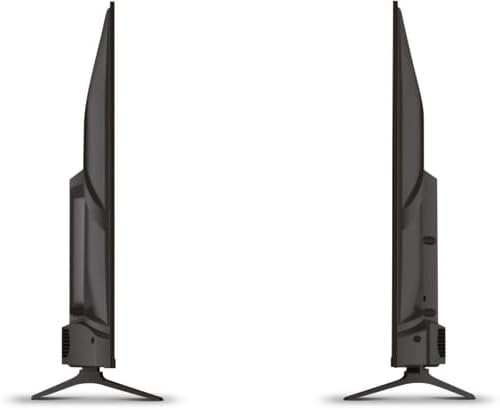
ചിത്രം 4.1: വശം view of the Schneider 43A1 TV, illustrating its profile for placement or wall mounting.
4.4 ബാഹ്യ ഉപകരണങ്ങൾ ബന്ധിപ്പിക്കുന്നു
നിങ്ങളുടെ ടിവി വിവിധ കണക്റ്റിവിറ്റി ഓപ്ഷനുകൾ വാഗ്ദാനം ചെയ്യുന്നു:
- എച്ച്ഡിഎംഐ: HDMI പോർട്ടുകളിലേക്ക് മൂന്ന് HDMI 2.0 ഉപകരണങ്ങൾ വരെ (ഉദാ: ബ്ലൂ-റേ പ്ലെയർ, ഗെയിം കൺസോൾ, സെറ്റ്-ടോപ്പ് ബോക്സ്) ബന്ധിപ്പിക്കുക.
- USB: Two USB ports are available for connecting USB storage devices to play media.
- AV/Audio Input: For older devices requiring composite video and stereo audio.
- കോക്സിയൽ ഔട്ട്പുട്ട്: ഒരു ബാഹ്യ ഓഡിയോ സിസ്റ്റത്തിലേക്ക് ബന്ധിപ്പിക്കുന്നതിന്.
- ആന്റിന/കേബിൾ ഇൻപുട്ട്: Connect your antenna or cable TV signal for DVB-T/T2/C/S2 reception.
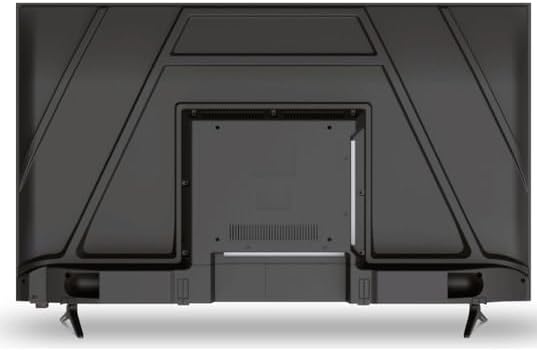
ചിത്രം 4.2: പിൻഭാഗം view of the Schneider 43A1 TV, highlighting connection ports.
4.5 ബന്ധിപ്പിക്കുന്ന പവർ
Plug the power cable into the TV's power input, then into a suitable wall outlet.
4.6 പ്രാരംഭ സജ്ജീകരണ വിസാർഡ്
Upon first power-on, the TV will guide you through an initial setup process. This includes selecting your language, connecting to a Wi-Fi network, and scanning for available channels (DVB-T/T2/C/S2).
5. പ്രവർത്തിക്കുന്നു
5.1 വിദൂര നിയന്ത്രണ പ്രവർത്തനങ്ങൾ
ടിവിയുടെ സവിശേഷതകൾ നാവിഗേറ്റ് ചെയ്യാൻ റിമോട്ട് കൺട്രോൾ നിങ്ങളെ അനുവദിക്കുന്നു:
- പവർ ബട്ടൺ: ടിവി ഓണാക്കുകയോ ഓഫാക്കുകയോ ചെയ്യുന്നു.
- വോളിയം കൂട്ടുക/താഴ്ത്തുക: ശബ്ദ നില ക്രമീകരിക്കുന്നു.
- ചാനൽ മുകളിലേക്കും താഴേക്കും: ടിവി ചാനലുകൾ മാറ്റുന്നു.
- ഇൻപുട്ട്/ഉറവിടം: Selects the input source (HDMI, USB, TV Tuner).
- നാവിഗേഷൻ ബട്ടണുകൾ: മെനു നാവിഗേഷനായി.
- Smart TV Buttons: Direct access to popular apps like Netflix, Prime Video, YouTube.
5.2 Smart TV (VIDAA)
The integrated VIDAA Smart TV platform provides access to a variety of applications and streaming services. Connect your TV to the internet via Wi-Fi to enjoy features like Netflix, Prime Video, and YouTube. Bluetooth connectivity allows for wireless connection to compatible audio devices.

ചിത്രം 5.1: കോണാകൃതിയിലുള്ള മുൻഭാഗം view of the Schneider 43A1 TV, displaying the VIDAA Smart TV interface.
5.3 ഇൻപുട്ട് തിരഞ്ഞെടുക്കൽ
Press the 'Input' or 'Source' button on your remote control to switch between connected devices (HDMI 1, HDMI 2, HDMI 3, USB, AV, TV Tuner).
5.4 ചിത്ര, ശബ്ദ ക്രമീകരണങ്ങൾ
Access the TV's menu to adjust picture and sound settings. The 4K UHD resolution, QLED-LCD technology, and Direct LED backlighting ensure a high-quality visual experience. The TV also features upscaling to enhance lower-resolution content. Audio is delivered via 2 x 8 W RMS stereo speakers with Dolby Audio support.
5.5 PC Monitor Mode
The TV can be used as a PC monitor by connecting your computer via an HDMI cable. This mode optimizes the display for computer use.
6. പരിപാലനം
6.1 ടിവി വൃത്തിയാക്കൽ
Before cleaning, ensure the TV is unplugged from the power outlet.
- സ്ക്രീൻ: മൃദുവായ, ലിന്റ് രഹിത തുണി ഉപയോഗിച്ച് സ്ക്രീൻ സൌമ്യമായി തുടയ്ക്കുക. കഠിനമായ പാടുകൾക്ക്, നേരിയ തോതിൽ dampവെള്ളം അല്ലെങ്കിൽ ഒരു പ്രത്യേക സ്ക്രീൻ ക്ലീനർ ഉപയോഗിച്ച് തുണിയിൽ തളിക്കുക (സ്ക്രീനിൽ നേരിട്ട് സ്പ്രേ ചെയ്യരുത്).
- പുറം: ടിവി തുടയ്ക്കാൻ മൃദുവായതും ഉണങ്ങിയതുമായ തുണി ഉപയോഗിക്കുക casing. അബ്രാസീവ് ക്ലീനറുകളോ ലായകങ്ങളോ ഒഴിവാക്കുക.
6.2 സോഫ്റ്റ്വെയർ അപ്ഡേറ്റുകൾ
പ്രകടനം മെച്ചപ്പെടുത്തുന്നതിനും പുതിയ സവിശേഷതകൾ ചേർക്കുന്നതിനുമായി നിങ്ങളുടെ ടിവിയിൽ സോഫ്റ്റ്വെയർ അപ്ഡേറ്റുകൾ ലഭിച്ചേക്കാം. ഈ അപ്ഡേറ്റുകൾ സ്വയമേവ ലഭിക്കുന്നതിന് നിങ്ങളുടെ ടിവി ഇന്റർനെറ്റുമായി കണക്റ്റുചെയ്തിട്ടുണ്ടെന്ന് ഉറപ്പാക്കുക അല്ലെങ്കിൽ ക്രമീകരണ മെനുവിലൂടെ അവ നേരിട്ട് പരിശോധിക്കുക.
7. പ്രശ്നപരിഹാരം
നിങ്ങളുടെ ടിവിയിൽ പ്രശ്നങ്ങൾ നേരിടുകയാണെങ്കിൽ, ഇനിപ്പറയുന്ന പൊതുവായ പ്രശ്നങ്ങളും പരിഹാരങ്ങളും പരിശോധിക്കുക:
- ശക്തിയില്ല:
- ടിവിയിലും ചുമരിലെ ഔട്ട്ലെറ്റിലും പവർ കേബിൾ സുരക്ഷിതമായി പ്ലഗ് ചെയ്തിട്ടുണ്ടോയെന്ന് പരിശോധിക്കുക.
- വാൾ ഔട്ട്ലെറ്റ് പ്രവർത്തിക്കുന്നുണ്ടെന്ന് ഉറപ്പാക്കുക (മറ്റൊരു ഉപകരണം ഉപയോഗിച്ച് പരിശോധിക്കുക).
- റിമോട്ട് കൺട്രോളിലോ ടിവിയിലോ പവർ ബട്ടൺ അമർത്തുക.
- ചിത്രം/ശബ്ദം ഇല്ല:
- ശരിയായ ഇൻപുട്ട് ഉറവിടം തിരഞ്ഞെടുത്തിട്ടുണ്ടെന്ന് ഉറപ്പാക്കുക (ഉദാ. HDMI 1, ടിവി).
- ടിവിക്കും ബാഹ്യ ഉപകരണങ്ങൾക്കും ഇടയിലുള്ള എല്ലാ കേബിൾ കണക്ഷനുകളും പരിശോധിക്കുക.
- വോളിയം മ്യൂട്ട് ചെയ്തിട്ടില്ല അല്ലെങ്കിൽ ഏറ്റവും കുറഞ്ഞതായി സജ്ജീകരിച്ചിട്ടില്ലെന്ന് ഉറപ്പാക്കുക.
- If using an antenna, check the antenna connection and perform a channel scan.
- റിമോട്ട് കൺട്രോൾ പ്രവർത്തിക്കുന്നില്ല:
- റിമോട്ട് കൺട്രോളിൽ ബാറ്ററികൾ മാറ്റിസ്ഥാപിക്കുക.
- റിമോട്ടിനും ടിവിയുടെ ഐആർ സെൻസറിനും ഇടയിൽ തടസ്സങ്ങളൊന്നുമില്ലെന്ന് ഉറപ്പാക്കുക.
- Smart TV/Network Issues:
- നിങ്ങളുടെ വൈ-ഫൈ റൂട്ടറും ഇന്റർനെറ്റ് കണക്ഷനും പരിശോധിക്കുക.
- Go to the TV's network settings to re-connect to your Wi-Fi network.
- ടിവിയും റൂട്ടറും പുനരാരംഭിക്കുക.
ഈ പരിഹാരങ്ങൾ പരീക്ഷിച്ചതിന് ശേഷവും പ്രശ്നം നിലനിൽക്കുകയാണെങ്കിൽ, ദയവായി ഉപഭോക്തൃ പിന്തുണയുമായി ബന്ധപ്പെടുക.
8 സ്പെസിഫിക്കേഷനുകൾ
| ഫീച്ചർ | സ്പെസിഫിക്കേഷൻ |
|---|---|
| മോഡൽ | Schneider 43A1 |
| ഡിസ്പ്ലേ വലിപ്പം | 109 സെ.മീ (43 ഇഞ്ച്) |
| റെസലൂഷൻ | 4K അൾട്രാ HD (3840 x 2160 പിക്സലുകൾ) |
| ഡിസ്പ്ലേ ടെക്നോളജി | QLED-LCD with Direct LED Backlight |
| കോൺട്രാസ്റ്റ് റേഷ്യോ | 1100:1 |
| തെളിച്ചം | 200 cd/m² |
| ഓഡിയോ ഔട്ട്പുട്ട് | 2 x 8 W RMS Stereo |
| ഓഡിയോ ടെക്നോളജി | ഡോൾബി ഓഡിയോ |
| HDMI പോർട്ടുകൾ | 3 (HDMI 2.0) |
| USB പോർട്ടുകൾ | 2 |
| മറ്റ് ഇൻപുട്ടുകൾ | AV/Audio Input |
| ഔട്ട്പുട്ടുകൾ | ഏകോപന put ട്ട്പുട്ട് |
| ട്യൂണർ | DVB-T/T2/C/S2 |
| സ്മാർട്ട് ടിവി പ്ലാറ്റ്ഫോം | VIDAA (Netflix, Prime Video, YouTube) |
| വയർലെസ് കണക്റ്റിവിറ്റി | വൈ-ഫൈ, ബ്ലൂടൂത്ത് |
| VESA അനുയോജ്യത | 200 x 200 മി.മീ |
| ഭാരം | 7.5 കിലോഗ്രാം |