
1. ഉൽപ്പന്നം കഴിഞ്ഞുview
The ATTACK SHARK X8SE is a high-performance wireless gaming mouse designed for precision and versatility. It features tri-mode connectivity, an advanced optical sensor, and a lightweight ergonomic design for extended use.
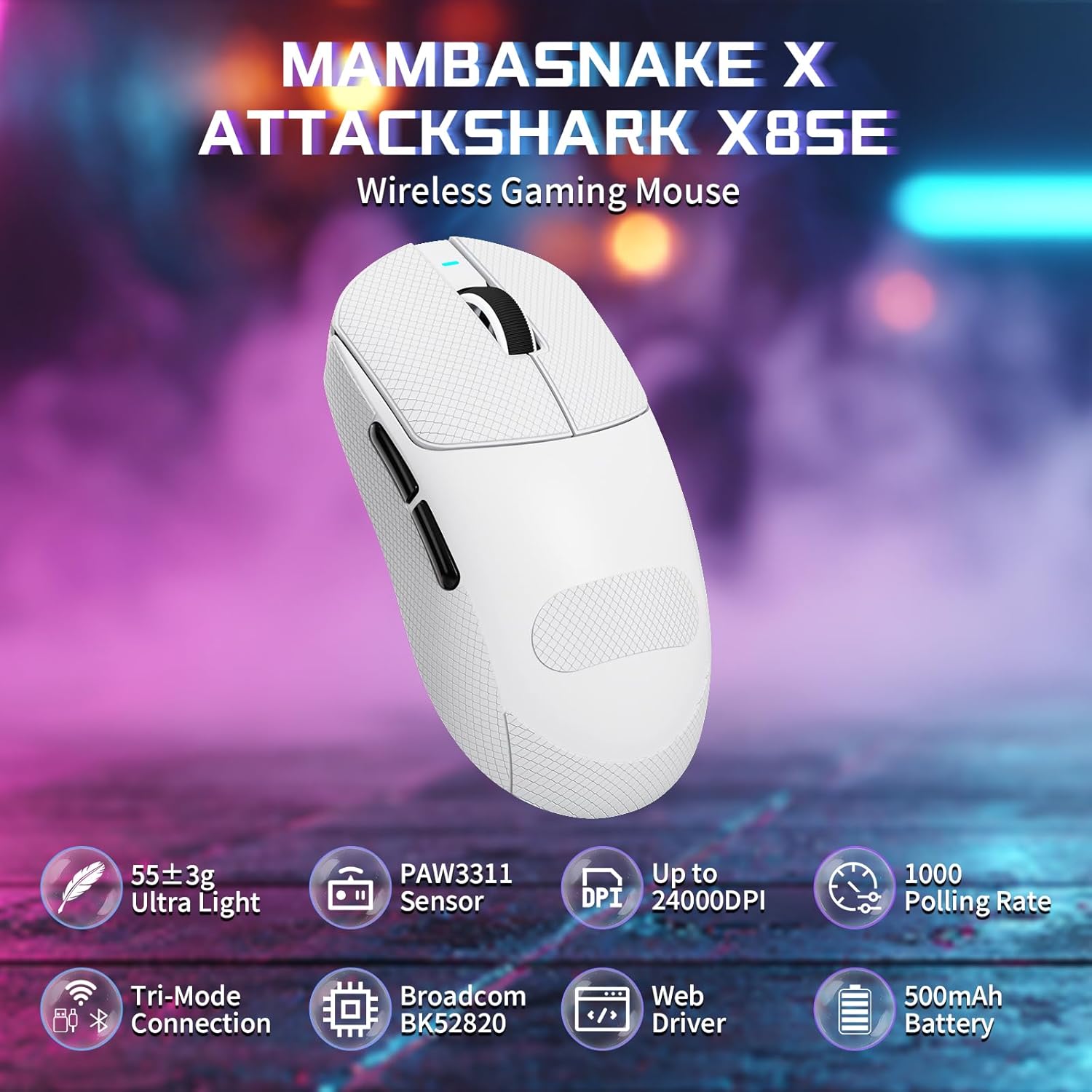
Figure 1: ATTACK SHARK X8SE Wireless Gaming Mouse highlighting ultra-light design, PAW3311 sensor, adjustable DPI, 1000Hz polling rate, tri-mode connection, Broadcom BK52820 chip, web driver, and 500mAh battery.
2. പാക്കേജ് ഉള്ളടക്കം
- ATTACK SHARK X8SE Wireless Gaming Mouse
- USB-C ചാർജിംഗ്/ഡാറ്റ കേബിൾ
- 2.4G USB റിസീവർ
- Griptape (pre-applied or included separately)
- ഇൻസ്ട്രക്ഷൻ മാനുവൽ
3. സജ്ജീകരണം
3.1 പ്രാരംഭ ചാർജിംഗ്
Before first use, connect the mouse to a USB-A port on your computer using the provided USB-C cable to ensure it is fully charged. The mouse can be used in wired mode while charging.
3.2 കണക്റ്റിവിറ്റി മോഡുകൾ
The X8SE mouse supports three connection modes: 2.4GHz Wireless, Bluetooth, and USB-C Wired. A switch on the bottom of the mouse allows you to select the desired mode.
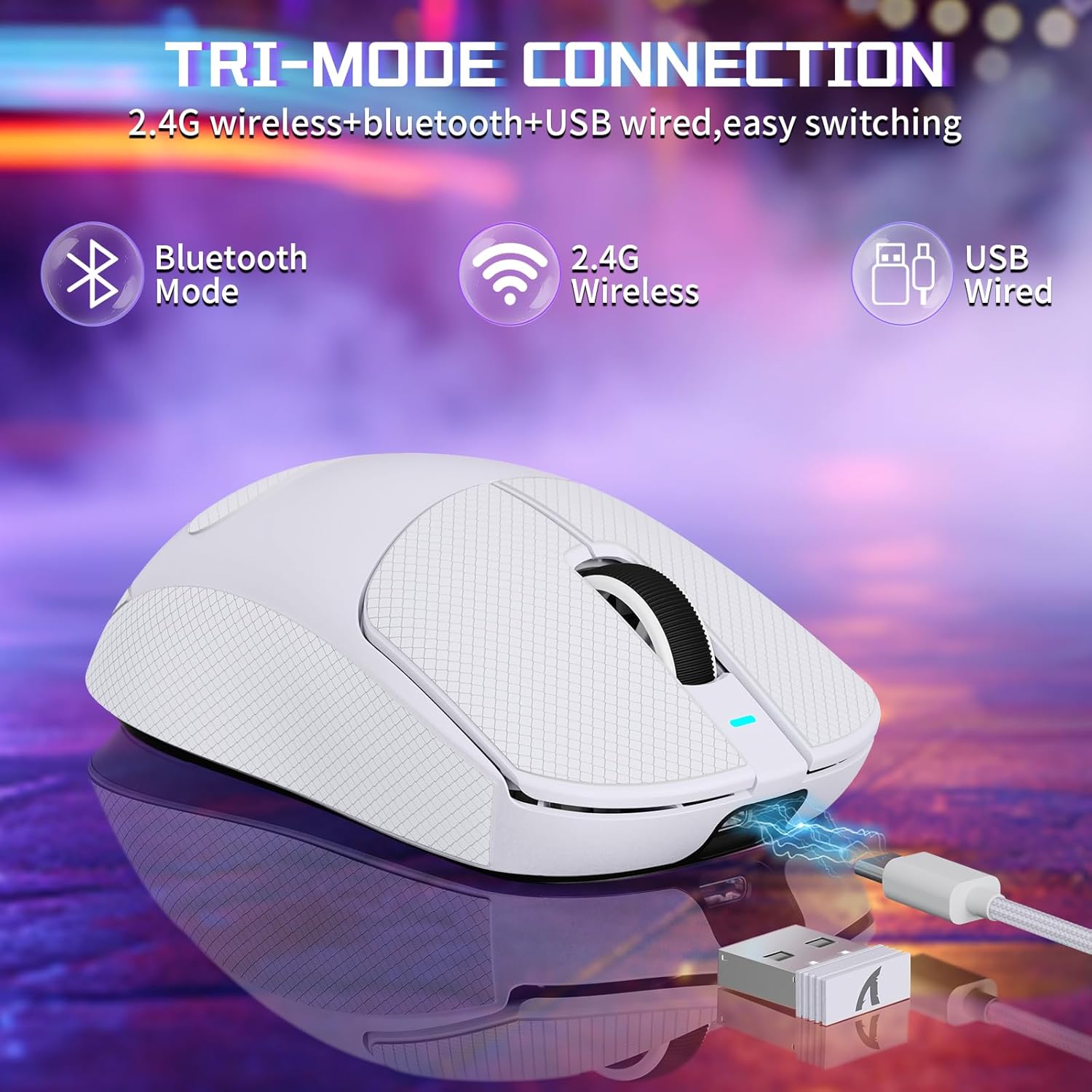
Figure 2: Tri-mode connection options including Bluetooth, 2.4G Wireless, and USB Wired.
3.2.1 2.4GHz വയർലെസ് മോഡ്
- മൗസിന്റെ അടിയിലുള്ള കമ്പാർട്ടുമെന്റിൽ സൂക്ഷിച്ചിരിക്കുന്ന 2.4G യുഎസ്ബി റിസീവർ കണ്ടെത്തുക.
- നിങ്ങളുടെ കമ്പ്യൂട്ടറിൽ ലഭ്യമായ ഒരു USB-A പോർട്ടിലേക്ക് USB റിസീവർ പ്ലഗ് ചെയ്യുക.
- Switch the mode selector on the bottom of the mouse to the '2.4G' position.
- മൗസ് നിങ്ങളുടെ കമ്പ്യൂട്ടറിലേക്ക് യാന്ത്രികമായി കണക്റ്റുചെയ്യണം.
3.2.2 ബ്ലൂടൂത്ത് മോഡ്
- Switch the mode selector on the bottom of the mouse to the 'BT' position.
- നിങ്ങളുടെ കമ്പ്യൂട്ടറിലോ ഉപകരണത്തിലോ, Bluetooth ക്രമീകരണങ്ങളിലേക്ക് നാവിഗേറ്റ് ചെയ്ത് Bluetooth പ്രവർത്തനക്ഷമമാക്കുക.
- ഇതിനായി തിരയുക new devices and select 'ATTACK SHARK X8SE' to pair.
3.2.3 USB-C വയേർഡ് മോഡ്
- Connect one end of the provided USB-C cable to the mouse and the other end to a USB-A port on your computer.
- മൗസ് യാന്ത്രികമായി വയേർഡ് മോഡിലേക്ക് മാറുകയും ചാർജ് ചെയ്യാൻ തുടങ്ങുകയും ചെയ്യും.
3.3 ഡ്രൈവർ ഇൻസ്റ്റലേഷൻ
The ATTACK SHARK X8SE utilizes an intelligent cloud-based driver for customization. This driver typically auto-detects your system. For advanced settings and customization, visit the official ATTACK SHARK website to download the latest software if not automatically prompted.
4. പ്രവർത്തന നിർദ്ദേശങ്ങൾ
4.1 ബട്ടൺ പ്രവർത്തനങ്ങൾ
The X8SE mouse features 5 programmable buttons and a DPI switch.
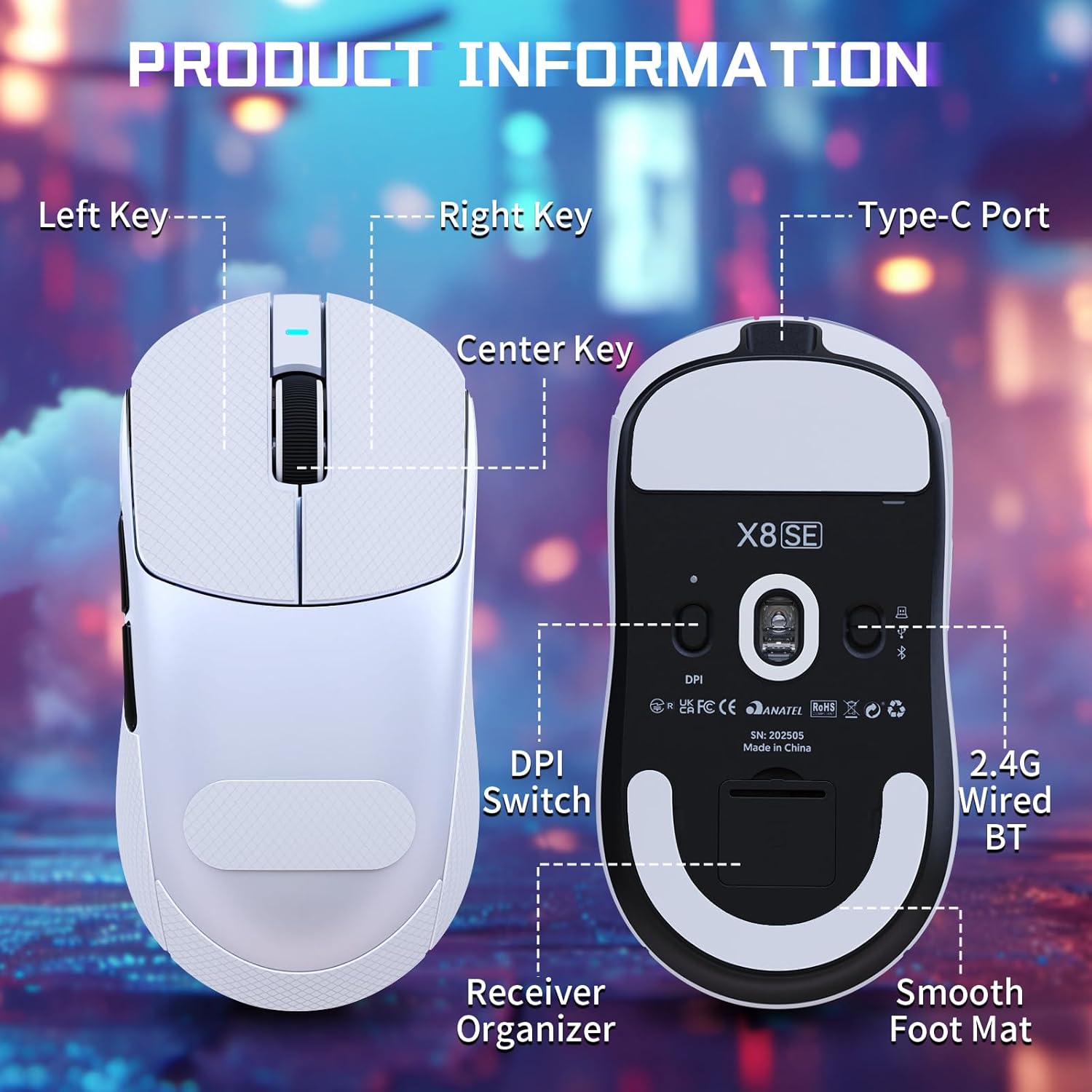
Figure 3: Product information diagram showing Left Key, Right Key, Center Key (scroll wheel), Type-C Port, Front Side Key, Back Side Key, DPI Switch, Receiver Organizer, and Smooth Foot Mat.
- ഇടത് കീ: പ്രാഥമിക ക്ലിക്ക് പ്രവർത്തനം.
- വലത് കീ: സെക്കൻഡറി ക്ലിക്ക് ഫംഗ്ഷൻ.
- മധ്യ കീ (സ്ക്രോൾ വീൽ): മുകളിലേക്കും/താഴേക്കും സ്ക്രോൾ ചെയ്യുക, മധ്യത്തിൽ ക്ലിക്ക് ചെയ്യുക.
- ഫ്രണ്ട് സൈഡ് കീ: Default function (programmable).
- പിൻവശത്തെ കീ: Default function (programmable).
- DPI Switch (bottom): DPI ക്രമീകരണങ്ങളിലൂടെ കടന്നുപോകുന്നു.
4.2 ഡിപിഐ അഡ്ജസ്റ്റ്മെന്റ്
The mouse is equipped with a PixArt PAW3311 optical sensor, offering up to 25,000 DPI. You can adjust the DPI sensitivity using the dedicated DPI switch on the bottom of the mouse. There are 6 adjustable DPI levels:
- 800 ഡിപിഐ
- 1600 ഡിപിഐ
- 2400 ഡിപിഐ
- 3200 ഡിപിഐ
- 8000 ഡിപിഐ
- 25000 ഡിപിഐ

Figure 4: Visual representation of adjustable DPI levels (800-25000) and polling rates (125Hz-1000Hz) with corresponding indicator lights.
4.3 പോളിംഗ് നിരക്ക് ക്രമീകരണം
The 2.4G wireless mode supports a 1000Hz polling rate for esports-level responsiveness. Polling rates can be adjusted via the cloud driver software to 125Hz, 250Hz, 500Hz, or 1000Hz.
4.4 ഇഷ്ടാനുസൃതമാക്കൽ
Utilize the intelligent cloud driver software to fully customize your mouse settings. This includes:
- Remapping button functions.
- Adjusting DPI levels and sensitivity.
- Setting polling rates.
- Recording and assigning macros.

Figure 5: The cloud driver interface for customizing mouse settings, including button assignments, DPI, and polling rate.
4.5 ബാറ്ററി ലൈഫ്
The built-in 500mAh battery provides up to 65 hours of continuous use. Battery status can typically be monitored via the driver software or system indicators.

Figure 6: The 500mAh large capacity battery ensures extended usage.
4.6 എർഗണോമിക് ഡിസൈൻ
Weighing approximately 55g, the X8SE features an optimized symmetrical shape suitable for medium to large hands, promoting comfort and control during long sessions.

Figure 7: Dimensions of the X8SE mouse (125mm length, 63mm width, 39.7mm height) and its ergonomic design for larger hands and symmetrical waist-tapered shape.
5. പരിപാലനം
5.1 വൃത്തിയാക്കൽ
നിങ്ങളുടെ മൗസ് വൃത്തിയാക്കാൻ, മൃദുവായതും ഉണങ്ങിയതുമായ ഒരു തുണി ഉപയോഗിക്കുക. കഠിനമായ അഴുക്കിന്, അല്പം ഡി.amp മൗസിനുള്ളിൽ ദ്രാവകം കടക്കുന്നില്ല എന്ന് ഉറപ്പാക്കാൻ വീര്യം കുറഞ്ഞ സോപ്പ് ഉള്ള തുണി ഉപയോഗിക്കാം. കഠിനമായ രാസവസ്തുക്കളോ ഉരച്ചിലുകളോ ഉള്ള വസ്തുക്കൾ ഒഴിവാക്കുക.
5.2 ബാറ്ററി കെയർ
ബാറ്ററി ലൈഫ് ദീർഘിപ്പിക്കാൻ, മൗസ് ഇടയ്ക്കിടെ പൂർണ്ണമായും ഡിസ്ചാർജ് ചെയ്യുന്നത് ഒഴിവാക്കുക. ബാറ്ററി ഇൻഡിക്കേറ്റർ കുറവായിരിക്കുമ്പോൾ മൗസ് ചാർജ് ചെയ്യുക. ദീർഘനേരം ഉപയോഗിക്കാത്തപ്പോൾ തണുത്തതും വരണ്ടതുമായ സ്ഥലത്ത് മൗസ് സൂക്ഷിക്കുക.
5.3 Griptape Application
If your mouse came with separate griptape, ensure the mouse surface is clean and dry before applying. Carefully peel the backing from the griptape and align it with the designated areas on the mouse for improved grip. Press firmly to secure.
6. പ്രശ്നപരിഹാരം
6.1 മൗസ് പ്രതികരിക്കുന്നില്ല
- കണക്റ്റിവിറ്റി പരിശോധിക്കുക: Ensure the mouse is in the correct mode (2.4G, BT, or Wired) and properly connected. For 2.4G, ensure the receiver is securely plugged in. For Bluetooth, verify pairing in your device's settings.
- ബാറ്ററി നില: Charge the mouse using the USB-C cable.
- പുനരാരംഭിക്കുക: Turn the mouse off and then on again using the switch on the bottom.
- ഡ്രൈവർ സോഫ്റ്റ്വെയർ: If using the cloud driver, ensure it is running correctly. Sometimes restarting the driver software or running it as an administrator can resolve issues.
- USB പോർട്ട്: നിങ്ങളുടെ കമ്പ്യൂട്ടറിൽ മറ്റൊരു USB പോർട്ട് പരീക്ഷിക്കുക.
6.2 DPI or Polling Rate Not Changing
- DPI സ്വിച്ച്: Ensure you are pressing the DPI switch on the bottom of the mouse firmly to cycle through settings.
- സോഫ്റ്റ്വെയർ ക്രമീകരണങ്ങൾ: Verify DPI and polling rate settings within the cloud driver software. Apply any changes made in the software.
6.3 ബ്ലൂടൂത്ത് ജോടിയാക്കൽ പ്രശ്നങ്ങൾ
- മൗസ് മോഡ്: Confirm the mouse is set to 'BT' mode.
- ഉപകരണ ബ്ലൂടൂത്ത്: Ensure Bluetooth is enabled and discoverable on your computer or device.
- ഉപകരണം മറക്കുക: If previously paired, try 'forgetting' the mouse in your device's Bluetooth settings and re-pairing.
7 സ്പെസിഫിക്കേഷനുകൾ
| ഫീച്ചർ | സ്പെസിഫിക്കേഷൻ |
|---|---|
| മോഡൽ | എക്സ്8എസ്ഇ |
| കണക്റ്റിവിറ്റി | 2.4GHz വയർലെസ്, ബ്ലൂടൂത്ത്, USB-C വയേർഡ് |
| സെൻസർ | PixArt PAW3311 Optical |
| ഡിപിഐ | 25,000 DPI വരെ ക്രമീകരിക്കാവുന്നതാണ് |
| ഐ.പി.എസ് | 400 ഐ.പി.എസ് |
| ത്വരണം | 40G |
| പോളിംഗ് നിരക്ക് | 125Hz, 250Hz, 500Hz, 1000Hz |
| സ്വിച്ചുകൾ | Huano Micro Switches (80 Million Clicks) |
| എൻകോഡർ | TTC Encoder |
| ബാറ്ററി | 500mAh (65 മണിക്കൂർ വരെ ഉപയോഗം) |
| ഭാരം | ഏകദേശം 55 ഗ്രാം (±3 ഗ്രാം) |
| അളവുകൾ | 125 മിമി x 63 മിമി x 39.7 മിമി (ഏകദേശം) |
| പ്രത്യേക സവിശേഷതകൾ | Ergonomic Design, Lightweight, Programmable Buttons, Rechargeable |
8. ഉൽപ്പന്ന വീഡിയോ
വീഡിയോ: ഒരു ഔദ്യോഗിക ഉൽപ്പന്ന വീഡിയോ പ്രദർശനംasing the ATTACK SHARK X8 SE 55g Superlight Wireless Gaming Mouse, demonstrating its design and features.
9. വാറൻ്റിയും പിന്തുണയും
For warranty information and technical support, please refer to the documentation included with your product or visit the official ATTACK SHARK webസൈറ്റ്. വാറന്റി ക്ലെയിമുകൾക്കായി നിങ്ങളുടെ വാങ്ങലിന്റെ തെളിവ് സൂക്ഷിക്കുക.