
പ്രധാനപ്പെട്ട സംരക്ഷണങ്ങൾ
Please read all instructions before operating the Sage The Luxe Brewer Thermal coffee maker and save them for future reference. Failure to follow these instructions may result in injury or damage to the appliance.
- ഉപകരണം ശരിയായി നിലത്തുണ്ടെന്ന് ഉറപ്പാക്കുക.
- പവർ കോർഡ്, പ്ലഗ് അല്ലെങ്കിൽ ഉപകരണം വെള്ളത്തിൽ അല്ലെങ്കിൽ മറ്റേതെങ്കിലും ദ്രാവകത്തിൽ മുക്കരുത്.
- വൃത്തിയാക്കുന്നതിന് മുമ്പോ ഉപയോഗത്തിലില്ലാത്തപ്പോഴോ എല്ലായ്പ്പോഴും പവർ ഔട്ട്ലെറ്റിൽ നിന്ന് ഉപകരണം അഴിക്കുക.
- ഉപകരണവും അതിൻ്റെ ചരടും കുട്ടികൾക്ക് ലഭ്യമാകാതെ സൂക്ഷിക്കുക.
- കേടായ ചരടോ പ്ലഗോ ഉപയോഗിച്ച് ഉപകരണം പ്രവർത്തിപ്പിക്കരുത്.
- വാട്ടർ ടാങ്കിൽ തണുത്ത വെള്ളം മാത്രം ഉപയോഗിക്കുക.
- Do not open the filter basket during the brewing cycle.
ഘടകങ്ങൾ
Familiarize yourself with the parts of your Sage The Luxe Brewer Thermal coffee maker.

ചിത്രം 1: ഫ്രണ്ട് view of the Sage The Luxe Brewer Thermal coffee maker, showing the clear water tank on the left, the control panel below it, and the thermal carafe and brew basket on the right.
- വാട്ടർ ടാങ്ക് (നീക്കം ചെയ്യാവുന്നത്)
- വാട്ടർ ടാങ്കിനുള്ള മൂടി
- Brew Basket (cone filter compatible)
- Thermal Carafe with Lid
- എൽസിഡി ഡിസ്പ്ലേ
- Control Dial / Start Button
- Function Buttons (e.g., Brew, Cold Brew, Custom)
സജ്ജമാക്കുക
1. പായ്ക്ക് ചെയ്യലും പ്രാരംഭ വൃത്തിയാക്കലും
- നിങ്ങളുടെ കോഫി മേക്കറിൽ നിന്ന് എല്ലാ പാക്കേജിംഗ് മെറ്റീരിയലുകളും പ്രൊമോഷണൽ ലേബലുകളും നീക്കം ചെയ്യുക.
- Wash the thermal carafe, carafe lid, brew basket, and water tank in warm, soapy water. Rinse thoroughly and dry all parts.
- ഒരു സോഫ്റ്റ്, ഡി ഉപയോഗിച്ച് ഉപകരണത്തിന്റെ പുറംഭാഗം തുടയ്ക്കുകamp തുണി.
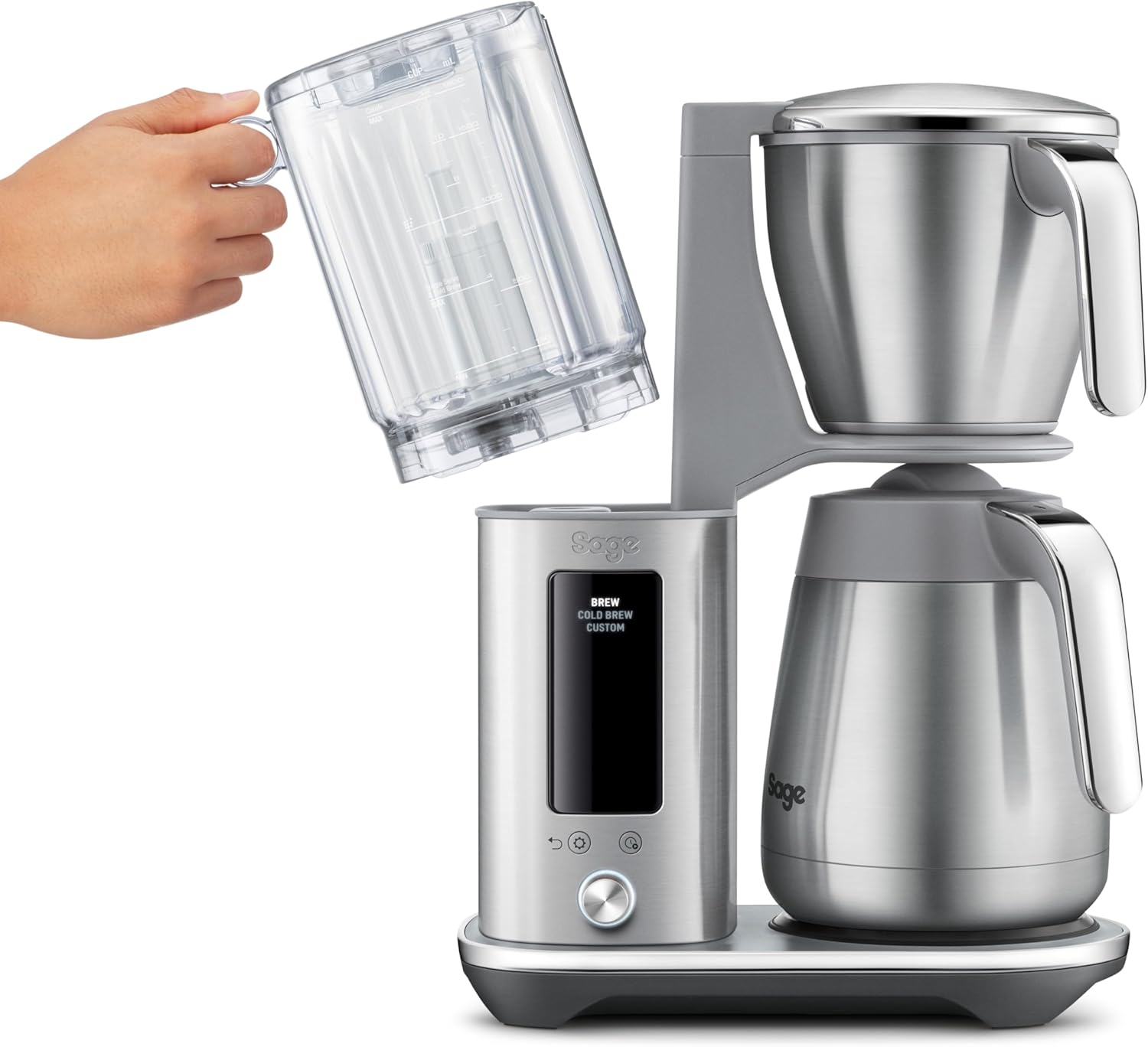
ചിത്രം 2: A hand demonstrating the removal of the water tank for cleaning or refilling.
2. First Use Cycle
Before brewing coffee for the first time, it is recommended to run a water-only cycle to prime the system and remove any manufacturing residues.
- Fill the water tank with fresh, cold water to the MAX line.
- Place an empty filter paper in the brew basket.
- Ensure the thermal carafe with its lid is correctly positioned on the heating plate.
- Select the "Brew" function and start the cycle. Allow the full cycle to complete.
- Discard the water from the carafe. Your coffee maker is now ready for use.
പ്രവർത്തന നിർദ്ദേശങ്ങൾ
1. Brewing Standard Coffee (Gold Cup Standard)
The Gold Cup setting is designed to brew coffee according to SCA (Specialty Coffee Association) standards for optimal flavor extraction.
- Fill the water tank with fresh, cold water to your desired level.
- Place a #4 cone filter paper into the brew basket.
- Add your preferred amount of medium-ground coffee to the filter. A general guideline is 60 grams of coffee per liter of water.
- Ensure the thermal carafe with its lid is correctly placed under the brew basket.
- Select the "Brew" option on the control panel. The display will show the selected brew type.
- Press the Start button (usually the center of the dial) to begin brewing. The display will show the brewing progress.

ചിത്രം 3: The coffee maker in operation, displaying the elapsed time since brewing began on the LCD screen.
2. Cold Brew Function
The Cold Brew function allows for a concentrated cold brew in approximately 30 minutes.
- Fill the water tank with fresh, cold water to the desired level for cold brew.
- Place a #4 cone filter paper into the brew basket.
- Add coarse-ground coffee suitable for cold brew to the filter.
- Ensure the thermal carafe with its lid is correctly placed.
- Select the "Cold Brew" option on the control panel.
- Press the Start button to begin the cold brew cycle.
- Once complete, the concentrated cold brew can be diluted with water or milk and served over ice.
3. Customizing Brew Profiles
The coffee maker allows you to adjust various parameters to create your personalized coffee experience.
- Select the "Custom" option on the control panel.
- Use the control dial to navigate through settings such as:
- പൂക്കുന്ന സമയം: Pre-wetting duration for coffee grounds.
- ബ്രൂ താപനില: Water temperature during brewing.
- ഫ്ലോ റേറ്റ്: Speed at which water is dispensed over the grounds.
- ചൂട് നിലനിർത്തുക: Duration the thermal carafe keeps coffee warm.
- Rotate the dial to adjust the value for each setting, and press the dial to confirm.
- Once all settings are configured, press the Start button to begin brewing with your custom profile.

ചിത്രം 4: A user interacting with the control dial to customize brewing parameters on the LCD screen.
4. Programmable Delayed Start
Set your coffee maker to start brewing automatically at a later time, up to 24 hours in advance.
- Prepare the coffee maker with water and coffee grounds as you would for a regular brew.
- Press the "Delay Start" button (refer to your specific model's button layout if different).
- Use the control dial to set the desired start time.
- Confirm the time and the coffee maker will display a timer counting down to the programmed start.
മെയിൻ്റനൻസ്
1. ദിവസേനയുള്ള ശുചീകരണം
പതിവായി വൃത്തിയാക്കുന്നത് മികച്ച പ്രകടനവും രുചിയും ഉറപ്പാക്കുന്നു.
- After each use, discard used coffee grounds and filter paper.
- Wash the brew basket, carafe, and carafe lid in warm, soapy water. Rinse thoroughly.
- ഡി ഉപയോഗിച്ച് കോഫി മേക്കറിന്റെ പുറംഭാഗം തുടയ്ക്കുകamp തുണി.
- ഉരച്ചിലുകളുള്ള ക്ലീനറുകളോ സ്കോറിംഗ് പാഡുകളോ ഉപയോഗിക്കരുത്.
2. ഡെസ്കലിംഗ്
Mineral deposits from water can build up over time, affecting performance. Descale your machine regularly, depending on water hardness and frequency of use.
- Empty the water tank and carafe.
- Prepare a descaling solution according to the manufacturer's instructions (e.g., white vinegar and water, or a commercial descaler).
- വാട്ടർ ടാങ്കിലേക്ക് ഡെസ്കലിംഗ് ലായനി ഒഴിക്കുക.
- Place the empty carafe with its lid under the brew basket.
- Run a full brew cycle with the descaling solution.
- After the cycle, discard the solution from the carafe.
- Rinse the water tank and carafe thoroughly.
- Run at least two full cycles with fresh, clean water to rinse out any remaining descaling solution.
3. വാട്ടർ ഫിൽറ്റർ മാറ്റിസ്ഥാപിക്കൽ
If your model includes a water filter in the tank, replace it every 2-3 months or as indicated by the appliance.
- Remove the old water filter from its holder in the water tank.
- പുതിയ വാട്ടർ ഫിൽറ്റർ തണുത്ത വെള്ളത്തിൽ 5 മിനിറ്റ് മുക്കിവയ്ക്കുക.
- Insert the new filter into the filter holder, ensuring it is securely seated.
ട്രബിൾഷൂട്ടിംഗ്
| പ്രശ്നം | സാധ്യമായ കാരണം | പരിഹാരം |
|---|---|---|
| കാപ്പി ഉണ്ടാക്കുന്നില്ല | No water in tank; appliance not plugged in; brew cycle not initiated. | Fill water tank; ensure power cord is securely plugged in; press Start button. |
| കാപ്പിയുടെ രുചി ദുർബലമാണ് | Insufficient coffee grounds; grounds too coarse; incorrect water-to-coffee ratio. | Increase coffee amount; use finer grind; adjust ratio (e.g., 60g/L). |
| Coffee overflows from filter basket | Too much coffee grounds; grounds too fine; filter basket clogged. | Reduce coffee amount; use coarser grind; clean filter basket thoroughly. |
| ഉപകരണം ഓണാക്കുന്നില്ല | No power; power outlet malfunction. | പവർ കണക്ഷൻ പരിശോധിക്കുക; മറ്റൊരു ഔട്ട്ലെറ്റ് പരീക്ഷിക്കുക; പ്രശ്നം നിലനിൽക്കുകയാണെങ്കിൽ ഉപഭോക്തൃ പിന്തുണയുമായി ബന്ധപ്പെടുക. |
സ്പെസിഫിക്കേഷനുകൾ
- മോഡൽ നമ്പർ: SDC465BSS4EEU1
- ബ്രാൻഡ്: മുനി
- ശേഷി: 1.77 ലിറ്റർ
- അളവുകൾ (L x W x H): 44 cm x 27.5 cm x 49.5 cm (17.32 in x 10.83 in x 19.49 in)
- ഭാരം: 7.83 കിലോഗ്രാം (17.26 പൗണ്ട്)
- മെറ്റീരിയൽ: ബ്രഷ് ചെയ്ത സ്റ്റെയിൻലെസ്സ് സ്റ്റീൽ
- പ്രത്യേക സവിശേഷതകൾ: One-button Gold Cup brewing, Rapid Cold Brew, Customizable brew profiles, Double-wall thermal carafe, Programmable delayed start.
- കോഫി ഫിൽട്ടർ വലുപ്പം: #4 Cone
- ഊർജ്ജ സ്രോതസ്സ്: കോർഡഡ് ഇലക്ട്രിക്
- ഓപ്പറേറ്റിംഗ് മോഡ്: പൂർണ്ണമായും ഓട്ടോമാറ്റിക്

ചിത്രം 5: Diagram illustrating the dimensions of the coffee maker.
വാറൻ്റിയും പിന്തുണയും
For warranty information and customer support, please refer to the warranty card included with your product or visit the official Sage Appliances webസൈറ്റ്. ഏതെങ്കിലും വാറന്റി ക്ലെയിമുകൾക്ക് നിങ്ങളുടെ വാങ്ങലിന്റെ തെളിവ് സൂക്ഷിക്കുക.
നിർമ്മാതാവ്: മുനി വീട്ടുപകരണങ്ങൾ