
1. ഉൽപ്പന്നം കഴിഞ്ഞുview
The Cordless CL-07 PRO Smart Door Lock is an advanced access control system designed to enhance home security with cutting-edge technology and seamless functionality. It offers multiple secure entry methods and remote monitoring capabilities.
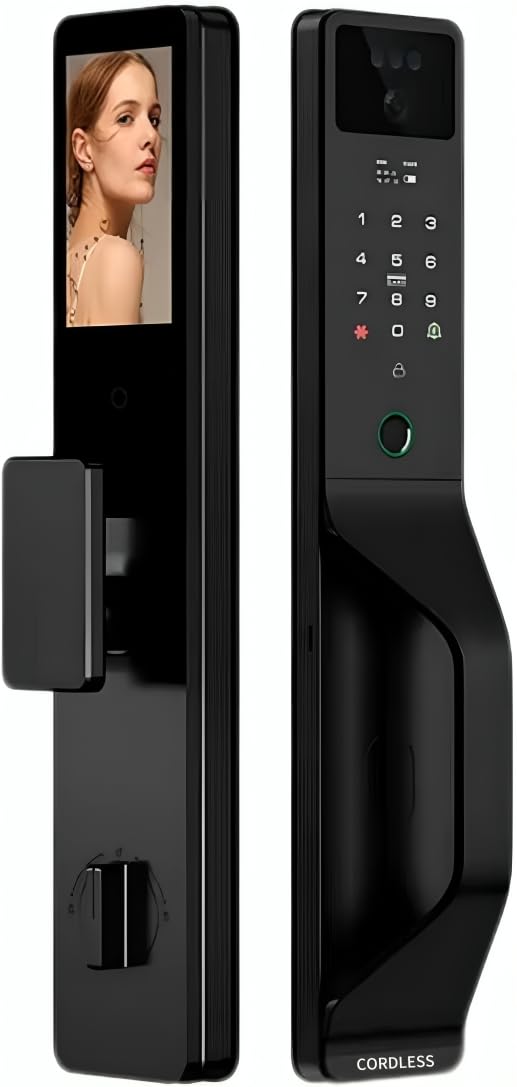
ചിത്രം 1.1: മുന്നിലും പിന്നിലും view of the CL-07 PRO Smart Door Lock. The front panel features a keypad, fingerprint sensor, and camera, while the back panel shows the internal display screen and manual lock mechanism.
പ്രധാന സവിശേഷതകൾ:
- ഒന്നിലധികം അൺലോക്കിംഗ് രീതികൾ: Supports 3D face recognition, fingerprint, password, magnetic card, mechanical key, and Tuya Smart App control.
- Two-Way Video Communication: Integrated smart camera with real-time two-way video call functionality for remote interaction with visitors.
- റിമോട്ട് മോണിറ്ററിംഗ്: Wi-Fi enabled with Tuya Smart App integration for comprehensive access control and visitor management via mobile device.
- ബഹുമുഖ ഇൻസ്റ്റാളേഷൻ: Compatible with both wooden and armored doors.
- Internal Display Screen: Provides convenient interface navigation and visitor monitoring from inside.
ഉൾപ്പെടുത്തിയ ഘടകങ്ങൾ:
- Smart Lock Unit (Front and Back Panels)
- സ്മാർട്ട് ക്യാമറ
- Video Display Screen
- Mechanical Key(s)
- ഇൻസ്റ്റലേഷൻ ഹാർഡ്വെയർ
2. സജ്ജീകരണവും ഇൻസ്റ്റാളേഷനും
Proper installation is crucial for the optimal performance and security of your CL-07 PRO Smart Door Lock. It is recommended to follow these steps carefully or seek professional assistance.
2.1 പ്രീ-ഇൻസ്റ്റാളേഷൻ ചെക്ക്ലിസ്റ്റ്:
- Verify door compatibility (wooden or armored doors).
- Ensure door thickness is within the specified range (refer to specifications).
- ഉൾപ്പെടുത്തിയിരിക്കുന്ന എല്ലാ ഘടകങ്ങളും ഉണ്ടെന്ന് സ്ഥിരീകരിക്കുക.
- Gather necessary tools (screwdriver, drill, measuring tape, etc.).
2.2 ഇൻസ്റ്റലേഷൻ ഘട്ടങ്ങൾ:
- വാതിൽ തയ്യാറാക്കുക: Remove any existing lock hardware. Ensure the door frame and boreholes are clean and properly sized according to the installation template (if provided).
- മോർട്ടൈസ് ലോക്ക് ഇൻസ്റ്റാൾ ചെയ്യുക: വാതിലിന്റെ അരികിൽ മോർട്ടൈസ് ലോക്ക് തിരുകുക, സ്ക്രൂകൾ ഉപയോഗിച്ച് ഉറപ്പിക്കുക.
- Mount Front Panel: Route the cables from the front panel through the door. Align the front panel with the mortise lock and secure it.
- കേബിളുകൾ ബന്ധിപ്പിക്കുക: Connect the cables from the front panel to the back panel, ensuring proper alignment of connectors.
- പിൻ പാനൽ ഇൻസ്റ്റാൾ ചെയ്യുക: Attach the back panel to the door, securing it with mounting screws. Ensure the lock operates smoothly before tightening fully.
- ബാറ്ററികൾ ഇൻസ്റ്റാൾ ചെയ്യുക: Insert the required batteries (not included) into the battery compartment on the back panel.
- പ്രാരംഭ സജ്ജീകരണം: Follow the on-screen prompts on the internal display to set up the administrator password and connect to your Wi-Fi network via the Tuya Smart App.
3. പ്രവർത്തന നിർദ്ദേശങ്ങൾ
The CL-07 PRO Smart Door Lock offers various methods for secure access and monitoring.
3.1 അൺലോക്ക് രീതികൾ:
- 3D Face Recognition: Stand directly in front of the lock's camera at the recommended distance. The lock will automatically recognize your registered face and unlock.
- ഫിംഗർപ്രിൻ്റ് ആക്സസ്: Place your registered finger firmly on the fingerprint sensor. The lock will verify your fingerprint and unlock.
- പാസ്വേഡ് എൻട്രി: Touch the keypad to activate it, then enter your registered password followed by the '#' key.
- Magnetic Card: Present your registered magnetic card to the card reader area on the lock.
- മെക്കാനിക്കൽ കീ: In case of power failure or emergency, insert the mechanical key into the hidden keyhole and turn to unlock.
- Tuya Smart App: Open the Tuya Smart App on your smartphone, select the lock, and use the remote unlock function.
3.2 Tuya Smart App Integration:
- റിമോട്ട് അൺലോക്കിംഗ്: Unlock the door from anywhere using the app.
- ആക്സസ് മാനേജ്മെൻ്റ്: Add, modify, or delete user fingerprints, faces, passwords, and magnetic cards. Set temporary access codes for guests.
- പ്രവർത്തന ലോഗുകൾ: View a history of all lock and unlock events, including method used and timestamp.
- Two-Way Video Call: Receive notifications when someone is at your door. Initiate a two-way video call through the app to communicate with visitors.
- തത്സമയ നിരീക്ഷണം: Access the live camera feed from the lock via the app.
4. പരിപാലനം
പതിവ് അറ്റകുറ്റപ്പണികൾ നിങ്ങളുടെ സ്മാർട്ട് ഡോർ ലോക്കിന്റെ ദീർഘായുസ്സും മികച്ച പ്രകടനവും ഉറപ്പാക്കുന്നു.
- വൃത്തിയാക്കൽ: Wipe the lock's surface with a soft, dry cloth. Avoid using abrasive cleaners, solvents, or harsh chemicals, as they can damage the finish and electronic components.
- ബാറ്ററി മാറ്റിസ്ഥാപിക്കൽ: Replace batteries promptly when the low battery indicator appears. Use high-quality alkaline batteries.
- സെൻസർ പരിചരണം: Keep the fingerprint sensor and camera lens clean and free of dust or smudges for accurate recognition.
- മെക്കാനിക്കൽ കീഹോൾ: Ensure the mechanical keyhole is clear of obstructions.
- ഫേംവെയർ അപ്ഡേറ്റുകൾ: Check the Tuya Smart App periodically for available firmware updates to ensure your lock has the latest features and security enhancements.
5. പ്രശ്നപരിഹാരം
If you encounter issues with your CL-07 PRO Smart Door Lock, refer to the following common problems and solutions:
| പ്രശ്നം | സാധ്യമായ കാരണം | പരിഹാരം |
|---|---|---|
| ലോക്ക് പ്രതികരിക്കുന്നില്ല / പവർ ഇല്ല | ഡെഡ് ബാറ്ററികൾ; തെറ്റായ ബാറ്ററി ഇൻസ്റ്റാളേഷൻ. | Replace batteries with new ones; Ensure batteries are inserted with correct polarity. |
| Fingerprint/Face recognition failure | Dirty sensor/camera; Unregistered fingerprint/face; Improper placement. | Clean sensor/camera; Re-register fingerprint/face; Ensure proper placement and angle. |
| Wi-Fi കണക്ഷൻ പ്രശ്നങ്ങൾ | തെറ്റായ വൈ-ഫൈ പാസ്വേഡ്; റൂട്ടർ വളരെ അകലെയാണ്; നെറ്റ്വർക്ക് ഇടപെടൽ. | Verify Wi-Fi password; Move router closer or use a Wi-Fi extender; Restart router and lock. |
| ലോക്ക് മെക്കാനിസം കുടുങ്ങി | Misalignment during installation; Obstruction in door frame. | Check installation alignment; Remove any obstructions. If issue persists, contact support. |
ഈ പരിഹാരങ്ങൾ പരീക്ഷിച്ചതിനുശേഷവും പ്രശ്നം നിലനിൽക്കുകയാണെങ്കിൽ, ദയവായി ഉപഭോക്തൃ പിന്തുണയുമായി ബന്ധപ്പെടുക.
6 സ്പെസിഫിക്കേഷനുകൾ
| ആട്രിബ്യൂട്ട് | വിശദാംശങ്ങൾ |
|---|---|
| മോഡൽ നമ്പർ | CL-07 PRO |
| ബ്രാൻഡ് | കോർഡ്ലെസ്സ് |
| അളവുകൾ | 10 x 8.5 x 20 സെ.മീ |
| ഇനത്തിൻ്റെ ഭാരം | 850 ഗ്രാം |
| മെറ്റീരിയൽ | അലൂമിനിയം, ടെമ്പർഡ് ഗ്ലാസ് |
| നിറം | Black And Silver |
| പവർ ഉറവിടം | ബാറ്ററി പവർ (ബാറ്ററികൾ ഉൾപ്പെടുത്തിയിട്ടില്ല) |
| വാല്യംtage | 12 വോൾട്ട് |
| കണക്റ്റിവിറ്റി | വൈഫൈ പ്രവർത്തനക്ഷമമാക്കി |
| പ്രത്യേക സവിശേഷതകൾ | 3D Face Recognition, Fingerprint Scanner, Mobile App Control, Two-way Audio |
| ഇൻസ്റ്റലേഷൻ രീതി | വാതിൽ മൗണ്ട് |
| അനുയോജ്യമായ വാതിലുകൾ | Wooden and Armored Doors |
| കൺട്രോളർ തരം | Smartphone App, Touch Panel |
7. വാറൻ്റിയും പിന്തുണയും
For warranty information and technical support, please refer to the documentation provided with your purchase or visit the official Cordless webസൈറ്റ്. വാറന്റി ക്ലെയിമുകൾക്കായി നിങ്ങളുടെ വാങ്ങലിന്റെ തെളിവ് സൂക്ഷിക്കുക.
ഉപഭോക്തൃ പിന്തുണ: For further assistance, troubleshooting, or inquiries, please contact Cordless customer support through the channels specified in your product packaging or on the official brand webസൈറ്റ്.