
1. ആമുഖം
This manual provides essential information for the safe and efficient use of your DOOGEE Note 58 Smartphone. Please read this guide thoroughly before operating your device to ensure optimal performance and longevity.
2 സുരക്ഷാ വിവരങ്ങൾ
- ബാറ്ററി സുരക്ഷ: Do not disassemble, impact, squeeze, or put the battery into fire. If severe swelling occurs, discontinue use. Avoid high temperatures.
- ചാർജിംഗ്: Use only approved chargers and cables. Unapproved chargers may cause fire, explosion, or other hazards.
- വെള്ളവും പൊടിയും പ്രതിരോധം: This device is not waterproof. Avoid exposure to liquids.
- ഡ്രൈവിംഗ് സുരക്ഷ: Always prioritize driving safety. Do not use your phone while driving unless absolutely necessary and in a hands-free manner.
- മെഡിക്കൽ ഉപകരണങ്ങൾ: Maintain a safe distance between your phone and implanted medical devices like pacemakers. Consult your physician for specific guidelines.
3. പാക്കേജ് ഉള്ളടക്കം
നിങ്ങളുടെ പാക്കേജിൽ ഇനിപ്പറയുന്ന ഇനങ്ങൾ അടങ്ങിയിട്ടുണ്ടെന്ന് പരിശോധിക്കുക:
- DOOGEE Note 58 Smartphone
- ടൈപ്പ്-സി കേബിൾ
- പവർ അഡാപ്റ്റർ
- സിം എജക്ടർ ഉപകരണം
- ഉപയോക്തൃ മാനുവൽ
- സംരക്ഷണ കേസ്
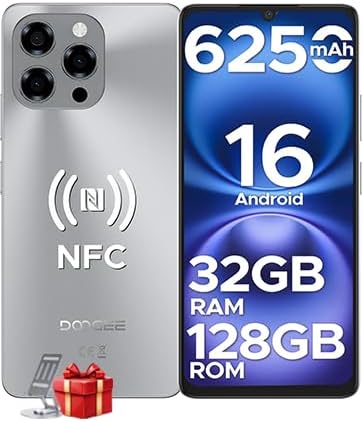
Image: The DOOGEE Note 58 Smartphone, showcasing its front and rear design, highlighting key specifications such as 6250mAh battery, Android 16, 32GB RAM, 128GB ROM, and NFC capabilities.

Image: An illustration of the DOOGEE Note 58 retail box and its contents, including the smartphone, Type-C cable, power adapter, SIM ejector tool, user manual, and protective case.
4. ഉപകരണ ലേഔട്ട്
Familiarize yourself with the physical components of your DOOGEE Note 58.

ചിത്രം: ഒരു വശം view of the DOOGEE Note 58, emphasizing its ultra-thin 8.6mm design. This image helps users locate side buttons and ports.
4.1 ഫിസിക്കൽ ബട്ടണുകളും പോർട്ടുകളും
- പവർ ബട്ടൺ: Located on the right side. Press and hold to power on/off or restart. Press briefly to lock/unlock the screen.
- വോളിയം ബട്ടണുകൾ: Located above the power button. Press to adjust media volume, call volume, or alarm volume.
- യുഎസ്ബി ടൈപ്പ്-സി പോർട്ട്: താഴെയായി സ്ഥിതിചെയ്യുന്നു. ചാർജ് ചെയ്യുന്നതിനും ഡാറ്റ കൈമാറ്റത്തിനും ഉപയോഗിക്കുന്നു.
- സ്പീക്കർ: അടിയിൽ സ്ഥിതിചെയ്യുന്നു.
- മൈക്രോഫോൺ: അടിയിൽ സ്ഥിതിചെയ്യുന്നു.
- സിം/എസ്ഡി കാർഡ് ട്രേ: Located on the left side. Use the provided ejector tool to open.
4.2 ക്യാമറകൾ
- പിൻ ക്യാമറ മൊഡ്യൂൾ: Located on the upper left of the back panel, featuring a 16MP main camera.
- മുൻ ക്യാമറ: Located at the top center of the display (waterdrop notch), featuring an 8MP camera.
5. സജ്ജീകരണം
5.1 Inserting SIM and SD Cards
- Locate the SIM/SD card tray on the left side of the device.
- ട്രേയുടെ അടുത്തുള്ള ചെറിയ ദ്വാരത്തിലേക്ക് സിം എജക്റ്റർ ഉപകരണം തിരുകുക, ട്രേ പുറത്തേക്ക് വരുന്നത് വരെ സൌമ്യമായി അമർത്തുക.
- Place your Nano-SIM card(s) and/or microSD card (up to 2TB) into the designated slots on the tray. Ensure the gold contacts face downwards.
- ഉപകരണത്തിൽ ക്ലിക്കുചെയ്യുന്നത് വരെ ട്രേ ശ്രദ്ധാപൂർവ്വം തിരികെ ഉപകരണത്തിലേക്ക് തള്ളുക.
5.2 പ്രാരംഭ പവർ ഓണും അടിസ്ഥാന സജ്ജീകരണവും
- Press and hold the Power button until the DOOGEE logo appears.
- നിങ്ങളുടെ ഭാഷ തിരഞ്ഞെടുക്കുന്നതിനും, ഒരു Wi-Fi നെറ്റ്വർക്കിലേക്ക് കണക്റ്റുചെയ്യുന്നതിനും, നിങ്ങളുടെ Google അക്കൗണ്ട് സജ്ജീകരിക്കുന്നതിനും ഓൺ-സ്ക്രീൻ നിർദ്ദേശങ്ങൾ പാലിക്കുക.
- You will be guided through setting up security features like Face ID during this process.
6. നിങ്ങളുടെ ഉപകരണം പ്രവർത്തിപ്പിക്കുന്നു
6.1 അടിസ്ഥാന നാവിഗേഷൻ
- ടാപ്പ് ചെയ്യുക: ഒരു ഇനം തിരഞ്ഞെടുക്കുകയോ ഒരു ആപ്പ് തുറക്കുകയോ ചെയ്യുക.
- സ്വൈപ്പ്: സ്ക്രീനുകളിലൂടെയോ ലിസ്റ്റുകളിലൂടെയോ സ്ക്രോൾ ചെയ്യുക.
- പിഞ്ച്: ഫോട്ടോകളിൽ സൂം ഇൻ ചെയ്യുകയോ സൂം ഔട്ട് ചെയ്യുകയോ ചെയ്യുക, web പേജുകൾ.
- ലോംഗ് പ്രസ്സ്: സന്ദർഭോചിത മെനുകൾ ആക്സസ് ചെയ്യുക അല്ലെങ്കിൽ ഐക്കണുകൾ നീക്കുക.
6.2 കോളുകളും സന്ദേശമയയ്ക്കലും
- കോളുകൾ ചെയ്യുന്നു: ഫോൺ ആപ്പ് തുറന്ന് നമ്പർ നൽകുക, തുടർന്ന് കോൾ ഐക്കണിൽ ടാപ്പ് ചെയ്യുക.
- സന്ദേശങ്ങൾ അയയ്ക്കുന്നു: മെസേജസ് ആപ്പ് തുറന്ന് 'സ്റ്റാർട്ട് ചാറ്റ്' ടാപ്പ് ചെയ്യുക, സ്വീകർത്താവും സന്ദേശവും നൽകുക, തുടർന്ന് അയയ്ക്കുക.
6.3 ക്യാമറ ഉപയോഗം
Your DOOGEE Note 58 features a 16MP main camera and an 8MP front camera for capturing photos and videos.

Image: A close-up of the DOOGEE Note 58's rear camera module, highlighting the 16MP main camera with OV16880 sensor and AF support.

Image: A person taking a selfie with the DOOGEE Note 58, illustrating the use of the 8MP front camera with IMX134 sensor and 78° FOV.
- ക്യാമറ ആപ്പ് തുറക്കുക.
- Select desired mode (Photo, Video, Portrait, Night, Pro, Time-lapse).
- Tap the shutter button to capture.
6.4 കണക്റ്റിവിറ്റി
- വൈഫൈ: Go to Settings > Network & internet > Wi-Fi to connect to available networks. Supports Wi-Fi 5 (2.4GHz/5GHz).
- ബ്ലൂടൂത്ത്: Go to Settings > Connected devices > Bluetooth to pair with other devices.
- NFC: For contactless payments and quick pairing. Enable in Settings > Connected devices > Connection preferences > NFC.
- OTG: Connect external USB devices (e.g., flash drives) or use for reverse charging.

Image: A hand holding the DOOGEE Note 58 near a payment terminal, demonstrating the multifunctional NFC feature for contactless payments.

Image: Two smartphones connected via an OTG cable, illustrating the reverse charging capability of the DOOGEE Note 58.
6.5 ബാറ്ററി മാനേജ്മെൻ്റ്
The DOOGEE Note 58 is equipped with a 6250mAh battery.

Image: An illustration of the DOOGEE Note 58's 6250mAh battery, detailing its long-lasting performance with examples like 1266 hours standby, 36.3 hours call time, 9 hours video playback, 11 hours web browsing, and 27 hours music playback.
- ബാറ്ററി ഉപയോഗം പരിശോധിക്കാൻ, ക്രമീകരണങ്ങൾ > ബാറ്ററി എന്നതിലേക്ക് പോകുക.
- ആവശ്യമുള്ളപ്പോൾ ബാറ്ററി ലൈഫ് വർദ്ധിപ്പിക്കാൻ ബാറ്ററി സേവർ മോഡ് പ്രവർത്തനക്ഷമമാക്കുക.
6.6 സ്റ്റോറേജ് മാനേജ്മെൻ്റ്
The device comes with 128GB of internal storage, expandable up to 2TB via microSD card.

Image: Visual representation of the DOOGEE Note 58's 128GB ROM and the option for 2TB expandable storage, emphasizing ample space for user data.
- ലേക്ക് view storage usage, go to Settings > Storage.
- കൈകാര്യം ചെയ്യുക files using the pre-installed File മാനേജർ ആപ്പ്.
6.7 സുരക്ഷാ സവിശേഷതകൾ
- മുഖം തിരിച്ചറിയൽ: Set up facial recognition for quick and secure unlocking. Go to Settings > Security > Face unlock.

Image: A user unlocking the DOOGEE Note 58 using Face ID, demonstrating instant and secure access.
6.8 ജിപിഎസ് നാവിഗേഷൻ
The device supports GPS, Glonass, Galileo, and Beidou for accurate positioning.

Image: A smartphone displaying a navigation map in a car, illustrating the accurate GPS navigation system of the DOOGEE Note 58.
- Use pre-installed map applications or download your preferred navigation app from the Google Play Store.
6.9 ആൻഡ്രോയിഡ് 16 സവിശേഷതകൾ
Your DOOGEE Note 58 runs on the latest Android 16 operating system, offering enhanced performance and features.

Image: Screenshots demonstrating Android 16's multi-functional system, including 'Super Notes', 'Split Screen Mode', and 'Dual System Mode' for enhanced productivity and privacy.
- സ്പ്ലിറ്റ് സ്ക്രീൻ മോഡ്: Use two apps simultaneously by long-pressing the recent apps button and selecting the split-screen option.
- Super Notes: Access advanced note-taking features for improved organization.
- Dual System Mode: Create separate user profiles for work and personal use, enhancing privacy and organization.
7. പരിപാലനം
7.1 നിങ്ങളുടെ ഉപകരണം വൃത്തിയാക്കൽ
- സ്ക്രീനും ബോഡിയും തുടയ്ക്കാൻ മൃദുവായ, ലിന്റ് രഹിത തുണി ഉപയോഗിക്കുക.
- കഠിനമായ രാസവസ്തുക്കളോ ഉരച്ചിലുകളോ ഉപയോഗിക്കുന്നത് ഒഴിവാക്കുക.
7.2 സോഫ്റ്റ്വെയർ അപ്ഡേറ്റുകൾ
- Regularly check for software updates to ensure optimal performance and security. Go to Settings > System > System update.
7.3 ബാറ്ററി കെയർ
- ബാറ്ററിയുടെ ആയുസ്സ് കുറയ്ക്കുമെന്നതിനാൽ തീവ്രമായ താപനില ഒഴിവാക്കുക.
- 100% ചാർജ് ആയതിനു ശേഷവും ഉപകരണം ദീർഘനേരം ചാർജ് ചെയ്യാൻ വയ്ക്കരുത്.
8. പ്രശ്നപരിഹാരം
8.1 പൊതുവായ പ്രശ്നങ്ങൾ
- ഉപകരണം ഓണാക്കുന്നില്ല: ബാറ്ററി ചാർജ് ചെയ്തിട്ടുണ്ടെന്ന് ഉറപ്പാക്കുക. കുറഞ്ഞത് 10 മിനിറ്റെങ്കിലും ചാർജറുമായി കണക്റ്റ് ചെയ്യുക, തുടർന്ന് പവർ ഓൺ ചെയ്യാൻ ശ്രമിക്കുക.
- ആപ്പുകൾ ക്രാഷാകുന്നു: ആപ്പിന്റെ കാഷെ മായ്ക്കുക (ക്രമീകരണങ്ങൾ > ആപ്പുകൾ > [ആപ്പ് നാമം] > സംഭരണവും കാഷെയും > കാഷെ മായ്ക്കുക). പ്രശ്നം നിലനിൽക്കുകയാണെങ്കിൽ, ആപ്പ് വീണ്ടും ഇൻസ്റ്റാൾ ചെയ്യുക.
- നെറ്റ്വർക്ക് പ്രശ്നങ്ങൾ: Check if airplane mode is off. Restart the device. Verify SIM card insertion.
- മന്ദഗതിയിലുള്ള പ്രകടനം: ഉപയോഗിക്കാത്ത ആപ്പുകൾ അടയ്ക്കുക, കാഷെ മായ്ക്കുക അല്ലെങ്കിൽ സംഭരണ ഇടം ശൂന്യമാക്കുക.
8.2 ഫാക്ടറി റീസെറ്റ്
ഒരു ഫാക്ടറി റീസെറ്റ് നിങ്ങളുടെ ഉപകരണത്തിലെ എല്ലാ ഡാറ്റയും മായ്ക്കുകയും അതിന്റെ യഥാർത്ഥ ഫാക്ടറി ക്രമീകരണങ്ങളിലേക്ക് പുനഃസ്ഥാപിക്കുകയും ചെയ്യും. തുടരുന്നതിന് മുമ്പ് പ്രധാനപ്പെട്ട ഡാറ്റയുടെ ബാക്കപ്പ് എടുക്കുക.
- ക്രമീകരണങ്ങൾ > സിസ്റ്റം > റീസെറ്റ് ഓപ്ഷനുകൾ എന്നതിലേക്ക് പോകുക.
- Tap 'Erase all data (factory reset)'.
- നിങ്ങളുടെ തീരുമാനം സ്ഥിരീകരിച്ച് ആവശ്യപ്പെടുകയാണെങ്കിൽ നിങ്ങളുടെ പിൻ/പാസ്വേഡ് നൽകുക.
9 സ്പെസിഫിക്കേഷനുകൾ
Detailed technical specifications for the DOOGEE Note 58 Smartphone.
| ഫീച്ചർ | സ്പെസിഫിക്കേഷൻ |
|---|---|
| മോഡൽ | കുറിപ്പ് 58 |
| ഓപ്പറേറ്റിംഗ് സിസ്റ്റം | ആൻഡ്രോയിഡ് 16 |
| പ്രോസസ്സർ | UNISOC T7520 Octa-core (1.8GHz) |
| റാം | 32GB (8GB ഫിസിക്കൽ + 24GB വെർച്വൽ) |
| ആന്തരിക സംഭരണം | 128 ജിബി |
| വികസിപ്പിക്കാവുന്ന സംഭരണം | 2TB വരെ (മൈക്രോഎസ്ഡി) |
| പ്രദർശിപ്പിക്കുക | 6.75-inch HD+ IPS (720x1600 pixels) |
| പുതുക്കിയ നിരക്ക് | 90Hz |
| പ്രധാന ക്യാമറ | 16എംപി |
| മുൻ ക്യാമറ | 8എംപി |
| ബാറ്ററി ശേഷി | 6250mAh |
| അളവുകൾ | 16.8 x 7.75 x 0.86 സെ.മീ |
| ഭാരം | 199 ഗ്രാം |
| കണക്റ്റിവിറ്റി | 4G, Wi-Fi 5 (2.4G/5G), Bluetooth, NFC, OTG |
| നാവിഗേഷൻ | ജിപിഎസ്, ഗ്ലോനാസ്, ഗലീലിയോ, ബീഡോ |
| സുരക്ഷ | മുഖം ഐഡി |
10. വാറൻ്റിയും പിന്തുണയും
10.1 വാറൻ്റി വിവരങ്ങൾ
- Your DOOGEE Note 58 Smartphone comes with a 2 വർഷത്തെ പരിമിത വാറൻ്റി വാങ്ങിയ തീയതി മുതൽ. ഈ വാറന്റി നിർമ്മാണ വൈകല്യങ്ങൾ ഉൾക്കൊള്ളുന്നു.
- A 30-day refund and free return policy is available for eligible purchases. Please refer to your retailer's return policy for details.
10.2 ഉപഭോക്തൃ പിന്തുണ
- For technical assistance or support inquiries, DOOGEE offers 24/7 online assistance. Please visit the official DOOGEE website or contact their customer service channels for further help.