
ആമുഖം
വാങ്ങിയതിന് നന്ദി.asing the ACTIVA Heat Max 2000W Fan Room Heater. This manual provides important information regarding the safe operation, installation, maintenance, and troubleshooting of your new appliance. Please read this manual thoroughly before use and retain it for future reference.
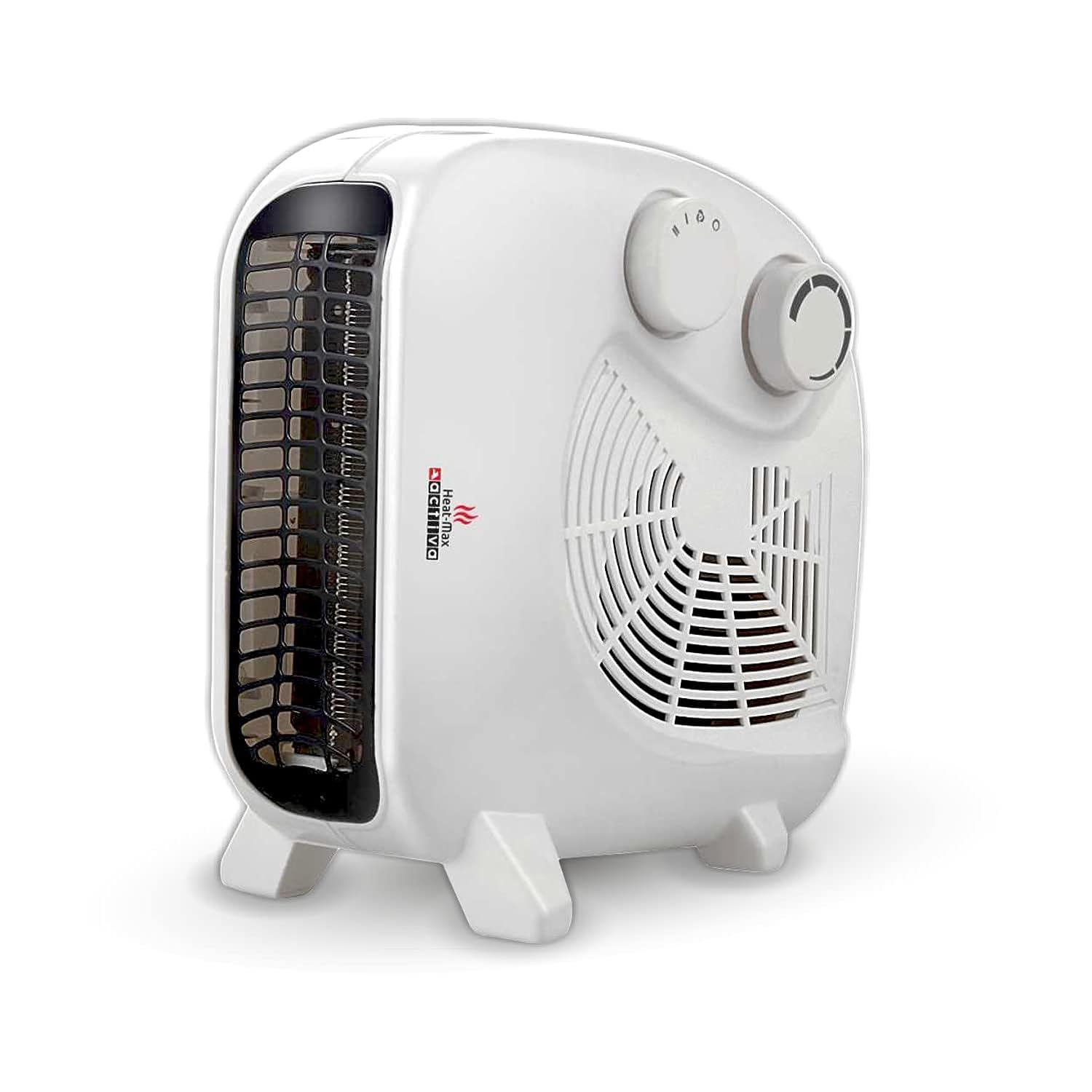
Image: The ACTIVA Heat Max 2000W Fan Room Heater, showcasing അതിന്റെ ഒതുക്കമുള്ള ഡിസൈൻ.
പ്രധാനപ്പെട്ട സുരക്ഷാ നിർദ്ദേശങ്ങൾ
തീ, വൈദ്യുതാഘാതം അല്ലെങ്കിൽ പരിക്ക് എന്നിവയ്ക്കുള്ള സാധ്യത കുറയ്ക്കുന്നതിന്, എല്ലായ്പ്പോഴും ഈ അടിസ്ഥാന മുൻകരുതലുകൾ പാലിക്കുക:
- ഈ ഹീറ്റർ ഉപയോഗിക്കുന്നതിന് മുമ്പ് എല്ലാ നിർദ്ദേശങ്ങളും വായിക്കുക.
- Plug the room heater directly into a wall socket. Do not use extension cords or power strips.
- Keep flammable materials such as furniture, pillows, bedding, papers, clothes, and curtains at least 3 feet (0.9 meters) from the front of the heater and away from the sides and rear.
- ശാരീരിക, ഇന്ദ്രിയ, മാനസിക ശേഷി കുറഞ്ഞ കുട്ടികളോ വ്യക്തികളോ ഏതെങ്കിലും ഉപകരണം ഉപയോഗിക്കുമ്പോഴോ സമീപത്തോ ഉപയോഗിക്കുമ്പോഴോ അടുത്ത മേൽനോട്ടം ആവശ്യമാണ്.
- ഉപയോഗിക്കാത്തപ്പോൾ എപ്പോഴും ഹീറ്റർ അൺപ്ലഗ് ചെയ്യുക.
- Do not cover the heater during operation or immediately after use, as this can cause overheating.
- To prevent drying out of air during prolonged usage, consider placing a bowl of water in the room to add moisture.
- കേടായ കോഡോ പ്ലഗോ ഉപയോഗിച്ച് ഒരു ഹീറ്ററും പ്രവർത്തിപ്പിക്കരുത്, അല്ലെങ്കിൽ ഹീറ്റർ തകരാറിലായതിനുശേഷം അല്ലെങ്കിൽ ഏതെങ്കിലും വിധത്തിൽ താഴെ വീണുപോയതിനുശേഷം അല്ലെങ്കിൽ കേടുപാടുകൾ സംഭവിച്ചതിനുശേഷം.
- വെളിയിൽ ഉപയോഗിക്കരുത്.
- Avoid placing the heater in areas where it may be exposed to water or high humidity.

Image: Recommended usage directions for safe operation, including warnings about flammable items, children, and covering the heater.

Image: Key safety and design features of the heater, such as overheat protection and durable construction.
ഉൽപ്പന്ന ഘടകങ്ങൾ
Familiarize yourself with the different parts of your ACTIVA Heat Max Fan Room Heater:

Image: Labeled diagram illustrating the key components of the heater, including the safety mesh grill, control knobs, hot air outlet, and fan.
- Safety Mesh Grill: Protects the heating element and prevents direct contact.
- താപനില നിയന്ത്രണ നോബ്: ആവശ്യമുള്ള മുറിയിലെ താപനില ക്രമീകരിക്കുന്നു.
- Heat Setting Knob: Selects between different heating modes (Fan, Low Heat, High Heat).
- ഹോട്ട് എയർ ഔട്ട്ലെറ്റ്: Where the heated air is expelled.
- ഫാൻ: Circulates air for heating or cooling.
സജ്ജമാക്കുക
അൺപാക്ക് ചെയ്യുന്നു
- ഹീറ്റർ അതിന്റെ പാക്കേജിംഗിൽ നിന്ന് ശ്രദ്ധാപൂർവ്വം നീക്കം ചെയ്യുക.
- Check for any signs of damage. If damaged, do not use and contact customer support.
- "ബോക്സിൽ എന്താണുള്ളത്" എന്ന വിഭാഗത്തിൽ ലിസ്റ്റ് ചെയ്തിരിക്കുന്ന എല്ലാ ഘടകങ്ങളും ഉണ്ടെന്ന് ഉറപ്പാക്കുക.
പ്ലേസ്മെൻ്റ്
The ACTIVA Heat Max heater can be used in both vertical and horizontal positions.
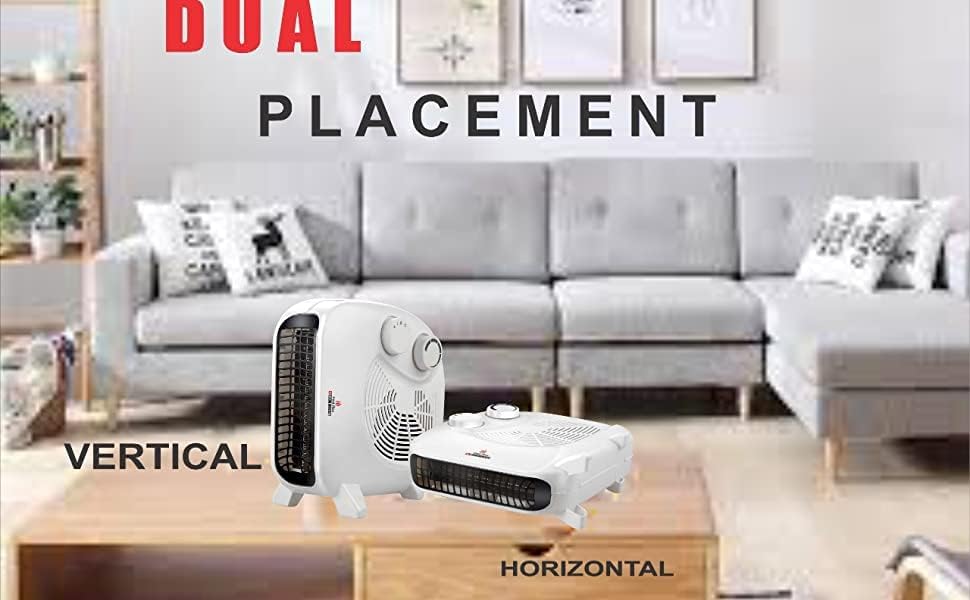
Image: The heater displayed in both vertical and horizontal positions, demonstrating its versatile placement options.
- ഹീറ്റർ ഒരു ഉറച്ച, ലെവൽ പ്രതലത്തിൽ സ്ഥാപിക്കുക.
- Ensure there is adequate clearance around the heater (at least 3 feet from walls, furniture, and other objects).
- ഹീറ്റർ നേരിട്ട് പവർ ഔട്ട്ലെറ്റിന് താഴെ വയ്ക്കരുത്.
പവർ കണക്ഷൻ
- Ensure the heater is switched off before plugging it in.
- Plug the power cord directly into a suitable 230V AC wall socket. This heater may require a 15 Amp സോക്കറ്റ്.
- Do not overload the circuit. Avoid plugging other high-wattage appliances into the same circuit.
പ്രവർത്തന നിർദ്ദേശങ്ങൾ
പവർ ഓൺ/ഓഫ്
- അനുയോജ്യമായ പവർ ഔട്ട്ലെറ്റിലേക്ക് ഹീറ്റർ പ്ലഗ് ചെയ്യുക.
- Turn the Heat Setting Knob to the desired mode (Fan, Low Heat, or High Heat). The power indicator light will illuminate.
- To turn off the heater, turn the Heat Setting Knob to the "OFF" position and unplug the unit from the wall socket.
ചൂട് ക്രമീകരണങ്ങൾ
The heater offers multiple settings for your comfort:
- ആരാധകൻ മാത്രം: Provides cool air circulation without heating.
- കുറഞ്ഞ ചൂട് (1000W): For gentle warmth or smaller rooms.
- ഉയർന്ന ചൂട് (2000W): For rapid heating of medium to large rooms.
ക്രമീകരിക്കാവുന്ന തെർമോസ്റ്റാറ്റ്
The Temperature Control Knob allows you to set your desired room temperature.
- Turn the Temperature Control Knob clockwise to increase the desired temperature, or counter-clockwise to decrease it.
- സെറ്റ് താപനില നിലനിർത്താൻ ഹീറ്റർ സൈക്കിൾ ഓണും ഓഫും ചെയ്യും.
മെയിൻ്റനൻസ്
പതിവ് അറ്റകുറ്റപ്പണികൾ നിങ്ങളുടെ ഹീറ്ററിന്റെ മികച്ച പ്രകടനവും ദീർഘായുസ്സും ഉറപ്പാക്കുന്നു.
വൃത്തിയാക്കൽ
- വൃത്തിയാക്കുന്നതിന് മുമ്പ് എല്ലായ്പ്പോഴും ഹീറ്റർ അൺപ്ലഗ് ചെയ്ത് പൂർണ്ണമായും തണുക്കാൻ അനുവദിക്കുക.
- ഒരു മൃദുവായ, ഡി ഉപയോഗിച്ച് ബാഹ്യ പ്രതലങ്ങൾ തുടയ്ക്കുകamp തുണി. ഉരച്ചിലുകളുള്ള ക്ലീനറുകളോ ലായകങ്ങളോ ഉപയോഗിക്കരുത്.
- ഹീറ്റർ വെള്ളത്തിൽ മുക്കുകയോ വെള്ളം നേരിട്ട് അതിൽ തളിക്കുകയോ ചെയ്യരുത്.
- എയർ ഇൻലെറ്റുകളിൽ നിന്നും ഔട്ട്ലെറ്റുകളിൽ നിന്നും പൊടി സൌമ്യമായി നീക്കം ചെയ്യാൻ ബ്രഷ് അറ്റാച്ച്മെന്റുള്ള ഒരു വാക്വം ക്ലീനർ ഉപയോഗിക്കുക.
സംഭരണം
- ഉപയോഗത്തിലില്ലാത്തപ്പോൾ, ഹീറ്റർ തണുത്തതും വരണ്ടതുമായ സ്ഥലത്ത് സൂക്ഷിക്കുക.
- പവർ കോർഡ് കേടുപാടുകൾ സംഭവിക്കാതിരിക്കാൻ വൃത്തിയായി പൊതിയുക.
ട്രബിൾഷൂട്ടിംഗ്
നിങ്ങളുടെ ഹീറ്ററിൽ പ്രശ്നങ്ങൾ നേരിടുകയാണെങ്കിൽ, ഇനിപ്പറയുന്ന പൊതുവായ പ്രശ്നങ്ങളും പരിഹാരങ്ങളും പരിശോധിക്കുക:
| പ്രശ്നം | സാധ്യമായ കാരണം | പരിഹാരം |
|---|---|---|
| ഹീറ്റർ ഓണാക്കുന്നില്ല. |
|
|
| Heater produces cool air only. |
|
|
| ഹീറ്റർ അപ്രതീക്ഷിതമായി ഓഫാകുന്നു. |
|
|
If the problem persists after trying these solutions, please contact customer support or a qualified service technician. Do not attempt to repair the heater yourself.
സ്പെസിഫിക്കേഷനുകൾ
| ബ്രാൻഡ് | ആക്ടിവ |
| മോഡൽ നമ്പർ | Heat Max |
| പവർ ഔട്ട്പുട്ട് | 2000W |
| ചൂടാക്കൽ മോഡുകൾ | 2 (1000W / 2000W) + Fan Only |
| പ്രത്യേക സവിശേഷതകൾ | Adjustable Speed, Lightweight, Noiseless, Overheat Protection, Portable |
| നിറം | വെള്ള |
| ഫോം ഫാക്ടർ | കാബിനറ്റ് |
| ഇൻഡോർ/ഔട്ട്ഡോർ ഉപയോഗം | ഇൻഡോർ |
| ഉൽപ്പന്ന അളവുകൾ | 29D x 17W x 30H സെന്റീമീറ്ററുകൾ |
| ഇനത്തിൻ്റെ ഭാരം | 1 കിലോ 500 ഗ്രാം |
| വാല്യംtage | 230 വോൾട്ട് (എസി) |
| ചൂടാക്കൽ കവറേജ് | Up to 162 Square Feet (approx.) |
| ഉൾപ്പെടുത്തിയ ഘടകങ്ങൾ | Main Unit (Fan Room Heater), Warranty Card |
വാറൻ്റിയും പിന്തുണയും
വാറൻ്റി വിവരങ്ങൾ
Your ACTIVA Heat Max 2000W Fan Room Heater comes with a 1 വർഷത്തെ വാറൻ്റി വാങ്ങിയ തീയതി മുതൽ. സാധാരണ ഉപയോഗത്തിലുള്ള നിർമ്മാണ വൈകല്യങ്ങൾ ഈ വാറന്റി ഉൾക്കൊള്ളുന്നു.
വാറന്റി തരം: Product installation is to be done by the customer. For repairs, the customer must send the product to an authorized service center. Repairs will only be performed at the service center.
ഉപഭോക്തൃ പിന്തുണ
For any queries, assistance, or to locate an authorized service center, please refer to the contact information provided on your warranty card or visit the official ACTIVA webസൈറ്റ്.
Manufacturer: TECHVISION INTERNATIONAL PVT. LTD. INDIA