
മോട്ടറോള മോട്ടോ G15 പവർ
മോട്ടറോള മോട്ടോ G15 പവർ 4G സ്മാർട്ട്ഫോൺ ഉപയോക്തൃ മാനുവൽ
Model: Moto G15 Power
1. ആമുഖം
Welcome to the user manual for your new Motorola Moto G15 Power 4G smartphone. This guide provides essential information to help you set up, operate, maintain, and troubleshoot your device. The Moto G15 Power is designed to deliver a superior mobile experience with its advanced features, including a vibrant Full HD+ display, a high-resolution camera system, and a long-lasting battery.
Please read this manual carefully to ensure optimal performance and longevity of your device. Keep it for future reference.
2. പ്രാരംഭ സജ്ജീകരണം
2.1 പാക്കേജ് ഉള്ളടക്കം
നിങ്ങളുടെ പാക്കേജിൽ ഇനിപ്പറയുന്ന ഇനങ്ങൾ ഉണ്ടെന്ന് ഉറപ്പാക്കുക:
- മോട്ടറോള മോട്ടോ G15 പവർ സ്മാർട്ട്ഫോൺ
- 30W ടർബോപവർ ചാർജർ
- യുഎസ്ബി-സി കേബിൾ
- സിം എജക്ടർ ഉപകരണം
- ദ്രുത ആരംഭ ഗൈഡ് (ഈ മാനുവൽ)
2.2 സിം, മൈക്രോ എസ്ഡി കാർഡുകൾ ചേർക്കൽ
- നിങ്ങളുടെ ഫോണിന്റെ വശത്ത് സിം ട്രേ കണ്ടെത്തുക.
- ട്രേയുടെ അടുത്തുള്ള ചെറിയ ദ്വാരത്തിലേക്ക് സിം എജക്റ്റർ ഉപകരണം തിരുകുക, ട്രേ പുറത്തേക്ക് വരുന്നത് വരെ സൌമ്യമായി അമർത്തുക.
- Place your Nano-SIM card(s) and/or microSD card into the tray with the gold contacts facing down. Ensure they are correctly seated. The Moto G15 Power supports Dual SIM functionality.
- ട്രേ അതിന്റെ സ്ഥാനത്ത് ക്ലിക്കായി വരുന്നത് വരെ ശ്രദ്ധാപൂർവ്വം ഫോണിലേക്ക് തിരികെ തള്ളുക.

ചിത്രം: വശം view of the Motorola Moto G15 Power, illustrating the location of the SIM card tray.
2.3 ഉപകരണം ചാർജ് ചെയ്യുന്നു
Before first use, fully charge your Moto G15 Power. Connect the USB-C cable to the phone's charging port and the 30W TurboPower charger to a power outlet. The battery indicator will show charging progress.
2.4 പവർ ഓൺ/ഓഫ്
- To power on: Press and hold the Power button (located on the right side of the phone) until the Motorola logo appears.
- പവർ ഓഫ് ചെയ്യാൻ: പവർ ബട്ടൺ അമർത്തിപ്പിടിക്കുക, തുടർന്ന് സ്ക്രീനിൽ 'പവർ ഓഫ്' ടാപ്പ് ചെയ്യുക.
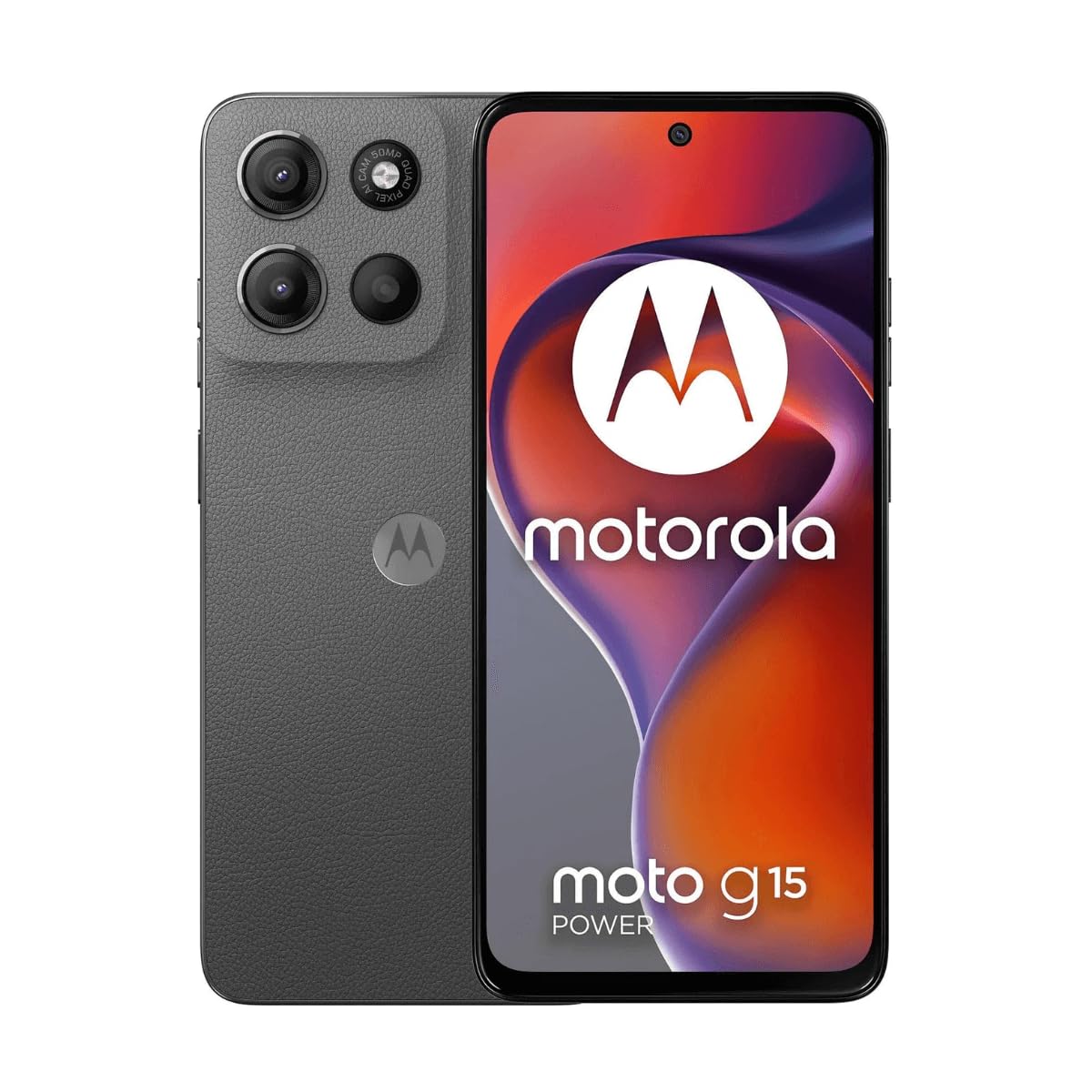
ചിത്രം: മുൻഭാഗം view of the Motorola Moto G15 Power, displaying the screen and the location of the power button on the right side.
3. നിങ്ങളുടെ ഉപകരണം പ്രവർത്തിപ്പിക്കുന്നു
3.1 ടച്ച്സ്ക്രീൻ നാവിഗേഷൻ
Your Moto G15 Power features a responsive 6.72-inch Full HD+ display. Use the following gestures for navigation:
- ടാപ്പ് ചെയ്യുക: ഒരു ഇനം തിരഞ്ഞെടുക്കുകയോ ഒരു ആപ്പ് തുറക്കുകയോ ചെയ്യുക.
- സ്വൈപ്പ്: സ്ക്രീനുകളിലൂടെയോ ലിസ്റ്റുകളിലൂടെയോ സ്ക്രോൾ ചെയ്യുക.
- പിഞ്ച്: ഫോട്ടോകളിൽ സൂം ഇൻ ചെയ്യുകയോ സൂം ഔട്ട് ചെയ്യുകയോ ചെയ്യുക, web പേജുകൾ.
- ലോംഗ് പ്രസ്സ്: സന്ദർഭോചിത മെനുകൾ ആക്സസ് ചെയ്യുക അല്ലെങ്കിൽ ഐക്കണുകൾ നീക്കുക.
3.2 കോളുകൾ വിളിക്കുകയും സന്ദേശങ്ങൾ അയയ്ക്കുകയും ചെയ്യുന്നു
To make a call, open the Phone app and dial the number or select a contact. To send a message, open the Messages app, tap 'Start chat', and enter the recipient and your message.
3.3 ക്യാമറ ഉപയോഗം
The Moto G15 Power is equipped with a 50 MP main camera with Quad Pixel technology and an 8 MP front camera. Open the Camera app to capture photos and videos.
- ഫോട്ടോ മോഡ്: ഒരു ചിത്രമെടുക്കാൻ ഷട്ടർ ബട്ടൺ ടാപ്പ് ചെയ്യുക.
- വീഡിയോ മോഡ്: റെക്കോർഡിംഗ് ആരംഭിക്കാൻ/നിർത്താൻ വീഡിയോ മോഡിലേക്ക് മാറി റെക്കോർഡ് ബട്ടൺ ടാപ്പ് ചെയ്യുക.
- സെൽഫി ക്യാമറ: Tap the camera switch icon to use the front camera.
- വിപുലമായ സവിശേഷതകൾ: Explore settings for portrait mode, night vision, and other photographic enhancements.

ചിത്രം: പിൻഭാഗം view of the Motorola Moto G15 Power, highlighting the 50MP camera module.
3.4 ഓഡിയോയും ഡിസ്പ്ലേയും
Experience enhanced audio with Dolby Atmos support, whether through headphones or the phone's speakers. The 6.72-inch Full HD+ display features a High Brightness Mode for improved outdoor visibility.
3.5 ബാറ്ററി മാനേജ്മെൻ്റ്
Your device is equipped with a 6000 mAh battery and supports 30W TurboPower charging. To optimize battery life:
- സ്ക്രീൻ തെളിച്ചം ക്രമീകരിക്കുക.
- ഉപയോഗിക്കാത്ത ആപ്പുകൾ അടയ്ക്കുക.
- ആവശ്യമുള്ളപ്പോൾ ബാറ്ററി സേവർ മോഡ് പ്രവർത്തനക്ഷമമാക്കുക.
3.6 കണക്റ്റിവിറ്റി
The Moto G15 Power supports 4G cellular networks, Wi-Fi, Bluetooth, and NFC. Access these settings via the Quick Settings panel or the Settings app.
4. പരിപാലനവും പരിചരണവും
4.1 നിങ്ങളുടെ ഉപകരണം വൃത്തിയാക്കൽ
നിങ്ങളുടെ ഫോണിന്റെ സ്ക്രീനും ബോഡിയും വൃത്തിയാക്കാൻ മൃദുവായ, ലിന്റ് രഹിത തുണി ഉപയോഗിക്കുക. ഉരച്ചിലുകളുള്ള വസ്തുക്കളോ കഠിനമായ രാസവസ്തുക്കളോ ഒഴിവാക്കുക. കഠിനമായ കറകൾക്ക്, ചെറുതായി ഡി.ampവെള്ളം കൊണ്ട് തുണി.
4.2 ജല പ്രതിരോധം
The Moto G15 Power is designed to be splash and liquid resistant. This means it can withstand minor splashes or light rain. It is not waterproof and should not be submerged in water. Liquid damage is not covered under warranty.
4.3 സോഫ്റ്റ്വെയർ അപ്ഡേറ്റുകൾ
നിങ്ങളുടെ ഉപകരണത്തിൽ ഏറ്റവും പുതിയ ഫീച്ചറുകൾ, സുരക്ഷാ പാച്ചുകൾ, പ്രകടന മെച്ചപ്പെടുത്തലുകൾ എന്നിവ ഉണ്ടെന്ന് ഉറപ്പാക്കാൻ സോഫ്റ്റ്വെയർ അപ്ഡേറ്റുകൾ പതിവായി പരിശോധിച്ച് ഇൻസ്റ്റാൾ ചെയ്യുക. ഇതിലേക്ക് പോകുക ക്രമീകരണങ്ങൾ> സിസ്റ്റം> സിസ്റ്റം അപ്ഡേറ്റുകൾ.
4.4 ബാറ്ററി കെയർ
To prolong battery life, avoid exposing your phone to extreme temperatures. Do not leave it fully charged or fully discharged for extended periods.
5. പ്രശ്നപരിഹാരം
5.1 ഉപകരണം ഓണാക്കുന്നില്ല
- ബാറ്ററി ചാർജ്ജ് ചെയ്തിട്ടുണ്ടെന്ന് ഉറപ്പാക്കുക. ചാർജർ കണക്റ്റ് ചെയ്ത് പവർ ഓൺ ചെയ്യാൻ ശ്രമിക്കുന്നതിന് മുമ്പ് കുറച്ച് മിനിറ്റ് കാത്തിരിക്കുക.
- പുനരാരംഭിക്കാൻ നിർബന്ധിക്കുന്നതിന് പവർ ബട്ടൺ കുറഞ്ഞത് 10-15 സെക്കൻഡ് അമർത്തിപ്പിടിക്കുക.
5.2 ചാർജിംഗ് പ്രശ്നങ്ങൾ
- Check if the charger and USB-C cable are securely connected to both the phone and the power outlet.
- Try using a different compatible charger and cable to rule out faulty accessories.
- ചാർജിംഗ് പോർട്ട് വൃത്തിയുള്ളതും അവശിഷ്ടങ്ങളില്ലാത്തതുമാണെന്ന് ഉറപ്പാക്കുക.
5.3 നെറ്റ്വർക്ക് കണക്റ്റിവിറ്റി പ്രശ്നങ്ങൾ
- നിങ്ങളുടെ ഫോൺ പുനരാരംഭിക്കുക.
- Check if Airplane Mode is disabled.
- നിങ്ങളുടെ സിം കാർഡ് ശരിയായി ചേർത്തിട്ടുണ്ടെന്നും സജീവമാണെന്നും ഉറപ്പാക്കുക.
- നെറ്റ്വർക്ക് ക്രമീകരണങ്ങൾ പുനഃസജ്ജമാക്കുക: ക്രമീകരണങ്ങൾ > സിസ്റ്റം > റീസെറ്റ് ഓപ്ഷനുകൾ > വൈഫൈ, മൊബൈൽ, ബ്ലൂടൂത്ത് എന്നിവ റീസെറ്റ് ചെയ്യുക.
5.4 ആപ്പുകൾ ക്രാഷാകുകയോ മരവിപ്പിക്കുകയോ ചെയ്യുന്നു
- ആപ്പ് അടച്ച് വീണ്ടും തുറക്കുക.
- ആപ്പിന്റെ കാഷെയും ഡാറ്റയും മായ്ക്കുക: Settings > Apps > [App Name] > Storage & cache > Clear cache / Clear storage.
- ഗൂഗിൾ പ്ലേ സ്റ്റോറിൽ നിന്ന് ആപ്പ് അപ്ഡേറ്റ് ചെയ്യുക.
- പ്രശ്നം നിലനിൽക്കുകയാണെങ്കിൽ, ആപ്പ് അൺഇൻസ്റ്റാൾ ചെയ്ത് വീണ്ടും ഇൻസ്റ്റാൾ ചെയ്യുക.
6 സ്പെസിഫിക്കേഷനുകൾ
| ഫീച്ചർ | സ്പെസിഫിക്കേഷൻ |
|---|---|
| മോഡലിൻ്റെ പേര് | Moto G15 പവർ |
| ഓപ്പറേറ്റിംഗ് സിസ്റ്റം | ആൻഡ്രോയിഡ് |
| പ്രോസസ്സർ | മീഡിയടെക് ഹീലിയോ G81 എക്സ്ട്രീം |
| റാം | 8 ജിബി |
| ആന്തരിക സംഭരണം | 512 ജിബി |
| വികസിപ്പിക്കാവുന്ന സംഭരണം | 512 ജിബി വരെ (മൈക്രോ എസ്ഡി) |
| ഡിസ്പ്ലേ വലിപ്പം | 6.72 ഇഞ്ച് |
| ഡിസ്പ്ലേ റെസല്യൂഷൻ | 2340 x 1080 pixels (Full HD+) |
| പിൻ ക്യാമറ | 50 എം.പി |
| മുൻ ക്യാമറ | 8 എം.പി |
| ബാറ്ററി ശേഷി | 6000 mAh |
| ചാർജിംഗ് | 30W ടർബോപവർ |
| കണക്റ്റിവിറ്റി | 4G, 2G, Wi-Fi, Bluetooth, NFC |
| സിം തരം | ഡ്യുവൽ നാനോ സിം |
| അളവുകൾ | 9 x 76 x 166 മിമി |
| ജല പ്രതിരോധം | Splash and liquid resistant |
| ഹെഡ്ഫോൺ ജാക്ക് | USB-C |
| നിറം | Gravity Grey |
7. വാറൻ്റി വിവരങ്ങൾ
Your Motorola Moto G15 Power is covered by a limited warranty. The terms and conditions of this warranty may vary by region. Please refer to the warranty card included in your product packaging or visit the official Motorola webവാറന്റി കവറേജ്, ദൈർഘ്യം, ക്ലെയിം നടപടിക്രമങ്ങൾ എന്നിവയെക്കുറിച്ചുള്ള വിശദമായ വിവരങ്ങൾക്ക് സൈറ്റ് സന്ദർശിക്കുക.
ഏതെങ്കിലും വാറന്റി ക്ലെയിമുകൾക്ക് നിങ്ങളുടെ വാങ്ങലിന്റെ തെളിവ് സൂക്ഷിക്കുക.
8. പിന്തുണ
കൂടുതൽ സഹായത്തിനോ സാങ്കേതിക പിന്തുണയ്ക്കോ അധിക ഉറവിടങ്ങൾ ആക്സസ് ചെയ്യുന്നതിനോ ദയവായി ഔദ്യോഗിക മോട്ടറോള പിന്തുണ സന്ദർശിക്കുക. website. You can find FAQs, software downloads, and contact information for customer service.
Motorola Official Support: www.motorola.com/support
Ask a question about this manual
Ask about setup, troubleshooting, compatibility, parts, safety, or missing instructions. Manuals+ will review the question and use this page’s manual context to help answer it.