
1. ആമുഖം
Welcome to the LOKMAT APPLLP 7 MAX Android Smart Watch user manual. This guide provides comprehensive instructions to help you set up, operate, and maintain your new smartwatch. Please read this manual thoroughly before using the device to ensure optimal performance and safety.
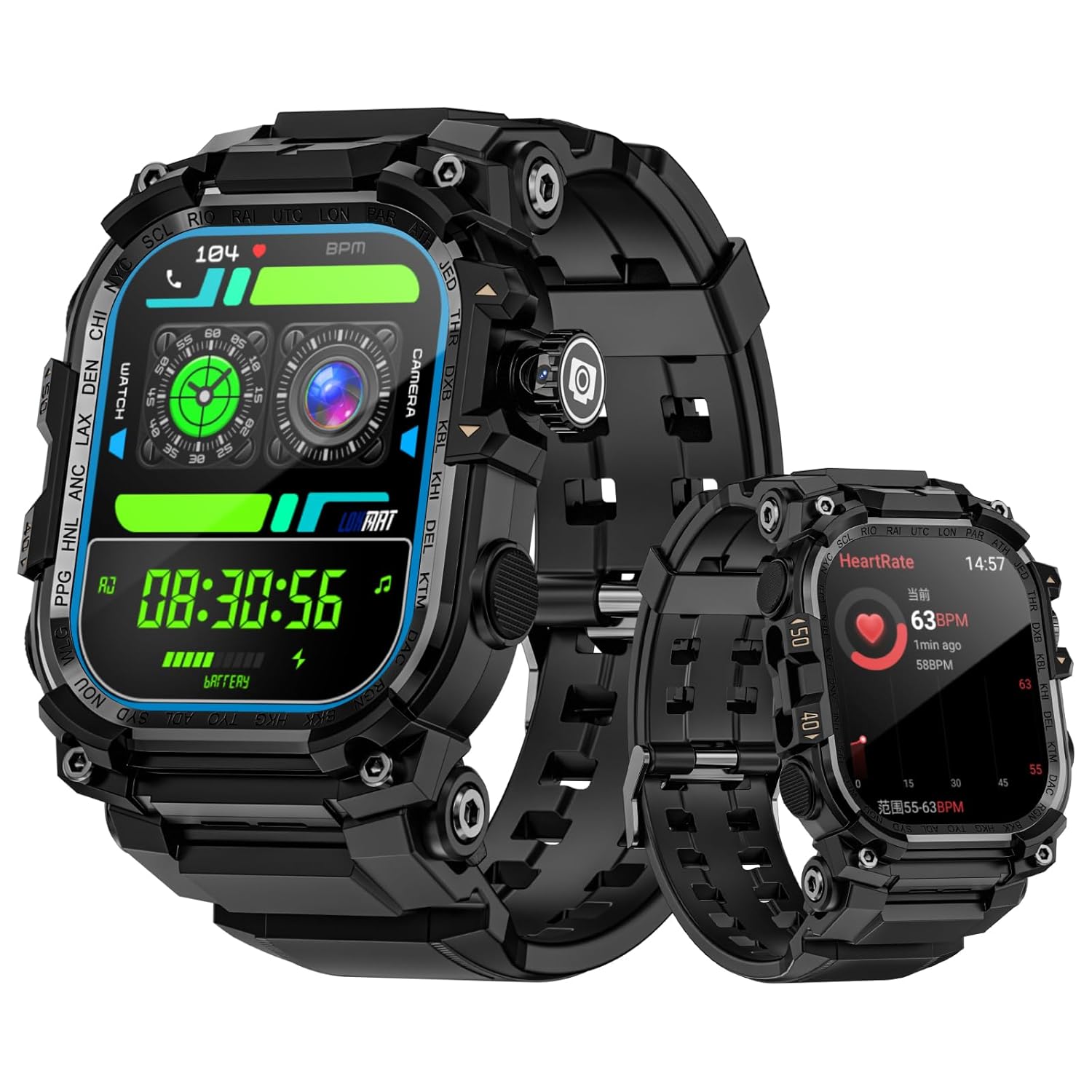
Figure 1: LOKMAT APPLLP 7 MAX Smart Watch displaying different watch faces and health metrics.
The LOKMAT APPLLP 7 MAX is an advanced Android smartwatch featuring a 2.06-inch AMOLED display, a 2-megapixel rotating camera, and 4G/5G network support for enhanced connectivity and functionality.
2 സുരക്ഷാ വിവരങ്ങൾ
To ensure safe and proper use of your LOKMAT APPLLP 7 MAX Smart Watch, please observe the following precautions:
- Do not attempt to disassemble, repair, or modify the device. Unauthorized modifications may void your warranty and pose safety risks.
- ഉപകരണത്തെ തീവ്രമായ താപനില, നേരിട്ടുള്ള സൂര്യപ്രകാശം, ഈർപ്പം എന്നിവയിൽ നിന്ന് അകറ്റി നിർത്തുക.
- ശക്തമായ ആഘാതങ്ങൾക്കോ വൈബ്രേഷനുകൾക്കോ ഉപകരണം വിധേയമാക്കുന്നത് ഒഴിവാക്കുക.
- Use only the provided charging cable and adapter. Using incompatible accessories may cause damage or fire.
- If the device becomes unusually hot, discontinue use immediately and contact customer support.
- കുട്ടികൾക്കും വളർത്തുമൃഗങ്ങൾക്കും ലഭ്യമല്ലാത്തവിധം ഉപകരണം സൂക്ഷിക്കുക.
- Consult a medical professional before using the device for health monitoring if you have pre-existing medical conditions.
3. ആരംഭിക്കൽ: സജ്ജീകരണം
3.1 ഉപകരണം ചാർജ് ചെയ്യുന്നു
Before initial use, fully charge your smartwatch. The device features magnetic charging.
- Connect the magnetic charging cable to a compatible USB power adapter (not included).
- Align the magnetic end of the cable with the charging contacts on the back of the watch. The magnets will snap into place.
- Ensure the charging icon appears on the watch screen.
- പൂർണ്ണമായി ചാർജ് ചെയ്യാൻ ഏകദേശം 2 മണിക്കൂർ അനുവദിക്കുക.

Figure 2: The smartwatch connected to its magnetic charging cable, indicating charging status.
3.2. പവർ ഓൺ/ഓഫ്
- പവർ ഓണാക്കാൻ: Press and hold the power button (usually located on the side) until the LOKMAT logo appears.
- പവർ ഓഫ് ചെയ്യാൻ: Press and hold the power button, then select "Power Off" from the options on the screen.
3.3. SIM Card Installation (Optional)
The APPLLP 7 MAX supports 4G/5G cellular connectivity. To use cellular features, install a nano-SIM card.
- വാച്ചിന്റെ വശത്തുള്ള സിം കാർഡ് സ്ലോട്ട് കണ്ടെത്തുക.
- Carefully open the SIM tray using the provided tool (if applicable) or your fingernail.
- Insert a nano-SIM card into the tray with the gold contacts facing down, ensuring it is correctly oriented.
- സിം ട്രേ അതിന്റെ സ്ഥാനത്ത് ക്ലിക്ക് ആകുന്നതുവരെ വാച്ചിലേക്ക് പതുക്കെ തള്ളുക.

Figure 3: Illustration of inserting a SIM card into the smartwatch for 4G/5G connectivity.
3.4. പ്രാരംഭ സജ്ജീകരണവും ജോടിയാക്കലും
Follow the on-screen instructions to complete the initial setup, including language selection, time zone, and connecting to Wi-Fi. To unlock full functionality, pair your smartwatch with your smartphone via the dedicated companion application.
- Download the official LOKMAT companion app from your smartphone's app store.
- നിങ്ങളുടെ സ്മാർട്ട്ഫോണിൽ ബ്ലൂടൂത്ത് പ്രവർത്തനക്ഷമമാക്കുക.
- Open the LOKMAT app and follow the instructions to search for and pair with your APPLLP 7 MAX.
- നിങ്ങളുടെ സ്മാർട്ട്ഫോണിലും സ്മാർട്ട് വാച്ചിലും പെയറിംഗ് അഭ്യർത്ഥന സ്ഥിരീകരിക്കുക.
4. പ്രവർത്തന നിർദ്ദേശങ്ങൾ
4.1. ഡിസ്പ്ലേയും നാവിഗേഷനും
The APPLLP 7 MAX features a 2.06-inch AMOLED full-touch display for intuitive interaction.

Figure 4: The 2.06-inch AMOLED display provides clear and vibrant visuals.
- മുകളിലേക്കും താഴേക്കും സ്വൈപ്പ് ചെയ്യുക: ദ്രുത ക്രമീകരണങ്ങളോ അറിയിപ്പുകളോ ആക്സസ് ചെയ്യുക.
- ഇടത്തേക്ക്/വലത്തേക്ക് സ്വൈപ്പ് ചെയ്യുക: Navigate between different widgets or app screens.
- ടാപ്പ് ചെയ്യുക: ഒരു ഇനം തിരഞ്ഞെടുക്കുകയോ ഒരു ആപ്ലിക്കേഷൻ തുറക്കുകയോ ചെയ്യുക.
- അമർത്തിപ്പിടിക്കുക: Customize watch faces or access context menus.
4.2. ക്യാമറ ഉപയോഗിക്കുന്നത്
The smartwatch is equipped with a 2-megapixel telescopic camera with 190-degree rotation.
- Open the Camera application on your watch.
- Rotate the camera module to adjust the viewആവശ്യാനുസരണം ആംഗിൾ.
- Tap the screen to focus, then tap the shutter icon to capture a photo or start/stop video recording.

Figure 5: The smartwatch's rotating camera module for flexible photo and video capture.
4.3. Connectivity and Communication
- 4G/5G Network: With a SIM card installed, you can make and receive calls, send messages, and use data directly from your watch.
- വൈഫൈ: Connect to Wi-Fi networks for internet access and faster data transfers.
- ബ്ലൂടൂത്ത്: Pair with Bluetooth headphones for music or other accessories.
- വീഡിയോ കോളുകൾ: Utilize the camera and network connectivity for high-definition video calls.
4.4. Applications and Features
The APPLLP 7 MAX runs on Android, allowing access to various applications.

Figure 6: The smartwatch's interface displaying a selection of popular applications.
- ആപ്പ് സ്റ്റോർ: Download and install additional applications from the built-in app market.
- സംഗീത പ്ലേബാക്ക്: Use pre-installed music apps or download others. Connect Bluetooth headphones for a private listening experience.
- ഫ്ലാഷ്ലൈറ്റ്: Activate the built-in flashlight feature for illumination.
- NFC Unlocking: Utilize NFC for quick and secure unlocking of compatible devices or systems.

Figure 7: The smartwatch displaying a music playback interface, ready for Bluetooth headphone connection.

Figure 8: The smartwatch's integrated flashlight providing illumination.

Figure 9: Using the smartwatch's NFC function for quick induction unlocking.
5. പരിപാലനം
5.1. നിങ്ങളുടെ സ്മാർട്ട് വാച്ച് വൃത്തിയാക്കൽ
പതിവായി വൃത്തിയാക്കുന്നത് നിങ്ങളുടെ ഉപകരണത്തിന്റെ രൂപവും പ്രവർത്തനക്ഷമതയും നിലനിർത്താൻ സഹായിക്കുന്നു.
- മൃദുവായ, ലിന്റ് രഹിത തുണി ഉപയോഗിച്ച് സ്ക്രീനും വാച്ച് ബോഡിയും തുടയ്ക്കുക.
- കഠിനമായ പാടുകൾക്ക്, ചെറുതായി dampതുണിയിൽ വെള്ളം ഒഴിക്കുക. കഠിനമായ രാസവസ്തുക്കളോ ഉരച്ചിലുകളോ ഉള്ള വസ്തുക്കൾ ഉപയോഗിക്കുന്നത് ഒഴിവാക്കുക.
- ചാർജ് ചെയ്യുന്നതിനുമുമ്പ് ചാർജിംഗ് കോൺടാക്റ്റുകൾ വൃത്തിയുള്ളതും വരണ്ടതുമാണെന്ന് ഉറപ്പാക്കുക.
5.2. ബാറ്ററി പരിചരണം
- ബാറ്ററി ഇടയ്ക്കിടെ പൂർണ്ണമായും ഡിസ്ചാർജ് ചെയ്യുന്നത് ഒഴിവാക്കുക.
- Charge the watch regularly, even if not in daily use, to maintain battery health.
- ദീർഘനേരം ഉപയോഗിക്കാത്തപ്പോൾ വാച്ച് തണുത്തതും വരണ്ടതുമായ സ്ഥലത്ത് സൂക്ഷിക്കുക.
6. പ്രശ്നപരിഹാരം
If you encounter issues with your LOKMAT APPLLP 7 MAX, refer to the following common solutions:
6.1. Device Will Not Power On or Charge
- ചാർജിംഗ് കേബിൾ വാച്ചിലേക്കും പവർ സ്രോതസ്സിലേക്കും സുരക്ഷിതമായി ബന്ധിപ്പിച്ചിട്ടുണ്ടെന്ന് ഉറപ്പാക്കുക.
- Verify the power adapter is functional.
- വാച്ചിലെയും കേബിളിലെയും ചാർജിംഗ് കോൺടാക്റ്റുകൾ വൃത്തിയാക്കുക.
- മറ്റൊരു USB പോർട്ട് അല്ലെങ്കിൽ പവർ അഡാപ്റ്റർ പരീക്ഷിക്കുക.
- If the battery is completely drained, it may take a few minutes for the charging indicator to appear.
- Perform a forced restart by pressing and holding the power button for approximately 10-15 seconds.
6.2. കുറഞ്ഞ ബാറ്ററി ലൈഫ്
- സ്ക്രീൻ തെളിച്ചം കുറയ്ക്കുക.
- Disable unnecessary notifications or background app refresh.
- Turn off Wi-Fi, Bluetooth, or cellular data when not in use.
- Limit the use of power-intensive features like GPS or continuous heart rate monitoring.
- Ensure all apps are updated to their latest versions.
6.3. App or Sensor Inaccuracy
- Ensure the watch's software and companion app are updated.
- Restart the watch and your paired smartphone.
- For health sensors (e.g., heart rate, steps), ensure the watch is worn snugly on your wrist.
- Calibrate sensors if an option is available in the watch settings or companion app.
- If an app is not working, try uninstalling and reinstalling it.
6.4. Connectivity Issues (Bluetooth, Wi-Fi, Cellular)
- Ensure Bluetooth/Wi-Fi/Cellular is enabled on the watch.
- ബ്ലൂടൂത്തിന്, ഉപകരണം ജോടി മാറ്റി വീണ്ടും ജോടിയാക്കുക.
- വൈഫൈയ്ക്കായി, നെറ്റ്വർക്ക് മറന്ന് വീണ്ടും കണക്റ്റുചെയ്യുക.
- For cellular, ensure the SIM card is correctly inserted and activated with your carrier. Check network signal strength.
- Restart both the watch and the connected device (e.g., smartphone).
7 സ്പെസിഫിക്കേഷനുകൾ
| ഫീച്ചർ | വിശദാംശങ്ങൾ |
|---|---|
| മോഡൽ | APPLLP 7 MAX |
| പ്രദർശിപ്പിക്കുക | 2.06-inch AMOLED, 410 x 502 resolution |
| ഓപ്പറേറ്റിംഗ് സിസ്റ്റം | ആൻഡ്രോയിഡ് |
| ക്യാമറ | 2-megapixel, 190° rotation |
| കണക്റ്റിവിറ്റി | 4G, 5G, Wi-Fi, Bluetooth |
| മെമ്മറി സ്റ്റോറേജ് കപ്പാസിറ്റി | 32 ജിബി |
| ബാറ്ററി ശേഷി | 930 മില്ലിamp മണിക്കൂർ (ലിഥിയം പോളിമർ) |
| ചാർജിംഗ് സമയം | ഏകദേശം 2 മണിക്കൂർ |
| ഇനത്തിൻ്റെ ഭാരം | 222 ഗ്രാം |
| പ്രത്യേക സവിശേഷതകൾ | Camera, NFC, Flashlight |
8. വാറൻ്റിയും പിന്തുണയും
For warranty information and customer support, please refer to the documentation included with your purchase or visit the official LOKMAT webസൈറ്റ്. വാറന്റി ക്ലെയിമുകൾക്കായി നിങ്ങളുടെ വാങ്ങലിന്റെ തെളിവ് സൂക്ഷിക്കുക.
If you require further assistance or have questions not covered in this manual, please contact LOKMAT customer service.