
ആമുഖം
Thank you for choosing the Greadio CD03P Portable Bluetooth CD Player. This manual provides essential information for the safe and efficient operation of your device. Please read it thoroughly before use and retain it for future reference.
The Greadio CD03P is a versatile audio device featuring CD playback, Bluetooth 5.3 connectivity, dual wireless karaoke microphones, dynamic LED lights, and multiple input options including USB, TF card, and AUX. It is powered by a 4000mAh rechargeable battery, offering portability for various environments.
ഉൽപ്പന്നം കഴിഞ്ഞുview
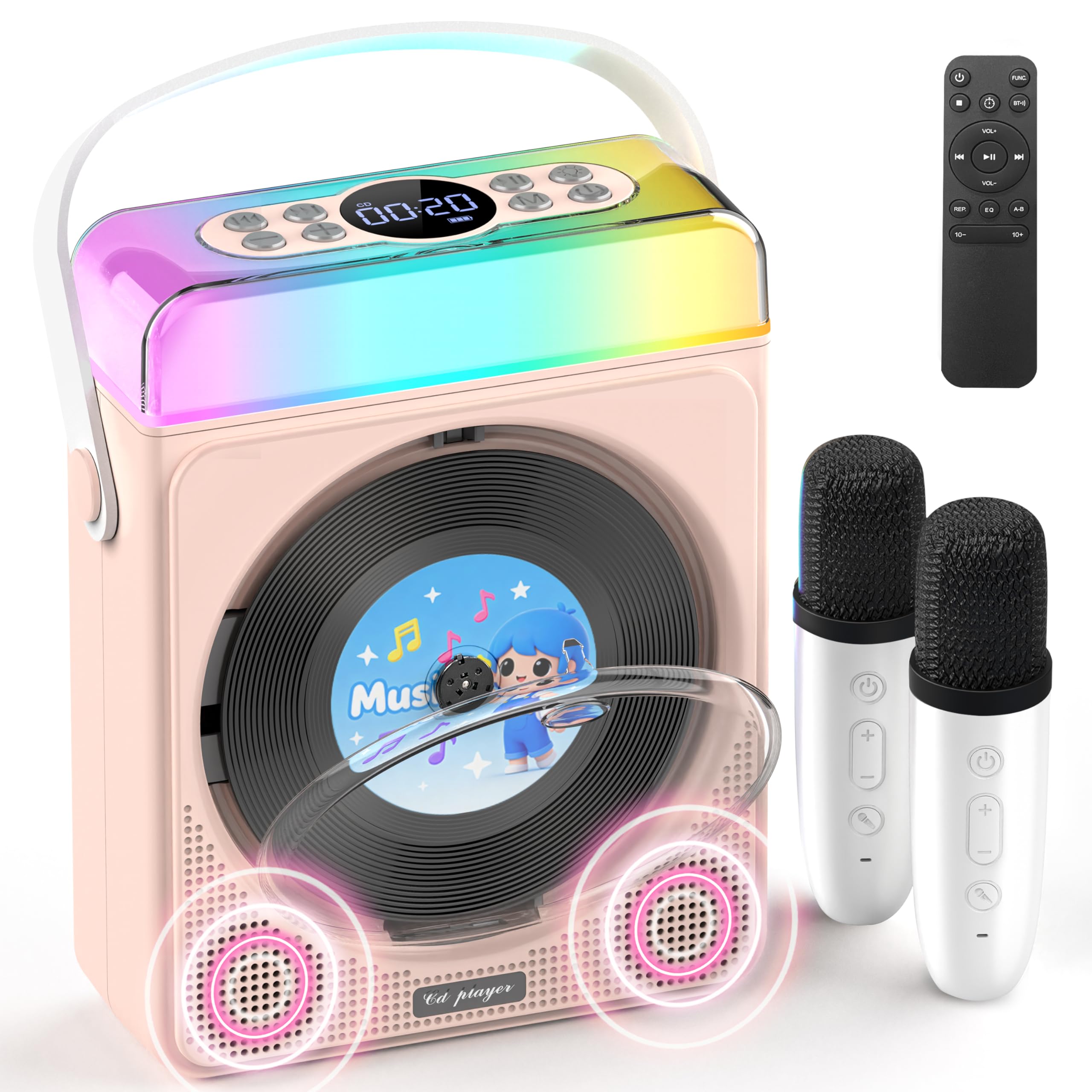
ചിത്രം 1: Greadio CD03P Portable Bluetooth CD Player with two microphones and LED lights.

ചിത്രം 2: മുകളിൽ view of the CD03P showing control buttons and LED light bar.
പാക്കേജ് ഉള്ളടക്കം:
- Portable CD Player x 1
- കരോക്കെ മൈക്രോഫോൺ x 2
- ടൈപ്പ്-സി ചാർജിംഗ് കേബിൾ x 1
- വിദൂര നിയന്ത്രണം x 1
- AUX കേബിൾ x 1
സജ്ജമാക്കുക
ഉപകരണം ചാർജ് ചെയ്യുന്നു:
Before first use, fully charge the CD player using the provided Type-C charging cable. Connect the cable to the Type-C port on the device and a compatible 5V/2A power adapter (not included). The battery indicator on the display will show charging status.
Charging the Microphones:
The two wireless microphones are rechargeable. Connect them to a power source using their respective charging cables (if provided, or compatible USB cables). Each microphone offers over 30 hours of playtime on a full charge.
പ്രവർത്തന നിർദ്ദേശങ്ങൾ
1. പവർ ഓൺ/ഓഫ്:
പവർ ബട്ടൺ ദീർഘനേരം അമർത്തുക (⏻) on the device or remote control to turn the unit on or off.
2. മോഡ് തിരഞ്ഞെടുക്കൽ:
അമർത്തുക M (Mode) button on the device or the FUNC. button on the remote control to cycle through available modes: CD, Bluetooth, USB, TF Card, and AUX.
3. സിഡി പ്ലേബാക്ക്:
- Press the release button to open the CD compartment cover.
- Carefully insert a CD (compatible with CD/CD-R/CD-RW/MP3/WMA formats) with the label side facing up.
- സിഡി കമ്പാർട്ട്മെന്റ് കവർ സുരക്ഷിതമായി അടയ്ക്കുക.
- Select "CD" mode using the Mode/FUNC. button. The device will begin loading and playing the CD.
- ഉപയോഗിക്കുക |< ഒപ്പം >| buttons for track navigation (short press) or fast forward/rewind (long press).
- അമർത്തുക ▶|| ▶|| പ്ലേ ചെയ്യാനോ താൽക്കാലികമായി നിർത്താനോ ഉള്ള ബട്ടൺ.
വീഡിയോ വിവരണം: This video demonstrates how to play CDs, USB, and TF cards on the Greadio CD03P. It shows inserting a CD, selecting the CD mode, and using playback controls.
4. Bluetooth Connectivity (Receiving Mode):
- അമർത്തുക M (Mode) button until "Bluetooth" mode is selected. The display will show "BLUE" and a blinking Bluetooth icon.
- On your mobile device, enable Bluetooth and search for "CD03P".
- Select "CD03P" to pair. A confirmation tone will sound upon successful connection.
- Play audio from your mobile device, and it will stream through the Greadio CD03P speakers.
വീഡിയോ വിവരണം: This video illustrates the Bluetooth receiving mode, showing how to connect a mobile phone to the Greadio CD03P for audio playback.
5. Bluetooth Connectivity (Transmitting Mode):
The CD03P can transmit audio to external Bluetooth speakers or headphones when in CD, USB, TF, or AUX mode (not in Bluetooth receiving mode).
- Ensure the CD03P is in CD, USB, TF, or AUX mode.
- ഷോർട്ട് അമർത്തുക BT button on the remote control. The Bluetooth icon on the display will blink.
- നിങ്ങളുടെ ബാഹ്യ ബ്ലൂടൂത്ത് സ്പീക്കറോ ഹെഡ്ഫോണുകളോ പെയറിംഗ് മോഡിൽ ഇടുക.
- Once connected, the Bluetooth icon on the CD03P will stop blinking. Audio will now play through the external Bluetooth device.
- To disconnect, short press the BT വീണ്ടും ബട്ടൺ.
വീഡിയോ വിവരണം: This video demonstrates the Bluetooth transmitting mode, showing how to connect the Greadio CD03P to external Bluetooth speakers or headphones.
6. USB/TF കാർഡ് പ്ലേബാക്ക്:
- Insert a USB flash drive into the USB port or a TF card into the TF card slot on the back of the device.
- അമർത്തുക M (മോഡ്) ബട്ടൺ അല്ലെങ്കിൽ FUNC. button on the remote to select "USB" or "TF" mode.
- ഉപകരണം സ്വയമേവ അനുയോജ്യമായ ഓഡിയോ കണ്ടെത്തി പ്ലേ ചെയ്യും file(MP3/WMA/WAV/APE/FLAC) എന്നിവ ഉപയോഗിക്കുക.
- ഉപയോഗിക്കുക |< ഒപ്പം >| buttons for track navigation (short press) or fast forward/rewind (long press).
- അമർത്തുക ▶|| ▶|| പ്ലേ ചെയ്യാനോ താൽക്കാലികമായി നിർത്താനോ ഉള്ള ബട്ടൺ.
Note: For best performance with USB/TF cards, use 64GB or less. Reformat 128GB cards to FAT32 if needed.
7. AUX ഇൻപുട്ട്:
- Connect an external audio device (e.g., smartphone, MP3 player) to the AUX port on the back of the CD03P using the provided AUX cable.
- അമർത്തുക M (മോഡ്) ബട്ടൺ അല്ലെങ്കിൽ FUNC. button on the remote to select "AUX" mode.
- Play audio from your external device. The sound will be output through the CD03P speakers.
8. Karaoke Microphones:
- Turn on the microphones by pressing their power buttons. They will automatically connect to the CD03P.
- ഉപയോഗിക്കുക +/- buttons on the microphone to adjust microphone volume.
- അമർത്തുക എം.ഐ.സി button on the microphone to cycle through five voice effects: Female, Monster, Baby, Original, and KTV mode.
- അമർത്തുക ശക്തി button on the microphone to switch between microphone modes (e.g., adjust background music, microphone volume, reverb).
വീഡിയോ വിവരണം: This video demonstrates how to connect and use the wireless microphones with the Greadio CD03P, including switching voice effects and adjusting settings.
9. LED ലൈറ്റുകൾ:
- The RGB light (LED1) turns on automatically when the device is powered on.
- ഷോർട്ട് അമർത്തുക വെളിച്ചം button on the device or remote to cycle through various light effects: breathing light (red, purple, blue, cyan, green, yellow, orange) and solid colors.
- ദീർഘനേരം അമർത്തുക വെളിച്ചം button to turn the LED lights off.
വീഡിയോ വിവരണം: This video showcases the dynamic LED light features of the Greadio CD03P, demonstrating how to cycle through different light modes and colors.
10. വോളിയം നിയന്ത്രണം:
ഉപയോഗിക്കുക VOL+ ഒപ്പം വോൾ- buttons on the device or remote control to adjust the main speaker volume.
11. ഇക്യു മോഡുകൾ:
ഷോർട്ട് അമർത്തുക EQ button on the remote control to switch between different equalizer modes (e.g., Pop, Jazz, Classic, Bass, Flat, Rock).
12. സ്ലീപ്പ് ടൈമർ:
The CD03P can function as a night light with a sleep timer. Refer to the full user manual for detailed instructions on setting the sleep timer.
മെയിൻ്റനൻസ്
- ജലത്തിൽ നിന്നും ഈർപ്പത്തിൽ നിന്നും ഉപകരണം അകറ്റി നിർത്തുക.
- മൃദുവായതും ഉണങ്ങിയതുമായ തുണി ഉപയോഗിച്ച് ഉപകരണം വൃത്തിയാക്കുക. അബ്രസീവ് ക്ലീനറുകളോ ലായകങ്ങളോ ഉപയോഗിക്കരുത്.
- തീവ്രമായ താപനിലയിലോ നേരിട്ടുള്ള സൂര്യപ്രകാശത്തിലോ ഉപകരണം തുറന്നുകാട്ടുന്നത് ഒഴിവാക്കുക.
- Do not press the CD base directly.
- ദീർഘനേരം ഉപയോഗത്തിലില്ലാത്തപ്പോൾ, ഉപകരണം തണുത്തതും വരണ്ടതുമായ സ്ഥലത്ത് സൂക്ഷിക്കുക.
ട്രബിൾഷൂട്ടിംഗ്
| പ്രശ്നം | സാധ്യമായ കാരണം | പരിഹാരം |
|---|---|---|
| ഉപകരണം പവർ ഓണാക്കുന്നില്ല. | ബാറ്ററി കുറവോ പവർ പ്രശ്നമോ. | ഉപകരണം പൂർണ്ണമായും ചാർജ് ചെയ്യുക. ചാർജിംഗ് കേബിൾ ശരിയായി ബന്ധിപ്പിച്ചിട്ടുണ്ടെന്ന് ഉറപ്പാക്കുക. |
| സിഡി പ്ലേ ചെയ്യുകയോ ഒഴിവാക്കുകയോ ചെയ്യുന്നില്ല. | സിഡി വൃത്തികെട്ടതോ, പോറലുകളുള്ളതോ, അല്ലെങ്കിൽ തെറ്റായി ചേർത്തതോ ആണ്. | Clean the CD with a soft cloth. Ensure the CD is inserted correctly with the label side up. Try a different CD. |
| ബ്ലൂടൂത്ത് ജോടിയാക്കൽ പരാജയപ്പെട്ടു. | Device is not in Bluetooth mode or too far from the paired device. | Ensure the CD03P is in Bluetooth receiving mode. Move devices closer. Disconnect from other Bluetooth devices. |
| മൈക്രോഫോൺ പ്രവർത്തിക്കുന്നില്ല. | Microphone is off, uncharged, or out of range. | Turn on the microphone. Charge the microphone. Ensure it is within range of the CD03P. |
| ശബ്ദമില്ല. | വോളിയം വളരെ കുറവാണ് അല്ലെങ്കിൽ മ്യൂട്ട് ചെയ്തിരിക്കുന്നു. തെറ്റായ മോഡ് തിരഞ്ഞെടുത്തു. | Increase volume. Check if the device is muted. Ensure the correct input mode (CD, Bluetooth, USB, TF, AUX) is selected. |
| ഉപകരണം പ്രതികരിക്കുന്നില്ല. | താൽക്കാലിക സോഫ്റ്റ്വെയർ തകരാർ. | Use a thin object to press the പുനഃസജ്ജമാക്കുക button on the back of the device. |
സ്പെസിഫിക്കേഷനുകൾ
| ഫീച്ചർ | വിശദാംശങ്ങൾ |
|---|---|
| മോഡൽ നമ്പർ | CD03P |
| ഉൽപ്പന്ന അളവുകൾ | 6.81 x 2.52 x 8.15 ഇഞ്ച് |
| ഇനത്തിൻ്റെ ഭാരം | 1.97 പൗണ്ട് |
| ബാറ്ററി ശേഷി | 4000mAh (റീചാർജ് ചെയ്യാവുന്നത്) |
| കണക്റ്റിവിറ്റി | ബ്ലൂടൂത്ത് 5.3, യുഎസ്ബി, ടിഎഫ് കാർഡ്, ഓക്സ് |
| സിഡി അനുയോജ്യത | CD/CD-R/CD-RW/MP3/WMA |
| ഉൾപ്പെടുത്തിയ ഘടകങ്ങൾ | Portable CD Player, 2 Karaoke Microphones, Type-C Charging Cable, Remote Control, AUX Cable |
വാറൻ്റിയും പിന്തുണയും
Greadio products come with a full year of coverage. For any issues or support needs, please contact Greadio customer service. Refer to the official Greadio webബന്ധപ്പെടാനുള്ള വിശദാംശങ്ങൾക്ക് സൈറ്റ് അല്ലെങ്കിൽ നിങ്ങളുടെ വാങ്ങൽ ഡോക്യുമെന്റേഷൻ.
Note: This device is designed for personal and recreational use. Any unauthorized modifications or misuse may void the warranty.