
1. ആമുഖം
This manual provides detailed instructions for the installation, operation, and maintenance of your PLKEQS M300S Android 14 Car Stereo. This multimedia player is designed specifically for Ford Fiesta models manufactured between 2009 and 2017, offering advanced features such as wireless CarPlay, wired Android Auto, GPS navigation, FM RDS radio, Bluetooth 5.0, and steering wheel control integration. Please read this manual thoroughly before using the product to ensure proper functionality and safety.
2. പാക്കേജ് ഉള്ളടക്കം
താഴെ ലിസ്റ്റ് ചെയ്തിരിക്കുന്ന എല്ലാ ഇനങ്ങളും നിങ്ങളുടെ പാക്കേജിൽ ഉൾപ്പെടുത്തിയിട്ടുണ്ടെന്ന് ദയവായി പരിശോധിക്കുക. ഏതെങ്കിലും ഇനങ്ങൾ നഷ്ടപ്പെട്ടിട്ടുണ്ടെങ്കിലോ കേടായിട്ടുണ്ടെങ്കിലോ, ദയവായി ഉപഭോക്തൃ പിന്തുണയുമായി ബന്ധപ്പെടുക.
- Host Screen (Main Unit) ×1
- Cables and Frame required for installation ×1 set
- 4LED Reversing Camera ×1 (Gift)
- Disassembly Tool ×1 (Gift)
- External Microphone ×1 (Gift)
- പവർ കേബിൾ × 1
- 4-Pin USB Cable ×1
- 6-Pin USB Cable ×1
- ജിപിഎസ് ആന്റിന ×1
- RCA Cable Set ×1
- Reverse Input Cable ×1
- Camera Video Line ×1
- Camera Power Cable ×1
- RCA Harness with 4G SIM Card Slot (for 4G version only) ×1
- RCA Harness (for WiFi version only) ×1
- 4G LTE Antenna (for 4G version only) ×1
- Canbus Decoder ×1
- Radio Antenna Adapter Cable ×1
- Rear Camera Input RCA Cable ×1

This image displays the complete contents of the product package. It shows the main head unit, various cables (power, USB, RCA, camera), antennas (GPS, 4G LTE), external microphone, Canbus decoder, and the reverse camera. Each component is numbered and labeled for easy identification, providing a clear overview of what is included.
3 സ്പെസിഫിക്കേഷനുകൾ
| ഫീച്ചർ | Specification (M300S Model) |
|---|---|
| ഓപ്പറേറ്റിംഗ് സിസ്റ്റം | ആൻഡ്രോയിഡ് 14.0 |
| പ്രോസസ്സർ | 8-core 8581 chip (4*A55 @ 1.6GHz, 4*A55 @ 1.2GHz) |
| റാം / റോം | 4 ജിബി റാം / 64 ജിബി റോം |
| ഡിസ്പ്ലേ റെസല്യൂഷൻ | 1280*720 |
| സ്ക്രീൻ തരം | IPS High-Definition Multi-touch Screen |
| നെറ്റ്വർക്ക് കണക്റ്റിവിറ്റി | 5G WiFi, 4G, USB, Hotspot |
| ബ്ലൂടൂത്ത് പതിപ്പ് | 5.0 |
| കാർപ്ലേ | വയർലെസ് |
| ആൻഡ്രോയിഡ് ഓട്ടോ | വയർഡ് |
| ഡിജിറ്റൽ സൗണ്ട് പ്രോസസർ (ഡിഎസ്പി) | അതെ |
| റേഡിയോ ഡാറ്റ സിസ്റ്റം (ആർഡിഎസ്) | അതെ |
| കൂളിംഗ് ഫാൻ | അന്തർനിർമ്മിത |
| പിന്തുണയ്ക്കുന്ന മീഡിയ ഫോർമാറ്റുകൾ | Mp3, Mp4, WMA, JPEG |
| Supported Optional Accessories | TPMS, DAB, OBD, DVR |
| മോഡൽ നമ്പർ | M300S (66538279-M300S) |
| നിർമ്മാതാവ് | PLKEQS |
| മാതൃരാജ്യം | ചൈന |

This table provides a detailed comparison of technical specifications across various PLKEQS car stereo models, including M100S, M120S, M150S, M200S, M300S, M400S, M500S, M600S, and M700S. It lists differences in internet connectivity, operating system, core processor, RAM/ROM configurations, Bluetooth module, screen resolution, screen type, cooling fan presence, full AV output, DSP, and RDS features. The M300S model is highlighted with 4G internet, Android 14, 8-core 8581 chip, 4G+64G RAM/ROM, Bluetooth 5.0, 1280*720 IPS screen, built-in cooling fan, optional full AV output, DSP, and RDS.
4. സജ്ജീകരണവും ഇൻസ്റ്റാളേഷനും
Installing the PLKEQS M300S car stereo requires specific technical skills and knowledge. It is highly recommended to seek assistance from professional installation engineers at a certified car conversion workshop to ensure correct and safe installation.
പ്രീ-ഇൻസ്റ്റലേഷൻ ചെക്ക്ലിസ്റ്റ്:
- വാഹന അനുയോജ്യത: Ensure your Ford Fiesta is from the 2009-2017 model years.
- ആവശ്യമായ ഘടകങ്ങൾ: Confirm you have the correct radio frame bezel and the original car cable plug adapter for your vehicle.
- ഉപകരണങ്ങൾ: Gather necessary tools, including the provided disassembly tool.
- സുരക്ഷ: Disconnect the car battery before starting any electrical work.
ഇൻസ്റ്റലേഷൻ ഘട്ടങ്ങൾ (പൊതു മാർഗ്ഗനിർദ്ദേശം):
- Carefully remove the original car radio and dashboard trim using appropriate tools.
- Connect the provided wiring harness to the car's original wiring. Ensure all connections are secure.
- Install the GPS antenna, 4G LTE antenna (if applicable), and external microphone in suitable locations.
- If installing a reverse camera, route the camera cable and connect it to the 'CAM-IN' port on the stereo. Refer to the wiring diagram for correct connections.
- Mount the PLKEQS M300S head unit into the dashboard opening, securing it with the appropriate frame and brackets.
- Reconnect the car battery and test all functions of the new stereo.
- Reassemble the dashboard trim.
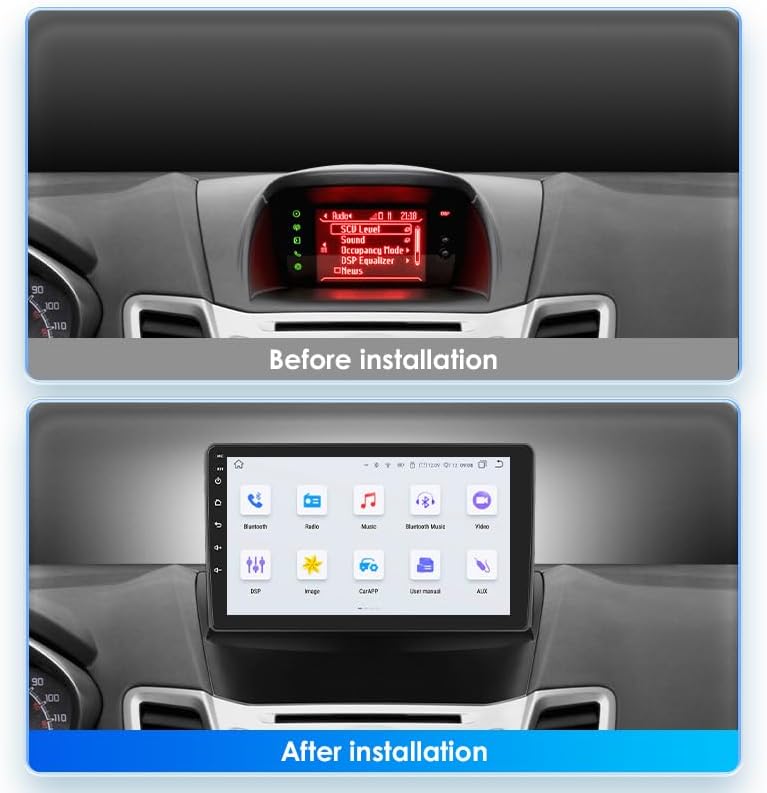
This image illustrates the visual transformation of the car's dashboard. The top panel shows the original car radio display before installation, while the bottom panel displays the new 9-inch PLKEQS M300S car stereo seamlessly integrated into the dashboard, showing its main interface.

This image explains the reverse camera functionality. It includes a wiring diagram for connecting the reverse camera to the car stereo and a clear display of the reverse camera's view on the stereo screen, complete with parking guidelines, enhancing safety during reversing maneuvers.
5. പ്രവർത്തന നിർദ്ദേശങ്ങൾ
5.1. Wireless CarPlay & Wired Android Auto
The PLKEQS M300S supports both wireless Apple CarPlay and wired Android Auto, allowing seamless integration with your smartphone for navigation, communication, and entertainment.
- വയർലെസ് കാർപ്ലേ: Connect your iPhone via Bluetooth for a wireless CarPlay experience. Once paired, CarPlay will launch automatically, mirroring essential iPhone apps to your car stereo screen. Use Siri voice control for hands-free operation.
- വയർഡ് ആൻഡ്രോയിഡ് ഓട്ടോ: Connect your Android phone via a USB cable to activate Android Auto. This provides access to Google Maps, Google Assistant, and other compatible apps directly on the stereo display.

This image highlights the compatibility of the car stereo with both Apple CarPlay and Android Auto. The main screen shows various app icons, while smaller insets demonstrate the user interfaces for CarPlay (via Bluetooth or USB cable) and Android Auto (via Bluetooth or USB cable), including navigation, calls, and music playback.
5.2. ജിപിഎസ് നാവിഗേഷൻ
The stereo comes with pre-installed offline maps and supports online navigation when connected to the internet.
- ഓഫ്ലൈൻ നാവിഗേഷൻ: Use the pre-loaded maps for navigation without an internet connection.
- ഓൺലൈൻ നാവിഗേഷൻ: Connect to 5G WiFi or your phone's hotspot to access real-time traffic updates and download additional map data from the app store.
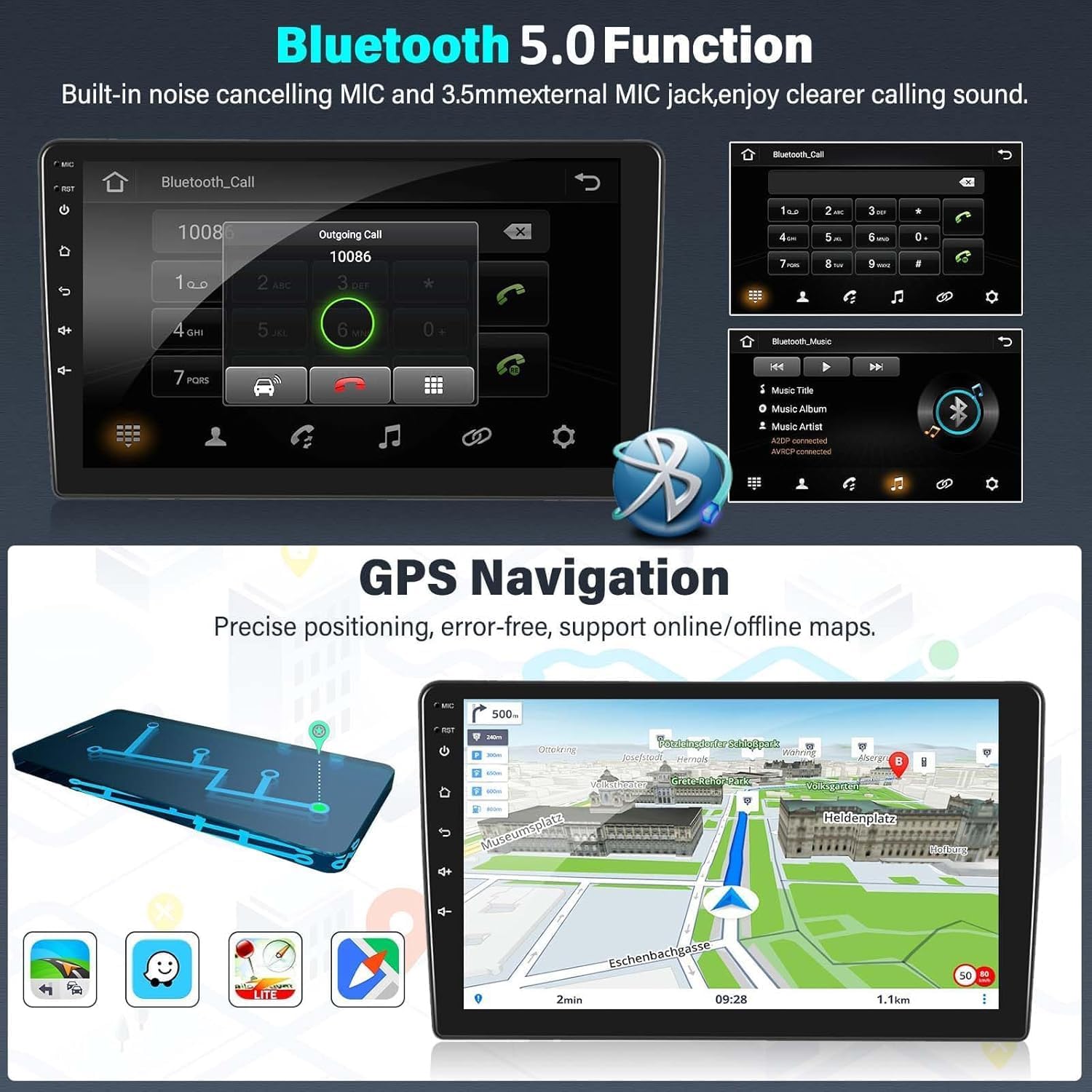
This image displays two key features: the Bluetooth 5.0 function for hands-free calling, showing a dial pad and call interface, and the GPS navigation system, illustrating a detailed map with route information and various navigation icons.
5.3. Bluetooth 5.0 Functionality
Connect your smartphone via Bluetooth 5.0 for hands-free calling and audio streaming.
- ഹാൻഡ്സ് ഫ്രീ കോളിംഗ്: Pair your phone to make and receive calls directly from the stereo. The built-in noise-canceling microphone ensures clear audio.
- ബ്ലൂടൂത്ത് സംഗീതം: Stream audio from your phone to the car stereo for high-quality sound playback.
5.4. FM RDS Radio
Enjoy your favorite radio stations with the integrated FM/AM tuner, featuring RDS for enhanced information display.
- യാന്ത്രിക ട്യൂണിംഗ്: Scan and save radio stations automatically.
- RDS Features: Display station name, program type, and other information where available.
- DAB Support: Compatible with external DAB devices for access to digital radio stations.

This image demonstrates the FM RDS radio interface, showing frequency tuning and station information. It also illustrates the steering wheel control feature, with an inset showing a hand interacting with car steering wheel buttons, indicating seamless integration with the vehicle's original controls.
5.5. സ്റ്റിയറിംഗ് വീൽ നിയന്ത്രണം (SWC)
The stereo supports the original car's steering wheel controls, allowing you to manage audio, calls, and other functions without taking your hands off the wheel. Configuration may be required in the system settings to map the buttons correctly.
5.6. Reverse Image Input
When the vehicle is shifted into reverse gear, the stereo automatically switches to the reverse camera display, providing a clear view of the area behind your car for safer parking and maneuvering.
5.7. മറ്റ് സവിശേഷതകൾ
- 5G WiFi & 4G Connectivity: For fast internet access and online services.
- 1080P Video Playback: Enjoy high-definition video content.
- USB കണക്റ്റിവിറ്റി: Play media from USB drives or connect compatible devices.
- Picture-in-Picture & Split Screen: Multitask by viewing two applications simultaneously.
- ബഹുഭാഷാ പിന്തുണ: Operate the system in your preferred language.
- മിറർ ലിങ്ക്: Mirror your smartphone screen to the stereo display.
- ഡിവിആർ പിന്തുണ: Connect an external DVR for recording driving footage.
6. പരിപാലനം
To ensure the longevity and optimal performance of your PLKEQS M300S car stereo, follow these maintenance guidelines:
- സ്ക്രീൻ വൃത്തിയാക്കൽ: ടച്ച്സ്ക്രീൻ മൃദുവായി തുടയ്ക്കാൻ മൃദുവായ, ലിന്റ് രഹിത തുണി ഉപയോഗിക്കുക. കഠിനമായ പാടുകൾക്ക്, ചെറുതായി dampതുണിയിൽ വെള്ളം അല്ലെങ്കിൽ സ്ക്രീൻ-സേഫ് ക്ലീനർ ഉപയോഗിക്കുക. കഠിനമായ രാസവസ്തുക്കളോ ഉരച്ചിലുകളോ ഉള്ള വസ്തുക്കൾ ഒഴിവാക്കുക.
- സോഫ്റ്റ്വെയർ അപ്ഡേറ്റുകൾ: സിസ്റ്റം ക്രമീകരണങ്ങളിലൂടെയോ നിർമ്മാതാവിന്റെയോ വഴി സോഫ്റ്റ്വെയർ അപ്ഡേറ്റുകൾക്കായി ഇടയ്ക്കിടെ പരിശോധിക്കുക. webഏറ്റവും പുതിയ സവിശേഷതകളും ബഗ് പരിഹാരങ്ങളും നിങ്ങൾക്ക് ലഭിക്കുന്നുണ്ടെന്ന് ഉറപ്പാക്കാൻ സൈറ്റ്.
- പരിസ്ഥിതി വ്യവസ്ഥകൾ: യൂണിറ്റിന് തീവ്രമായ താപനില, ദീർഘനേരം നേരിട്ടുള്ള സൂര്യപ്രകാശം, അല്ലെങ്കിൽ അമിതമായ ഈർപ്പം എന്നിവ ഏൽക്കുന്നത് ഒഴിവാക്കുക.
- കേബിൾ കണക്ഷനുകൾ: എല്ലാ കേബിൾ കണക്ഷനുകളും സുരക്ഷിതമാണെന്നും കേടുപാടുകൾ സംഭവിച്ചിട്ടില്ലെന്നും ഉറപ്പാക്കാൻ ഇടയ്ക്കിടെ പരിശോധിക്കുക.
7. പ്രശ്നപരിഹാരം
If you encounter issues with your PLKEQS M300S car stereo, please refer to the following common troubleshooting steps:
- ശക്തിയില്ല: Check the power cable connections and ensure the car battery is properly connected. Verify the car's fuse box for any blown fuses related to the stereo.
- ശബ്ദമില്ല: Check speaker connections. Ensure the volume is not muted or set too low. Verify audio settings in the system.
- ടച്ച്സ്ക്രീൻ പ്രതികരിക്കുന്നില്ല: യൂണിറ്റ് പുനരാരംഭിക്കാൻ ശ്രമിക്കുക. പ്രശ്നം നിലനിൽക്കുകയാണെങ്കിൽ, ഒരു ഫാക്ടറി റീസെറ്റ് ആവശ്യമായി വന്നേക്കാം (ശ്രദ്ധിക്കുക: ഇത് എല്ലാ ഉപയോക്തൃ ഡാറ്റയും മായ്ക്കും).
- ജിപിഎസ് പ്രവർത്തിക്കുന്നില്ല: ജിപിഎസ് ആന്റിന ശരിയായി ഇൻസ്റ്റാൾ ചെയ്തിട്ടുണ്ടെന്നും വ്യക്തമായ ഒരു ലൈൻ ഉണ്ടെന്നും ഉറപ്പാക്കുക. view ആകാശത്തിന്റെ. സിസ്റ്റത്തിലെ GPS ക്രമീകരണങ്ങൾ പരിശോധിക്കുക.
- ബ്ലൂടൂത്ത് കണക്ഷൻ പ്രശ്നങ്ങൾ: സ്റ്റീരിയോയിലും ഫോണിലും ബ്ലൂടൂത്ത് പ്രവർത്തനക്ഷമമാക്കിയിട്ടുണ്ടെന്ന് ഉറപ്പാക്കുക. മുമ്പത്തെ ജോടിയാക്കലുകൾ ഇല്ലാതാക്കി വീണ്ടും കണക്റ്റ് ചെയ്യാൻ ശ്രമിക്കുക.
- കാർപ്ലേ/ആൻഡ്രോയിഡ് ഓട്ടോ കണക്റ്റ് ചെയ്യുന്നില്ല: For CarPlay, ensure Wi-Fi and Bluetooth are on. For Android Auto, try a different USB cable. Ensure your phone's operating system is up to date.
- സ്റ്റിയറിംഗ് വീൽ നിയന്ത്രണങ്ങൾ പ്രവർത്തിക്കുന്നില്ല: Access the SWC learning function in the system settings and reconfigure the buttons.
If these steps do not resolve the issue, please contact PLKEQS customer support for further assistance.
8. വാറൻ്റിയും പിന്തുണയും
PLKEQS offers a warranty for this product during the specified warranty period. For detailed information regarding warranty terms, conditions, and duration, please refer to the product description or contact PLKEQS customer service directly.
For technical support, installation inquiries, or any other questions, please reach out to PLKEQS customer support. Contact information can typically be found on the product packaging or the official PLKEQS webസൈറ്റ്.