
AUHIFVAX D16 Dron
AUHIFVAX D16 Drone User Manual
Model: D16 Dron
1. ആമുഖം
Welcome to the AUHIFVAX D16 Drone user manual. This guide provides essential information for the safe operation, setup, and maintenance of your D16 Dual HD Camera Foldable Remote Control Drone. The D16 drone features dual HD cameras, intelligent obstacle avoidance, and optical flow hover technology for stable and enjoyable flight experiences. Please read this manual thoroughly before operating your drone to ensure proper usage and to prevent damage or injury.

Image 1.1: The AUHIFVAX D16 Drone, highlighting its compact and advanced design.
2. സുരക്ഷാ മാർഗ്ഗനിർദ്ദേശങ്ങൾ
Operating a drone requires responsibility. Adhere to the following safety guidelines to ensure a safe and enjoyable experience:
- ഫ്ലൈറ്റ് പരിസ്ഥിതി: Fly in open, unobstructed areas, away from people, animals, buildings, and power lines. Avoid flying near airports or restricted airspace.
- കാലാവസ്ഥാ സാഹചര്യങ്ങൾ: Do not fly in strong winds, rain, snow, or fog. Adverse weather can affect drone stability and control.
- ബാറ്ററി സുരക്ഷ: Use only the provided charging cable and battery. Do not overcharge or puncture batteries. Discontinue use if batteries show signs of swelling or damage.
- വിമാന യാത്രയ്ക്ക് മുമ്പുള്ള പരിശോധന: Before each flight, ensure propellers are securely attached, batteries are fully charged, and the drone and remote control are properly paired.
- പ്രായം ശുപാർശ: This product is suitable for users aged 14 and above. Adult supervision is recommended for younger operators.
- സ്വകാര്യതയെ ബഹുമാനിക്കുക: Be mindful of others' privacy when using the camera features.
3. പാക്കേജ് ഉള്ളടക്കം
നിങ്ങളുടെ പാക്കേജിൽ എല്ലാ ഇനങ്ങളും ഉണ്ടെന്ന് ഉറപ്പാക്കുക:
- D16 Drone x 1
- വിദൂര നിയന്ത്രണം x 1
- സ്പെയർ പ്രൊപ്പല്ലർ ബ്ലേഡുകൾ x 4
- ചാർജിംഗ് കേബിൾ x 1
- ഉപയോക്തൃ മാനുവൽ (ഈ പ്രമാണം)

Image 3.1: Illustrated package contents for the D16 Drone.
4. ഘടക ഐഡന്റിഫിക്കേഷൻ
4.1 ഡ്രോൺ ഘടകങ്ങൾ
Familiarize yourself with the main parts of your D16 Drone:
- പ്രൊപ്പല്ലറുകൾ: ലിഫ്റ്റിനും പ്രൊപ്പൽഷനുമായി നാല് കറങ്ങുന്ന ബ്ലേഡുകൾ.
- മോട്ടോറുകൾ: Drive the propellers.
- ഡ്യുവൽ HD ക്യാമറകൾ: Front-facing and bottom-facing cameras for photo and video capture. The front camera has 180-degree electrical adjustment.
- Obstacle Avoidance Sensors: Detect obstacles to prevent collisions.
- ഒപ്റ്റിക്കൽ ഫ്ലോ സെൻസർ: Located on the bottom, assists with stable hovering.
- ബാറ്ററി കമ്പാർട്ട്മെൻ്റ്: Houses the drone's rechargeable battery.
- പവർ ബട്ടൺ: To turn the drone on/off.
4.2 റിമോട്ട് കൺട്രോൾ ഘടകങ്ങൾ
Understand the functions of the remote control:

Image 4.1: Remote Control Guide, detailing button functions.
- Throttle Joystick (Left): ഉയരം (മുകളിലേക്ക്/താഴേക്ക്) ഭ്രമണം (ഇടത്/വലത്) എന്നിവ നിയന്ത്രിക്കുന്നു.
- Direction Lever (Right): മുന്നോട്ടും പിന്നോട്ടും ഇടത്തോട്ടോ വലത്തോട്ടോ ഉള്ള ചലനങ്ങൾ നിയന്ത്രിക്കുന്നു.
- വൈദ്യുതി സ്വിച്ച്: റിമോട്ട് കൺട്രോൾ ഓൺ/ഓഫ് ചെയ്യുന്നു.
- One-Click Start/Drop: ഓട്ടോമാറ്റിക് ടേക്ക് ഓഫ് അല്ലെങ്കിൽ ലാൻഡിംഗ് ആരംഭിക്കുന്നു.
- വേഗത മാറൽ: Adjusts flight speed (e.g., low, medium, high).
- Obstacle Avoidance Switch: Toggles the obstacle avoidance feature.
- ലെൻസ് അഡ്ജസ്റ്റ്മെൻ്റ്: Controls the vertical angle of the front camera.
- സ്റ്റണ്ട് റോൾ: Activates 360-degree rolling stunts.
- Direction Fine-Tuning Buttons: Adjust drone drift (forward, backward, left, right).
- മൊബൈൽ ഫോൺ ഹോൾഡർ: Secures your smartphone for FPV (First Person View) and app control.
5. സജ്ജീകരണം
5.1 ഡ്രോൺ ബാറ്ററി ചാർജ് ചെയ്യുന്നു
- Remove the drone battery from its compartment.
- Connect the charging cable to the battery and a suitable USB power source (e.g., computer USB port, USB wall adapter).
- The indicator light on the charging cable will show the charging status. Refer to the battery's specific instructions for full charge indication.
- പൂർണ്ണമായി ചാർജ് ചെയ്തുകഴിഞ്ഞാൽ, ചാർജറിൽ നിന്ന് ബാറ്ററി വിച്ഛേദിക്കുക.
5.2 ഡ്രോൺ ബാറ്ററി ഇൻസ്റ്റാൾ ചെയ്യുന്നു
- ഡ്രോൺ ഓഫ് ചെയ്തിട്ടുണ്ടെന്ന് ഉറപ്പാക്കുക.
- Carefully insert the charged battery into the battery compartment on the drone.
- ബാറ്ററി കമ്പാർട്ട്മെൻ്റ് കവർ സുരക്ഷിതമായി അടയ്ക്കുക.
5.3 പ്രൊപ്പല്ലർ ഇൻസ്റ്റാളേഷൻ (ആവശ്യമെങ്കിൽ)
The D16 drone typically comes with propellers pre-installed. If replacement is necessary:
- Identify the correct propeller type (A or B) for each motor arm. Propellers are usually marked.
- Align the propeller with the motor shaft and press down firmly until it clicks into place. Ensure it is secure but not forced.
- Double-check that all propellers are correctly installed and free from damage before flight.
5.4 റിമോട്ട് കൺട്രോൾ ബാറ്ററി ഇൻസ്റ്റലേഷൻ
The remote control requires its own batteries (not included). Refer to the remote control's battery compartment for the correct battery type and polarity.
5.5 ആപ്പ് ഡൗൺലോഡും കണക്ഷനും
For advanced features and FPV, download the dedicated drone control app from your smartphone's app store. ഇതിനായി തിരയുക "D16 Drone" or refer to the QR code in the quick start guide (if provided). Follow the in-app instructions to connect your phone to the drone's Wi-Fi network.
6. പ്രവർത്തന നിർദ്ദേശങ്ങൾ
6.1 പവർ ഓണും ജോടിയാക്കലും
- ഡ്രോൺ പരന്നതും ലെവൽ ഉപരിതലത്തിൽ വയ്ക്കുക.
- Press and hold the drone's power button until the indicator lights turn on.
- റിമോട്ട് കൺട്രോളിന്റെ പവർ സ്വിച്ച് ഉപയോഗിച്ച് അത് ഓണാക്കുക.
- ഇടത് ജോയിസ്റ്റിക്ക് (ത്രോട്ടിൽ) മുഴുവൻ മുകളിലേക്കും പിന്നീട് മുഴുവൻ താഴേക്കും തള്ളുക. ഡ്രോണിന്റെ ലൈറ്റുകൾ മിന്നുന്നത് നിർത്തി ഉറച്ചതായിത്തീരും, ഇത് ജോടിയാക്കൽ വിജയകരമാണെന്ന് സൂചിപ്പിക്കുന്നു.
6.2 ടേക്ക് ഓഫും ലാൻഡിംഗും
- ഒറ്റ ക്ലിക്ക് ടേക്ക് ഓഫ്: Press the "One-Click Start/Drop" button on the remote. The drone will automatically ascend to a stable hovering height.
- മാനുവൽ ടേക്ക് ഓഫ്: After pairing, push both joysticks down and outwards simultaneously to unlock the motors. Then, slowly push the left joystick (throttle) up to ascend.
- ഒറ്റ ക്ലിക്ക് ലാൻഡിംഗ്: Press the "One-Click Start/Drop" button again. The drone will automatically descend and land.
- മാനുവൽ ലാൻഡിംഗ്: Slowly pull the left joystick (throttle) down until the drone lands. Once landed, push both joysticks down and inwards to stop the motors.
6.3 ഫ്ലൈറ്റ് നിയന്ത്രണങ്ങൾ
- ഇടത് ജോയ്സ്റ്റിക്ക് (ത്രോട്ടിൽ):
മുകളിലേക്ക്/താഴേക്ക്: ഉയരം കൂട്ടുക/കുറയ്ക്കുക.
Left/Right: Rotate drone left/right (yaw). - വലത് ജോയ്സ്റ്റിക്ക് (ദിശ):
Up/Down: Fly forward/backward.
Left/Right: Fly left/right (sideways).
6.4 ക്യാമറ പ്രവർത്തനം
The D16 drone is equipped with dual HD cameras. Use the remote control or the dedicated app to capture photos and videos.
- ഫോട്ടോ/വീഡിയോ ക്യാപ്ചർ: Specific buttons on the remote or controls within the app allow you to start/stop video recording and take photos.
- ലെൻസ് അഡ്ജസ്റ്റ്മെൻ്റ്: Use the dedicated button on the remote to adjust the vertical angle of the front camera (180-degree electrical adjustment).
- തത്സമയ ഇമേജ് ട്രാൻസ്മിഷൻ: Connect your smartphone to the drone's Wi-Fi to view തത്സമയംtagക്യാമറയിൽ നിന്ന് ഇ.
6.5 പ്രത്യേക സവിശേഷതകൾ

Image 6.1: Visual representation of advanced flight modes and safety features.
- ഒപ്റ്റിക്കൽ ഫ്ലോ ഹോവർ: The drone uses a bottom-mounted sensor to maintain a stable position, especially useful for indoor flight or when GPS is unavailable.
- ബുദ്ധിപരമായ തടസ്സം ഒഴിവാക്കൽ: Sensors detect nearby obstacles, allowing the drone to automatically adjust its flight path to prevent collisions. Activate/deactivate using the dedicated switch on the remote.
- തലയില്ലാത്ത മോഡ്: In this mode, the drone's orientation is relative to the pilot, regardless of which way the drone's front is facing. This simplifies control for beginners.
- ട്രാക്ക് ഫ്ലൈറ്റ്: Draw a flight path on your smartphone screen within the app, and the drone will automatically follow it.
- 360° Rolling: Press the stunt roll button and move the right joystick in a direction to perform a 360-degree flip. Ensure sufficient altitude and clear surroundings before attempting.
- One-Click Emergency Stop: In case of unexpected situations, a dedicated button can immediately stop the drone's motors.
- Beauty Filters & MV Production: Available through the companion app, these features allow for enhanced photo/video editing and creation directly on your smartphone.
- ആംഗ്യ തിരിച്ചറിയൽ: Certain hand gestures can trigger photo or video capture when using the app. Refer to the app's instructions for specific gestures.
7. പരിപാലനം
Regular maintenance ensures the longevity and optimal performance of your D16 Drone.
- വൃത്തിയാക്കൽ: Use a soft, dry cloth to clean the drone's body and camera lenses. Avoid using harsh chemicals or solvents.
- പ്രൊപ്പല്ലർ പരിശോധന: Regularly check propellers for cracks, bends, or damage. Replace any damaged propellers immediately using the spare blades provided.
- ബാറ്ററി കെയർ: Store batteries in a cool, dry place. Do not leave batteries fully charged or fully discharged for extended periods. Charge them to about 50-60% for long-term storage.
- സംഭരണം: When not in use, store the drone and remote control in a safe, dry place, away from direct sunlight and extreme temperatures. The foldable design makes it easy to store.
8. പ്രശ്നപരിഹാരം
If you encounter issues with your D16 Drone, refer to the following common problems and solutions:
| പ്രശ്നം | സാധ്യമായ കാരണം | പരിഹാരം |
|---|---|---|
| ഡ്രോൺ പ്രവർത്തിക്കുന്നില്ല | Battery is not charged or incorrectly installed. | Charge the drone battery fully. Ensure the battery is correctly inserted and the power button is pressed firmly. |
| Remote control does not power on | റിമോട്ട് കൺട്രോൾ ബാറ്ററികൾ കുറവോ തെറ്റായി ഇൻസ്റ്റാൾ ചെയ്തതോ ആണ്. | റിമോട്ട് കൺട്രോൾ ബാറ്ററികൾ മാറ്റിസ്ഥാപിക്കുക. പോളാരിറ്റി പരിശോധിക്കുക. |
| Drone fails to pair with remote | Incorrect pairing procedure or interference. | Ensure drone and remote are powered on. Repeat the pairing sequence (throttle up then down). Move to an area with less interference. |
| അസ്ഥിരമായ പറക്കൽ അല്ലെങ്കിൽ ഒഴുകിപ്പോകൽ | Drone not calibrated on a flat surface; propellers damaged; strong winds. | Ensure drone is placed on a flat surface before takeoff. Check and replace damaged propellers. Avoid flying in windy conditions. Use fine-tuning buttons to correct drift. |
| Camera not working or poor image quality | Camera lens is dirty; app not connected; insufficient lighting. | Clean the camera lens. Ensure the app is correctly connected to the drone's Wi-Fi. Fly in well-lit conditions. |
| Obstacle avoidance not functioning | Feature is disabled; sensors are dirty or blocked. | Ensure the obstacle avoidance switch is enabled on the remote. Clean the drone's sensors. |
9 സ്പെസിഫിക്കേഷനുകൾ
Technical details for the AUHIFVAX D16 Drone:
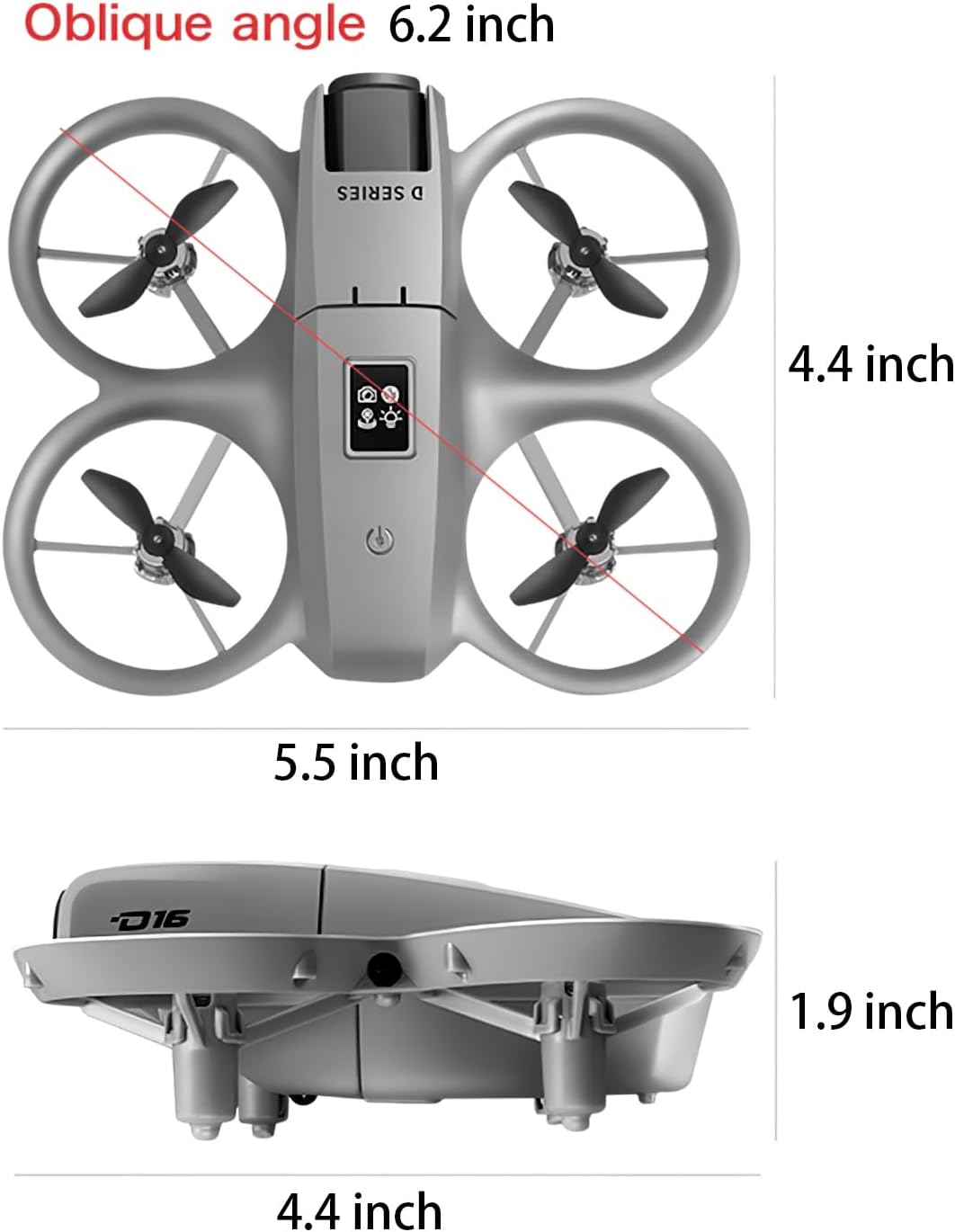
Image 9.1: D16 Drone dimensions.
| ഫീച്ചർ | വിശദാംശങ്ങൾ |
|---|---|
| മോഡലിൻ്റെ പേര് | D16 Dron |
| ബ്രാൻഡ് | AUHIFVAX |
| നിറം | ചാരനിറം |
| മെറ്റീരിയൽ | പ്ലാസ്റ്റിക് |
| ഉൽപ്പന്ന അളവുകൾ | 5.5"L x 4.5"W x 1.9"H |
| ഇനത്തിൻ്റെ ഭാരം | 1 പൗണ്ട് |
| വീഡിയോ ക്യാപ്ചർ റെസല്യൂഷൻ | HD (1080p mentioned in description) |
| ഫലപ്രദമായ സ്റ്റിൽ റെസല്യൂഷൻ | 1080 എം.പി |
| പ്രത്യേക സവിശേഷതകൾ | Beauty filters, Intelligent obstacle avoidance, Optical flow hover, Trajectory flight, 180° Electronic Adjustable Lens |
| കണക്റ്റിവിറ്റി ടെക്നോളജി | APP Controller, Remote Control, Wi-Fi |
| പരമാവധി പരിധി | 120 മീറ്റർ |
| നൈപുണ്യ നില | Beginner To Intermediate |
| റീചാർജ് ചെയ്യാവുന്ന ബാറ്ററി ഉൾപ്പെടുത്തിയിട്ടുണ്ട് | Yes (for drone) |
| റിമോട്ട് കൺട്രോൾ ഉൾപ്പെടുത്തിയിട്ടുണ്ട് | അതെ |
10. വാറൻ്റിയും പിന്തുണയും
For warranty information and technical support, please refer to the product packaging or contact AUHIFVAX customer service directly. Keep your purchase receipt as proof of purchase for any warranty claims.
For further assistance, please visit the official AUHIFVAX webസൈറ്റ് ചെയ്യുക അല്ലെങ്കിൽ അവരുടെ ഉപഭോക്തൃ പിന്തുണ ചാനലുകളുമായി ബന്ധപ്പെടുക.
Ask a question about this manual
Ask about setup, troubleshooting, compatibility, parts, safety, or missing instructions. Manuals+ will review the question and use this page’s manual context to help answer it.