
1. ആമുഖം
This manual provides essential information for the safe and efficient operation of your TOPTRO Quadra Projector. Please read it thoroughly before using the device and retain it for future reference. The TOPTRO Quadra Projector offers a native 1080p resolution with true 4K HDR10/HLG support, running on a Linux OS with pre-installed streaming applications.
2. പാക്കേജ് ഉള്ളടക്കം
പാക്കേജിൽ എല്ലാ ഇനങ്ങളും ഉണ്ടെന്ന് ഉറപ്പാക്കുക:
- TOPTRO Quadra Projector
- റിമോട്ട് കൺട്രോൾ
- പവർ കേബിൾ
- ഉപയോക്തൃ മാനുവൽ (ഈ പ്രമാണം)
3. സജ്ജീകരണം
3.1 പ്ലേസ്മെൻ്റ്
Place the projector on a stable, flat surface or mount it to the ceiling. Ensure adequate ventilation around the device. For optimal viewing, position the projector to achieve the desired screen size. The projector supports a maximum projection size of 300 inches.

Image: Optimal projection distances for various screen sizes.
3.2 പവർ കണക്ഷൻ
പ്രൊജക്ടറിന്റെ പവർ ഇൻപുട്ടിലേക്കും തുടർന്ന് അനുയോജ്യമായ ഒരു ഇലക്ട്രിക്കൽ ഔട്ട്ലെറ്റിലേക്കും പവർ കേബിൾ ബന്ധിപ്പിക്കുക.
3.3 ബാഹ്യ ഉപകരണങ്ങൾ ബന്ധിപ്പിക്കുന്നു
The TOPTRO Quadra Projector features multiple connectivity options:
- എച്ച്ഡിഎംഐ: Connect laptops, Blu-ray players, gaming consoles (e.g., PS4), or TV sticks using the dual HDMI ports. One port supports HDMI ARC for enhanced audio return.
- USB: മീഡിയ പ്ലേബാക്കിനായി USB ഡ്രൈവുകൾ ഇടുക.
- 3.5mm ഓഡിയോ ഔട്ട്: ബാഹ്യ സ്പീക്കറുകളോ ഹെഡ്ഫോണുകളോ ബന്ധിപ്പിക്കുക.
- ബ്ലൂടൂത്ത് 5.2: വയർലെസ് ഓഡിയോയ്ക്കായി ബ്ലൂടൂത്ത് സ്പീക്കറുകളുമായോ ഹെഡ്ഫോണുകളുമായോ ജോടിയാക്കുക.
- Dual Band WiFi (2.4GHz + 5GHz): Connect to your home network for online streaming and updates.
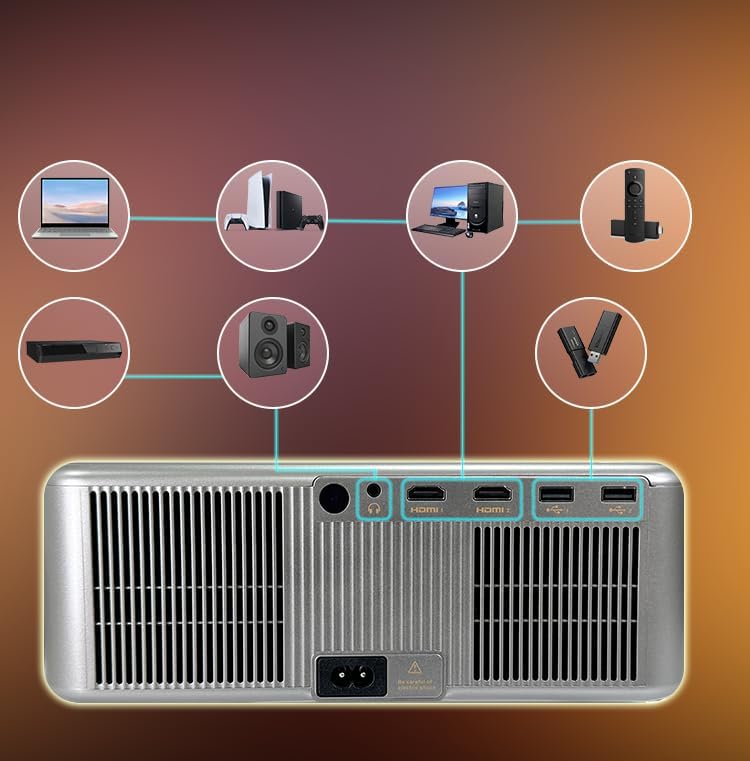
ചിത്രം: പിൻ പാനൽ കണക്റ്റിവിറ്റി പോർട്ടുകൾ.
3.4 Initial Power On and Automatic Adjustments
Press the power button on the projector or remote control to turn on the device. The projector features fully automatic adjustments:
- ഓട്ടോ ഫോക്കസ്: പ്രൊജക്ടർ ചിത്രത്തിന്റെ വ്യക്തത യാന്ത്രികമായി ക്രമീകരിക്കും.
- യാന്ത്രിക കീസ്റ്റോൺ തിരുത്തൽ: The image will be automatically squared to compensate for angled projection.
- യാന്ത്രിക തടസ്സം ഒഴിവാക്കൽ: The projection area will adjust to avoid objects in the path.
- ഓട്ടോ സ്ക്രീൻ ഫിറ്റ്: The image will automatically fit within the boundaries of your projection surface.

Image: Automatic image adjustment features.
4. പ്രവർത്തന നിർദ്ദേശങ്ങൾ
4.1 Navigating the Linux OS
The TOPTRO Quadra Projector runs on a Linux operating system. Use the provided remote control to navigate the user interface. The home screen provides access to pre-installed applications and settings.

Image: Projector displaying the Linux OS interface with streaming apps.
4.2 സ്ട്രീമിംഗ് ആപ്ലിക്കേഷനുകൾ
The projector comes with pre-installed and certified applications such as Netflix, YouTube, and Prime Video. Access these directly from the home screen for 4K content streaming.

Image: Remote control with quick access buttons for streaming services.
4.3 Wireless Screen Mirroring
The projector supports Miracast for wireless screen mirroring from Android and iOS devices. Refer to your device's instructions for initiating screen mirroring and select the projector from the available devices.
4.4 Image and Sound Settings
Access the settings menu to adjust image parameters such as brightness, contrast, and color. The projector supports HDR10/HLG for enhanced dynamic range. Audio settings allow for volume control and selection of output devices (internal speakers, Bluetooth, 3.5mm jack, HDMI ARC).
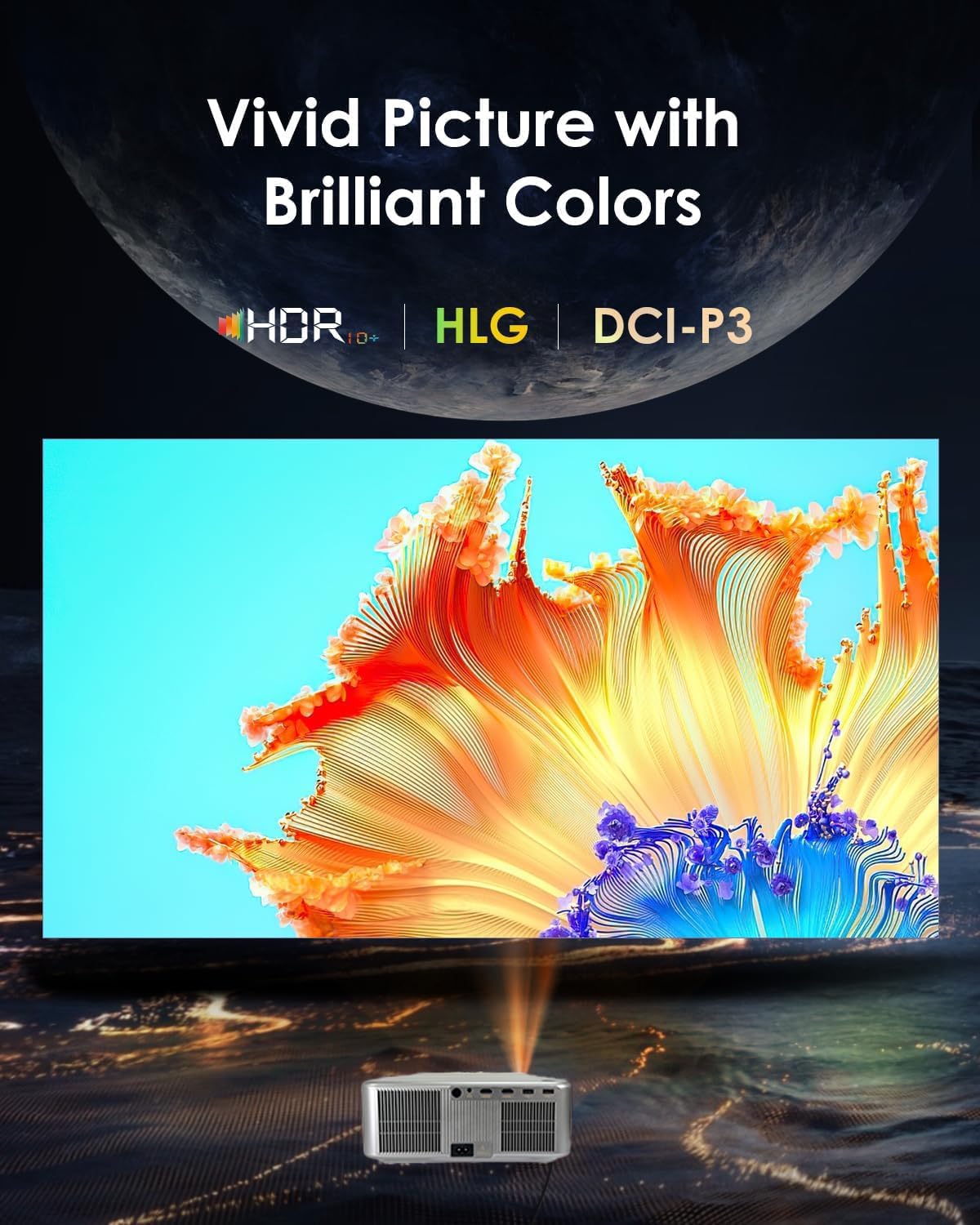
Image: Displaying vivid picture quality with HDR10+, HLG, and DCI-P3 color support.
5. പരിപാലനം
5.1 ലെൻസ് വൃത്തിയാക്കൽ
Gently wipe the projector lens with a soft, lint-free cloth specifically designed for optical surfaces. Avoid using abrasive cleaners or excessive force.
5.2 Cleaning the Vents
Regularly clean the air vents to prevent dust buildup, which can affect performance and lead to overheating. Use a soft brush or compressed air to clear the vents.
5.3 എൽamp ജീവിതം
പ്രൊജക്ടർ എൽamp has an estimated life of 50,000 hours. No user replacement is typically required during the product's lifespan under normal usage conditions.
6. പ്രശ്നപരിഹാരം
6.1 ചിത്രമില്ല
- പ്രൊജക്ടർ ഓണാക്കിയിട്ടുണ്ടെന്നും പവർ കേബിൾ സുരക്ഷിതമായി ബന്ധിപ്പിച്ചിട്ടുണ്ടെന്നും ഉറപ്പാക്കുക.
- Check the input source. Verify that the correct HDMI or other input is selected.
- Confirm that the connected device (laptop, media player) is powered on and outputting a signal.
- കേബിൾ കണക്ഷനുകൾക്ക് അയവ് ഉണ്ടോ അല്ലെങ്കിൽ കേടുപാടുണ്ടോ എന്ന് പരിശോധിക്കുക.
6.2 ശബ്ദമില്ല
- പ്രൊജക്ടറിലും ബന്ധിപ്പിച്ചിരിക്കുന്ന ഉറവിട ഉപകരണത്തിലും ശബ്ദം ക്രമീകരിക്കുക.
- Ensure external speakers or headphones are properly connected if used.
- If using Bluetooth, confirm the projector is paired with the correct audio device.
- Check audio settings in the projector's menu to ensure the correct audio output is selected.
6.3 Image is Blurry or Distorted
- Allow the projector's auto-focus feature to complete its adjustment.
- Ensure the projector is placed perpendicular to the screen for best results, allowing auto-keystone to function optimally.
- Check for any physical obstructions in front of the lens.
6.4 Connectivity Issues (WiFi/Bluetooth)
- For WiFi, ensure the projector is within range of your router and the password is entered correctly. Try restarting your router.
- ബ്ലൂടൂത്തിന്, നിങ്ങൾ കണക്റ്റ് ചെയ്യാൻ ശ്രമിക്കുന്ന ഉപകരണം ജോടിയാക്കൽ മോഡിലാണെന്നും പരിധിക്കുള്ളിലാണെന്നും ഉറപ്പാക്കുക.
7 സ്പെസിഫിക്കേഷനുകൾ
| ബ്രാൻഡ് | ടോപ്ട്രോ |
| മോഡൽ | Quadra Certified (X6) |
| ഡിസ്പ്ലേ ടെക്നോളജി | എൽസിഡി |
| നേറ്റീവ് റെസല്യൂഷൻ | 1920 x 1080 (1080p) |
| പിന്തുണയുള്ള റെസല്യൂഷൻ | 3840 x 2160 (4K) വരെ |
| ചിത്രത്തിന്റെ തെളിച്ചം | 30000 ല്യൂമെൻസ് (2500 ANSI ല്യൂമെൻസ്) |
| ഇമേജ് ദൃശ്യതീവ്രത അനുപാതം | 10000:1 |
| വീക്ഷണാനുപാതം | 16:9 |
| പുതുക്കിയ നിരക്ക് | 60 Hz |
| പ്രത്യേക സവിശേഷതകൾ | 4K HDR 10/HLG, Net - Flix Certified Linux OS, 2GB RAM, 32GB ROM, Auto Focus & Keystone, Auto Obstacle Avoidance, Auto Screen Fit, 15W Speakers, HDMI ARC, Dual HDMI, Dual 5G & 2.4G WiFi 6, Bluetooth 5.2, WiFi Display, Electronic Focus & 6D Electronic correction, AI Image Tech (Color Correction, Noise Reduction, Edge Enhancement), MEMC Motion Compensation, Dolby Audio. |
| ഹാർഡ്വെയർ ഇന്റർഫേസ് | 3.5mm Audio, Bluetooth 5, Ethernet, HDMI, USB |
| അനുയോജ്യമായ ഉപകരണങ്ങൾ | Laptop, Speaker, Television, Gaming Consoles, TV Sticks |
| Lamp ജീവിതം | 50,000 മണിക്കൂർ |
| ഉൽപ്പന്ന അളവുകൾ | 28 x 13 x 30 സെ.മീ |
| ഇനത്തിൻ്റെ ഭാരം | 3 കി.ഗ്രാം |

ചിത്രം: കഴിഞ്ഞുview of advanced features and specifications.
8. വാറൻ്റി വിവരങ്ങൾ
The TOPTRO Quadra Projector comes with a 1 വർഷത്തെ വാറൻ്റി provided by TOPTRO from the date of purchase. For detailed warranty terms and conditions, please visit the official TOPTRO webസൈറ്റ്.
9. പിന്തുണ
For technical assistance, customer service, or warranty claims, please contact TOPTRO support:
- Webസൈറ്റ്: toptro.in
- ഇമെയിൽ: support@toptro.in or sreeprojectors@gmail.com
- WhatsApp: 8341888860