
dbsono N8A
dbsono Bluetooth Speaker N8A User Manual
മോഡൽ: N8A
1. ആമുഖം
This manual provides essential information for the proper setup, operation, and maintenance of your dbsono Bluetooth Speaker N8A. Please read this guide thoroughly before using the product to ensure optimal performance and longevity.

Image 1.1: The dbsono Bluetooth Speaker N8A, a compact and portable wireless speaker.
2. ബോക്സിൽ എന്താണുള്ളത്?
അൺബോക്സിംഗ് ചെയ്യുമ്പോൾ എല്ലാ ഇനങ്ങളും ഉണ്ടെന്ന് ഉറപ്പാക്കുക:
- ബ്ലൂടൂത്ത് സ്പീക്കർ
- പവർ കേബിൾ (ടൈപ്പ്-സി)
- ദ്രുത ആരംഭ ഗൈഡ്
3. ഉൽപ്പന്നം കഴിഞ്ഞുview
3.1. ഘടകങ്ങൾ
The dbsono Bluetooth Speaker N8A features a robust acoustic configuration for enhanced audio output.

ചിത്രം 3.1: ആന്തരികം view showing dual full-range drivers and passive radiators for powerful stereo sound.
3.2. നിയന്ത്രണങ്ങളും പോർട്ടുകളും
The speaker's controls are conveniently located on the top panel, and connectivity ports are on the rear, protected by a cover.
Image 3.2: Top panel with power, volume, play/pause, and light mode buttons.

ചിത്രം 3.3: പിൻഭാഗം view showing the AUX and Type-C charging ports, protected by a waterproof cover.
| ബട്ടൺ | ഷോർട്ട് പ്രസ്സ് | ലോംഗ് പ്രസ്സ് |
|---|---|---|
| ശക്തി | Turn on/off speaker (3s) / Reset Speaker (8s) | |
| വ്യാപ്തം - | വോളിയം കുറയുന്നു | മുമ്പത്തെ ട്രാക്ക് |
| പ്ലേ/താൽക്കാലികമായി നിർത്തുക | സംഗീതം പ്ലേ ചെയ്യുക/താൽക്കാലികമായി നിർത്തുക | Disconnect/Reconnect Bluetooth |
| വോളിയം + | വോളിയം കൂട്ടുക | അടുത്ത ട്രാക്ക് |
| ലൈറ്റ് മോഡ് | ലൈറ്റ് മോഡ് മാറ്റുക |
4. സജ്ജീകരണം
4.1. സ്പീക്കറിൽ നിന്ന് നിരക്ക് ഈടാക്കുന്നു
Before first use, fully charge the speaker using the provided Type-C power cable. Connect the cable to the charging port on the rear of the speaker and a compatible USB power source. The LED indicator will show charging status.
4.2. ബ്ലൂടൂത്ത് ജോടിയാക്കൽ
- Press and hold the Power button for 3 seconds to turn on the speaker. A blue LED will flash, indicating it's in pairing mode.
- നിങ്ങളുടെ ഉപകരണത്തിൽ (സ്മാർട്ട്ഫോൺ, ടാബ്ലെറ്റ്, ലാപ്ടോപ്പ്), ബ്ലൂടൂത്ത് പ്രവർത്തനക്ഷമമാക്കി ലഭ്യമായ ഉപകരണങ്ങൾക്കായി തിരയുക.
- Select "DB GO MAX" from the list of devices.
- Once connected, you will hear an audible confirmation, and the blue LED will stop flashing and remain solid.
5. പ്രവർത്തന നിർദ്ദേശങ്ങൾ
5.1. അടിസ്ഥാന പ്ലേബാക്ക്
- പ്ലേ/താൽക്കാലികമായി നിർത്തുക: പ്ലേ/പോസ് ബട്ടൺ ഹ്രസ്വമായി അമർത്തുക.
- വോളിയം കൂട്ടുക/താഴ്ത്തുക: വോളിയം + അല്ലെങ്കിൽ വോളിയം - ബട്ടണുകൾ ഹ്രസ്വമായി അമർത്തുക.
- അടുത്തത് / മുമ്പത്തെ ട്രാക്ക്: Long press the Volume + for next track, or Volume - for previous track.
5.2. Lightshow Modes
The speaker features dynamic RGB lights that pulse with your music. Short press the Light Mode button to cycle through different light patterns or turn the lights off.

Image 5.1: The speaker displaying its vibrant RGB light effects.
5.3. ട്രൂ വയർലെസ് സ്റ്റീരിയോ (TWS) ജോടിയാക്കൽ
For an immersive stereo experience, you can pair two dbsono N8A speakers together.
- രണ്ട് സ്പീക്കറുകളും ഓണാക്കിയിട്ടുണ്ടെന്നും മറ്റ് ബ്ലൂടൂത്ത് ഉപകരണങ്ങളുമായി ബന്ധിപ്പിച്ചിട്ടില്ലെന്നും ഉറപ്പാക്കുക.
- On one speaker (this will be the primary speaker), long press the Play/Pause button until you hear a pairing tone.
- രണ്ട് സ്പീക്കറുകളും പരസ്പരം യാന്ത്രികമായി ബന്ധിപ്പിക്കും. കണക്റ്റ് ചെയ്തുകഴിഞ്ഞാൽ, നിങ്ങൾക്ക് ഒരു സ്ഥിരീകരണ ശബ്ദം കേൾക്കാനാകും.
- ഇപ്പോൾ, വിഭാഗം 4.2-ൽ വിവരിച്ചിരിക്കുന്നതുപോലെ ബ്ലൂടൂത്ത് വഴി നിങ്ങളുടെ ഉപകരണം പ്രാഥമിക സ്പീക്കറുമായി ബന്ധിപ്പിക്കുക.

Image 5.2: Two dbsono N8A speakers wirelessly connected for True Wireless Stereo sound.
Video 5.3: Demonstration of the DB GO MAX Ultra-Powerful Vibration and TWS pairing feature.
6. പരിപാലനം
6.1. വൃത്തിയാക്കൽ
മൃദുവായ സ്പീക്കർ തുടയ്ക്കുക, ഡിamp cloth. Do not use harsh chemicals or abrasive cleaners. Ensure the charging port cover is securely closed before cleaning or exposing to water.
6.2. ജല പ്രതിരോധം
The speaker has an IPX5 water resistance rating, protecting it from splashes and light rain. It is not designed for submersion in water. Always ensure the port cover is sealed to maintain water resistance.
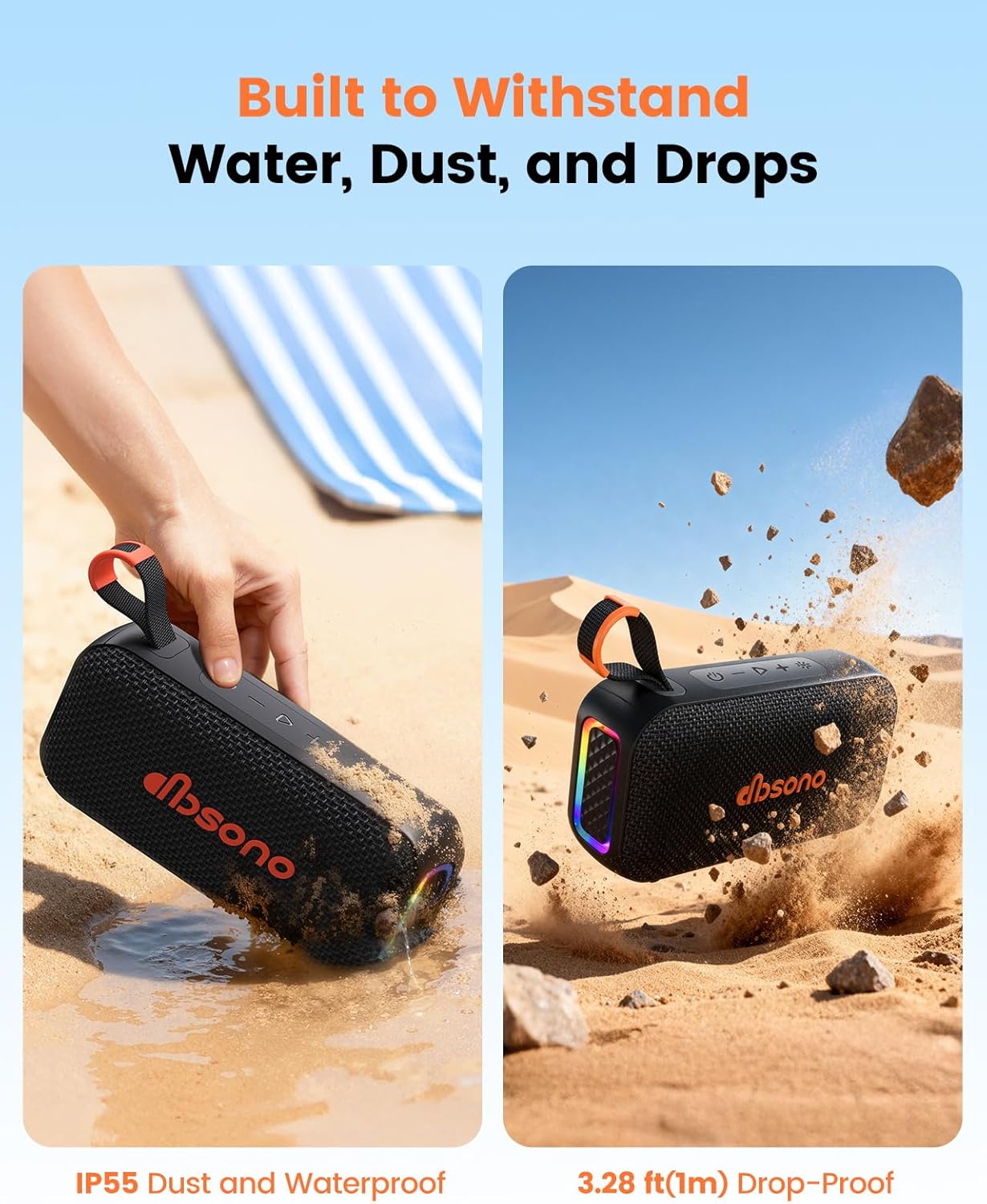
Image 6.1: The speaker's IPX5 rating provides protection against water splashes and dust.
7. പ്രശ്നപരിഹാരം
- സ്പീക്കർ ഓണാകില്ല: ബാറ്ററി ചാർജ്ജ് ചെയ്തിട്ടുണ്ടെന്ന് ഉറപ്പാക്കുക. ഒരു പവർ സ്രോതസ്സിലേക്ക് കണക്റ്റ് ചെയ്ത് വീണ്ടും ശ്രമിക്കുക.
- ബ്ലൂടൂത്ത് വഴി ജോടിയാക്കാൻ കഴിയുന്നില്ല: Make sure the speaker is in pairing mode (flashing blue LED). Check that Bluetooth is enabled on your device and that "DB GO MAX" is selected. If already paired, try disconnecting and reconnecting.
- ശബ്ദമില്ല: സ്പീക്കറിലും കണക്റ്റുചെയ്തിരിക്കുന്ന ഉപകരണത്തിലും വോളിയം ലെവലുകൾ പരിശോധിക്കുക. സ്പീക്കർ ശരിയായി ജോടിയാക്കിയിട്ടുണ്ടെന്ന് ഉറപ്പാക്കുക.
- മോശം ശബ്ദ നിലവാരം: Move the speaker closer to your device to reduce interference. Ensure the speaker is fully charged.
- TWS pairing issues: Ensure both speakers are fully charged and not connected to any other device before attempting TWS pairing.
8 സ്പെസിഫിക്കേഷനുകൾ
| ഫീച്ചർ | വിശദാംശങ്ങൾ |
|---|---|
| മോഡലിൻ്റെ പേര് | N8A |
| ബ്രാൻഡ് | ഡിബിസോണോ |
| സ്പീക്കർ തരം | പോർട്ടബിൾ സ്പീക്കർ |
| കണക്റ്റിവിറ്റി ടെക്നോളജി | ബ്ലൂടൂത്ത്, ഓക്സിലറി |
| വയർലെസ് കമ്മ്യൂണിക്കേഷൻ ടെക്നോളജി | ബ്ലൂടൂത്ത് 5.4 |
| ബ്ലൂടൂത്ത് ശ്രേണി | 15 മീറ്റർ |
| സ്പീക്കർ പരമാവധി ഔട്ട്പുട്ട് പവർ | 20 വാട്ട്സ് |
| ഓഡിയോ put ട്ട്പുട്ട് മോഡ് | സ്റ്റീരിയോ |
| ഫ്രീക്വൻസി പ്രതികരണം | 16 KHz |
| കളിസമയം | 30 മണിക്കൂർ വരെ |
| ജല പ്രതിരോധ നില | IPX5 (വാട്ടർ റെസിസ്റ്റൻ്റ്) |
| ഉൽപ്പന്ന അളവുകൾ | 6.85"D x 2.05"W x 3.66"H |
| ഇനത്തിൻ്റെ ഭാരം | 1.15 പൗണ്ട് (0.52 കിലോഗ്രാം) |
| പവർ ഉറവിടം | Battery Powered (1 C battery included) |
| നിയന്ത്രണ രീതി | സ്പർശിക്കുക |
| പ്രത്യേക സവിശേഷതകൾ | LED Light, Lightweight, Portable, Stereo Pairing, Waterproof |
9. വാറണ്ടിയും പിന്തുണയും
9.1. വാറൻ്റി വിവരങ്ങൾ
The dbsono Bluetooth Speaker N8A comes with a Limited Warranty. Please refer to the official dbsono webവിശദമായ വാറന്റി നിബന്ധനകൾക്കും വ്യവസ്ഥകൾക്കും സൈറ്റ് അല്ലെങ്കിൽ നിങ്ങളുടെ വാങ്ങൽ ഡോക്യുമെന്റേഷൻ കാണുക.
9.2. ഉപഭോക്തൃ പിന്തുണ
For technical assistance, troubleshooting, or other inquiries, please visit the dbsono Store on Amazon or contact our customer service team through the contact information provided in your product packaging or on the official webസൈറ്റ്.
Ask a question about this manual
Ask about setup, troubleshooting, compatibility, parts, safety, or missing instructions. Manuals+ will review the question and use this page’s manual context to help answer it.