
1. ഉൽപ്പന്നം കഴിഞ്ഞുview
The dbsono Portable Bluetooth Speaker (Model DB A53) is a versatile 2-in-1 device that functions as both a portable Bluetooth speaker and a magnetic phone stand. It features loud sound, TWS (True Wireless Stereo) pairing capability, various dynamic RGB light modes, and is water-resistant for diverse indoor and outdoor use.

Image 1.1: The dbsono Portable Bluetooth Speaker attached to a smartphone, showcasing അതിന്റെ ഇരട്ട പ്രവർത്തനക്ഷമത.
പ്രധാന സവിശേഷതകൾ:
- 2-ഇൻ-1 ഡിസൈൻ: Functions as a Bluetooth speaker and a magnetic phone stand.
- Loud Sound: Equipped with a 1.57-inch driver for clear and powerful audio.
- ടിഡബ്ല്യുഎസ് കണക്ഷൻ: Pair two speakers for an immersive stereo sound experience.
- Dynamic Light Modes: Features 9 different RGB light modes to enhance ambiance.
- വെള്ളത്തെ പ്രതിരോധിക്കുന്ന: IPX5 rating protects against splashes and sweat.
- പോർട്ടബിൾ: എളുപ്പത്തിൽ കൊണ്ടുപോകുന്നതിനായി ഒതുക്കമുള്ളതും ഭാരം കുറഞ്ഞതുമായ ഡിസൈൻ.
2. സജ്ജീകരണം
2.1 പവർ ഓൺ/ഓഫ്
- പവർ ഓണാക്കാൻ: Long-press the power button located on the bottom of the speaker until the LED lights illuminate and you hear an audible prompt.
- പവർ ഓഫ് ചെയ്യാൻ: Long-press the power button again until the LED lights turn off and you hear an audible prompt.
2.2 ബ്ലൂടൂത്ത് ജോടിയാക്കൽ
- Ensure the speaker is powered on and in pairing mode (LED lights will be flashing).
- നിങ്ങളുടെ ഉപകരണത്തിൽ (സ്മാർട്ട്ഫോൺ, ടാബ്ലെറ്റ് മുതലായവ), ബ്ലൂടൂത്ത് ക്രമീകരണങ്ങളിലേക്ക് നാവിഗേറ്റ് ചെയ്യുക.
- ഇതിനായി തിരയുക available devices and select "DB A53" from the list.
- Once connected, the speaker will provide an audible confirmation, and the LED lights will become solid.
2.3 TWS (ട്രൂ വയർലെസ് സ്റ്റീരിയോ) ജോടിയാക്കൽ
To achieve a richer, louder stereo sound, you can pair two dbsono DB A53 speakers together.
- Power on both dbsono DB A53 speakers.
- Double-tap the power button on one of the speakers. You will hear an alarming sound, followed by a prompt tone indicating successful pairing of the two speakers.
- Turn on your device's Bluetooth and select "DB A53" to connect to the paired speakers.
- You can now enjoy wireless stereo sound from both speakers.
Video 2.1: Demonstrates the steps for connecting two dbsono Bluetooth speakers for TWS stereo sound.
2.4 Phone Stand Attachment
The speaker can attach magnetically to your phone, serving as a convenient stand.
For iPhone 12/13/14/15/16 Series and MagSafe Covers:
These devices have built-in magnetic capabilities and do not require a metal ring. Simply align the speaker with the back of your phone or MagSafe case, and it will snap into place.
Video 2.2: Shows how to directly attach the speaker to an iPhone 12 or later, or a MagSafe case.
For Other Mobile Phones & Phone Cases:
A metal ring (included in the package) is required for magnetic attachment.
- Clean the back surface of your phone case where you intend to attach the metal ring.
- Peel off the protective film from the adhesive side of the metal ring.
- Carefully center and firmly press the metal ring onto the back of your phone case. Ensure it is securely attached.
- Once the metal ring is in place, the speaker can be magnetically attached to it.
Video 2.3: Illustrates the operating steps for attaching the metal ring to a phone case for magnetic speaker use.

Image 2.1: Visual guide for direct magnetic attachment (iPhone 12+) and using the metal ring (other phones).
3. പ്രവർത്തന നിർദ്ദേശങ്ങൾ
3.1 ഓഡിയോ പ്ലേ ചെയ്യുന്നു
Once connected via Bluetooth, audio from your device will automatically play through the dbsono speaker. Use your connected device to control playback (play/pause, skip tracks) and volume.
3.2 Adjusting Light Modes
The speaker features 9 different dynamic RGB light modes. To cycle through these modes, short-press the Light button located on the speaker. The lights will change with each press, allowing you to select your preferred effect.
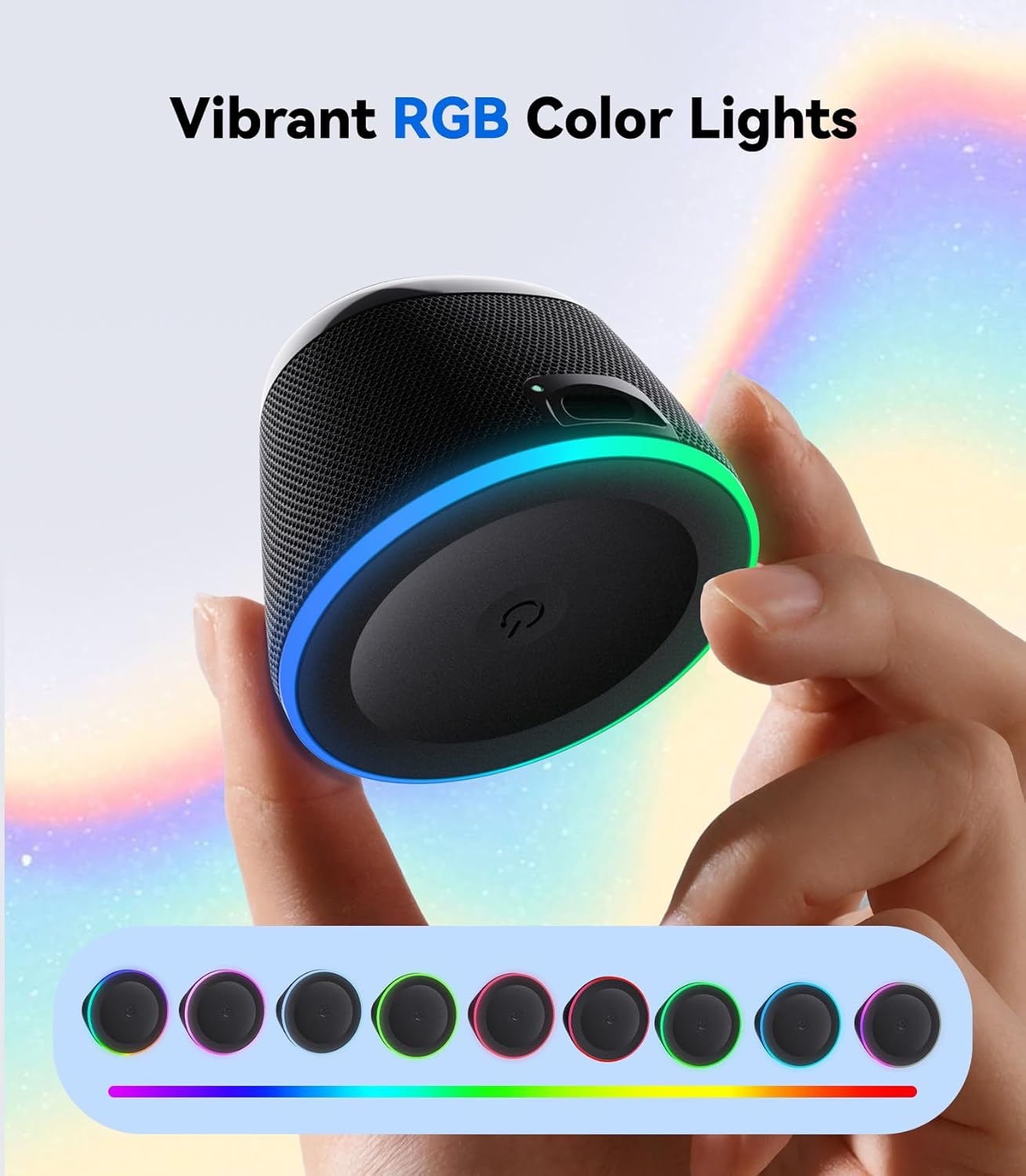
Image 3.1: The dbsono speaker displaying its vibrant RGB color lights.
3.3 ഒരു ഫോൺ സ്റ്റാൻഡായി ഉപയോഗിക്കുന്നു
With the speaker magnetically attached to your phone (either directly or via the metal ring), you can position your phone for hands-free viewing of videos, video calls, or simply to keep it upright while listening to music.
4. പരിപാലനം
- വൃത്തിയാക്കൽ: സ്പീക്കർ വൃത്തിയാക്കാൻ മൃദുവായതും ഉണങ്ങിയതുമായ തുണി ഉപയോഗിക്കുക. കഠിനമായ രാസവസ്തുക്കളോ ഉരച്ചിലുകളോ ഉള്ള വസ്തുക്കളോ ഉപയോഗിക്കരുത്.
- ജല പ്രതിരോധം: The speaker has an IPX5 water-resistant rating, meaning it can withstand splashes and light rain. However, it is not designed for submersion in water. Ensure the USB port is fully dry before charging after exposure to moisture.
- സംഭരണം: നേരിട്ടുള്ള സൂര്യപ്രകാശത്തിൽ നിന്നും കടുത്ത താപനിലയിൽ നിന്നും മാറി തണുത്തതും വരണ്ടതുമായ സ്ഥലത്ത് സ്പീക്കർ സൂക്ഷിക്കുക.
- ചാർജിംഗ്: Use the provided power cable for charging. A wall charger is not included.

Image 4.1: The dbsono speaker demonstrating its water-resistant and splashproof capabilities.
5. പ്രശ്നപരിഹാരം
- സ്പീക്കർ പവർ ഓൺ ചെയ്യുന്നില്ല: Ensure the battery is charged. Connect the speaker to a power source using the provided USB cable.
- ബ്ലൂടൂത്ത് വഴി ജോടിയാക്കാൻ കഴിയുന്നില്ല:
- സ്പീക്കർ ജോടിയാക്കൽ മോഡിലാണെന്ന് ഉറപ്പാക്കുക (LED മിന്നുന്നു).
- Make sure your device's Bluetooth is enabled and within range (typically 10 meters).
- Forget/remove "DB A53" from your device's Bluetooth list and try pairing again.
- സ്പീക്കറും നിങ്ങളുടെ ഉപകരണവും പുനരാരംഭിക്കുക.
- ശബ്ദമില്ല അല്ലെങ്കിൽ കുറഞ്ഞ ശബ്ദം:
- സ്പീക്കറിലും കണക്റ്റുചെയ്ത ഉപകരണത്തിലും വോളിയം ലെവലുകൾ പരിശോധിക്കുക.
- ബ്ലൂടൂത്ത് വഴി സ്പീക്കർ നിങ്ങളുടെ ഉപകരണവുമായി ശരിയായി ബന്ധിപ്പിച്ചിട്ടുണ്ടെന്ന് ഉറപ്പാക്കുക.
- TWS pairing issues:
- Ensure both speakers are fully charged and powered on.
- Repeat the TWS pairing steps carefully (double-tap power button on one speaker).
- Disconnect any existing Bluetooth connections from both speakers before attempting TWS pairing.
- കാന്തിക ബന്ധം ദുർബലമാണ്:
- For non-MagSafe phones, ensure the metal ring is securely and correctly attached to your phone case.
- Avoid using overly thick phone cases that might interfere with magnetic strength.
6 സ്പെസിഫിക്കേഷനുകൾ
| ഫീച്ചർ | വിശദാംശങ്ങൾ |
|---|---|
| മോഡലിൻ്റെ പേര് | ഡിബി എ53 |
| ബ്രാൻഡ് | ഡിബിസോണോ |
| ഉൽപ്പന്ന അളവുകൾ | 2.36"D x 2.36"W x 4.5"H |
| ഇനത്തിൻ്റെ ഭാരം | 3.04 ഔൺസ് (0.19 പൗണ്ട്) |
| മെറ്റീരിയൽ | Standalone Speaker |
| കണക്റ്റിവിറ്റി ടെക്നോളജി | ബ്ലൂടൂത്ത് 5.3 |
| സ്പീക്കർ തരം | Outdoor (also suitable for Indoor) |
| പ്രത്യേക ഫീച്ചർ | വാട്ടർപ്രൂഫ് (IPX5) |
| അനുയോജ്യമായ ഉപകരണങ്ങൾ | ലാപ്ടോപ്പ്, സ്മാർട്ട്ഫോൺ, ടാബ്ലെറ്റ്, ടെലിവിഷൻ |
| സ്പീക്കർ പരമാവധി ഔട്ട്പുട്ട് പവർ | 5 വാട്ട്സ് |
| ഓഡിയോ ഡ്രൈവർ വലിപ്പം | 40 മില്ലിമീറ്റർ |
| പവർ ഉറവിടം | Battery Powered (1 C battery included) |
| നിയന്ത്രണ രീതി | സ്പർശിക്കുക |
7. ബോക്സിൽ എന്താണുള്ളത്?

Image 7.1: Visual representation of the items included in the dbsono speaker package.
- Mini Speaker (dbsono DB A53)
- Power Cable (Type-C Charging Cable)
- ദ്രുത ആരംഭ ഗൈഡ്
- Metal Ring (x2)
- ഉപയോക്തൃ മാനുവൽ (ഈ പ്രമാണം)
Note: Wall charger is not included.
8. വാറൻ്റിയും പിന്തുണയും
8.1 വാറൻ്റി വിവരങ്ങൾ
This product comes with a Limited Warranty. Please refer to the Quick Start Guide or contact customer support for specific details regarding warranty coverage and duration.
8.2 ഉപഭോക്തൃ പിന്തുണ
For any questions, technical assistance, or warranty claims, please contact dbsono customer support through the official channels provided in your product packaging or on the dbsono webസൈറ്റ്.