
1. ഉൽപ്പന്നം കഴിഞ്ഞുview
The ICARZONE MA200 V6 is an advanced OBD2 diagnostic scanner designed for comprehensive vehicle analysis. It provides access to professional-level diagnostics, allowing users to read and clear fault codes across various vehicle systems, perform essential maintenance services, and monitor live data. This tool is suitable for home mechanics, DIY enthusiasts, and professionals seeking detailed vehicle insights.
പ്രധാന സവിശേഷതകൾ:
- Full System Diagnostics (Engine, ABS, SRS, Transmission, etc.)
- 6 Essential Maintenance Services (Oil Reset, EPB, SAS, TPMS, DPF, BMS)
- Full OBDII Functions (Read/Clear Codes, Live Data, I/M Readiness, etc.)
- Battery Test Functionality
- ആജീവനാന്ത സൗജന്യ സോഫ്റ്റ്വെയർ അപ്ഡേറ്റുകൾ
അനുയോജ്യത: The MA200 V6 is designed for most car models from the following manufacturing groups: BMW, BENZ, PORSCHE, VAG (Audi, Volkswagen, Bentley, Bugatti, Lamborghini, Seat, Skoda), JLR (Land Rover, Jaguar), and VOLVO (Volvo, Saab). Specific compatible brands include Porsche, Benz, Sprinter, Smart, Maybach, Land Rover, Jaguar, BMW, MINI, Rolls Royce, Volvo, Saab, Audi, Volkswagen, Bentley, Bugatti, Lamborghini, Seat, Skoda, MAN LD, Volkswagen CV, and Volkswagen LT3.
കുറിപ്പ്: Compatibility varies by vehicle make, model, and year. Please provide your car's VIN number for a precise compatibility check before use.

Image 1.1: The MA200 V6 scanner is compatible with a wide range of vehicles from major manufacturing groups.
2. ബോക്സിൽ എന്താണുള്ളത്?
പാക്കേജ് തുറക്കുമ്പോൾ, താഴെ പറയുന്ന എല്ലാ ഇനങ്ങളും ഉണ്ടെന്ന് ഉറപ്പാക്കുക:
- MA200 V6 Main Device
- പാക്കേജിംഗ് ബോക്സ്
- പോർട്ടബിൾ സ്റ്റോറേജ് ബാഗ്
- PC Connecting Cable (USB)
- TF Card (contained within the device)
- TF കാർഡ് റീഡർ
- ഉപയോക്തൃ മാനുവൽ (ഈ പ്രമാണം)
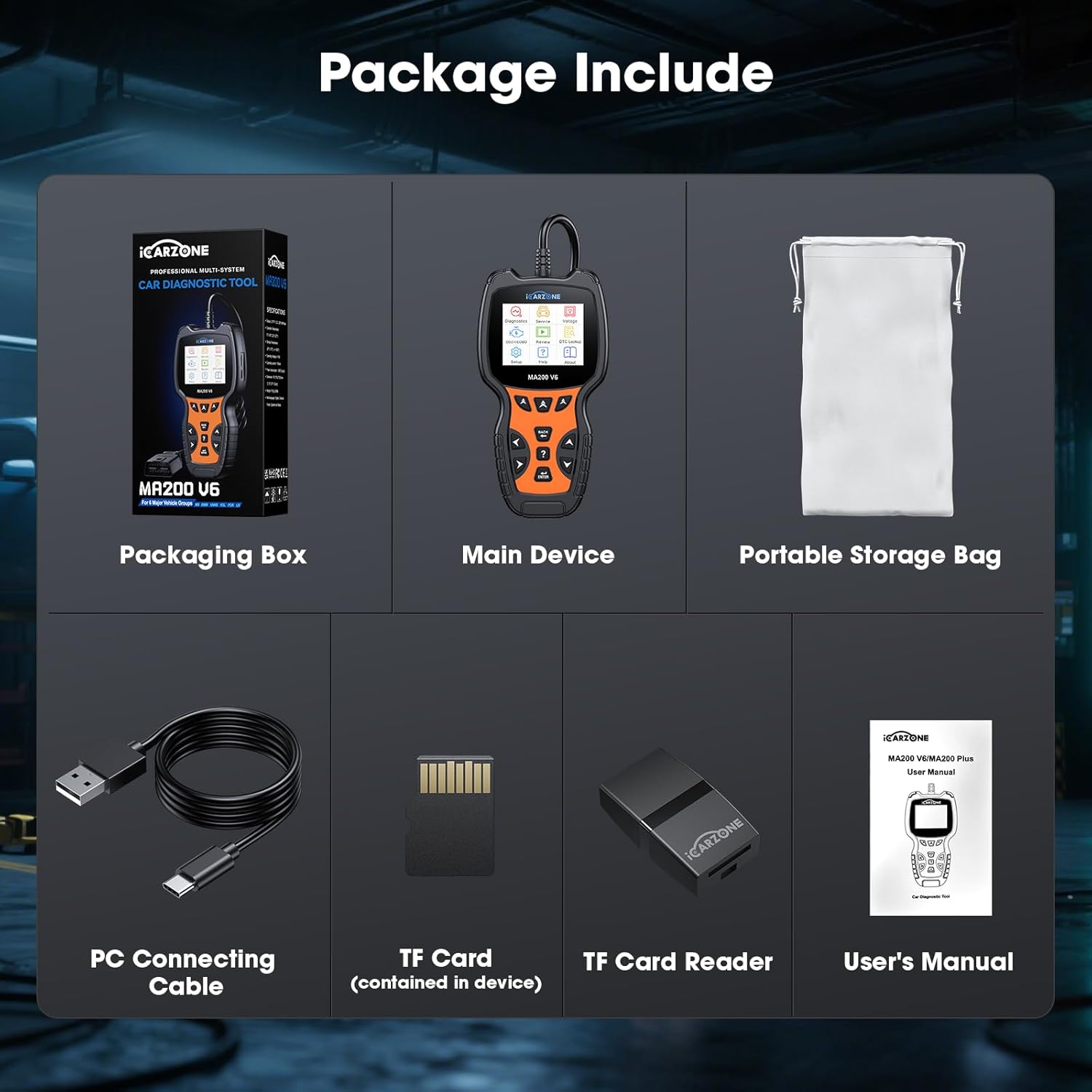
Image 2.1: All components included in the MA200 V6 product package.
3. സജ്ജീകരണ നിർദ്ദേശങ്ങൾ
Follow these steps to set up and begin using your MA200 V6 OBD2 Scanner:
- OBD2 പോർട്ട് കണ്ടെത്തുക: The OBD2 port is typically located under the dashboard on the driver's side of the vehicle. Refer to your vehicle's owner's manual if you cannot find it.
- സ്കാനർ ബന്ധിപ്പിക്കുക: Plug the MA200 V6's diagnostic cable connector firmly into the vehicle's OBD2 port. The scanner receives power directly from the vehicle's port, so no external batteries are required.
- പവർ ഓൺ: Once connected, the scanner will automatically power on. If it does not, ensure the vehicle's ignition is in the 'ON' position (engine can be off).
- പ്രാരംഭ സജ്ജീകരണം: Follow any on-screen prompts for initial language selection or system configuration.
4. പ്രവർത്തന നിർദ്ദേശങ്ങൾ
This section details the primary functions and how to operate your MA200 V6 scanner.
4.1. Full System Diagnostic
The MA200 V6 can access and diagnose various electronic control units (ECUs) within your vehicle, including Engine, Anti-lock Braking System (ABS), Supplemental Restraint System (SRS/Airbag), Transmission, and more. This allows for a comprehensive fault code detection beyond basic engine codes.
- From the main menu, select "Diagnostics."
- Choose "Auto Scan" to automatically identify your vehicle and scan all available systems, or select "Control Unit" to manually choose a specific system (e.g., Engine, ABS, SRS).
- The scanner will display any detected fault codes (DTCs) and their descriptions.
- You can generate a diagnostic report for review or to share with a repair shop.

Image 4.1: The MA200 V6 provides full system diagnostic capabilities, covering various vehicle modules.
4.2. 6 Maintenance Services
The MA200 V6 offers six commonly used maintenance and reset functions:
- ഓയിൽ റീസെറ്റ്: ഓയിൽ മാറ്റത്തിനു ശേഷം എഞ്ചിൻ ഓയിൽ ലൈഫ് സിസ്റ്റം പുനഃസജ്ജമാക്കുന്നു.
- ഇപിബി റീസെറ്റ് (ഇലക്ട്രോണിക് പാർക്കിംഗ് ബ്രേക്ക്): Essential for safely replacing brake pads on vehicles with electronic parking brakes.
- SAS റീസെറ്റ് (സ്റ്റിയറിങ് ആംഗിൾ സെൻസർ): Calibrates the steering angle sensor, crucial for vehicle stability control systems.
- TPMS റീസെറ്റ് (ടയർ പ്രഷർ മോണിറ്ററിംഗ് സിസ്റ്റം): Resets the TPMS system after tire rotation, sensor replacement, or tire pressure adjustment.
- DPF Reset (Diesel Particulate Filter): Initiates the DPF regeneration process to clear blockages in diesel vehicles.
- ബിഎംഎസ് റീസെറ്റ് (ബാറ്ററി മാനേജ്മെന്റ് സിസ്റ്റം): Registers a new battery with the vehicle's ECU to ensure proper charging and system function.
കുറിപ്പ്: The availability and specific procedures for these services vary by vehicle model. Please check compatibility for your specific car's VIN.

Image 4.2: The MA200 V6 provides 6 essential maintenance services for routine vehicle care.
4.3. OBDII Full Functions
The MA200 V6 supports all standard OBDII protocols, enabling comprehensive diagnostics for all OBDII-compliant vehicles (typically 1996 and newer in the US).
- കോഡുകൾ വായിക്കുക: Retrieves generic (P0, P2, P3, and U0) and manufacturer specific (P1, P3, and U1) codes.
- കോഡുകൾ മായ്ക്കുക: Erases Diagnostic Trouble Codes (DTCs) and turns off the Check Engine Light (MIL). Note: Codes can only be permanently cleared after the underlying problem is fixed.
- തത്സമയ ഡാറ്റ സ്ട്രീം: വാഹനത്തിന്റെ സെൻസറുകളിൽ നിന്നുള്ള തത്സമയ ഡാറ്റ ടെക്സ്റ്റ് അല്ലെങ്കിൽ ഗ്രാഫ് ഫോർമാറ്റിൽ പ്രദർശിപ്പിക്കുന്നു.
- I/M സന്നദ്ധത: Checks the readiness of emission-related monitors, indicating if the vehicle is ready for an emissions test.
- ഫ്രീസ് ഫ്രെയിം ഡാറ്റ: Shows a snapshot of vehicle operating conditions at the time an emission-related fault occurred.
- O2 സെൻസർ ടെസ്റ്റ്: O2 സെൻസർ മോണിറ്റർ പരിശോധനാ ഫലങ്ങൾ വീണ്ടെടുക്കുന്നു.
- ഓൺ-ബോർഡ് മോണിറ്റർ ടെസ്റ്റ്: എമിഷനുമായി ബന്ധപ്പെട്ട പവർട്രെയിൻ ഘടകങ്ങൾക്കും സിസ്റ്റങ്ങൾക്കുമുള്ള പരിശോധനാ ഫലങ്ങൾ വീണ്ടെടുക്കുന്നു.
- വാഹന വിവരം: Displays the Vehicle Identification Number (VIN), Calibration ID (CALID), and Calibration Verification Number (CVN).
- ബാറ്ററി ടെസ്റ്റ്: Evaluates the vehicle's battery health.
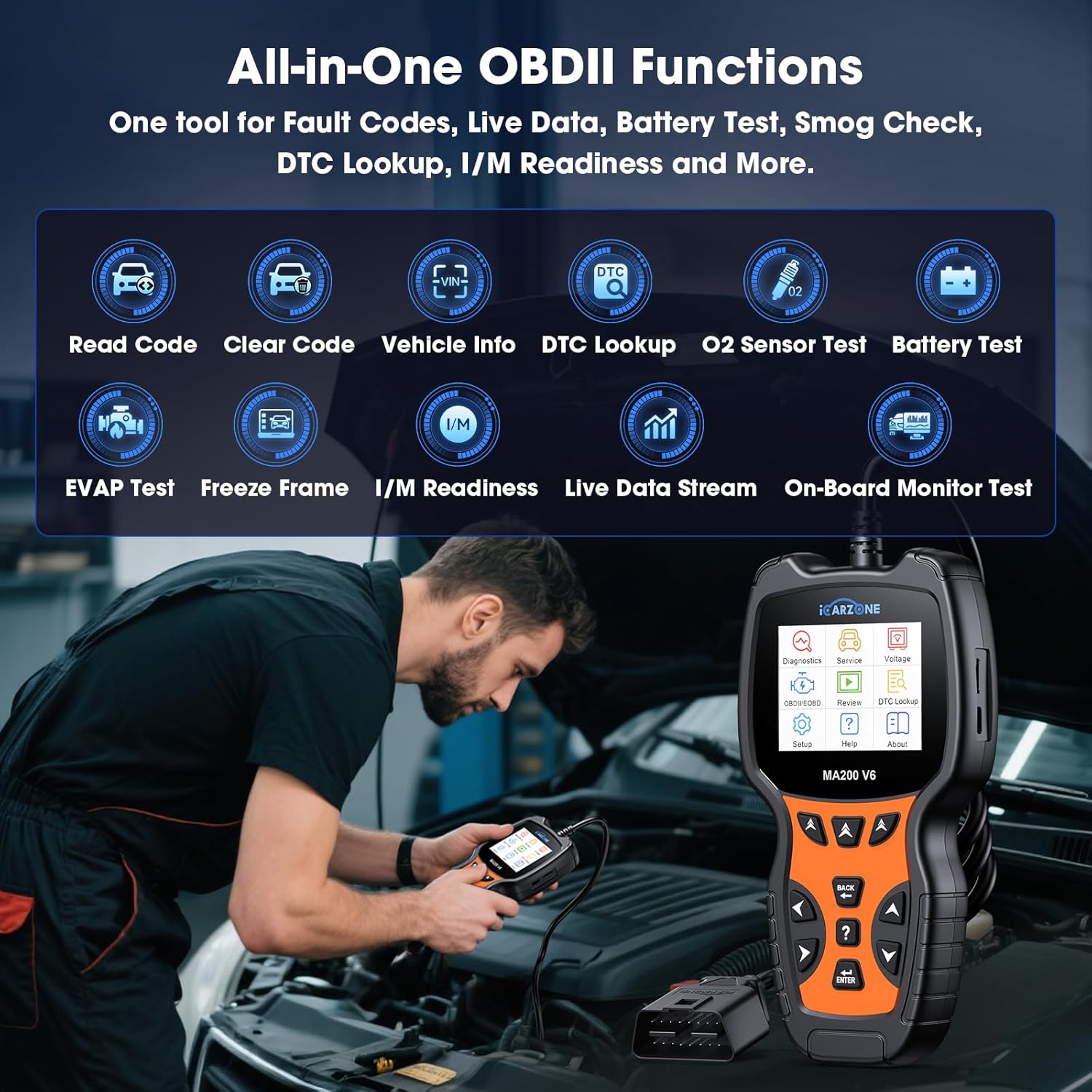
Image 4.3: The MA200 V6 provides a comprehensive suite of OBDII functions for standard diagnostics.
4.4. ഡിടിസി ലുക്ക്അപ്പ്
The MA200 V6 includes a built-in DTC library to help you understand the meaning of diagnostic trouble codes.
- From the main menu, select "DTC Lookup."
- Enter the specific DTC code you wish to look up.
- The scanner will display a detailed description of the code, helping you identify potential issues.

Image 4.4: The MA200 V6's DTC library assists in understanding and addressing fault codes.
4.5. Auto VIN Function
The Auto VIN feature automatically identifies your vehicle's VIN for quicker diagnostics setup.
- When prompted during a diagnostic session, select "Auto VIN."
- The scanner will attempt to read the VIN from the vehicle's ECU.
കുറിപ്പ്: Auto VIN may not be applicable to all vehicles. For some cars, you may need to manually enter the VIN to proceed with diagnostics.
5. പരിപാലനം
To ensure optimal performance and longevity of your MA200 V6 scanner:
- സോഫ്റ്റ്വെയർ അപ്ഡേറ്റുകൾ: The MA200 V6 offers lifetime free software updates. Regularly connect your device to a computer using the provided USB cable and visit the official ICARZONE website to download and install the latest software. This ensures compatibility with newer vehicle models and access to updated features.
- വൃത്തിയാക്കൽ: മൃദുവായതും ഉണങ്ങിയതുമായ തുണി ഉപയോഗിച്ച് ഉപകരണം തുടയ്ക്കുക. അബ്രസീവ് ക്ലീനറുകളോ ലായകങ്ങളോ ഉപയോഗിക്കുന്നത് ഒഴിവാക്കുക.
- സംഭരണം: Store the scanner in its portable storage bag when not in use to protect it from dust and physical damage.
6. പ്രശ്നപരിഹാരം
If you encounter issues while using your MA200 V6 scanner, refer to the following common problems and solutions:
- സ്കാനർ പവർ ഓൺ ചെയ്യുന്നില്ല:
- Ensure the scanner is securely connected to the vehicle's OBD2 port.
- വാഹനത്തിന്റെ ഇഗ്നിഷൻ 'ഓൺ' സ്ഥാനത്താണെന്ന് ഉറപ്പാക്കുക.
- OBD2 പോർട്ടിനായി വാഹനത്തിന്റെ ഫ്യൂസ് പരിശോധിക്കുക (നിങ്ങളുടെ വാഹനത്തിന്റെ മാനുവൽ കാണുക).
- തകരാർ കോഡുകൾ മായ്ക്കാൻ കഴിയില്ല:
- Fault codes can only be successfully erased after the underlying mechanical or electrical problem has been fixed. If the issue persists, the code will reappear.
- Auto VIN fails to identify vehicle:
- Auto VIN is not universally compatible with all vehicles. Try manually entering the VIN when prompted.
- Specific diagnostic or service function not working:
- The compatibility of advanced functions (like maintenance services) varies significantly by vehicle make, model, and year. Contact ICARZONE support with your vehicle's VIN for a compatibility check.
- Ensure your scanner's software is up to date.
- "Link Error" or "Communication Error":
- Verify the OBD2 cable connection is secure.
- വാഹനത്തിന്റെ ഇഗ്നിഷൻ ഓണാണെന്ന് ഉറപ്പാക്കുക.
- Try the scanner on a different OBDII-compliant vehicle to rule out a vehicle-specific issue.
7 സ്പെസിഫിക്കേഷനുകൾ
| ഫീച്ചർ | സ്പെസിഫിക്കേഷൻ |
|---|---|
| മോഡൽ | MA200 V6 സ്പെസിഫിക്കേഷനുകൾ |
| ബ്രാൻഡ് | ICARZONE |
| പവർ ഉറവിടം | Corded Electric (via OBD2 port) |
| ഓപ്പറേറ്റിംഗ് സിസ്റ്റം | Professional Automotive Inspection OS |
| സ്ക്രീൻ വലിപ്പം | 2.8 ഇഞ്ച് |
| ഇനത്തിൻ്റെ ഭാരം | 1.15 പൗണ്ട് |
| പാക്കേജ് അളവുകൾ | 8.35 x 4.02 x 2.44 ഇഞ്ച് |
| ഓട്ടോമോട്ടീവ് ഫിറ്റ് തരം | വാഹനത്തിൻ്റെ പ്രത്യേക ഫിറ്റ് |
8. വാറൻ്റിയും പിന്തുണയും
ICARZONE is committed to providing reliable products and excellent customer service.
- വാറൻ്റി: The MA200 V6 OBD2 Scanner comes with a 1-year brand warranty from the date of purchase. Please retain your proof of purchase for warranty claims.
- ആജീവനാന്ത സൗജന്യ അപ്ഡേറ്റുകൾ: Enjoy lifetime free software upgrades for your device. Regularly check the official ICARZONE website for the latest updates to ensure your scanner remains current with new vehicle models and features.
- സാങ്കേതിക സഹായം: Lifetime technical support is available for all MA200 V6 users. If you have any questions, encounter issues, or require assistance with specific vehicle compatibility, please do not hesitate to contact our support team.
For support, please visit the official ICARZONE webസൈറ്റ് അല്ലെങ്കിൽ നിങ്ങളുടെ ഉൽപ്പന്ന പാക്കേജിംഗിനൊപ്പം നൽകിയിരിക്കുന്ന കോൺടാക്റ്റ് വിവരങ്ങൾ റഫർ ചെയ്യുക.