
1. ആമുഖം
This manual provides essential information for setting up, operating, and maintaining your DOOGEE Note 56 smartphone. Please read it carefully to ensure proper use and to maximize the device's performance and longevity.
2. ബോക്സിൽ എന്താണുള്ളത്?
Upon opening your DOOGEE Note 56 package, you should find the following items:
- 1 x DOOGEE Note 56 Cell Phone
- 1 x Type-C Port Cable
- 1 x ചാർജർ
- 1 x Protective Film (Pre-applied)
- 1 x SIM Card Pin
- 1 x ഉപയോക്തൃ മാനുവൽ
- 1 x വാറൻ്റി കാർഡ്
- 1 x TPU Protective Case
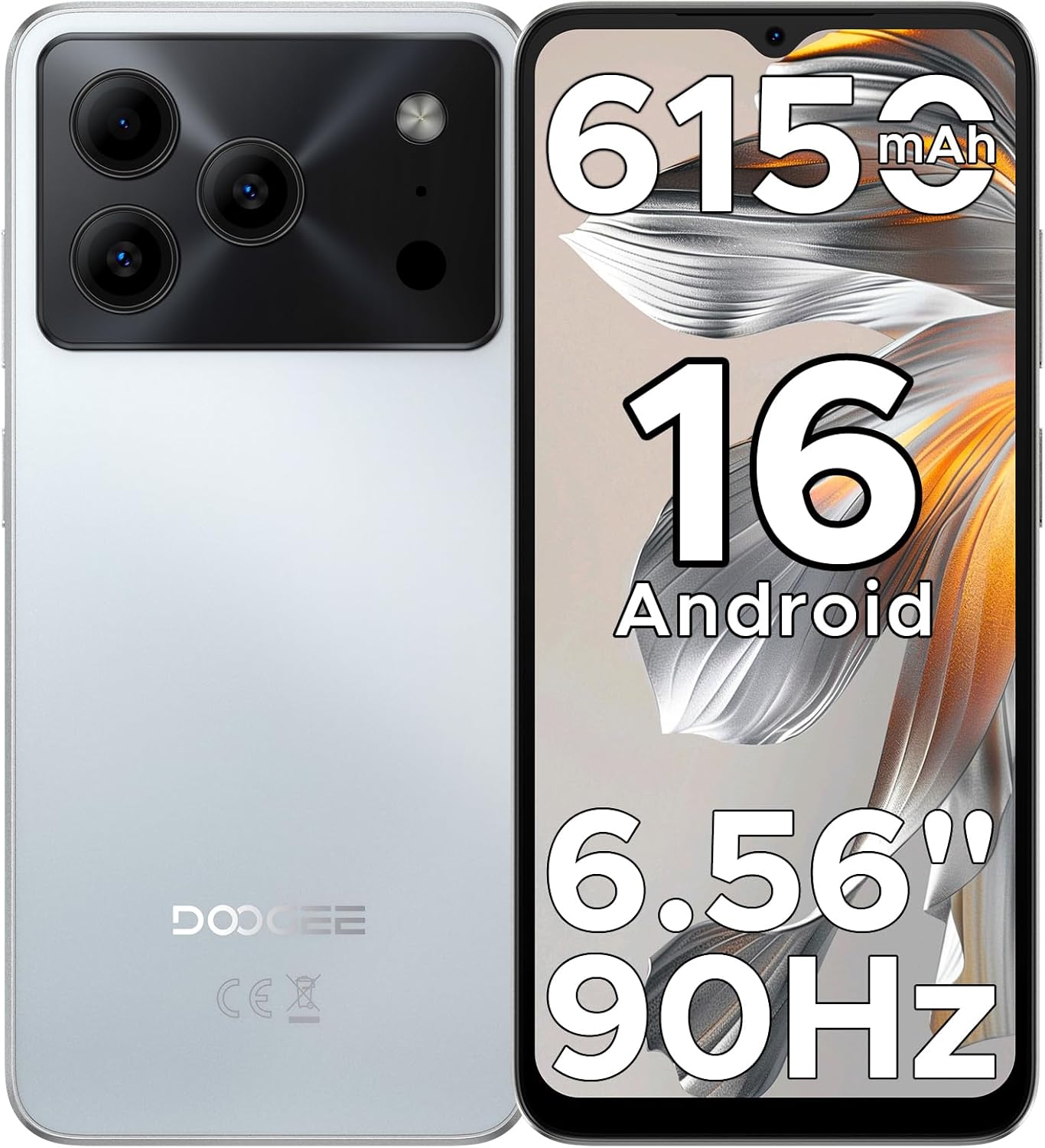
Image: The DOOGEE Note 56 smartphone, highlighting its 6150mAh battery, Android 16 OS, 6.56-inch display, and 90Hz refresh rate.
3. സജ്ജീകരണം
3.1. സിം കാർഡും സ്റ്റോറേജ് കാർഡും ഇൻസ്റ്റാൾ ചെയ്യൽ
The DOOGEE Note 56 supports dual SIM cards and expandable storage via a TF card. Use the provided SIM tool to open the SIM tray.
- ഫോണിന്റെ വശത്ത് സിം ട്രേ കണ്ടെത്തുക.
- ട്രേയുടെ അടുത്തുള്ള ചെറിയ ദ്വാരത്തിലേക്ക് സിം എജക്റ്റർ ഉപകരണം തിരുകുക, ട്രേ പുറത്തേക്ക് വരുന്നത് വരെ ദൃഢമായി അമർത്തുക.
- Place your Nano-SIM card(s) and/or TF card into the designated slots on the tray. Ensure the gold contacts are facing down.
- ഉപകരണത്തിന്റെ വശവുമായി ഫ്ലഷ് ആകുന്നതുവരെ ട്രേ ശ്രദ്ധാപൂർവ്വം ഫോണിലേക്ക് തിരികെ തള്ളുക.
3.2. പ്രാരംഭ പവർ ഓണും അടിസ്ഥാന കോൺഫിഗറേഷനും
- Press and hold the Power button (located on the right side) until the DOOGEE logo appears.
- നിങ്ങളുടെ ഭാഷ തിരഞ്ഞെടുക്കുന്നതിനും, ഒരു Wi-Fi നെറ്റ്വർക്കിലേക്ക് കണക്റ്റുചെയ്യുന്നതിനും, നിങ്ങളുടെ Google അക്കൗണ്ട് സജ്ജീകരിക്കുന്നതിനും ഓൺ-സ്ക്രീൻ നിർദ്ദേശങ്ങൾ പാലിക്കുക.
- Review നിബന്ധനകളും വ്യവസ്ഥകളും അംഗീകരിക്കുക.
3.3. ഫെയ്സ് അൺലോക്ക് സജ്ജീകരണം
For quick and secure access, you can set up Face Unlock:
- നാവിഗേറ്റ് ചെയ്യുക ക്രമീകരണങ്ങൾ > സുരക്ഷയും സ്വകാര്യതയും > ഫേസ് അൺലോക്ക്.
- Follow the on-screen instructions to register your face. Ensure you are in a well-lit area and hold the phone at arm's length.
- Once registered, you can unlock your phone by simply looking at the front camera.

Image: Visual representation of Instant Face Unlock in action, alongside accurate navigation and FM radio interfaces.
4. പ്രവർത്തന നിർദ്ദേശങ്ങൾ
4.1. ഡിസ്പ്ലേ സവിശേഷതകൾ
The DOOGEE Note 56 features a 6.56-inch HD+ IPS waterdrop screen with a 90Hz refresh rate, offering a smooth and clear visual experience. The 20:9 aspect ratio and 269 PPI contribute to vibrant visuals for videos, browsing, and gaming.

Image: The DOOGEE Note 56 display showcasing its 6.56-inch HD+ screen with a 90Hz refresh rate for smooth viewing.
4.2. ക്യാമറ ഉപയോഗം
Capture moments with the 8MP main rear camera and 5MP front camera. The camera system includes AI Scene Recognition, which automatically detects 12 scenes and optimizes settings for clearer shots. Available features include HDR, Night Mode, Beauty, and Portrait mode.
- പിൻ ക്യാമറ: 8MP for clear, natural photos. Supports HDR, Pro Mode, Smile Capture, Panoramas, Burst Shots, Night Mode, and Fun Filters.
- മുൻ ക്യാമറ: 5MP with Beauty Mode and Portrait effect for bright and natural selfies.

Image: An illustration of the DOOGEE Note 56's 5MP front and 8MP rear cameras, highlighting AI Scene Recognition and exampഉപകരണം ഉപയോഗിച്ച് എടുത്ത ഫോട്ടോകൾ.
4.3. ബാറ്ററി മാനേജ്മെന്റ്
The device is equipped with a 6150mAh Silicon-Carbon battery, designed for extended use. It supports OTG reverse charging, allowing you to use your phone as a power bank for other devices.
- ചാർജിംഗ്: Use the provided Type-C cable and charger for optimal charging.
- OTG റിവേഴ്സ് ചാർജിംഗ്: Connect a compatible OTG cable to charge other devices from your phone.
- ബാറ്ററി ലൈഫ്: Expect approximately 7 hours of web browsing, 49.5 hours of music playback, 14 hours of video watching, or 28 hours of calling on a full charge.
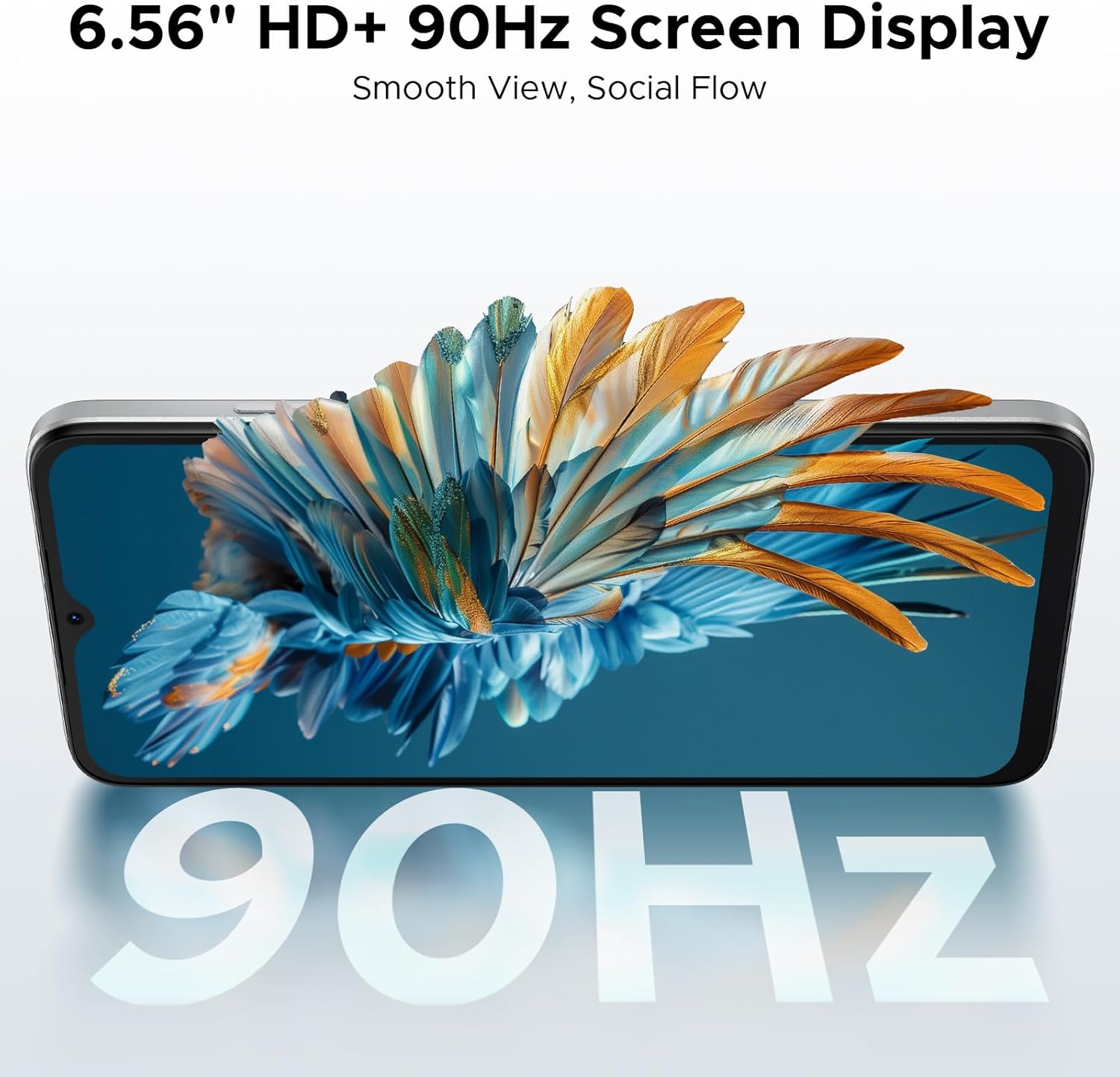
Image: A diagram illustrating the 6150mAh Silicon-Carbon battery, emphasizing its longevity, durability, smaller size, and 5W reverse charging capability.
4.4. സ്റ്റോറേജ് മാനേജ്മെൻ്റ്
The phone comes with 64GB of built-in storage and supports expansion up to 2TB via a TF (microSD) card. This allows ample space for photos, apps, and media.
- സംഭരണം മാനേജ് ചെയ്യാൻ, ഇതിലേക്ക് പോകുക ക്രമീകരണങ്ങൾ > സംഭരണം.
- Insert a TF card into the SIM tray for additional storage. (TF card needs to be purchased separately).

Image: A visual representation of the phone's internal architecture, highlighting 64GB storage and 24GB RAM (3GB physical + 21GB virtual).
4.5. കണക്റ്റിവിറ്റി
Stay connected with various options:
- 4G Dual SIM: ഫ്ലെക്സിബിൾ നെറ്റ്വർക്ക് ഉപയോഗത്തിനായി രണ്ട് സിം കാർഡുകൾ പിന്തുണയ്ക്കുന്നു.
- വൈഫൈ: ഇന്റർനെറ്റ് ആക്സസ്സിനായി വയർലെസ് നെറ്റ്വർക്കുകളിലേക്ക് കണക്റ്റുചെയ്യുക.
- ബ്ലൂടൂത്ത് 4.2: വയർലെസ് ആക്സസറികളുമായി ബന്ധിപ്പിക്കുന്നതിന്.
- ജിപിഎസ്: നാവിഗേഷൻ, ലൊക്കേഷൻ സേവനങ്ങൾക്കായി.
- എഫ്എം റേഡിയോ: പ്രാദേശിക റേഡിയോ സ്റ്റേഷനുകൾ ശ്രദ്ധിക്കുക.
- പിന്തുണയ്ക്കുന്ന ബാൻഡുകൾ: GSM: B2/3/5/8; WCDMA: B1/2/4/5/8; TDD: B38/40/41; FDD: B1/2/3/4/5/7/8/18/19/20/25/26/28A/28B/66. Please check with your local carrier for compatibility.

Image: A person holding the DOOGEE Note 56, with a list of supported 4G network bands (GSM, WCDMA, LTE-TDD, LTE-FDD) and a note about carrier compatibility.
4.6. Android 16 OS Features
The DOOGEE Note 56 runs on the latest Android 16 operating system, providing an efficient, secure, and user-friendly experience. Key features include:
- Intuitive interface for daily use.
- Enhanced security and privacy controls.
- Smart OS features like Smart Body Sensing, Dual System Mode, Super Clipboard, Memory Expansion, Screen Optimization, and Customizable Screen Colors.

Image: Various screenshots of the Android 16 OS interface, demonstrating features like battery status, system settings, music player, maps, and app icons.
5. പരിപാലനം
5.1. ബാറ്ററി പരിചരണം
- ബാറ്ററിയുടെ പ്രകടനം മോശമാക്കാൻ സാധ്യതയുള്ളതിനാൽ, തീവ്രമായ താപനില ഒഴിവാക്കുക.
- 100% ചാർജ് ആയതിനു ശേഷവും ഫോൺ അധികനേരം ചാർജ് ചെയ്യാൻ വയ്ക്കരുത്.
- ഉപകരണത്തിനൊപ്പം നൽകിയിരിക്കുന്ന ഒറിജിനൽ ചാർജറും കേബിളും മാത്രം ഉപയോഗിക്കുക.
5.2. സോഫ്റ്റ്വെയർ അപ്ഡേറ്റുകൾ
നിങ്ങളുടെ ഉപകരണത്തിൽ ഏറ്റവും പുതിയ ഫീച്ചറുകൾ, സുരക്ഷാ പാച്ചുകൾ, പ്രകടന മെച്ചപ്പെടുത്തലുകൾ എന്നിവ ഉണ്ടെന്ന് ഉറപ്പാക്കാൻ സോഫ്റ്റ്വെയർ അപ്ഡേറ്റുകൾ പതിവായി പരിശോധിച്ച് ഇൻസ്റ്റാൾ ചെയ്യുക. നിങ്ങൾക്ക് സാധാരണയായി ഈ ഓപ്ഷൻ ഇതിൽ കണ്ടെത്താനാകും ക്രമീകരണങ്ങൾ > സിസ്റ്റം > സിസ്റ്റം അപ്ഡേറ്റ്.
5.3. വൃത്തിയാക്കൽ
- ഫോണിന്റെ സ്ക്രീനും ബോഡിയും വൃത്തിയാക്കാൻ മൃദുവായ, ലിന്റ് രഹിത തുണി ഉപയോഗിക്കുക.
- കഠിനമായ രാസവസ്തുക്കളോ ഉരച്ചിലുകളോ ഉപയോഗിക്കുന്നത് ഒഴിവാക്കുക.
- തുറമുഖങ്ങൾ പൊടിയും അവശിഷ്ടങ്ങളും ഇല്ലാതെ സൂക്ഷിക്കുക.
6. പ്രശ്നപരിഹാരം
If you encounter issues with your DOOGEE Note 56, consider the following common solutions:
- ഉപകരണം പ്രതികരിക്കുന്നില്ല: റീസ്റ്റാർട്ട് ചെയ്യാൻ പവർ ബട്ടൺ ഏകദേശം 10-15 സെക്കൻഡ് അമർത്തിപ്പിടിക്കുക.
- ആപ്പുകൾ ക്രാഷാകുന്നു: പ്രശ്നമുള്ള ആപ്പിന്റെ കാഷെ മായ്ക്കുക (ക്രമീകരണങ്ങൾ > ആപ്പുകൾ > [ആപ്പ് നാമം] > സംഭരണം > കാഷെ മായ്ക്കുക). പ്രശ്നം നിലനിൽക്കുകയാണെങ്കിൽ, ആപ്പ് വീണ്ടും ഇൻസ്റ്റാൾ ചെയ്യാൻ ശ്രമിക്കുക.
- മോശം ബാറ്ററി ലൈഫ്: Check background app usage (Settings > Battery) and adjust settings. Reduce screen brightness or disable unnecessary features like GPS or Bluetooth when not in use.
- നെറ്റ്വർക്ക് കണക്റ്റിവിറ്റി പ്രശ്നങ്ങൾ: Toggle Airplane Mode on and off. Restart the phone. Check SIM card installation.
- സംഭരണം നിറഞ്ഞു: അനാവശ്യമായി ഇല്ലാതാക്കുക files, photos, or apps. Consider moving media to a TF card.
For more complex issues, refer to the DOOGEE support webസൈറ്റ് അല്ലെങ്കിൽ ഉപഭോക്തൃ സേവനവുമായി ബന്ധപ്പെടുക.
7 സ്പെസിഫിക്കേഷനുകൾ
| ഫീച്ചർ | വിശദാംശങ്ങൾ |
|---|---|
| മോഡലിൻ്റെ പേര് | കുറിപ്പ് 56 |
| ഓപ്പറേറ്റിംഗ് സിസ്റ്റം | ആൻഡ്രോയിഡ് 16 |
| സിപിയു വേഗത | 1.6 GHz |
| സ്ക്രീൻ വലിപ്പം | 6.56 ഇഞ്ച് |
| റെസലൂഷൻ | 720 x 1612 |
| പുതുക്കിയ നിരക്ക് | 90Hz |
| ഇൻസ്റ്റാൾ ചെയ്ത RAM മെമ്മറി വലുപ്പം | 24 ജിബി (3 ജിബി ഫിസിക്കൽ + 21 ജിബി വെർച്വൽ) |
| മെമ്മറി സ്റ്റോറേജ് കപ്പാസിറ്റി | 64 ജിബി (ടിഎഫ് കാർഡ് വഴി 2 ടിബി വരെ വികസിപ്പിക്കാം) |
| ബാറ്ററി ശേഷി | 6150 മില്ലിamp മണിക്കൂർ (ലിഥിയം പോളിമർ) |
| പിൻ ക്യാമറ | 8എംപി |
| മുൻ ക്യാമറ | 5എംപി |
| കണക്റ്റിവിറ്റി ടെക്നോളജികൾ | USB, Wi-Fi, Bluetooth 4.2, GPS, FM Radio |
| പ്രത്യേക സവിശേഷതകൾ | Dual SIM, Expandable Memory, Supports USB OTG, Face Unlock |
| ഭാരം | 9.2 ഔൺസ് (262 ഗ്രാം) |
| അളവുകൾ | 7.63 x 4.09 x 2 ഇഞ്ച് |
| നിറം | വെള്ള |
8. ഔദ്യോഗിക ഉൽപ്പന്ന വീഡിയോകൾ
The following videos provide additional information and visual guides for your DOOGEE Note 56 smartphone:
DOOGEE Note 56 Unlocked Phone Android 16
വീഡിയോ: ഒരു ഓവർview of the DOOGEE Note 56, highlighting its features as an unlocked Android 16 phone.
DOOGEE Note 56 8.45mm Ultra-thin Body
Video: This video showcases the ultra-slim design of the DOOGEE Note 56, emphasizing its 8.45mm thin profile.
DOOGEE Note 56 6150mAh Silicon-Carbon Battery
Video: A detailed look at the 6150mAh Silicon-Carbon battery of the DOOGEE Note 56, highlighting its capacity and benefits.
9. വാറൻ്റിയും പിന്തുണയും
Your DOOGEE Note 56 comes with a warranty. Please refer to the included Warranty Card in your product package for detailed information regarding warranty terms, conditions, and duration. For further support, you may visit the official DOOGEE webസൈറ്റ് അല്ലെങ്കിൽ അവരുടെ ഉപഭോക്തൃ സേവനവുമായി ബന്ധപ്പെടുക.