
1. ആമുഖം
This manual provides essential information for the safe and efficient use of your DOOGEE Blade 20 Max Rugged Phone. Please read this manual thoroughly before operating your device to ensure optimal performance and longevity.
2. ബോക്സിൽ എന്താണുള്ളത്?
Upon opening your DOOGEE Blade 20 Max package, you should find the following items:
- 1 x Blade 20 Max Rugged Phone
- 1 x ടൈപ്പ്-സി യുഎസ്ബി കേബിൾ
- 1 x ചാർജർ
- 1 x Screen-printed Protective Film (Pre-applied)
- 1 x Anti-explosion film
- 1 x പാക്കിംഗ് ബോക്സ്
- 1 x മാനുവൽ
- 1 x വാറൻ്റി കാർഡ്
വീഡിയോ വിവരണം: This video demonstrates the unboxing process of the DOOGEE Blade 20 Max Rugged Phone, showcasing all included accessories and the phone itself as it is removed from its packaging.
3. ഉൽപ്പന്നം കഴിഞ്ഞുview
The DOOGEE Blade 20 Max is a rugged smartphone designed for durability and high performance. It features a robust build, a large display, and advanced camera capabilities.
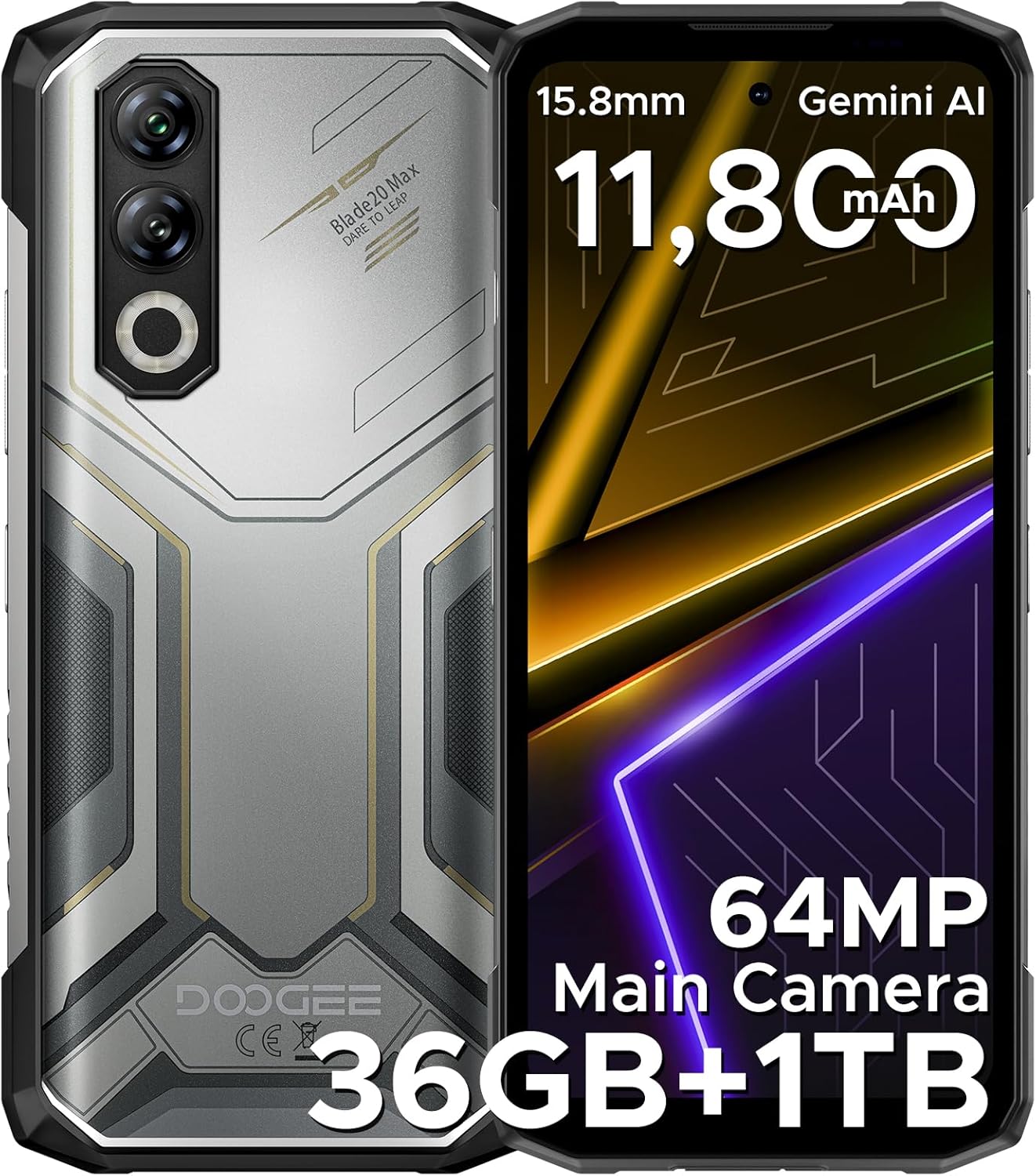
ചിത്ര വിവരണം: എ വിശദമായി view of the DOOGEE Blade 20 Max Rugged Phone, showing both the front display and the textured back panel with its multi-camera setup.

ചിത്ര വിവരണം: An infographic highlighting key features of the DOOGEE Blade 20 Max, including its 1TB ROM, 15.8mm slim body, 11,800mAh Silicon Battery, 64MP Main Camera, and 20MP Night Vision.
4. സജ്ജീകരണം
4.1. സിം, ടിഎഫ് കാർഡ് ഇൻസ്റ്റാളേഷൻ
The DOOGEE Blade 20 Max supports a triple-card slot, allowing for two SIM cards and one TF (microSD) card simultaneously.
- ഉപകരണത്തിന്റെ വശത്ത് സിം കാർഡ് ട്രേ കണ്ടെത്തുക.
- ട്രേ തുറക്കാൻ അതിനടുത്തുള്ള ചെറിയ ദ്വാരത്തിലേക്ക് സിം എജക്റ്റർ ടൂൾ (നൽകിയിട്ടുണ്ടെങ്കിൽ) തിരുകുക.
- Carefully place your Nano-SIM cards and TF card into the designated slots on the tray. Ensure they are correctly oriented.
- Gently push the tray back into the phone until it is flush with the device's side.
4.2. പ്രാരംഭ പവർ ഓൺ
- Press and hold the Power button (usually on the right side) until the DOOGEE logo appears on the screen.
- ഭാഷാ തിരഞ്ഞെടുപ്പ്, വൈ-ഫൈ കണക്ഷൻ, ഗൂഗിൾ അക്കൗണ്ട് സജ്ജീകരണം എന്നിവയുൾപ്പെടെയുള്ള പ്രാരംഭ സജ്ജീകരണം പൂർത്തിയാക്കാൻ ഓൺ-സ്ക്രീൻ നിർദ്ദേശങ്ങൾ പാലിക്കുക.
4.3. നെറ്റ്വർക്ക് കോൺഫിഗറേഷൻ
This device supports various frequency bands. Before purchasing, it is recommended to verify compatibility with your local carrier's network to ensure proper functionality. Refer to the specifications section for detailed frequency band information.
5. പ്രവർത്തന നിർദ്ദേശങ്ങൾ
5.1. ഡിസ്പ്ലേ
The Blade 20 Max features a 6.6-inch HD+ IPS notch-free punch-hole display with a 120Hz refresh rate for smooth visuals. It offers vibrant colors and clear images.

ചിത്ര വിവരണം: An image detailing the 6.6-inch HD+ 120Hz display of the DOOGEE Blade 20 Max, highlighting its Incell screen type, 16.7M screen color, 84% screen-to-body ratio, and 1500:1 screen contrast.
5.2. പ്രകടനവും സംഭരണവും
Powered by the 6nm Mediatek Helio G100 Octa Core processor and running Android 15, the device offers fast and responsive performance. It comes with 12GB of physical RAM, expandable by an additional 24GB of virtual memory, totaling 36GB RAM. Storage includes a massive 1TB ROM, suitable for extensive data and applications.

ചിത്ര വിവരണം: A diagram illustrating the Helio G100 Octa-core chipset, emphasizing its 6nm processing and Mali G57 GPU for efficient performance.

ചിത്ര വിവരണം: An illustration showing the 12GB+1TB massive storage configuration of the DOOGEE Blade 20 Max, detailing 36GB RAM (12GB Basic + 24GB Virtual RAM) and 1TB ROM.
വീഡിയോ വിവരണം: This video highlights the 1TB ROM storage capacity of the DOOGEE Blade 20 Max, demonstrating its ability to store a large volume of data.
5.3. ക്യാമറ സിസ്റ്റം
The device is equipped with a triple-camera system: a 64MP main camera, a 16MP front camera, and a 20MP night vision camera, allowing for clear photos in various lighting conditions.

ചിത്ര വിവരണം: A visual representation of the DOOGEE Blade 20 Max's camera system, highlighting the 64MP main camera, 20MP night vision camera, and 16MP front camera.

ചിത്ര വിവരണം: ഒരു ഇമേജ് പ്രദർശനംasing various multi-mode camera features of the DOOGEE Blade 20 Max, including anti-shake, anti-flicker, multi-frame noise reduction, pro mode, and burst mode.
5.4. ബാറ്ററി മാനേജ്മെന്റ്
The phone is equipped with a large 11800mAh Silicon Anode Battery, providing extended usage times. It supports 33W fast charging and 5W reverse charging, allowing you to charge other devices.
- സ്റ്റാൻഡ്ബൈ സമയം: 19 ദിവസം വരെ
- Video Watching: 29.9 മണിക്കൂർ വരെ
- സംഗീതം പ്ലേ ചെയ്യുന്നു: 186 മണിക്കൂർ വരെ
- വിളിക്കുന്നു: 100 മണിക്കൂർ വരെ

ചിത്ര വിവരണം: An illustration of the DOOGEE Blade 20 Max's 11800mAh Silicon Anode Battery, highlighting its 33W fast charging and 5W reverse charging capabilities, along with estimated usage times.
വീഡിയോ വിവരണം: This video demonstrates the long-lasting 11800mAh battery of the DOOGEE Blade 20 Max Rugged Phone, showcasing its endurance for extended use.
5.5. സുരക്ഷാ സവിശേഷതകൾ
Unlock your device securely using either side fingerprint recognition or facial unlock.

ചിത്ര വിവരണം: An infographic illustrating the security features (Face & Side Fingerprint Unlock) and connectivity options (NFC, GPS, Glonass, Galileo, Beidou, 2 SIM + 1 TF Card Slot) of the DOOGEE Blade 20 Max.
5.6. കണക്റ്റിവിറ്റി
The Blade 20 Max supports Bluetooth, NFC (for Google Pay), Wi-Fi, and multiple navigation systems including GPS, Glonass, Galileo, and Beidou.
5.7. AI സവിശേഷതകൾ
The device includes built-in Gemini AI for enhanced functionality, supporting tasks such as content creation, image analysis, code development, language learning, and smart assistance.

ചിത്ര വിവരണം: A visual representation of the Built-in Gemini AI features on the DOOGEE Blade 20 Max, showing examples of content creation, image analysis, code development, language learning, smart assistant, and Gemini Live.
5.8. Android 15 OS Features
Experience a smooth and intuitive user interface with Android 15, offering features like App Cloning, Dual System Mode, Split Screen, Screen Awareness, Live Caption (English Only), Enhanced Privacy Protection, Glove Mode, and Super Clipboard.

ചിത്ര വിവരണം: ഒരു ഇൻഫോഗ്രാഫിക് ഷോasing various features of the Android 15 operating system on the DOOGEE Blade 20 Max, including App Cloning, Dual System Mode, Split Screen, Screen Awareness, Live Caption, Enhanced Privacy Protection, Glove Mode, and Super Clipboard.
6. ഈട് സവിശേഷതകൾ
The DOOGEE Blade 20 Max is built to withstand harsh environments, featuring:
- IP68 റേറ്റിംഗ്: Water-resistant, capable of being submerged in 1.5m of water for 30 minutes.
- IP69K റേറ്റിംഗ്: Dustproof and resistant to high-pressure, high-temperature water jets.
- MIL-STD-810H സർട്ടിഫിക്കേഷൻ: Military-grade durability, tested for drops from 1.5 meters.

ചിത്ര വിവരണം: An image illustrating the IP68, IP69K, and MIL-STD-810H durability ratings of the DOOGEE Blade 20 Max, showing the phone submerged in water, covered in dust, and with a drop test indication.
7. പരിപാലനം
To ensure the longevity and optimal performance of your DOOGEE Blade 20 Max, follow these maintenance guidelines:
- വൃത്തിയാക്കൽ: ഫോൺ പതിവായി മൃദുവായ, ഡി-ടൈപ്പർ ഉപയോഗിച്ച് തുടയ്ക്കുക.amp തുണി. കഠിനമായ രാസവസ്തുക്കളോ ഉരച്ചിലുകളോ ഉള്ള വസ്തുക്കൾ ഒഴിവാക്കുക.
- സോഫ്റ്റ്വെയർ അപ്ഡേറ്റുകൾ: Keep your device's software updated to the latest version to benefit from security patches and performance improvements.
- ബാറ്ററി കെയർ: Avoid extreme temperatures. Do not fully discharge the battery frequently. Use the original charger and cable for optimal charging.
- തുറമുഖ സംരക്ഷണം: Ensure all port covers (for USB-C, SIM tray) are securely closed to maintain water and dust resistance.
8. പ്രശ്നപരിഹാരം
If you encounter issues with your device, refer to the following common troubleshooting steps:
- ഉപകരണം ഓണാക്കുന്നില്ല: Ensure the battery is charged. Connect the phone to the charger for at least 15 minutes, then try powering it on again.
- നെറ്റ്വർക്ക് പ്രശ്നങ്ങൾ: Check if your SIM card is properly inserted. Verify that your carrier's frequency bands are supported by the device. Restart the phone.
- മന്ദഗതിയിലുള്ള പ്രകടനം: Close unnecessary background applications. Clear cache regularly. Consider performing a factory reset if issues persist (back up your data first).
- ടച്ച്സ്ക്രീൻ പ്രതികരിക്കുന്നില്ല: ഉപകരണം പുനരാരംഭിക്കുക. പ്രശ്നം നിലനിൽക്കുകയാണെങ്കിൽ, ഉപഭോക്തൃ പിന്തുണയുമായി ബന്ധപ്പെടുക.
9 സ്പെസിഫിക്കേഷനുകൾ
| ഫീച്ചർ | വിശദാംശങ്ങൾ |
|---|---|
| മോഡലിൻ്റെ പേര് | Blade 20 Max |
| ബ്രാൻഡ് | ഡോഗി |
| ഓപ്പറേറ്റിംഗ് സിസ്റ്റം | ആൻഡ്രോയിഡ് 15 |
| സിപിയു മോഡൽ | MediaTek Helio G100 Octa Core |
| സിപിയു വേഗത | 2.2 GHz |
| ഇൻസ്റ്റാൾ ചെയ്ത RAM മെമ്മറി വലുപ്പം | 36 ജിബി (12 ജിബി ഫിസിക്കൽ + 24 ജിബി വെർച്വൽ) |
| മെമ്മറി സ്റ്റോറേജ് കപ്പാസിറ്റി | 1 ടി.ബി |
| സ്ക്രീൻ വലിപ്പം | 6.6 ഇഞ്ച് |
| റെസലൂഷൻ | 720 x 1280 |
| പുതുക്കിയ നിരക്ക് | 120 Hz |
| ബാറ്ററി ശേഷി | 11800 മില്ലിamp മണിക്കൂറുകൾ |
| കണക്റ്റിവിറ്റി ടെക്നോളജികൾ | ബ്ലൂടൂത്ത്, NFC, വൈ-ഫൈ |
| ജിപിഎസ് | True (GPS, Glonass, Galileo, Beidou) |
| പ്രത്യേക സവിശേഷതകൾ | Expandable Memory, Fast Charging Support, Rugged Body, Face ID, Fingerprint Recognition, Night Vision Camera |
| ഇനത്തിൻ്റെ ഭാരം | 1 പൗണ്ട് |
| പാക്കേജ് അളവുകൾ | 8 x 4 x 2 ഇഞ്ച് |
| ഈട് റേറ്റിംഗുകൾ | IP68, IP69K, MIL-STD-810H |
| പിന്തുണയ്ക്കുന്ന ഫ്രീക്വൻസി ബാൻഡുകൾ | GSM: B2/3/5/8; WCDMA: B1/2/4/5/8; TDD: B34/38/39/40/41; FDD: B1/2/3/4/5/7/8/12/17/18/19/20/25/26/28AB/66 |
10. വാറൻ്റിയും പിന്തുണയും
Your DOOGEE Blade 20 Max Rugged Phone comes with a warranty. Please refer to the included Warranty Card in your product packaging for detailed terms and conditions, including warranty period and coverage.
For technical support, service, or further inquiries, please visit the official DOOGEE website or contact their customer service channels. Keep your purchase receipt and warranty card handy for any support requests.