
OKP Life L1
OKP Life L1 Lidar Robot Vacuum Cleaner User Manual
മോഡൽ: L1
1. ആമുഖം
Thank you for choosing the OKP Life L1 Lidar Robot Vacuum Cleaner. This manual provides essential information for the safe operation, maintenance, and troubleshooting of your device. Please read it thoroughly before use and retain it for future reference.
2. പ്രധാന സുരക്ഷാ നിർദ്ദേശങ്ങൾ
പരിക്കിന്റെയോ കേടുപാടുകളുടെയോ സാധ്യത കുറയ്ക്കുന്നതിന്, ഈ സുരക്ഷാ നിർദ്ദേശങ്ങൾ ശ്രദ്ധാപൂർവ്വം വായിക്കുകയും നിങ്ങളുടെ റോബോട്ട് സജ്ജീകരിക്കുമ്പോഴും ഉപയോഗിക്കുമ്പോഴും പരിപാലിക്കുമ്പോഴും അവ കൈവശം വയ്ക്കുകയും ചെയ്യുക.
- 8 വയസ്സും അതിനുമുകളിലും പ്രായമുള്ള കുട്ടികൾക്കും ശാരീരികമോ ഇന്ദ്രിയപരമോ മാനസികമോ ആയ കഴിവുകൾ കുറഞ്ഞവർക്കും അനുഭവപരിചയവും അറിവും ഇല്ലാത്തവർക്കും സുരക്ഷിതമായ രീതിയിൽ ഉപകരണം ഉപയോഗിക്കുന്നതുമായി ബന്ധപ്പെട്ട മേൽനോട്ടമോ നിർദ്ദേശമോ നൽകുകയും അപകടസാധ്യതകൾ മനസ്സിലാക്കുകയും ചെയ്തിട്ടുണ്ടെങ്കിൽ ഈ ഉപകരണം ഉപയോഗിക്കാൻ കഴിയും. .
- കുട്ടികൾ ഉപകരണം ഉപയോഗിച്ച് കളിക്കുന്നില്ലെന്ന് ഉറപ്പാക്കാൻ മേൽനോട്ടം വഹിക്കണം.
- മേൽനോട്ടമില്ലാതെ കുട്ടികൾ വൃത്തിയാക്കലും ഉപയോക്തൃ പരിപാലനവും നടത്തരുത്.
- നിർമ്മാതാവ് നൽകുന്ന യഥാർത്ഥ പവർ അഡാപ്റ്റർ മാത്രം ഉപയോഗിക്കുക.
- തുറന്ന തീജ്വാലകളോ ദുർബലമായ വസ്തുക്കളോ ഉള്ള പരിതസ്ഥിതികളിൽ റോബോട്ട് ഉപയോഗിക്കരുത്.
- Ensure the robot is used on dry surfaces only.
- മുടി, അയഞ്ഞ വസ്ത്രങ്ങൾ, വിരലുകൾ, ശരീരത്തിൻ്റെ എല്ലാ ഭാഗങ്ങളും തുറസ്സുകളിൽ നിന്നും ചലിക്കുന്ന ഭാഗങ്ങളിൽ നിന്നും അകറ്റി നിർത്തുക.
3. പാക്കേജ് ഉള്ളടക്കം
പാക്കേജിൽ എല്ലാ ഘടകങ്ങളും ഉണ്ടെന്ന് ഉറപ്പാക്കുക:
- OKP Life L1 Robot Vacuum Cleaner
- ചാർജിംഗ് ഡോക്ക്
- പവർ അഡാപ്റ്റർ
- സൈഡ് ബ്രഷുകൾ (2 ജോഡി)
- HEPA Filter (1 extra)
- ക്ലീനിംഗ് ടൂൾ
- ഉപയോക്തൃ മാനുവൽ
4. ഉൽപ്പന്നം കഴിഞ്ഞുview
Familiarize yourself with the components of your OKP Life L1 robot vacuum.

ചിത്രം 4.1: മുകളിൽ view of the OKP Life L1 Lidar Robot Vacuum Cleaner alongside its mobile application interface. The robot is white with a dark grey Lidar sensor on top and a power button. The app shows cleaning status and control options.
റോബോട്ട് ഘടകങ്ങൾ:
- Lidar Sensor: കൃത്യമായ നാവിഗേഷനും മാപ്പിംഗിനും.
- പവർ ബട്ടൺ: To start/pause cleaning or power on/off.
- ഡസ്റ്റ്ബിൻ: Collects debris.
- സൈഡ് ബ്രഷുകൾ: പ്രധാന കുറ്റിക്കാടുകളുടെ പാതയിലേക്ക് അവശിഷ്ടങ്ങൾ തൂത്തുവാരുക.
- Main Brush Roll: Agitates and lifts debris from floors.
- ചാർജിംഗ് കോൺടാക്റ്റുകൾ: For automatic recharging at the dock.
- ക്ലിഫ് സെൻസറുകൾ: റോബോട്ട് പടികൾ താഴേക്ക് വീഴുന്നത് തടയുക.
- ബമ്പർ: തടസ്സങ്ങൾ കണ്ടെത്തുന്നു.
5. സജ്ജീകരണവും പ്രാരംഭ ഉപയോഗവും
5.1 Preparing the Robot
- റോബോട്ടിൽ നിന്നും ചാർജിംഗ് ഡോക്കിൽ നിന്നും എല്ലാ സംരക്ഷണ ഫിലിമുകളും സ്റ്റിക്കറുകളും നീക്കം ചെയ്യുക.
- സൈഡ് ബ്രഷുകൾ ക്ലിക്ക് ചെയ്യുന്നതുവരെ പോസ്റ്റുകളിൽ അമർത്തിപ്പിടിച്ചുകൊണ്ട് അവ ഇൻസ്റ്റാൾ ചെയ്യുക.
5.2 Placing the Charging Dock
Place the charging dock against a wall in an open, uncluttered area. Ensure there is at least 0.5 meters (1.6 feet) of clear space on both sides and 1.5 meters (4.9 feet) in front of the dock. Plug in the power adapter.
5.3 പ്രാരംഭ ചാർജ്
Place the robot on the charging dock. The indicator light will show charging status. Fully charge the robot before its first use (approximately 5-6 hours).
5.4 Connecting to the OKP Life App
The OKP Life L1 supports remote control via the OKP Life App. This allows for scheduling, mode customization, and real-time monitoring.
- Download the "OKP Life" app from your mobile device's app store.
- ഒരു അക്കൗണ്ട് രജിസ്റ്റർ ചെയ്ത് ലോഗിൻ ചെയ്യുക.
- Follow the in-app instructions to add your L1 robot vacuum. Ensure your Wi-Fi network is 2.4GHz.
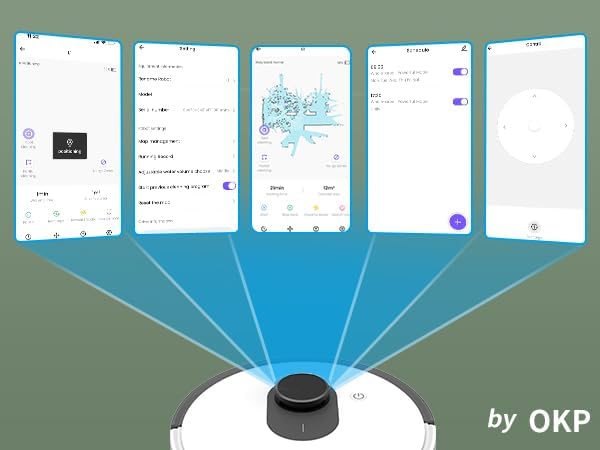
ചിത്രം 5.1: Various screenshots of the OKP Life mobile application, demonstrating features like device connection, settings, mapping, and remote control options.
5.5 വോയ്സ് കൺട്രോൾ ഇന്റഗ്രേഷൻ
The L1 is compatible with Amazon Alexa and Google Assistant for hands-free operation.
- Ensure your robot is connected to the OKP Life App.
- Alexa അല്ലെങ്കിൽ Google Home ആപ്പ് തുറക്കുക.
- ഇതിനായി തിരയുക the "OKP Life" skill/service and enable it.
- Link your OKP Life account.
- You can now use voice commands such as "Alexa, turn on L1" or "Hey Google, start cleaning with L1."

ചിത്രം 5.2: The OKP Life L1 robot vacuum on a rug, with an Amazon Echo Dot speaker and a smartphone displaying the control app. This illustrates the voice and app control capabilities.
6. Operating Your Robot Vacuum
6.1 ക്ലീനിംഗ് മോഡുകളും നാവിഗേഷനും
The L1 utilizes advanced LDS laser radar and SLAM navigation to create accurate real-time maps of your home, optimizing cleaning routes and ensuring comprehensive coverage.

ചിത്രം 6.1: The OKP Life L1 robot vacuum navigating a living room, with blue lines illustrating its precision LiDAR mapping and navigation path.
The robot offers various cleaning modes accessible via the app:
- ഓട്ടോ ക്ലീൻ: റോബോട്ട് ബുദ്ധിപരമായി നിങ്ങളുടെ വീട് മുഴുവൻ വൃത്തിയാക്കുന്നു.
- സ്പോട്ട് ക്ലീൻ: ഏകാഗ്രമായ പരിശ്രമത്തിലൂടെ ഒരു പ്രത്യേക പ്രദേശം വൃത്തിയാക്കുന്നു.
- സോൺ ക്ലീൻ: Select specific rooms or areas on the map for cleaning.
- ഷെഡ്യൂൾ ചെയ്ത വൃത്തിയാക്കൽ: റോബോട്ടിന് യാന്ത്രികമായി വൃത്തിയാക്കാൻ പ്രത്യേക സമയം സജ്ജമാക്കുക.

ചിത്രം 6.2: The OKP Life L1 robot vacuum next to a smartphone displaying its app, which shows a floor plan map where a user can select a specific zone for vacuuming using the LiDAR sensor data.

ചിത്രം 6.3: The OKP Life L1 robot vacuum on a rug, with a smartphone displaying the app's features including No-Go Zones, Real-time Mapping, Recharge Resume, Partial Cleaning, and Spot Cleaning.
6.2 Suction Power and Carpet Boost
The L1 features a 4000Pa suction motor for effective cleaning. It automatically increases suction power when detecting carpets for deeper cleaning.

ചിത്രം 6.4: The OKP Life L1 robot vacuum moving from a hard floor to a carpet, illustrating its ability to boost suction power for effective carpet cleaning.
6.3 No-Go Zones and Invisible Walls
Use the OKP Life App to define "No-Go Zones" or "Invisible Walls" to prevent the robot from entering specific areas or protecting fragile items.

ചിത്രം 6.5: The OKP Life L1 robot vacuum demonstrating its ability to respect "No-Go Zones" (preventing entry into a pet area) and "Invisible Walls" (blocking access to a specific room entrance).
6.4 തടസ്സം ഒഴിവാക്കൽ
Freemove 3.0 obstacle avoidance technology ensures the robot navigates smoothly around furniture, stairs, walls, and pets, minimizing collisions and preventing it from getting stuck.
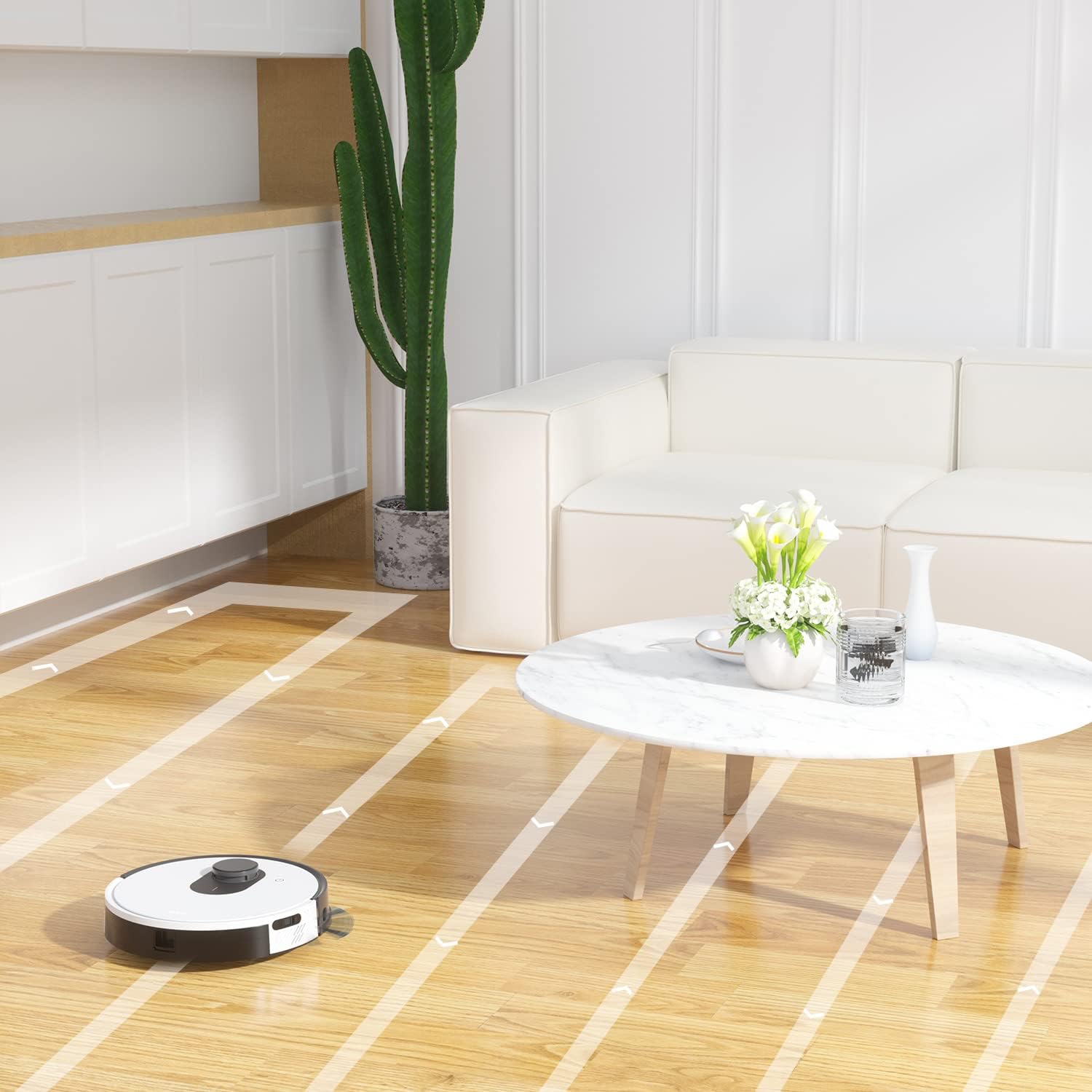
ചിത്രം 6.6: The OKP Life L1 robot vacuum cleaning a room, illustrating its efficient path planning and obstacle avoidance capabilities.
6.5 ബാറ്ററി മാനേജ്മെൻ്റ്
The robot features a 4000mAh battery, providing up to 200 minutes of continuous cleaning. When the battery is low or cleaning is complete, the robot automatically returns to its charging dock.
7. പരിപാലനം
Regular maintenance ensures optimal performance of your robot vacuum.
7.1 ഡസ്റ്റ്ബിൻ ശൂന്യമാക്കൽ
Empty the dustbin after each cleaning cycle. Press the dustbin release button, remove the dustbin, and discard collected debris. Clean the filter inside the dustbin.
7.2 മെയിൻ ബ്രഷ് റോൾ വൃത്തിയാക്കൽ
The self-cleaning brush roll reduces hair tangles. However, periodically remove the main brush roll and use the provided cleaning tool to remove any tangled hair or debris.
7.3 ക്ലീനിംഗ് സൈഡ് ബ്രഷുകൾ
Check side brushes regularly for wear or damage. Remove any tangled hair or debris. Replace worn brushes as needed.
7.4 സെൻസറുകളും ചാർജിംഗ് കോൺടാക്റ്റുകളും വൃത്തിയാക്കൽ
Wipe the cliff sensors, bumper sensor, and charging contacts on both the robot and the charging dock with a clean, dry cloth to ensure proper function.
7.5 ഫിൽട്ടർ മാറ്റിസ്ഥാപിക്കൽ
Replace the HEPA filter every 3-6 months, or more frequently depending on usage, to maintain optimal suction performance.
8. പ്രശ്നപരിഹാരം
പൊതുവായ പ്രശ്നങ്ങളും അവയുടെ പരിഹാരങ്ങളും അറിയാൻ ഈ വിഭാഗം കാണുക.
| പ്രശ്നം | സാധ്യമായ കാരണം | പരിഹാരം |
|---|---|---|
| റോബോട്ട് ഓണാക്കുന്നില്ല. | ബാറ്ററി കുറവാണ്; പവർ സ്വിച്ച് ഓഫ്. | Charge the robot; Ensure power switch is on. |
| റോബോട്ടിന് ചാർജിംഗ് ഡോക്കിലേക്ക് മടങ്ങാൻ കഴിയില്ല. | Charging dock obstructed; Robot too far from dock. | Clear obstacles around the dock; Manually place robot near dock. |
| സക്ഷൻ പവർ ദുർബലമാണ്. | Dustbin full; Filter clogged; Main brush tangled. | മാലിന്യക്കൂമ്പാരം ശൂന്യമാക്കുക; ഫിൽട്ടർ വൃത്തിയാക്കുക/മാറ്റിസ്ഥാപിക്കുക; പ്രധാന ബ്രഷ് വൃത്തിയാക്കുക. |
| റോബോട്ട് ഇടയ്ക്കിടെ കുടുങ്ങിപ്പോകാറുണ്ട്. | Loose cables/rugs; Small obstacles. | Clear floor of obstructions; Use No-Go Zones. |
| ആപ്പ് കണക്ഷൻ പ്രശ്നങ്ങൾ. | Incorrect Wi-Fi (not 2.4GHz); Router issues. | Ensure 2.4GHz Wi-Fi; Restart router and robot; Re-pair in app. |
9 സ്പെസിഫിക്കേഷനുകൾ
| ഫീച്ചർ | വിശദാംശങ്ങൾ |
|---|---|
| ബ്രാൻഡ് | OKP ലൈഫ് |
| മോഡലിൻ്റെ പേര് | L1 Lidar Robot Vacuum |
| പ്രത്യേക ഫീച്ചർ | HEPA Filtration, Vacuums |
| നിറം | ക്ലൗഡ് വൈറ്റ് |
| ഉൽപ്പന്ന അളവുകൾ | 12"L x 12"W x 3.5"H |
| ഉൾപ്പെടുത്തിയ ഘടകങ്ങൾ | ബാറ്ററി |
| ബാറ്ററി ലൈഫ് | Up to 200 minutes (4000mAh battery) |
| Capacity (Dustbin) | 500 മില്ലി ലിറ്റർ |
| ബാറ്ററികൾ ആവശ്യമാണ് | 1 ലിഥിയം അയോൺ ബാറ്ററി (ഉൾപ്പെടുത്തിയിരിക്കുന്നു) |
| അനുയോജ്യമായ ഉപകരണങ്ങൾ | ആമസോൺ എക്കോ, ഗൂഗിൾ ഹോം, സ്മാർട്ട്ഫോണുകൾ |
| ഇനത്തിൻ്റെ ഭാരം | 7 പൗണ്ട് |
| നിർമ്മാതാവ് | OKP ലൈഫ് |
| ഇനം മോഡൽ നമ്പർ | L1 |
10. വാറൻ്റിയും പിന്തുണയും
For warranty information and technical support, please refer to the official OKP Life webസൈറ്റിൽ ബന്ധപ്പെടുക അല്ലെങ്കിൽ അവരുടെ ഉപഭോക്തൃ സേവനവുമായി ബന്ധപ്പെടുക. വാങ്ങിയതിന്റെ തെളിവായി നിങ്ങളുടെ വാങ്ങൽ രസീത് സൂക്ഷിക്കുക.
ഓൺലൈൻ പിന്തുണ: Visit the official OKP Life webപതിവുചോദ്യങ്ങൾ, ട്രബിൾഷൂട്ടിംഗ് ഗൈഡുകൾ, ബന്ധപ്പെടാനുള്ള വിവരങ്ങൾ എന്നിവയ്ക്കുള്ള സൈറ്റ്.
കസ്റ്റമർ സർവീസ്: Refer to your product packaging or the OKP Life webനിർദ്ദിഷ്ട ഉപഭോക്തൃ സേവന കോൺടാക്റ്റ് വിശദാംശങ്ങൾക്കായി സൈറ്റ്.
Ask a question about this manual
Ask about setup, troubleshooting, compatibility, parts, safety, or missing instructions. Manuals+ will review the question and use this page’s manual context to help answer it.