
1. ആമുഖം
This user manual provides detailed instructions for the operation and maintenance of your Phinistec F6 MP3 Player. Please read this manual thoroughly before using the device to ensure proper functionality and to maximize your user experience. Keep this manual for future reference.
2. ഉൽപ്പന്നം കഴിഞ്ഞുview
2.1 പ്രധാന സവിശേഷതകൾ
- ബ്ലൂടൂത്ത് 5.3 സാങ്കേതികവിദ്യ: Enhanced compatibility, stable signal, and reduced power consumption for wireless audio. Note: Cannot connect to phones or tablets.
- Integrated HD Speaker: Provides loud, clear stereo sound for an immersive audio experience without headphones.
- എഫ്എം റേഡിയോ പ്രവർത്തനം: Supports automatic station search, saving favorite stations, and radio recording.
- വിപുലീകരിച്ച ബാറ്ററി ലൈഫ്: Up to 50 hours of continuous music playback with a 500mAh battery.
- Lossless HiFi Sound: Premium chips deliver high-fidelity audio quality.
- Ample സംഭരണം: 64GB internal memory, expandable up to 256GB via Micro SD card (FAT32 format).
- Wide Audio Format Support: Compatible with APE, FLAC, MP3, OGG, AAC, ACELP, WMA, WAV.
- 2.4 ഇഞ്ച് ടച്ച്സ്ക്രീൻ: Intuitive interface for easy navigation.
- വോയ്സ് റെക്കോർഡർ: Built-in function for audio recording.
2.2 പാക്കേജ് ഉള്ളടക്കം
പാക്കേജിൽ എല്ലാ ഇനങ്ങളും ഉണ്ടെന്ന് ഉറപ്പാക്കുക:
- Phinistec F6 MP3 Player
- ഇൻസ്ട്രക്ഷൻ മാനുവൽ
- യുഎസ്ബി ഡാറ്റ കേബിൾ
- വയർഡ് ഇയർഫോണുകൾ

Image: Contents of the Phinistec F6 MP3 Player package, showing the device, user manual, USB cable, and wired earphones.
2.3 ഉപകരണ ലേayട്ട്
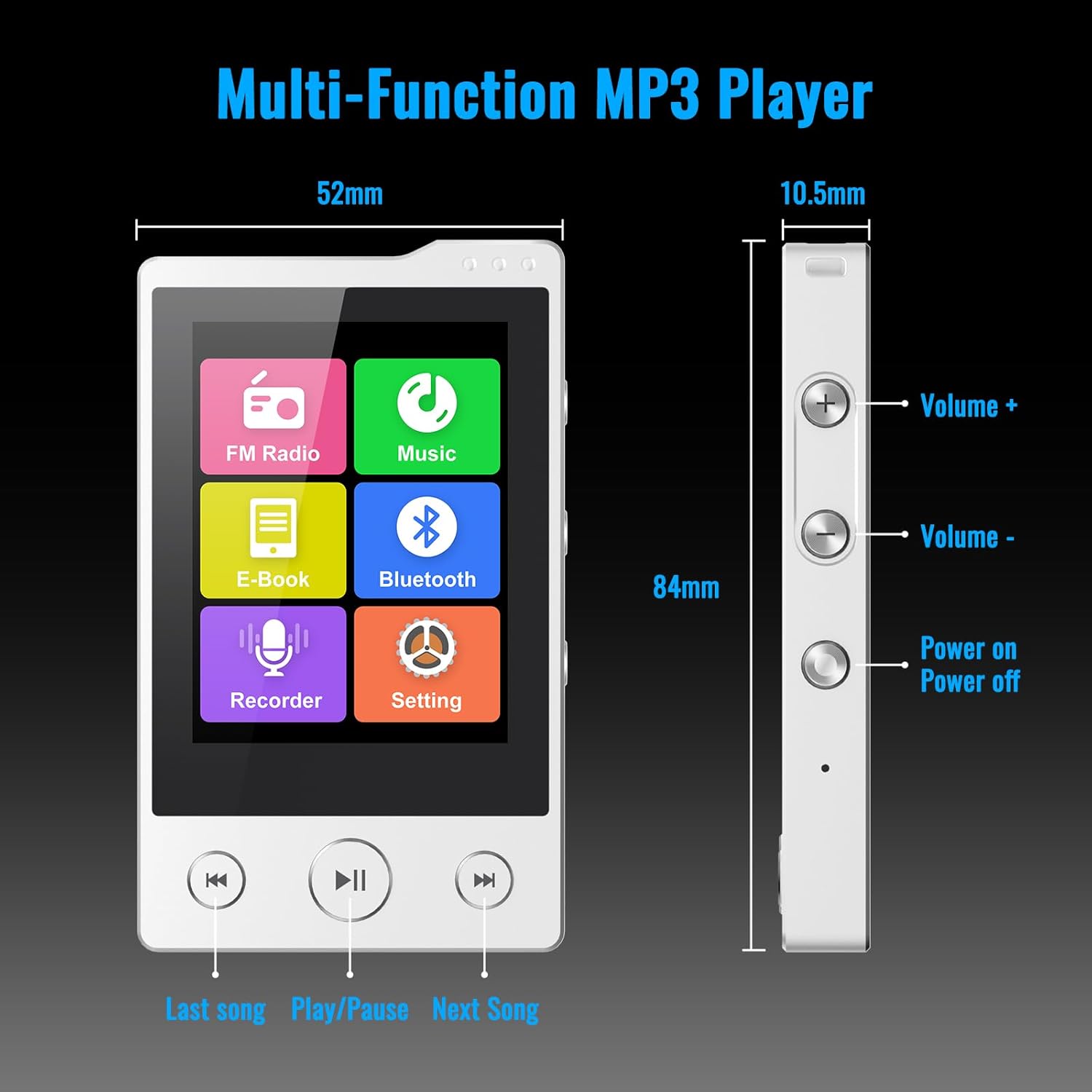
ചിത്രം: മുൻവശവും വശവും view of the Phinistec F6 MP3 Player with labels for Volume +, Volume -, Power On/Off buttons, and navigation buttons (Last song, Play/Pause, Next Song). Dimensions are also indicated.
- ഫ്രണ്ട് പാനൽ: 2.4-inch touchscreen display, 'Last Song', 'Play/Pause', and 'Next Song' navigation buttons.
- വലത് വശം: Volume Up (+), Volume Down (-), and Power On/Off buttons.
- താഴെ: 3.5mm audio jack, USB-C port for charging and data transfer, Micro SD card slot.
3. സജ്ജീകരണം
3.1 ഉപകരണം ചാർജ് ചെയ്യുന്നു
- Connect the provided USB-C cable to the player's USB-C port.
- USB കേബിളിന്റെ മറ്റേ അറ്റം ഒരു USB പവർ അഡാപ്റ്ററുമായി (ഉൾപ്പെടുത്തിയിട്ടില്ല) അല്ലെങ്കിൽ ഒരു കമ്പ്യൂട്ടറിന്റെ USB പോർട്ടുമായി ബന്ധിപ്പിക്കുക.
- The battery indicator on the screen will show charging status. A full charge provides approximately 50 hours of music playback.

Image: The Phinistec F6 MP3 Player connected to a USB-C charging cable, illustrating the charging process.
3.2 ഒരു മൈക്രോ എസ്ഡി കാർഡ് ചേർക്കുന്നു
The device supports Micro SD cards up to 256GB (FAT32 format) for expanded storage.
- Locate the Micro SD card slot on the bottom of the player.
- മൈക്രോ എസ്ഡി കാർഡ് സ്ലോട്ടിൽ ക്ലിക്കുചെയ്യുന്നത് വരെ സൌമ്യമായി ചേർക്കുക.
- നീക്കം ചെയ്യാൻ, കാർഡ് പുറത്തേക്ക് വരുന്നത് വരെ അകത്തേക്ക് തള്ളുക.

Image: A Micro SD card being inserted into the Phinistec F6 MP3 Player, highlighting the expandable storage feature.
3.3 കൈമാറ്റം Files
- Connect the player to your computer using the USB-C cable.
- The player will appear as a removable disk on your computer.
- Drag and drop your desired music, video, or e-book files into the appropriate folders on the player or Micro SD card.
- Safely eject the device from your computer before disconnecting the cable.
4. പ്രവർത്തന നിർദ്ദേശങ്ങൾ
4.1 പവർ ഓൺ/ഓഫ്
- പവർ ഓണാക്കാൻ: Press and hold the Power button on the right side until the screen illuminates.
- പവർ ഓഫ് ചെയ്യാൻ: Press and hold the Power button until the power-off option appears on the screen, then confirm.
4.2 അടിസ്ഥാന നാവിഗേഷൻ
- ടച്ച് സ്ക്രീൻ: ആപ്ലിക്കേഷനുകൾ തുറക്കാൻ ഐക്കണുകളിൽ ടാപ്പ് ചെയ്യുക, മെനുകൾ നാവിഗേറ്റ് ചെയ്യാൻ സ്വൈപ്പ് ചെയ്യുക.
- വോളിയം ബട്ടണുകൾ: Use the '+' and '-' buttons on the right side to adjust audio volume.
- നാവിഗേഷൻ ബട്ടണുകൾ: Use the physical 'Last Song', 'Play/Pause', and 'Next Song' buttons below the screen for media control.
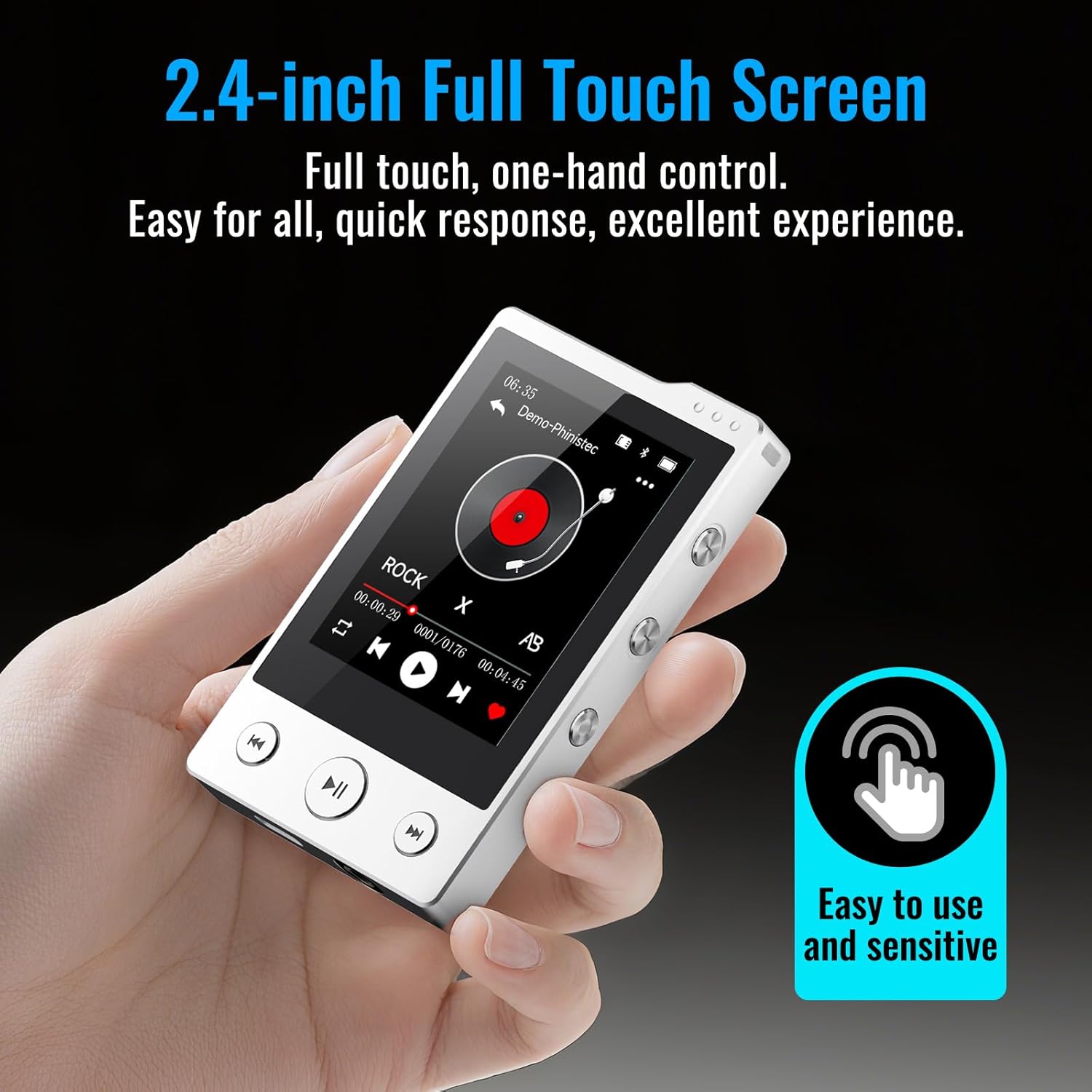
Image: A hand interacting with the 2.4-inch full touchscreen of the Phinistec F6 MP3 Player, illustrating its ease of use.
4.3 മ്യൂസിക് പ്ലേബാക്ക്
- From the main menu, tap the 'Music' icon.
- Browse your music library by artist, album, genre, or folder.
- പ്ലേബാക്ക് ആരംഭിക്കാൻ ഒരു പാട്ടിൽ ടാപ്പ് ചെയ്യുക.
- Use the on-screen controls or physical buttons for play/pause, skip tracks, and volume adjustment.
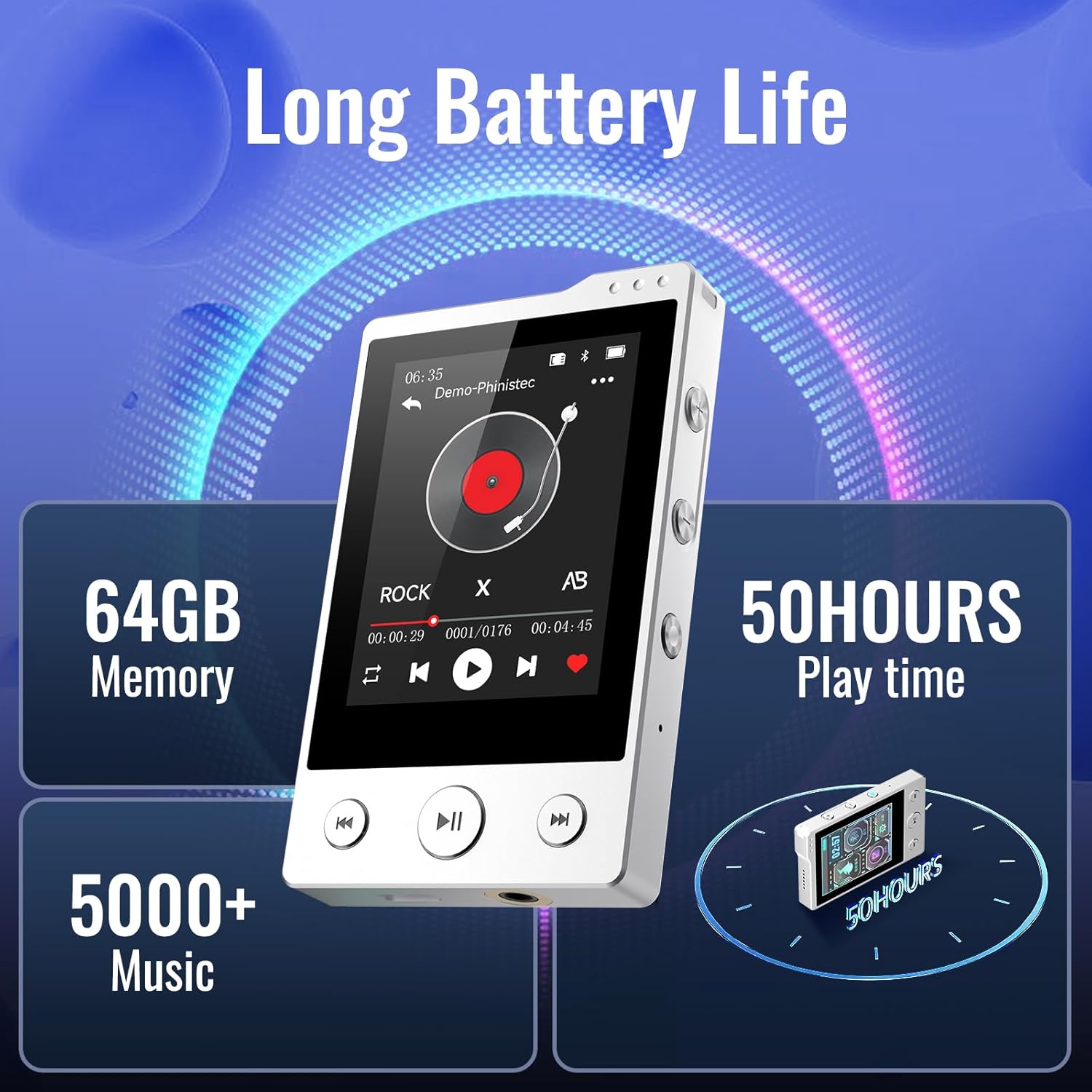
Image: The Phinistec F6 MP3 Player screen showing music playback, along with indicators for 64GB memory and 50 hours of play time.
4.4 ബ്ലൂടൂത്ത് കണക്റ്റിവിറ്റി
The F6 MP3 player features Bluetooth 5.3 for connecting to Bluetooth headphones or speakers.
- From the main menu, tap the 'Bluetooth' icon or navigate to 'Settings' and select 'Bluetooth'.
- Turn on Bluetooth. The player will scan for available devices.
- നിങ്ങളുടെ ബ്ലൂടൂത്ത് ഹെഡ്ഫോണുകളോ സ്പീക്കറോ പെയറിംഗ് മോഡിലാണെന്ന് ഉറപ്പാക്കുക.
- ജോടിയാക്കാൻ ലിസ്റ്റിൽ നിന്ന് നിങ്ങളുടെ ഉപകരണം തിരഞ്ഞെടുക്കുക.
Note: The Phinistec F6 MP3 Player cannot connect to mobile phones or tablets via Bluetooth.

Image: The Phinistec F6 MP3 Player interface displaying icons for FM Radio, Music, E-Book, Bluetooth, Recorder, and Settings, with illustrations of compatible Bluetooth devices like headsets, speakers, and car audio systems.
4.5 എഫ്എം റേഡിയോ
To use the FM radio, wired earphones must be connected as they act as the antenna.
- Connect wired earphones to the 3.5mm audio jack.
- From the main menu, tap the 'FM Radio' icon.
- Select 'Auto Search' to find available stations or manually tune.
- You can save favorite stations and record radio broadcasts.
4.6 വോയ്സ് റെക്കോർഡർ
- From the main menu, tap the 'Recorder' icon.
- റെക്കോർഡിംഗ് ആരംഭിക്കാൻ റെക്കോർഡ് ബട്ടൺ ടാപ്പ് ചെയ്യുക.
- Tap again to pause/resume, and tap the stop button to save the recording.
4.7 ഇ-ബുക്ക് റീഡർ
The player supports reading e-books in TXT format.
- Transfer TXT format e-book fileകളിക്കാരന് എസ്.
- From the main menu, tap the 'E-book' icon.
- Select the desired e-book to open and read.
4.8 വീഡിയോ പ്ലേബാക്ക്
The player supports video playback. Some video formats may require conversion using compatible software on a computer before transfer.
- Transfer compatible video fileകളിക്കാരന് എസ്.
- From the main menu, tap the 'Video' icon.
- ആവശ്യമുള്ള വീഡിയോ തിരഞ്ഞെടുക്കുക file കളിക്കാൻ.
4.9 ക്രമീകരണങ്ങൾ
Access the 'Settings' menu to customize various aspects of the player, including:
- Display brightness and timeout
- തീയതിയും സമയവും
- ഭാഷ
- ഇക്വലൈസർ ക്രമീകരണങ്ങൾ
- System information and factory reset options
5. പരിപാലനം
- വൃത്തിയാക്കൽ: ഉപകരണം വൃത്തിയാക്കാൻ മൃദുവായതും ഉണങ്ങിയതുമായ തുണി ഉപയോഗിക്കുക. ദ്രാവക ക്ലീനറുകളോ ഉരച്ചിലുകളുള്ള വസ്തുക്കളോ ഒഴിവാക്കുക.
- സംഭരണം: നേരിട്ടുള്ള സൂര്യപ്രകാശവും കടുത്ത താപനിലയും ഏൽക്കാത്ത തണുത്തതും വരണ്ടതുമായ സ്ഥലത്ത് പ്ലെയർ സൂക്ഷിക്കുക.
- ബാറ്ററി കെയർ: ബാറ്ററി ലൈഫ് വർദ്ധിപ്പിക്കാൻ, ബാറ്ററി ഇടയ്ക്കിടെ പൂർണ്ണമായും ഡിസ്ചാർജ് ചെയ്യുന്നത് ഒഴിവാക്കുക. ദീർഘനേരം ഉപയോഗത്തിലില്ലെങ്കിൽ പോലും ഉപകരണം പതിവായി ചാർജ് ചെയ്യുക.
- ആഘാതം ഒഴിവാക്കുക: Protect the device from drops and impacts to prevent damage to the screen and internal components.
6. പ്രശ്നപരിഹാരം
| പ്രശ്നം | സാധ്യമായ പരിഹാരം |
|---|---|
| ഉപകരണം പവർ ഓണാക്കുന്നില്ല. | Ensure the battery is charged. Connect to a power source and try again. If unresponsive, perform a hard reset (refer to device layout for reset pinhole if available, or hold power button for 10-15 seconds). |
| ബ്ലൂടൂത്ത് ഉപകരണത്തിലേക്ക് കണക്റ്റുചെയ്യാൻ കഴിയുന്നില്ല. | Ensure Bluetooth is enabled on both the player and the target device. Place devices close to each other. Ensure the target device is in pairing mode. Remember, the player cannot connect to phones or tablets. |
| എഫ്എം റേഡിയോ പ്രവർത്തിക്കുന്നില്ല. | Ensure wired earphones are properly connected to the 3.5mm audio jack, as they function as the antenna. |
| Files not appearing on the player. | അത് സ്ഥിരീകരിക്കുക files were transferred to the correct folders. Check if the Micro SD card is properly inserted and formatted (FAT32). Ensure file formats are supported by the player. |
| ടച്ച്സ്ക്രീൻ പ്രതികരിക്കുന്നില്ല. | Restart the device. If the issue persists, ensure the screen is clean and free of moisture. |
7 സ്പെസിഫിക്കേഷനുകൾ
| ഫീച്ചർ | വിശദാംശങ്ങൾ |
|---|---|
| മോഡലിൻ്റെ പേര് | F6 |
| ബ്രാൻഡ് | Phinistec |
| മെമ്മറി സ്റ്റോറേജ് കപ്പാസിറ്റി | 64 GB (Expandable up to 256GB via Micro SD) |
| കണക്റ്റിവിറ്റി ടെക്നോളജി | Bluetooth 5.3, Aux (3.5mm), USB-C |
| പ്രത്യേക സവിശേഷതകൾ | Built-In Speaker, FM Radio, Touch Screen, Voice Recorder |
| സ്ക്രീൻ വലിപ്പം | 2.4 ഇഞ്ച് |
| അനുയോജ്യമായ ഉപകരണങ്ങൾ | Headphones, Personal Computer, Bluetooth Speakers |
| മീഡിയ തരം | മൈക്രോ എസ്.ഡി |
| പിന്തുണയ്ക്കുന്ന ഓഡിയോ ഫോർമാറ്റുകൾ | APE, FLAC, MP3, OGG, AAC, ACELP, WMA, WAV |
| ബാറ്ററി | 500mAh (Up to 50 hours music playback) |
| ഇനത്തിൻ്റെ ഭാരം | 6.4 ഔൺസ് |
| അളവുകൾ | 4.41 x 2.83 x 1.46 ഇഞ്ച് |
8. വാറൻ്റിയും പിന്തുണയും
For warranty information or technical support, please refer to the contact details provided with your purchase documentation or visit the official Phinistec webസൈറ്റ്. വാറന്റി ക്ലെയിമുകൾക്കായി നിങ്ങളുടെ വാങ്ങലിന്റെ തെളിവ് സൂക്ഷിക്കുക.