
1. ആമുഖം
This manual provides comprehensive instructions for the safe and efficient operation of your TechniSat Viola under-cabinet kitchen radio. Please read this manual thoroughly before using the device and retain it for future reference. This device combines modern design with practical features for your kitchen or bedroom.
2 സുരക്ഷാ വിവരങ്ങൾ
തീ, വൈദ്യുതാഘാതം, പരിക്കുകൾ എന്നിവ കുറയ്ക്കുന്നതിന് ഈ ഉൽപ്പന്നം ഉപയോഗിക്കുമ്പോൾ എല്ലായ്പ്പോഴും അടിസ്ഥാന സുരക്ഷാ മുൻകരുതലുകൾ പാലിക്കുക.
- മഴയോ ഈർപ്പമോ ഉപകരണത്തെ തുറന്നുകാട്ടരുത്.
- സി തുറക്കരുത്.asing. എല്ലാ സേവനങ്ങളും യോഗ്യതയുള്ള ഉദ്യോഗസ്ഥർക്ക് റഫർ ചെയ്യുക.
- വൈദ്യുതി വിതരണം വോളിയം ഉറപ്പാക്കുകtage ഉപകരണത്തിൽ വ്യക്തമാക്കിയ ആവശ്യകതകളുമായി പൊരുത്തപ്പെടുന്നു.
- താപ സ്രോതസ്സുകൾക്ക് സമീപം അല്ലെങ്കിൽ നേരിട്ട് സൂര്യപ്രകാശത്തിൽ ഉപകരണം സ്ഥാപിക്കുന്നത് ഒഴിവാക്കുക.
- കുട്ടികൾക്ക് ലഭ്യമാകാതെ സൂക്ഷിക്കുക.
3. പാക്കേജ് ഉള്ളടക്കം
The TechniSat Viola kitchen radio package includes the following items:
- TechniSat Viola Kitchen Radio (Anthracite)
- ലൂപ്പ് ആൻ്റിന
- പവർ അഡാപ്റ്റർ
- മൗണ്ടിംഗ് ആക്സസറികൾ
- ഉപയോക്തൃ മാനുവൽ
4. ഉൽപ്പന്നം കഴിഞ്ഞുview
Familiarize yourself with the components and controls of your TechniSat Viola radio.
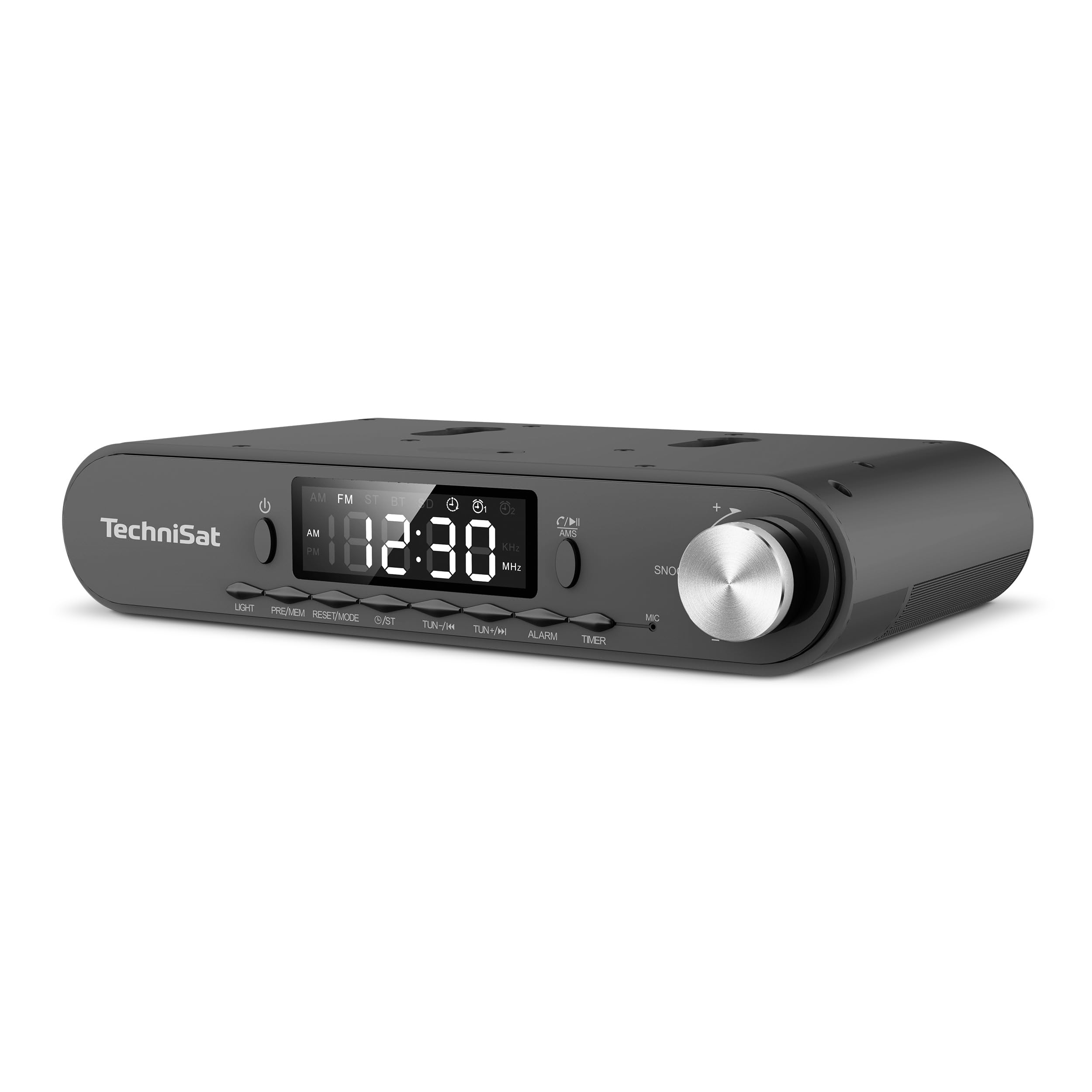
ചിത്രം 1: Front panel of the TechniSat Viola radio. This image displays the front panel of the TechniSat Viola radio, showing the LED display, control buttons (LIGHT, MODE/RESET, MEM/PRE, TUN-/K, TUN+/I, ALARM, TIMER), power button, and the volume/snooze knob. The TechniSat logo is visible on the left.
നിയന്ത്രണ പാനൽ ലേഔട്ട്:
- പവർ ബട്ടൺ: ഉപകരണം ഓണാക്കുകയോ ഓഫാക്കുകയോ ചെയ്യുന്നു.
- LED ഡിസ്പ്ലേ: Shows time, frequency, and mode information.
- ലൈറ്റ് ബട്ടൺ: Activates the integrated LED work light.
- MODE/RESET Button: Switches between operating modes and resets settings.
- MEM/PRE Button: Stores and recalls radio station presets.
- TUN-/K and TUN+/I Buttons: Adjusts tuning frequency or navigates tracks.
- അലാറം ബട്ടൺ: Sets and manages alarm functions.
- ടൈമർ ബട്ടൺ: Accesses and controls the cooking timer.
- Volume/Snooze Knob: Adjusts volume; press for snooze function.
- MIC: Microphone for hands-free function.
5. സജ്ജീകരണം
Follow these steps to set up your TechniSat Viola radio:
- അൺപാക്ക്: പാക്കേജിംഗിൽ നിന്ന് എല്ലാ ഘടകങ്ങളും ശ്രദ്ധാപൂർവ്വം നീക്കം ചെയ്യുക.
- ആന്റിന കണക്ഷൻ: Connect the provided loop antenna to the external antenna port on the back of the radio. Position the antenna for optimal reception.
- പവർ കണക്ഷൻ: Connect the power adapter to the DC input port on the radio and then plug the adapter into a standard electrical outlet.
- Placement/Mounting: Decide whether to use the radio as a standalone unit on a flat surface or mount it under a cabinet. Use the provided mounting accessories for under-cabinet installation, ensuring it is securely fastened.
- പ്രാരംഭ പവർ ഓൺ: Press the Power button to turn on the radio. The LED display will illuminate.
6. പ്രവർത്തന നിർദ്ദേശങ്ങൾ
6.1. റേഡിയോ ഓപ്പറേഷൻ (FM)
- എഫ്എം മോഡ് തിരഞ്ഞെടുക്കുക: അമർത്തുക മോഡ്/റീസെറ്റ് 'FM' പ്രദർശിപ്പിക്കുന്നത് വരെ ബട്ടൺ അമർത്തുക.
- സ്വമേധയാലുള്ള ട്യൂണിംഗ്: ഉപയോഗിക്കുക TUN-/K or TUN+/I ആവൃത്തി സ്വമേധയാ ക്രമീകരിക്കാനുള്ള ബട്ടണുകൾ.
- Automatic Scan (AMS): അമർത്തിപ്പിടിക്കുക MEM/PRE button to automatically scan and store available FM stations. The radio supports up to 40 favorite memory slots.
- പ്രീസെറ്റുകൾ തിരിച്ചുവിളിക്കുക: ചുരുക്കത്തിൽ അമർത്തുക MEM/PRE button to cycle through stored stations.
6.2. ബ്ലൂടൂത്ത് പ്രവർത്തനം
The integrated Bluetooth receiver allows you to stream audio wirelessly from your smartphone or tablet.
- ബ്ലൂടൂത്ത് മോഡ് നൽകുക: അമർത്തുക മോഡ്/റീസെറ്റ് button until 'BT' is displayed. The radio will enter pairing mode, indicated by a flashing Bluetooth icon.
- ജോടിയാക്കൽ: On your smartphone or tablet, enable Bluetooth and search for available devices. Select 'TechniSat Viola' from the list.
- ഓഡിയോ സ്ട്രീമിംഗ്: Once paired, you can play music from your device, and the audio will be streamed through the radio's speakers.
- ഹാൻഡ്സ് ഫ്രീ കോളിംഗ്: When a call comes in while connected via Bluetooth, you can answer it using the radio's controls and speak through the built-in microphone (MIC).
6.3. ടൈമർ ഫംഗ്ഷൻ
The radio features a convenient cooking timer.
- ടൈമർ സജ്ജമാക്കുക: അമർത്തുക ടൈമർ button to access the timer settings. Use the TUN-/K or TUN+/I buttons to adjust the desired countdown time.
- ടൈമർ ആരംഭിക്കുക/നിർത്തുക: അമർത്തുക ടൈമർ button again to start or pause the countdown.
6.4. അലാറവും സ്നൂസും
Utilize the alarm functions for daily reminders or wake-up calls.
- അലാറം സജ്ജമാക്കുക: അമർത്തുക അലാറം button to enter alarm setup. Use the TUN-/K or TUN+/I buttons to set the alarm time and select the alarm source (e.g., radio or buzzer).
- അലാറം സജീവമാക്കുക/നിർജ്ജീവമാക്കുക: അമർത്തുക അലാറം button repeatedly to toggle the alarm on or off.
- സ്നൂസ് പ്രവർത്തനം: അലാറം മുഴങ്ങുമ്പോൾ, അമർത്തുക Volume/Snooze Knob to activate the snooze function, pausing the alarm for a short period.
6.5. LED Work/Night Light
The integrated LED lighting can serve as a work light or a subtle night light.
- ലൈറ്റ് സജീവമാക്കുക: അമർത്തുക വെളിച്ചം LED ലൈറ്റ് ഓണാക്കാനുള്ള ബട്ടൺ.
- Adjust/Deactivate Light: അമർത്തുക വെളിച്ചം button again to cycle through brightness levels or turn off the light.
7. പരിപാലനം
Proper care ensures the longevity of your TechniSat Viola radio.
- വൃത്തിയാക്കൽ: Clean the radio with a soft, dry cloth. Do not use abrasive cleaners, solvents, or chemical sprays, as these can damage the surface.
- വൈദ്യുതി വിച്ഛേദിക്കൽ: Always unplug the device from the power outlet before cleaning or if it will not be used for an extended period.
- വെൻ്റിലേഷൻ: അമിതമായി ചൂടാക്കുന്നത് തടയാൻ വെൻ്റിലേഷൻ ഓപ്പണിംഗുകൾ തടഞ്ഞിട്ടില്ലെന്ന് ഉറപ്പാക്കുക.
8. പ്രശ്നപരിഹാരം
നിങ്ങളുടെ റേഡിയോയിൽ പ്രശ്നങ്ങൾ നേരിടുകയാണെങ്കിൽ, ഇനിപ്പറയുന്ന പൊതുവായ പ്രശ്നങ്ങളും പരിഹാരങ്ങളും പരിശോധിക്കുക:
| പ്രശ്നം | സാധ്യമായ കാരണം | പരിഹാരം |
|---|---|---|
| പവർ ഇല്ല / ഉപകരണം ഓണാകുന്നില്ല | പവർ അഡാപ്റ്റർ ബന്ധിപ്പിച്ചിട്ടില്ല അല്ലെങ്കിൽ ഔട്ട്ലെറ്റ് തകരാറിലാണ്. | Check if the power adapter is securely plugged into the radio and a working electrical outlet. Try a different outlet. |
| ശബ്ദമില്ല | Volume too low; incorrect audio source selected. | Increase the volume using the knob. Ensure the correct mode (FM, Bluetooth) is selected. |
| മോശം റേഡിയോ സ്വീകരണം | Antenna not properly positioned or connected; weak signal. | Adjust the position of the loop antenna. Ensure it is fully connected. Try moving the radio to a different location. |
| ബ്ലൂടൂത്ത് കണക്റ്റ് ചെയ്യുന്നില്ല | Radio not in pairing mode; device too far; Bluetooth off on smartphone. | Ensure the radio is in Bluetooth pairing mode. Keep your smartphone within range. Check Bluetooth settings on your smartphone. |
9 സ്പെസിഫിക്കേഷനുകൾ
Key technical specifications for the TechniSat Viola 0000/2932 radio:
| ഫീച്ചർ | വിശദാംശങ്ങൾ |
|---|---|
| ബ്രാൻഡ് | ടെക്നിസാറ്റ് |
| മോഡൽ നമ്പർ | 0000/2932 |
| നിറം | ആന്ത്രാസൈറ്റ് |
| കണക്റ്റിവിറ്റി ടെക്നോളജി | ബ്ലൂടൂത്ത് |
| പ്രത്യേക സവിശേഷതകൾ | Timer control via direct selection button, External antenna connection, Under-cabinet or standalone use, Aluminum volume/selection control, Bluetooth audio streaming, Alarm, Sleep, Snooze, LED work/night light |
| അനുയോജ്യമായ ഉപകരണങ്ങൾ | സ്മാർട്ട്ഫോൺ |
| പവർ ഉറവിടം | ഇലക്ട്രിക് കേബിൾ |
| പിന്തുണയ്ക്കുന്ന റേഡിയോ ബാൻഡുകൾ | FM |
| ട്യൂണിംഗ് സാങ്കേതികവിദ്യ | FM |
| ഉൽപ്പന്ന അളവുകൾ (L x W x H) | 21.2 സെ.മീ x 12.1 സെ.മീ x 4.2 സെ.മീ |
| നിർമ്മാതാവ് | ടെക്നിസാറ്റ് |
| മാതൃരാജ്യം | ചൈന |
10. വാറൻ്റിയും പിന്തുണയും
For warranty information and technical support, please refer to the documentation provided with your purchase or contact TechniSat customer service directly. Specific details regarding spare parts availability and software updates are not provided in this manual.