
1 സുരക്ഷാ വിവരങ്ങൾ
Please read this manual carefully before using your DOOGEE U13 tablet to ensure safe and proper operation. Keep this manual for future reference.
- Avoid exposing the device to extreme temperatures (hot or cold), direct sunlight, or high humidity.
- ടാബ്ലെറ്റ് വെള്ളത്തിൽ നിന്നും മറ്റ് ദ്രാവകങ്ങളിൽ നിന്നും അകറ്റി നിർത്തുക.
- Use only chargers and accessories approved by DOOGEE to prevent damage and ensure safety.
- Handle the device with care to prevent drops or impacts.
- For eye comfort, utilize the blue light reduction mode and take regular breaks during prolonged use.
2. പാക്കേജ് ഉള്ളടക്കം
Verify that all items are present in your DOOGEE U13 package:
- DOOGEE U13 Tablet (with pre-applied screen protector)
- Protective Case (doubles as a stand)
- Stylus Pen (with replaceable tips)
- യുഎസ്ബി-സി മുതൽ യുഎസ്ബി-സി വരെ ചാർജിംഗ് കേബിൾ
- 18W USB-PD Power Adapter
- ഉപയോക്തൃ മാനുവൽ
- സിം എജക്ടർ പിൻ

Image: DOOGEE U13 Tablet with included accessories including the protective case, stylus, and charging components.
3. ഡിവൈസ് ഓവർview
ഫ്രണ്ട് View
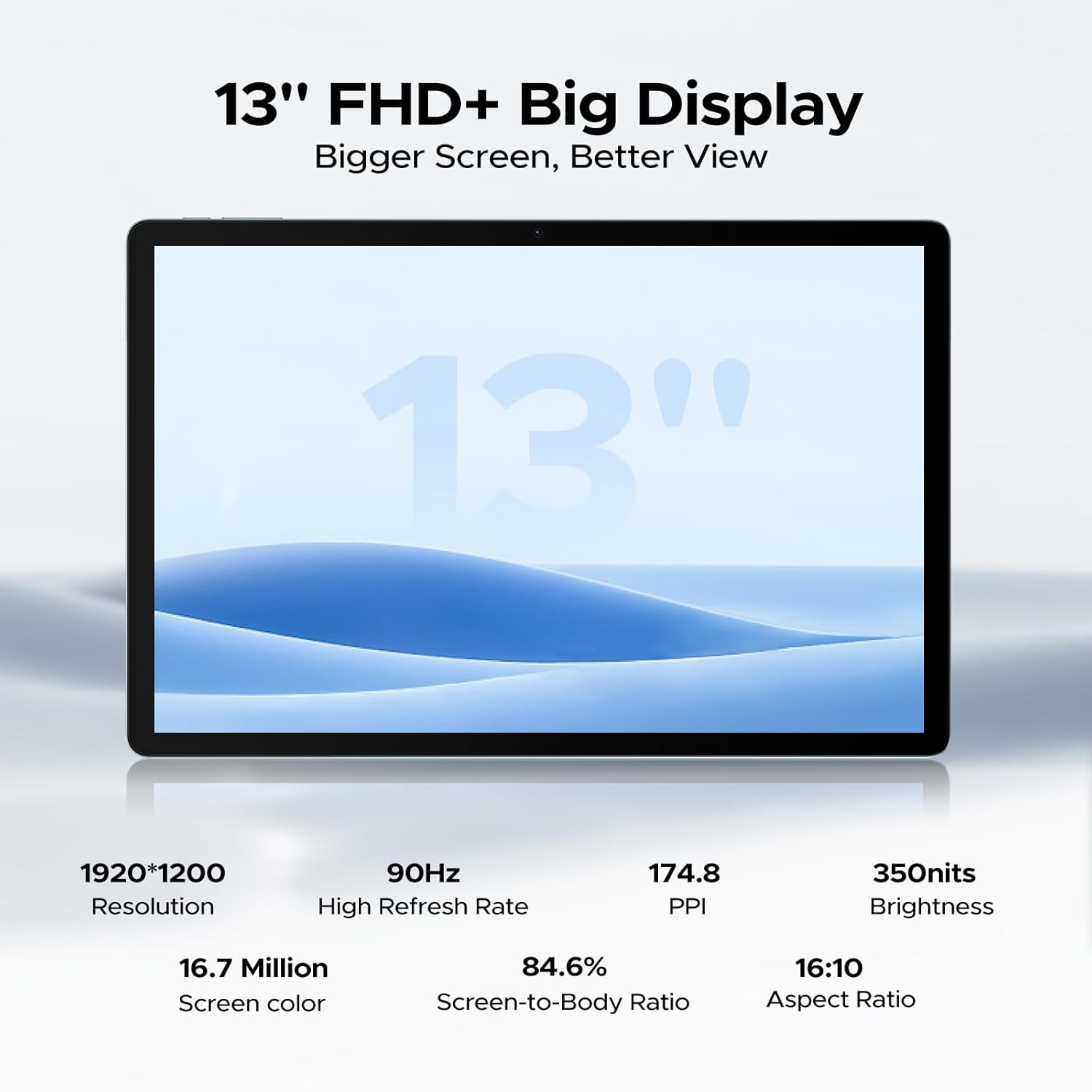
The front features a large 13-inch FHD+ display. The 5MP front camera is located at the top center of the screen.

ചിത്രം: മുൻഭാഗം view of the DOOGEE U13 tablet showcasing അതിന്റെ വലിയ ഡിസ്പ്ലേ.
വശവും അരികും Views
- മുകളിലെ അറ്റം: Power button, Volume Up/Down buttons, and a microphone.
- Right Edge: 3.5mm headphone jack and the SIM/MicroSD card slot.
- താഴത്തെ അറ്റം: USB-C port for charging and data transfer, flanked by two of the quad speakers.
- Left Edge: The remaining two quad speakers.
ചിത്രം: വശം view of the DOOGEE U13 tablet highlighting the USB-C port, speaker grills, and 3.5mm headphone jack.
തിരികെ View
The back of the tablet features a sleek metal body with DOOGEE branding. The 13MP rear camera module with flash is located in the upper corner.

ചിത്രം: പിന്നിലേക്ക് view of the DOOGEE U13 tablet, showcasing its metal finish and the rear camera module.
4. സജ്ജീകരണം
പവർ ചെയ്യുന്നത് ഓൺ/ഓഫ്
- പവർ ഓണാക്കാൻ: Press and hold the Power button located on the top edge until the DOOGEE logo appears.
- പവർ ഓഫ് ചെയ്യാൻ: Press and hold the Power button until the power options appear on the screen, then select "Power Off".
- പുനരാരംഭിക്കാൻ: പവർ ഓപ്ഷനുകൾ ദൃശ്യമാകുന്നതുവരെ പവർ ബട്ടൺ അമർത്തിപ്പിടിക്കുക, തുടർന്ന് "പുനരാരംഭിക്കുക" തിരഞ്ഞെടുക്കുക.
പ്രാരംഭ കോൺഫിഗറേഷൻ
Upon first power-on, follow the on-screen prompts to set up your device:
- നിങ്ങൾ ഇഷ്ടപ്പെടുന്ന ഭാഷയും പ്രദേശവും തിരഞ്ഞെടുക്കുക.
- ഒരു Wi-Fi നെറ്റ്വർക്കിലേക്ക് കണക്റ്റുചെയ്യുക.
- നിങ്ങളുടെ Google അക്കൗണ്ട് ഉപയോഗിച്ച് സൈൻ ഇൻ ചെയ്യുക അല്ലെങ്കിൽ പുതിയൊരെണ്ണം സൃഷ്ടിക്കുക.
- Review നിബന്ധനകളും വ്യവസ്ഥകളും അംഗീകരിക്കുക.
നെറ്റ്വർക്ക് കണക്ഷൻ
- വൈഫൈ: ക്രമീകരണങ്ങൾ > നെറ്റ്വർക്ക് & ഇന്റർനെറ്റ് > വൈ-ഫൈ എന്നതിലേക്ക് പോകുക, തുടർന്ന് നിങ്ങൾക്ക് ആവശ്യമുള്ള നെറ്റ്വർക്ക് തിരഞ്ഞെടുത്ത് പാസ്വേഡ് നൽകുക.
- 4G LTE: Insert a nano-SIM card into the SIM/MicroSD card slot using the provided ejector pin. Configure mobile data settings via Settings > Network & Internet > Mobile network.
Google അക്കൗണ്ട് സജ്ജീകരണം
A Google account is essential for accessing the Google Play Store, Gmail, YouTube, and other Google services. If you skipped this during initial setup, you can add an account via Settings > Accounts > Add account > Google.
5. ഓപ്പറേറ്റിംഗ് സിസ്റ്റം
The DOOGEE U13 tablet runs on the latest Android 16 operating system, providing a user-friendly interface and enhanced features.
- Gemini AI Engine: Experience intelligent task optimization, faster app response, and smarter overall performance.
- Split-Screen Multitasking: Use two apps simultaneously for improved productivity.
- നീല വെളിച്ചം കുറയ്ക്കൽ മോഡ്: Activate this feature for reduced eye strain during prolonged use, especially in low-light conditions.
- ഫേസ് അൺലോക്ക്: Securely unlock your device with facial recognition.
- WPS Office: Built-in PC-level WPS Office for productivity tasks (feature not supported in the Russian region).
6. ഡിസ്പ്ലേയും ഓഡിയോയും
ഡിസ്പ്ലേ സവിശേഷതകൾ
- വലിപ്പം: 13-inch FHD+ IPS display.
- റെസലൂഷൻ: 1920x1200 pixels for crisp images and vibrant colors.
- പുതുക്കൽ നിരക്ക്: 90Hz for ultra-smooth scrolling and responsive interactions.
- വൈഡ്വൈൻ എൽ1: Certified for streaming 1080P HD content from popular services like Prime Video, HBO, and YouTube.
വീഡിയോ: ഒരു പ്രൊമോഷണൽ വീഡിയോ ഷോasing the DOOGEE U13's elegant design and display quality. This video highlights the tablet's aesthetic appeal and vibrant screen.
ഓഡിയോ സിസ്റ്റം
- ക്വാഡ് സ്പീക്കറുകൾ: Integrated 1217 BOX quad-speaker system delivers immersive stereo sound.
- ഹെഡ്ഫോൺ ജാക്ക്: A 3.5mm headphone jack is available for wired audio connections.
- ബ്ലൂടൂത്ത് ഓഡിയോ: Connect wireless headphones or speakers via Bluetooth 5.0.
7. സംഭരണവും പ്രകടനവും
പ്രോസസ്സർ
The DOOGEE U13 is powered by the UNISOC T7280 Octa-Core processor, clocked at up to 2.2GHz, ensuring smooth operation for various applications, from work to gaming.
മെമ്മറി (റാം)
With 32GB of RAM (6GB physical + 26GB virtual expansion), the tablet handles multitasking efficiently, allowing you to switch between apps seamlessly.
ആന്തരിക സംഭരണം (ROM)
ഈ ഉപകരണം 256GB ഇന്റേണൽ സ്റ്റോറേജുമായി വരുന്നു, ampനിങ്ങളുടെ ഇടം files, apps, and media.
വികസിപ്പിക്കാവുന്ന സംഭരണം
You can expand the storage up to an additional 2TB using a TF (MicroSD) card, offering vast capacity for all your digital content.
8. ക്യാമറ പ്രവർത്തനങ്ങൾ
പിൻ ക്യാമറ
The 13MP stacked rear camera allows you to capture clear photos and videos, even in challenging lighting conditions.
മുൻ ക്യാമറ
The 5MP front camera is ideal for video conferencing, online classes, and taking selfies.
9. കണക്റ്റിവിറ്റി
വയർലെസ് കണക്റ്റിവിറ്റി
- വൈഫൈ: Supports 2.4G/5G dual-band Wi-Fi (802.11ac, 802.11ax, 802.11b, 802.11g, 802.11n) for high-speed internet access.
- ബ്ലൂടൂത്ത്: Bluetooth 5.0 ensures stable and efficient connections with wireless peripherals.
- വയർലെസ് സ്ക്രീൻ മിററിംഗ്: Easily cast your tablet's screen to compatible larger displays.
നാവിഗേഷൻ സംവിധാനങ്ങൾ
The DOOGEE U13 integrates five major navigation systems for precise and reliable positioning:
- എ-ജിപിഎസ്
- ജിപിഎസ്
- BeiDou
- ഗ്ലോനാസ്
- ഗലീലിയോ
10. ബാറ്ററി മാനേജ്മെന്റ്
ബാറ്ററി ശേഷി
The tablet is equipped with a robust 11,000mAh Lithium Polymer battery, designed to provide all-day power.
ചാർജിംഗ്
Supports 18W USB-PD fast charging via the USB-C port. Use the provided 18W power adapter and USB-C cable for optimal charging speed.
കണക്കാക്കിയ ബാറ്ററി ലൈഫ്
- Up to 30 days of standby time.
- 20 മണിക്കൂർ വരെ സംഗീതം പ്ലേബാക്ക് ചെയ്യാം.
- Up to 12 hours of video watching.
11. പരിപാലനം
നിങ്ങളുടെ ഉപകരണം വൃത്തിയാക്കുന്നു
To clean your DOOGEE U13 tablet:
- വൃത്തിയാക്കുന്നതിന് മുമ്പ് ഉപകരണം പവർ ഓഫ് ചെയ്യുക.
- സ്ക്രീനും ബോഡിയും മൃദുവായതും ലിന്റ് രഹിതവുമായ ഒരു തുണി ഉപയോഗിച്ച് മൃദുവായി തുടയ്ക്കുക.
- കഠിനമായ പാടുകൾക്ക്, ചെറുതായി dampവെള്ളം ഉപയോഗിച്ച് തുണി അല്ലെങ്കിൽ ഇലക്ട്രോണിക് ഉപകരണങ്ങൾക്കായി പ്രത്യേകം രൂപകൽപ്പന ചെയ്ത ഒരു സ്ക്രീൻ ക്ലീനർ.
- കഠിനമായ രാസവസ്തുക്കൾ, ഉരച്ചിലുകൾ ഉള്ള വസ്തുക്കൾ, എയറോസോൾ സ്പ്രേകൾ എന്നിവ ഉപയോഗിക്കുന്നത് ഒഴിവാക്കുക.
സോഫ്റ്റ്വെയർ അപ്ഡേറ്റുകൾ
Keep your tablet's software up to date to benefit from the latest features, security patches, and performance improvements:
- Ensure your device is connected to Wi-Fi and has sufficient battery (at least 50%).
- ക്രമീകരണങ്ങൾ > സിസ്റ്റം > സിസ്റ്റം അപ്ഡേറ്റ് എന്നതിലേക്ക് പോകുക.
- Check for available updates and follow the on-screen instructions to install them.
12. പ്രശ്നപരിഹാരം
നിങ്ങൾ നേരിട്ടേക്കാവുന്ന പൊതുവായ പ്രശ്നങ്ങൾക്കുള്ള പരിഹാരങ്ങൾ ഇതാ:
- ഉപകരണം പവർ ചെയ്യുന്നില്ല: Ensure the battery is charged. If it still doesn't turn on, press and hold the Power button for 10-15 seconds to force a restart.
- സ്ക്രീൻ പ്രതികരിക്കുന്നില്ല: Try restarting the device. If the screen remains unresponsive, perform a force restart.
- വൈഫൈ/ബ്ലൂടൂത്ത് കണക്റ്റിവിറ്റി പ്രശ്നങ്ങൾ: Toggle Wi-Fi or Bluetooth off and on in Settings. Restart your tablet and the router/Bluetooth device.
- ആപ്പുകൾ ക്രാഷാകുകയോ മരവിപ്പിക്കുകയോ ചെയ്യുന്നു: Go to Settings > Apps, select the problematic app, and clear its cache and data. If the issue persists, reinstall the app.
- മന്ദഗതിയിലുള്ള പ്രകടനം: Close unnecessary background applications. Clear cached data. Check your available internal storage and consider expanding it with a TF card if full.
- ശബ്ദമില്ല: Check the volume levels. Ensure headphones are not connected if you intend to use speakers. Test with different audio fileകൾ അല്ലെങ്കിൽ ആപ്പുകൾ.
13 സ്പെസിഫിക്കേഷനുകൾ
| ഫീച്ചർ | സ്പെസിഫിക്കേഷൻ |
|---|---|
| ഡിസ്പ്ലേ വലിപ്പം | 13 ഇഞ്ച് |
| സ്ക്രീൻ റെസല്യൂഷൻ | 1920 x 1200 Pixels (FHD+) |
| പുതുക്കിയ നിരക്ക് | 90Hz |
| പ്രോസസ്സർ | UNISOC T7280 Octa-Core (up to 2.2GHz) |
| റാം | 32GB (6GB + 26GB virtual expansion) |
| ആന്തരിക സംഭരണം | 256 ജിബി |
| വികസിപ്പിക്കാവുന്ന സംഭരണം | TF കാർഡ് വഴി 2TB വരെ |
| ഓപ്പറേറ്റിംഗ് സിസ്റ്റം | ആൻഡ്രോയിഡ് 16 |
| ബാറ്ററി ശേഷി | 11000mAh |
| ഫാസ്റ്റ് ചാർജിംഗ് | 18W USB-PD |
| പിൻ ക്യാമറ | 13എംപി |
| മുൻ ക്യാമറ | 5എംപി |
| വൈഫൈ | 2.4G/5G Dual-band (802.11ac, 802.11ax, 802.11b, 802.11g, 802.11n) |
| ബ്ലൂടൂത്ത് | 5.0 |
| നാവിഗേഷൻ | A-GPS, GPS, BeiDou, GLONASS, Galileo |
| അളവുകൾ | 11.88 x 7.76 x 0.29 ഇഞ്ച് |
| ഭാരം | 1.48 പൗണ്ട് (670 ഗ്രാം) |
| നിറം | കറുപ്പ് |
14. വാറൻ്റിയും പിന്തുണയും
ഉൽപ്പന്ന വാറൻ്റി
The DOOGEE U13 tablet comes with a 2-Years Limited Warranty from the date of purchase. Please retain your proof of purchase for warranty claims.
ഉപഭോക്തൃ പിന്തുണ
- ഓൺലൈൻ പിന്തുണ: Access 24/7 One-on-One Online Support for any technical assistance or queries. Refer to the official DOOGEE webബന്ധപ്പെടാനുള്ള വിശദാംശങ്ങൾക്കുള്ള സൈറ്റ്.
- പണം തിരികെ നൽകാനുള്ള ഗ്യാരണ്ടി: Enjoy a 30-Days Money Back Guarantee and Free Return policy from your purchase point.
Video: A promotional video highlighting the DOOGEE U13's large display and features for all-day entertainment. This video emphasizes the visual experience and overall enjoyment of the tablet.