
1. ആമുഖം
This manual provides essential information for the safe and efficient use of your DOOGEE U13 Android 16 Tablet. Please read this manual thoroughly before operating the device and retain it for future reference.
The DOOGEE U13 is a high-performance tablet designed for various tasks, from productivity to entertainment, featuring a large display, powerful processor, and extended battery life.

Image 1.1: DOOGEE U13 Tablet highlighting its main features.
2. പാക്കേജ് ഉള്ളടക്കം
പാക്കേജ് തുറക്കുമ്പോൾ, എല്ലാ ഇനങ്ങളും നിലവിലുണ്ടെന്നും നല്ല നിലയിലാണെന്നും ദയവായി പരിശോധിക്കുക:
- DOOGEE U13 Tablet
- USB-C ചാർജിംഗ് കേബിൾ
- പവർ അഡാപ്റ്റർ
- സിം എജക്റ്റ് ടൂൾ (ബാധകമെങ്കിൽ)
- ദ്രുത ആരംഭ ഗൈഡ്
- വാറൻ്റി കാർഡ്
3. ഉപകരണ ലേഔട്ട്
Familiarize yourself with the physical components of your DOOGEE U13 tablet.

ചിത്രം 3.1: കഴിഞ്ഞുview of DOOGEE U13 Tablet features and design.
3.1 പോർട്ടുകളും ബട്ടണുകളും
- പവർ ബട്ടൺ: വശത്ത് സ്ഥിതിചെയ്യുന്നു, ഉപകരണം ഓൺ/ഓഫ് ചെയ്യാനോ ഉണർത്താനോ ഉറങ്ങാനോ ഉപയോഗിക്കുന്നു.
- വോളിയം ബട്ടണുകൾ: മീഡിയയുടെയും അറിയിപ്പുകളുടെയും വോളിയം ക്രമീകരിക്കുക.
- യുഎസ്ബി-സി പോർട്ട്: ചാർജിംഗിനും ഡാറ്റ കൈമാറ്റത്തിനും.
- 3.5 എംഎം ഹെഡ്ഫോൺ ജാക്ക്: വയേർഡ് ഓഡിയോ ഔട്ട്പുട്ടിനായി.
- മൈക്രോ എസ്ഡി കാർഡ് സ്ലോട്ട്: For expandable storage (up to 2TB).
3.2 ക്യാമറകൾ
- പിൻ ക്യാമറ: 13MP main camera for capturing photos and videos.
- മുൻ ക്യാമറ: വീഡിയോ കോളുകൾക്കും സെൽഫികൾക്കുമായി 5MP ക്യാമറ.
4. സജ്ജീകരണം
4.1 പ്രാരംഭ പവർ ഓൺ
- Press and hold the Power Button until the DOOGEE logo appears.
- നിങ്ങളുടെ ഭാഷ, പ്രദേശം എന്നിവ തിരഞ്ഞെടുത്ത് ഒരു വൈഫൈ നെറ്റ്വർക്കിലേക്ക് കണക്റ്റുചെയ്യുന്നതിന് ഓൺ-സ്ക്രീൻ നിർദ്ദേശങ്ങൾ പാലിക്കുക.
- ഗൂഗിൾ പ്ലേ സ്റ്റോറും മറ്റ് സേവനങ്ങളും ആക്സസ് ചെയ്യുന്നതിന് നിങ്ങളുടെ ഗൂഗിൾ അക്കൗണ്ട് ഉപയോഗിച്ച് സൈൻ ഇൻ ചെയ്യുക അല്ലെങ്കിൽ പുതിയൊരെണ്ണം സൃഷ്ടിക്കുക.
4.2 ബാറ്ററി ചാർജ് ചെയ്യുന്നു
Before first use, fully charge the tablet. Connect the USB-C cable to the tablet's charging port and the power adapter to a wall outlet. The charging indicator will show the battery status.

Image 4.1: Battery specifications and charging capabilities.
4.3 ഒരു മൈക്രോ എസ്ഡി കാർഡ് ചേർക്കൽ
- ടാബ്ലെറ്റിൻ്റെ വശത്ത് കാർഡ് സ്ലോട്ട് കണ്ടെത്തുക.
- ട്രേ തുറക്കാൻ നൽകിയിരിക്കുന്ന സിം എജക്റ്റ് ടൂൾ ഉപയോഗിക്കുക.
- Place the MicroSD card into the designated slot on the tray.
- ടാബ്ലെറ്റിലേക്ക് ട്രേ ശ്രദ്ധാപൂർവ്വം വീണ്ടും തിരുകുക.
5. പ്രവർത്തന നിർദ്ദേശങ്ങൾ
5.1 അടിസ്ഥാന നാവിഗേഷൻ
- സ്പർശിക്കുക: ഒരു ആപ്പ് തുറക്കാൻ ഒരു ഐറ്റം തിരഞ്ഞെടുക്കാനോ ഐക്കണിൽ ടാപ്പ് ചെയ്യാനോ.
- സ്വൈപ്പ്: Move your finger across the screen to scroll through content or switch screens.
- പിഞ്ച്-ടു-സൂം: ചിത്രങ്ങൾ സൂം ഇൻ ചെയ്യാനോ ഔട്ട് ചെയ്യാനോ രണ്ട് വിരലുകൾ ഉപയോഗിക്കുക, web പേജുകൾ.
5.2 ഡിസ്പ്ലേ ക്രമീകരണങ്ങൾ
Your tablet features a 13-inch FHD+ 90Hz display for a smooth visual experience.
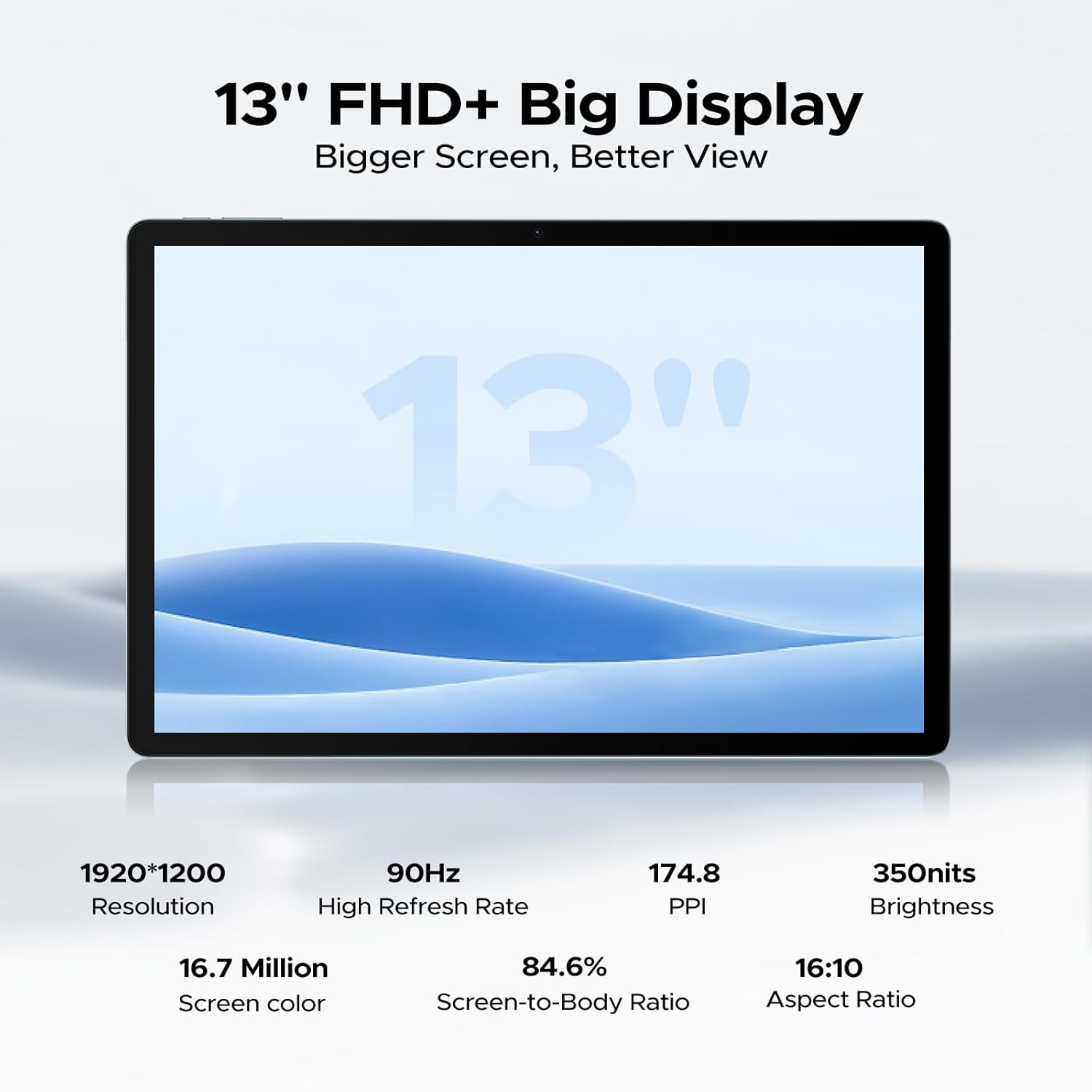
Image 5.1: Detailed specifications of the tablet's display.
Access display settings via ക്രമീകരണങ്ങൾ > ഡിസ്പ്ലേ to adjust brightness, dark mode, eye comfort mode, and refresh rate.
5.3 ഓഡിയോ
The tablet is equipped with quad speakers for immersive sound and supports a 3.5mm headphone jack.
5.4 ക്യാമറ ഉപയോഗം
Open the Camera app to capture photos and videos. The 13MP main camera offers various modes, while the 5MP front camera is ideal for video calls.

Image 5.2: Features of the 13MP main camera.

Image 5.3: The 5MP front camera in use for video calls.
5.5 Android 16 and Gemini AI
The DOOGEE U13 runs on Android 16, offering enhanced features and security. It integrates Gemini AI for intelligent task optimization and improved performance.

Image 5.4: Android 16 OS interface.

Image 5.5: Diverse Android 16 OS functions.

Image 5.6: Gemini AI capabilities.
6. ബാറ്ററി മാനേജ്മെന്റ്
The DOOGEE U13 is equipped with an 11000mAh battery. To maximize battery life:
- സ്ക്രീൻ തെളിച്ചം സുഖകരമായ തലത്തിലേക്ക് ക്രമീകരിക്കുക.
- പശ്ചാത്തലത്തിൽ പ്രവർത്തിക്കുന്ന ഉപയോഗിക്കാത്ത ആപ്ലിക്കേഷനുകൾ അടയ്ക്കുക.
- ഉപയോഗത്തിലില്ലാത്തപ്പോൾ Wi-Fi, Bluetooth, GPS എന്നിവ ഓഫാക്കുക.
- Utilize battery saver modes available in Android settings.
The tablet supports 18W fast charging and 5W reverse charging.
7. സ്റ്റോറേജ് മാനേജ്മെൻ്റ്
Your tablet comes with 256GB of internal storage and 32GB of RAM (6GB base + 26GB expansion). Storage can be expanded up to 2TB using a MicroSD card (purchased separately).

Image 7.1: RAM and ROM specifications.
സംഭരണം മാനേജ് ചെയ്യാൻ, ഇതിലേക്ക് പോകുക ക്രമീകരണങ്ങൾ > സംഭരണം. ഇവിടെ നിങ്ങൾക്ക് കഴിയും view storage usage, free up space, and format your MicroSD card.
8. കണക്റ്റിവിറ്റി
8.1 വൈഫൈ
The tablet supports 2.4G/5G dual-band Wi-Fi for fast and stable internet connections. To connect, go to ക്രമീകരണങ്ങൾ > നെറ്റ്വർക്കും ഇന്റർനെറ്റും > വൈ-ഫൈ, select your network, and enter the password.
8.2 ബ്ലൂടൂത്ത്
ബ്ലൂടൂത്ത് പ്രവർത്തനക്ഷമമാക്കുക ക്രമീകരണങ്ങൾ > കണക്റ്റുചെയ്ത ഉപകരണങ്ങൾ > ബ്ലൂടൂത്ത് to pair with wireless headphones, speakers, or other Bluetooth accessories.
8.3 സ്ക്രീൻ മിററിംഗ്
Use the wireless screen mirroring feature to cast your tablet's display to compatible larger screens. This option is typically found in Settings > Connected devices > Connection preferences > Cast.
9. സുരക്ഷാ സവിശേഷതകൾ
9.1 ഫേസ് അൺലോക്ക്
The DOOGEE U13 supports face unlock for quick and secure access to your device. Set up face unlock in Settings > Security & privacy > Device unlock > Face unlock.

Image 9.1: Security and connectivity features.
10. പരിപാലനം
10.1 വൃത്തിയാക്കൽ
ടാബ്ലെറ്റിന്റെ സ്ക്രീനും ബോഡിയും വൃത്തിയാക്കാൻ മൃദുവായ, ലിന്റ് രഹിത തുണി ഉപയോഗിക്കുക. കഠിനമായ രാസവസ്തുക്കളോ ഉരച്ചിലുകളോ ഉള്ള വസ്തുക്കൾ ഉപയോഗിക്കുന്നത് ഒഴിവാക്കുക.
10.2 സോഫ്റ്റ്വെയർ അപ്ഡേറ്റുകൾ
നിങ്ങളുടെ ടാബ്ലെറ്റിൽ ഏറ്റവും പുതിയ സവിശേഷതകൾ, സുരക്ഷാ പാച്ചുകൾ, പ്രകടന മെച്ചപ്പെടുത്തലുകൾ എന്നിവ ഉറപ്പാക്കാൻ സോഫ്റ്റ്വെയർ അപ്ഡേറ്റുകൾ പതിവായി പരിശോധിച്ച് ഇൻസ്റ്റാൾ ചെയ്യുക. പോകുക ക്രമീകരണങ്ങൾ > സിസ്റ്റം > സിസ്റ്റം അപ്ഡേറ്റ്.
11. പ്രശ്നപരിഹാരം
- ടാബ്ലെറ്റ് ഓണാക്കുന്നില്ല: ബാറ്ററി ചാർജ്ജ് ചെയ്തിട്ടുണ്ടെന്ന് ഉറപ്പാക്കുക. വീണ്ടും പവർ ഓൺ ചെയ്യാൻ ശ്രമിക്കുന്നതിന് മുമ്പ് കുറഞ്ഞത് 30 മിനിറ്റെങ്കിലും ചാർജറുമായി കണക്റ്റ് ചെയ്യുക.
- സ്ക്രീൻ പ്രതികരിക്കുന്നില്ല: Try restarting the tablet by holding the Power Button for about 10-15 seconds.
- വൈഫൈ കണക്ഷൻ പ്രശ്നങ്ങൾ: Restart your Wi-Fi router and the tablet. Forget the network in Wi-Fi settings and reconnect.
- ആപ്പുകൾ ക്രാഷാകുന്നു: പ്രശ്നമുള്ള ആപ്പിന്റെ കാഷെ മായ്ക്കുക (ക്രമീകരണങ്ങൾ > ആപ്പുകൾ > [ആപ്പ് നാമം] > സംഭരണവും കാഷെയും > കാഷെ മായ്ക്കുക). If the issue persists, reinstall the app.
- മന്ദഗതിയിലുള്ള പ്രകടനം: Close unnecessary background apps, clear cache, and ensure sufficient storage space. Consider a factory reset as a last resort (back up your data first).
12 സ്പെസിഫിക്കേഷനുകൾ
Below are the key technical specifications for the DOOGEE U13 Tablet:
| ഫീച്ചർ | സ്പെസിഫിക്കേഷൻ |
|---|---|
| മോഡൽ | U13 |
| ഓപ്പറേറ്റിംഗ് സിസ്റ്റം | ആൻഡ്രോയിഡ് 16 |
| പ്രോസസ്സർ | UNISOC T7280 Octa-Core (up to 2.2GHz) |
| ജിപിയു | മാലി-ജി57 |
| റാം | 32GB (6GB ഫിസിക്കൽ + 26GB വെർച്വൽ) |
| ആന്തരിക സംഭരണം | 256 ജിബി |
| വികസിപ്പിക്കാവുന്ന സംഭരണം | മൈക്രോഎസ്ഡി കാർഡ് വഴി 2TB വരെ |
| ഡിസ്പ്ലേ വലിപ്പം | 13 ഇഞ്ച് |
| ഡിസ്പ്ലേ തരം | FHD+ IPS |
| റെസലൂഷൻ | 1920 x 1200 പിക്സലുകൾ |
| പുതുക്കിയ നിരക്ക് | 90Hz |
| തെളിച്ചം | 350 നിറ്റ് |
| പിൻ ക്യാമറ | 13എംപി |
| മുൻ ക്യാമറ | 5എംപി |
| ബാറ്ററി ശേഷി | 11000mAh |
| ചാർജിംഗ് | 18W USB-PD Fast Charging, 5W Reverse Charging |
| കണക്റ്റിവിറ്റി | വൈ-ഫൈ 5 (802.11ac), ബ്ലൂടൂത്ത് 5.0 |
| നാവിഗേഷൻ | A-GPS, GPS, BeiDou, GLONASS, Galileo |
| അളവുകൾ | 11.88 x 7.76 x 0.29 inches (7.5mm ultra-thin) |
| ഭാരം | 1.48 പൗണ്ട് (670 ഗ്രാം) |

Image 12.1: DOOGEE U-series tablet comparison, highlighting U13 specifications.
13. വാറൻ്റിയും പിന്തുണയും
Your DOOGEE U13 Tablet comes with a standard warranty. Please refer to the included warranty card for specific terms and conditions.
For technical support, troubleshooting assistance, or warranty claims, please contact DOOGEE customer service through their official webസൈറ്റ് അല്ലെങ്കിൽ നിങ്ങളുടെ ഉൽപ്പന്ന പാക്കേജിംഗിൽ നൽകിയിരിക്കുന്ന ബന്ധപ്പെടാനുള്ള വിവരങ്ങൾ.

Image 13.1: DOOGEE customer service and warranty information.