
ആമുഖം
Thank you for choosing the Jesebang YT18 Wireless Earbuds. These earbuds are designed to provide a high-quality audio experience with advanced features such as Bluetooth 5.4 connectivity, Environmental Noise Cancellation (ENC) for clear calls, IP7 waterproofing, and a long-lasting 48-hour battery life. This manual will guide you through the setup, operation, and maintenance of your new earbuds to ensure optimal performance and enjoyment.
ബോക്സിൽ എന്താണുള്ളത്
എല്ലാ ഇനങ്ങളും ഉണ്ടെന്ന് ഉറപ്പാക്കാൻ പാക്കേജ് ഉള്ളടക്കങ്ങൾ പരിശോധിക്കുക:
- 1 x പോർട്ടബിൾ ചാർജിംഗ് ബോക്സ്
- 1 x യുഎസ്ബി-സി ചാർജിംഗ് കേബിൾ
- 1 x ഉപയോക്തൃ മാനുവൽ
- 2 x YT18 Headphones (Left and Right)
- 3 x ജോഡി സിലിക്കൺ ഇയർപ്ലഗുകൾ (S / M / L)

Image: Package contents of the Jesebang YT18 Wireless Earbuds.
ഉൽപ്പന്നം കഴിഞ്ഞുview
The Jesebang YT18 Wireless Earbuds feature a comfortable over-ear design with ear hooks for a secure fit, making them ideal for sports and active lifestyles. The charging case includes a dual LED digital display to show battery levels for both earbuds and the case itself.
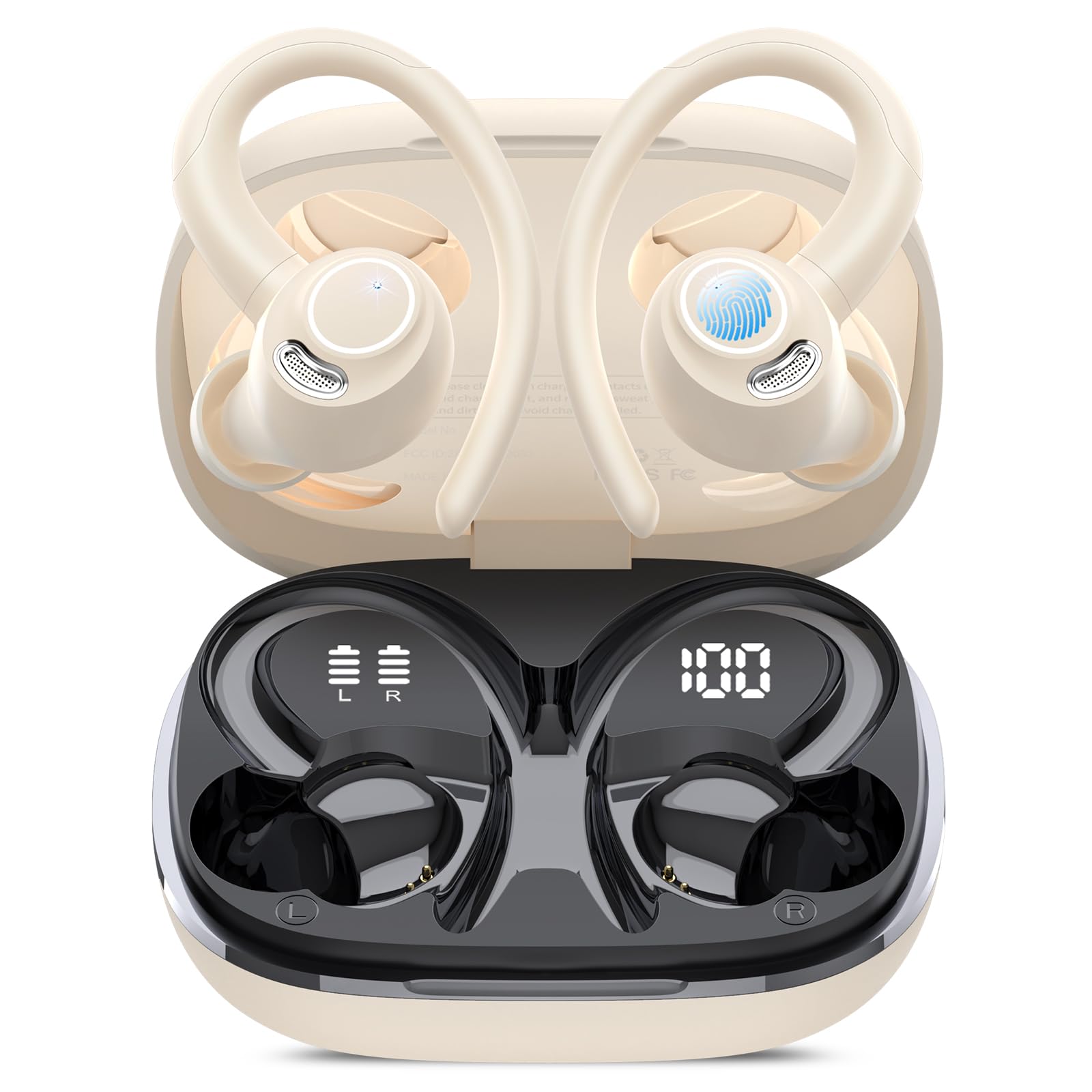
Image: Jesebang YT18 Wireless Earbuds and Charging Case.
Sound Quality Components
Image: Internal components contributing to the unique stereo sound quality.
The earbuds are equipped with 14.2mm dynamic drivers, composite diaphragms, and 1080DB sensitivity to deliver deep bass, balanced mids, and clear highs for an enhanced listening experience.
പരിസ്ഥിതി ശബ്ദം റദ്ദാക്കൽ (ENC)

Image: Dual ENC Noise Cancellation Microphones.
Each earbud features 4 ENC noise-canceling microphones, effectively filtering out over 80% of external noise to ensure clear voice transmission during calls, even in noisy environments.
സജ്ജീകരണവും ജോടിയാക്കലും
പ്രാരംഭ ചാർജിംഗ്
ആദ്യമായി ഉപയോഗിക്കുന്നതിന് മുമ്പ്, ഇയർബഡുകളും ചാർജിംഗ് കെയ്സും പൂർണ്ണമായും ചാർജ് ചെയ്യുക. നൽകിയിരിക്കുന്ന USB-C കേബിൾ കെയ്സിലെ ചാർജിംഗ് പോർട്ടിലേക്കും ഒരു പവർ സ്രോതസ്സിലേക്കും ബന്ധിപ്പിക്കുക. കെയ്സിലെ LED ഡിസ്പ്ലേ ചാർജിംഗ് നിലയെ സൂചിപ്പിക്കും.

Image: USB-C Charging for the case and earbuds.
ആദ്യ തവണ ജോടിയാക്കൽ
- നിങ്ങളുടെ ഉപകരണത്തിന്റെ ബ്ലൂടൂത്ത് ഓണാക്കിയിട്ടുണ്ടെന്ന് ഉറപ്പാക്കുക.
- ചാർജിംഗ് കേസ് തുറന്ന് രണ്ട് ഇയർബഡുകളും നീക്കം ചെയ്യുക. അവ സ്വയമേവ ജോടിയാക്കൽ മോഡിലേക്ക് പ്രവേശിക്കും.
- On your device, search for Bluetooth devices and select "YT18" from the list.
- Once connected, the earbuds will automatically pair with your device every time you remove them from the case.

Image: One-step Auto Pairing process.
പ്രവർത്തന നിർദ്ദേശങ്ങൾ
ഇയർബഡുകൾ ധരിക്കുന്നു
To ensure the best sound quality and a secure fit, choose the correct size silicone earplugs (S, M, L) and adjust the ear hooks:
- Select the ear tip size that provides a comfortable and snug seal in your ear canal.
- Place the earbud into your ear, ensuring the ear tip is properly seated.
- Gently wrap the flexible ear hook over and behind your ear until it feels secure.
- Adjust the earbud and hook for optimal comfort and stability.

Image: Guide to wearing the earbuds stably.
സ്മാർട്ട് ടച്ച് നിയന്ത്രണങ്ങൾ
The earbuds feature high-precision touch sensors for easy control:
- പ്ലേ/താൽക്കാലികമായി നിർത്തുക: ഇയർബഡുകളിൽ ഏതെങ്കിലുമൊന്നിൽ രണ്ടുതവണ ടാപ്പ് ചെയ്യുക.
- അടുത്ത ട്രാക്ക്: വലത് ഇയർബഡ് 2 സെക്കൻഡ് അമർത്തിപ്പിടിക്കുക.
- മുമ്പത്തെ ട്രാക്ക്: ഇടത് ഇയർബഡ് 2 സെക്കൻഡ് അമർത്തിപ്പിടിക്കുക.
- വോളിയം കൂട്ടുക: വലതുവശത്തെ ഇയർബഡിൽ ഒറ്റ ടാപ്പ് ചെയ്യുക.
- വോളിയം താഴേക്ക്: ഇടതുവശത്തെ ഇയർബഡിൽ ഒറ്റ ടാപ്പ് ചെയ്യുക.
- മറുപടി കോൾ: ഇയർബഡിൽ ഒരിക്കൽ ടാപ്പ് ചെയ്യുക.
- ഹാംഗ് അപ്പ് കോൾ: ഏതെങ്കിലും ഇയർബഡിൽ 2 സെക്കൻഡ് അമർത്തിപ്പിടിക്കുക.
- വോയ്സ് അസിസ്റ്റന്റ് (സിരി) സജീവമാക്കുക: Tap three times on either earbud.

Image: Smart Touch Control functions.
ചാർജിംഗ്
The Jesebang YT18 earbuds offer extended battery life and convenient charging features:
- ഇയർബഡ് പ്ലേടൈം: ഒറ്റ ചാർജിൽ 8 മണിക്കൂർ വരെ.
- ചാർജിംഗ് കെയ്സുള്ള മൊത്തം കളിസമയം: 48 മണിക്കൂർ വരെ.
- ചാർജിംഗ് സമയം: ഫുൾ ചാർജിനായി ഏകദേശം 1.5 മണിക്കൂർ.
ഡ്യുവൽ എൽഇഡി ഡിജിറ്റൽ ഡിസ്പ്ലേ
The charging case features a dual LED display that clearly shows the remaining battery percentage of the charging case and the individual charge status of each earbud (L/R). This allows you to monitor battery levels and avoid unexpected power loss.

Image: 48H Long Playtime and LED Display.
പരിപാലനവും പരിചരണവും
IP7 വാട്ടർപ്രൂഫ് റേറ്റിംഗ്
The earbuds are IP7 waterproof, meaning they can withstand sweat and rain, making them suitable for workouts and outdoor activities. However, the charging case is not waterproof. Avoid submerging the earbuds in water for extended periods.

Image: IP7 Dust Resistant and Water Resistant.
വൃത്തിയാക്കൽ
Regularly clean your earbuds and charging case to maintain optimal performance and hygiene:
- ഇയർബഡുകളും ചാർജിംഗ് കെയ്സും തുടയ്ക്കാൻ മൃദുവായതും ഉണങ്ങിയതും ലിന്റ് രഹിതവുമായ ഒരു തുണി ഉപയോഗിക്കുക.
- ചെവിയുടെ അറ്റം നീക്കം ചെയ്ത് നേരിയ സോപ്പും വെള്ളവും ഉപയോഗിച്ച് വൃത്തിയാക്കുക, തുടർന്ന് വീണ്ടും ഘടിപ്പിക്കുന്നതിന് മുമ്പ് നന്നായി ഉണക്കുക.
- ഉരച്ചിലുകളുള്ള വസ്തുക്കളോ കഠിനമായ രാസവസ്തുക്കളോ ഉപയോഗിക്കുന്നത് ഒഴിവാക്കുക.
ട്രബിൾഷൂട്ടിംഗ്
If you encounter any issues with your Jesebang YT18 Wireless Earbuds, please refer to the following common solutions:
- ഇയർബഡുകൾ ജോടിയാക്കുന്നില്ല: Ensure both earbuds are fully charged. Place them back in the case, close it, then open it again and remove them to re-enter pairing mode. Check your device's Bluetooth settings to ensure "YT18" is selected.
- ശബ്ദമില്ല: Check the volume levels on both your device and the earbuds. Ensure the earbuds are properly connected to your device.
- ചാർജിംഗ് പ്രശ്നങ്ങൾ: Verify the USB-C cable is securely connected to both the case and the power source. Try a different charging cable or adapter.
- മോശം കോൾ നിലവാരം: Ensure the earbuds are clean and the microphones are not obstructed. Move to an area with less background noise.
- ഇയർബഡുകൾ വീഴുന്നു: Experiment with the different sizes of silicone earplugs provided to find the best fit for your ears. Ensure the ear hooks are properly adjusted over your ears.
സ്പെസിഫിക്കേഷനുകൾ
| മോഡലിൻ്റെ പേര് | YT18 |
| ബ്രാൻഡ് | ജെസെബാംഗ് |
| കണക്റ്റിവിറ്റി ടെക്നോളജി | വയർലെസ്സ് (ബ്ലൂടൂത്ത് 5.4) |
| ബ്ലൂടൂത്ത് ശ്രേണി | 15 മീറ്റർ വരെ |
| ഓഡിയോ ഡ്രൈവർ വലിപ്പം | 14.2 മില്ലിമീറ്റർ |
| ശബ്ദ നിയന്ത്രണം | ENC Noise Cancellation, Sound Isolation |
| ബാറ്ററി ലൈഫ് (ഇയർബഡുകൾ) | 8 മണിക്കൂർ വരെ |
| ബാറ്ററി ലൈഫ് (കേസിനൊപ്പം) | 48 മണിക്കൂർ വരെ |
| ചാർജിംഗ് സമയം | 1.5 മണിക്കൂർ |
| ജല പ്രതിരോധ നില | IP7 വാട്ടർപ്രൂഫ് |
| നിയന്ത്രണ രീതി | സ്പർശിക്കുക |
| ചെവി പ്ലേസ്മെൻ്റ് | ചെവിക്ക് മുകളിൽ |
| ഫോം ഫാക്ടർ | ചെവിയിൽ |
| മെറ്റീരിയൽ | സിലിക്കൺ |
വാറൻ്റി & പിന്തുണ
For warranty information and customer support, please refer to the contact details provided in the product packaging or visit the official Jesebang webസൈറ്റ്. വാറൻ്റി ക്ലെയിമുകൾക്കായി നിങ്ങളുടെ വാങ്ങൽ രസീത് സൂക്ഷിക്കുക.