
1. ആമുഖം
Welcome to your new Tibuta Smartpad A10_M 10.1-inch Android 15 Tablet. This manual provides essential information for setting up, operating, maintaining, and troubleshooting your device. Please read this guide thoroughly to ensure optimal performance and a satisfying user experience.

Image 1.1: Tibuta Smartpad A10_M Tablet showcasing its multitasking features with 8GB RAM, 64GB ROM, and 1TB expandable storage.
2. ബോക്സിൽ എന്താണുള്ളത്?
Upon unpacking your Tibuta Smartpad A10_M, please verify that all the following items are included:
- Tibuta Smartpad A10_M Tablet
- സംരക്ഷണ കേസ്
- USB-C ചാർജിംഗ് കേബിൾ
- പവർ അഡാപ്റ്റർ
- ഉപയോക്തൃ മാനുവൽ (ഈ പ്രമാണം)

Image 2.1: The Tibuta Smartpad A10_M Tablet, charger, USB cable, and manual, as typically found in the product box.
3. ഉൽപ്പന്നം കഴിഞ്ഞുview
The Tibuta Smartpad A10_M is designed for versatile use, offering a balance of performance and portability. Key features include:
- ഡിസ്പ്ലേ: 10.1-inch IPS HD (1280x800 pixels) with eye protection technology.
- ഓപ്പറേറ്റിംഗ് സിസ്റ്റം: Android 15 for optimized performance and user experience.
- പ്രകടനം: Quad-Core processor with 8GB RAM (3GB + 5GB expandable) for smooth multitasking.
- സംഭരണം: 64GB internal storage, expandable up to 1TB via Micro SD card.
- ക്യാമറകൾ: ഫോട്ടോകൾക്കും വീഡിയോ കോളുകൾക്കുമായി 5MP പിൻ ക്യാമറയും 8MP മുൻ ക്യാമറയും.
- കണക്റ്റിവിറ്റി: Dual-band Wi-Fi (2.4G+5G) and Bluetooth 5.4 for fast and stable wireless connections.
- ബാറ്ററി: 5000mAh high-capacity battery for extended use.
- ഓഡിയോ: Dual speakers and a 3.5mm headphone jack.
3.1 ഡിസ്പ്ലേ സവിശേഷതകൾ
Experience clear and vibrant visuals on the 10.1-inch IPS HD screen. The display incorporates low blue light technology to reduce eye strain during prolonged use.

Image 3.1: The tablet's HD Eyes Protection Display, featuring 1280x800 resolution, IPS technology, and a 16:10 aspect ratio.
3.2 പ്രകടനവും സംഭരണവും
Powered by Android 15 and a Quad-Core processor, the tablet offers smooth performance for various applications. With 64GB of internal storage and support for up to 1TB via a Micro SD card, you have ampനിങ്ങളുടെ ഇടം files.

Image 3.2: The tablet displaying multiple applications, illustrating its large storage capacity and expandability for media and documents.
3.3 കണക്റ്റിവിറ്റി
Stay connected with dual-band Wi-Fi (2.4G+5G) and Bluetooth 5.4. The USB-C port allows for quick charging and data transfer.

Image 3.3: The tablet highlighting its 5G/2.4G Wi-Fi and Bluetooth 5.0 capabilities, demonstrating compatibility with various peripherals like game controllers, headphones, and keyboards.
3.4 ബാറ്ററി ലൈഫ്
The 5000mAh battery provides up to 8 hours of average use, ensuring you can enjoy your content for longer periods.

Image 3.4: The tablet emphasizing its 5000mAh battery, USB-C interface, and estimated usage times for gaming, video watching, and standby.
3.5 ഭൗതിക അളവുകൾ
The tablet's compact design makes it easy to handle and carry.
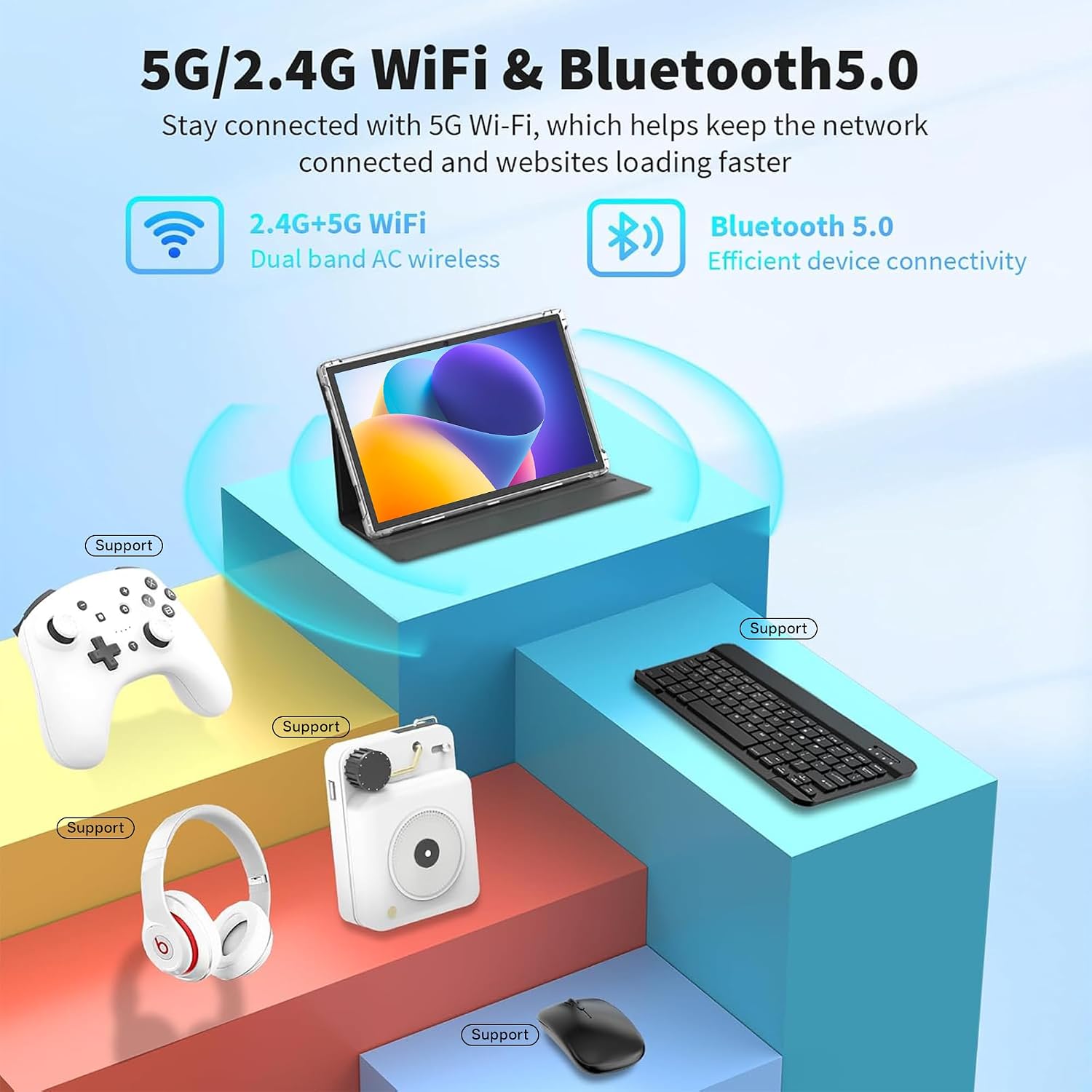
Image 3.5: Detailed diagram illustrating the length (24.39cm/9.60inch), width (16.25cm/6.39inch), and thickness (0.82cm/0.32inch) of the tablet.
4. സജ്ജീകരണം
4.1 പ്രാരംഭ ചാർജിംഗ്
Before first use, fully charge your tablet. Connect the USB-C cable to the tablet's charging port and the power adapter to a wall outlet. The charging indicator will show the charging status.
4.2 പവർ ഓൺ/ഓഫ്
- പവർ ഓണാക്കാൻ: Press and hold the Power button (usually located on the side or top edge) until the Tibuta logo appears on the screen.
- പവർ ഓഫ് ചെയ്യാൻ: പവർ മെനു ദൃശ്യമാകുന്നതുവരെ പവർ ബട്ടൺ അമർത്തിപ്പിടിക്കുക. ഓപ്ഷനുകളിൽ നിന്ന് "പവർ ഓഫ്" തിരഞ്ഞെടുക്കുക.
- പുനരാരംഭിക്കാൻ: പവർ മെനുവിൽ നിന്ന്, "പുനരാരംഭിക്കുക" തിരഞ്ഞെടുക്കുക.
4.3 പ്രാരംഭ സജ്ജീകരണ വിസാർഡ്
The first time you power on the tablet, you will be guided through an initial setup process. This includes selecting your language, connecting to a Wi-Fi network, setting up your Google account, and configuring basic security settings. Follow the on-screen prompts to complete the setup.
5. പ്രവർത്തന നിർദ്ദേശങ്ങൾ
5.1 Basic Touchscreen Gestures
- ടാപ്പ് ചെയ്യുക: ഒരു ആപ്പ് തുറക്കാൻ, ഒരു ഇനം തിരഞ്ഞെടുക്കാൻ, അല്ലെങ്കിൽ ഒരു ബട്ടൺ അമർത്താൻ സ്ക്രീനിൽ ഒരിക്കൽ സ്പർശിക്കുക.
- സ്പർശിച്ച് പിടിക്കുക: Press and hold an item to access contextual menus or drag items.
- സ്വൈപ്പ്: Drag your finger across the screen to scroll through pages, lists, or switch between home screens.
- പിഞ്ച്-ടു-സൂം: സ്ക്രീനിൽ രണ്ട് വിരലുകൾ വയ്ക്കുക, സൂം ഇൻ ചെയ്യുന്നതിന് അവയെ വേർപെടുത്തുക, അല്ലെങ്കിൽ സൂം ഔട്ട് ചെയ്യുന്നതിന് ഒരുമിച്ച് നീക്കുക.
5.2 Wi-Fi-ലേക്ക് ബന്ധിപ്പിക്കുന്നു
- പോകുക ക്രമീകരണങ്ങൾ > നെറ്റ്വർക്കും ഇൻ്റർനെറ്റും > വൈഫൈ.
- വൈഫൈ ടോഗിൾ ചെയ്യുക On.
- ലിസ്റ്റിൽ നിന്ന് നിങ്ങൾക്ക് ആവശ്യമുള്ള വൈഫൈ നെറ്റ്വർക്ക് തിരഞ്ഞെടുക്കുക.
- ആവശ്യപ്പെടുകയാണെങ്കിൽ നെറ്റ്വർക്ക് പാസ്വേഡ് നൽകുക, തുടർന്ന് ടാപ്പുചെയ്യുക ബന്ധിപ്പിക്കുക.
5.3 ബ്ലൂടൂത്ത് ഉപകരണങ്ങൾ ജോടിയാക്കൽ
- പോകുക ക്രമീകരണങ്ങൾ > ബന്ധിപ്പിച്ച ഉപകരണങ്ങൾ > ബ്ലൂടൂത്ത്.
- ബ്ലൂടൂത്ത് ടോഗിൾ ചെയ്യുക On.
- നിങ്ങളുടെ ബ്ലൂടൂത്ത് ഉപകരണം ജോടിയാക്കൽ മോഡിലാണെന്ന് ഉറപ്പാക്കുക.
- ലഭ്യമായ ഉപകരണങ്ങളുടെ പട്ടികയിൽ നിന്ന് ഉപകരണം തിരഞ്ഞെടുത്ത് ജോടിയാക്കൽ പൂർത്തിയാക്കാൻ ഓൺ-സ്ക്രീൻ നിർദ്ദേശങ്ങൾ പാലിക്കുക.
5.4 ആപ്ലിക്കേഷനുകൾ ഇൻസ്റ്റാൾ ചെയ്യുകയും കൈകാര്യം ചെയ്യുകയും ചെയ്യുക
- ആപ്പുകൾ ഇൻസ്റ്റാൾ ചെയ്യുക: തുറക്കുക ഗൂഗിൾ പ്ലേ സ്റ്റോർ ആപ്പ്, നിങ്ങൾക്ക് ആവശ്യമുള്ള ആപ്പ് തിരയുക, ടാപ്പ് ചെയ്യുക ഇൻസ്റ്റാൾ ചെയ്യുക.
- ആപ്പുകൾ അൺഇൻസ്റ്റാൾ ചെയ്യുക: Touch and hold the app icon on the home screen or app drawer, then drag it to "Uninstall" or select "App info" and choose "Uninstall". Alternatively, go to ക്രമീകരണങ്ങൾ > ആപ്പുകൾ > എല്ലാ ആപ്പുകളും കാണുക, ആപ്പ് തിരഞ്ഞെടുത്ത്, ടാപ്പ് ചെയ്യുക അൺഇൻസ്റ്റാൾ ചെയ്യുക.
5.5 ക്യാമറകൾ ഉപയോഗിക്കുന്നത്
The tablet features a 5MP rear camera and an 8MP front camera. Open the ക്യാമറ app to take photos or record videos. You can switch between front and rear cameras within the app interface.
5.6 സംഭരണം വികസിപ്പിക്കൽ
To expand storage, insert a Micro SD card (up to 1TB, not included) into the designated slot on the tablet. The tablet will prompt you to format the card for use as portable or internal storage.

Image 5.1: The tablet being used for various activities including work, entertainment, and creative tasks.
6. പരിപാലനം
- വൃത്തിയാക്കൽ: ടാബ്ലെറ്റിന്റെ സ്ക്രീനും ബോഡിയും വൃത്തിയാക്കാൻ മൃദുവായ, ലിന്റ് രഹിത തുണി ഉപയോഗിക്കുക. കഠിനമായ രാസവസ്തുക്കളോ ഉരച്ചിലുകളോ ഉള്ള വസ്തുക്കൾ ഉപയോഗിക്കുന്നത് ഒഴിവാക്കുക.
- സോഫ്റ്റ്വെയർ അപ്ഡേറ്റുകൾ: നിങ്ങളുടെ ടാബ്ലെറ്റിൽ ഏറ്റവും പുതിയ സവിശേഷതകളും സുരക്ഷാ പാച്ചുകളും ഉണ്ടെന്ന് ഉറപ്പാക്കാൻ സിസ്റ്റം അപ്ഡേറ്റുകൾ പതിവായി പരിശോധിച്ച് ഇൻസ്റ്റാൾ ചെയ്യുക. പോകുക ക്രമീകരണങ്ങൾ > സിസ്റ്റം > സിസ്റ്റം അപ്ഡേറ്റ്.
- സ്റ്റോറേജ് മാനേജ്മെന്റ്: അനാവശ്യമായത് ഇടയ്ക്കിടെ നീക്കം ചെയ്യുക files and uninstall unused apps to free up storage space and maintain optimal performance.
- ബാറ്ററി കെയർ: Avoid extreme temperatures and do not let the battery fully discharge frequently. For long-term storage, charge the battery to about 50%.
7. പ്രശ്നപരിഹാരം
| പ്രശ്നം | പരിഹാരം |
|---|---|
| ടാബ്ലെറ്റ് ഓണാക്കുന്നില്ല. | ബാറ്ററി ചാർജ്ജ് ചെയ്തിട്ടുണ്ടെന്ന് ഉറപ്പാക്കുക. ചാർജർ കണക്റ്റ് ചെയ്ത് വീണ്ടും പവർ ചെയ്യാൻ ശ്രമിക്കുന്നതിന് മുമ്പ് കുറച്ച് മിനിറ്റ് കാത്തിരിക്കുക. പ്രതികരിക്കുന്നില്ലെങ്കിൽ, റീസ്റ്റാർട്ട് ചെയ്യാൻ നിർബന്ധിതമാക്കാൻ പവർ ബട്ടൺ 10-15 സെക്കൻഡ് അമർത്തിപ്പിടിക്കുക. |
| വൈഫൈ കണക്ഷൻ പ്രശ്നങ്ങൾ. | ക്രമീകരണങ്ങളിൽ വൈഫൈ പ്രവർത്തനക്ഷമമാക്കിയിട്ടുണ്ടോയെന്ന് പരിശോധിക്കുക. നിങ്ങളുടെ വൈഫൈ റൂട്ടർ പുനരാരംഭിക്കുക. നെറ്റ്വർക്ക് മറന്ന് വീണ്ടും കണക്റ്റുചെയ്യുക. നിങ്ങൾ വൈഫൈ സിഗ്നലിന്റെ പരിധിയിലാണെന്ന് ഉറപ്പാക്കുക. |
| മന്ദഗതിയിലുള്ള പ്രകടനം അല്ലെങ്കിൽ ആപ്പുകൾ ക്രാഷാകൽ. | Close unused apps. Clear app caches (Settings > Apps > [App Name] > Storage & cache > Clear cache). Restart the tablet. Ensure sufficient free storage space. |
| ബാറ്ററി പെട്ടെന്ന് തീരുന്നു. | Reduce screen brightness. Turn off Wi-Fi, Bluetooth, and GPS when not in use. Close background apps. Check battery usage in Settings to identify power-hungry apps. |
If you encounter issues not listed here or require further assistance, please contact Tibuta customer support.
8 സ്പെസിഫിക്കേഷനുകൾ
| ഫീച്ചർ | വിശദാംശങ്ങൾ |
|---|---|
| ബ്രാൻഡ് | ടിബുട്ട |
| മോഡലിൻ്റെ പേര് | A10_M-EU |
| ഓപ്പറേറ്റിംഗ് സിസ്റ്റം | ആൻഡ്രോയിഡ് 15 |
| സ്ക്രീൻ വലിപ്പം | 10.1 ഇഞ്ച് |
| ഡിസ്പ്ലേ റെസല്യൂഷൻ | 1280 x 800 പിക്സലുകൾ (IPS HD) |
| പ്രോസസ്സർ | Quad-Core (Intel Integrated) |
| റാം | 8 GB (3GB + 5GB expandable) |
| ആന്തരിക സംഭരണം | 64 ജിബി |
| വികസിപ്പിക്കാവുന്ന സംഭരണം | Up to 1 TB via Micro SD card |
| പിൻ ക്യാമറ | 5 എം.പി |
| മുൻ ക്യാമറ | 8 എം.പി |
| ബാറ്ററി ശേഷി | 5000 mAh (ലിഥിയം-അയോൺ) |
| ശരാശരി ബാറ്ററി ലൈഫ് | 8 മണിക്കൂർ |
| കണക്റ്റിവിറ്റി | Wi-Fi (802.11n, 2.4G+5G), Bluetooth 5.4 |
| തുറമുഖങ്ങൾ | USB-C, 3.5mm Headphone Jack |
| അളവുകൾ (L x W x H) | 33L x 26W x 5H cm (Package) |
| ഇനത്തിൻ്റെ ഭാരം | 1.01 കിലോഗ്രാം (പാക്കേജ്) |
| നിറം | ചാരനിറം |
| മോഡൽ വർഷം | 2025 |
9. വാറൻ്റിയും പിന്തുണയും
Tibuta Android tablets come with a 2 വർഷത്തെ വാറൻ്റി. ഞങ്ങൾ നൽകുന്നു 24/7 ഉപഭോക്തൃ പിന്തുണ to assist you with any technical issues or questions regarding the installation and use of your device.
For warranty claims, technical assistance, or general inquiries, please refer to the contact information provided on the Tibuta official webസൈറ്റ് അല്ലെങ്കിൽ നിങ്ങളുടെ ഉൽപ്പന്നത്തിൽ ഉൾപ്പെടുത്തിയിരിക്കുന്ന വാറന്റി കാർഡ്.
Note: Video content for this product was not available or did not meet embedding criteria.