
1. ആമുഖം
This manual provides detailed instructions for the safe and efficient use of your DOOGEE U12 Android 16 Tablet. Please read this manual thoroughly before operating the device to ensure optimal performance and longevity. Keep this manual for future reference.
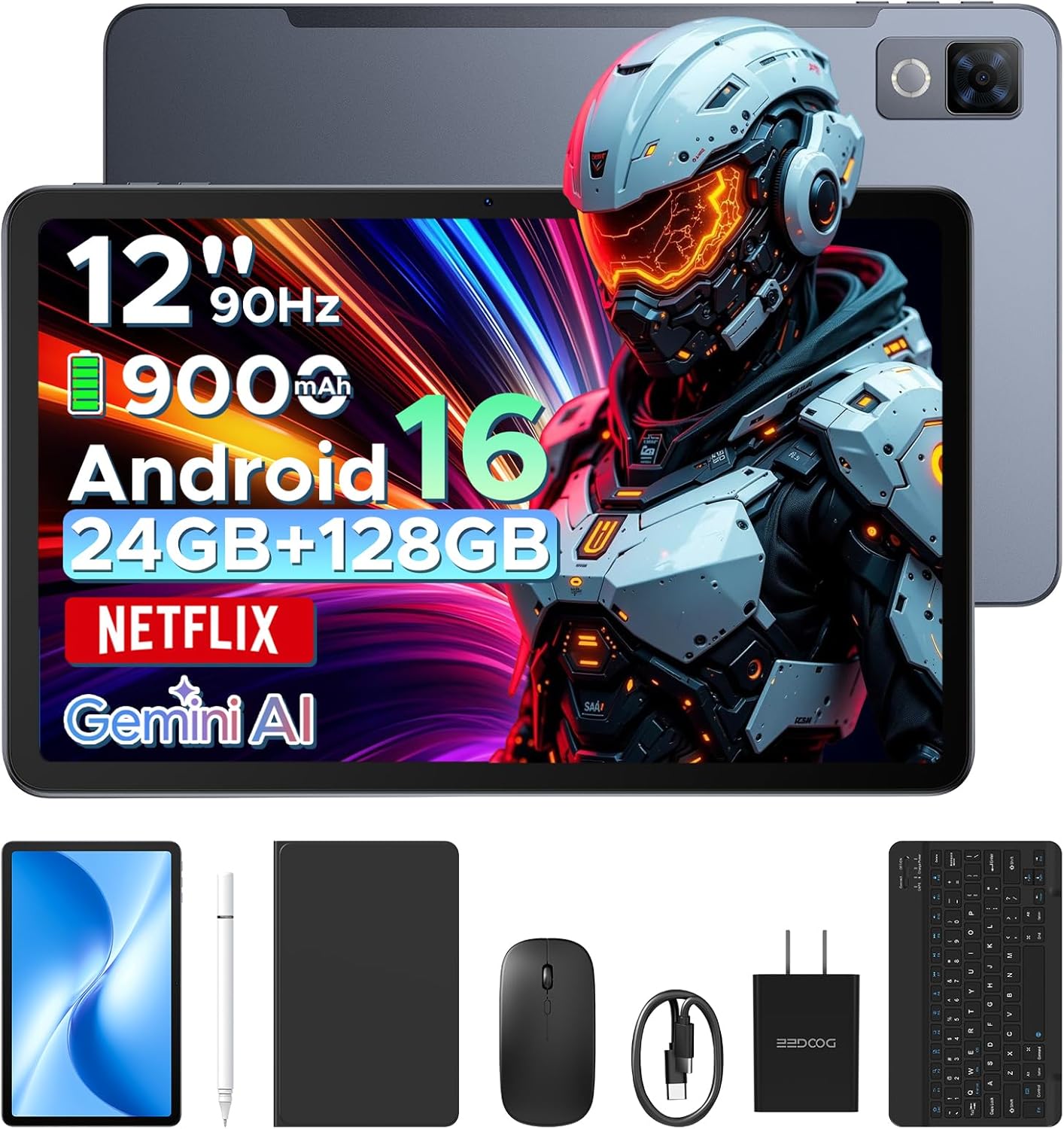
Image: The DOOGEE U12 tablet shown with its accompanying accessories, including a keyboard, mouse, and stylus.
2. പാക്കേജ് ഉള്ളടക്കം
നിങ്ങളുടെ പാക്കേജിൽ എല്ലാ ഇനങ്ങളും ഉണ്ടെന്ന് ഉറപ്പാക്കുക:
- DOOGEE U12 Tablet
- ബ്ലൂടൂത്ത് കീബോർഡ്
- മൗസ്
- സ്റ്റൈലസ് പേന
- സ്ക്രീൻ പ്രൊട്ടക്ടർ
- സംരക്ഷണ കേസ്
- ചാർജർ (പവർ അഡാപ്റ്റർ)
- ടൈപ്പ്-സി യുഎസ്ബി കേബിൾ
- ഉപയോക്തൃ മാനുവൽ (ഈ പ്രമാണം)
- സേവന കാർഡ്

Image: An organized display of all items included in the DOOGEE U12 tablet package.
3. സജ്ജീകരണ ഗൈഡ്
3.1 പ്രാരംഭ ചാർജിംഗ്
Before first use, fully charge the tablet using the provided charger and USB Type-C cable. Connect the cable to the tablet's charging port and the adapter to a power outlet. The charging indicator will show the charging status.
3.2 പവർ ഓൺ/ഓഫ്
- പവർ ഓണാക്കാൻ: Press and hold the Power button until the DOOGEE logo appears on the screen.
- പവർ ഓഫ് ചെയ്യാൻ: പവർ ബട്ടൺ അമർത്തിപ്പിടിക്കുക, തുടർന്ന് സ്ക്രീനിൽ പ്രദർശിപ്പിച്ചിരിക്കുന്ന ഓപ്ഷനുകളിൽ നിന്ന് 'പവർ ഓഫ്' തിരഞ്ഞെടുക്കുക.
- പുനരാരംഭിക്കാൻ: പവർ ബട്ടൺ അമർത്തിപ്പിടിക്കുക, തുടർന്ന് ഓപ്ഷനുകളിൽ നിന്ന് 'പുനരാരംഭിക്കുക' തിരഞ്ഞെടുക്കുക.
3.3 പ്രാരംഭ കോൺഫിഗറേഷൻ
Upon first power-on, follow the on-screen prompts to set up your tablet. This includes selecting your language, connecting to a Wi-Fi network, and signing in with your Google account.
3.4 കണക്റ്റിംഗ് ആക്സസറികൾ
- ബ്ലൂടൂത്ത് കീബോർഡ്/മൗസ്: Turn on the keyboard/mouse and enable Bluetooth on your tablet (Settings > Connected devices > Bluetooth). Select the accessory from the list of available devices to pair.
- സ്റ്റൈലസ് പേന: The stylus pen is generally passive and does not require pairing. Simply use it directly on the screen.
- സംരക്ഷണ കേസ്: Install the tablet into the protective case for enhanced protection and to use it as a stand.
4. പ്രവർത്തന നിർദ്ദേശങ്ങൾ
4.1 ഡിസ്പ്ലേ സവിശേഷതകൾ
The DOOGEE U12 features a 12-inch FHD+ IPS display with a resolution of 2000x1200 pixels and a 90Hz refresh rate. This provides clear visuals and smooth interaction.
- വൈഡ്വൈൻ എൽ1 പിന്തുണ: Stream high-definition content from platforms like Netflix, YouTube, and Amazon Prime Video.
- നേത്ര സംരക്ഷണം: Utilize Eye Comfort Mode, Dark Mode, and Auto Brightness Adjustment for reduced eye strain.
- Split-Screen Multitasking: Run two applications simultaneously by using the split-screen feature.

Image: The 12-inch 2K Ultra-Clear Big Display of the DOOGEE U12, highlighting its visual clarity.

Image: The tablet's eye protection display features, including Eye Comfort Mode, Dark Mode, and Auto Brightness Adjustment.
4.2 പ്രകടനവും സംഭരണവും
The tablet is powered by an Unisoc T7255 Octa-Core processor, ensuring smooth operation for various tasks.
- റാം: കാര്യക്ഷമമായ മൾട്ടിടാസ്കിംഗിനായി 24GB (6GB ഫിസിക്കൽ + 18GB വെർച്വൽ).
- ആന്തരിക സംഭരണം (ROM): 128GB for applications and files.
- വികസിപ്പിക്കാവുന്ന സംഭരണം: Supports up to 2TB via TF (microSD) card (sold separately).

Image: A visual representation of the powerful Unisoc T7255 Octa-Core Processor.

Image: Details on the tablet's memory configuration, including 24GB RAM and 128GB ROM with expansion capabilities.
4.3 ബാറ്ററി മാനേജ്മെൻ്റ്
The DOOGEE U12 is equipped with a 9000mAh high-capacity battery.
- ഫാസ്റ്റ് ചാർജിംഗ്: Supports 18W fast charging for quick power replenishment.
- വിപരീത ചാർജിംഗ്: Features 5W reverse charging, allowing the tablet to charge other compatible devices via OTG.

Image: An illustration of the tablet's 9000mAh battery and its charging capabilities.
4.4 ക്യാമറകൾ
Capture photos and videos with the integrated cameras:
- പിൻ ക്യാമറ: 13 മെഗാപിക്സലുകൾ
- മുൻ ക്യാമറ: 8 മെഗാപിക്സലുകൾ

ചിത്രം: വിശദമായ ഒരു ചിത്രം view of the tablet's camera modules, indicating the 13MP main camera and 8MP front camera.
4.5 കണക്റ്റിവിറ്റി
- വൈഫൈ: Dual-band (2.4G/5G) for stable internet connection.
- ബ്ലൂടൂത്ത്: Version 5.0 for wireless accessory pairing.
- നാവിഗേഷൻ: Supports GPS, BDS, GLONASS, and Galileo for accurate positioning.
- ഓഡിയോ ജാക്ക്: Standard 3.5mm headphone jack.

ചിത്രം: ഒരു ഓവർview of additional features including facial recognition, navigation system, Widevine L1, and WiFi 5.
4.6 Android 16 OS and Gemini AI
The tablet runs on the Android 16 operating system, offering enhanced performance and features.
- ജെമിനി AI: Integrated AI for tasks such as summarizing documents, setting meetings, and providing intelligent tips.
- Multi-user System: Create separate user profiles for different individuals.
- രക്ഷാകർതൃ നിയന്ത്രണം: Manage and restrict access for children's profiles.
- ബെഡ്ടൈം മോഡ്: Schedule screen time and notifications for better sleep.
- Live Subtitles: Real-time captioning for audio content.
- Digital Health Tools: Monitor and manage your digital well-being.
- WPS Office: Pre-installed office suite for productivity tasks.

ചിത്രം: ഒരു ഓവർview of the built-in Gemini AI features designed to enhance work and daily life.

Image: Various functions of the Android 16 operating system, including user management and digital well-being tools.
4.7 ഓഡിയോ
The tablet is equipped with dual speakers for clear audio output.

Image: The tablet's audio capabilities, featuring premium dual speakers and a 3.5mm audio jack.
4.8 Physical Design
The DOOGEE U12 features a sleek 7.8mm ultra-thin metal body, balancing portability with durability.

Image: The ultra-thin 7.8mm metal-integrated body of the DOOGEE U12 tablet.
5. പരിപാലനം
- വൃത്തിയാക്കൽ: സ്ക്രീനും ബോഡിയും വൃത്തിയാക്കാൻ മൃദുവായ, ലിന്റ് രഹിത തുണി ഉപയോഗിക്കുക. ഉരച്ചിലുകളുള്ള വസ്തുക്കളോ കഠിനമായ രാസവസ്തുക്കളോ ഒഴിവാക്കുക.
- സംഭരണം: നേരിട്ടുള്ള സൂര്യപ്രകാശവും കടുത്ത താപനിലയും ഏൽക്കാത്ത തണുത്തതും വരണ്ടതുമായ സ്ഥലത്ത് ടാബ്ലെറ്റ് സൂക്ഷിക്കുക.
- സംരക്ഷണം: Use the provided protective case and screen protector to guard against drops and scratches.
- സോഫ്റ്റ്വെയർ അപ്ഡേറ്റുകൾ: മികച്ച പ്രകടനവും സുരക്ഷയും ഉറപ്പാക്കാൻ സിസ്റ്റം അപ്ഡേറ്റുകൾ പതിവായി പരിശോധിച്ച് ഇൻസ്റ്റാൾ ചെയ്യുക.
6. പ്രശ്നപരിഹാരം
6.1 ടാബ്ലെറ്റ് ഓണാകുന്നില്ല
- ബാറ്ററി ചാർജ്ജ് ചെയ്തിട്ടുണ്ടെന്ന് ഉറപ്പാക്കുക. ചാർജർ കണക്റ്റ് ചെയ്ത് വീണ്ടും പവർ ചെയ്യാൻ ശ്രമിക്കുന്നതിന് മുമ്പ് കുറച്ച് മിനിറ്റ് കാത്തിരിക്കുക.
- പുനരാരംഭിക്കാൻ നിർബന്ധിക്കുന്നതിന് പവർ ബട്ടൺ കുറഞ്ഞത് 10-15 സെക്കൻഡ് അമർത്തിപ്പിടിക്കുക.
6.2 Screen Is Unresponsive
- ടാബ്ലെറ്റ് പുനരാരംഭിക്കുക.
- സ്ക്രീൻ വൃത്തിയുള്ളതും അവശിഷ്ടങ്ങൾ ഇല്ലാത്തതുമാണെന്ന് ഉറപ്പാക്കുക.
- If a screen protector is installed, ensure it is properly applied and not interfering with touch sensitivity.
6.3 വൈ-ഫൈ കണക്റ്റിവിറ്റി പ്രശ്നങ്ങൾ
- ക്രമീകരണങ്ങളിൽ വൈഫൈ ഓഫും ഓണും ആക്കുക.
- നിങ്ങളുടെ വൈഫൈ റൂട്ടർ പുനരാരംഭിക്കുക.
- Forget the network and reconnect (Settings > Network & internet > Internet > Saved networks).
- ടാബ്ലെറ്റ് വൈഫൈ സിഗ്നലിന്റെ പരിധിയിലാണെന്ന് ഉറപ്പാക്കുക.
6.4 ആക്സസറികൾ കണക്റ്റുചെയ്യുന്നില്ല
- Ensure the accessory is powered on and in pairing mode (if applicable).
- ടാബ്ലെറ്റിൽ ബ്ലൂടൂത്ത് പ്രവർത്തനക്ഷമമാക്കിയിട്ടുണ്ടെന്ന് ഉറപ്പാക്കുക.
- Remove any previously paired instances of the accessory from the tablet's Bluetooth settings and attempt to re-pair.
- Check the accessory's battery level.
7 സ്പെസിഫിക്കേഷനുകൾ
| ഫീച്ചർ | വിശദാംശങ്ങൾ |
|---|---|
| മോഡൽ | DOOGEE U12 |
| ഓപ്പറേറ്റിംഗ് സിസ്റ്റം | ആൻഡ്രോയിഡ് 16 |
| ഡിസ്പ്ലേ വലിപ്പം | 12 ഇഞ്ച് |
| ഡിസ്പ്ലേ റെസല്യൂഷൻ | 2000x1200 പിക്സലുകൾ |
| പുതുക്കിയ നിരക്ക് | 90Hz |
| പ്രോസസ്സർ | യൂണിസോക്ക് T7255 ഒക്ടാ-കോർ |
| റാം | 24GB (6GB ഫിസിക്കൽ + 18GB വെർച്വൽ) |
| ആന്തരിക സംഭരണം (ROM) | 128 ജിബി |
| വികസിപ്പിക്കാവുന്ന സംഭരണം | 2TB വരെ (TF കാർഡ്) |
| ബാറ്ററി ശേഷി | 9000mAh |
| ഫാസ്റ്റ് ചാർജിംഗ് | 18W |
| റിവേഴ്സ് ചാർജിംഗ് | 5W |
| പിൻ ക്യാമറ | 13 മെഗാപിക്സലുകൾ |
| മുൻ ക്യാമറ | 8 മെഗാപിക്സലുകൾ |
| വൈഫൈ | ഡ്യുവൽ-ബാൻഡ് (2.4G/5G) |
| ബ്ലൂടൂത്ത് | പതിപ്പ് 5.0 |
| നാവിഗേഷൻ | GPS/BDS/GLONASS/ഗലീലിയോ |
| ഓഡിയോ ജാക്ക് | 3.5 മി.മീ |
| അളവുകൾ (LxWxH) | 11.11 x 7 x 0.31 ഇഞ്ച് |
| ഭാരം | 1.48 പൗണ്ട് |
| ബോഡി മെറ്റീരിയൽ | ലോഹം |
| നിറം | ചാരനിറം |
8. വാറൻ്റിയും പിന്തുണയും
Your DOOGEE U12 tablet comes with comprehensive support:
- വാറൻ്റി: A two-year limited warranty covers manufacturing defects.
- സാങ്കേതിക സഹായം: ആജീവനാന്ത സാങ്കേതിക പിന്തുണ നൽകുന്നു.
- കസ്റ്റമർ സർവീസ്: Expect 24-hour responses to your inquiries for worry-free use.
- For support, please refer to the contact information on the included Service Card or visit the official DOOGEE webസൈറ്റ്.